2017 TOYOTA HIGHLANDER ESP
[x] Cancel search: ESPPage 81 of 732
811-2. Theft deterrent system
1
For safety and security
HIGHLANDER_U (OM0E017U)
■System maintenance
The vehicle has a maintenance-free type engine immobilizer system.
■ Conditions that may cause the system to malfunction
●If the grip portion of the key is in contact with a metallic object
● If the key is in close proximity to or touching a key to the security system
(key with a built-in transponder chip) of another vehicle
■ Certification for the en gine immobilizer system
For vehicles sold in the U.S.A.
FCC ID: WRKRI-44BTY FCC ID: NI4TMIMB-3
This device complies with part 15 of the FCC Rules. Operation is subject to
the following two conditions: (1) This device may not cause harmful interfer-
ence; and (2) This device must accept any interference received, including
interference that may cause undesired operation.
Changes or modifications not expressly approved by the party responsible for
compliance could void the user's authority to operate the equipment.
For vehicles sold in Canada
This device complies with Industry Canada licence-exempt RSSs. Operation
is subject to the following two conditions: (1) This device may not cause inter-
ference; and (2) This device must accept any interference, including interfer-
ence that may cause undesired operation of the device.
Le présent appareil est conforme aux CNR d'lndustrie Canada applicables
aux appareils radio exempts de licence. L'exploitation est autorisée aux deux
conditions suivantes: (1) l'appareil ne doit pas produire de brouillage; (2) l'util-
isateur de l'appareil doit accepter tout brouillage radioélectrique subi, même
si le brouillage est susceptible d'en compromettre le fonctionnement.
NOTICE
■ To ensure the system operates correctly
Do not modify or remove the system. If modified or removed, the proper
operation of the system cannot be guaranteed.
Page 97 of 732

972. Instrument cluster
2
Instrument cluster
HIGHLANDER_U (OM0E017U)
●Current fuel consumption*1
Displays the current rate of fuel consumption
● Average fuel economy (after reset
*2/after start/after refuel)*1
Displays the average fuel economy since the function was reset,
the engine was started, and the v ehicle was refueled, respectively
Use the displayed average fuel economy as a reference.
●Average vehicle speed (after reset*2/after start)*1
Displays the average vehicle speed since the function was reset
and the engine was started, respectively
● Elapsed time (after reset
*2/after start)*1
Displays the elapsed time since the function was reset and the
engine was started, respectively
● Distance (driving range/after start/after reset
*2)*1
Displays the estimated maximum distance that can be driven with
the quantity of fuel remaining and the distance driven after the
engine was started, respectively.
• This distance is computed based on your average fuel consumption. As a result, the actual distance that can be driven may differ from that dis-
played.
• When only a small amount of fuel is added to the tank, the display may
not be updated.
When refueling, turn the engine switch off. If the vehicle is refueled with-
out turning the engine switch off, the display may not be updated.
● Eco Driving Indicator
→P. 1 0 2
● AWD control (if equipped)
Displays the torque distribution between the front and rear axles of
the AWD control system
● Display off
A blank screen is displayed
*1: Can be registered to Drive information 1 through 3. ( →P. 99)
*2: Resetting procedures:
• Select a function to be reset using the meter control switches and then press and hold to reset.
• If there is more than one function that can be reset, check boxes will be displayed next to those functions.
Drive information
Page 101 of 732
1012. Instrument cluster
2
Instrument cluster
HIGHLANDER_U (OM0E017U)
■Settings can be changed
Customizable features: →P. 681
■ Pop-up display
In some situations, such as when a switch operation is performed, a pop-up
display, will be temporarily displayed on the multi-information display.
The pop-up display function can be set on/off.
■ Setting display automatic cancelation
In the following situations, setting display in which the settings can b\
e
changed through the meter control switch will automatically be turned off.
●When a warning message appears while the setting display is displayed
● When the vehicle begins to move while the setting display is displayed
■ Liquid crystal display
Small spots or light spots may appear on the display. This phenomenon is
characteristic of liquid crystal displays, and there is no problem continuing to
use the display.
WARNING
■The information display at low temperatures
Allow the interior of the vehicle to warm up before using the liquid crystal
information display. At extremely low temperatures, the display monitor may
respond slowly, and display changes may be delayed.
For example, there is a lag between the driver’s shifting and the new gear
number appearing on the display. This l ag could cause the driver to down-
shift again, causing rapid and excessive engine braking and possibly an
accident resulting in death or injury.
■ Cautions during setting up the display
As the engine needs to be running during setting up the display, ensure that
the vehicle is parked in a place with adequate ventilation. In a closed area
such as a garage, exhaust gases including harmful carbon monoxide (CO)
may collect and enter the vehicle. This may lead to death or a serious
health hazard.
NOTICE
■During setting up the display
To prevent battery discharge, ensure that the engine is running while setting
up the display features.
Page 122 of 732

1223-2. Opening, closing and locking the doors
HIGHLANDER_U (OM0E017U)■
Conditions affecting the operation of the smart key system or wireless
remote control
Vehicles without a smart key system
→P. 1 1 1
Vehicles with a smart key system
→P. 144
■ Customization
Settings (e.g. unlocking function using a key) can be changed.
(Customizable features: →P. 680)
WARNING
■To prevent an accident
Observe the following precautions while driving the vehicle.
Failure to do so may result in a door opening and an occupant falling out of
the vehicle, resulting in death or serious injury.
● Ensure that all doors are properly closed and locked.
● Do not pull the inside handle of the doors while driving.
Be especially careful for the front doors, as the doors may be opened even
if the inside lock buttons are in locked position.
● Set the rear door child-protector locks when children are seated in the rear
seats.
Page 147 of 732

1473-2. Opening, closing and locking the doors
3
Operation of each component
HIGHLANDER_U (OM0E017U)■
Certification for the smart key system
For vehicles sold in the U.S.A.
FCC ID: HYQ23AAB FCC ID: HYQ14FBA
NOTE:
This device complies with part 15 of the FCC Rules. Operation is subject to
the following two conditions: (1) This device may not cause harmful interfer-
ence, and (2) this device must accept any interference received, including
interference that may cause undesired operation.
FCC WARNING:
Changes or modifications not expressly approved by the party responsible for
compliance could void the user’s authority to operate the equipment.
For vehicles sold in Canada
NOTE:
This device complies with Industry Canada’s licence-exempt RSSs. Opera-
tion is subject to the following two conditions:
(1) This device may not cause interference; and
(2) This device must accept any interference, including interference that may
cause undesired operation of the device.
For vehicles sold in the U.S.A.
FCC ID: NI4TMLF12-1
This device complies with part 15 of the FCC Rules. Operation is subject to
the following two conditions: (1) This device may not cause harmful interfer-
ence; and (2) This device must accept any interference received, including
interference that may cause undesired operation.
Changes or modifications not expressly approved by the party responsible for
compliance could void the user’s authority to operate the equipment.
For vehicles sold in Canada
This device complies with Industry Canada licence-exempt RSSs. Operation
is subject to the following two conditions: (1) This device may not cause inter-
ference; and (2) This device must accept any interference, including interfer-
ence that may cause undesired operation of the device.
NOTE:
Le présent appareil est conforme aux CNR d'lndustrie Canada appli-
cables aux appareils radio exempts de licence. L'exploitation est autori-
sée aux deux conditions suivantes: (1) l'appareil ne doit pas produire de
brouillage; (2) l'utilisateur de l'appareil doit accepter tout brouillage
radioélectrique subi, même si le br ouillage est susceptible d'en compro-
mettre le fonctionnement.
Page 165 of 732
1653-3. Adjusting the seats
3
Operation of each component
HIGHLANDER_U (OM0E017U)■
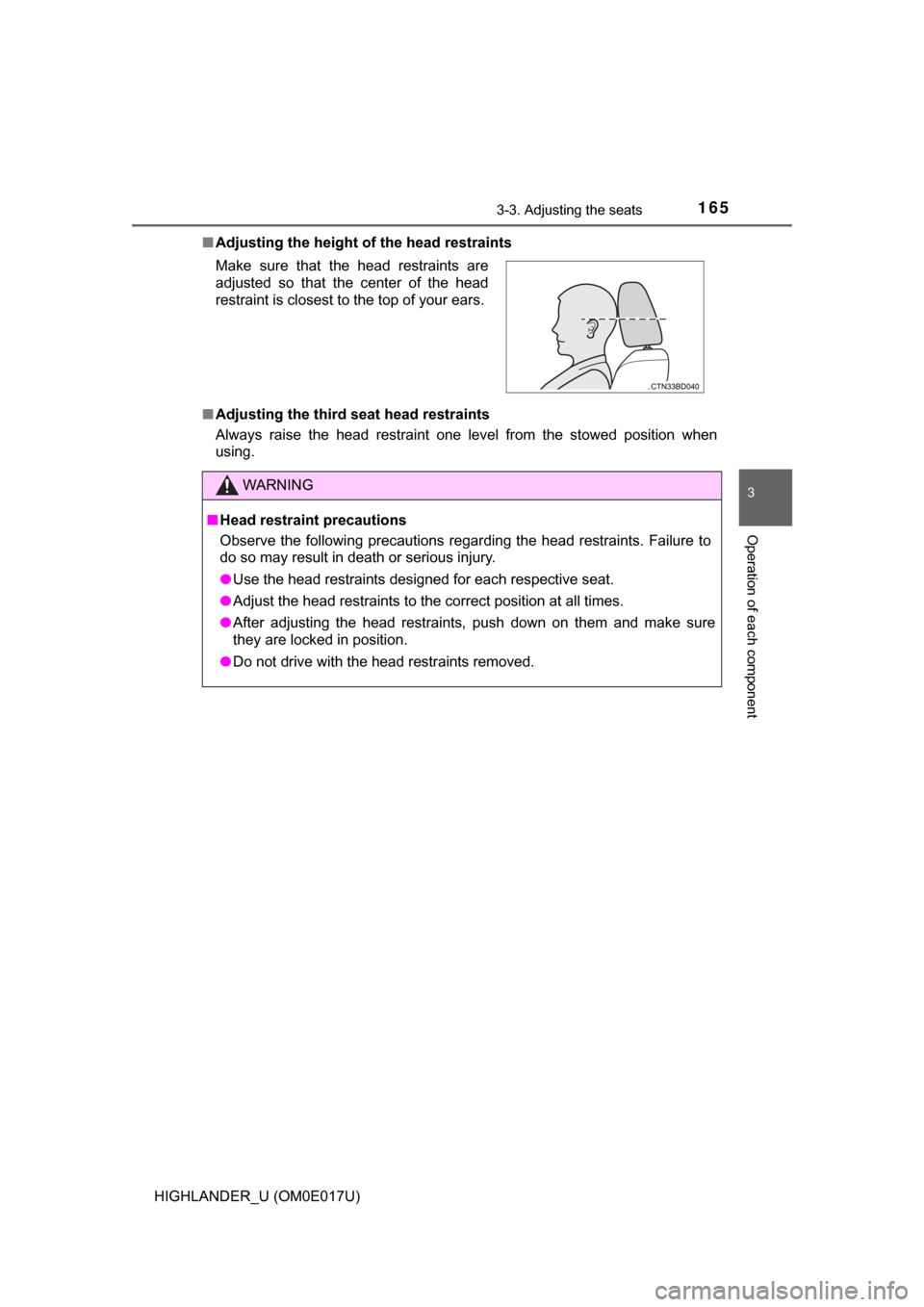
Adjusting the height of the head restraints
■ Adjusting the third seat head restraints
Always raise the head restraint one level from the stowed position when
using. Make sure that the head restraints are
adjusted so that the center of the head
restraint is closest to the top of your ears.
WARNING
■Head restraint precautions
Observe the following precautions regarding the head restraints. Failure to
do so may result in death or serious injury.
● Use the head restraints designed for each respective seat.
● Adjust the head restraints to the correct position at all times.
● After adjusting the head restraints, push down on them and make sure
they are locked in position.
● Do not drive with the head restraints removed.
Page 169 of 732

1693-4. Adjusting the steering wheel and mirrors
3
Operation of each component
HIGHLANDER_U (OM0E017U)
Auto anti-glare inside rear view mirror
Responding to the level of brightne ss of the headlights of vehicles
behind, the reflected light is automatically reduced.
Changing automatic anti- glare function mode
ON/OFF
When the automatic anti-glare
function is in ON mode, the indica-
tor illuminates.
The function will set to ON mode
each time the engine switch is
turned to IGNITION ON mode.
Pressing the button turns the func-
tion to OFF mode. (The indicator
also turns off.)
■ To prevent sensor error (vehicles with an auto anti-glare inside rear view
mirror)
Indicator
To ensure that the sensors operate prop-
erly, do not touch or cover them.
WARNING
Do not adjust the position of the mirror while driving.
Doing so may lead to mishandling of the vehicle and cause an accident,
resulting in death or serious injury.
Page 175 of 732

1753-5. Opening and closing the windows
3
Operation of each component
HIGHLANDER_U (OM0E017U)
WARNING
Observe the following precautions.
Failure to do so may result in death or serious injury.
■Closing the windows
● The driver is responsible for all the power window operations, including the
operation for the passengers. In order to prevent accidental operation,
especially by a child, do not let a child operate the power windows. It is
possible for children and other passengers to have body parts caught in
the power window. Also, when riding with a child, it is recommended to use
the window lock switch. ( →P. 173)
● Check to make sure that all passengers do not have any part of their body
in a position where it could be caught when a window is being operated.
● When using the wireless remote control, key or mechanical key and oper-
ating the power windows, operate the power window after checking to
make sure that there is no possibility of any passenger having any of their
body parts caught in the window. Also do not let a child operate window by
the wireless remote control, key or mechanical key. It is possible for chil-
dren and other passengers to get caught in the power window.
● When exiting the vehicle, turn the engine switch off, carry the key and exit
the vehicle along with the child. There may be accidental operation, due to
mischief, etc., that may possibly lead to an accident.
■ Jam protection function (windows with one-touch closing function
only)
● Never use any part of your body to intentionally activate the jam protection
function.
● The jam protection function may not work if something gets caught just
before the window fully closes.