2017 PEUGEOT 5008 change time
[x] Cancel search: change timePage 189 of 404
187
SPORT
SPORT
"Sport" button
With the engine running, when the programme
associated with the button is active, the
gearbox delays changing up for a more
dynamic driving style.
The programme is automatically deactivated
when the ignition is switched off.
Activating the Sport programme or the
Dynamic pack is not recommended in the
following situations:
-
o
ne of the special modes (other than
standard mode) of Advanced Grip Control is
on,
-
l
ow fuel level reached,
-
l
ow AdBlue level reached.Pressing this button has no effect when a
trailer is connected.
Sport programme
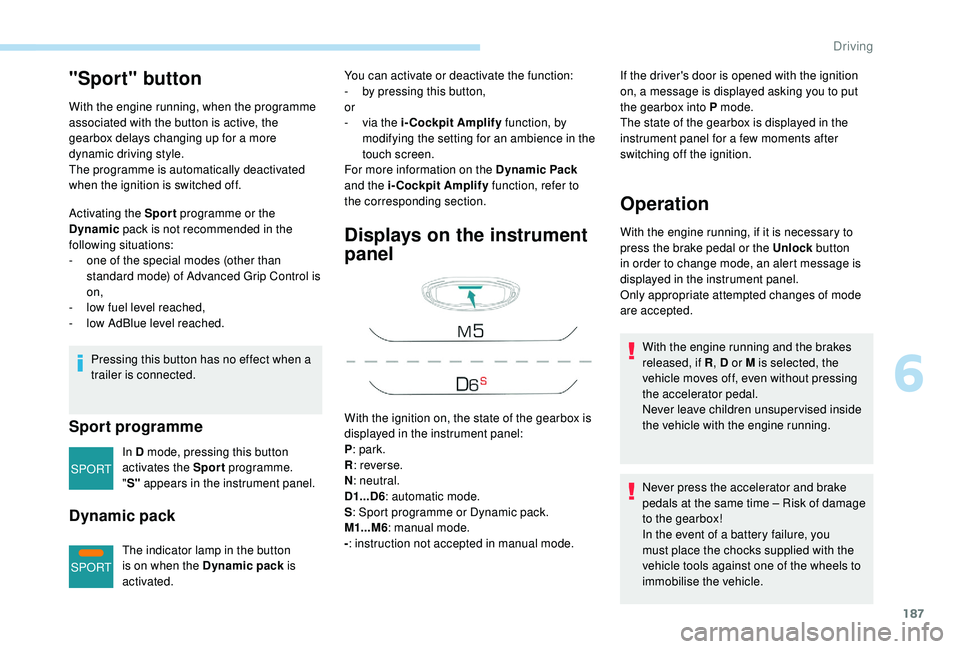
In D mode, pressing this button
activates the Sport programme.
" S" appears in the instrument panel.
Dynamic pack
The indicator lamp in the button
is on when the Dynamic pack is
activated.
Displays on the instrument
panel
If the driver's door is opened with the ignition
on, a message is displayed asking you to put
the gearbox into P mode.
The state of the gearbox is displayed in the
instrument panel for a few moments after
switching off the ignition.
Operation
You can activate or deactivate the function:
- b y pressing this button,
or
-
v
ia the i-Cockpit Amplify function, by
modifying the setting for an ambience in the
touch screen.
For more information on the Dynamic Pack
and the i-Cockpit Amplify function, refer to
the corresponding section.
With the ignition on, the state of the gearbox is
displayed in the instrument panel:
P : park.
R : reverse.
N : neutral.
D1...D6 : automatic mode.
S : Sport programme or Dynamic pack.
M1...M6 : manual mode.
- : instruction not accepted in manual mode. With the engine running, if it is necessary to
press the brake pedal or the Unlock
button
in order to change mode, an alert message is
displayed in the instrument panel.
Only appropriate attempted changes of mode
are accepted.
Never press the accelerator and brake
pedals at the same time – Risk of damage
to the gearbox!
In the event of a battery failure, you
must place the chocks supplied with the
vehicle tools against one of the wheels to
immobilise the vehicle. With the engine running and the brakes
released, if R , D or M is selected, the
vehicle moves off, even without pressing
the accelerator pedal.
Never leave children unsuper vised inside
the vehicle with the engine running.
6
Driving
Page 190 of 404
188
General points
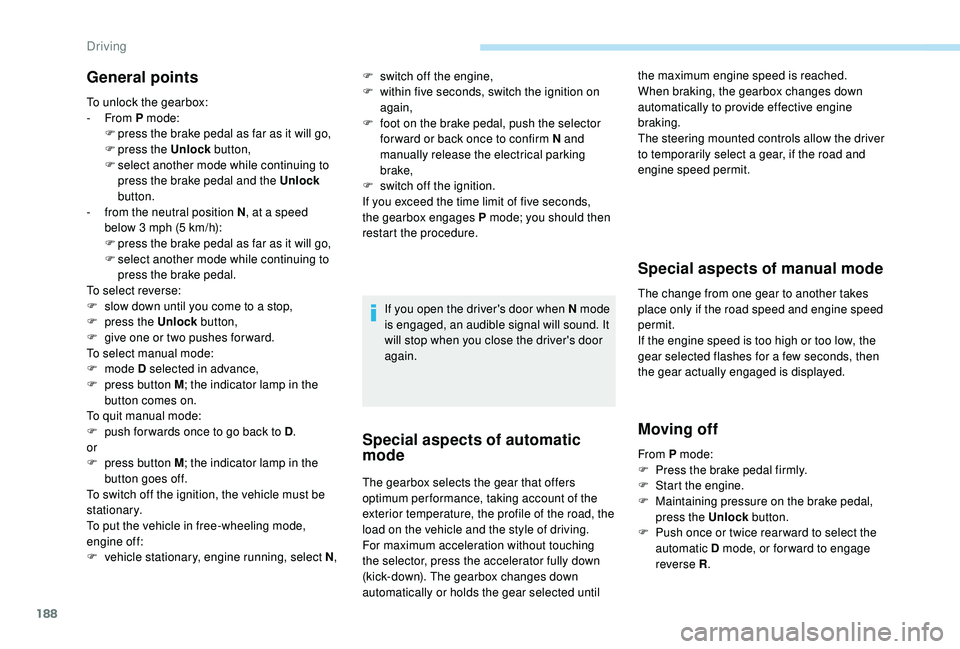
To unlock the gearbox:
- From P mode:
F
p
ress the brake pedal as far as it will go,
F
press the Unlock button,
F
s
elect another mode while continuing to
press the brake pedal and the Unlock
button.
-
f
rom the neutral position N , at a speed
below 3 mph (5 km/h):
F
p
ress the brake pedal as far as it will go,
F
s
elect another mode while continuing to
press the brake pedal.
To select reverse:
F
s
low down until you come to a stop,
F
p
ress the Unlock button,
F
g
ive one or two pushes for ward.
To select manual mode:
F
mode D selected in advance,
F
p
ress button M ; the indicator lamp in the
button comes on.
To quit manual mode:
F
p
ush for wards once to go back to D .
or
F
p
ress button M ; the indicator lamp in the
button goes off.
To switch off the ignition, the vehicle must be
stationary.
To put the vehicle in free-wheeling mode,
engine off:
F
v
ehicle stationary, engine running, select N ,If you open the driver's door when N mode
is engaged, an audible signal will sound. It
will stop when you close the driver's door
again.
Special aspects of automatic
mode
The gearbox selects the gear that offers
optimum per formance, taking account of the
exterior temperature, the profile of the road, the
load on the vehicle and the style of driving.
For maximum acceleration without touching
the selector, press the accelerator fully down
(kick-down). The gearbox changes down
automatically or holds the gear selected until
Special aspects of manual mode
The change from one gear to another takes
place only if the road speed and engine speed
permit.
If the engine speed is too high or too low, the
gear selected flashes for a few seconds, then
the gear actually engaged is displayed.
Moving off
the maximum engine speed is reached.
When braking, the gearbox changes down
automatically to provide effective engine
braking.
The steering mounted controls allow the driver
to temporarily select a gear, if the road and
engine speed permit.
F
s
witch off the engine,
F
w
ithin five seconds, switch the ignition on
again,
F
f
oot on the brake pedal, push the selector
for ward or back once to confirm N and
manually release the electrical parking
brake,
F
s
witch off the ignition.
If you exceed the time limit of five seconds,
the gearbox engages P mode; you should then
restart the procedure.
From P mode:
F
P
ress the brake pedal firmly.
F
S
tart the engine.
F
M
aintaining pressure on the brake pedal,
press the Unlock button.
F
P
ush once or twice rear ward to select the
automatic D mode, or for ward to engage
reverse R .
Driving
Page 196 of 404
194
Deactivation / Reactivation
In certain circumstances, such as the need
to maintain the temperature in the passenger
compartment, it may be useful to deactivate the
Stop & Start system.
The system can be deactivated at any time,
once the ignition is switched on.
If the engine is in STOP mode, it restarts
immediately.
The Stop & Start system is reactivated
automatically every time the ignition is switched
on.
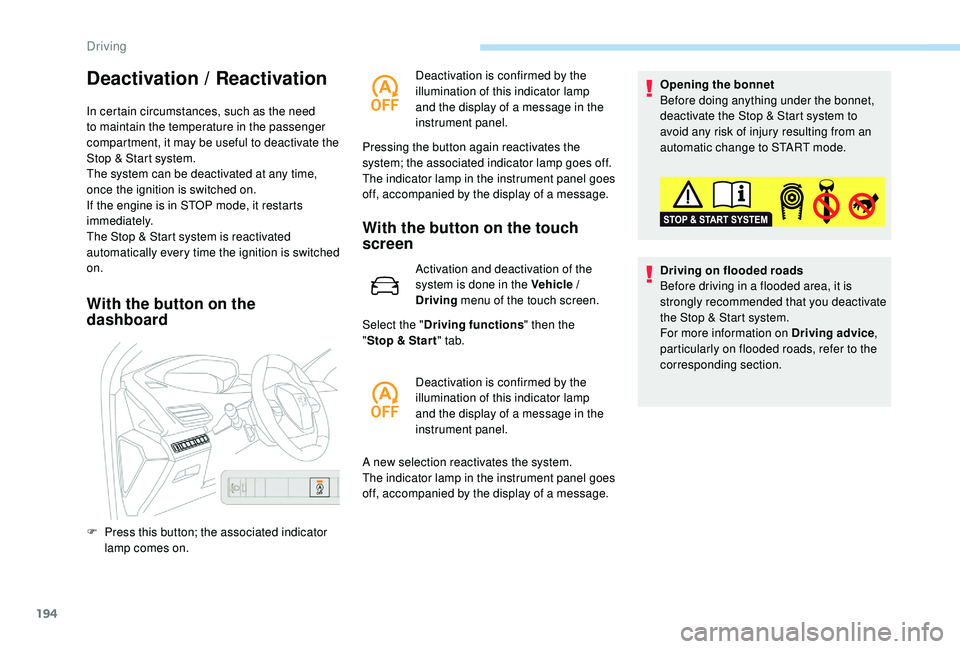
With the button on the
dashboardWith the button on the touch
screen
Activation and deactivation of the
system is done in the Vehicle /
Driving
menu of the touch screen.
Select the " Driving functions " then the
" Stop & Star t " tab.
A new selection reactivates the system.
The indicator lamp in the instrument panel goes
off, accompanied by the display of a message. Opening the bonnet
Before doing anything under the bonnet,
deactivate the Stop & Start system to
avoid any risk of injury resulting from an
automatic change to START mode.
Driving on flooded roads
Before driving in a flooded area, it is
strongly recommended that you deactivate
the Stop & Start system.
For more information on Driving advice
,
particularly on flooded roads, refer to the
corresponding section.
F
P
ress this button; the associated indicator
lamp comes on. Deactivation is confirmed by the
illumination of this indicator lamp
and the display of a message in the
instrument panel.
Pressing the button again reactivates the
system; the associated indicator lamp goes off.
The indicator lamp in the instrument panel goes
off, accompanied by the display of a message.
Deactivation is confirmed by the
illumination of this indicator lamp
and the display of a message in the
instrument panel.
Driving
Page 197 of 404
195
Operating fault
In the event of a fault with the
system, this warning lamp
flashes for a few moments in the
instrument panel, then remains on,
accompanied by the display of a
message.
Have it checked by a PEUGEOT dealer or a
qualified workshop.
If a fault occurs in STOP mode, the engine may
stall.
All of the instrument panel warning lamps come on.
It is then necessary to switch off the ignition and
start the engine again with the key or the
"START/STOP" button.
The Stop & Start system requires a
12 V battery of specific technology and
specification.
All work on this type of battery must be
carried out only by a PEUGEOT dealer or
a qualified workshop.
For more information on the 12
V batter y,
refer to the corresponding section.
Under-inflation detection
System which automatically checks the
pressures of the tyres while driving.
The system monitors the pressures in the four
tyres, once the vehicle is moving.
It compares the information given by the wheel
speed sensors with reference values, which
must be reinitialised ever y time the tyre
pressures are adjusted or a wheel changed .
The system triggers an alert as soon as it
detects a drop in the inflation pressure of one
or more tyres.
The under-inflation detection system does
not replace the need for vigilance on the
part of the driver.
This system does not avoid the need to
check the tyre pressures (including the
spare wheel) every month as well as
before a long journey.
Driving with under-inflated tyres worsens
road-holding, lengthens braking distances,
causes premature wear of the tyres,
particularly in adverse conditions (heavy
loads, high speeds, long journeys). Driving with under-inflated tyres
increases fuel consumption.
The inflation pressures defined for your
vehicle can be found on the tyre pressure
label.
For more information on the
Identification markings , refer to the
corresponding section.
Checking tyre pressures
This check should be done when the tyres
are "cold" (vehicle stopped for 1
hour or
after a journey of less than 6
miles (10 km)
at moderate speeds).
Other wise, add 0.3
bar to the pressures
shown on the label.
Snow chains
The system does not have to be
reinitialised after fitting or removing snow
chains.
6
Driving
Page 234 of 404
232
The state of the system is not kept in memory
when the ignition is switched off.
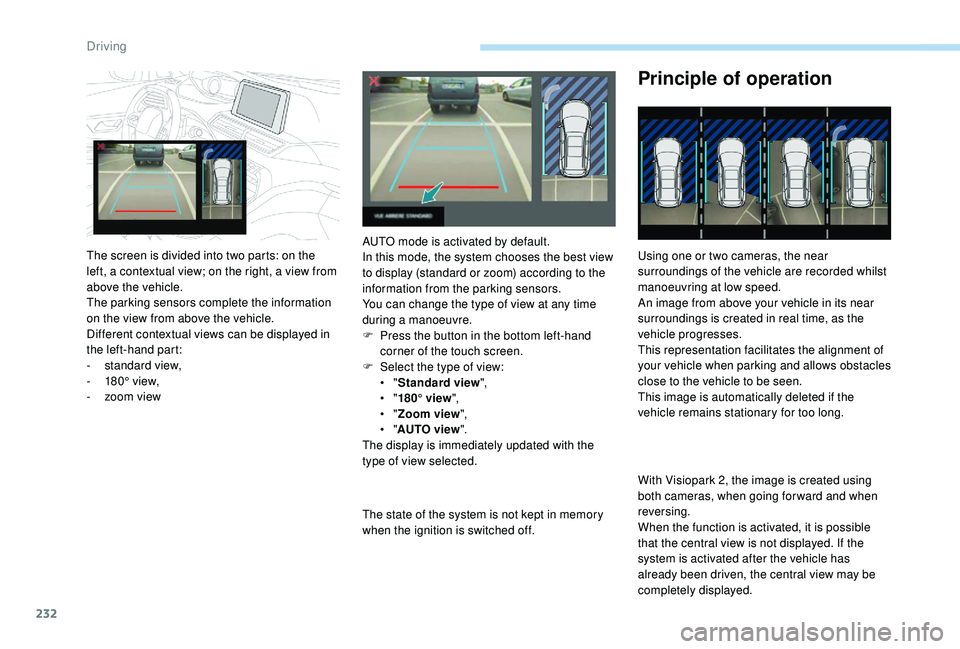
Principle of operation
Using one or two cameras, the near
surroundings of the vehicle are recorded whilst
manoeuvring at low speed.
An image from above your vehicle in its near
surroundings is created in real time, as the
vehicle progresses.
This representation facilitates the alignment of
your vehicle when parking and allows obstacles
close to the vehicle to be seen.
This image is automatically deleted if the
vehicle remains stationary for too long.
With Visiopark 2, the image is created using
both cameras, when going for ward and when
reversing.
When the function is activated, it is possible
that the central view is not displayed. If the
system is activated after the vehicle has
already been driven, the central view may be
completely displayed.
The screen is divided into two parts: on the
left, a contextual view; on the right, a view from
above the vehicle.
The parking sensors complete the information
on the view from above the vehicle.
Different contextual views can be displayed in
the left-hand part:
-
s
tandard view,
-
1
80° view,
-
z
oom view AUTO mode is activated by default.
In this mode, the system chooses the best view
to display (standard or zoom) according to the
information from the parking sensors.
You can change the type of view at any time
during a manoeuvre.
F
P
ress the button in the bottom left-hand
corner of the touch screen.
F
Sel
ect the type of view:
•
" Standard view ",
•
" 180° view ",
•
" Zoom view ",
•
" AUTO view ".
The display is immediately updated with the
type of view selected.
Driving
Page 260 of 404
258
Checking levels
Check all of these levels regularly, in line with
the manufacturer's service schedule. Top them
up if necessary, unless other wise indicated.
If a level drops significantly, have the
corresponding system checked by a PEUGEOT
dealer or a qualified workshop.Take care when working under the bonnet,
as certain areas of the engine may be
extremely hot (risk of burns) and the
cooling fan could start at any time (even
with the ignition off).
Used products
Avoid prolonged contact of used oil or
fluids with the skin.
Most of these fluids are harmful to health
or indeed very corrosive.Do not discard used oil or fluids into
sewers or onto the ground.
Take used oil to a PEUGEOT dealer
or a qualified workshop and dispose
of it in the containers reser ved for this
purpose.
Engine oil level
The check is carried out either when
the ignition is switched on using the
oil level indicator in the instrument
panel for vehicles equipped with an
electric gauge, or using the dipstick.
To ensure that the reading is correct, your
vehicle must be parked on a level sur face
with the engine stopped for more than
30
minutes.
It is normal to top up the oil level between
two ser vices (or oil changes). PEUGEOT
recommends that you check the level, and top
up if necessary, every 3,000
miles (5,000 km).
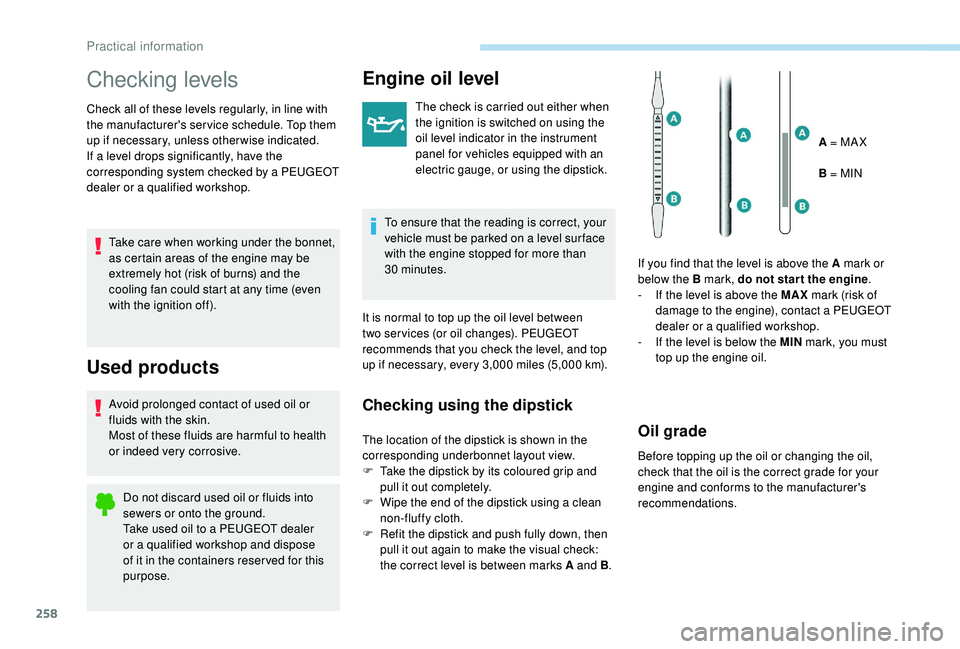
Checking using the dipstick
The location of the dipstick is shown in the
corresponding underbonnet layout view.
F
T
ake the dipstick by its coloured grip and
pull it out completely.
F
W
ipe the end of the dipstick using a clean
non-fluffy cloth.
F
R
efit the dipstick and push fully down, then
pull it out again to make the visual check:
the correct level is between marks A and B .A = MA X
B = MIN
If you find that the level is above the A mark or
below the B mark, do not star t the engine .
-
I
f the level is above the MAX
mark (risk of
damage to the engine), contact a PEUGEOT
dealer or a qualified workshop.
-
I
f the level is below the MIN
mark, you must
top up the engine oil.Oil grade
Before topping up the oil or changing the oil,
check that the oil is the correct grade for your
engine and conforms to the manufacturer's
recommendations.
Practical information
Page 263 of 404
261
Air filter and passenger compartment filter
Refer to the manufacturer's
ser vice schedule for details of the
replacement intervals for these
components.
Depending on the environment (e.g. dusty
atmosphere) and the use of the vehicle (e.g.
city driving), replace them twice as often if
necessary .
A clogged passenger compartment filter may
have an adverse effect on the per formance
of the air conditioning system and generate
undesirable odours.
Oil filter
Change the oil filter each time the
engine oil is changed.
Refer to the manufacturer's
ser vice schedule for details of
the replacement inter val for this
component.
Particle filter (Diesel)
The start of saturation of the particle
filter is indicated by the temporary
illumination of this warning lamp
accompanied by a message about
the risk of the filter clogging up. As soon as the traffic conditions permit,
regenerate the filter by driving at a speed
of at least 40
mph (60 km/h) until the
warning lamp goes off.
If the warning lamp stays on, this indicates
a low Diesel additive level.
For more information on Checking levels ,
refer to the corresponding section.
On a new vehicle, the first particle
filter regeneration operations may be
accompanied by a "burning" smell, which
is per fectly normal.
Following prolonged operation of the
vehicle at very low speed or at idle,
you may, in exceptional circumstances,
notice the emission of water vapour at the
exhaust on acceleration. This does not
affect the behaviour of the vehicle or the
environment.
Manual gearbox
The gearbox does not require any
maintenance (no oil change).
Refer to the manufacturer's service
schedule for the checking inter val
for this component.
Automatic gearbox
The gearbox does not require any
maintenance (no oil change).
Refer to the manufacturer’s service
schedule for the checking inter val
for this component.
Brake pads
Brake wear depends on the style
of driving, particularly in the case
of vehicles used in town, over short
distances. It may be necessary to
have the condition of the brakes
checked, even between vehicle
services.
Unless there is a leak in the circuit, a drop in
the brake fluid level indicates that the brake
pads are worn.
7
Practical information
Page 299 of 404

1
PEUGEOT Connect Nav
GPS satellite navigation –
Applications – Multimedia
audio system – Bluetooth
®
telephone
Contents
First steps
2
S
teering mounted controls
3
M
enus
4
V
oice commands
5
N
avigation
1
1
Connected navigation
1
5
Applications
1
8
Radio
2
3
DAB radio (Digital Audio Broadcasting)
2
5
Media
26
T
elephone
2
8
Configuration
3
3
Frequently asked questions
3
7The different functions and settings
described vary according to the version
and configuration of your vehicle.
As a safety measure and because it
requires sustained attention by the
driver, the pairing of a Bluetooth mobile
telephone with the Bluetooth hands-free
system of your audio system must be
done with the vehicle stationary
and the
ignition on.
The system is protected in such a way that
it will only operate in your vehicle.
The display of the Energy Economy
Mode message signals that a change to
standby is imminent.
The link below gives access to OSS (Open
Source Software) codes for the system.
https://www.groupe-psa.com/fr/oss/
https://www.groupe-psa.com/en/oss/
PEUGEOT Connect Nav
.
PEUGEOT Connect Nav