2017 NISSAN LEAF phone
[x] Cancel search: phonePage 115 of 268
![NISSAN LEAF 2017 1.G Navigation Manual [Voicetag]Registers a voicetag for the entry which allows the
entry to be used with the voice recognition system.
[Charging Sta. Att.] [Quick Charge Station]The location is registered as a charging st](/manual-img/5/531/w960_531-114.png "NISSAN LEAF 2017 1.G Navigation Manual [Voicetag]Registers a voicetag for the entry which allows the
entry to be used with the voice recognition system.
[Charging Sta. Att.] [Quick Charge Station]The location is registered as a charging st")
[Voicetag]Registers a voicetag for the entry which allows the
entry to be used with the voice recognition system.
[Charging Sta. Att.] [Quick Charge Station]The location is registered as a charging station with
quick charge equipment and can be included in the
charging station search.
[Normal
Charge Sta-
tion] The location is registered as a s charging station
with normal charge equipment and can be included
in the charging station search.
[Not a Charge
Station] The location is registered as a location that is not a
charging station.
[Icon] Selects an icon for the entry.
[Sound] Sets the type of the alarm that sounds when the
vehicle approaches the location.
[Direction] Sets the alarm to sound when approaching from a
specific direction.
[Distance] Sets the alarm to sound when reaching a specific
distance to the location.
[Phone No.] Registers a phone number of the location.
[Group] Registers a group of the entry.
[Entry Numbers] Registers an entry number for the location.
[Move Location] Adjusts the stored location information.
[Delete] Deletes the stored location information.
[OK] Confirms and saves the edited stored location
information.
3-55
3. Navigation
Page 124 of 268
AUDIO OPERATION PRECAU-
TIONS
RADIO
Push the power switch to the ACC or ON
position and push
turn on the radio. If you listen to the radio with the
READY to drive indicator light is OFF, the power
switch should be pushed to the ACC position.
Radio reception is affected by station signal
strength, distance from radio transmitter, build-
ings, bridges, mountains and other external
influences. Intermittent changes in reception
quality normally are caused by these external
influences.
Using a cellular phone in or near the vehicle
may influence radio reception quality.
Radio reception
Your radio system is equipped with state-of-the-
art electronic circuits to enhance radio reception.
These circuits are designed to extend reception
range, and to enhance the quality of that
reception.
However there are some general characteristics
of both FM and AM radio signals that can affect
radio reception quality in a moving vehicle, even
when the finest equipment is used. These characteristics are completely normal in a given
reception area, and do not indicate any malfunc-
tion in your radio system.
Reception conditions will constantly change
because of vehicle movement. Buildings, terrain,
signal distance and interference from other
vehicles can work against ideal reception.
Described below are some of the factors that
can affect your radio reception.
Some cellular phones or other devices may
cause interference or a buzzing noise to come
from the audio system speakers. Storing the
device in a different location may reduce or
eliminate the noise.
FM radio reception
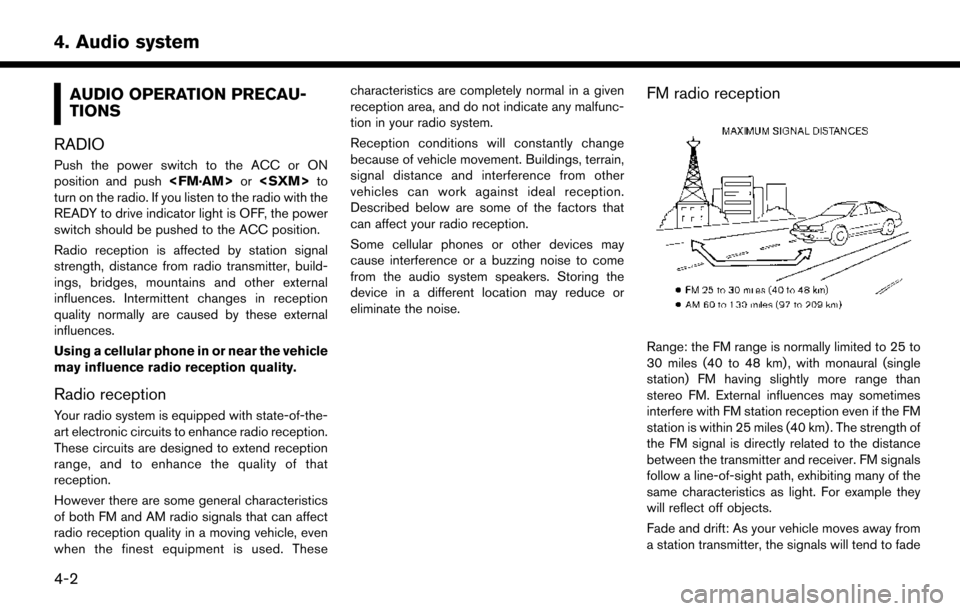
Range: the FM range is normally limited to 25 to
30 miles (40 to 48 km) , with monaural (single
station) FM having slightly more range than
stereo FM. External influences may sometimes
interfere with FM station reception even if the FM
station is within 25 miles (40 km) . The strength of
the FM signal is directly related to the distance
between the transmitter and receiver. FM signals
follow a line-of-sight path, exhibiting many of the
same characteristics as light. For example they
will reflect off objects.
Fade and drift: As your vehicle moves away from
a station transmitter, the signals will tend to fade
4-2
4. Audio system
Page 131 of 268
*1 Files created with a combination of 48 kHz sampling frequency and 64 kbps bit rate cannot be played.
*2 Protected WMA files (DRM) cannot be played.
*3 Made by iTunes
Š.
*4 Available codes depend on what kind of media, versions and information are going to be displayed.
BLUETOOTHŠSTREAMING AUDIO
. Some BluetoothŠaudio devices may not be
recognized by the in-vehicle audio system.
. It is necessary to set up the wireless
connection between a compatible Blue-
tooth
Šaudio device and the in-vehicle Blue-
toothŠmodule before using the BluetoothŠ
streaming audio.
. The Bluetooth
Šstreaming audio may stop
playing when
— receiving a hands-free call.
— checking the connection to the hands- free phone.
— connecting the hands-free phone or the audio device.
— downloading the phonebook memory from the connected cellular phone.
. Do not place a Bluetooth
Šaudio device in an
area surrounded by metal or far away from
the in-vehicle Bluetooth
Šmodule to prevent
tone quality degradation and wireless con-
nection disruption. .
While an audio device is connected through
a Bluetooth
Šwireless connection, the bat-
tery of the device may discharge quicker than
usual.
. This system supports the Bluetooth
ŠAd-
vanced Audio Distribution Profile (A2DP)
and Audio/Video Remote Control Profile
(AVRCP) .
. Wireless LAN (Wi-Fi) and the Bluetooth
Š
functions share the same frequency band
(2.4 GHz) . Using the BluetoothŠand the
wireless LAN functions at the same time may
slow down or disconnect the communication
and cause undesired noise. It is recom-
mended that you turn off the wireless LAN
(Wi-Fi) when using the Bluetooth
Šfunctions.
4-9
4. Audio system
Page 147 of 268
.iPod classicŠ(120GB)
. iPod nano
Š(7th generation)
. iPod nano
Š(6th generation)
. iPod nano
Š(5th generation)
. iPod nano
Š(4th generation)
. iPod nano
Š(3rd generation)
. iPod nano
Š(2nd generation)
. iPod nano
Š(1st generation)
. iPhone
Š5
. iPhone
Š4S
. iPhone
Š4
. iPhone
Š3GS
. iPhone
Š3G
. iPhone
Š
INFO:
. Make sure that the iPod
Šfirmware is
updated.
. The Lightning
TMconnector works with
iPhoneŠ5, iPod touchŠ(5th generation) ,
and iPod nanoŠ(7th generation) .
The 30-pin connector works with iPhoneŠ
4S, iPhoneŠ4, iPhoneŠ3GS, iPhoneŠ3G, iPhone
Š, iPod touchŠ(1st through 4th
generation) , iPod classicŠand iPod nanoŠ
(1st through 6th generation) .
USB works with iPhoneŠ5, iPhoneŠ4S,
iPhoneŠ4, iPhoneŠ3GS, iPhoneŠ3G,
iPhoneŠ, iPod touchŠ(1st through 5th
generation) iPod classicŠand iPod nanoŠ
(1st through 7th generation) .
. Refer to your device manufacturer’s owner
information regarding the proper use and
care of the device.
4-25
4. Audio system
Page 157 of 268
still be transmitted if vehicle telematics features
are accessed either in the vehicle or remotely.
Your agreement to the transmission and use of
data by NISSAN can be provided in various
ways. The vehicle is equipped with a “pop up”
screen on the vehicle navigation system that will
ask for your consent to this data transfer. A
version of the following message will appear:
“Pursuant to subscription agreement, your vehi-
cle wirelessly transmits recorded vehicle data to
NISSAN for various purposes, including Nissan-
Connect
SMEV, product evaluation, research and
development. By touching [OK], you consent to
the transmission and use of your vehicle data.
See Owner’s Manual or NissanConnect
SM
Website for terms and details.” If you touch
[OK], your vehicle will transmit data as designed
in connection with the vehicle telematics system.
If you touch [Decline] your vehicle will not
transmit data. However, the telematics features
referenced above, and perhaps others, will not
be available to you. The vehicle’s static naviga-
tion system will remain operational, and you will
be able to access your radio and climate
controls.
Telematics features are dependent on cellular
data transmission. Some areas may have limited
or no cellular connectivity, resulting in a loss or
interruption of data transmission and, as a result, certain features may be temporarily unavailable.
Even if areas with good signal reception, cellular
connectivity can be adversely affected by things
such as tall buildings, apartments, tunnels,
underground parking, mountainous areas, etc.
Even if the signal strength bar of the in-vehicle
data communication module indicates good
reception, connectivity may be disrupted. This
does not indicate a malfunction. Operate the
system again after a few minutes to restore
connectivity. NissanConnect
SMEV telematics
features are offered as a convenience to the
vehicle owner. NISSAN is not responsible for,
and owner assumes all risk of, interruptions in
service or errors based on incomplete or
inaccurate data. NissanConnect
SMEV commu-
nications may be received at a verified e-mail
address or by SMS/text messaging-enabled
mobile phone. Standard text rates and/or data
usage may apply depending on your carrier.
If your vehicle’s telematics account is active, and
you are not the original owner, please contact
NISSAN at the website or phone number above
as soon as possible to update the telematics
enrollment information. Upon sale of the vehicle,
please contact NISSAN at the website or phone
number above so that NISSAN’s records may be
updated. NissanConnect
SMEV subscription will
automatically terminate at the end of the initial free term if you do not wish to renew your
subscription agreement at the prices then in
effect.
5-3
5. NissanConnectSMEV
Page 159 of 268
.Battery status check:
The status of the battery can be checked
using your personal computer or cellular
phone even if you are not in the vehicle.
. Unplugged status, Charge status:
By registering frequently used charging
stations, notifications can be sent to your
personal computer or cellular phone e-mail
address to inform you when the charging
connector is disconnected at those locations
or charging is completed.
. Remote charge, Remote climate con-
trol:
Remote activation of battery charging or
climate control can be set using your
personal computer or cellular phone.
. Li-ion battery warmer status (if so
equipped):
When the ambient temperature is low, the Li-
ion battery warmer operates automatically.
Notifications will be sent to your personal
computer or cellular phone e-mail address
under the following conditions in order to
remind you to connect the charging con-
nector.
— Approximately 5 minutes after the Li-ion battery warmer starts operating while the
power switch is in the OFF state and the charging cable is not connected to the
vehicle.
— Approximately 5 minutes after the Li-ion battery warmer stops operating due to
low remaining Li-ion battery power while
the power switch is in the OFF state and
the charging cable is not connected to
the vehicle.
NOTE:
. The remaining Li-ion battery power
lowers gradually while the battery war-
mer is operating without connecting the
charging connector.
. When the remaining Li-ion battery
power lowers, the battery warmer stops
operating. When this occurs, the Li-ion
battery temperature lowers gradually,
and as a result the EV system may be
disabled.
Navigation Telematics (NissanConnect
SM
EV) . Automatic update of charging stations:
The information for the charging stations that
is recorded in the map data is automatically
updated. .
All Information Feeds:
Convenient information for driving such as
weather and traffic information, ECO infor-
mation shared with the LEAF users, etc. is
provided.
. Favorites:
When the information of an Internet site is
selected and it is stored in the page that is
specially established in the NissanCon-
nect
SMWebsite, the information is converted
into an appropriate format via the Nissan
Data Center and provided for use in the
vehicle. The content of the information is
automatically read out. For the registration
method of information data, visit the Nissan-
Connect
SMWebsite.
NOTE:
. Completing the NissanConnect
SMEV
registration is necessary before using
this service.
. To check the Li-ion battery charging
status or to use the remote heater and
air conditioner using an internet en-
abled smart phone or personal compu-
ter, the following conditions must be
met:
5-5
5. NissanConnectSMEV
Page 160 of 268
—The vehicle must be located in a
cellular phone or smart phone cover-
age area.
— The internet enabled cellular phone
or smart phone must be located in a
cellular phone or smart phone cover-
age area.
— The computer must be connected to
the internet.
— A cellular phone capable of text
messaging must be used to receive
text message regarding vehicle
charge status.
. When the charge connector is discon-
nected from the vehicle, the heater and
air conditioner operates using vehicle
Li-ion battery electric power.
. If the remote heater and air conditioner
function and Li-ion battery charging are
performed at the same time, Li-ion
battery charging will take longer than
usual due to the power used to heat or
cool the vehicle.
. Certain remote functions require a
compatible smart phone, which is not
included with vehicle. .
NissanConnectSMEV information sys-
tem features are included through a
subscription service which requires
owner consent to activate. The sub-
scription must be active to use these
features.
. NissanConnect
SMEV communications
may be received at a verified e-mail
address or by SMS/text messaging-
enabled cellular phone.
. Standard text rates and/or data usage
may apply depending on your carrier.
ABOUT SERVICE APPLICATION
Registration to the NissanConnectSMEV is
necessary before using this service. For detailed
information, contact a NISSAN certified LEAF
dealer.
CAUTION
If the vehicle is sold to another person,
this service must be canceled and all
data stored in the device must be deleted
to avoid having personal data inadver-
tently disclosed.
NOTICE FOR USAGE
. The NissanConnectSMEV use the TCU
(Telematics Control Unit) . Even if the signal
strength bar of the in-vehicle data commu-
nication module indicates good reception,
connection to the Nissan Data Center may
be disabled. This does not indicate a
malfunction. Operate the system again after
a few minutes.
. The NissanConnect
SMEV cannot be used
under the following conditions:
— The vehicle moves outside the service area of the TCU (Telematics Control Unit)
connection to the system.
— The vehicle is in a location with poor signal reception such as a tunnel, under-
ground parking, behind a building or in a
mountainous area.
RADIO APPROVAL NUMBER AND
INFORMATION
WARNING
.The TCU antenna is installed inside
the upper central part of the instru-
ment panel. An occupant should not
get any closer to the antenna than
specified by the pacemaker manu-
5-6
5. NissanConnectSMEV
Page 163 of 268
*1Contents:
The contents of the NissanConnectSMEV
feeds are displayed.
*2Menu:
Stops the Text-to-Speech voice announce-
ments and displays the operation menu
items on the right side of the screen.
*3[]/[]:
Turns to the next or previous page if the
information has a number of content pages.
*4:
If the information contains map information,
the icon be displayed. It can be set as the
destination.
*5:
If the information contains phone number
information, the icon is displayed. It is
possible to make a phone call to the facility.
After parking the vehicle in a safe location and
touching [Menu], the operation menu is dis-
played on the right side of the screen.
INFO:
The availability of the operation menu items
differs depending on the contents of the
selected information.
STORING FAVORITES
Favorite feeds selected from the information
feeds can be stored in a folder.
1. Touch [Info] on the Launch Bar and touch [NissanConnect EV].
2. Touch [Favorite Feeds].
3. Touch [Add New]. A folder list is displayed.
4. Touch the preferred folder from the list. An information feed list is displayed. 5. Touch a favorite feed to be stored.
6. Check the contents of the message, then
touch [Yes]. When the contents of the
information are sent to the Nissan Data
Center, the registration is completed.
INFO:
. The contents that are entered in the favorites
folder need to be transmitted to the Nissan
Data Center. Registration of the contents is
not completed until the data is transmitted to
the Nissan Data Center.
. A message is displayed if communication is
interrupted while downloading information.
Touch [Yes] to restart the download.
VIEWING NISSANCONNECTSMEV
RECORDS
The information feeds that were referred to
previously are displayed. A maximum of 3 feeds
can be stored in the history.
1. Touch [Info] on the Launch Bar and touch
[NissanConnect EV].
2. Touch [History]. An Information feed list is displayed.
5-9
5. NissanConnectSMEV