2017 NISSAN LEAF phone
[x] Cancel search: phonePage 227 of 268

10 Troubleshooting guide
Customer assistance ............................................................. 10-2
System unit ........................................................................\
...... 10-3Liquid crystal display ....................................................... 10-3
Unique EV functions .............................................................. 10-5 Driving range ..................................................................... 10-5
Charging stations ............................................................. 10-6
Energy information display ............................................. 10-7
Timer function .................................................................... 10-8
Audio system ........................................................................\
10-10 HD Radio technology (for U.S.) ................................. 10-10
Compact Disc (CD) player ......................................... 10-12
iPod
Šplayer .................................................................... 10-14 USB memory device ................................................... 10-16
Bluetooth
Šstreaming audio ..................................... 10-17
BluetoothŠHands-Free Phone System ........................ 10-19
NissanConnectSMEV ........................................................ 10-22
Navigation ........................................................................\
..... 10-23 Basic operations .......................................................... 10-23
Vehicle icon .................................................................. 10-24
Route calculation and visual guidance .................. 10-26
Voice guidance ............................................................ 10-28
Traffic information ........................................................ 10-29
Voice recognition ................................................................ 10-30
Page 232 of 268
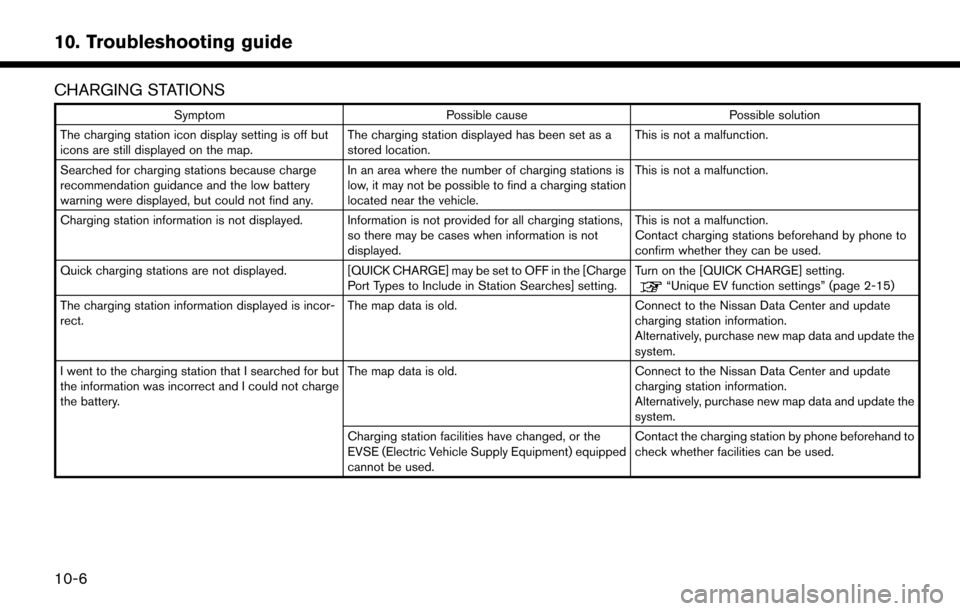
CHARGING STATIONS
SymptomPossible cause Possible solution
The charging station icon display setting is off but
icons are still displayed on the map. The charging station displayed has been set as a
stored location.This is not a malfunction.
Searched for charging stations because charge
recommendation guidance and the low battery
warning were displayed, but could not find any. In an area where the number of charging stations is
low, it may not be possible to find a charging station
located near the vehicle.This is not a malfunction.
Charging station information is not displayed. Information is not provided for all charging stations, so there may be cases when information is not
displayed.This is not a malfunction.
Contact charging stations beforehand by phone to
confirm whether they can be used.
Quick charging stations are not displayed. [QUICK CHARGE] may be set to OFF in the [Charge Port Types to Include in Station Searches] setting.Turn on the [QUICK CHARGE] setting.
“Unique EV function settings” (page 2-15)
The charging station information displayed is incor-
rect. The map data is old.
Connect to the Nissan Data Center and update
charging station information.
Alternatively, purchase new map data and update the
system.
I went to the charging station that I searched for but
the information was incorrect and I could not charge
the battery. The map data is old.
Connect to the Nissan Data Center and update
charging station information.
Alternatively, purchase new map data and update the
system.
Charging station facilities have changed, or the
EVSE (Electric Vehicle Supply Equipment) equipped
cannot be used. Contact the charging station by phone beforehand to
check whether facilities can be used.
10-6
10. Troubleshooting guide
Page 245 of 268
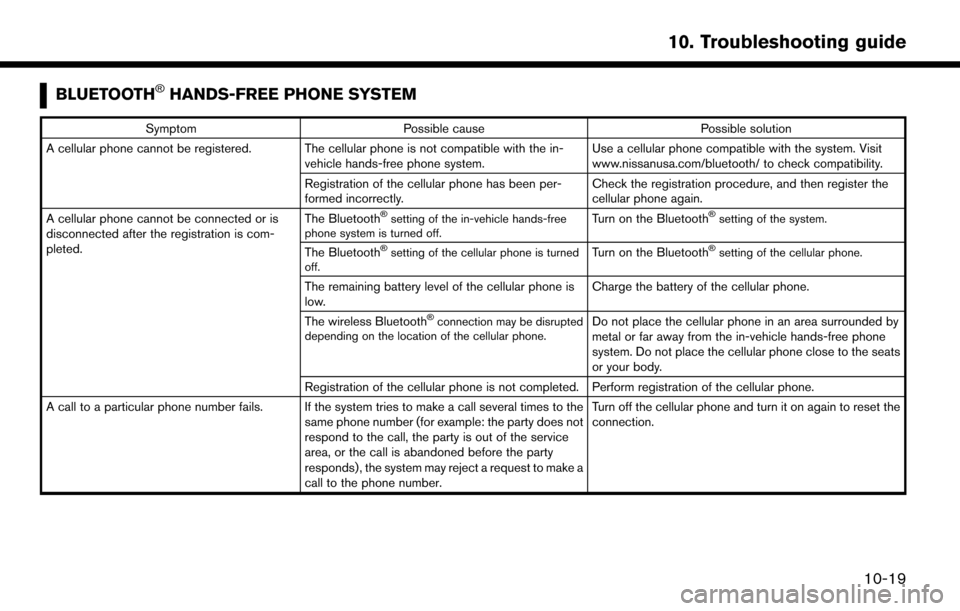
BLUETOOTHŠHANDS-FREE PHONE SYSTEM
SymptomPossible cause Possible solution
A cellular phone cannot be registered. The cellular phone is not compatible with the in- vehicle hands-free phone system. Use a cellular phone compatible with the system. Visit
www.nissanusa.com/bluetooth/ to check compatibility.
Registration of the cellular phone has been per-
formed incorrectly. Check the registration procedure, and then register the
cellular phone again.
A cellular phone cannot be connected or is
disconnected after the registration is com-
pleted. The Bluetooth
Šsetting of the in-vehicle hands-free
phone system is turned off.Turn on the BluetoothŠsetting of the system.
The BluetoothŠsetting of the cellular phone is turned
off.Turn on the BluetoothŠsetting of the cellular phone.
The remaining battery level of the cellular phone is
low. Charge the battery of the cellular phone.
The wireless Bluetooth
Šconnection may be disrupted
depending on the location of the cellular phone.Do not place the cellular phone in an area surrounded by
metal or far away from the in-vehicle hands-free phone
system. Do not place the cellular phone close to the seats
or your body.
Registration of the cellular phone is not completed. Perform registration of the cellular phone.
A call to a particular phone number fails. If the system tries to make a call several times to the same phone number (for example: the party does not
respond to the call, the party is out of the service
area, or the call is abandoned before the party
responds) , the system may reject a request to make a
call to the phone number. Turn off the cellular phone and turn it on again to reset the
connection.
10-19
10. Troubleshooting guide
Page 246 of 268
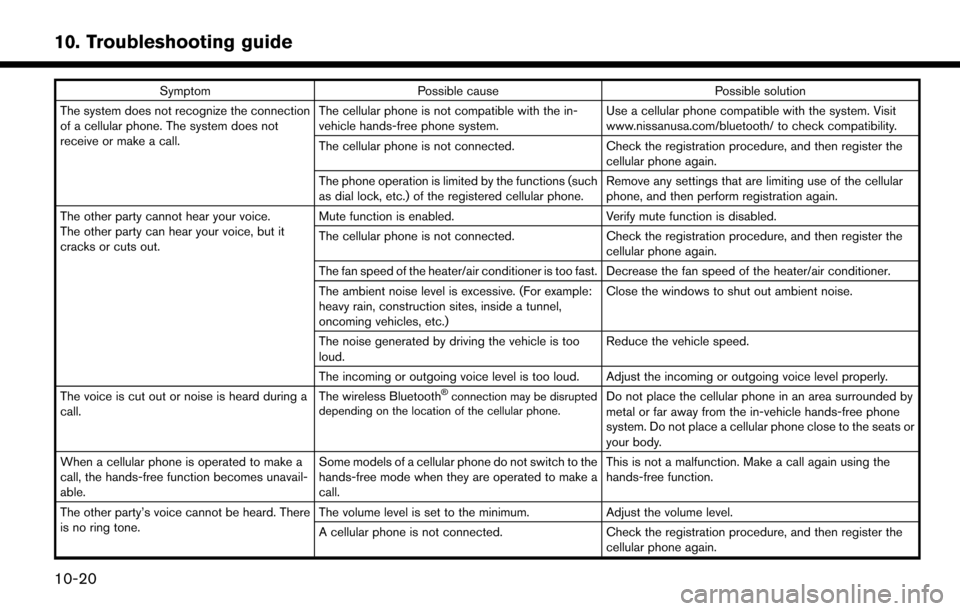
SymptomPossible cause Possible solution
The system does not recognize the connection
of a cellular phone. The system does not
receive or make a call. The cellular phone is not compatible with the in-
vehicle hands-free phone system.
Use a cellular phone compatible with the system. Visit
www.nissanusa.com/bluetooth/ to check compatibility.
The cellular phone is not connected. Check the registration procedure, and then register the
cellular phone again.
The phone operation is limited by the functions (such
as dial lock, etc.) of the registered cellular phone. Remove any settings that are limiting use of the cellular
phone, and then perform registration again.
The other party cannot hear your voice.
The other party can hear your voice, but it
cracks or cuts out. Mute function is enabled.
Verify mute function is disabled.
The cellular phone is not connected. Check the registration procedure, and then register the
cellular phone again.
The fan speed of the heater/air conditioner is too fast. Decrease the fan speed of the heater/air conditioner.
The ambient noise level is excessive. (For example:
heavy rain, construction sites, inside a tunnel,
oncoming vehicles, etc.) Close the windows to shut out ambient noise.
The noise generated by driving the vehicle is too
loud. Reduce the vehicle speed.
The incoming or outgoing voice level is too loud. Adjust the incoming or outgoing voice level properly.
The voice is cut out or noise is heard during a
call. The wireless Bluetooth
Šconnection may be disrupted
depending on the location of the cellular phone.Do not place the cellular phone in an area surrounded by
metal or far away from the in-vehicle hands-free phone
system. Do not place a cellular phone close to the seats or
your body.
When a cellular phone is operated to make a
call, the hands-free function becomes unavail-
able. Some models of a cellular phone do not switch to the
hands-free mode when they are operated to make a
call. This is not a malfunction. Make a call again using the
hands-free function.
The other party’s voice cannot be heard. There
is no ring tone. The volume level is set to the minimum.
Adjust the volume level.
A cellular phone is not connected. Check the registration procedure, and then register the
cellular phone again.
10-20
10. Troubleshooting guide
Page 247 of 268
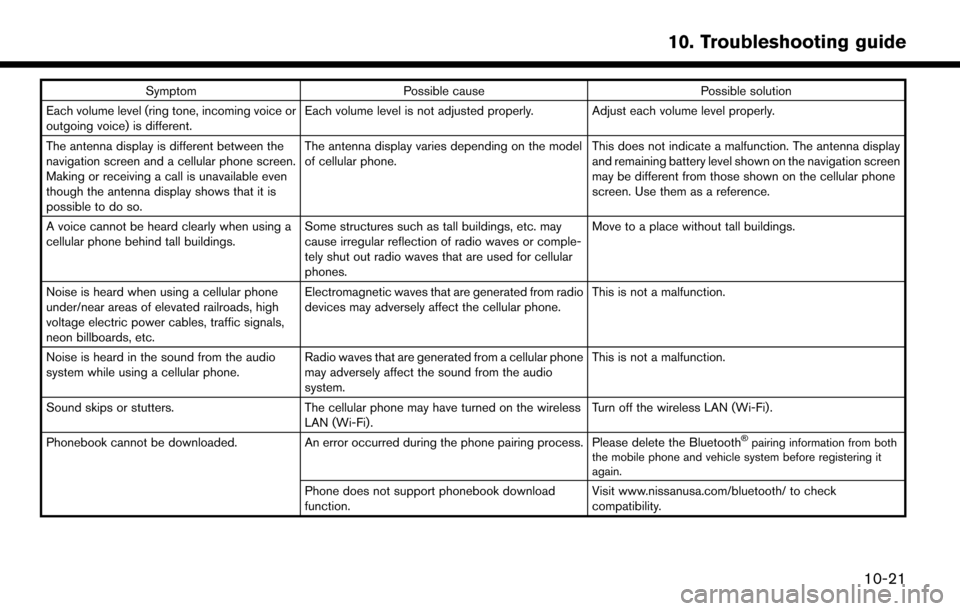
SymptomPossible cause Possible solution
Each volume level (ring tone, incoming voice or
outgoing voice) is different. Each volume level is not adjusted properly. Adjust each volume level properly.
The antenna display is different between the
navigation screen and a cellular phone screen.
Making or receiving a call is unavailable even
though the antenna display shows that it is
possible to do so. The antenna display varies depending on the model
of cellular phone.
This does not indicate a malfunction. The antenna display
and remaining battery level shown on the navigation screen
may be different from those shown on the cellular phone
screen. Use them as a reference.
A voice cannot be heard clearly when using a
cellular phone behind tall buildings. Some structures such as tall buildings, etc. may
cause irregular reflection of radio waves or comple-
tely shut out radio waves that are used for cellular
phones. Move to a place without tall buildings.
Noise is heard when using a cellular phone
under/near areas of elevated railroads, high
voltage electric power cables, traffic signals,
neon billboards, etc. Electromagnetic waves that are generated from radio
devices may adversely affect the cellular phone.
This is not a malfunction.
Noise is heard in the sound from the audio
system while using a cellular phone. Radio waves that are generated from a cellular phone
may adversely affect the sound from the audio
system. This is not a malfunction.
Sound skips or stutters. The cellular phone may have turned on the wireless
LAN (Wi-Fi). Turn off the wireless LAN (Wi-Fi).
Phonebook cannot be downloaded. An error occurred during the phone pairing process. Please delete the Bluetooth
Špairing information from both
the mobile phone and vehicle system before registering it
again.
Phone does not support phonebook download
function. Visit www.nissanusa.com/bluetooth/ to check
compatibility.
10-21
10. Troubleshooting guide
Page 256 of 268
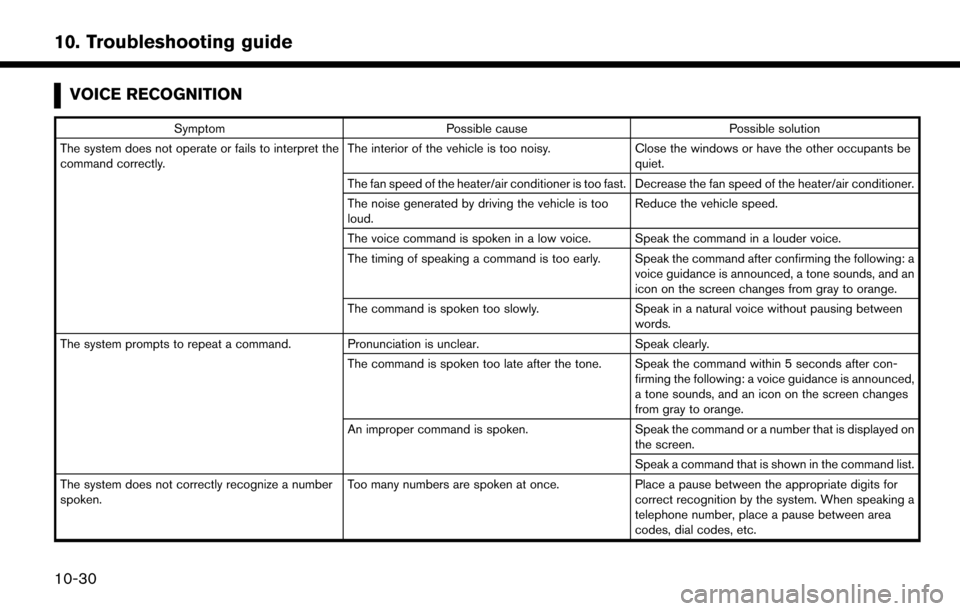
VOICE RECOGNITION
SymptomPossible cause Possible solution
The system does not operate or fails to interpret the
command correctly. The interior of the vehicle is too noisy.
Close the windows or have the other occupants be
quiet.
The fan speed of the heater/air conditioner is too fast. Decrease the fan speed of the heater/air conditioner.
The noise generated by driving the vehicle is too
loud. Reduce the vehicle speed.
The voice command is spoken in a low voice. Speak the command in a louder voice.
The timing of speaking a command is too early. Speak the command after confirming the following: a voice guidance is announced, a tone sounds, and an
icon on the screen changes from gray to orange.
The command is spoken too slowly. Speak in a natural voice without pausing between
words.
The system prompts to repeat a command. Pronunciation is unclear. Speak clearly.
The command is spoken too late after the tone. Speak the command within 5 seconds after con- firming the following: a voice guidance is announced,
a tone sounds, and an icon on the screen changes
from gray to orange.
An improper command is spoken. Speak the command or a number that is displayed on
the screen.
Speak a command that is shown in the command list.
The system does not correctly recognize a number
spoken. Too many numbers are spoken at once.
Place a pause between the appropriate digits for
correct recognition by the system. When speaking a
telephone number, place a pause between area
codes, dial codes, etc.
10-30
10. Troubleshooting guide
Page 257 of 268
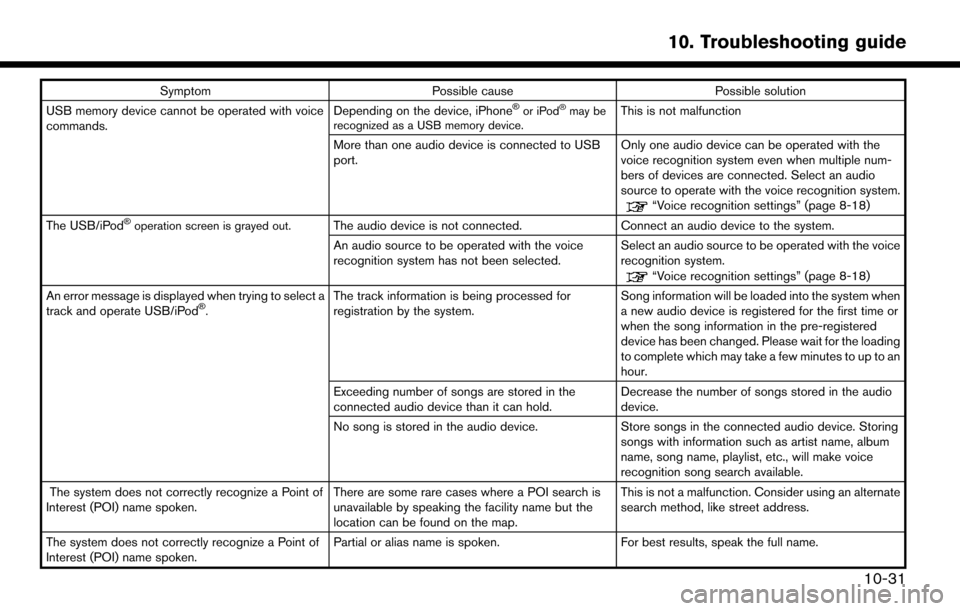
SymptomPossible cause Possible solution
USB memory device cannot be operated with voice
commands. Depending on the device, iPhoneŠor iPodŠmay be
recognized as a USB memory device.This is not malfunction
More than one audio device is connected to USB
port. Only one audio device can be operated with the
voice recognition system even when multiple num-
bers of devices are connected. Select an audio
source to operate with the voice recognition system.
“Voice recognition settings” (page 8-18)
The USB/iPodŠoperation screen is grayed out.The audio device is not connected. Connect an audio device to the system.
An audio source to be operated with the voice
recognition system has not been selected. Select an audio source to be operated with the voice
recognition system.
“Voice recognition settings” (page 8-18)
An error message is displayed when trying to select a
track and operate USB/iPod
Š.The track information is being processed for
registration by the system. Song information will be loaded into the system when
a new audio device is registered for the first time or
when the song information in the pre-registered
device has been changed. Please wait for the loading
to complete which may take a few minutes to up to an
hour.
Exceeding number of songs are stored in the
connected audio device than it can hold. Decrease the number of songs stored in the audio
device.
No song is stored in the audio device. Store songs in the connected audio device. Storing songs with information such as artist name, album
name, song name, playlist, etc., will make voice
recognition song search available.
The system does not correctly recognize a Point of
Interest (POI) name spoken. There are some rare cases where a POI search is
unavailable by speaking the facility name but the
location can be found on the map.This is not a malfunction. Consider using an alternate
search method, like street address.
The system does not correctly recognize a Point of
Interest (POI) name spoken. Partial or alias name is spoken.
For best results, speak the full name.
10-31
10. Troubleshooting guide
Page 259 of 268
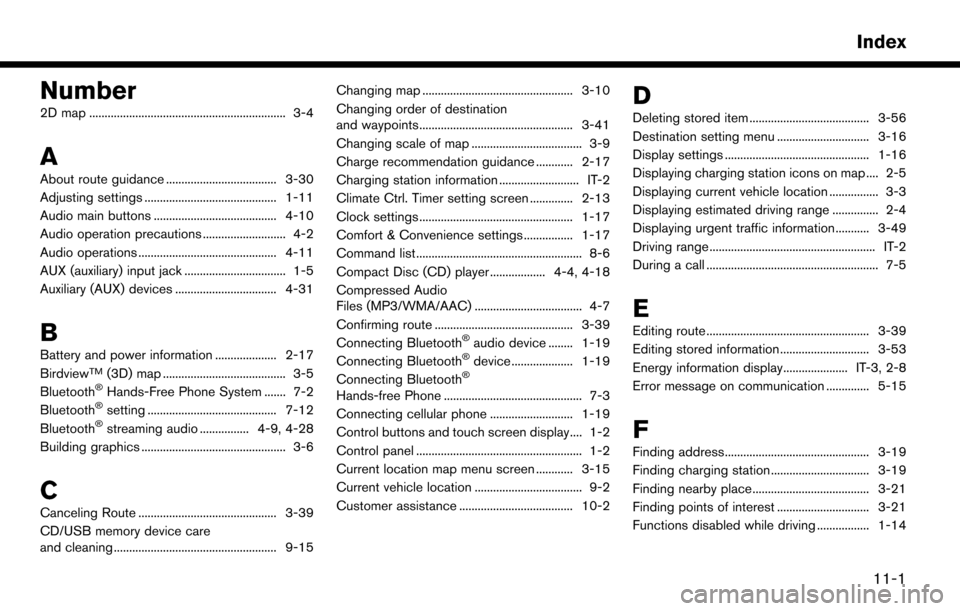
Number
2D map ................................................................ 3-4
A
About route guidance .................................... 3-30
Adjusting settings ........................................... 1-11
Audio main buttons ........................................ 4-10
Audio operation precautions ........................... 4-2
Audio operations ............................................. 4-11
AUX (auxiliary) input jack ................................. 1-5
Auxiliary (AUX) devices ................................. 4-31
B
Battery and power information .................... 2-17
BirdviewTM(3D) map ........................................ 3-5
BluetoothŠHands-Free Phone System ....... 7-2
BluetoothŠsetting .......................................... 7-12
BluetoothŠstreaming audio ................ 4-9, 4-28
Building graphics ............................................... 3-6
C
Canceling Route ............................................. 3-39
CD/USB memory device care
and cleaning ..................................................... 9-15 Changing map ................................................. 3-10
Changing order of destination
and waypoints.................................................. 3-41
Changing scale of map .................................... 3-9
Charge recommendation guidance ............ 2-17
Charging station information .......................... IT-2
Climate Ctrl. Timer setting screen .............. 2-13
Clock settings .................................................. 1-17
Comfort & Convenience settings ................ 1-17
Command list ...................................................... 8-6
Compact Disc (CD) player .................. 4-4, 4-18
Compressed Audio
Files (MP3/WMA/AAC) ................................... 4-7
Confirming route ............................................. 3-39
Connecting Bluetooth
Šaudio device ........ 1-19
Connecting BluetoothŠdevice .................... 1-19
Connecting BluetoothŠ
Hands-free Phone ............................................. 7-3
Connecting cellular phone ........................... 1-19
Control buttons and touch screen display.... 1-2
Control panel ...................................................... 1-2
Current location map menu screen ............ 3-15
Current vehicle location ................................... 9-2
Customer assistance ..................................... 10-2
D
Deleting stored item ....................................... 3-56
Destination setting menu .............................. 3-16
Display settings ............................................... 1-16
Displaying charging station icons on map .... 2-5
Displaying current vehicle location ................ 3-3
Displaying estimated driving range ............... 2-4
Displaying urgent traffic information........... 3-49
Driving range ...................................................... IT-2
During a call ........................................................ 7-5
E
Editing route ..................................................... 3-39
Editing stored information ............................. 3-53
Energy information display..................... IT-3, 2-8
Error message on communication .............. 5-15
F
Finding address............................................... 3-19
Finding charging station ................................ 3-19
Finding nearby place...................................... 3-21
Finding points of interest .............................. 3-21
Functions disabled while driving ................. 1-14
11-1
Index