2017 MERCEDES-BENZ G-Class mirror
[x] Cancel search: mirrorPage 83 of 286
If somebodybecomes trapped:
Rpress one of the memory function position
buttons, or
Rpress one of the memory function memory
buttons, or
Rmove the switch for steering wheel adjust-
ment in the opposite direction to that in
which the steering wheel is moving
The adjustment process is stopped.
GWARNING
If you drive off whilet he EASY-ENTRY/EXIT
feature is making adjustments, you could lose
control of the vehicle.T here isarisk of an
accident.
Alway swaitu ntil the adjustment process is
complete before driving off.
!Do not activate the EASY-ENTRY/EXIT fea-
ture, if the seat backrest is reclined too far
backwards. This can damage the front or rear
seats. You must first move the backrest to a
vertical position.
The EASY-ENTRY/EXIT feature makes getting in
and out of you rvehicle easier.
You can activate and deactivate the EASY-
ENTRY/EXIT feature in the on-board computer
(
Ypage 166).
Position of the steering whee lwhen the
EASY-ENTRY/EXIT feature is active
The steering wheel moves upwards and towards
the dashboard if:
Ryou remove the SmartKey from the ignition
lock or
Ryou open the driver's door and the SmartKey
is in position 0or 1in the ignition lock
iThe steering wheel only moves upwards and
towards the dashboard if it has not already
reached the uppers teering limiter.
Position of the steering whee lfor driv-
ing
The steering wheel is moved to the last selected positionw hen:
Rthe driver's door is closed
Ryou insert the SmartKey into the ignition lock
The last positionoft he steering column is stored
when you switch off the ignition or when you
store the setting with the memory function
(
Ypage 83).
Mirrors
Rear-view mirror
XAdjust the rear-view mirror in such away that
you have agood view of road and traffic con-
ditions behind you.
Exteriorm irrors
Adjusting the exterio rmirrors
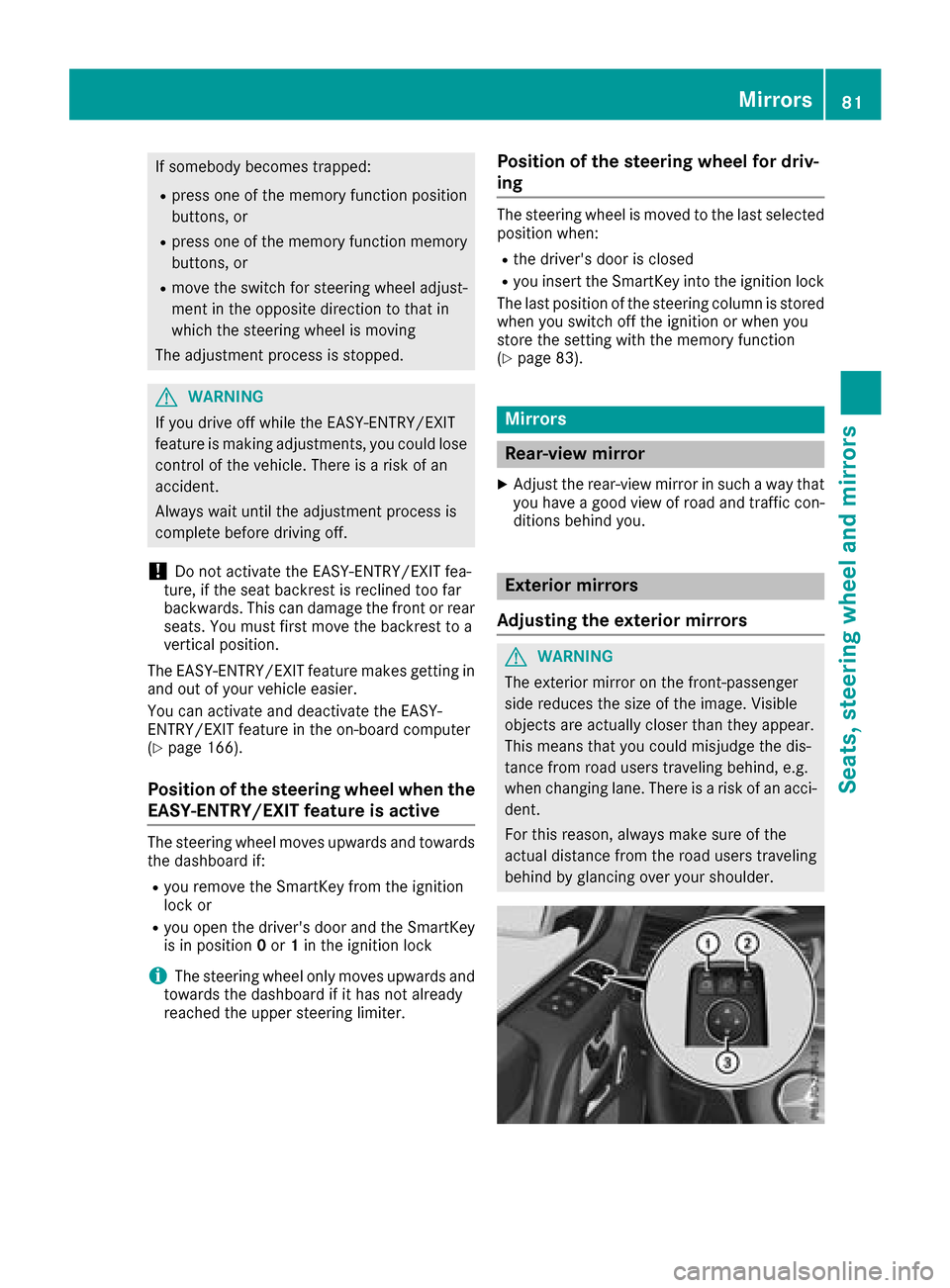
GWARNING
The exterior mirror on the front-passenger
side reduces the size of the image.V isible
objects are actually closer than they appear.
This means that you could misjudge the dis-
tance from road users traveling behind, e.g.
when changing lane. There is arisk of an acci-
dent.
For this reason, always make sure of the
actual distance from the road users traveling
behind by glancing over you rshoulder.
Mirrors81
Seats, steeringw heel and mirrors
Z
Page 84 of 286
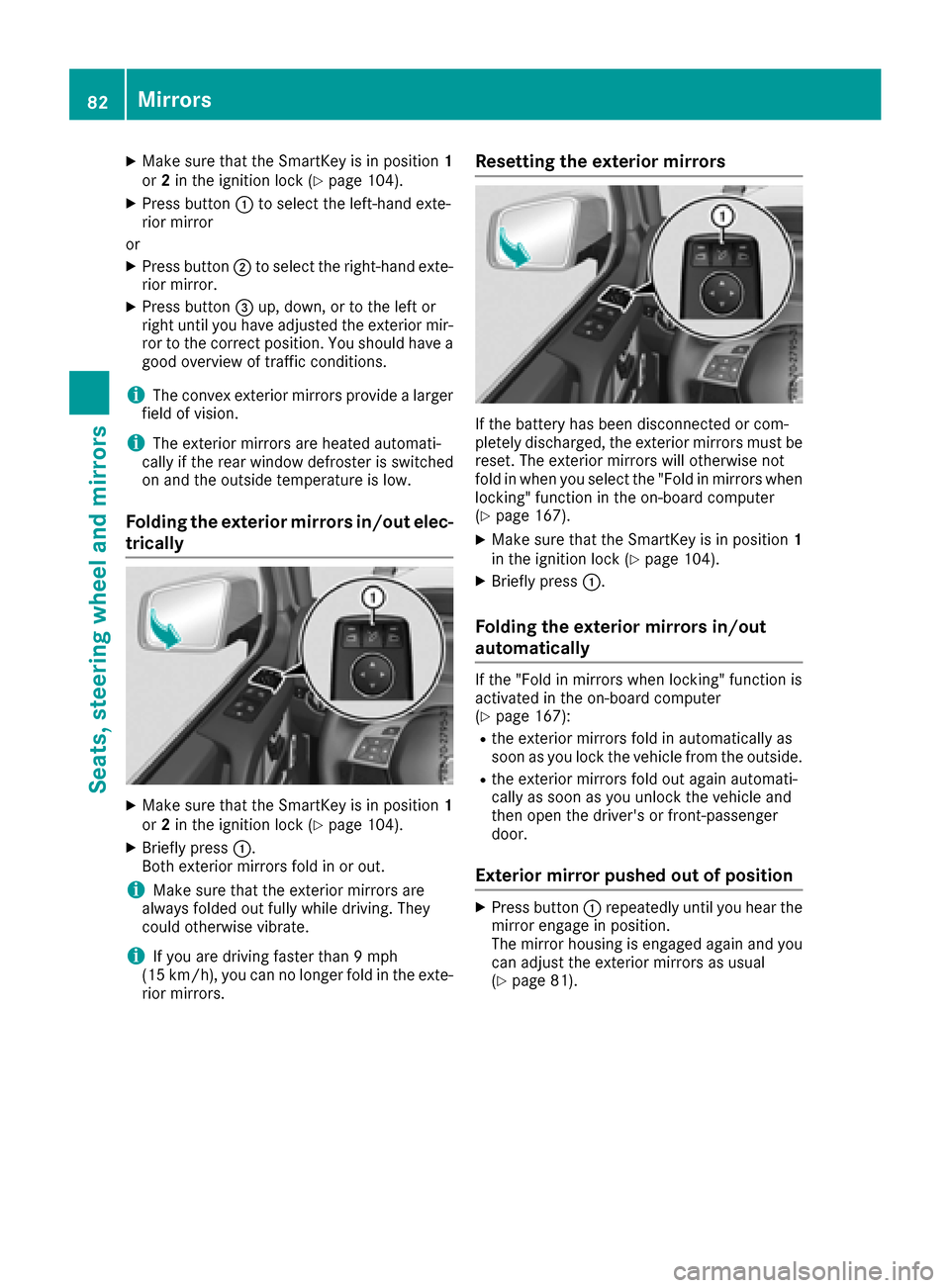
XMake sure that the SmartKey is in position1
or 2in the ignition lock (Ypage 104).
XPress button :to select the left-hand exte-
rior mirror
or
XPress button ;to select the right-hand exte-
rior mirror.
XPress button =up, down, or to the left or
right until you have adjusted the exterior mir- ror to the correct position. You should have a
good overview of traffic conditions.
iThe convex exterior mirrors provide alarger
field of vision.
iThe exterior mirrors are heated automati-
cally if the rear window defroster is switched
on and the outside temperature is low.
Folding the exterior mirrors in/out elec-
trically
XMake sure that the SmartKey is in position 1
or 2in the ignition lock (Ypage 104).
XBriefly press :.
Both exterior mirrors fold in or out.
iMake sure that the exterior mirrors are
always folded out fully while driving. They
could otherwise vibrate.
iIf you are driving faster than 9mph
(15 km/h), you can no longer fold in the exte-
rior mirrors.
Resetting the exterior mirrors
If the battery has been disconnected or com-
pletely discharged, the exterior mirrors must be
reset. The exterior mirrors will otherwise not
fold in when you select the "Fold in mirrors when
locking" function in the on-board computer
(
Ypage 167).
XMake sure that the SmartKey is in position 1
in the ignition lock (Ypage 104).
XBriefly press :.
Folding the exterior mirrors in/out
automatically
If the "Fold in mirrors when locking" function is
activated in the on-board computer
(
Ypage 167):
Rthe exterior mirrors fold in automatically as
soon as you lock the vehicle from the outside.
Rthe exterior mirrors fold out again automati-
cally as soon as you unlock the vehicle and
then open the driver's or front-passenger
door.
Exterior mirror pushed out of position
XPress button :repeatedly until you hear the
mirror engage in position.
The mirror housing is engaged again and you
can adjust the exterior mirrors as usual
(
Ypage 81).
82Mirrors
Seats, steering wheela nd mirrors
Page 85 of 286
Automa tica nti-glar emirror s
The rear-view mirror and th eexter iorm irror on
th ed river's side automatically go int oanti-glare
mod eif:
Rthei gnition is switched on and
Rinciden tligh tfro mh eadlamp sstrikes th esen-
sor in th erear-view mirror
iThe mirror sdonotgo int oanti-glare mod eif
revers egear is engage doriftheinterior light-
ing is switched on .
Parking position for th eexteri or mir-
ror on thef ront-passenger side
Setting/stori ng theparki ng position
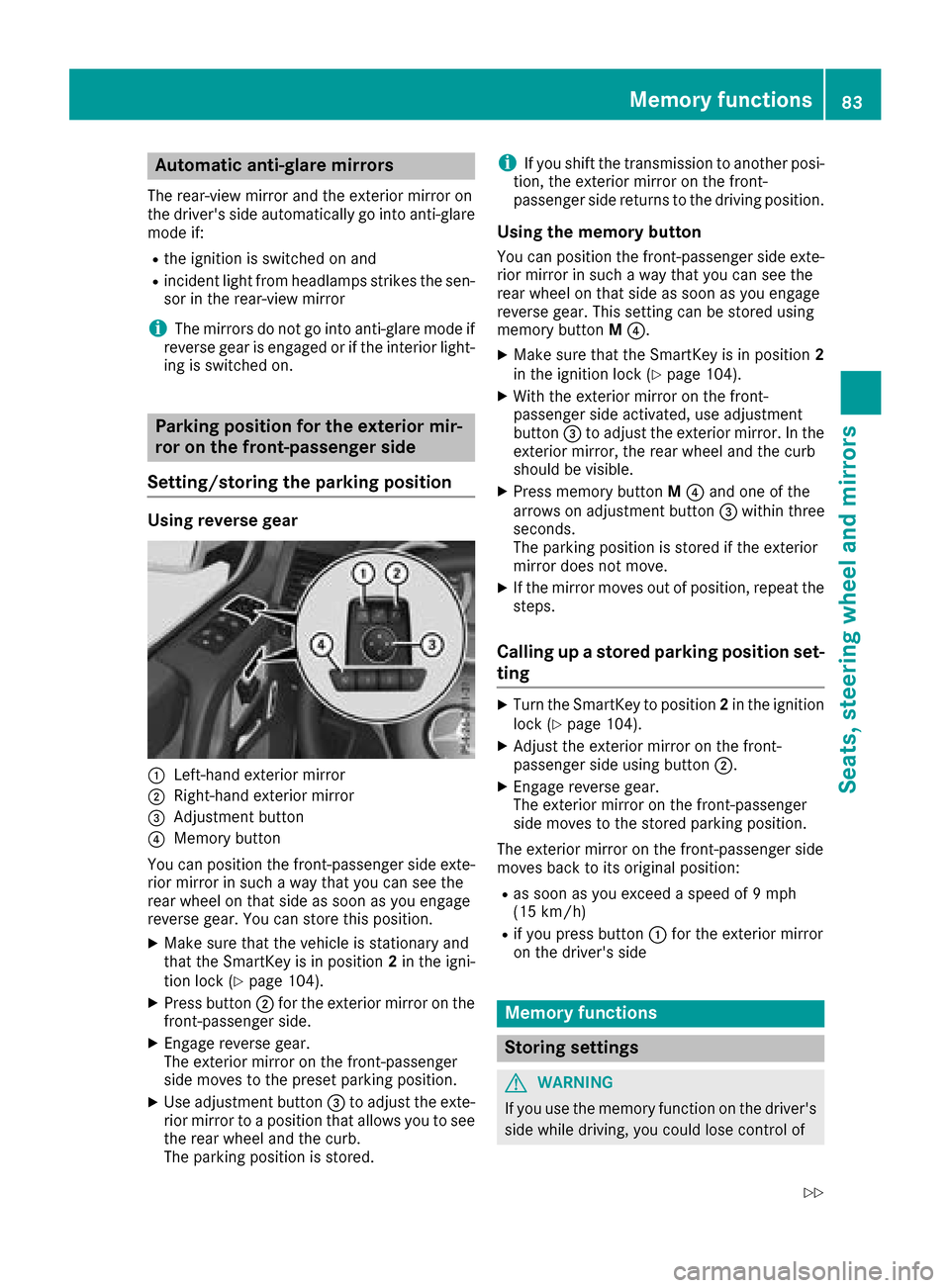
Usin grevers egear
:Left-han dexter iorm irror
;Right-hand exterio rmirror
=Adjustmen tbutto n
?Memory butto n
You can position th efront-pa ssenger side exte -
rio rm irror in suc haway that you can see th e
rear whee lonthats ide as soo nasyou engage
revers egear .You can store this position .
XMakesuret hatthe vehicl eisstationary and
that th eSmartKey is in position 2in th eigni-
tion loc k(
Ypage 104).
XPress butto n; for th eexter iorm irror on th e
front-passenger side .
XEngage reversegear .
The exterio rmirror on th efront-pa ssenger
side moves to th epreset parking position .
XUse adjustmentbutto n= to adjust th eexte-
rio rm irror to aposition that allows you to see
th er ear whee land th ecurb.
The parking position is stored.
iIf you shif tthe transmission to another posi-
tion ,the exterio rmirror on th efront -
passenger side return stothedrivin gposition .
Usingthe memory button
You can position th efront-pa ssenger side exte -
rio rm irror in suc haway that you can see th e
rear whee lonthats ide as soo nasyou engage
revers egear .This setting can be store dusing
memory butto nM ?.
XMak esuret hatthe SmartKey is in position 2
in thei gnition loc k(Ypage 104).
XWiththe exterio rmirror on th efront -
passenger side activated, use adjustmen t
butto n= to adjust th eexter iorm irror .Int he
exterio rmirror ,the rear whee land th ecurb
should be visible.
XPress memory butto nM ? and on eofthe
arrows on adjustmen tbutto n= within three
seconds.
The parking position is store diftheexterio r
mirror does no tmove.
XIf th emirror moves out of position ,repeat th e
steps.
Calling up astoredp arki ng position set-
ting
XTurn th eSma rtKey to position 2in th eignition
loc k(Ypage 104).
XAdjus tthe exterio rmirror on th efront -
passenger side usin gbutto n;.
XEngage revers egear .
The exterio rmirror on th efront-pa ssenger
side moves to th estoredp arking position .
The exterio rmirror on th efront-pa ssenger side
moves bac ktoitsoriginal position :
Ras soonasyou exceed aspee dof9 mph
(15 km/h)
Rif you press butto n: for th eexter iorm irror
on th edriver's side
Mem oryfunctions
Stori ng settings
GWARNIN G
If you use th ememory function on th edriver's
side while driving, you could lose control of
Memoryf unctions83
Seats ,steering wheel and mirrors
Z
Page 86 of 286
the vehicleasaresultoft he adjustments
being made .There is ariskofana ccident.
Onlyu sethe memory functio nonthe driver's
side when the vehicl eisstationary.
GWARNING
When the memory functio nadjusts the seat or
steering wheel, yo uand othe rvehicl eoccu-
pants –particularly children –could become
trapped .There is ariskofi njury.
Whil ethe memory functio nism aking adjust-
ments ,makes uret hatnoo ne hasa ny body
parts in the swee pofthe seat or steering
wheel. If somebod ybecome strapped ,imm e-
diately release the memory functio nposit ion
button. The adjustment proces sisstopped.
GWARNING
Childre ncould become trapped if theya cti-
vate the memory function, particularly when
unattended .There is ariskofi njury.
When leaving the vehicle, always take the
SmartKeyw ithy ou and lock the vehicle. Never
leav echildren unsupervised in the vehicle.
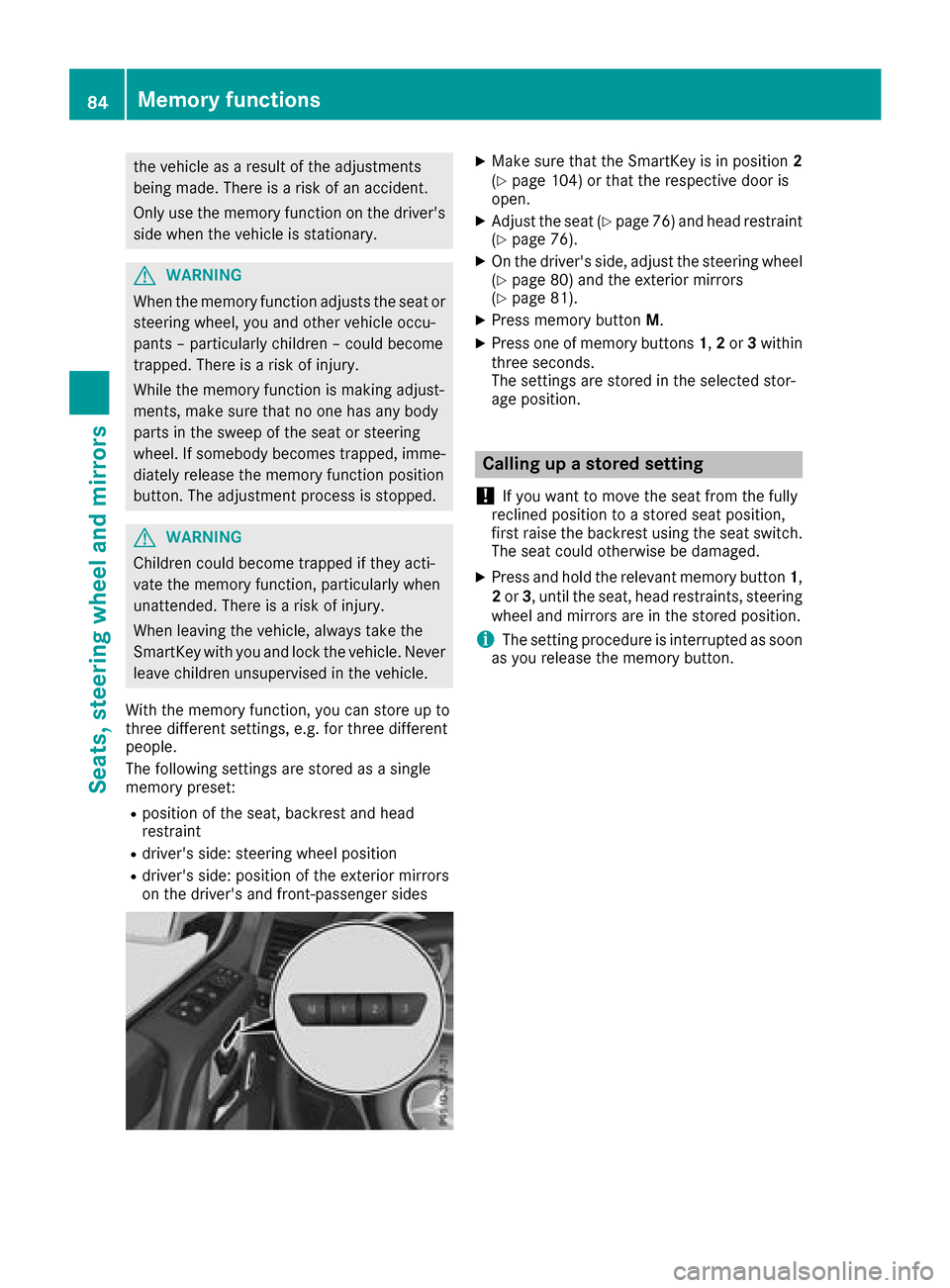
With the memory function, yo ucan stor eupto
threed ifferent settings, e.g .for threed ifferent
people.
The following setting sarestored as asingle
memory preset:
Rpositio nofthe seat, backrest and head
restraint
Rdriver's side :steering whee lposit ion
Rdriver's side :posit ionoft he exterio rmirrors
on the driver's and front-passenge rsides
XMake sure thatt he SmartKeyisinp osition 2
(Ypage 104 )orthatthe respectiv edooris
open.
XAdjust the seat (Ypage 76 )and hea drestraint
(Ypage 76).
XOn the driver'ss ide,adjus tthe steering wheel
(Ypage 80 )and the exterio rmirrors
(Ypage 81).
XPress memory button M.
XPress one of memory buttons 1,2 or 3within
threes econds.
The settings are stored in the selecte dstor-
ag ep osition.
Calling up astored setting
!
If yo uwanttom ove the sea tfrom the fully
recline dposition toas tored sea tposition,
first raise the backres tusing the sea tswitch.
The sea tcould otherwise be damaged.
XPress and hol dthe relevant memory button 1,
2 or 3,u nti lthe seat, hea drestraints, steering
whee land mirrors are in the stored position.
iThe setting procedur eisinterruptedass oon
as yo urelease the memory button.
84Memory functions
Seats, steering wheel andmirrors
Page 139 of 286

obstacle or stationary vehicle, DISTRONIC
PLUS will not brake for these.
RCrossing vehicles: DISTRONIC PLUS may mis-
takenly detect vehicles that are crossingyour
lane. Activating DISTRONIC PLUS at traffic
lights with crossingt raffic,for example, could
cause your vehicle to pull away unintention-
ally.
In such situations, brake if necessary.
DISTRONIC PLUS is then deactivated.
Blind Spot Assist
General notes
Blind Spot Assist monitor sthe areas on either
side of the vehicle that are not visible to the
driver with two lateral, rear-facingr adar sen-
sors. Awarning lamp lights up in the exterior
mirrors and draws your attention to vehicles
detected in the monitored area. If you then
switch on the corresponding turn signal to
change lane, you will also receive an optical and
audiblew arning.
Blind Spot Assist supports you from aspeed of
approximately 20 mph (30 km/h).
Important safety notes
GWARNING
Blind Spot Assist does not react to:
Rvehicles overtaken too closely on the side,
placing them in the blind spot area
Rvehicles which approach with alarge speed
differential and overtak eyour vehicle
As aresult, Blind Spot Assist may not give
warnings in such situations. There is arisk of
an accident.
Always observe the traffic conditions care-
fully, and maintain asafe lateral distance.
Blind Spot Assist is only an aid. It may fail to
detect some vehicles and is no substitute for
attentive driving. Always ensure that there is
sufficient distance to the side for other road
users and obstacles.
iUSA only:
This device has been approved by the FCC as
a" Vehicular RadarS ystem". The radar sensor
is intended for use in an automotive radar system only. Removing, tampering with, or
altering the device will void any warranties,
and is not permitted by the FCC. Do not tam-
per with, alter, or use in any non-approved
way.
Any unauthorized modification to this device
could void the user’s authority to operate the
equipment.
Radar sensors
The radar sensors for Blind Spot Assist are inte-
grated into the rear bumper. Make sure that the
bumpers are free from dirt, ice or slush. The
sensors must not be covered, for example by
cycle racks or overhanging loads. Following a
severe impact or in the event of damage to the
bumpers, have the function of the radar sensors
checked at aqualified specialist workshop.
Blind Spot Assist may no longer work properly.
Monitoring area
In particular, the detection of obstacles can be
impaired if:
Rthere is dirt on the sensors or anything else
coveringt he sensors
Rthere is poor visibility, e.g. due to fog, heavy
rain, snow or spray
Rthere are narrow vehicles, e.g. motorcycles or
bicycles
Rthe road has very wide lanes
Rthe road has narrow lanes
Ryou are not driving in the middle of the lane
Rthere are barriers or other road boundaries
Driving systems137
Driving and parking
Z
Page 140 of 286
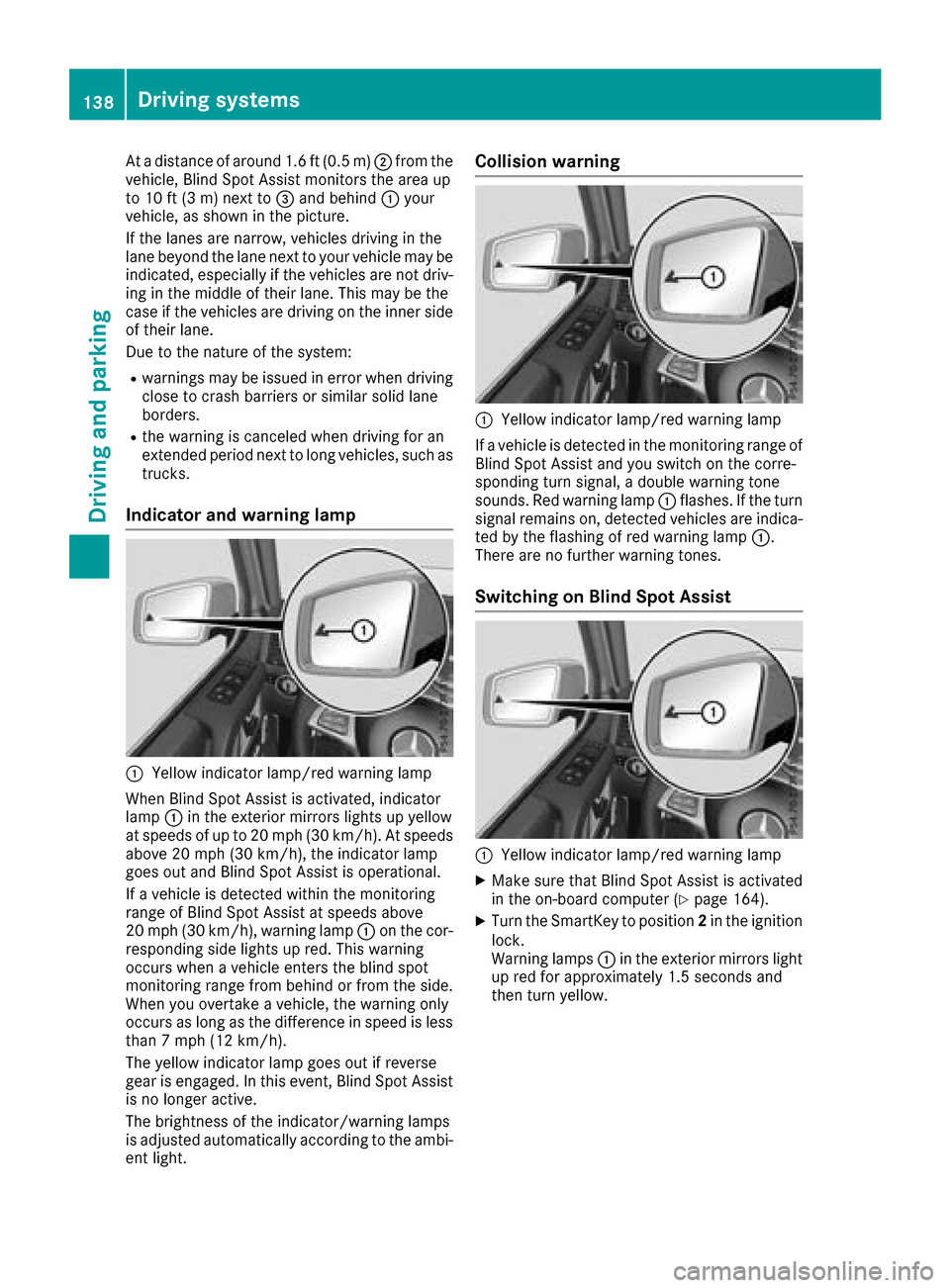
Atad istance of around 1.6 ft (0.5 m); from the
vehicle, Blind Spo tAssist monitors the area up
to 10 ft (3 m)next to =and behind :your
vehicle, as shown in the picture.
If the lanes are narrow,v ehicles driving in the
lane beyond the lane next to your vehicl emay be
indicated,e specially if the vehicles are not driv-
ing in the middl eoftheirlan e. Thi smay be the
cas eift he vehicles are driving on the inne rside
of thei rlan e.
Due to the nature of the system:
Rwarning smaybe issued in error when driving
close to crash barriers or similar solid lane
borders.
Rthe warning is cancele dwhend riving for an
extended perio dnext to long vehicles, such as
trucks.
Indicator and warning lamp
:Yellow indicator lamp/red warning lamp
Whe nBlind Spo tAssist is activated, indicator
lamp :in the exterio rmirrors lights up yellow
at speed sofupto20m ph (30 km/h). At speeds
above 20 mph (30 km/h), the indicator lamp
goe soutand Blind Spo tAssist is operational.
If av ehicl eisd etectedw ithint he monitoring
rang eofB lind Spo tAssist at speed sabove
20 mph (30 km/h), warning lamp :on the cor-
responding side lights up red.T hisw arning
occurs when avehicl eenter sthe blind spot
monitoring rang efrom behind or from the side.
Whe nyou overtake avehicle, the warning only
occurs as long as the difference in speed is less
than7m ph (12 km/h).
The yellow indicator lamp goe soutif reverse
gea rise ngaged .Inthise vent, Blind Spo tAssist
is no longer active.
The brightness of the indicator/warning lamps
is adjusted automaticall yaccording to the ambi-
ent light.
Collisio nwarning
:Yellow indicator lamp/red warning lamp
If av ehicl eisd etectedint he monitoring rang eof
Blind Spo tAssist and yo uswitch on the corre-
sponding turn signal, adouble warning tone
sounds. Re dwarning lamp :flashes. If the turn
signalr emains on, detectedv ehicles are indica-
ted by the flashing of red warning lamp :.
There are no further warning tones.
Switchin gonBlind SpotA ssist
:Yellow indicator lamp/red warning lamp
XMake sure thatB lind SpotAssist is activated
in the on-board compute r(Ypage 164).
XTurn the SmartKey to position 2in the ignition
lock.
Warning lamps :in the exterio rmirrors light
up red for approximately1 .5 seconds and
then turn yellow.
138Driving systems
Driving an dparking
Page 145 of 286
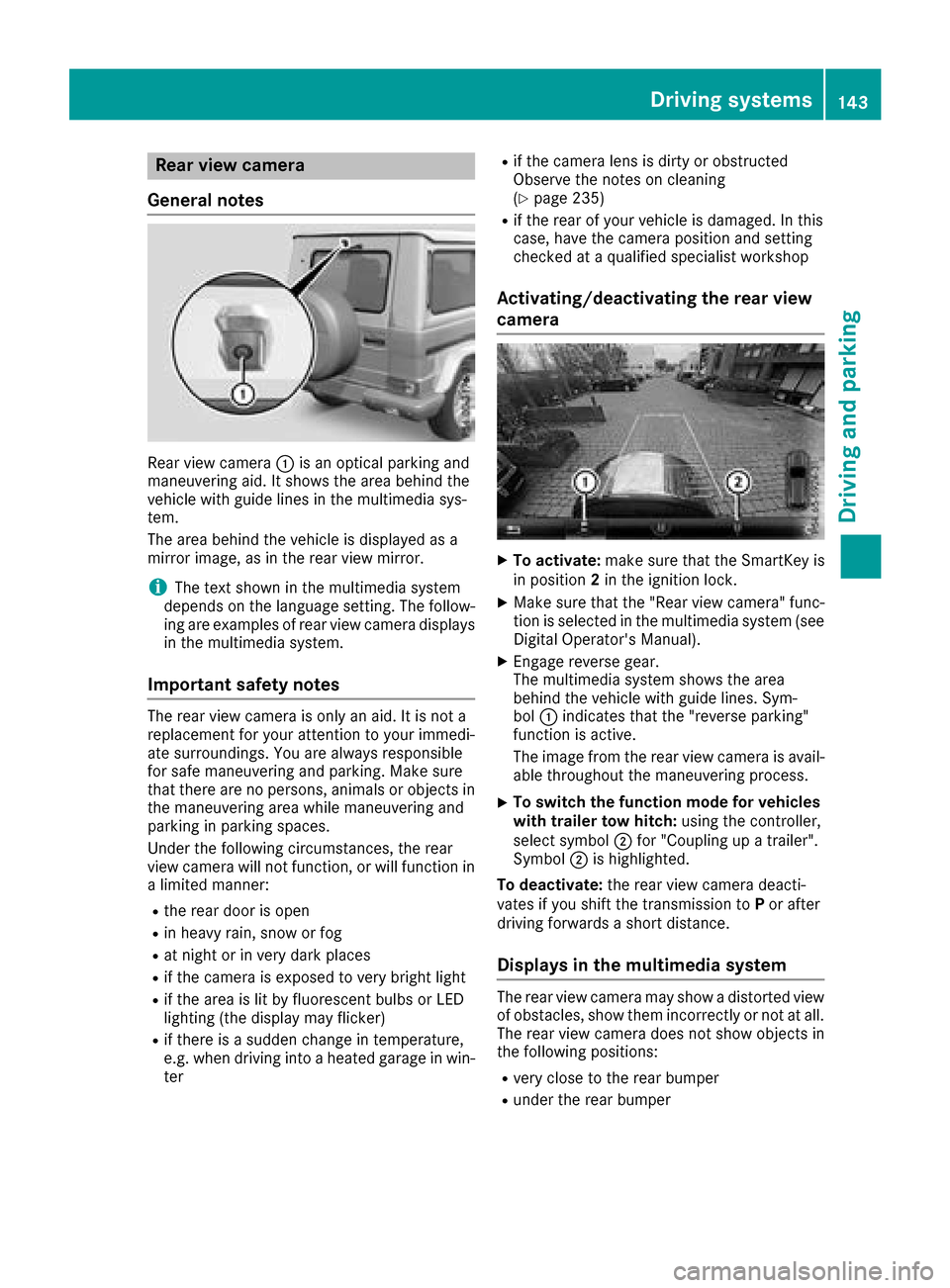
Rear viewcamera
General notes
Rear vie wcamera :is an optical parking and
maneuvering aid. It shows the are abehind the
vehicl ewithg uide lines in the multimedi asys-
tem.
The are abehind the vehicl eisdisplayed as a
mirror image, as in the rearv iewm irror.
iThe text shown in the multimedi asystem
depends on the languag esetting. The follow-
ing are examples of rearv iewc amera displays
in the multimedi asystem.
Important safety notes
The rearv iewc amera is only an aid. It is not a
replacement for your attention to your immedi-
ate surroundings. Yo uare always responsible
for safe maneuvering and parking .Makes ure
that there are no persons,a nimalsoro bjects in
the maneuvering are awhile maneuvering and
parking in parking spaces.
Unde rthe following circumstances, the rear
vie wc amera will not function, or will function in
al im ite dm anner:
Rthe reard ooriso pen
Rin heavy rain, snow or fog
Rat nigh torinv ery dark places
Rif the camera is exposed to very bright light
Rif the are aislitby fluorescent bulb sorLED
lighting (the display may flicker)
Rif there is asudde nchange in temperature,
e.g. when driving into aheated garag einwin-
ter
Rif the camera lens is dirty or obstructed
Observe the notes on cleaning
(
Ypage 235)
Rif the rearofy ourv ehicl eisd amaged. In this
case, have the camera position and setting
checke dataq ualified specialist workshop
Activating/deactivatin gthe rear view
camera
XTo activate: make sure that the SmartKey is
in position 2in the ignition lock.
XMake sure that the "Rearv iewc amera" func-
tion is selected in the multimedi asystem (see
Digital Operator's Manual).
XEngag ereverse gear.
The multimedi asystem shows the area
behind the vehicl ewithg uide lines. Sym-
bol :indicates that the "reversep arking"
function is active.
The image from the rearv iewc amera is avail-
able throughout the maneuvering process.
XTo switc hthe functio nmode for vehicles
with trailer tow hitch: using the controller,
select symbol ;for "Coupling up atrailer".
Symbol ;is highlighted.
To deactivate: the rearviewc amera deacti-
vate sify oushift the transmissio ntoP or after
driving forward sashort distance.
Displays in the multimedias ystem
The rearviewc amera may showad istortedv iew
of obstacles, showt hem incorrectlyornot at all.
The rearv iewc amera doe snot showo bjects in
the following positions:
Rvery close to the rearb umper
Runder the rearb umper
Driving systems143
Driving and parking
Z
Page 146 of 286
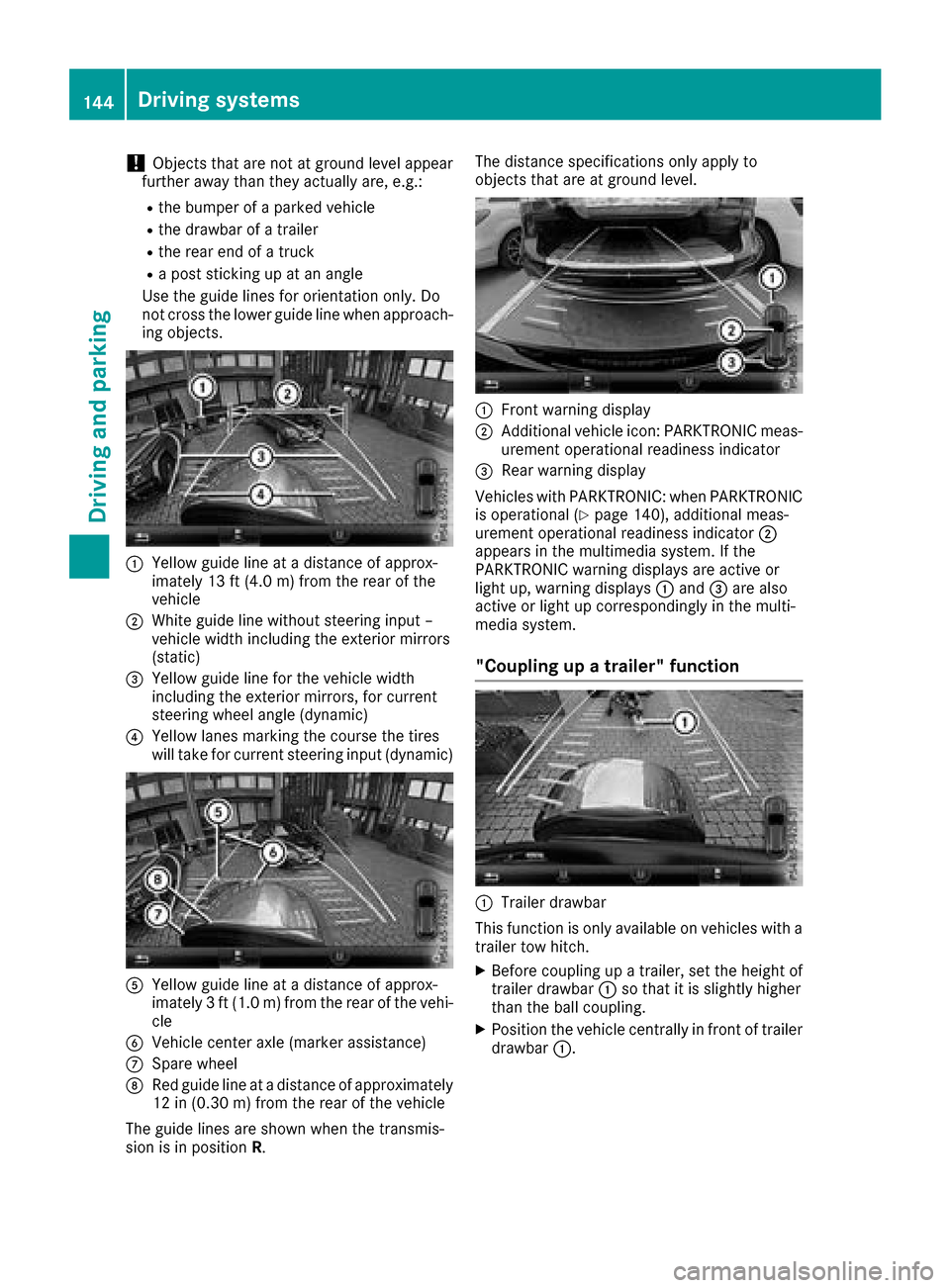
!Objects that are not at ground level appear
further awayt han they actually are, e.g.:
Rthe bumper of aparked vehicle
Rthe drawbarofat railer
Rthe rear end ofatruck
Rap ost sticking up at an angle
Use the guide lines for orientation only. Do
not cross the lower guide line when approach-
ing objects.
:Yellowg uide line at adistance of approx-
imately 13 ft (4.0 m) from the rear of the
vehicle
;White guide line without steering input –
vehicle width including the exterior mirrors
(static)
=Yellowg uide line for the vehicle width
including the exterior mirrors, for current
steering wheel angle (dynamic)
?Yellowl anes marking the course the tires
will take for current steering input (dynamic)
AYellowg uide line at adistance of approx-
imately 3ft(1.0 m) from the rear of the vehi-
cle
BVehicle center axle (marker assistance)
CSpare wheel
DRed guide line at adistance of approximately
12 in (0.30 m)from the rear of the vehicle
The guide lines are shownw hen the transmis-
sion is in position R. The distance specifications only apply to
objects that are at ground level.
:Front warning display
;Additional vehiclei
con: PARKTRONIC meas-
urement operational readiness indicator
=Rea rwarning display
Vehicles with PARKTRONIC: when PARKTRONIC
is operational (
Ypag e140), additiona lmeas-
urement operational readiness indicator ;
appears in the multimedias ystem. If the
PARKTRONIC warning display sare active or
light up, warning displays :and =are also
active or light up correspondinglyint he multi-
medias ystem.
"Coupling up atrailer" function
:Trailer drawbar
This function is only available on vehicles with a
trailer tow hitch.
XBefore coupling up atrailer, set the height of
trailer drawbar :so that it is slightly higher
than the bal lcoupling.
XPosition the vehiclec entrallyinfront of trailer
drawbar :.
144Driving systems
Driving and parking