2017 MERCEDES-BENZ G-Class fog light bulb
[x] Cancel search: fog light bulbPage 13 of 286
Google™ Local Searchsee alsoD igital Operator's Man-
ual. ................................................. 198
GTW (Gross Trailer Weight) (defini-
tion) .................................................... 268
H
Hazard warning lamps ........................ 87
Head restraints
Adjusting .........................................7 6
Adjusting (rear )................................ 77
Installing/removing (rear )................ 77
Luxur y.............................................. 76
Resetting (front) ............................... 76
see NECK-PR Oheadr estraints
see NECK-PR Oluxuryh eadr estraints
Headlamps
Cleaning system (function) .............. 86
Cleaning system (notes) ................ 280
Fogging up ....................................... 87
Protective grill e................................ 90
see Automatic headlamp mode
Heating
see Climate control
Hig hbeamf lasher ............................... 87
High-beam headlamps
Display message ............................ 176
Switching on/off .............................. 87
HOLDf unction
Activating ....................................... 139
Activation conditions ..................... 139
Deactivating ................................... 139
Function/note s............................. 139
Generaln otes ................................ 139
Home address
see also Digital Operator's Man-
ual.................................................. 198
Hood
Closing ........................................... 226
Displa ymessage ............................ 186
Important safety notes .................. 225
Opening ......................................... 225
Horn ...................................................... 31
Hydroplaning ..................................... 125
I
Ignitionlock
see Key positions
Immobilizer .......................................... 61
Indicator lamp
Replacing bulb s(rear) ...................... 91
Insect protection on the radiator .... 226
Instrument cluster
Overview .......................................... 32
Warning and indicator lamps ........... 32
Instrument clusterl ighting .............. 157
Interior lighting
Automati ccontrol ............................ 88
Delayed switch-off (on-board
computer) ...................................... 166
Overview .......................................... 88
iPod
®
see also Digital Operator's Man-
ua l.................................................. 198
J
Jack
Pump lever ..................................... 270
Storage location ............................ 238
Using ............................................. 270
Jump starting (engine) ...................... 243
K
Keyp ositions
SmartKey ....................................... 104
L
Lap time (RACETIMER) ...................... 168
LATCH-type (ISOFIX )child seat
anchors ................................................ 51
License plate lamp (display mes-
sage) ................................................... 176
Light senso r(display message) ....... 176
Lights
Activating/deactivating the inte-
riorlighting delaye dswitch-off ....... 166
Automati cheadlamp mode. ............. 86
Combination switch ......................... 87
Fogged up headlamp s...................... 87
Generaln otes .................................. 85
Index11
Page 14 of 286
Hazard warning lamps ..................... 87
High beamflasher ............................ 87
High-beamh eadlamps ..................... 87
Light switch .....................................8 5
Low-beamh eadlamps...................... 85
Parking lamps .................................. 86
Rear fog lamp .................................. 86
Standing lamps ................................ 86
Switching the daytime running
lamps on/off( on-board com-
puter) ............................................. 165
Switching the daytime running
lamps on/off( switch) ...................... 85
Switching the exterio rlighting
delaye dswitch-off on/off( on-
board computer) ............................ 165
Switching the surround lighting
on/off( on-board computer) .......... 165
Turn signal s..................................... 87
see Interior lighting
see Replacing bulbs
Load anchorage ................................. 208
Loadin gguidelines ............................ 204
Locking
see Central locking
Locking (doors)
Automati c........................................ 67
Emergency locking ........................... 68
From inside (central locking but-
ton) .................................................. 67
Locking centrally
see Central locking
Locking verification signal (on-
board computer) ............................... 166
LO WR ANGE off-road gear ................ 146
Low-beam headlamps
Displa ymessage ............................ 176
Switching on/off. ............................. 85
Lumbar support
Adjusting the 4-wa ylum bars up-
por t.................................................. 78
Luxury hea drestraints ....................... 76
M
M+S tires ............................................ 253
Malfunctio nmessage
see Displa ymessages Matte finis
h(clea ning instruc-
tions) .................................................. 233
mbrace
Call priority .................................... 218
Displa ymessage ............................ 173
Downloading destinations
(COMAND) ..................................... 218
Downloading routes ....................... 221
Emergency cal l.............................. 215
Generaln otes ................................ 214
Ge ofencing ................................... 221
Info cal lbutton .............................. 217
Locating astolen vehicl e............... 220
Remote fault diagnosis. ................. 220
Remote vehicl eloc king .................. 219
Roadside assistance button ........... 216
Search &Send ............................... 218
Self-test ......................................... 215
Speed alert .................................... 221
System .......................................... 215
Triggering the vehicl ealarm ........... 221
Vehicl eremote unlocking .............. 219
Mechanical key
Function/note s................................ 64
Genera lnotes .................................. 64
Inserting .......................................... 64
Locking vehicl e................................ 68
Removing ......................................... 64
Unlocking the driver'sd oor.............. 68
Memory card (audio) ......................... 162
Memory function ................................. 83
Mercedes-Benz Intelligent Drive
DISTRONIC PLUS. .......................... 132
Messagem emory (on-board com-
puter) .................................................. 170
Messages
see Displa ymessages
Mirro rturn signal
Cleaning ......................................... 234
Mirrors
Sun visor ........................................ 211
see Exterior mirrors
see Rear-vie wmirror
Mobil ephone
Connecting (Bluetooth®inter-
face ).............................................. 201
12Index
Page 91 of 286
the Xenon bulb and touch the electrical con-
tacts.There is ariskoff atal injury.
Never touch the parts or the electrical con-
tacts of the Xenon bulb .Alway shavew orko n
the Xenon bulb scarrie doutataq uali fied spe-
cialist workshop.
GWARNING
Bulbs ,lam ps and connectors can ge tveryh ot
when operating .Ifyouchange abulb, you
could burn yourself on these components.
There is ariskofi njury.
Allow these components to coo ldow nb efore
changing abulb.
Do not us eabulbifith asbeen dropped or if its
glas stub eh asbeen scratched.
The bulb maye xplode if:
Ryout ouch it
Rit is hot
Ryoud ropi t
Ryous cratch it
Use bulb sonlyinc losedl amps thath aveb een
designe dfor thisp urpose.O nlyinstal lspare
bulb soft he same typ eand the specifie dvolt-
age.
Marks on the glas stub er educe the service life
of the bulbs. Do not touch the glas stub ew ith
your bare hands .Ifnecessary,c lean the glass
tub ew henc oldw itha lcohol or spiri tand rubi t
off with alint-freec loth.
Protect bulb sfromm oisture durin goperation.
Do not allo wbulbs to come into contact with
liquids.
Xeno nbulbs and LE Dmodules: in additio nto
the Xenon bulbs, there ar eLED modules which
yo uc annot change yourself.
Hav ethe following bulb sreplaced at aquali fied
specialis tworkshop:
RHigh-mounte dbrake lamp
RAdditiona ltur ns ignals in the exteriorm irrors
RHigh-beam/low-beam headlamps (Xenon
headlamps)
RDaytim erunning lamps
RLicens eplate lamp
RParking lamps/standing lamps
RSid em arker lamps
iIndividua lseg ments of the licens eplate
lamp LEDs mayf ailw ithou tad isplay message
appearing in the multifunctio ndisplay .Regu-
larly check the licens eplate lamp. If neces-
sary,v isitaquali fied specialis tworkshop.
Yo uc an replace the following bulbs:
RTurn signa llam p(front)
RBrake/tail lamp
RTurn signa llam p(rear)
RTail lamps/standing lamps
RBackup lamp
RRear fog lamp
Replace onl ythe bulb slisted(
Ypage 89).
Hav ethe bulb sthaty oucannot change yourself
replaced at aquali fied specialis tworkshop.
If yo urequire assistance replacing bulbs, con-
sult aquali fied specialis tworkshop.
If the new bulb still does not light up ,consul ta
qualified specialis tworkshop.
Headlamps and lights ar eanimportant aspect of
vehicl esafety .You must therefore make sure
thatt hese functio ncorrectl yatalltimes .Have
the headlamp setting checked regularly.
Overvie wofbulbt ypes
Front bulbs
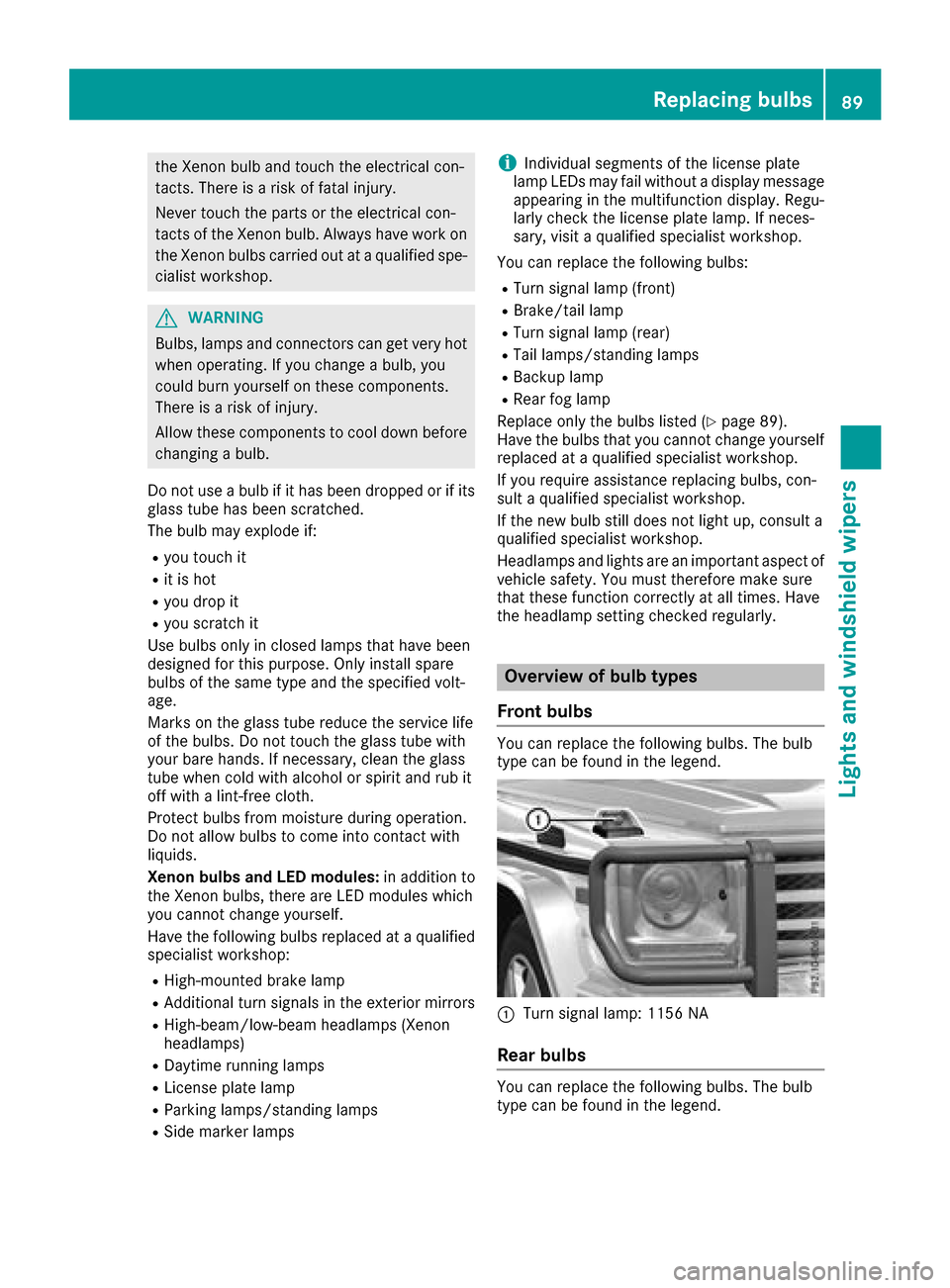
Yo uc an replace the following bulbs. Th ebulb
typ ecan be found in the legend.
:Turn signa llam p: 1156 NA
Rea rbulbs
Youc an replace the following bulbs. Th ebulb
typ ecan be found in the legend.
Replacin gbulbs89
Lights and windshield wiper s
Z
Page 92 of 286
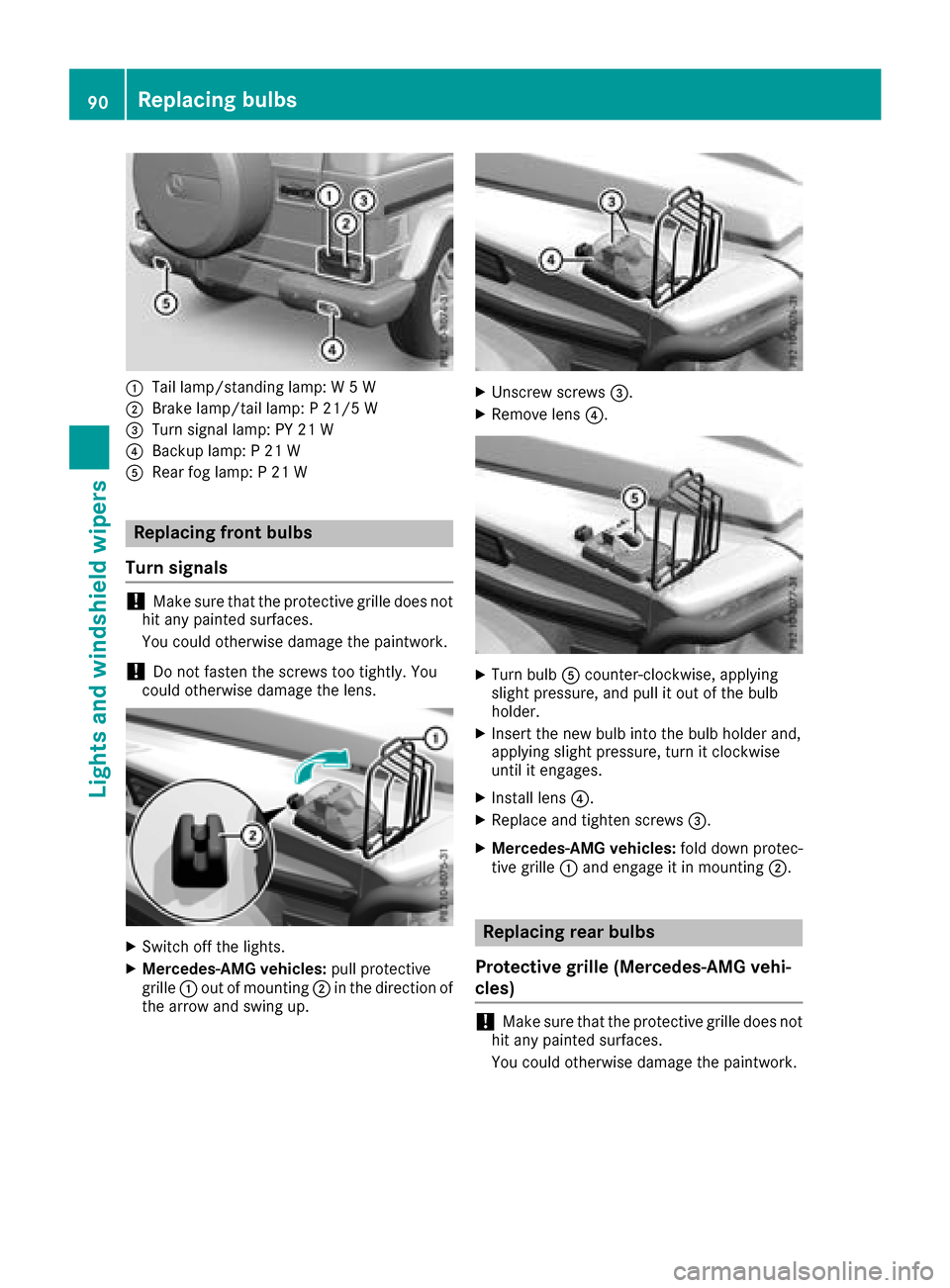
:Tail lamp/standinglamp: W5W
;Brake lamp/tail lamp: P21/5 W
=Turn signal lamp: PY 21 W
?Backup lamp: P21W
ARear fog lamp: P21W
Replacing front bulbs
Turns ignals
!Make sure that the protective grille does not
hit any painted surfaces.
You could otherwise damage the paintwork.
!Do not fasten the screws too tightly. You
could otherwise damage the lens.
XSwitch off the lights.
XMercedes-AMG vehicles: pull protective
grille :out of mounting ;in the direction of
the arrow and swing up.
XUnscrew screws =.
XRemove lens?.
XTurn bulbAcounter-clockwise, applying
slight pressure, and pull it out of the bulb
holder.
XInsert the new bulb into the bulb holder and,
applying slight pressure, turn it clockwise
until it engages.
XInstall lens ?.
XReplace and tighten screws =.
XMercedes-AMG vehicles:fold down protec-
tive grille :and engage it in mounting ;.
Replacing rear bulbs
Protective grille (Mercedes-AMG vehi-
cles)
!Make sure that the protective grille does not
hit any painted surfaces.
You could otherwise damage the paintwork.
90Replacing bulbs
Lights and windshield wipers
Page 93 of 286
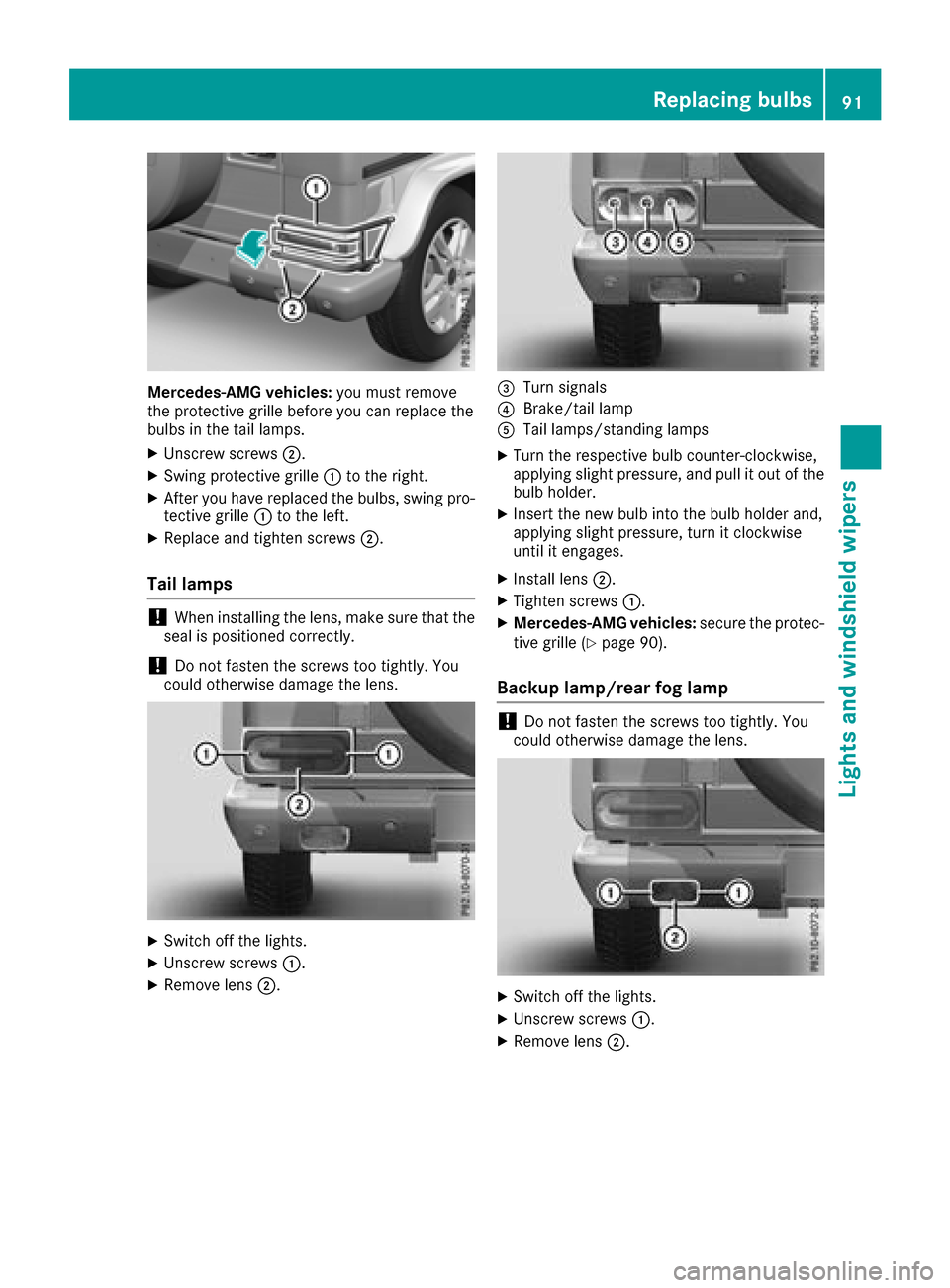
Mercedes-AMG vehicles:you must remove
the protective grille before you can replace the
bulbs in the tail lamps.
XUnscrew screws ;.
XSwing protective grille :to the right.
XAfter you have replaced the bulbs, swing pro-
tective grille :to the left.
XReplace and tighten screws ;.
Tail lamps
!When installing the lens, make sure that the
seal is positioned correctly.
!Do not fasten the screws too tightly.Y ou
could otherwise damage the lens.
XSwitch off the lights.
XUnscrew screws :.
XRemove lens;.
=Turn signals
?Brake/tail lamp
ATaillamps/standing lamps
XTurn the respective bul bcounter-clockwise,
applying slight pressure, and pul litout of the
bul bh older.
XInsert the new bul binto the bul bholder and,
applying slight pressure, turn it clockwise
until it engages.
XInstall lens ;.
XTighten screws :.
XMercedes-AMG vehicles: secure the protec-
tive grille (Ypag e90).
Backup lamp/rear fog lamp
!Do not fasten the screws too tightly.Y ou
coul dotherwise damage the lens.
XSwitch off the lights.
XUnscrew screws :.
XRemove lens;.
Replacing bulbs91
Lights and windshield wipers
Z
Page 145 of 286
Rear viewcamera
General notes
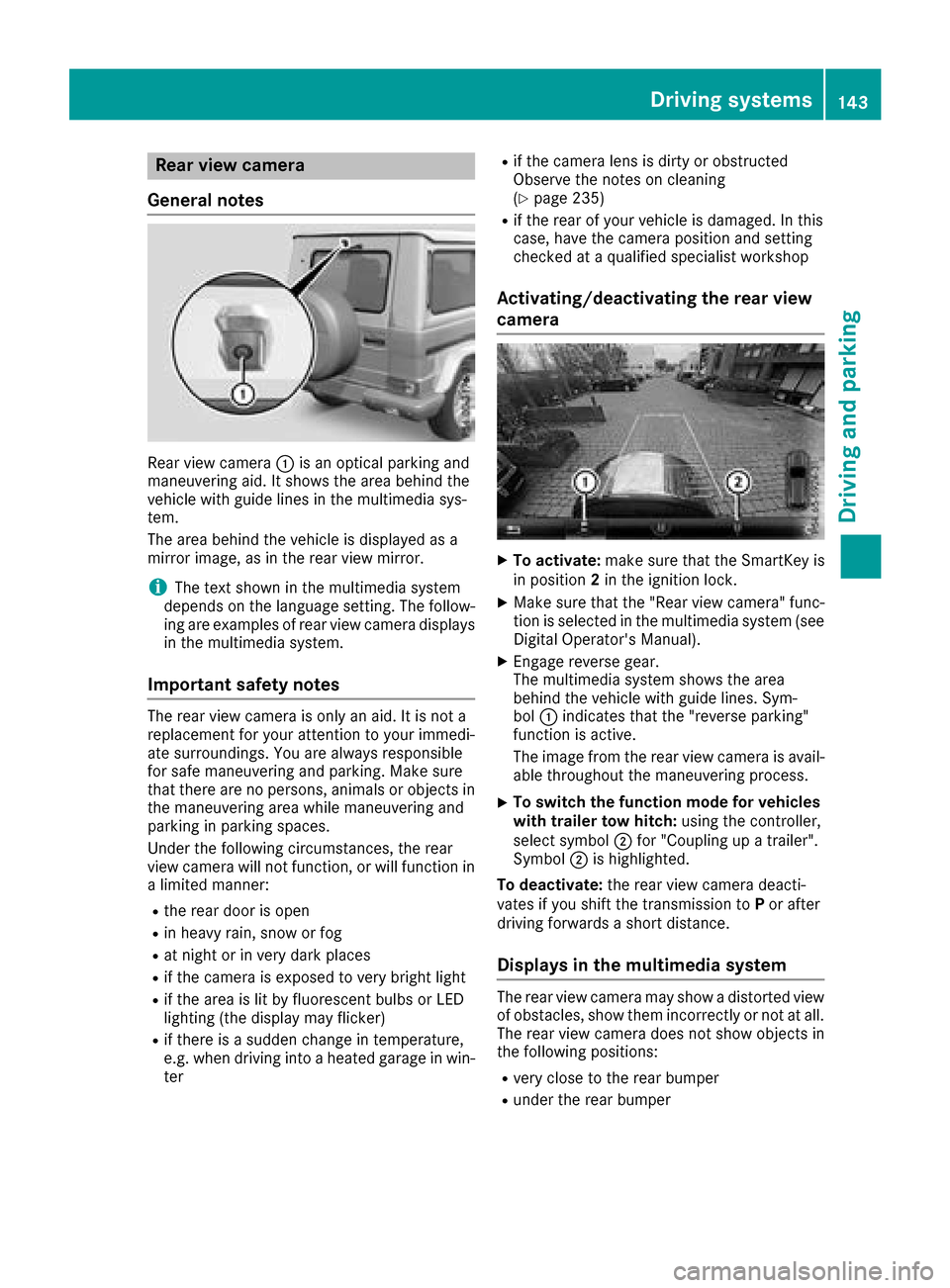
Rear vie wcamera :is an optical parking and
maneuvering aid. It shows the are abehind the
vehicl ewithg uide lines in the multimedi asys-
tem.
The are abehind the vehicl eisdisplayed as a
mirror image, as in the rearv iewm irror.
iThe text shown in the multimedi asystem
depends on the languag esetting. The follow-
ing are examples of rearv iewc amera displays
in the multimedi asystem.
Important safety notes
The rearv iewc amera is only an aid. It is not a
replacement for your attention to your immedi-
ate surroundings. Yo uare always responsible
for safe maneuvering and parking .Makes ure
that there are no persons,a nimalsoro bjects in
the maneuvering are awhile maneuvering and
parking in parking spaces.
Unde rthe following circumstances, the rear
vie wc amera will not function, or will function in
al im ite dm anner:
Rthe reard ooriso pen
Rin heavy rain, snow or fog
Rat nigh torinv ery dark places
Rif the camera is exposed to very bright light
Rif the are aislitby fluorescent bulb sorLED
lighting (the display may flicker)
Rif there is asudde nchange in temperature,
e.g. when driving into aheated garag einwin-
ter
Rif the camera lens is dirty or obstructed
Observe the notes on cleaning
(
Ypage 235)
Rif the rearofy ourv ehicl eisd amaged. In this
case, have the camera position and setting
checke dataq ualified specialist workshop
Activating/deactivatin gthe rear view
camera
XTo activate: make sure that the SmartKey is
in position 2in the ignition lock.
XMake sure that the "Rearv iewc amera" func-
tion is selected in the multimedi asystem (see
Digital Operator's Manual).
XEngag ereverse gear.
The multimedi asystem shows the area
behind the vehicl ewithg uide lines. Sym-
bol :indicates that the "reversep arking"
function is active.
The image from the rearv iewc amera is avail-
able throughout the maneuvering process.
XTo switc hthe functio nmode for vehicles
with trailer tow hitch: using the controller,
select symbol ;for "Coupling up atrailer".
Symbol ;is highlighted.
To deactivate: the rearviewc amera deacti-
vate sify oushift the transmissio ntoP or after
driving forward sashort distance.
Displays in the multimedias ystem
The rearviewc amera may showad istortedv iew
of obstacles, showt hem incorrectlyornot at all.
The rearv iewc amera doe snot showo bjects in
the following positions:
Rvery close to the rearb umper
Runder the rearb umper
Driving systems143
Driving and parking
Z