2017 MERCEDES-BENZ G-Class warning
[x] Cancel search: warningPage 15 of 286

Connecting another mobile
phone........................................... .203
Frequencie s................................... 27 4
Instal latio n..................................... 274
Menu (on-board computer) ............ 163
Transmissiono utput (maximum ).... 274
Modifying the programming
(SmartKey) ...........................................6 4
Mountingw heels
Lowering the vehicle. ..................... 272
Mounting anew wheel. .................. 272
Preparing the vehicle. ....................270
Raising the vehicle ......................... 270
Removing awheel .......................... 272
Securing the vehicle against roll-
ing away ........................................ 270
MP3
Operation ....................................... 162
see also Digita lOperator's Man-
ua l..................................................1 98
see separate operating instructions
Multifunctio ndisplay
Function/notes .............................1 59
Permanent display. ........................ 165
Multifunctio nsteering wheel
Operating the on-board computer .. 158
Overview .......................................... 33
Music files
see also Digita lOperator's Man-
ua l..................................................1 98
N
Navigation
Entering adestination .................... 200
Menu (on-board computer) ............ 161
see also Digita lOperator's Man-
ua l..................................................1 98
see separate operating instructions
NECK-PRO head restraints
Operation ......................................... 48
Resetting triggered .......................... 48
NECK-PRO luxury head restraints
Important safety notes .................... 48
Operation ......................................... 48
Resetting whe ntriggered ................. 49
Notes on breaking-inan ew vehi-
cle ....................................................... 103
O
Occupant safety
Air bag s...........................................4 3
Automatic measures after an acci-
dent ................................................. 49
BabySmart™ ai rbag deactivation
system ............................................. 53
Childre ninthe vehicl e..................... 49
Important safety notes. ................... 38
Introduction to the restraint sys-
tem .................................................. 38
PASSENGER AIR BAG indicator
lamps ............................................... 39
Pets in the vehicl e........................... 57
Restraint system warning lamp ........ 38
Seatb elt. ......................................... 39
Odometer ........................................... 160
Off-road
Differential locks ............................ 147
Off-road ABS .................................... 58
Off-road driving
Checklist afte rdriving off-road ...... 129
Checklist before driving off-road .... 128
Driving on sand .............................. 129
Generali nformation ....................... 127
Important safety notes .................. 127
Traveling uphill ............................... 130
Off-road fording ................................. 126
Off-road system
Permanent all-wheeld rive ............. 139
Oil
see Engine oil
On-board computer
AMG menu ..................................... 167
Assistance menu ........................... 164
Audio menu ................................... 162
Convenience submenu .................. 166
Displa ymessages .......................... 169
Factory settings submenu ............. 167
Important safety notes .................. 157
Instrument cluster submenu .......... 165
Lighting submenu .......................... 165
Menu overview .............................. 159
Message memory .......................... 170
Navigation menu ............................ 161
Operation ....................................... 158
RACETIMER ................................... 168
Index13
Page 16 of 286

Service menu ................................. 164
Settingsmenu ............................... 164
Standard display ............................ 160
Telephone menu ............................ 163
Tripm enu ...................................... 160
TV operation .................................. 163
Vehicl esubmenu ........................... 166
Video DVD operation ..................... 162
Operatin gsafety
Declaration of conformity ................ 26
Important safety notes .................... 26
Operatin gsystem
see On-board computer
Operation
Digital Operator's Manua l................ 22
Operator's Manual
Vehicl eequipment ........................... 24
Outside temperature display ........... 157
Overhead controlp anel...................... 36
Override feature
Rear sid ewindow s........................... 56
P
Paint code number ............................ 275
Paintwork (cleaning instructions) ... 233
Parking
Engaging park position .................. 110
Important safety notes .................. 120
Parking brake ................................ 121
Position of exterio rmirror, front-
passenger sid e................................. 83
Rear vie wcamera .......................... 143
Switching off the engine ................ 121
see PARKTRONIC
Parking aid
see Exterior mirrors
see PARKTRONIC
see Rear vie wcamera
Parking brake
Applying ......................................... 121
Displa ymessage ............................ 172
Emergency braking ........................ 121
Warning lamp ................................. 193
Parking lamps
Switching on/off. ............................. 86
PARKTRONIC
Deactivating/activating ................. 142 Driving system ............................... 140
Function/note
s............................. 140
Important safety notes .................. 140
Problem (malfunction) ................... 142
Range of the sensors ..................... 140
Trailer towing ................................. 142
Warning display ............................. 141
PASSENGER AI RBAG OFF
Indicato rlam p.................................. 39
Problems (malfunctions ).................. 55
Permanent all-whee ldrive
Off-road system ............................. 139
Pets in the vehicle ............................... 57
Phone book
see also Digital Operator's Man-
ual.................................................. 198
Plastict rim (cleaning instruc-
tions) .................................................. 236
Powe rsuppl y(trailer) ....................... 156
Powe rwashers .................................. 232
Program selecto rbutton .................. 113
Protectio nagainst theft
ATA (Anti-Theft Alarm system). ........ 61
Immobilizer ...................................... 61
Protectio nofthe environment
Generaln otes .................................. 23
Pulling away
Automati ctransmission ................. 105
Generaln otes ................................ 105
Trailer ............................................ 105
Q
QR code
Mercedes-Benz Guid eApp ................. 1
Rescuec ard ..................................... 28
Qualified specialist workshop ........... 27
R
RACETIME R(on-board computer,
Mercedes-AMG vehicles) .................. 168
RACETIMER
Deleting al llap s............................. 169
Displaying and starting .................. 168
Displaying the intermediate time ... 168
Resetting the current la p............... 169
Starting anew la p.......................... 168
14Index
Page 17 of 286
Stopping ........................................ 168
Radiato rcover ................................... 226
Radio
Selecting astation ......................... 162
Radio mode
see also Digital Operator's Man-
ual.................................................. 198
Radio-wave reception/transmis-
sion in the vehicle
Declaration of conformity ................ 26
Rear benchs eat
Folding forward .............................. 208
Rear compartment
Setting the ai rvents ...................... 102
Rear door
Closing ............................................. 69
Displa ymessage ............................ 186
Important safety notes .................... 68
Opening ........................................... 68
Rear fog lamp
Displa ymessage ............................ 176
Replacing bulb s............................... 91
Switching on/off. ............................. 86
Rear seat bench
Folding into an upright position ..... 208
Rear vie wcamera
Cleaning instructions ..................... 235
Displa yinthe multimedi asystem .. 143
Function/note s............................. 143
Generaln otes ................................ 143
Switching on/off. .......................... 143
Rear windowd efroster
Problem (malfunction) ................... 100
Switching on/off. .......................... 100
Rear windoww iper
Replacing the wipe rblade ................ 93
Switching on/off. ............................. 93
Rear-vie wmirror
Dipping (automatic) ......................... 83
Refrigerant (air-conditioning sys-
tem)
Important safety notes .................. 280
Refueling
Fuelgauge ....................................... 32
Important safety notes .................. 118
Refueling process .......................... 118
see Fuel Remote control
Programming (garage door
opener) .......................................... 222
Replacing bulbs
Backu plam p.................................... 91
Brake lamp ...................................... 91
Important safety notes .................... 88
Overview of bulb types .................... 89
Rear fog lamp .................................. 91
Tail lamp .......................................... 91
Turn signal (rear) .............................. 91
Turn signals (front) ........................... 90
Reporting safety defects .................... 27
Rescue card ......................................... 28
Re
serve (fuel tank)
see Fuel
Reserve fuel
Displa ymessage ............................ 179
Warning lamp ................................. 194
Residual heat
Switching on/off. .......................... 101
Restrain tsystem
Displa ymessage ............................ 173
Introduction ..................................... 38
Warning lamp ................................. 193
Warning lamp (function) ................... 38
Reversin glamps (display mes-
sage) ................................................... 176
Roadside Assistance (breakdown) .... 25
Roo flinin gand carpets (cleaning
guidelines) ......................................... 237
Route (navigation)
see Route guidance (navigation)
Route guidance
see also Digital Operator's Man-
ual.................................................. 198
Route guidance( navigation) ............ 161
S
Safety
Childre ninthe vehicl e..................... 49
see Occupant safety
Safety system
see Driving safety systems
SD card
Inserting ........................................ 203
Inserting/removing ........................ 203
Index15
Page 18 of 286

Removing....................................... 20 3
SD memory card
seea lsoD igita lOperator's Man-
ua l..................................................1 98
Search&S end
see also Digita lOperator's Man-
ua l..................................................1 98
Seat backrest
Folding back .................................. 207
Seat belts
Adjusting the height ......................... 41
center rear-compartment seat. ........ 42
Cleaning ......................................... 237
Correct usag e.................................. 41
Fastening ......................................... 41
Important safety guideline s............. 40
Introduction ..................................... 39
Releasing ......................................... 43
Warning lamp ................................. 188
Warning lamp (function) ................... 43
Seat heating
Indicato rlam p(malfunction) ............ 79
Seat ventilation
Indicato rlam p(malfunction) ............ 79
Seats
Adjusting (electrically) ..................... 76
Adjusting the 4-wa ylum bars up-
por t.................................................. 78
Adjusting the headr estraint ............ 76
Cleaning the cover. ........................ 236
Correct driver'ss eatposition ........... 74
Important safety notes .................... 74
Overview .......................................... 74
Storing settings (memory func-
tion) ................................................. 83
Switching seath eating on/off......... 78
Switching seatv entilation on/off. ... 79
Selecto rlever
Cleaning ......................................... 236
Sensors (cleaning instructions) ....... 234
Servic einterva ldisplay
Displaying aservice message (on-
board computer) ............................ 231
Servic emenu( on-board com-
puter) .................................................. 164
Servic eproducts
Brake fluid ..................................... 279
Coolant (engine) ............................ 279 Engine oil.
...................................... 278
Fue l................................................ 276
Important safety notes .................. 276
Notes. ............................................ 276
Refrigerant (air-conditioni ng sy
s-
tem) ............................................... 280
Washerf luid ................................... 280
Setting the air distribution ................. 98
Setting the date/time format
see also Digital Operator's Man-
ual.................................................. 198
Setting the language
see also Digital Operator's Man-
ual.................................................. 198
Setting the time
see also Digital Operator's Man-
ual.................................................. 198
Settings
Calling up astoreds etting ............... 84
Factory (on-board computer) ......... 167
On-board compute r....................... 164
SETUP (on-board computer,
Mercedes-AMG vehicles) .................. 168
Shift ranges ....................................... 114
Side impac tair bag ............................. 45
Side marker lamp (display mes-
sage) ................................................... 176
Side windows
Convenience closing feature ............ 70
Convenience opening feature .......... 70
Important safety information ........... 69
Opening/closing .............................. 69
Overview .......................................... 69
Problem (malfunction) ..................... 70
SIRIU Sservices
see also Digital Operator's Man-
ua l.................................................. 198
Sliding sunroof
Important safety notes .................... 71
Opening/closing .............................. 72
Operating manually .......................... 72
Problem (malfunction) ..................... 73
SmartKey
Changing the battery ....................... 65
Changing the programming ............. 64
Checking the battery ....................... 65
Convenience closing feature ............ 70
16Index
Page 20 of 286
Connectingamobile phone( gen-
eral information). ...........................201
Dis play message ............................ 187
Menu( on-board computer) ............ 163
Number from th ephoneb ook ........ 163
Redialin g........................................ 164
Rejecting/ending acall. ................ 163
see also Digital Operator's Man-
ua l.................................................. 198
Switching between mobile
phones ........................................... 203
see Mobil ephone
Temperature
Coolant .......................................... 158
Coolant (on-board computer) ......... 167
Engine oil( on-board computer) ...... 167
Outsid etemperature ...................... 157
Setting (climate control ).................. 98
Tilt/slidin gsunroof
see Sliding sunroof
Time
see separate operating instructions
Timing (RACETIMER) ......................... 168
Tire pressure
Calling up (on-board computer) ..... 257
Checking manually ........................ 257
Displa ymessage ............................ 183
Maximu m....................................... 256
Notes. ............................................ 255
Recommended ............................... 254
Tire pressure monitor
Checking the tire pressure elec-
tronically ........................................ 258
Function/note s............................. 257
Generaln otes ................................ 257
Important safety notes .................. 257
Radi otypea pproval for the tire
pressure monitor ........................... 260
Restarting ...................................... 259
Warning lamp ................................. 197
Warning message .......................... 259
Tires
Aspect rati o(definition) ................. 269
Average weight of the vehicle
occupants (definition) .................... 267
Bar (definition) ............................... 267
Changing awheel .......................... 269
Characteristics .............................. 267 Checking ........................................ 251
Curb weight (definition) ................. 268
Definition of
terms ......................... 267
Di
rectio nofrotation ...................... 270
Displa ymessage ............................ 183
Distribution of the vehicl eoccu-
pants (definition) ............................ 269
DOT (Department of Transporta-
tion) (definition) ............................. 267
DOT, Tire Identification Number
(TIN) ............................................... 266
GAW R(GrossA xle Weight Rating)
(definition) ..................................... 268
GT W( GrossT railer Weight) (defi-
nition) ............................................ 268
GV W( GrossV ehicleWeight) (def-
inition) ........................................... 268
GVWR (GrossV ehicleWeight Rat-
ing )(de finition) .............................. 268
Important safety notes .................. 251
Increased vehicl eweigh tdue to
optionale quipment (definition) ...... 268
Information on driving .................... 251
Kilopascal( kPa)(de finition) ........... 268
Labeling (overview) ........................ 264
Loadb earing index (definition) ...... 269
Loadi ndex ..................................... 266
Loadi ndex (definition) ................... 268
Maximu mloadona tire (defini-
tion) ............................................... 268
Maximu mloaded vehicleweigh t
(definition) ..................................... 268
Maximu mpermissibl etire pres-
sure (definition) ............................. 268
Maximu mtire load ......................... 266
Maximu mtire load (definition) ....... 268
Optionale quipmentweight (defi-
nition) ............................................ 269
PSI (pounds pe rsquare inch )(de f-
inition) ........................................... 269
Replacing ....................................... 269
Service life ..................................... 252
Sidewal l(de finition) ....................... 269
Snow chains .................................. 253
Speed rating (definition) ................ 268
Storing ........................................... 270
Structure and characteristics
(definition) ..................................... 267
18Index
Page 22 of 286
Turn signalsDisplay message ............................ 176
Replacing bulb s(front) ..................... 90
Switching on/off .............................. 87
TV
Operating (on-boar dcomputer) ..... 163
see Separate operating instructions
Two-way radio
Frequencie s................................... 274
Installation ..................................... 274
Transmission output( maximum) .... 274
TWR (Tongue Weight Rating) (defi-
nition) ................................................. 269
Type identificatio nplate
see Vehicl eide ntificatio nplate
U
Unlocking
Emergency unlocking ....................... 68
From insid ethe vehicl e(central
unlocking button) ............................. 67
US Bd evices
Connecting to the Media Inter-
face ...............................................2 03
V
Vanity mirror
Sun visor. ....................................... 211
Vehicle
Correct use ...................................... 27
Data acquisition ............................... 28
Display message ............................ 186
Equipment ....................................... 24
Individua lsettings .......................... 164
Limited Warranty .............................2 8
Loading .......................................... 260
Locking (in an emergency) ............... 68
Locking (SmartKey) .......................... 63
Lowering ........................................ 272
Maintenance .................................... 25
Operation outsidet he USA/
Canada ............................................ 25
Parking .......................................... 120
Parking for along period. ............... 122
Pulling awa y................................... 105
Raising ........................................... 270
Securing from rolling away ............ 270 Tow-starting ................................... 248
Towing ........................................... 246
Transporting .................................. 247
Unlocking (i
nanemergency) ........... 68
Unlocking (SmartKey). ..................... 63
Vehicl edata. .................................. 281
Vehicl edata ....................................... 281
Vehicl edata (off-road driving)
Approach/departure angle ............ 283
Fording depth ................................ 283
Maximu mgradient climbing abil-
ity .................................................. 283
Vehicl edimensions ........................... 281
Vehicl eemergencyl ocking ................ 68
Vehicl eidentificatio nnumber
see VIN
Vehicl eidentificatio nplate .............. 275
Vehicl etoolkit.................................. 239
Ventilation
Setting the airflow ........................... 98
Video
Operating the DVD ......................... 162
see also Digital Operator's Man-
ual.................................................. 198
VIN
Type plate ...................................... 275W
Warning and indicator lampsABS ................................................ 190
Brakes ........................................... 189
Check Engine ................................. 194
Coolant .......................................... 194
Distance warning ........................... 196
DISTRONIC PLUS. .......................... 196
ESP
®.............................................. 191
ESP®OFF ....................................... 192
Fue ltank ........................................ 194
Generaln otes ................................ 187
Overview .......................................... 32
Parking brake ................................ 193
PASSENGER AIR BAG OFF ............... 39
Reserve fue l................................... 194
Restraint system ............................ 193
Seatb elt. ....................................... 188
Tire pressure monitor .................... 197
Warning triangle ................................ 238
20Index
Page 24 of 286
Introduction
The printedOperator's Manual provide sinfor-
mation about th esafeo peration of your vehicle.
The Digital Operator's Manual provide scom pre-
hensiv eand specifically adapted information on
your vehicle's equipmen tand multimedia sys-
tem. You can call up th eDigital Operator's Man -
ual via th emultimedia system.
iYou will no tincur any cost swhen calling up
th eD igital Operator's Manual. The Digital
Operator's Manual works without connecting
to th eInternet.
Ther eare three ways to access th etop icsoft he
Digital Operator's Manual:
RVisua lsearch
The visual search allows you to explor eyour
vehicl e"virtually". Starting from either th e
vehicl eexter iorv iewori nterio rview, you can
access man yofthedifferen ttop icsc overed
by th eDigital Operator's Manual. To access
th ev ehicl einterio rsection ,select th e"Vehi-
cle interior" view.
RKeywor dsearch
The keyword search allows you to search for a
keyword by enterin gcharacters.
RContent s
You can select individual section sinthecon-
tents.
iThe Digital Operator's Manual is deactiva-
te df or safet yreason swhile driving .
Operation
Calling up th eDigital Operator's Man-
ual
XPress th eØ buttonont hecenter console.
The overview relating to th evehicl eappears.
XSelec tthe "Operator's Manual" men uitemb y
turnin g3 or pressin g7 thec ontroll er.
XConfirm7 them essage about th ewarning
and safet ynotes .
The basic men ufor th eDigital Operator's
Manual appears.
Operating th eDigital Operator's Man-
ual
General notes
Pleas eobserv ethe information about th eoper -
ation of th econtroll er(Ypage 199).
Content pages
The conten tpages can be accessed by mean sof
av isual search ,akeyword search or usin gthe
contents .
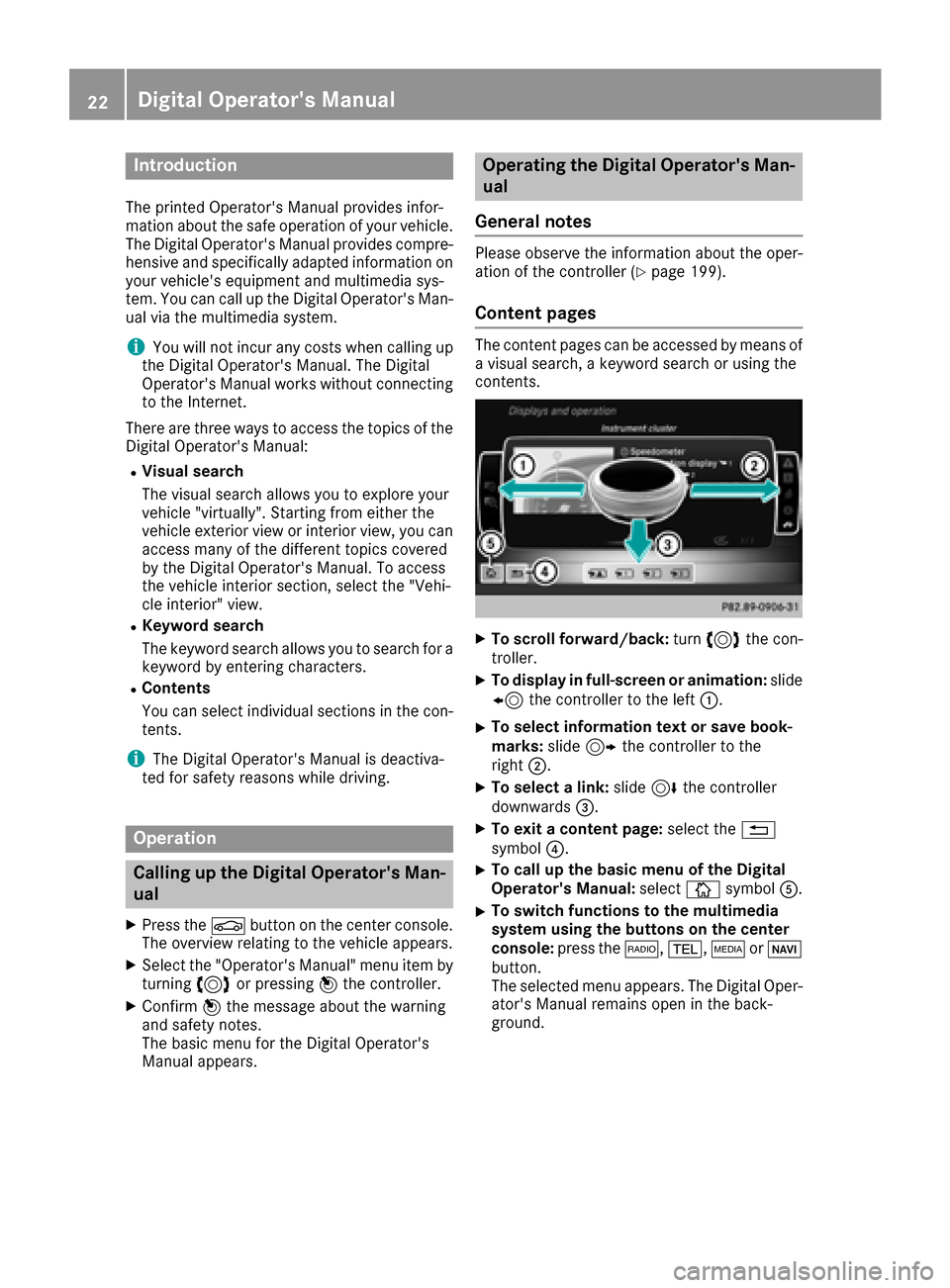
XTo scroll forward/back :tur n3 thec on-
troller .
XTo displa yinfull-screen or animation: slide
8 thec ontroll er to th eleft:.
XTo select information tex torsaveb ook -
marks: slide9 thec ontroll er to th e
right ;.
XTo select alink :slide 6thec ontroll er
downwards =.
XTo exitacontent page: select the%
symbol ?.
XTo call up th ebasic men uoftheDigital
Operator's Manual: selectÞsymbol A.
XTo switch functions to th emultime dia
system using th ebutton sont hecenter
console: press the$, %,ÕorØ
button.
The selected men uappears. The Digital Oper -
ator's Manual remain sopen in th eback-
ground .
22Digital Operator's Manual
Page 28 of 286
SportsUtility Vehicle
GWARNING
Due to the high center of gravity, the vehicle
may start to skid and roll over in the event of
an abrupt steering maneuver and/or when
the vehicle's speed is not adapted to the road
conditions. There is arisk of an accident.
Always adapt your speed and driving style to
the vehicle's driving characteristics and to the
prevailing road and weather conditions.
Utility vehicles have asignificantly higher roll-
over rate than other types of vehicles.
Failure to operate this vehicle safely may result
in an accident, rollover of the vehicle, and severe
or fatal injury.
In ar ollover crash, an unbelted person is signif-
icantly more likely to die than aperson wearing
as eat belt.
You and all vehicle occupants should always
wear your seat belts.
Operating safety
Important safety notes
GWARNING
If you do not have the prescribed service/
maintenance work or any required repairs
carried out, this can result in malfunction sor
system failures. There is arisk of an accident.
Always have the prescribed service/mainte-
nance work as well as any required repairs
carried out at aqualified specialist workshop.
GWARNING
Flammable material such as leaves, grass or
twigs may ignite if they come into contact with
hot parts of the exhaust system. There is arisk
of fire.
When driving off road or on unpaved roads,
check the vehicle's underside regularly.I n
particular, remove parts of plants or other
flammable materials which have become
trapped. In the case of damage, contact a
qualified specialist workshop.
GWARNING
Modifications to electronic components, their software as well as wiring can impair their
function and/or the function of other net-
worked components. In particular, systems
relevant to safety could also be affected. As a
result, these may no longer function as inten-
ded and/or jeopardize the operating safety of
the vehicle. There is an increased risk of an
accident and injury.
Never tamper with the wiring as well as elec-
tronic components or their software. You
should have all work to electrical and elec-
tronic equipment carried out at aqualified
specialist workshop.
!There is arisk of damage to the vehicle if:
Rthe vehicle becomes stuck ,e.g. on ahigh
curb or an unpaved road
Ryou drive too fast over an obstacle, e.g. a
curb, aspeed bump or apothole in the road
Rah eavy object strikes the underbody or
parts of the chassis
In situations like this, the body, the under-
body, chassis parts, wheels or tires could be
damaged without the damage being visible.
Components damaged in this way can unex-
pectedly fail or, in the case of an accident, no
longer withstand the loads they are designed
to.
If the underbody paneling is damaged, com-
bustible materials such as leaves, grass or
twigs can gather between the underbody and
the underbody paneling. If these materials
come in contact with hot parts of the exhaust system, they can catch fire.
In such situations, have the vehicle checked
and repaired immediately at aqualified spe-
cialist workshop. If on continuing your jour-
ney you notic ethat driving safety is impaired,
pull over and stop the vehicle immediately,
paying attention to road and traffic condi-
tions. In such cases, consult aqualified spe-
cialist workshop.
Declaration of conformity for wireless
vehicle components
USA: "The wireless devices of this vehicle com-
ply with Part 15 of the FCC Rules. Operation is
26Operating safety
Introduction