2017 MERCEDES-BENZ G-Class transmission oil
[x] Cancel search: transmission oilPage 15 of 286

Connecting another mobile
phone........................................... .203
Frequencie s................................... 27 4
Instal latio n..................................... 274
Menu (on-board computer) ............ 163
Transmissiono utput (maximum ).... 274
Modifying the programming
(SmartKey) ...........................................6 4
Mountingw heels
Lowering the vehicle. ..................... 272
Mounting anew wheel. .................. 272
Preparing the vehicle. ....................270
Raising the vehicle ......................... 270
Removing awheel .......................... 272
Securing the vehicle against roll-
ing away ........................................ 270
MP3
Operation ....................................... 162
see also Digita lOperator's Man-
ua l..................................................1 98
see separate operating instructions
Multifunctio ndisplay
Function/notes .............................1 59
Permanent display. ........................ 165
Multifunctio nsteering wheel
Operating the on-board computer .. 158
Overview .......................................... 33
Music files
see also Digita lOperator's Man-
ua l..................................................1 98
N
Navigation
Entering adestination .................... 200
Menu (on-board computer) ............ 161
see also Digita lOperator's Man-
ua l..................................................1 98
see separate operating instructions
NECK-PRO head restraints
Operation ......................................... 48
Resetting triggered .......................... 48
NECK-PRO luxury head restraints
Important safety notes .................... 48
Operation ......................................... 48
Resetting whe ntriggered ................. 49
Notes on breaking-inan ew vehi-
cle ....................................................... 103
O
Occupant safety
Air bag s...........................................4 3
Automatic measures after an acci-
dent ................................................. 49
BabySmart™ ai rbag deactivation
system ............................................. 53
Childre ninthe vehicl e..................... 49
Important safety notes. ................... 38
Introduction to the restraint sys-
tem .................................................. 38
PASSENGER AIR BAG indicator
lamps ............................................... 39
Pets in the vehicl e........................... 57
Restraint system warning lamp ........ 38
Seatb elt. ......................................... 39
Odometer ........................................... 160
Off-road
Differential locks ............................ 147
Off-road ABS .................................... 58
Off-road driving
Checklist afte rdriving off-road ...... 129
Checklist before driving off-road .... 128
Driving on sand .............................. 129
Generali nformation ....................... 127
Important safety notes .................. 127
Traveling uphill ............................... 130
Off-road fording ................................. 126
Off-road system
Permanent all-wheeld rive ............. 139
Oil
see Engine oil
On-board computer
AMG menu ..................................... 167
Assistance menu ........................... 164
Audio menu ................................... 162
Convenience submenu .................. 166
Displa ymessages .......................... 169
Factory settings submenu ............. 167
Important safety notes .................. 157
Instrument cluster submenu .......... 165
Lighting submenu .......................... 165
Menu overview .............................. 159
Message memory .......................... 170
Navigation menu ............................ 161
Operation ....................................... 158
RACETIMER ................................... 168
Index13
Page 65 of 286
SmartKey
Important safety notes
GWARNING
If children are left unsupervised in the vehicle,
they could:
Ropen the doors, thus endangering other
people or road users.
Rget out and disrupt traffic.
Roperate the vehicle's equipment.
Additionally, children could set the vehicle in
motion if, for example, they:
Rrelease the parking brake.
Rshifting the automatic transmission out of
park position P
RStart the engine.
There is arisk of an accident and injury.
When leaving the vehicle, always take the
SmartKey with you and lock the vehicle. Never
leave children or animals unattended in the
vehicle. Always keep the SmartKey out of
reach of children.
GWARNING
If you attach heavy or large object stothe
SmartKey, the SmartKey could be uninten-
tionally turned in the ignition lock. This could
cause the engine to be switched off. There is a risk of an accident.
Do not attach any heavy or large object stothe
SmartKey. Remove any bulky key rings before
insertingt he SmartKey into the ignition lock.
!Keep the SmartKey away from stron gmag-
netic fields. Otherwise, the remote control
function could be affected.
Strong magnetic fields can occur in the vicin-
ity of powerful electrical installations.
Do not keep the SmartKey:
Rwith electronic devices, e.g. amobile phone
or another SmartKey.
Rwith metallic objects, e.g. coins or metal foil.
Rinside metallic objects, e.g. ametal case.
This can affect the functionality of the Smart- Key. Ac
heck which periodically establishes aradio
connection between the vehicle and the Smart-
Key determines whether avalid SmartKey is in
the vehicle. This occurs, for example:
Rwhen startin gthe engine
Rwhile driving
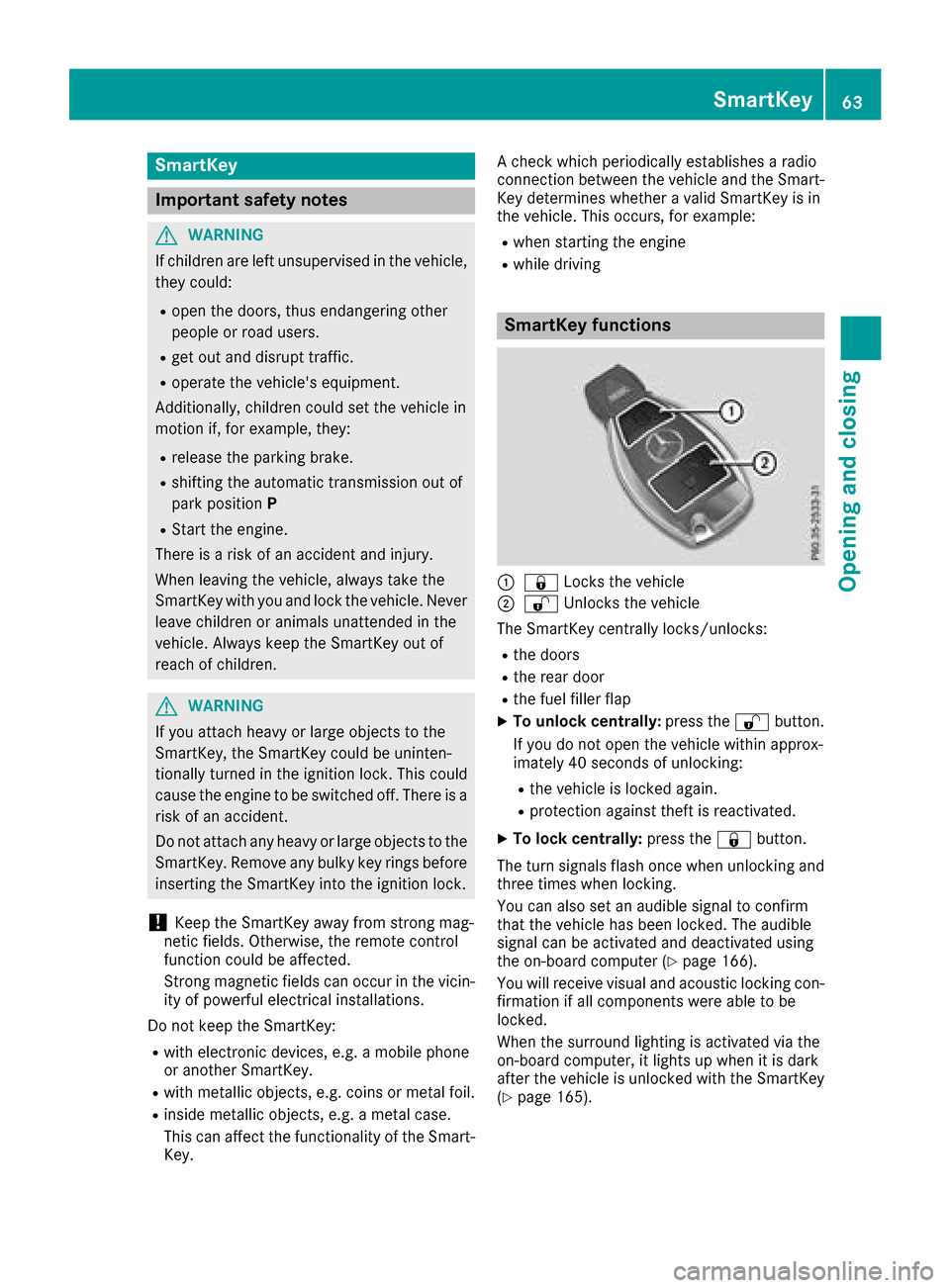
SmartKey functions
:& Locks the vehicle
;%Unlockst he vehicle
The SmartKey centrally locks/unlocks:
Rthe doors
Rthe rear door
Rthe fuel filler flap
XTo unlock centrally: press the%button.
If you do not open the vehicle within approx-
imately 40 seconds of unlocking:
Rthe vehicle is locked again.
Rprotection against theft is reactivated.
XTo lock centrally: press the&button.
The turn signals flash once when unlocking and
three times when locking.
You can also set an audible signal to confirm
that the vehicle has been locked. The audible
signal can be activated and deactivated using
the on-board computer (
Ypage 166).
You will receive visual and acoustic locking con-
firmation if all components were able to be
locked.
When the surround lighting is activated via the
on-board computer, it lights up when it is dark
after the vehicle is unlocked with the SmartKey (
Ypage 165).
SmartKey63
Opening and closing
Z
Page 105 of 286
Notesonb reaking-in anew vehicle
Important safety notes
Thes ensors ystemofs omedriving and driving
safety systems adjusts automaticall ywhile a
certai ndistance is being driven after the vehicle
ha sb eend elivere dorafter repairs. Full system
effectiveness is not reachedu ntilthe end of this
teach-inp rocedure.
New and replaced brake pads and discs only
reach their optimum braking effect after several hundred kilometers of driving. Compensate for
thi sb yapplyin ggreate rforce to the brake pedal.
The first 1000 miles (150 0km)
Them orey ou look after the engine when it is
new ,the mor esatisfied yo uwillbew ithi ts per-
formance in the future.
RYo us houl dtherefore drive at varying vehicle
and engine speeds for the first 1,000 miles
(1,500 km).
RAvoi dheavy loads, e.g .driving at full throttle,
during thi speriod.
RWhen shifting gear smanually, shift up in good
time, befor ethe tachomete rneedl ereaches
Ô of the wa ytothe red area of the tachom-
ete rdisplay .
RDo not manuall yshift to alower gear to brake
the vehicle.
RTry to avoi ddepressing the accelerator pedal
beyond the pressure point (kickdown).
Additiona lbreaking-i nnote sfor Mercedes-AMG
vehicles:
RDo not drive fastert han85m ph (140km/h)
for the first 1,000 mile s(1,50 0km).
ROnlyb rieflyallow the engine to reach amax-
imum engine spee dof4,500 rpm.
RAvoiddriving off-roa dbefor et he first differ-
ential oi lchange at 2,000 mile s(3,000 km).
RIdeally ,for the first 1,000 mile s(1,50 0km),
drive in program C.
After 1,000 mile s(1,500 km), you can increase
the engine speedg radually and bring the vehicle
to ful lspeed.
You should also observe these notes on break-
i
ng in if the engine or parts of the drive train on
you rvehicle have beenr eplaced.
Always observe the maximu mpermissible
speed.
Axl edifferential transmission
(Mercedes-AMG vehicles)
Change the oil after abreaking-in period of
2,000 miles( 3,000 km) to improve protectiono f
the axle differential transmission.
This oil change prolongs the service life of the
axle differential transmission. Have the oil
change carrie dout at aqualified specialist work-
shop.
Driving
Important safety notes
GWARNING
Objects in the driver's footwell may restrict
the clearance around the pedal sorblock a
depressedp edal.This jeopardizes the oper-
ating and road safety of the vehicle. There is a risk of an accident.
Stow al lobjects securely in the vehicle so that
they do not get into the driver's footwell.
When using floormats or carpets, make sure
that they are properly secured so that they do not sliporo bstruct the pedals. Do not place
severalf loormats or carpets on top of one
another.
GWARNING
Unsuitabl efootwear can hinde rcorrect usage
of the pedals, e.g.:
Rshoesw ith thick soles
Rshoeswith high heels
Rslippers
There is arisk of an accident.
Wears uitablefootwear to ensure correct
usage of the pedals.
GWARNING
If you switch off the ignition while driving,
safety-relevant functions are only available
with limitations, or not at all. This coul daffect,
for example, the power steering and the brake
boosting effect. You wil lrequire considerably
more effort to steer and brake .There is arisk
of an accident.
Driving103
Driving and parking
Z
Page 106 of 286

Do not switch off the ignition whiledriving.
GWARNING
If the parkin gbrake hasn ot been fully
released when driving, the parkin gbrake can:
Roverheat and cause afire
Rlose its hol dfunction.
There is ariskoff irea nd an accident. Release
the parkin gbrake full ybefor ed rivin goff.
!Warm up the engine quickly. Do not us ethe
engine's full performance unti lithasreached
operating temperature.
Onlys hift the automatic transmission to the
desired drive positio nwhent he vehicl eissta-
tionary.
Where possible, avoi dspinning the drive
wheels when pulling away on slippery roads.
Yo uc ould otherwis edamag ethe drive train.
!Avoi dhighe ngine speeds when the engine
is cold. The engine's servic elifec ould other-
wise be significantl yshortened. Do not use
the engine's full performance unti lithas
reachedo perating temperature.
!Mercedes-AMG vehicles: at lowengine oil
temperatures belo w68‡ (+20† ),the max-
imu me ngine spee disrestricted in order to
protect the engine .Toprotect the engine and
maintain smooth engine operation, avoi ddriv-
ing at full throttle when the engine is cold.
SmartKey positions
gTo remove the SmartKey
1Powe rsuppl yfor som econsumers ,suc ha s
the windshiel dwiper s
2Ignitio n(powe rsuppl yfor al lconsumers)
and drive position
3To start the engine
As soo nasthe ignition is switched on, al lthe
indicator lamps in the instrument cluster light
up .Ifani ndicator lamp does not go ou tafter
startin gthe engine or lights up whil edriving, see
(
Ypage 189).
If the SmartKeyisinp osition gin the ignition
lock for alon gerp eriod, it can no longe rbe
turned in the ignition lock. The steerin gisthen
locked .Tounlock, remove the SmartKeya nd
reinsert it into the ignition lock.
The steerin gislocked when yo uremove the
SmartKeyf romthe ignition lock.
XRemov ethe SmartKeyw hent he engine is
switched off.
The starter battery could otherwis ebedis-
charged.
If yo ucanno tturnt he SmartKeyint he ignition
lock, the starter battery mayn ot be charged
sufficiently.
XCheck the starter battery and charge it if nec-
essar y(Ypage 243).
or
XJump-star tthe vehicl e(Ypage 243).
Yo uc an onl yremove the SmartKeyi f:
Rthe SmartKeyisinpositiongin the ignition
lock
Rthe automatic transmission selecto rlev er is
in j
Starting the engine
Important safety notes
GWARNING
If children ar eleftu nsupervised in the vehicle,
theyc ould:
Ropen the doors ,thuse ndangering other
people or roa dusers.
Rgeto utand disrupt traffic.
Roperate the vehicle's equipment.
104Driving
Driving an dparking
Page 119 of 286
XWhen gearshift recommendation:appears
on the multifunction display, pull the right-
hand steerin gwheel paddle shifter
(
Ypage 114).
The automatic transmission shifts to recom-
mended gear ;.
Downshifting
XPull the left-hand steerin gwheel paddle
shifter (Ypage 114).
The automatic transmission shifts down to
the next gear.
If you slow down or stop without shiftin gdown,
the automatic transmission automatically shifts
down.
Selecting the optimal gear for maxi-
mum acceleration
XPull the left-hand steerin gwheel paddle
shifter until the transmission selects the opti-
mum gear accordingtot he speed.
Switching off the manual drive program
XAll vehicles (except Mercedes ‑AMG vehi-
cles): press the program selector button
repeatedly until Eor Sis shown in the multi-
function display.
XMercedes‑AMG vehicles: press the program
selector button repeatedly until Cor Sis
shown in the multifunction display.
Problems with the automatic transmission
ProblemPossible causes/consequences and MSolutions
The transmission has
problems shiftinggear.The transmission is losing oil.
XHave the transmission checked at aqualified specialist workshop
immediately.
The acceleration ability
is deteriorating.
The transmission no lon-
ger changes gear.The transmission is in emergency mode.
It is only possible to shift into secondgear and reverse gear.
XStop the vehicle.
XShift the transmission to position P.
XTurn the SmartKey to positiongin the ignition lock.
XWait at least ten seconds before restarting the engine.
XShift the transmission to position Dor R.
If D is selected, the transmission shifts into secondgear; ifRis
selected, the transmission shifts into reverse gear.
XHave the transmission checked at aqualified specialist workshop
immediately.
You hear awarning tone.You have:
Rswitched off the engine
Ropened the driver's door
Rnot shifted the selector lever to position P
XShift the selector lever to positionP.
Automatic transmission117
Driving and parking
Z
Page 129 of 286
adapt your driving style and driveataspeedto
suit th eprevailingw eather conditions.
You shouldp ay special attention to road condi-
tions when temperatures are aroun dfreezing
point.
For morei nformationondriving with snow
chains ,see (
Ypage 253).
For morei nformationondriving with summer
tires, see (
Ypage 253).
Observ ethe note sint he"Winte roperation" sec-
tio n(
Ypage 252).
Off-road driving
Important safety notes
GWARNING
If you driv eonasteep incline at an angle or
tur nw hen driving on an incline ,the vehicle
coul dslip sideways,t ip and rollover. Thereisa
risk of an accident.
Always driv eonasteep incline in th eline of
fall (straigh tupordown)and do no tturnt he
vehicle.
GWARNING
Flammable material suchasl eaves, grassor
twig smay ignite if they com eintoc ontac twith
hot part softheexhaust system. Thereisar isk
of fire.
When driving off road or on unpaved roads,
check th evehicle's undersid eregularly. In
particular ,remove part sofplants or other
flammable materials whichh ave become
trapped. In th ecaseofd amage,c ontacta
qualified specialist workshop.
!Thereisar isk of damage to th evehicle if:
Rthev ehicle become sstuck ,e .g.onah igh
cur boranu npaved road
Ryou drivetoo fast ove ranobstacle ,e.g.a
curb, aspeedb ump or apothole in th eroad
Rah eavyo bject strikes th eunderbod yor
part soft hechassis
In situations like this, th ebody, th eunder-
body, chassis parts, wheels or tires coul dbe
damage dwithout th edamage beingv isible.
Components damage dinthisw ay can unex- pectedly fail or, in th
ecaseofana ccident, no
longer withstand th eloads they are designed
to.
If th eunderbod ypaneling is damaged, com-
bustible materials suchasl eaves, grassor
twig scan gather between th eunderbod yand
th eu nderbod ypaneling .Ifthese materials
com einc ontac twith hot part softheexhaust
system, they can catch fire.
In suchs ituations,have th evehicle checked
and repaired immediately at aqualified spe-
cialis tworkshop.Ifonc ontinuing your jour-
ney you notic ethatd riving safet
y is impaired,
pull ove rand stop th evehicle immediately,
paying attention to road and traffic condi-
tions .Insuchc ases, consult aqualified spe-
cialis tworkshop.
When driving off-road, substances suchass and,
mud and wate rorwaterm ixed with oil may get
int ot he brakes. This may lead to areductio nin
braking performanc eortotal brak efailur easa
result of increased wear. The braking charac-
teristics chang edependingont hematerial
enteringt hebrakes. Clean th ebrakes after driv-
ing off-road. If you detect areduced braking
effect or grindingn oises,h ave th ebrak esystem
checked in aqualified specialist workshop as
soon as possible. Adap tyour driving style to the
differentb raking characteristics.
Drivin goff-road increases th elikelihoodofd am-
age to th evehicle ,which, in turn, can lead to
failur eoft hemechanical assembly or systems.
Adap tyour driving style to suit th eterra in con-
ditions. Drive carefully. Hav edamage to the
vehicle rectified immediately at aqualified spe-
cialis tworkshop.
Do no tswitch to transmission position Nwhen
driving off-road. If you tr ytob rak ethe vehicle
usingt heservic ebrake, you coul dlose control
of th evehicle .Ifthegradientist oosteep for your
vehicle ,driveb ack down in reverseg ear.
General notes
HEnvironmental note
Protection of th eenvironmentisofp rimary
importance. Treat nature with respect.
Observ eall prohibiting signs.
Read this sectio ncarefully before driving your
vehicle off-road. Practic ebydriving ove rmore
gentle off-road terrain first.
Driving tips127
Driving and parking
Z
Page 130 of 286

Familiarize yourself with the characteristics of
your vehicle and the gearshift operation before
driving through difficult terrain.
The following driving systems are specially
adapted to off-roadd riving:
R4ETS (Ypage 59)
ROff-roadABS (Ypage 58)
RTransfer case (Ypage 145)
RDifferentia llocks (Ypage 120)
Observe the following notes:
RStop the vehicle before yo udrive off-roada nd,
if necessary ,shift the transfe rcase to the off-
roadd riving position LOW RANGE
(
Ypage 146).
REngag ethe differential locks if necessary
(Ypage 148).
iABS, 4ETS, ESP®and BAS are deactivated
while the differential locks are engaged.T his
allow sthe front wheels to lock briefly, so that
these can dig into aloose surface .However,
please note that locke dwheels skid and can
no longer steer.
RCheck that items of luggage and loads are
stowed safely and are well secured
(
Ypage 209).
RTo avoid damaging the vehicle, make sure
there is always sufficient ground clearance.
RAlway skeep the engine running and in gear
whe ndriving on adownhil lgradient.
RAlway skeep the engine running and in gear
whe ndriving downani ncline.
RDrive slowlyand evenly, if necessary at a
walking pace.
REnsure that the wheels are in contact with the
ground at al ltimes.
RDrive with extreme care on unfamilia roff-road
routes where visibility is poor. For safety rea-
sons, get ou
tofthe vehicle firs tand survey
the off-roadr oute.
RCheck the depth of water before fording rivers
and streams.
RWatch outfor obstacles.
RAlwayskeep the doors, reard oor, sidewin-
dowsa nd the sliding sunroof closed while the
vehicle is in motion.
RSwitch off cruise control.
RDo not deviate from marke droutes.
RAdap tyou rspeed to the terrain. The rougher,
steeper or more ruts on the terrain, the slower
your speed should be.
RDo not jump with the vehicle. as this will inter-
rup tthe vehicle' spropulsion.
RAvoid hig hengine speeds .Drive at appropri-
ate engine speeds (maximu m3,000 rpm).
RDo not shift the automatic transmission to
position N.
RAlwayscheck the vehicle for damag eafteroff-
roadd riving.
Do not use the HOLD function whe ndriving off-
road, on steep uphil lordownhil lgradients or on
slippery or loose surfaces. The HOLD function
cannot holdt he vehicle on such surfaces.
You can obtain further information aboutr etro-
fitting specia lall-terrain tires from aquali fied
specialist workshop.
Checklist before driving off-road
!If the engine oil warning lamp lights up while
the vehicle is in motion, stop the vehicle in a
saf ep lace as soona spossible. Check the
engine oil level. The engine oil warning lamp
warning mus tnot be ignored.C ontinuing the
journey while the symbol is displaye dcould
lea dtoe ngine damage.
XEngin eoillevel: check the engine oil level
and ad doil if necessary.
Whend riving on steep gradients, the engine
oil level mus tbes ufficiently hig htoensure a
correct oil supply in the vehicle.
XTire-changing too lkit: check that the jack is
working and make sur eyou hav ethe lug
wrench, arobust tow cable and afolding
spade in the vehicle.
XWheels and tires: check the tire treadd epth
and tire pressure.
XCheck for damag eand remove any foreign
objects, e.g. small stones,f rom the wheels/
tires.
XReplace any missing valve caps.
XReplace dente dordamaged wheels .Also
check the spare wheel.
XRims: dentedorbent rims can result in aloss
of tire pressure and damag ethe tire bead.
Befored riving off-road, check the wheels and
replace them if necessary.
128Drivin gtips
Drivin gand parking
Page 169 of 286
XPress the=or; button on the steering
wheel to select the Sett.menu.
XPress the:or9 button to select the
Conveniencesubmenu.
XPress ato confirm.
XPress the :or9 button to select the
Easy Entry/Exitfunction.
If the EasyEntry/Exitfunction is activated,
the vehicle steerin gwheel appears in red in
the multifunction display.
XPress the abutton to save the setting.
Further information on the EASY-ENTRY/EXIT
feature (
Ypage 80).
Switching the fold-in mirrors when lock-
ing feature on/off
When you activat ethe Auto.MirrorFoldingfunction, the exterior mirrors are folded in when
the vehicle is locked. If you unlock the vehicle
and then open adoor, the exterior mirrors fold
out again.
XPress the =or; button on the steering
wheel to select the Sett.menu.
XPress the:or9 button to select the
Conveniencesubmenu.
XPress ato confirm.
XPress the :or9 button to select the
Auto. Mirror Foldingfunction.
If the Auto. Mirror Foldingfunction is
activated, the vehicle's exterior mirror is dis-
played in red in the multifunction display.
XPress the abutton to save the setting.
:To fold the exterior mirrors in or out
If you have activated the Auto.
MirrorFold‐ingfunction and you fold the exterior mirrors in
using button :,they will not fold out automat-
ically (
Ypage 82).
You can then only fold out the exterior mirrors
using button :.
Restoring the factor ysettings
XPress the =or; button on the steering
wheel to select the Sett.menu.
XPress the:or9 button to select the
Factory Settingsubmenu.
XPress ato confirm.
The ResetAllSettings?display message
appears.
XPress the :or9 button to select Noor
Yes.
XPress ato confirm the selection.
If you have selected Yesand confirmed, the
multifunction display shows aconfirmation
message.
For safety reasons, the Daytime Running
Lightsfunction in theLightssubmenu is only
reset if the vehicle is stationary.
AMG menu in Mercedes-AMG vehicles
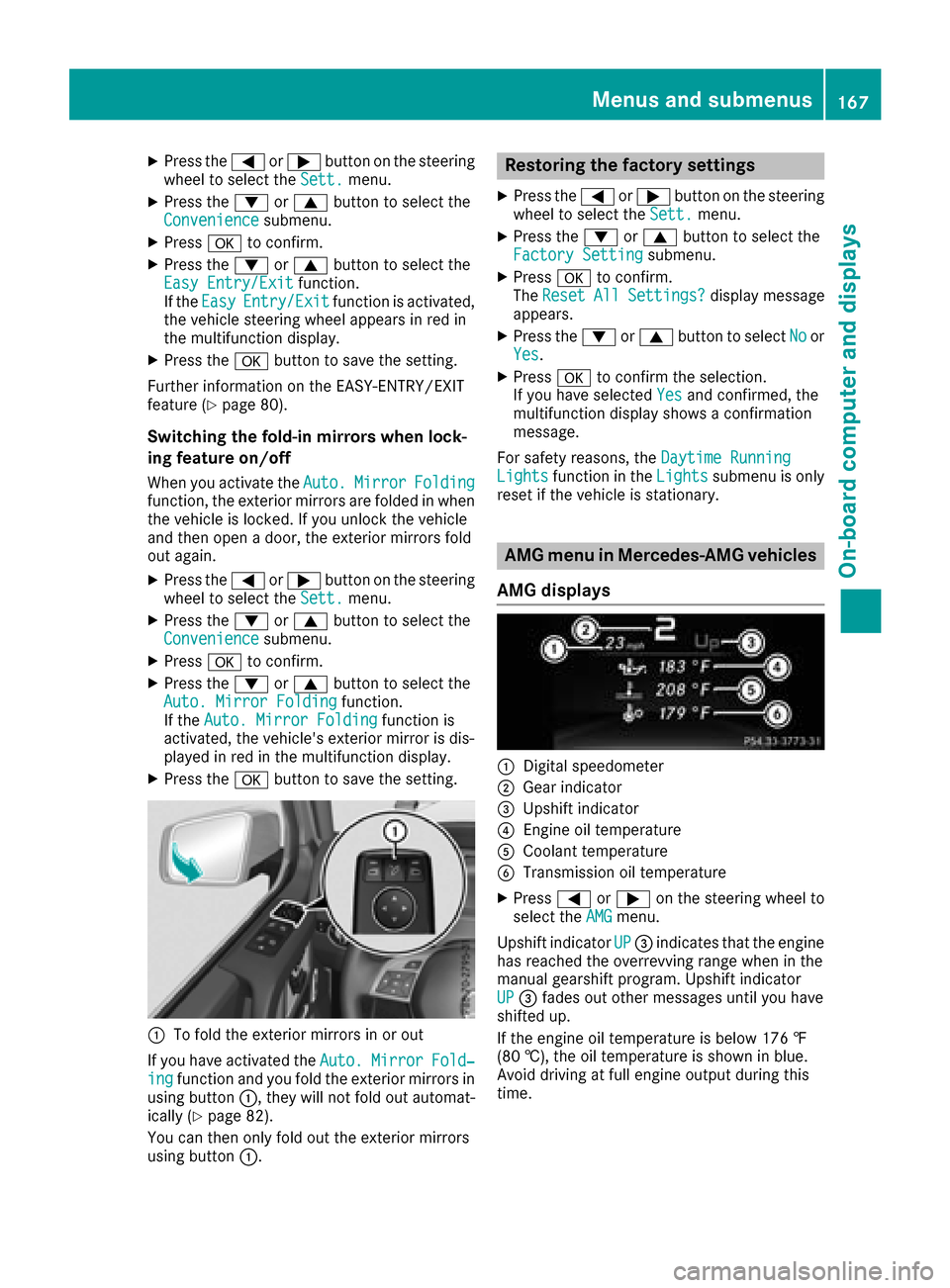
AMG displays
:Digital speedometer
;Gear indicator
=Upshift indicator
?Engine oil temperature
ACoolant temperature
BTransmission oil temperature
XPress =or; on the steerin gwheel to
select the AMGmenu.
Upshift indicator UP
=indicates that the engine
has reached the overrevving range when in the
manual gearshift program. Upshift indicator
UP
= fades out other messages until you have
shifted up.
If the engine oil temperature is below 176 ‡
(80 †), the oil temperature is shown in blue.
Avoid driving at full engine output during this
time.
Menus and submenus167
On-board computer and displays
Z