Page 142 of 585
R
The GPS.
The function is no tactive:
R Atspeeds belo w80km/h.
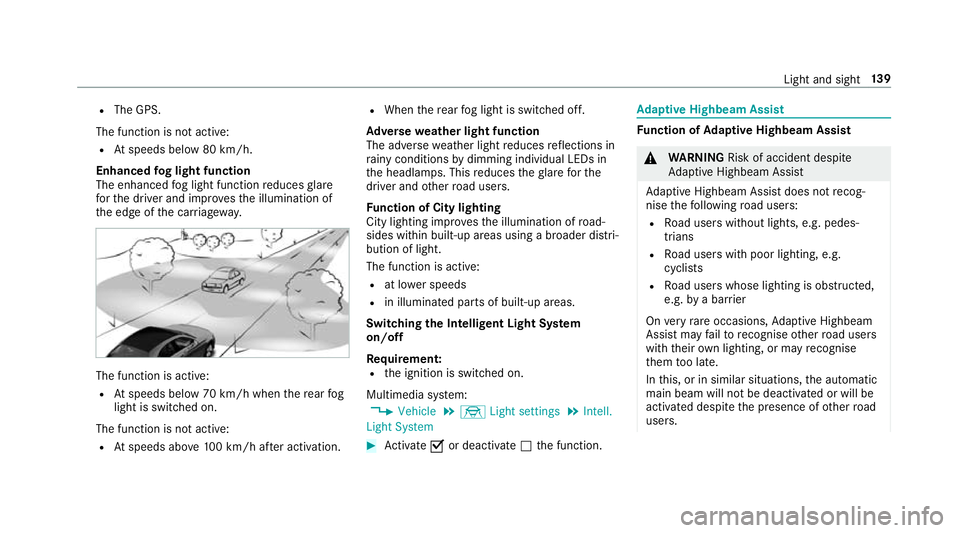
Enhanced fogl ight function
The enhanced fogl ight function reduces glare
fo rt he driver and impr ovesthe illumination of
th ee dgeoft he car riag ewa y. The function is active:
R Atspeeds belo w70km/h when ther ear fog
light is switched on.
The function is no tactive:
R Atspeeds abo ve100k m/h af tera ctivation. R
When ther ear fogl ight is switched off.
Ad versew eathe rlight function
The adverse weather light reduces reflections in
ra inyc ondition sbydimming individual LED sin
th eh eadlamps. This reduces theg larefor the
driver and other road users.
Fu nction of City lighting
City lighting impr ovesthe illumination of road‐
sides within built-up areas usin gabroader distri‐
bution of light.
The function is active:
R at lo werspeeds
R in illumina tedp arts of built-up areas.
Switching theI ntelligent Light Sy stem
on/off
Requ irement:
R thei gnition is switched on.
Multimedia sy stem:
, Vehicle .
÷ Light settings .
Intell.
Light System #
Activate Oor deacti vate ª thef unction. Ad
aptiv eHighbeam Assist Fu
nction of Adaptiv eHighbeam Assist &
WARNING Risk of accident despi te
Ad aptiv eHighbeam Assist
Ad aptiv eHighbeam Assis tdoes no trecog‐
nis ethe following road users:
R Road user swithout lights, e.g .pedes‐
trians
R Road user swithp oor lighting ,e.g.
cyclists
R Road user swhos elighting is obstructed,
e.g .bya barrier
On very rare occasions, Adaptiv eHighbeam
Assis tmayfailto recognise other road users
wit htheir ownlighting, or ma yrecognise
th em tool ate.
In this, or in similar situations ,the automatic
main beam will no tbedeactivated or will be
activated despit ethe presence of other road
users. Ligh
tand sight 13 9
Page 144 of 585
Ad
aptiv eHighbeam Assis tPlus Ad
aptiv eHighbeam Assis tPlus function &
WARNING Risk of accident despi te
Ad aptiv eHighbeam Assis tPlus
Ad aptiv eHighbeam Assis tPlus does no trec‐
ognise thef ollowing road users:
R Road user swithout lights, e.g .pedes‐
trians
R Road user swithp oor lighting ,e.g.
cyclists
R Road user swhos elighting is obstructed,
e.g .bya barrier
On very rare occasions, Adaptiv eHighbeam
Assis tPlus ma yfail torecognise other road
user sthat ha velights, or ma yrecognise
th em tool ate.
In this, or in similar situations ,the automatic
main beam will no tbedeactivated or will be
activated despit ethe presence of other road
users. #
Alw ayso bser vethet raffic carefull yand
switc hoffthem ain beam in good time. Sy
stem limitations
Ad aptiv eHighbeam Assis tPlus canno ttak ei nto
account road, weather or traf ficc onditions.
De tection ma yberestricted if:
R Visibility is impaired, fore xamp le in fog,
heavy rain or sno w.
R Ther eisd irtont he sensor sorthe sensors
ar eo bscured.
Ad aptiv eHighbeam Assis tPlus is on lyan aid.
Yo ua re re sponsible fora dju sting thev ehicle's
lighting tothep reva ilin glight ,visibilit yand traf‐
fi cc onditions. Ad
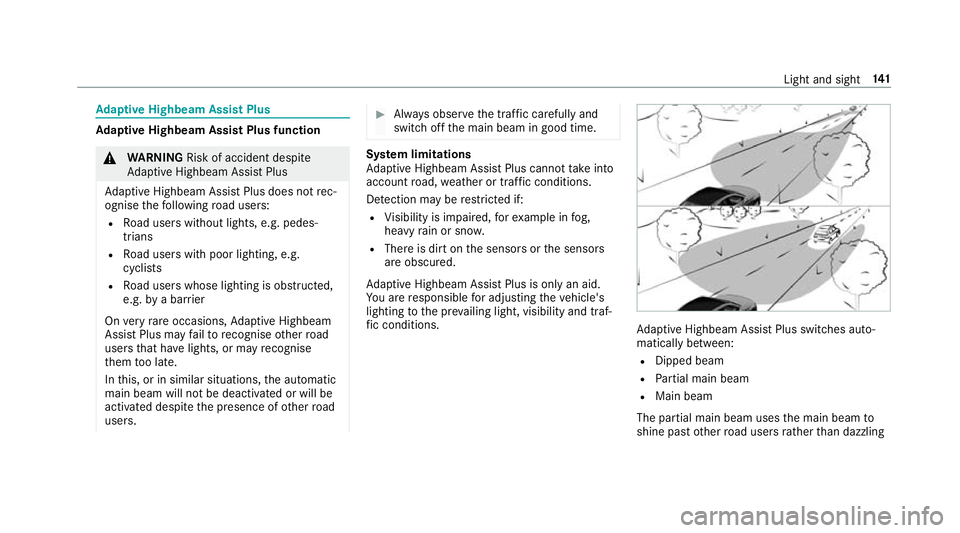
aptiv eHighbeam Assis tPlus swit ches auto‐
maticall ybetwe en:
R Dipped beam
R Partial main beam
R Main beam
The partial main beam uses them ain beam to
shine pas tother road user srather than dazzling Ligh
tand sight 141
Page 147 of 585
Ac
tivatin gclimate-dependen tlighting #
Select Climate. #
Activate Oor deacti vate ª thef unction.
The colour of thea mbient lighting adapts to
suit thea ir conditionin gsetting.
Ac tivatin gwelcome lighting #
Select Welcome. #
Activate Oor deacti vate ª thef unction.
When thev ehicle is unloc ked, as pecial inte‐
ri or lighting sequence runs. Settin
gthe in terior lighting switch-of fdelay
time Multimedia sy
stem:
, Vehicle .
÷ Light settings .
Inte-
rior light shut-off #
Setthe switch-of fdela ytime. Changing bulbs (onl
yfor vehicles with halo‐
ge nh eadla mps) Note
sonc hanging bulbs &
WARNING Risk of bu rnsf romh otcom‐
ponent parts whils treplacing abulb
Bulbs, lamps and plugs can become very hot
during operation.
When replacing abulb, youc ould bur nyour‐
self on these componen tparts. #
Allo wthe component parts tocool
down befor ereplacing theb ulb. R
Do no tuse ab ulb if it has been dropped or if
its glass has been sc ratched. The bulb may
ot herwise explode.
R Do no ttouc hthe glass bulb wit hyour bare
hands.
R Protect bulbs from moistur eand do no tallow
bulbs tocome int ocontact wi thliquids. Overvie
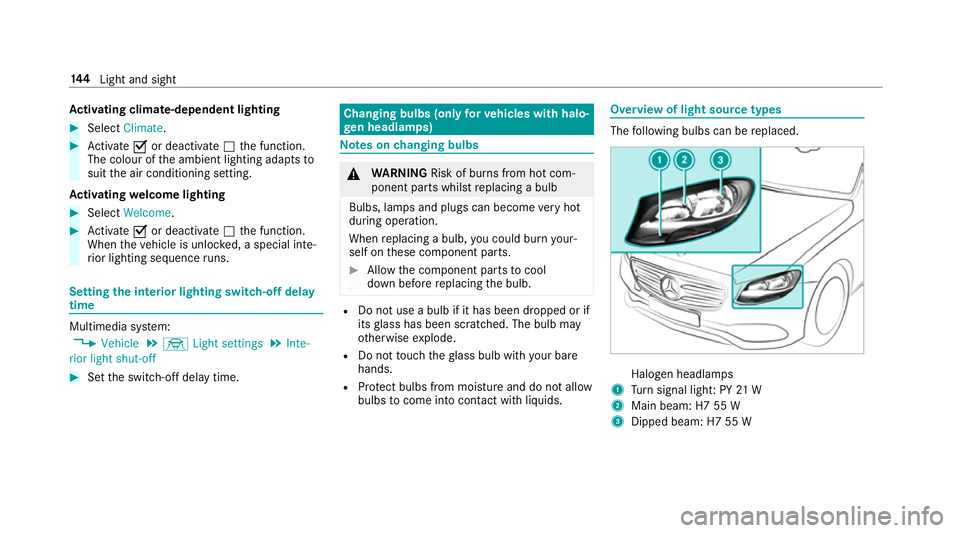
woflight source types The
following bulbs can be replaced. Halogen headlamps
1 Turn signal light :PY21W
2 Main beam: H7 55 W
3 Dipped beam: H7 55 W 14 4
Light and sight
Page 150 of 585
Switching
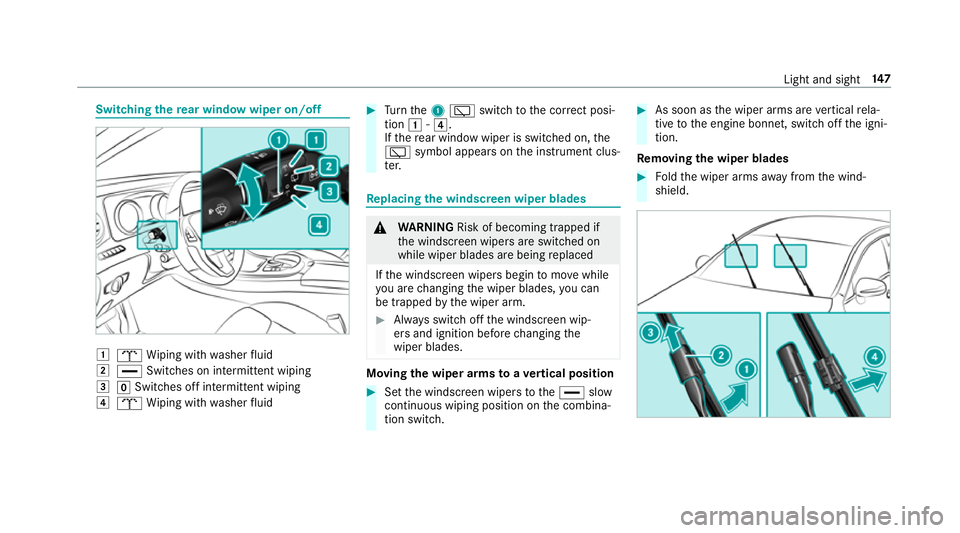
ther ear windo wwiper on/off 1
b Wiping wit hwashe rfluid
2 ° Switches on intermittent wiping
3 gSwitches of fintermittent wiping
4 b Wiping wit hwashe rfluid #
Turn the 1è switchtot he cor rect posi‐
tion 1-4.
If th er ear windo wwiper is swit ched on, the
è symbol appears onthei nstrument clus‐
te r. Re
placing the windsc reen wiper blades &
WARNING Risk of becoming trapped if
th ew indscreen wiper sareswitched on
while wiper blades ar ebeing replaced
If th ew indscreen wiper sbegin tomo vewhile
yo ua rechanging thew iper blades, youc an
be trapped bythew iper arm. #
Alw ayss witc hoffthew indscreen wip‐
er sa nd ignition befor echanging the
wiper blades. Moving
thew iper arms toav ertical position #
Setthe windscreen wiper stothe° slow
continuous wiping position on thec ombina‐
tion switch. #
As soon as thew iper arms ar evertical rela‐
tiv etot he engine bonnet, switc hoffthei gni‐
tion.
Re moving the wiper blades #
Foldthew iper arms away from thew ind‐
shield. Light and sight
147
Page 152 of 585
%
The duration of thec olour chang evaries
depending on theu sag econditions. Re
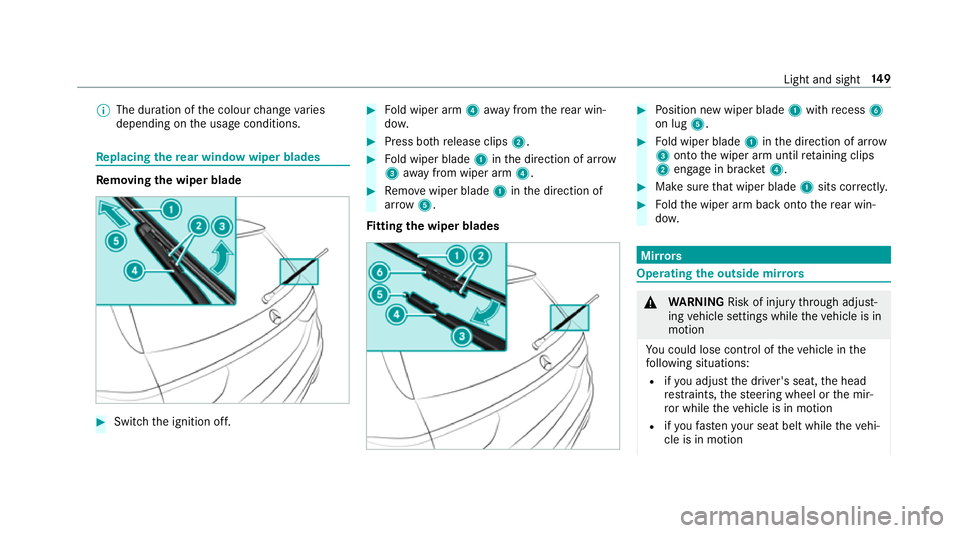
placing the rear windo wwiper blades Re
moving the wiper blade #
Switc hthe ignition off. #
Fold wiper arm 4away from ther ear win‐
do w. #
Press bo threlease clips 2. #
Fold wiper blade 1inthed irection of ar row
3 away from wiper arm 4. #
Remo vewiper blade 1inthed irection of
ar row 5.
Fi ttin gthe wiper blades #
Position ne wwiper blade 1withrecess 6
on lug 5. #
Fold wiper blade 1inthed irection of ar row
3 ontothe wiper ar muntilretainin gclips
2 engag einbrack et 4 . #
Makesur ethat wiperb lade1sitsc orrectl y. #
Foldthew iper ar mbacko ntot he rear win‐
do w. Mir
rors Operating
theo utside mir rors &
WARNING Risk of inju rythro ugh adjust‐
ing vehicle settings while thev ehicle is in
motion
Yo uc ould lose cont roloft hevehicle in the
fo llowing situations:
R ifyo ua djus tthe driver's seat, theh ead
re stra ints, thes teering wheel or them ir‐
ro rw hile thev ehicle is in motion
R ifyo uf asteny our seat belt whilet hevehi‐
cle is in motion Light and sight
14 9
Page 153 of 585
#
Befor estarti ngthee ngine: adjus tthe
driver's seat, theh ead restra ints, the
st eering wheel or them irro ra nd fasten
yo ur seat belt. &
WARNING Risk of accident du etomis‐
judgement of dis tances whe nusing the
outside mir ror
The outside mir rors reflect objects on a
smaller scale. The objects in vie wareinfact
closer than they appear.
As aresult, youm aymisjud gethed ista nce
betwee nyou and ther oad user driving
behi ndyou, e.g .when changing lanes. #
Therefore, alw aysl ook over your shoul‐
der in order toensur ethat youa re
aw areoft he actual dis tance between
yo ua nd ther oad user sdrivin gb ehind
yo u. Fo
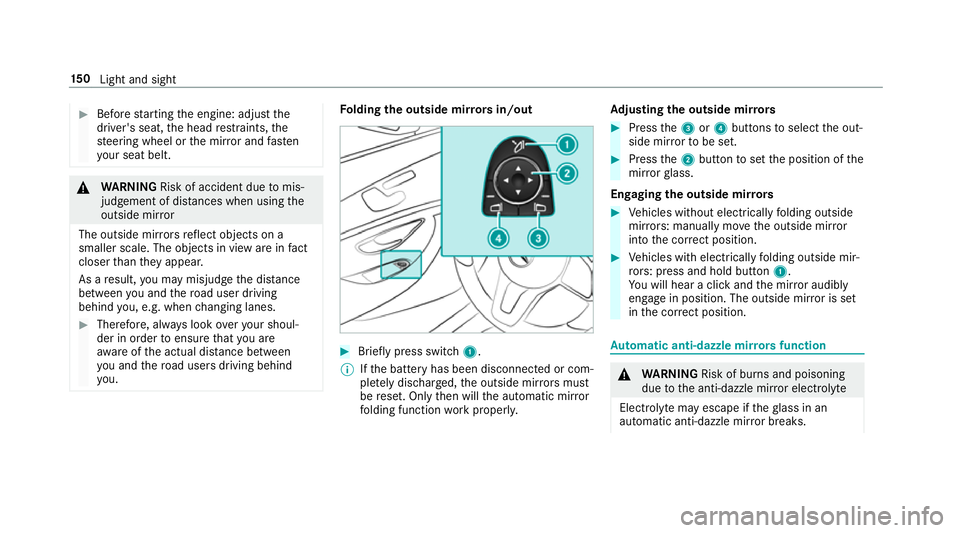
lding theo utside mir rors in/out #
Brief lypress switch 1.
% Ifth eb atter yhas been disconnected or com‐
ple tely discharged ,the outside mir rors must
be reset. Onl ythen will thea utomatic mir ror
fo lding function workproperly. Ad
justin gthe outside mir rors #
Press the3or4 buttons toselect theo ut‐
side mir rortobes et. #
Press the2button tosetthe position of the
mir rorg lass.
Engaging theo utside mir rors #
Vehicles without electricall yfolding outside
mir rors:m anually mo vetheo utside mir ror
int ot he cor rect position. #
Vehicles wit helectricall yfolding outside mir‐
ro rs:p ress and hol dbutton 1.
Yo uw ill hear aclicka nd them irro ra udibly
engag einposition .The outside mir roriss et
in thec orrect position. Au
tomatic anti-dazzl emirro rs function &
WARNING Risk of bu rnsa nd poisoning
due tothea nti-dazzle mir rore lectrolyte
Electrolyt emayescap eiftheglass in an
automatic anti-dazzle mir rorb reaks. 15 0
Light and sight
Page 170 of 585
&
WARNING Risk offire caused byflam‐
mable material on thee xhau stsystem
Flammable materials brought in byeither ani‐
mals or environmen talinfluences ma yignite
if th ey come int ocontact wi thhotp arts of
th ee ngine or exhaus tsyst em. #
Therefore, checkr egularly that there
ar enof lammable materials in the
engine compartmen torontheexhaust
sy stem. Re
quirements:
R thek eyis located in thev ehicle and thek ey
batter yisnotdischar ged.
R or,ift he "Digital Vehicle Key" function is acti‐
va tedv iatheM ercedes me connect weba pp:
th em obile phone is in thes towa ge space
(→ pag e168). #
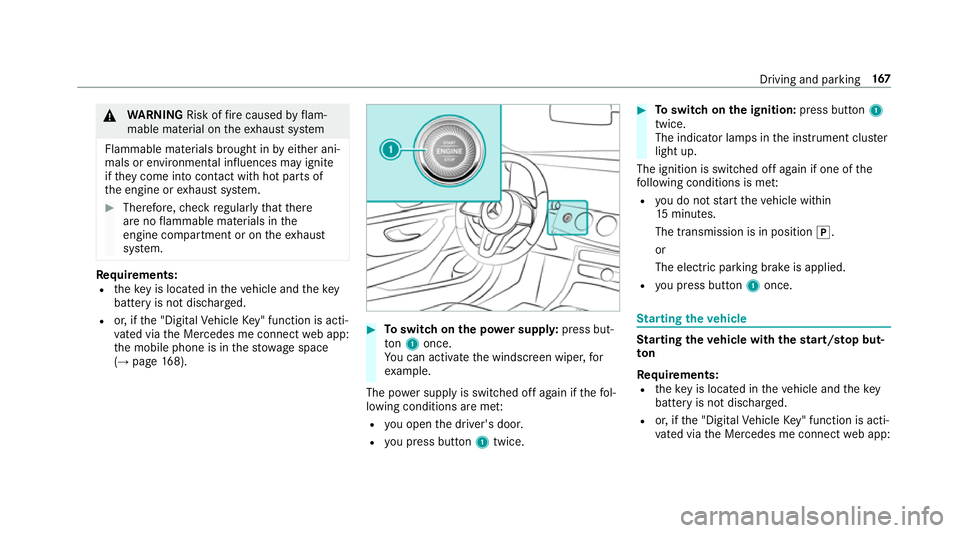
Toswitc hont he powersupp ly:press but‐
ton 1once.
Yo uc an activat ethe windscreen wiper ,for
ex ample.
The po wersupp lyis switched of fagain if thef ol‐
lowing condition sareme t:
R youo pen thed rive r's door.
R youp ress but ton1twice. #
Toswitc hont he ignition: press button1
twice.
The indicator lamps in thei nstrument clus ter
light up.
The ignition is switched of fagain if one of the
fo llowing condition sismet:
R youdon otstar tt he vehicle within
15 minutes.
The transmission is in position j.
or
The electric parking brak eisapplied.
R youp ress but ton1once. St
arting the vehicle St
arting the vehicl ewiththes tart/ stop but‐
ton
Requ irements:
R thek eyis located in thev ehicle and thek ey
batter yisnotdischar ged.
R or,ift he "Digital Vehicle Key" function is acti‐
va tedv iatheM ercedes me connect weba pp: Driving and parking
167
Page 199 of 585
If ABS inter
venes when braking, youw illfeel a
pulsing in theb rake pedal. The pulsating brake
pedal can be an indication of hazardous road
condition sand can ser veas areminder totake
ex trac arew hile driving.
Sy stem limitations
R ABSisa ctivefroms peeds of appr ox.
8k m/h.
R ABS ma ybeimpaire dorm aynotfunction if a
malfunction has occur reda nd they el‐
low ! ABSwarning lam plight supc ontin‐
uousl yinthe instrument clus tera fter the
engine is star ted. Fu
nction of BAS(Brak eAssis tSystem) &
WARNING Risk of an accident caused by
am alfunctio ninBAS (Brak eAssistSys‐
te m)
If BA Sism alfunctioning ,the braking dis tance
in an emergency braking situatio nis
increased. #
Dep ress theb rake pedal wit hfull force
in emer gency braking situations. ABS
pr eve nts thew heels from locking. BA
Ss uppo rtsy our emer gency braking situation
wit ha dditional brak eforce.
If yo ud epress theb rake pedal quickl y,BA Sis
acti vated:
R BASa utomatically boosts theb rake pres‐
sure.
R BASc an sho rten theb raking dis tance.
R ABS pr events thew heels from locking.
The brakes will function as usual oncey ou
re lease theb rake pedal. BASisd eactivated. Fu
nctions of ESP ®
(Electronic Stability Pro‐
gr am) &
WARNING Risk of skidding if ESP ®
is
malfunctioning
If ESP ®
is malfunctioning ,ESP ®
canno tcarry
out vehicle stabilisation .Inaddition ,other
driving saf etys ystems ar eswitched off. #
Driv eonc arefull y. #
Have ESP ®
ch eckedataq ualified spe‐
cialis tworks hop. &
WARNING Risk of skidding if ESP ®
is
deactivated
If yo ud eactivat eESP®
,E SP ®
canno tcarry
out vehicle stabilisation. #
ESP ®
shoul donly be deacti vatedint he
fo llowing situations. 19 6
Driving and pa rking