2017 MERCEDES-BENZ E-CLASS ESTATE trailer
[x] Cancel search: trailerPage 230 of 585
Re
versing camera Fu
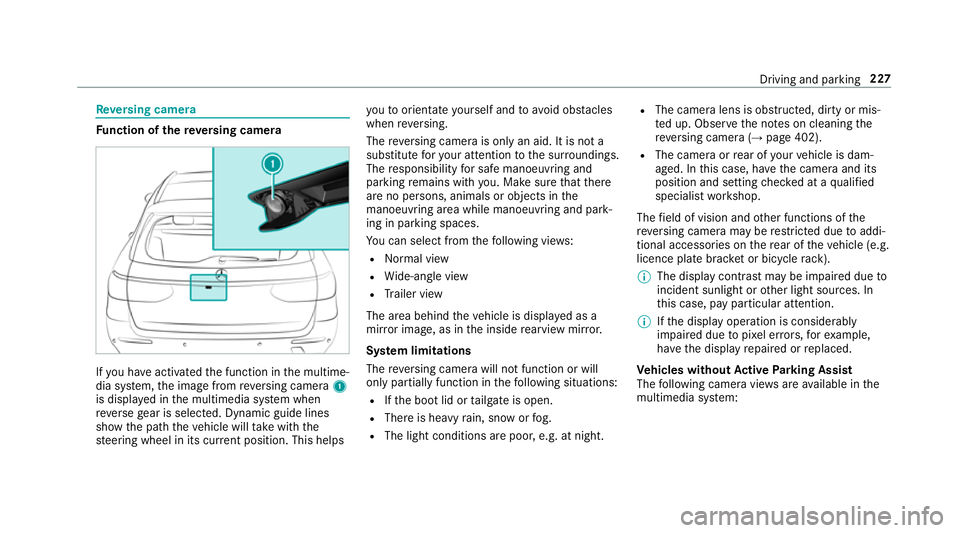
nction of ther eve rsing camera If
yo uh ave activated thef unction in them ultime‐
dia sy stem, thei mag efromr eve rsing camera 1
is displa yedint he multimedia sy stem when
re ve rseg ear is selected. Dynamic guide lines
sho wthe pat hthe vehicle will take wit hthe
st eering wheel in its cur rent position. Thi shelps yo
utoo rientat eyourself and toavo id obs tacles
whe nreve rsing.
The reve rsing camer aisonlyana id. It is no ta
substitut efor your attentio ntothe sur roundings.
The responsibility fors afem anoeuvring and
parking remains wit hyou. Mak esuret hat there
ar enop ersons, animals or objects in the
manoeuvring area whil emanoeuvring and park‐
ing in parking spaces.
Yo uc an select from thef ollowing vie ws:
R Normal view
R Wide-angle view
R Trailer view
The area behin dthe vehicle is displa yedasa
mir rorimage, as in thei nside rearvie wmirro r.
Sy stem limitations
The reve rsing camera will no tfunction or will
onl ypartiall yfunction in thef ollowing situations:
R Ifth eb ootlid or tailgat eiso pen.
R Ther eish eavyrain, sno worfog.
R The light conditions ar epoor ,e.g. at night. R
The camer alens is obstructed, dirty or mis‐
te du p. Obser vethen otes on cleaning the
re ve rsing camer a(→pag e402).
R The camera or rear of your vehicle is dam‐
aged. In this case, ha vethec amer aand its
position and setting checkedataq ualified
specialis tworks hop.
The field of vision and other functions of the
re ve rsing camera ma yberestricted due toaddi‐
tional accesso ries on ther ear of thev ehicle (e.g.
licence plat ebrack et or bicycle rack ).
% The displa ycontras tmaybe impaired due to
incident sunligh torother light sources. In
th is case, pa yparticular attention.
% Ifth ed ispla yoperation is considerably
impaired due topixel er rors,for example,
ha ve thed ispla yrepaired or replaced.
Ve hicles without Activ eP arking Assist
The following camera vie wsarea vailable in the
multimedia sy stem: Driving and parking
227
Page 231 of 585
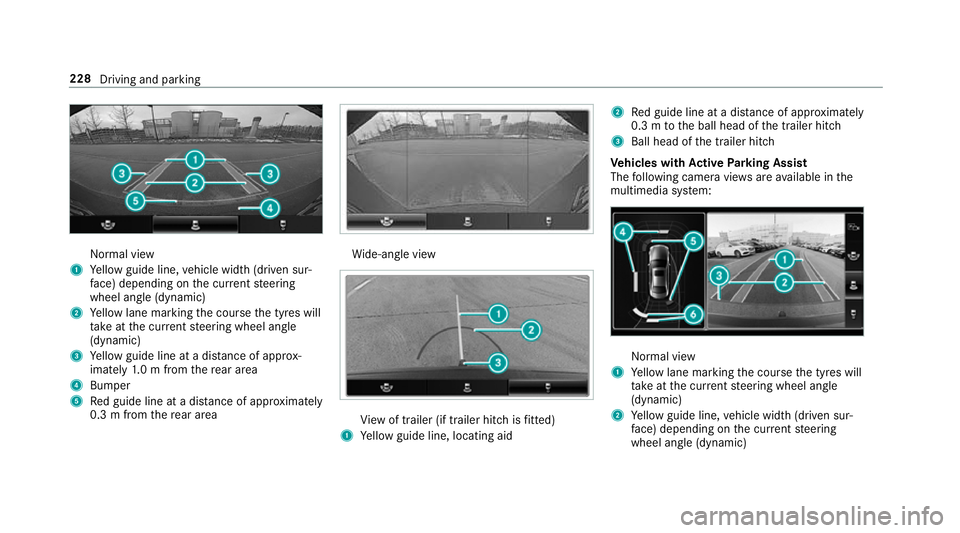
Normal view
1 Yello wg uide line, vehicle widt h(driven sur‐
fa ce) depending on thec urrent steering
wheel angle (dynamic)
2 Yello wl ane markin gthe course thet yres will
ta ke atthec urrent steering wheel angle
(dynamic)
3 Yello wg uide line at adista nce of appr ox‐
imatel y1.0mf romt herear area
4 Bumper
5 Redg uide line at adista nce of appr oximately
0. 3mf romt herear area Wi
de-angle view Vi
ew of trailer (if trailer hitc hisfitted)
1 Yello wg uide line, locating aid 2
Redg uide line at adista nce of appr oximately
0. 3mtot he ball head of thet railer hitch
3 Ball head of thet railer hitch
Ve hicles with Activ eP arking Assist
The following camera vie wsarea vailable in the
multimedia sy stem: Normal view
1 Yello wl ane markin gthe course thet yres will
ta ke atthec urrent steering wheel angle
(dynamic)
2 Yello wg uide line, vehicle widt h(driven sur‐
fa ce) depending on thec urrent steering
wheel angle (dynamic) 228
Driving and parking
Page 232 of 585
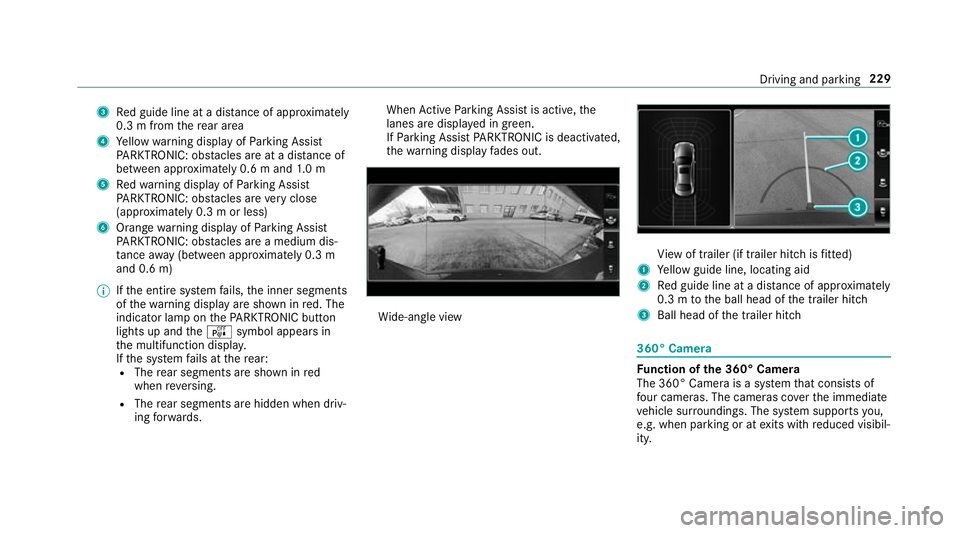
3
Redg uide line at adista nce of appr oximately
0. 3mf romt herear area
4 Yello ww arning displa yofParking Assist
PA RKTRONIC: obstacles ar eatadista nce of
betwee napproximately 0.6 mand1.0m
5 Redw arning displa yofParking Assist
PA RKTRONIC: obstacles ar everyc lose
(appr oximatel y0.3mo rless)
6 Orang ewarning displa yofParking Assist
PA RKTRONIC: obstacles ar eamedium dis‐
ta nce away (between appr oximatel y0.3 m
and 0. 6m)
% Ifth ee ntir esystemf ails, thei nner segments
of thew arning displa yareshown in red. The
indicator lam ponthePARKTRONI Cbutton
light supa ndthe é symbol appear sin
th em ultifunction displa y.
If th es ystemf ails at ther ear:
R The rear segment sareshown in red
when reve rsing.
R The rear segment sarehidde nwhen driv‐
ing forw ards. When
ActiveP arking Assis tisactive, the
lanes ar edispla yeding reen.
If Pa rking Assis tPARKTRONIC is deactivated,
th ew arning displa yfades out. Wi
de-angle view Vi
ew of trailer (if trailer hitc hisfitted)
1 Yello wg uide line, locating aid
2 Redg uide line at adista nce of appr oximately
0. 3mtot he ball head of thet railer hitch
3 Ball head of thet railer hitch 360° Camera
Fu
nction of the3 60° Camera
The 360° Camera is asyst em that consists of
fo ur cameras. The cameras co verthe immediate
ve hicle sur roundings. The sy stem supports you,
e.g .when parkin goratexitsw ithr educed visibil‐
ity. Driving and parking
229
Page 233 of 585
The 360° Camer
aisonlyana id. It is no tasub‐
st itut efor your attentio ntothe sur roundings.
The responsibility fors afem anoeuvring and
parking remains wit hyou. Mak esuret hat there
ar enop ersons, animals or objects in the
manoeuvring area whil emanoeuvring and park‐
ing in parking spaces.
The sy stem evaluates images from thef ollowing
cameras:
R Reversing camera
R Front camera
R Twos ide cameras in theo utside mir rors
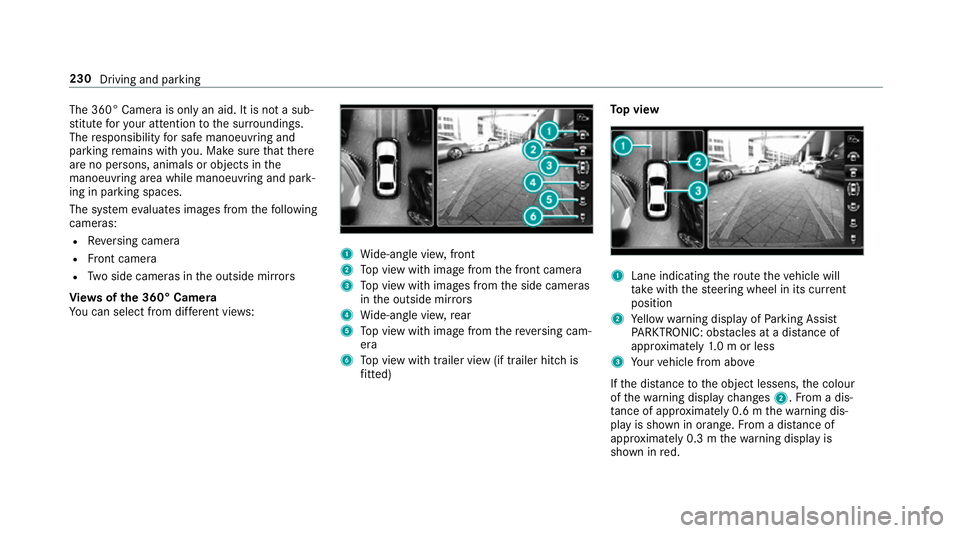
Vi ew soft he 360 °Camera
Yo uc an select from dif fere nt vie ws: 1
Wide-angle vie w,front
2 Topv ieww ithi mag efromt he front camera
3 Topv ieww ithi mages from thes ide cameras
in theo utside mir rors
4 Wide-angle vie w,rear
5 Topv ieww ithi mag efromt hereve rsing cam‐
era
6 Topv ieww itht railer vie w(if trailer hitc his
fi tted) To
pv iew 1
Lane indicating ther out ethe vehicle will
ta ke wit hthe steering wheel in its cur rent
position
2 Yello ww arning displa yofParking Assist
PA RKTRONIC: obstacles at adista nce of
appr oximatel y1.0morl ess
3 Your vehicle from abo ve
If th ed ista nce totheo bjec tlessens, thec olour
of thew arning displa ychanges 2.Fromad is‐
ta nce of appr oximatel y0.6mt hewarning dis‐
pla yiss hown in orange. From adistan ce of
appr oximatel y0.3mt hewarning displa yis
shown in red. 230
Driving and parking
Page 234 of 585
When
Parking Assis tPARKTRONIC is operational
an dnoo bjectisd etected, thes egment softhe
wa rning displa yareshown in grey.
% Ifth ee ntir esystemf ails, thes egment sof
th ew arning displa yareshown in red. The
indicator lam ponthePARKTRONI Cbutton
light supa ndthe é symbol appear sin
th em ultifunction displa y.
If th es ystemf ails at ther ear ,the displa yof
th es egment schanges as follo ws:
R The rear segment sareshown in red
when reve rsing.
R The rear segment sarehidde nwhen driv‐
ing forw ards.
If Pa rking Assis tPARKTRONIC is deactivated,
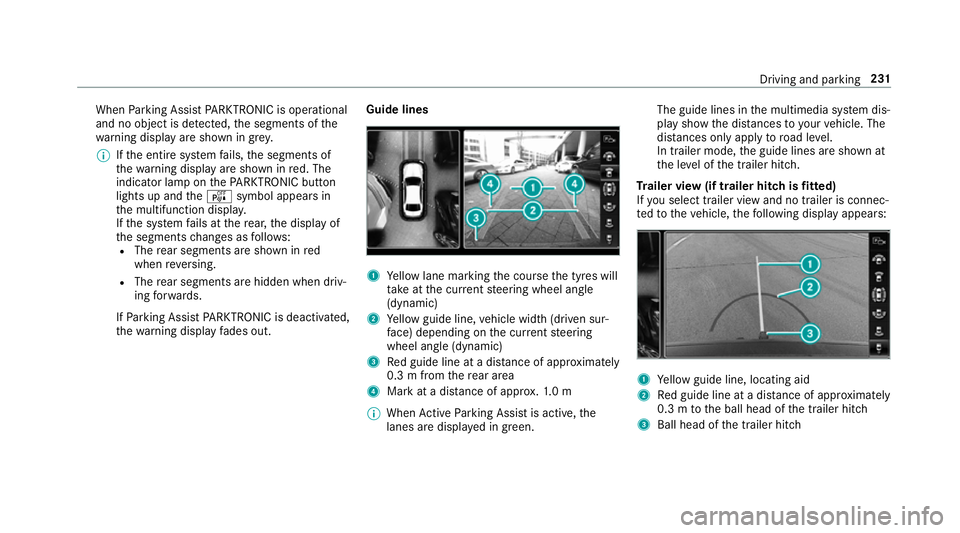
th ew arning displa yfades out. Guid
elines 1
Yello wl ane markin gthe course thet yres will
ta ke atthec urrent steering wheel angle
(dynamic)
2 Yello wg uide line, vehicle widt h(driven sur‐
fa ce) depending on thec urrent steering
wheel angle (dynamic)
3 Redg uide line at adista nce of appr oximately
0. 3mf romt herear area
4 Markatad istance of appr ox.1 .0 m
% When ActiveP arking Assis tisactive, the
lanes ar edispla yeding reen. The guide lines in
them ultimedia sy stem dis‐
pla yshowt he dis tances toyour vehicle. The
dis tances only apply toroad le vel.
In trailer mode, theg uide lines ar eshown at
th el eve loft he trailer hitch.
Tr aile rview( if traile rhitchisf itted)
If yo us elect trailer vie wand no trailer is connec‐
te dtot hevehicle, thef ollowing displa yappears: 1
Yello wg uide line, locating aid
2 Redg uide line at adista nce of appr oximately
0. 3mtot he ball head of thet railer hitch
3 Ball head of thet railer hitch Driving and parking
231
Page 237 of 585
Ac
tiveP arking Assis tisonlyana id. It is no ta
substitut efor your attentio ntothe sur roundings.
The responsibility fors afem anoeuvring and
parking remains wit hyou. Mak esuret hat no
persons, animals or objectse tc. areinthe
manoeuvring range.
Ac tiveP arking Assis tiscancelled if, among
ot her things ,one of thef ollowing actions is car‐
ri ed out:
R Youd eactivat eParking Assis tPARKTRONIC.
R Youd eactivat eActiv eParking Assist.
R Youb egin steering.
R Youa ppl ythe parking brake.
R Youe ngage j.
R ESP ®
inte rvenes.
R Youo pen thet ailgate.
Sy stem limitations of Activ eP arkin gAssist
Object slocated abo veor belo wthe de tection
ra ng eofA ctiveParking Assis tare notd etected
when thep arking space is being measured.
These ar ealso no ttaken in toaccount when the
parkin gmanoeuvr eiscalculated, e.g. overhang‐
ing loads, overhangs or loading ramp sofl orries or
theb oundaries of parking spaces. In some cir‐
cums tances, ActiveP arking Assis tmaytherefore
guide youi ntot he parking space prematurel y. &
WARNING Risk of accident du eto
object slocated abo veor belo wthe
de tection rang eofA ctiveParking Assist
If th er ea reobjects abo veor belo wthe
de tection range, thef ollowing situations may
arise:
R ActiveP arking Assis tmaysteer tooe arly.
R Vehicles with automatic transmis‐
sion: Thevehicle ma ynotstop in front of
th ese objects.
This could cause acollision. #
Inthese situations, do no tuse Active
Pa rking Assist. Sn
owfa ll or heavy rain ma ylead toap arking
spac ebeingm easured inaccuratel y.Pa rking
spaces that ar epartial lyoccupied bytrailer
dr aw bar sm ight no tbeidentified as suc horbe
measured incor rectly .Only us eActiv eParking
Assis tonlevel, high-grip ground. Do no
tuse ActiveP arking Assis tinthefollowing
situations:
R Ifyo ua redrivin ginextreme weather condi‐
tions suc hasice,p ackeds noworinh eavy
ra in.
R Ifyo ua retranspo rting aload that pr otru des
be yond thev ehicle.
R Ifth ep arking space is on asteep downhill or
uphill gradient.
R Ifyo uh ave installed sno wchains.
Ac tiveP arking Assis tmayalso displa yparking
spaces that ar enotsuitable forp arking, e.g.:
R Parking spaces wher eparkin gisp rohibited.
R Parking spaces on unsuitable sur faces.
Ac tiveP arking Assis twill no tassis tyou with
parking spaces at right angles tothed irection of
tr av el in thef ollowing situations:
R If tw oparkin gspaces ar elocated immedi‐
atel ynexttoe acho ther.
R Ifth ep arking space is directly next toalow
obs tacle su chasalow kerb. 234
Driving and parking
Page 238 of 585
Ac
tiveP arking Assis twill no tassis tyou with
parking spaces at right angles tothed irection of
tra velint hefollowing situations:
R Ifth ep arking space is on akerb.
R Ifth ep arking space is bordered byan obs ta‐
cle ,e.g. atree, ap ostora trailer.
Pa rking wit hActive Parking Assist
% Depending on thev ehicle's equipment, the
button ma yalso be located at adiffe re nt
positio ninthe centre console. #
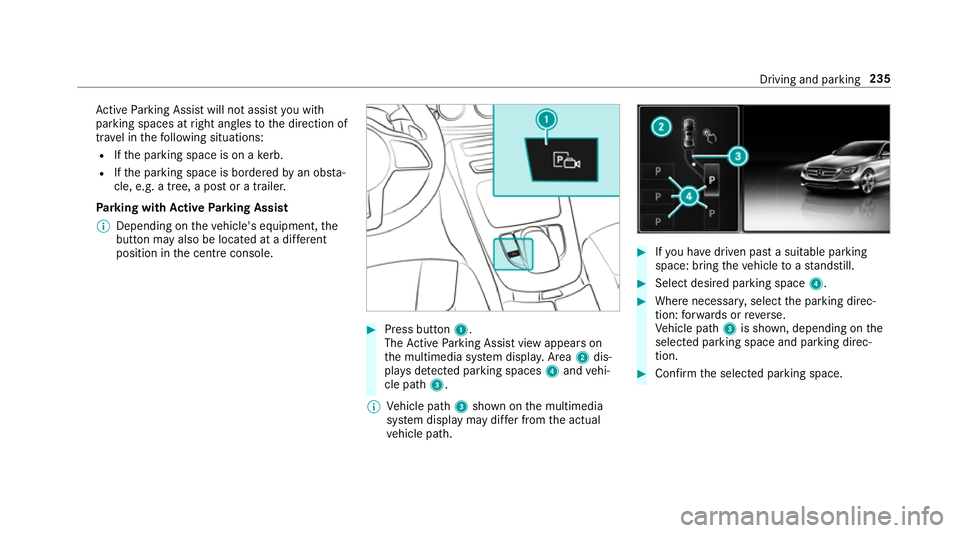
Press button 1.
The ActiveP arking Assis tviewa ppear son
th em ultimedia sy stem displa y.Area 2dis‐
pl ay sd etected parking spaces 4and vehi‐
cle path 3.
% Vehicle path 3shown on them ultimedia
sy stem displa ymaydifferf romt he actual
ve hicle path. #
Ifyo uh ave driven pas tasuitable parking
space: bring thev ehicle toas tandstill. #
Select desired parkin gspace 4. #
Wher enecessar y,select thep arking direc‐
tion :for wa rdsorr everse.
Ve hicle path 3is shown, depending on the
selected parking space and parking direc‐
tion. #
Confir mthe selected parking space. Driving and parking
235
Page 255 of 585
R
Youh avea dop tedas porty driving stylew ith
high cornering speeds or high ratesofa ccel‐
eration.
R ESP ®
is deactivated.
R When driving wit hatrailer, thee lectrical con‐
nection tothet railer has been cor rectly
es tablished.
R Ifal oss of tyr epressur eorad efectivetyre
has been de tected and displ ayed.
The sy stem ma ybeimpaired or ma ynotfunction
in thef ollowing situations:
R Ther eisp oor visibilit y,e.g. due toinsuf ficient
illumination of ther oad, highly variable shade
conditions, or due torain, sno w,fogorh eavy
spr ay.
R Ther eisg lare, e.g. from thes un, reflections
or oncoming tra ffic.
R Ther eisd irtont he windscreen in thev icinity
of them ultifunction camer aorthe camer ais
mis tedu p, damaged or obscured.
R No or se veral, unclear lane markings are
presen tfor one lane, e.g. in aconstruction
area. R
The lane markings ar eworn, dar korcovered.
R The dis tance tothev ehicle in front is too
small and thel ane markings thus canno tbe
de tected.
R The lane markings chang equickl y,e.g. lanes
branc hoff,c ross one ano ther or mer ge.
R The road is very nar rowa nd winding.
Ve hicles with Drivin gAssistanc epacka ge or
Driving Assistance Plus pa ckage: ActiveL ane
Ke eping Assis tuses radar sensor stomonitor
se verala reas around thev ehicle. If ther adar
senso rsinther ear bumper ar edirty or co vered
wit hs now, thes ystemm aybe impaired or may
no tfunction .Ifano bstacle in thel ane in which
yo ua redrivin ghas been de tected, no lane-cor‐
re cting brak eappli cation occu rs.
Ac tivatin gActive Lan eKeeping Assist &
WARNING Risk of accident despi te
Ac tiveL aneK eeping Assis twarning
Al ane-cor recting brak eappli cation cannot
al wa ys bring thev ehicle bac kintot he origi‐
nal lane. #
Alw ayss teer,b rake or accelera teyour‐
self ,especiall yifActiveLaneK eeping
Assis twarns youorm akesalane-cor‐
re cting brak eappli cation. &
WARNING Risk of accident despi teinter‐
ve ntio nofA ctiveLaneK eeping Assist
Ac tiveL aneK eeping Assis tdoes no tdetect
traf ficc onditions or road users. In very rare
cases, thes ystem ma ymakeani nappropri‐
at eb rake application, e.g. af teri ntentional ly
driving overas olidl ane marking.
The brak eapplication can be inter rupte dat
an yt ime if yous teer slightl yinthe opposite
direction. #
Alw aysm akes uret hat ther eiss uffi‐
cient di stanc etot he side foro ther traf‐
fi coro bstacles. &
WARNING Risk of accident despi teLane
Ke eping Assist
Lane Keeping Assis tcann otalw aysc learly
de tect lane markings. 252
Driving and pa rking