2017 LEXUS RX200T car
[x] Cancel search: carPage 145 of 776

1453-2. Opening, closing and locking the doors
3
Operation of each component
RX350/RX200t_EE_OM48F32E
■Conditions affecting the operation of the smart entry & start system or wireless remote control
P. 170
■Customization
Some functions can be customized. ( P. 740)
WARNING
■To prevent an accident
Observe the following precautions while driving the vehicle.
Failure to do so may result in a door open ing and an occupant falling out, resulting in death or serious injury.
●Ensure that all doors are properly closed and locked.
●Do not pull the inside handle of the doors while driving.
Be especially careful for the front doors, as the doors may be opened even if the inside lock buttons are in locked position.
●Set the rear door child-protector locks wh en children are seated in the rear seats.
■When opening or closing a door
Check the surroundings of the vehicle such as whether the vehicle is on an incline,
whether there is enough space for a door to open and whether a strong wind is blow- ing. When opening or closing the door, hold the door handle tightly to prepare for any unpredictable movement.
■When using the wireless remote control and operating the power windows or themoon roof or panoramic moon roof
Operate the power windows or the moon roof or panoramic moon roof after checking
to make sure that there is no possibility of any passenger having any of their body parts caught in the windows or the moon roof or panoramic moon roof. Also, do not allow children to operate the wireless remote contro l. It is possible for children and other
passengers to get caught in the power windows or the moon roof or panoramic moon roof.
Page 146 of 776

1463-2. Opening, closing and locking the doors
RX350/RX200t_EE_OM48F32E
◆Smart entry & start system
Carry the electronic key to enable
this function.
Locks all the doors
Check that the door is securely
locked.
Unlocks all the doors
The doors cannot be unlocked for 3
seconds after the doors are locked.
◆Wireless remote control
P. 140
◆Door lock switch
P. 142
Raise the back door while pressing up
the back door opener switch.
Back door
: If equipped
The back door can be locked/unlocked and opened by the following proce-
dures.
Locking and unlocking the back door from the outside
1
2
Locking and unlocking the back door from the inside
Opening the back door from the outside
Page 149 of 776

1493-2. Opening, closing and locking the doors
3
Operation of each component
RX350/RX200t_EE_OM48F32E
WARNING
■Operating the back door
Observe the following precautions. Failure to do so may cause parts of the body to be caught, resulting in death or serious
injury.
●Remove any heavy loads, such as snow and ic e, from the back door before opening it. Failure to do so may cause the back door to suddenly shut again after it is opened.
●When opening or closing th e back door, thoroughly check to make sure the sur- rounding area is safe.
●If anyone is in the vicinity, make sure they are safe and let them know that the back
door is about to open or close.
●Use caution when opening or closing the b ack door in windy weather as it may move abruptly in strong wind.
●Do not pull on the back door damper stay ( P. 150) to close the back door, and do not hang on the back door damper stay. Doing so may cause hands to be caught or the back door damper stay to break,
causing an accident.
●If a bicycle carrier or similar heavy object is attached to the back door, it may sud- denly shut again after being opened, causing someone’s hands, arms, head or neck to
be caught and injured. When installing an accessory part to the back door, using a genuine Lexus part is recommended.
●The back door may suddenly shut if it is notopened fully. It is more difficult to open or
close the back door on an incline than on a level surface, so beware of the back doorunexpectedly opening or closing by itself.
Make sure that the back door is fully open and secure before using the luggage compart-ment.
●When closing the back door, take extra care
to prevent your fingers, etc., from being caught.
●When closing the back door, make sure to
press it lightly on its outer surface. If the back door handle is used to fully close the backdoor, it may result in hands or arms being
caught.
Page 151 of 776
1513-2. Opening, closing and locking the doors
3
Operation of each component
RX350/RX200t_EE_OM48F32E
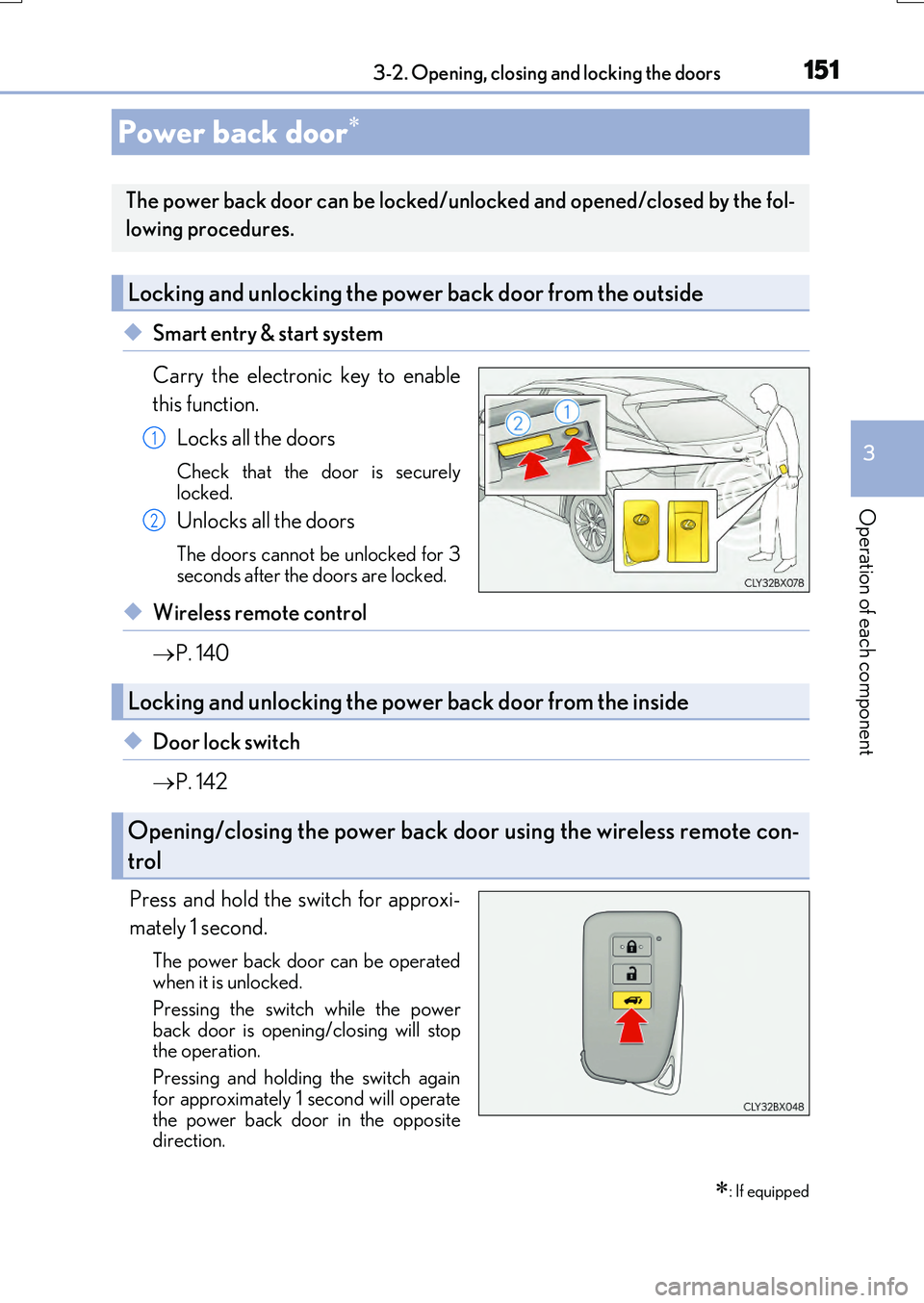
◆Smart entry & start system
Carry the electronic key to enable
this function.
Locks all the doors
Check that the door is securely
locked.
Unlocks all the doors
The doors cannot be unlocked for 3
seconds after the doors are locked.
◆Wireless remote control
P. 140
◆Door lock switch
P. 142
Press and hold the switch for approxi-
mately 1 second.
The power back door can be operated
when it is unlocked.
Pressing the switch while the power
back door is open ing/closing will stop
the operation.
Pressing and holding the switch again
for approximately 1 second will operate
the power back door in the opposite
direction.
Power back door
: If equipped
The power back door can be locked/unlocked and opened/closed by the fol-
lowing procedures.
Locking and unlocking the power back door from the outside
1
2
Locking and unlocking the power back door from the inside
Opening/closing the power back door using the wireless remote con-
trol
Page 152 of 776

1523-2. Opening, closing and locking the doors
RX350/RX200t_EE_OM48F32E
Press and hold the switch for approxi-
mately 1 second.
A buzzer will sound and the power back
door will automatically open or close. However, if the power back door islocked, it will not open.
Pressing the switch while the power back door is open ing/closing will stop the operation.
Pressing and holding the switch again for approximately 1 second will operate the power back door in the opposite
direction.
■Back door opener switch
When the power back door is
unlocked: Press the back door
opener switch.
When the power back door is
locked: While carrying an elec-
tronic key, press the back door
opener switch to unlock the power
back door and then press the back
door opener switch again.
A buzzer will sound and the power b ack door will automatically open.
Pressing the switch while the power back door is opening/closing will stop the operation.
■Wireless remote control
P. 151
Opening/closing the power back door from the inside
Opening the power back door from the outside
Page 153 of 776

1533-2. Opening, closing and locking the doors
3
Operation of each component
RX350/RX200t_EE_OM48F32E
■Touchless sensor (vehicles with a touchless power back door)
The touchless power back door enable s automatic opening of the power back
door by holding a hand over the upper part of the rear emblem or touching
the upper part of the rear emblem. When operating the touchless power back
door, make sure that the touchless sensor operation is enabled ( P. 115) and
that you are carrying an electronic key.
While carrying an electronic key, move your hand slowly toward the upper
part of the rear emblem and hold it there until the emergency flashers flash.
(The upper part of the rear emblem can also be touched.)
When all of the doors are locked: When your hand is detected, the emergency flashers will flash and all of the doors will be unlocked.
Move your hand away from the rear emblem and then move it over the
upper part of the rear emblem again slowly and hold it there until a buzzer
sounds. (The upper part of the re ar emblem can also be touched.)
Immediately after the buzzer sounds, move your hand away. If you do not move your hand away, a buzzer will sound twice and the power back door will not oper-
ate.
Check that the power back door begins to open.
To stop the power back door partway, touch the rear emblem.
To operate the power back door again, use a power back door switch. ( P. 152, 154) (Holding your hand over the upper part of the rear emblem will not operate
the touchless sensor again.)
1
2
3
Page 160 of 776

1603-2. Opening, closing and locking the doors
RX350/RX200t_EE_OM48F32E
■Situations in which the touchless sensor may malfunction (vehicles with a touchless power back door)
In the following situations, the touchless sensor may operate unintentionally.
To prevent unintentional operation, keep the electronic key out of the operational range or disable the touchless sensor operation. ( P. 115)
●When a large amount of water is applied to the rear emblem, such as in heavy rain
●When the vehicle is being washed and water is applied to the rear emblem
●When dirt is wiped off the rear emblem
●If someone leans toward or against the rear emblem
●When a metal object is brought near the rear emblem
●When a vehicle cover is installed or removed near the rear emblem
■Situations in which the touchless sensor may not operate properly (vehicles with a
touchless power back door)
If the touchless sensor does not operate in the following situations, use the back door opener switch to open the power back door. ( P. 154)
●In the following situations, the sensitivity of the touchless sensor may be temporarily reduced and the touchless sensor may not operate:
• When a large amount of wate r is applied to the rear emblem, such as in heavy rain
• When the vehicle is being washed and water is applied to the rear emblem • For several seconds after dirt is wiped off the rear emblem • When the rear emblem is covered with mud, snow, ice, etc.
• When the vehicle has been parked for a while near objects that may move and con- tact the rear emblem, such as tall grass or trees• When an external radio wave sour ce is near the touchless sensor
●The touchless sensor may not operate in the following situations:
• When an electronic key is not being carried • When an electronic key is no t within the operational range • When an external radio wave source interferes with the communication between
the vehicle and electronic key ( P. 170) • When the power back door is not fully closed• When a hand is held pa rallel to the rear emblem*
*: The detection settings can be changed by any authorized Lexus dealer or repairer,
or another duly qualified and equipped professional. ( P. 742)
■Customization
Some functions can be customized. ( P. 110, 740)
Page 162 of 776

1623-2. Opening, closing and locking the doors
RX350/RX200t_EE_OM48F32E
WARNING
■Operating the power back door
Observe the following precautions.
Failure to do so may cause parts of the body to be caught, resulting in death or serious
injury.
●Remove any heavy loads, such as snow and ice, from the power back door before
opening it. Failure to do so may cause the power back door to suddenly shut again
after it is opened.
●When opening or closing the power back do or, thoroughly check to make sure the
surrounding area is safe.
●If anyone is in the vicinity, make sure they are safe and let them know that the power
back door is about to open or close.
●Use caution when opening or closing the power back door in windy weather as it may
move abruptly in strong wind.
●Do not pull on the back door spindle ( P. 165) to close the power back door, and
do not hang on the back door spindle.
Doing so may cause hands to be caught or the back door spindle to break, causing
an accident.
●If a bicycle carrier or similar heavy object is attached to the power back door, it may
suddenly shut again after being opened, causing someone’s hands, arms, head or
neck to be caught and injured. When installing an accessory part to the power back
door, using a genuine Lexus part is recommended.
●The power back door may suddenly shut if it is
not opened fully, while on a steep incline.
Make sure that the power back door is secure
before using the luggage compartment.
●When closing the power back door, take
extra care to prevent your fingers, etc., from
being caught.
●When closing the power back door, make
sure to press it lightly on its outer surface. If
the back door handle is used to fully close the
power back door, it may result in hands or
arms being caught.