2017 LEXUS RX200T car
[x] Cancel search: carPage 364 of 776

3644-5. Using the driving support systems
RX350/RX200t_EE_OM48F32E
■Conditions under which the BSM function may not function correctly
●The BSM function may not detect vehicles correctly in the following situations:
• When the sensor is misaligned due to a strong impact to the sensor or its surround-
ing area • When mud, snow, ice, a sticker, etc. is covering the sensor or surrounding area onthe rear bumper
• When driving on a road surface that is wet with standing water during bad weather, such as heavy rain, snow, or fog• When multiple vehicles are approaching wi th only a small gap between each vehicle
• When the distance between your vehicle and a following vehicle is short • When there is a significant difference in speed between your vehicle and the vehiclethat enters the detection area
• When the difference in speed between your vehicle and another vehicle is changing • When a vehicle enters a detection area traveling at about the same speed as yourvehicle
• As your vehicle starts from a stop, a vehicle remains in the detection area • When driving up and down consecutive steep inclines, such as hills, dips in the road, etc.
• When driving on roads with sharp bends, consecutive curves, or uneven surfaces • When vehicle lanes are wide, or when driving on the edge of a lane, and the vehiclein an adjacent lane is far away from your vehicle
• When towing a trailer (vehicles with towing package) • When items such as a bicycle carrier are installed on the rear of the vehicle• When there is a significant difference in height between your vehicle and the vehicle
that enters the detection area • Immediately after the BSM function is turned on
●Instances of the BSM function unnecessarily detecting a vehicle and/or object mayincrease in the following situations:
• When the sensor is misaligned due to a strong impact to the sensor or its surround- ing area• When the distance between your vehicle and a guardrail, wall, etc. that enters the
detection area is short • When driving up and down consecutive steep inclines, such as hills, dips in the road, etc.
• When vehicle lanes are narrow, or when driving on the edge of a lane, and a vehicle traveling in a lane other than the adjacent lanes enters the detection area• When driving on roads with sharp bends, consecutive curves, or uneven surfaces
• When the tires are slipping or spinning • When the distance between your vehicle and a following vehicle is short• When a bicycle carrier or other accessory is installed to the rear of the vehicle
• When towing a trailer (vehicles with towing package)
Page 366 of 776

3664-5. Using the driving support systems
RX350/RX200t_EE_OM48F32E
■RCTA icon display (if equipped)
When a vehicle approaching from the right or left at the rear of the vehicle is
detected, the following will be displayed on the audio system screen.
DisplayContent
A vehicle is approaching from the le ft at the rear of the vehicle
A vehicle is approaching from the right at the rear of the vehicle
Vehicles are approaching from both sides of the vehicle
The RCTA function is malfunctioning ( P. 357)
WARNING
■Cautions regarding the use of the function
The driver is solely responsible for safe driving. Always drive safely, taking care to
observe your surroundings.
The RCTA function is only a supplementary fu nction which alerts the driver that a vehi- cle is approaching from the right or left at th e rear of the vehicle. As the RCTA function
may not function correctly under certain conditions, the driver’s own visual confirma- tion of safety is necessary. Over reliance on this function may lead to an accidentresulting death or serious injury.
Page 389 of 776

3894-5. Using the driving support systems
4
Driving
RX350/RX200t_EE_OM48F32E
■Situations in which the Intelligent Clearance Sonar function may operate even if there is no possibility of a collision
In some situations such as the following, the Intelligent Clearance Sonar function may
operate even though there is no possibility of a collision.
●Vehicle surroundings
• When driving toward a banner, flag, low- hanging branch or boom barrier (such as those used at railroad crossings, toll gates and parking lots).• When driving on a narrow path surrounded by a structure, such as in a tunnel or on
an iron bridge) • When parallel parking• When there is a rut or hole in the surface of the road
• When driving on a metal cover (grating), such as those used for drainage ditches • When driving on a steep slope
• If a sensor is hit by a large amount of wa ter, such as when driving on a flooded road
●Weather
• If a sensor is covered with ice, snow, dirt, etc. (when cleared, the system will return to normal)• If heavy rain or water strikes a sensor
• When driving in inclement weather su ch as fog, snow or a sandstorm
●Other ultrasonic waves sources
• When vehicle horns, vehicle detectors, motorcycle engines, air brakes of large vehi- cles, the clearance sonar of other vehicles or other devices which produce ultra-sonic waves are near the vehicle
• If a sticker or an electronic component, such as a backlit license plate (especially flu- orescent type), fog lights, a fender pole or wireless antenna is installed near a sensor
●Changes in the vehicle posture
• If the vehicle is significantly tilted • If the front of the vehicle is raised or lowered due to the carried load
• If the orientation of a sensor has been changed due to a collision or other impact
• When driving on a narrow road
• When driving on a gravel road or in an area with tall grass
Page 390 of 776

3904-5. Using the driving support systems
RX350/RX200t_EE_OM48F32E
■If the Intelligent Clearance Sonar function operates unnecessarily such as at a railroad crossing
Even in the event that the Intelligent Cleara nce Sonar function operates unnecessarily,
such as at a railroad crossing, brake contro l will be canceled after approximately 2 sec- onds, allowing you to proceed forward and leave the area, Brake control can also be canceled by depressing the brake pedal. Depressing the accelerator pedal again will
allow you to proceed forward and leave the area.
■Situations in which the Intelligent Cleara nce Sonar Brake function may not operate properly
In some situations such as the following , this function may not operate properly.
●Weather
• If a sensor is covered with ice, snow, dirt, etc. (when cleared, the system will return to normal)
• If heavy rain or water strikes a sensor • When driving in inclement weather su ch as fog, snow or a sandstorm
●Vehicle surroundings
• When an object that cannot be detected is between the vehicle and a detected object
• If an object such as a vehicle, motorcycle, bicycle or pedestrian cuts in front of the vehicle or runs out from the side of the vehicle.
●Other ultrasonic waves sources
• When vehicle horns, vehicle detectors, motorcycle engines, air brakes of large vehi- cles, the clearance sonar of other vehicles or other devices which produce ultra-
sonic waves are near the vehicle • If a sticker or an electronic component, such as a backlit license plate (especially flu-orescent type), fog lights, a fender pole or wireless antenna is installed near a sensor
●Changes in the vehicle posture
• If the vehicle is significantly tilted
• If the front of the vehicle is raised or lowered due to the carried load • If the orientation of a sensor has been changed due to a collision or other impact
• When a sensor or the area around a sensor is extremely hot or cold
• When strong winds are blowing
Page 392 of 776

3924-5. Using the driving support systems
RX350/RX200t_EE_OM48F32E
WARNING
■Limitations of the Intelligent Clearance Sonar system
Do not overly rely on the system, as doing so may lead to an accident.
●The driver is solely responsible for safe dr iving. Always drive carefully, taking care to
observe your surroundings. The Intelligent Clearance Sonar system is designed to provide support to lessen the severity of collisions. However, it may not operate in some situations.
●The Intelligent Clearance Sonar system is not designed to stop the vehicle com- pletely. Additionally, even if the system has stopped the vehicle, it is necessary todepress the brake pedal immediately as brak e control will be canceled after approxi-
mately 2 seconds.
■To ensure the Intelligent Clearance Sonar system can operate properly
Observe the following precautions regarding the sensors ( P. 383). Failure to do so
may cause a sensor to not operate properly, and may cause an accident.
●Do not modify, disassemble or paint the sensors.
●Do not replace a sensor with a part other than a genuine part.
●Do not subject a sensor or its surrounding area to a strong impact.
●Do not damage the sensors, and always keep them clean.
Observe the following precautions regarding the radar sensors ( P. 360). Failure to
do so may cause a radar sensor to not operate properly, and may cause an accident.
●Do not modify, disassemble or paint the sensors.
●Do not replace a radar sensor with a part other than a genuine part.
●Do not subject a radar sensor or its surrounding area to a strong impact.
●Do not damage the radar sensors, and alwa ys keep the radar sensors and their sur- rounding area on the bumper clean.
■Handling the suspension
Do not modify the suspension, as changes to the height or inclination of the vehicle may prevent the sensors from detecting objects correctly or cause the system to not oper-
ate or operate unnecessarily.
Page 393 of 776

3934-5. Using the driving support systems
4
Driving
RX350/RX200t_EE_OM48F32E
NOTICE
■To prevent the system from malfunctioning
●If the area around a sensor is subjected to an impact, the system may not operate properly due to the sensor being misali gned. Have the vehicle inspected by any
authorized Lexus dealer or repairer, or an other duly qualified and equipped profes- sional.
●When using a high pressure washer to wash the vehicle, do not spray the sensors
directly, as doing so may cause a sensor to malfunction.
●When using steam to clean the vehicle, do not direct steam too close to the sensors as doing so may cause a sensor to malfunction.
■To prevent a radar sensor from malfunctioning
●If the area around a radar sensor is subjec ted to an impact, the system may not oper- ate properly due to a sensor malfunction. Have the vehicle inspected by any autho-
rized Lexus dealer or repairer, or anothe r duly qualified and equipped professional.
●Observe the radar sensor handling precautions. (P. 360)
■To prevent unnecessary operation of the Intelligent Clearance Sonar system
In the following situations, disable the Inte lligent Clearance Sonar system as the system may operate even though there is no possibility of a collision.
●When inspecting the vehicle using a chassis roller, chassis dynamo or free roller
●When loading the vehicle onto a boat, truck or other transport vessel
●If the suspension has been modified or tires of a size other than specified are installed
●If the front of the vehicle is raised or lowered due to the carried load
●If towing eyelets are installed
Page 399 of 776

3994-5. Using the driving support systems
4
Driving
RX350/RX200t_EE_OM48F32E
■Situations in which the Rear Crossing Traffic Auto Brake function may not operate properly
In some situations such as the following , this function may not operate properly.
●Objects and vehicles which the radar sensors are not designed to detect
• Stationary objects • Vehicles which are moving away from your vehicle
• Pedestrians, motorcycles, bicycles, etc.*• Objects which are extremely close to a radar sensor • Vehicles which are approaching from the right or left at the rear of the vehicle at a
traveling speed of less than approximately 8 km/h (5 mph) • Vehicles which are approaching from the right or left at the rear of the vehicle at a traveling speed of more than a pproximately 24 km/h (15 mph)
*: Depending on conditions, detection of a vehicle and/or object may occur.
●Situations in which the radar sensors may not be able to detect an object
• When a sensor or the area around a sensor is extremely hot or cold • If the rear bumper is covered with ice, snow, dirt, etc.
• If heavy rain or water strikes the vehicle • When the detection area of a radar sensor is obstructed by an adjacent vehicle• If the vehicle is significantly tilted
• If towing eyelets are installed • If the suspension has been modified or ti res of a size other than specified are installed
• If the front of the vehicle is raised or lowered due to the carried load • If a sticker or an electronic component, such as a backlit license plate (especially flu-orescent type), fog lights, a fender pole or wireless antenna is installed near a radar
sensor • If the orientation of a radar sensor has been changed due to a collision or other
impact or removal and installation • When multiple vehicles are approaching wi th only a small gap between each vehicle • When a vehicle is approaching at high speed
●Situations in which the radar sensor may not detect a vehicle
• When a vehicle approaches from the right or left at the rear of the vehicle while youare turning while backing up
• When turning while backing up
• When backing out of a shallow angle park-
ing spot
Page 411 of 776
4114-5. Using the driving support systems
4
Driving
RX350/RX200t_EE_OM48F32E
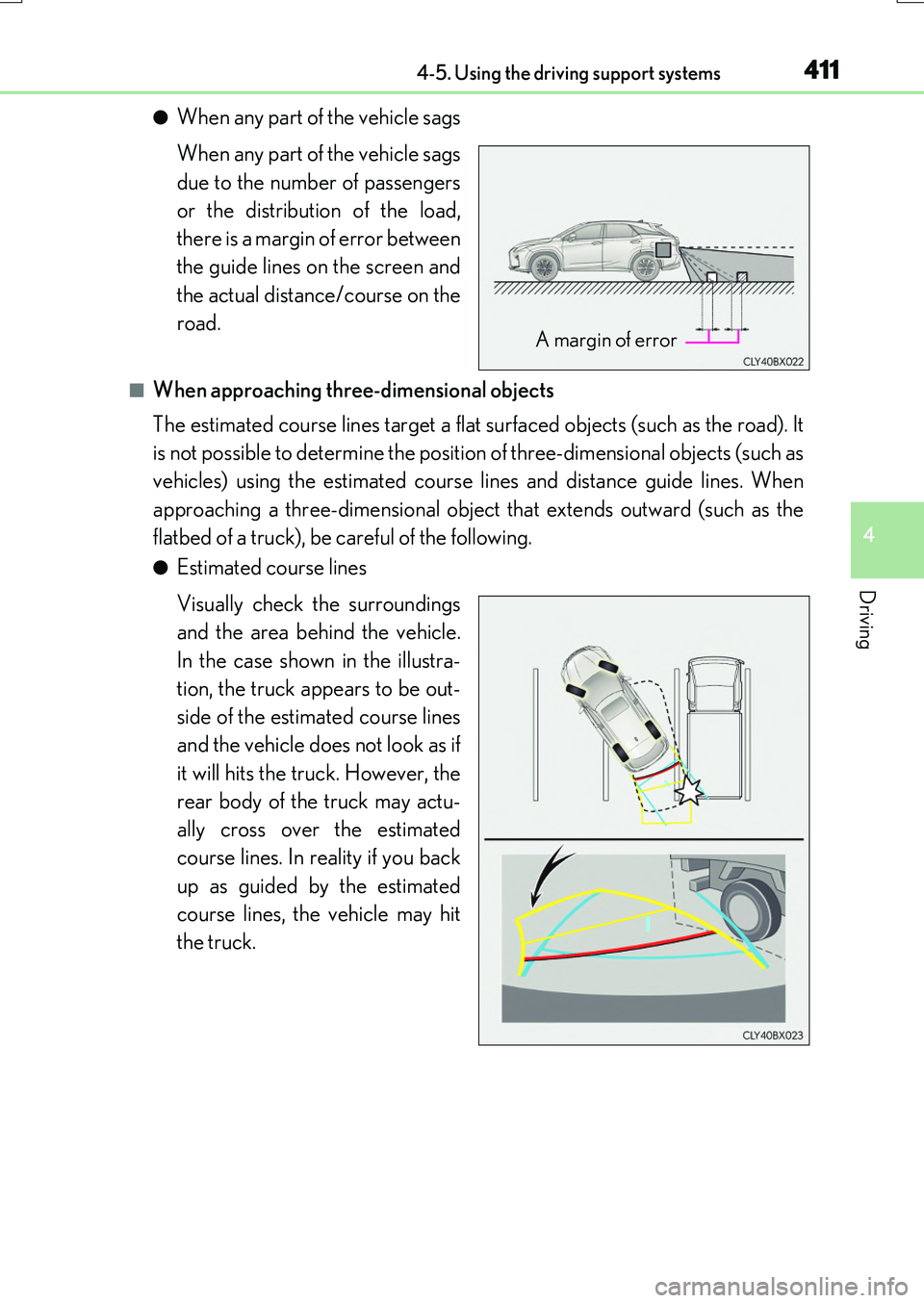
●When any part of the vehicle sags
When any part of the vehicle sags
due to the number of passengers
or the distribution of the load,
there is a margin of error between
the guide lines on the screen and
the actual distance/course on the
road.
■When approaching three-dimensional objects
The estimated course lines target a flat surfaced objects (such as the road). It
is not possible to determine the position of three-dimensional objects (such as
vehicles) using the estimated course lines and distance guide lines. When
approaching a three-dimensional object that extends outward (such as the
flatbed of a truck), be careful of the following.
●Estimated course lines
Visually check the surroundings
and the area behind the vehicle.
In the case shown in the illustra-
tion, the truck appears to be out-
side of the estimated course lines
and the vehicle does not look as if
it will hits the truck. However, the
rear body of the truck may actu-
ally cross over the estimated
course lines. In reality if you back
up as guided by the estimated
course lines, the vehicle may hit
the truck.
A margin of error