Page 164 of 565
Continued163
uuAdjusting the Seats uAdjusting the Seat Positions
Controls
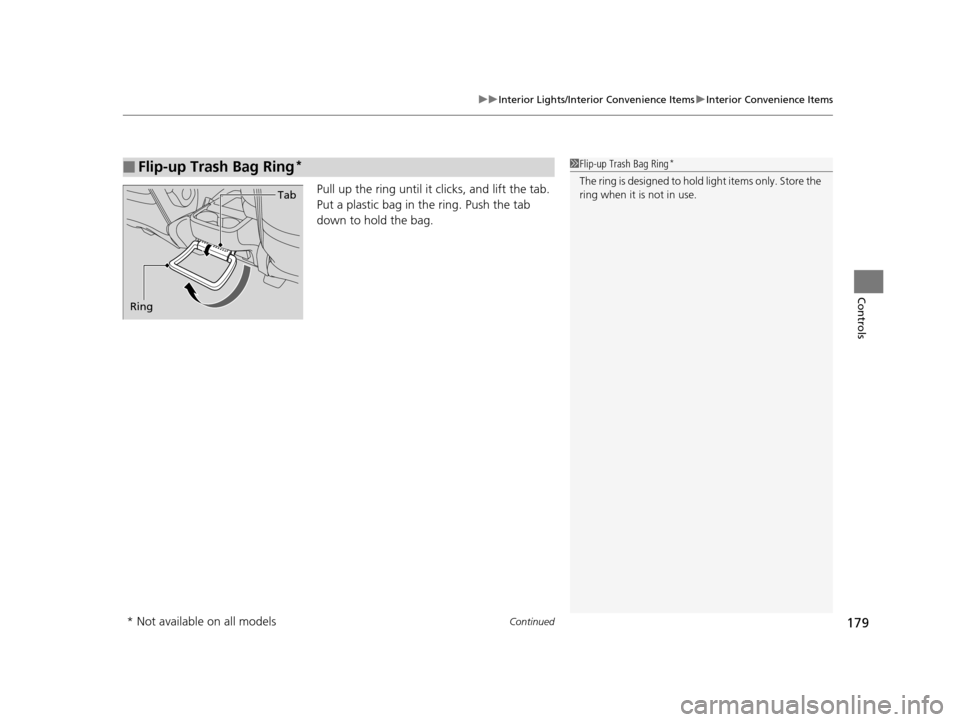
Adjust the driver's seat -back to a comfortable,
upright position, leaving ample space
between your chest and the airbag cover in
the center of the steering wheel.
The front seat passenger should also adjust
their seat-back to a comfortable, upright
position.
Reclining a seat-back so that the shoulder part of the belt no longer rests against the
occupant's chest reduces the protective capa bility of the belt. It also increases the
chance of sliding under the belt in a crash and being seriously injured. The farther a
seat-back is reclined, the gr eater the risk of injury.
■Adjusting the Seat-Backs1Adjusting the Seat-Backs
Do not put a cushion, or other object, between the
seat-back and your back.
Doing so may interfere with proper seat belt or airbag
operation.
If you cannot get far e nough away from the steering
wheel and still reach th e controls, we recommend
that you investigate whether some type of adaptive
equipment may help.
3WARNING
Reclining the seat-back too far can result in
serious injury or death in a crash.
Adjust the seat-back to an upright position,
and sit well back in the seat.
17 US ODYSSEY (KA KC)-31TK86600.book 163 ページ 2016年10月24日 月曜日 午後4時2分
Page 167 of 565
uuAdjusting the Seats uAdjusting the Seat Positions
166
Controls
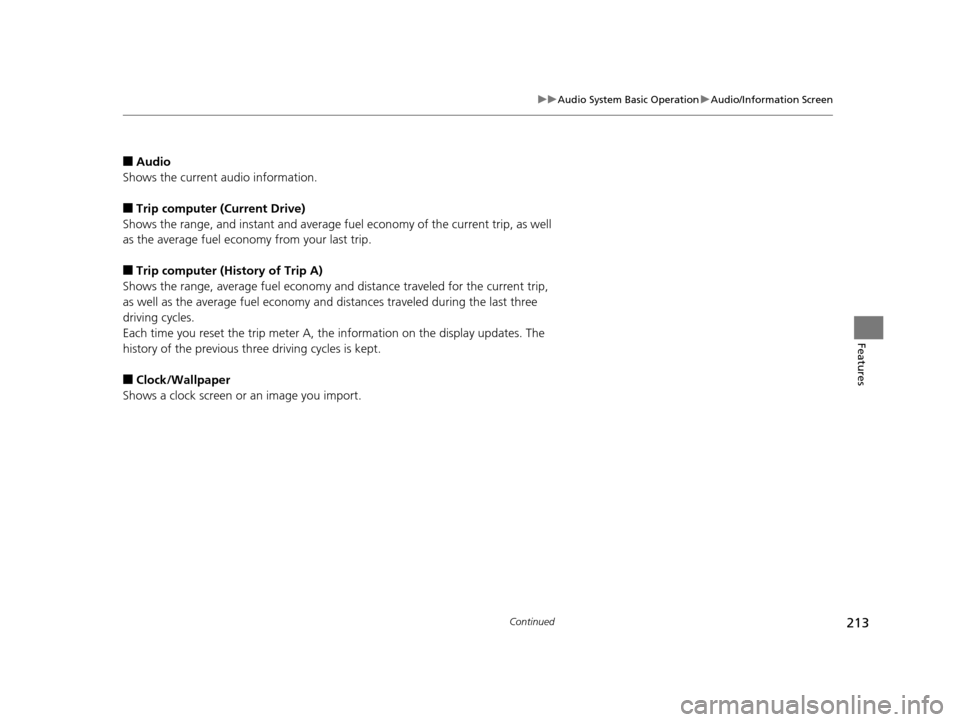
A passenger sitting in the second row/third
row center seating position should adjust the
height of their head restraint to an
appropriate position befo re the vehicle begins
moving.
To raise the head restraint:
Pull it upward.
To lower the head restraint:
Push it down while pressing the release
button.
Head restraints can be removed for cleaning or repair.
To remove a head restraint:
Pull the restraint up as far as it will go. Then push the release button, and pull the
restraint up and out.
To reinstall a head restraint:
Insert the legs back in place, then adjust the head restraint to an appropriate height
while pressing the release butto n. Pull up on the restraint to make sure it is locked
in position.
■Changing the Second Row*/Third Row Center Seat Head
Restraint Positions
■Removing and Reinstalling the Head Restraints1 Removing and Reinstalling the Head Restraints
To remove the third row seat outer head restraints,
fold down the seat-back first.
2 Adjusting the passenger’s manual seats
P. 162
3WARNING
Failure to reinstall, or correctly reinstall, the
head restraints can result in severe injury
during a crash.
Always replace the he ad restraints before
driving.
* Not available on all models
17 US ODYSSEY (KA KC)-31TK86600.book 166 ページ 2016年10月24日 月曜日 午後4時2分
Page 168 of 565
Continued167
uuAdjusting the Seats uAdjusting the Seat Positions
Controls
After all occupants have adjusted their s eats and head restraints, and put on their
seat belts, it is very important that they continue to sit upright, well back in their
seats, with their feet on the floor, until the vehicle is safe ly parked and the engine is
off.
Sitting improperly can increase the chance of injury during a crash. For example, if
an occupant slouches, lies down, turns sideways, sits forward, leans forward or
sideways, or puts one or both feet up, the chance of injury during a crash is greatly
increased.
In addition, an occupant who is out of posi tion in the front seat can be seriously or
fatally injured in a crash by striking interior parts of the vehicle or being struck by an
inflating front airbag.
■Maintain a Proper Sitting Position1 Maintain a Proper Sitting Position
3WARNING
Sitting improperly or out of position can
result in serious injury or death in a crash.
Always sit upright, well back in the seat,
with your feet on the floor.
17 US ODYSSEY (KA KC)-31TK86600.book 167 ページ 2016年10月24日 月曜日 午後4時2分
Page 179 of 565

178
uuInterior Lights/Interior Convenience Items uInterior Convenience Items
Controls
Interior Convenience Items
Pull the handle to open the glove box. You
can lock the glove box with the master key or
built-in key
*.
Pull up on the lever to open the console
compartment.
■Removing the center console
Pull up the handle on the front lower side and
unlock the console from the floor. Raise it
forward to remove.
■Glove Box1 Glove Box
3WARNING
An open glove box can cause serious injury
to your passenger in a crash, even if the
passenger is wearing the seat belt.
Always keep the glove box closed while
driving.
■Removable Center Console*1Removable Center Console*
When you reinstall the center console, place the rear
side on the floor first, and align the marks on the
sides with the marks on the floor. Push the center
console down and lock it. M ake sure it is securely
latched before driving.
Marks
Handle
Lever
* Not available on all models
17 US ODYSSEY (KA KC)-31TK86600.book 178 ページ 2016年10月24日 月曜日 午後4時2分
Page 180 of 565
Continued179
uuInterior Lights/Interior Convenience Items uInterior Convenience Items
Controls
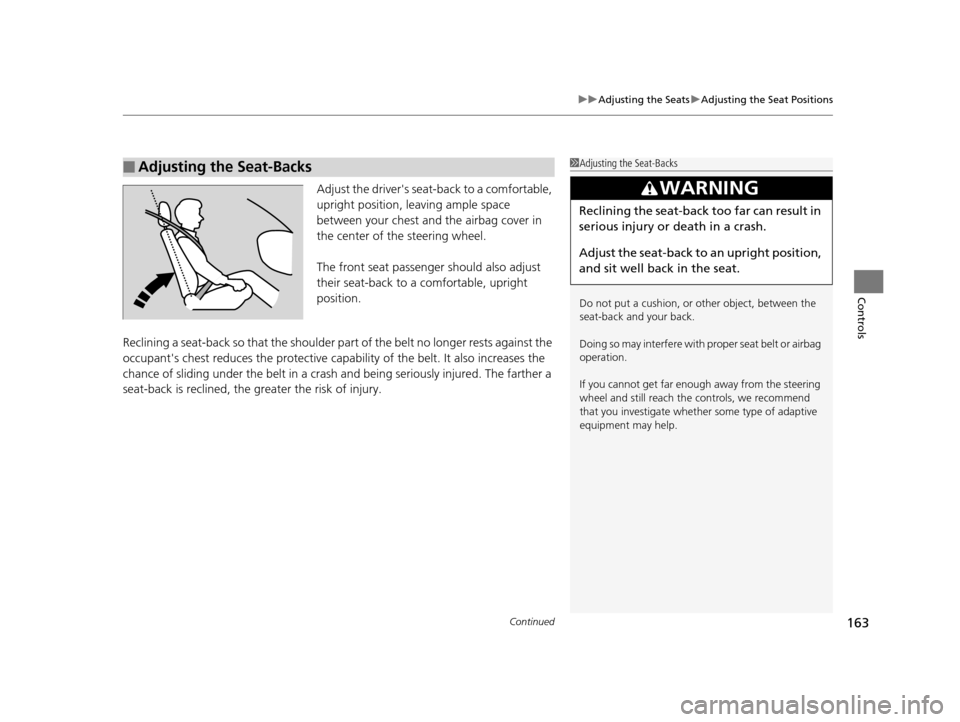
Pull up the ring until it clicks, and lift the tab.
Put a plastic bag in th e ring. Push the tab
down to hold the bag.
■Flip-up Trash Bag Ring*1 Flip-up Trash Bag Ring*
The ring is designed to hold light items only. Store the
ring when it is not in use.
Ring Tab
* Not available on all models
17 US ODYSSEY (KA KC)-31TK86600.book 179 ページ 2016年10月24日 月曜日
午後4時2分
Page 214 of 565
213
uuAudio System Basic Operation uAudio/Information Screen
Continued
Features
■Audio
Shows the current audio information.
■Trip computer (Current Drive)
Shows the range, and instant and average fuel economy of the current trip, as well
as the average fuel economy from your last trip.
■Trip computer (History of Trip A)
Shows the range, average fuel economy and distance traveled for the current trip,
as well as the average fuel economy and distances traveled during the last three
driving cycles.
Each time you reset the trip meter A, th e information on the display updates. The
history of the previous three driving cycles is kept.
■Clock/Wallpaper
Shows a clock screen or an image you import.
17 US ODYSSEY (KA KC)-31TK86600.book 213 ページ 2016年10月24日 月曜日 午後4時2分
Page 215 of 565
uuAudio System Basic Operation uAudio/Information Screen
214
Features
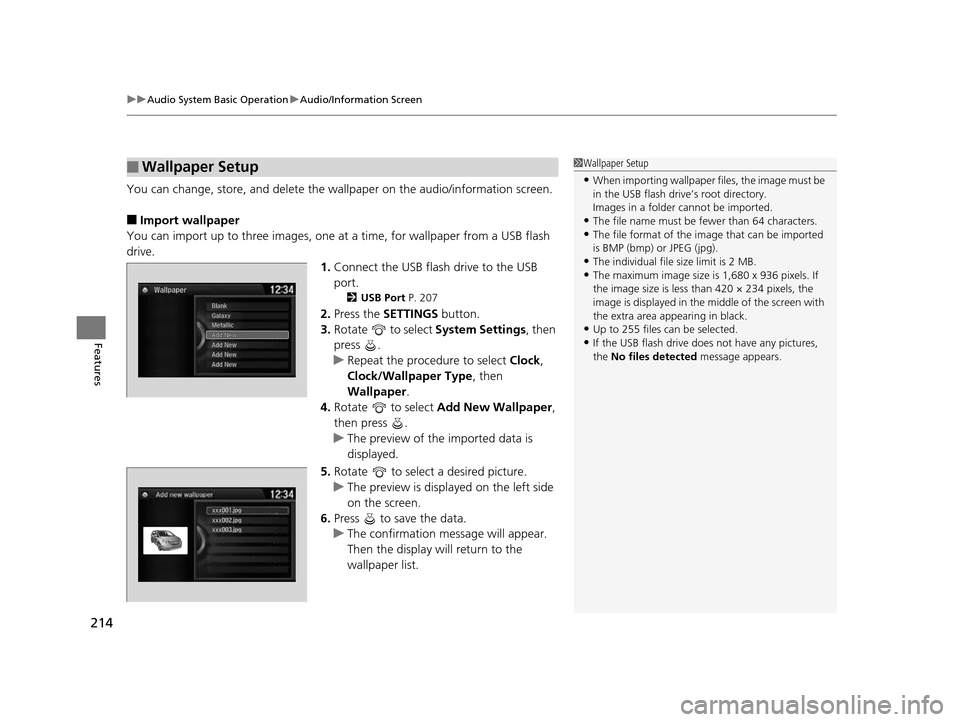
You can change, store, and delete the wa llpaper on the audio/information screen.
■Import wallpaper
You can import up to three images, one at a time, for wallpaper from a USB flash
drive.
1.Connect the USB flash drive to the USB
port.
2 USB Port P. 207
2.Press the SETTINGS button.
3. Rotate to select System Settings, then
press .
u Repeat the procedure to select Clock,
Clock/Wallpaper Type , then
Wallpaper .
4. Rotate to select Add New Wallpaper ,
then press .
u The preview of the imported data is
displayed.
5. Rotate to select a desired picture.
u The preview is displayed on the left side
on the screen.
6. Press to save the data.
u The confirmation message will appear.
Then the display will return to the
wallpaper list.
■Wallpaper Setup1Wallpaper Setup
•When importing wallpaper files, the image must be
in the USB flash drive’s root directory.
Images in a folder cannot be imported.
•The file name must be fewer than 64 characters.•The file format of the im age that can be imported
is BMP (bmp) or JPEG (jpg).
•The individual file size limit is 2 MB.•The maximum image size is 1,680 x 936 pixels. If
the image size is less than 420 × 234 pixels, the
image is displayed in the middle of the screen with
the extra area appearing in black.
•Up to 255 files can be selected.
•If the USB flash drive doe s not have any pictures,
the No files detected message appears.
xxx001.jpg
xxx002.jpg
xxx003.jpg
17 US ODYSSEY (KA KC)-31TK86600.book 214 ページ 2016年10月24日 月曜日 午後4時2分
Page 220 of 565
Continued219
uuAudio System Basic Operation uPlaying AM/FM Radio
Features
Provides text data information related to your selected RDS-capable FM station.
■To find an RDS station from Station List
1. Press while listening to an FM station.
2. Rotate to select the station, then press .
■Manual update
Updates your available st ation list at any time.
1. Press while listening to an FM station.
2. Rotate to select Refresh, then press .
■Radio Data System (RDS)1Playing AM/FM Radio
The ST indicator appears on the display indicating
stereo FM broadcasts.
Stereo reproduction in AM is not available.
Switching the Audio Mode
Press the SOURCE button on the steering wheel.
2 Audio Remote Controls P. 210
You can also switch the mode by pressing the MENU
button and selecting Change Source on the MENU
screen.
You can store 6 AM stations and 12 FM stations into
the preset button memory. FM1 and FM2 let you
store 6 stations each.
1 Radio Data System (RDS)
When you select an RDS-capable FM station, the RDS
automatically turns on, and the frequency display
changes to the station name. However, when the
signals of that station become weak, the display
changes from the statio n name to the frequency.
17 US ODYSSEY (KA KC)-31TK86600.book 219 ページ 2016年10月24日 月曜日 午後4時2分