Page 299 of 565
298
uuCustomized Features u
Features
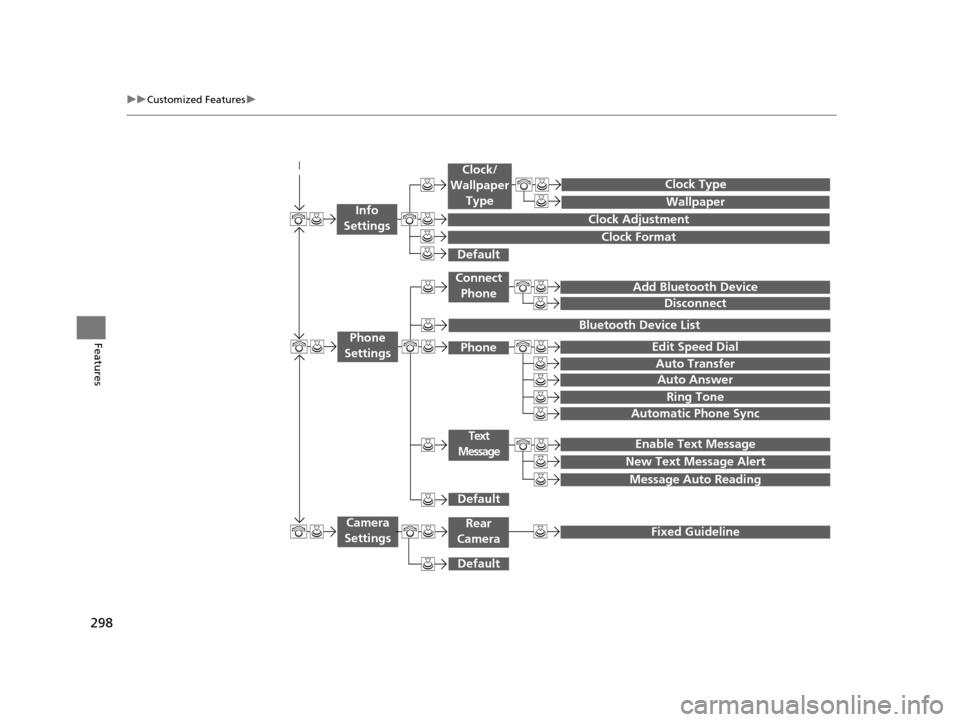
Add Bluetooth Device
Disconnect
Edit Speed Dial
Auto Transfer
Auto Answer
Ring Tone
Automatic Phone Sync
Default
Enable Text Message
Message Auto Reading
New Text Message Alert
Phone
Settings
Connect
Phone
Text
Message
Bluetooth Device List
Phone
Default
Fixed GuidelineCamera
Settings
Wallpaper
Clock Type
Default
Clock Adjustment
Clock Format
Clock/
Wallpaper Type
Info
Settings
Rear
Camera
17 US ODYSSEY (KA KC)-31TK86600.book 298 ページ 2016年10月24日 月曜日 午後4時2分
Page 300 of 565
299
uuCustomized Features u
Continued
Features
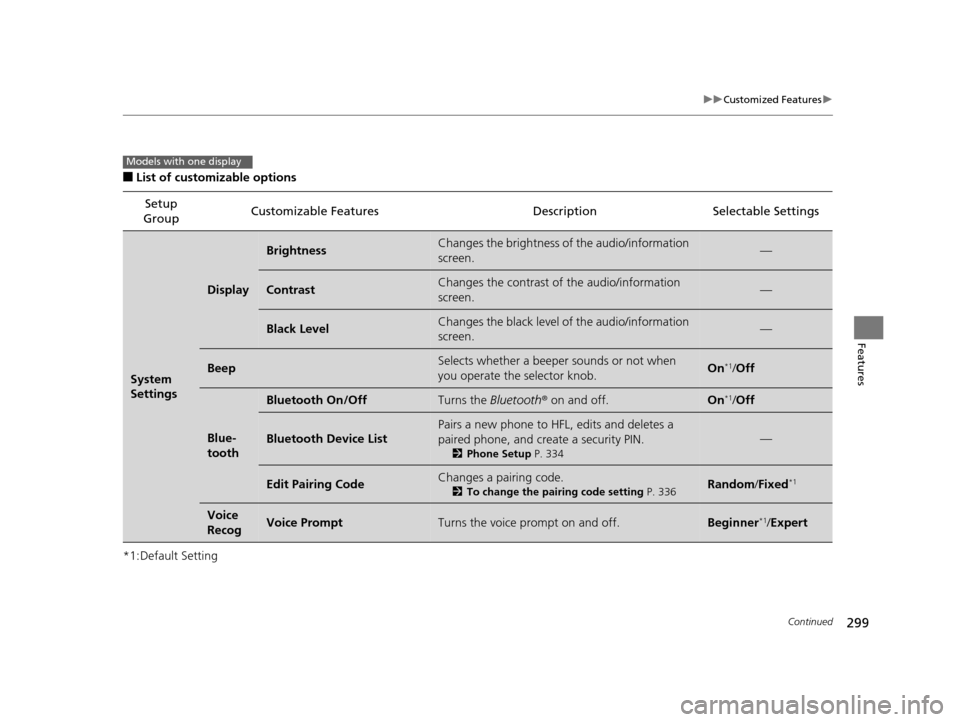
■List of customizable options
*1:Default Setting Setup
Group Customizable Features Description Selectable Settings
System
Settings
Display
BrightnessChanges the brightness of the audio/information
screen.—
ContrastChanges the contrast of the audio/information
screen.—
Black LevelChanges the black level of the audio/information
screen.—
BeepSelects whether a beeper
sounds or not when
you operate the selector knob.On*1/ Off
Blue-
tooth
Bluetooth On/OffTurns the Bluetooth® on and off.On*1/Off
Bluetooth Device List
Pairs a new phone to HFL, edits and deletes a
paired phone, and create a security PIN.
2 Phone Setup P. 334
—
Edit Pairing CodeChanges a pairing code.
2To change the pairing code setting P. 336Random/Fixed*1
Voice
RecogVoice PromptTurns the voice prompt on and off.Beginner*1/ Expert
Models with one display
17 US ODYSSEY (KA KC)-31TK86600.book 299 ページ 2016年10月24日 月曜日 午後4時2分
Page 306 of 565
305
uuCustomized Features u
Continued
Features
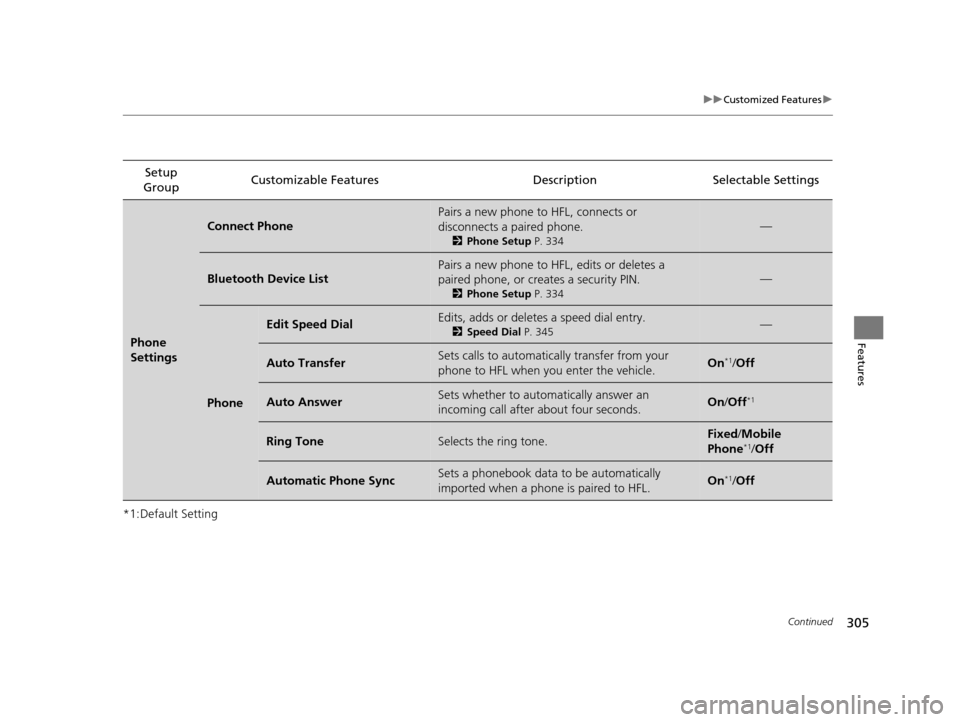
*1:Default SettingSetup
Group Customizable Features Description Selectable Settings
Phone
Settings
Connect Phone
Pairs a new phone to HFL, connects or
disconnects a paired phone.
2
Phone Setup P. 334
—
Bluetooth Device List
Pairs a new phone to HFL, edits or deletes a
paired phone, or creates a security PIN.
2Phone Setup P. 334
—
Phone
Edit Speed DialEdits, adds or deletes a speed dial entry.
2Speed Dial P. 345—
Auto TransferSets calls to automatically transfer from your
phone to HFL when you enter the vehicle.On*1/Off
Auto AnswerSets whether to automatically answer an
incoming call after about four seconds.On /Off*1
Ring ToneSelects the ring tone.Fixed /Mobile
Phone*1/ Off
Automatic Phone SyncSets a phonebook data to be automatically
imported when a phone is paired to HFL.On*1/Off
17 US ODYSSEY (KA KC)-31TK86600.book 305 ページ 2016年10月24日 月曜日 午後4時2分
Page 309 of 565
308
uuCustomized Features u
Features
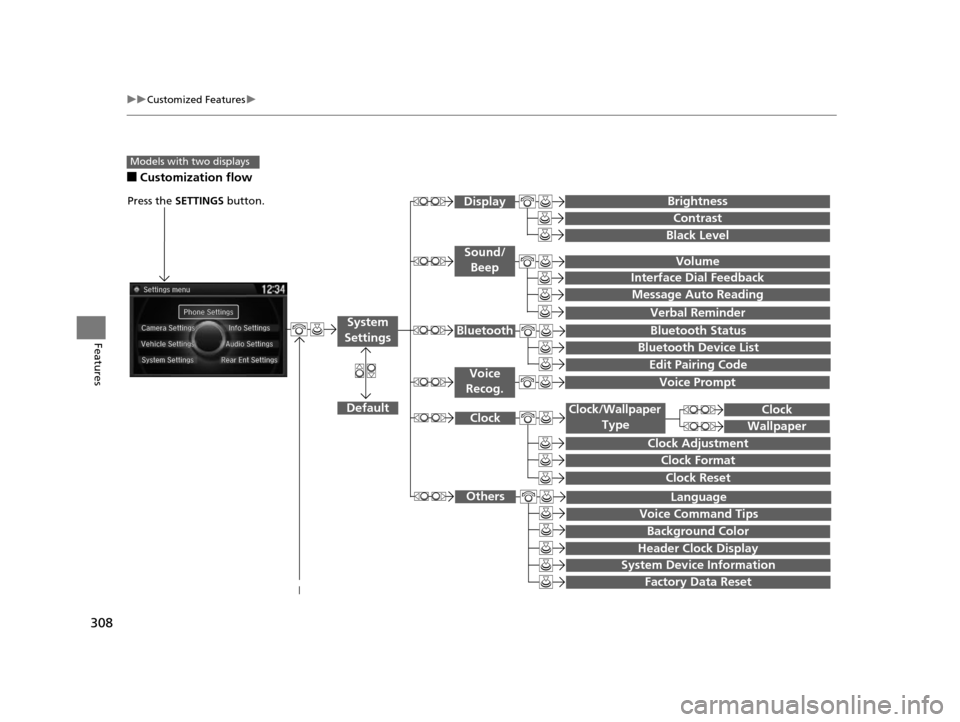
■Customization flow
Models with two displays
Press the SETTINGS button.
Voice Prompt
Message Auto Reading
Volume
Interface Dial Feedback
Verbal Reminder
Brightness
Contrast
Black Level
Bluetooth Status
Bluetooth Device List
Edit Pairing Code
Default
Sound/Beep
Display
System
SettingsBluetooth
Voice
Recog.
System Device Information
Factory Data Reset
Background Color
Header Clock Display
Clock Reset
Clock
Clock Adjustment
Clock Format
Clock
Language
Voice Command Tips
Others
Wallpaper
Clock/Wallpaper
Type
17 US ODYSSEY (KA KC)-31TK86600.book 308 ページ 2016年10月24日 月曜日 午後4時2分
Page 312 of 565
311
uuCustomized Features u
Continued
Features
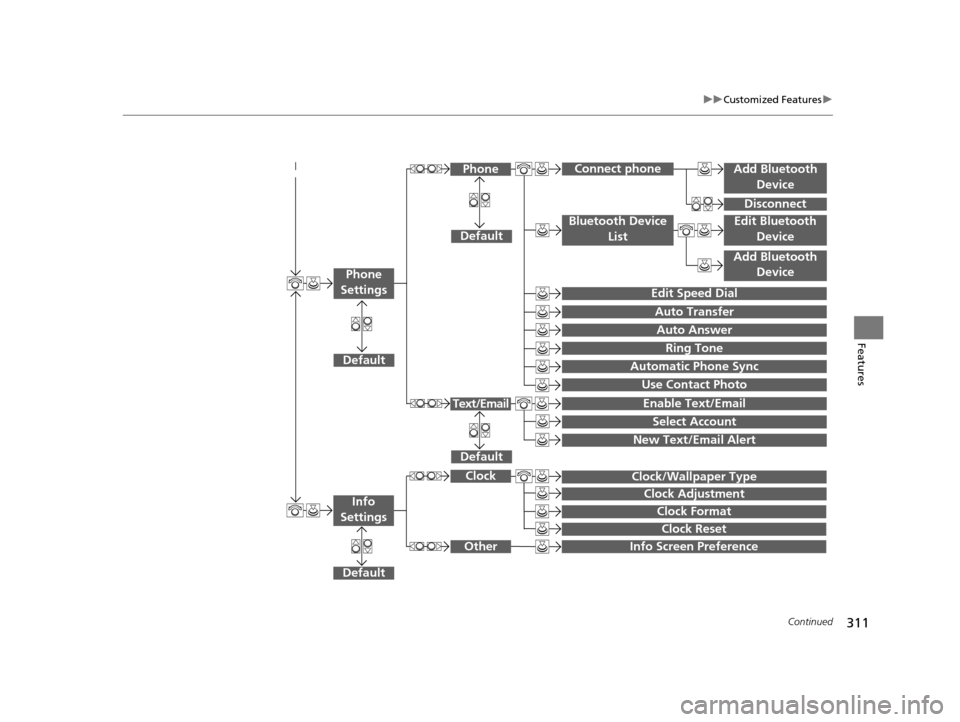
Add Bluetooth
Device
Disconnect
Default
PhoneConnect phone
Edit Bluetooth Device
Add Bluetooth Device
Bluetooth Device
List
Edit Speed Dial
Auto Transfer
Auto Answer
Ring Tone
Automatic Phone Sync
Use Contact Photo
Default
Default
Enable Text/Email
Select Account
New Text/Email Alert
Text/Email
Phone
Settings
Clock Reset
Info Screen Preference
Clock Format
Clock/Wallpaper Type
Clock Adjustment
Clock
Default
Other
Info
Settings
17 US ODYSSEY (KA KC)-31TK86600.book 311 ページ 2016年10月24日 月曜日 午後4時2分
Page 313 of 565
312
uuCustomized Features u
Features
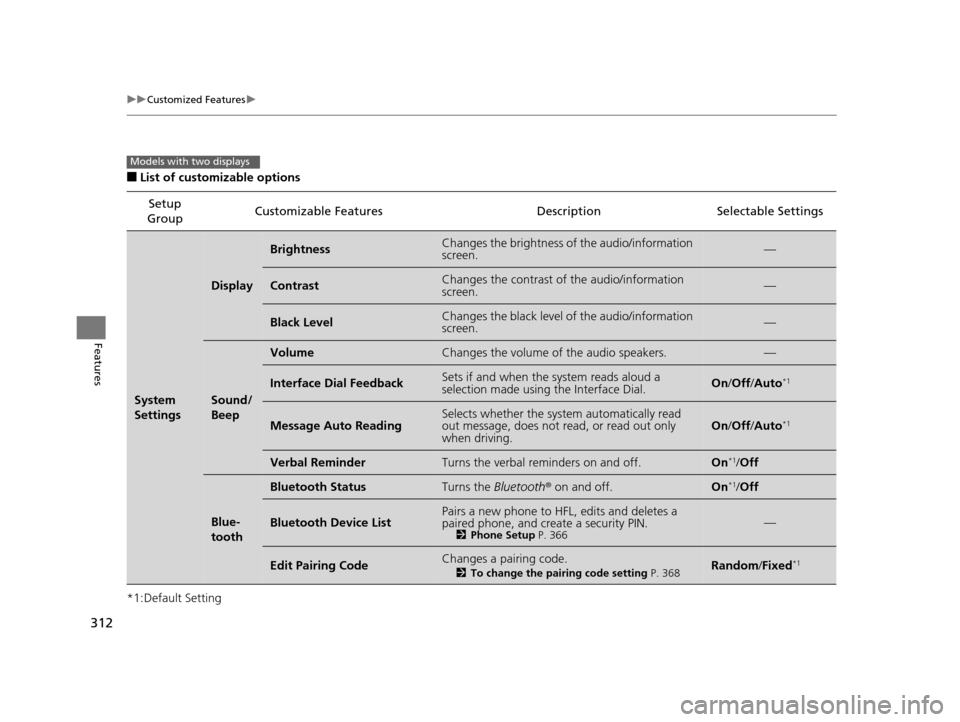
■List of customizable options
*1:Default Setting Setup
Group Customizable Features Descri
ption Selectable Settings
System
Settings
Display
BrightnessChanges the brightness of the audio/information
screen.—
ContrastChanges the contrast of the audio/information
screen.—
Black LevelChanges the black level of the audio/information
screen.—
Sound/
Beep
VolumeChanges the volume of the audio speakers.—
Interface Dial FeedbackSets if and when the system reads aloud a
selection made using the Interface Dial.On/Off /Auto*1
Message Auto ReadingSelects whether the system automatically read
out message, does not read, or read out only
when driving.On /Off /Auto*1
Verbal ReminderTurns the verbal reminders on and off.On*1/Off
Blue-
tooth
Bluetooth StatusTurns the Bluetooth ® on and off.On*1/Off
Bluetooth Device ListPairs a new phone to HFL, edits and deletes a
paired phone, and create a security PIN.
2 Phone Setup P. 366—
Edit Pairing CodeChanges a pairing code.
2To change the pairing code setting P. 368Random/Fixed*1
Models with two displays
17 US ODYSSEY (KA KC)-31TK86600.book 312 ページ 2016年10月24日 月曜日 午後4時2分
Page 323 of 565
322
uuCustomized Features u
Features
*1:Default SettingSetup
Group Customizable Features Descri
ption Selectable Settings
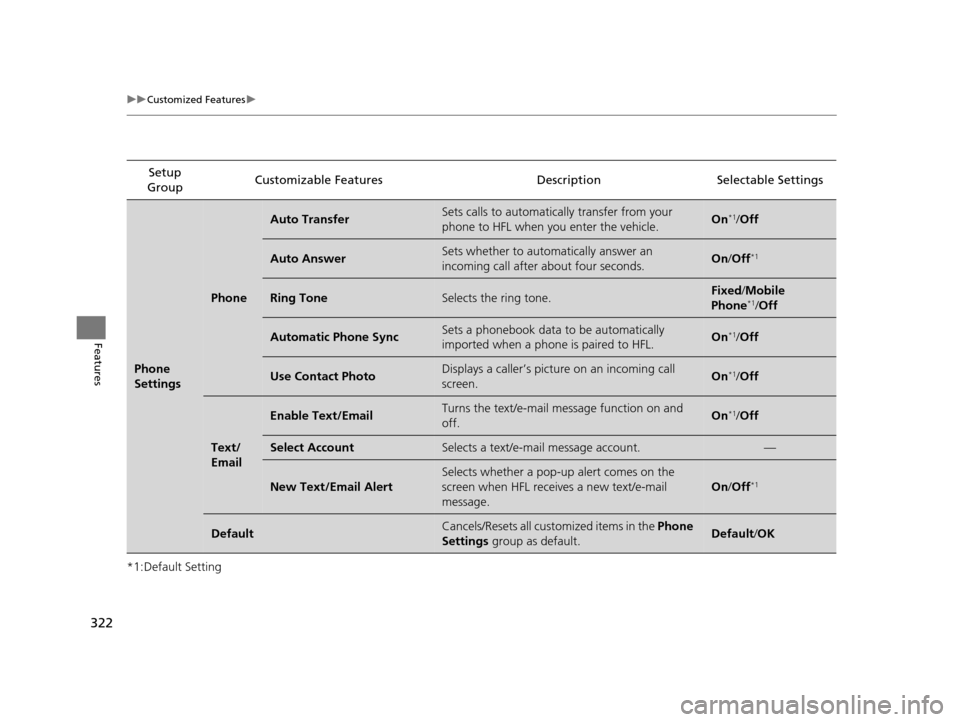
Phone
Settings
Phone
Auto TransferSets calls to automatically transfer from your
phone to HFL when you enter the vehicle.On*1/Off
Auto AnswerSets whether to automatically answer an
incoming call after about four seconds.On /Off*1
Ring ToneSelects the ring tone.Fixed /Mobile
Phone*1/ Off
Automatic Phone SyncSets a phonebook data to be automatically
imported when a phone is paired to HFL.On*1/Off
Use Contact PhotoDisplays a caller’s picture on an incoming call
screen.On*1/Off
Text/
Email
Enable Text/EmailTurns the text/e-mail me ssage function on and
off.On*1/ Off
Select AccountSelects a text/e-mail message account.—
New Text/Email Alert
Selects whether a pop-up alert comes on the
screen when HFL receiv es a new text/e-mail
message.
On /Off*1
DefaultCancels/Resets all customized items in the Phone
Settings group as default.Default/OK
17 US ODYSSEY (KA KC)-31TK86600.book 322 ページ 2016年10月24日 月曜日 午後4時2分
Page 328 of 565
327Continued
Features
Bluetooth® HandsFreeLink ®
See the Navigation System Manual for how to operate the Bluetooth® HandsFreeLink® .
Bluetooth ® HandsFreeLink ® (HFL) allows you to place and receive phone calls using
your vehicle’s audio system, without handling your cell phone.
Using HFL
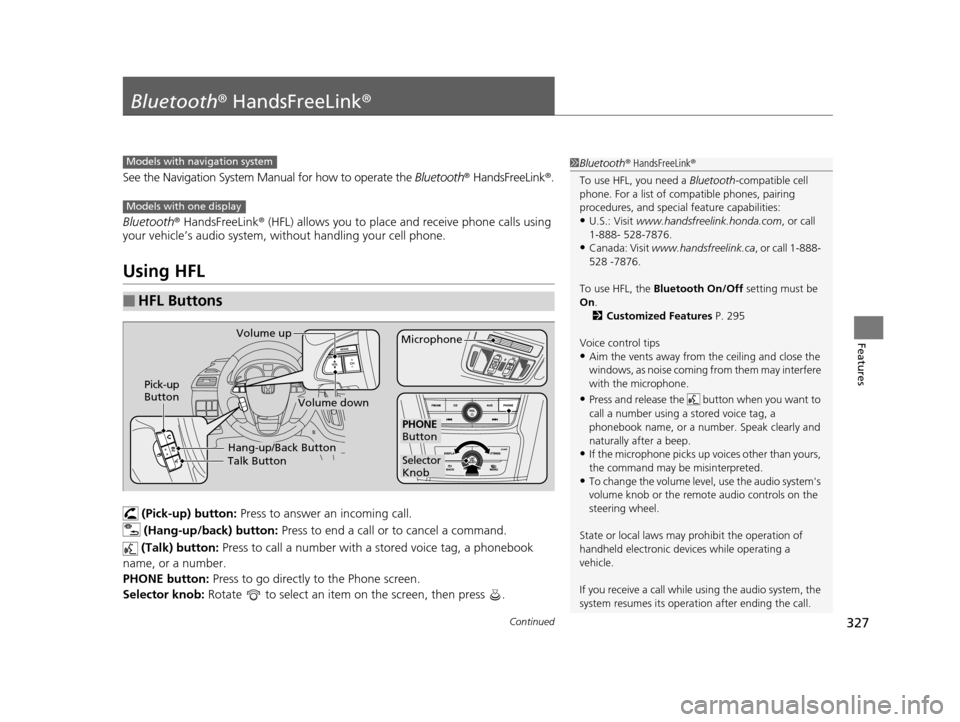
(Pick-up) button: Press to answer an incoming call.
(Hang-up/back) button: Press to end a call or to cancel a command.
(Talk) button: Press to call a number with a stored voice tag, a phonebook
name, or a number.
PHONE button: Press to go directly to the Phone screen.
Selector knob: Rotate to select an item on the screen, then press .
■HFL Buttons
1Bluetooth ® HandsFreeLink ®
To use HFL, you need a Bluetooth-compatible cell
phone. For a list of compatible phones, pairing
procedures, and special feature capabilities:
•U.S.: Visit www.handsfreelink.honda.com , or call
1-888- 528-7876.
•Canada: Visit www.handsfreelink.ca , or call 1-888-
528 -7876.
To use HFL, the Bluetooth On/Off setting must be
On .
2 Customized Features P. 295
Voice control tips
•Aim the vents away from the ceiling and close the
windows, as noise coming fr om them may interfere
with the microphone.
•Press and release the but ton when you want to
call a number using a stored voice tag, a
phonebook name, or a numbe r. Speak clearly and
naturally after a beep.
•If the microphone picks up vo ices other than yours,
the command may be misinterpreted.
•To change the volume level, use the audio system's
volume knob or the remote audio controls on the
steering wheel.
State or local laws may pr ohibit the operation of
handheld electronic devi ces while operating a
vehicle.
If you receive a call while using the audio system, the
system resumes its operati on after ending the call.
Models with navigation system
Models with one display
Talk ButtonVolume up
MicrophoneHang-up/Back Button
Pick-up
Button
Volume down
Selector
Knob
PHONE
Button
17 US ODYSSEY (KA KC)-31TK86600.book 327 ページ 2016年10月24日 月曜日 午後4時2分