2017 HONDA ODYSSEY Brakes
[x] Cancel search: BrakesPage 23 of 565

22
Quick Reference Guide
What to Do If
*1:Models with the smart entry system have an ENGINE START/STOP button instead of an ignition switch.
The ignition switch does
not turn from
(0 to (q*1.
Why?
●The steering wheel may be locked.
●Try to turn the steering wheel left and
right while turning the ignition key
*.
●Move the steering wheel left and right
while pressing the ENGINE START/STOP
button
* at the same time.
The ignition switch does
not turn from
(q to (0*1
and I cannot remove the
key. Why?
The shift lever should be moved to (P.
Why does the brake pedal
pulsate slightly when
applying the brakes?This can occur when the ABS activates, and does not indicate a
problem. Apply firm, steady pressure on the brake pedal. Never
pump the brake pedal.
2 Anti-lock Brake System (ABS) (P438)
17 US ODYSSEY (KA KC)-31TK86600.book 22 ページ 2016年10月24日 月曜日 午後4時2分
Page 90 of 565

89
uuIndicators uMulti-Information Display Warn ing and Information Messages*
Continued
Instrument Panel
MessageConditionExplanation
●Flashes when the system senses a likely collision with
a vehicle in front of you.●Take appropriate action to prev ent a collision (apply the
brakes, change lanes, etc.).
2 Forward Collision Warning (FCW)* P. 418
●Appears when your vehicle is too close to the traffic
lane lines. The beeper sounds.●Take appropriate action to keep your vehicle within the
lane lines.
2 Lane Departure Warning (LDW)* P. 422
●Appears while you are customizing the settings and
the shift lever is moved out of
(P.2Customized Features P. 99
●Appears if you try to go to CUSTOMIZE SETTINGS
from the multi-information display while the audio/
information screen shows the Vehicle Settings
menu.●Select either display to customize a setting. You cannot
have CUSTOMIZE SETTINGS displayed on the multi-
information display and Vehicle Settings on the audio/
information screen simultaneously.
2 Customized Features P. 99, 295
●Appears when you set the power mode to
ACCESSORY or ON.
2Starting the Engine P. 407
●Appears when the steering wheel is locked.●Move the steering wheel left and right while pressing
the ENGINE START/STOP button.
* Not available on all models
17 US ODYSSEY (KA KC)-31TK86600.book 89 ページ 2016年10月24日 月曜日 午後4時2分
Page 404 of 565
403
uuTowing a Trailer uTowing Preparation
Continued
Driving
■Trailer brakes
Recommended for any trailer with a total weight of 1,000 lbs (450 kg) or more:
There are two common types of trailer bra kes: surge and electric. Surge brakes are
common for boat trailers, since the brakes will get wet. If you choose electric brakes,
be sure they are electronically actuated. Do not attempt to attach trailer brakes to
your vehicle's hydraulic system, as it wi ll lower braking effectiveness and create a
potential hazard.
■Trailer light
Trailer lights and equipment must comply with federal, state, province/territory, and
local regulations. Check with your local trailer sales or rental agency for the
requirements in the area where you plan to tow.
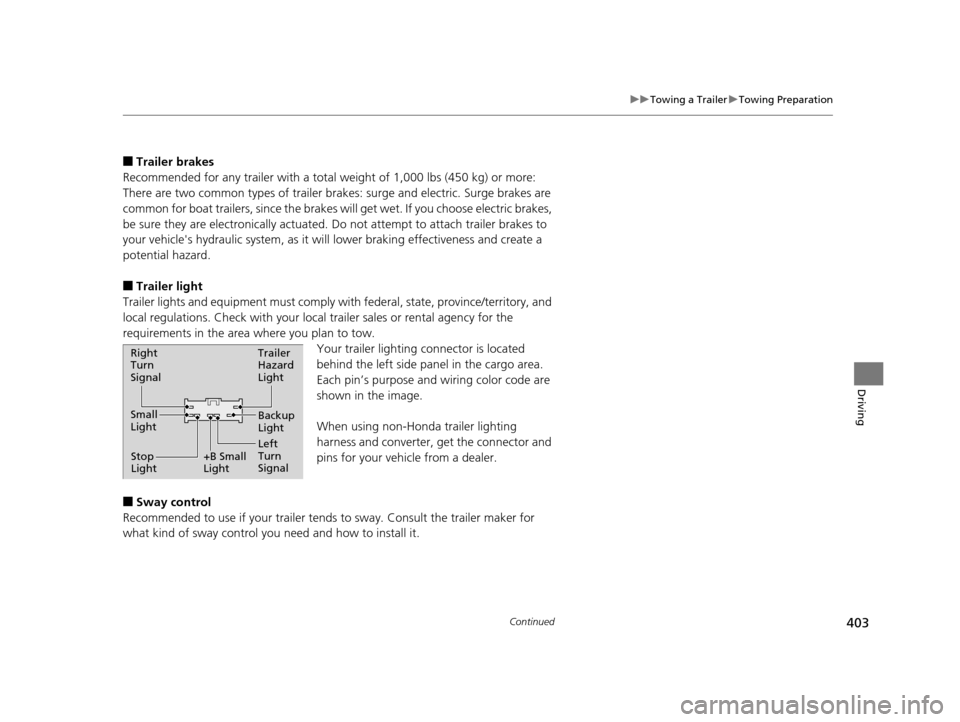
Your trailer lighting connector is located
behind the left side panel in the cargo area.
Each pin’s purpose and wiring color code are
shown in the image.
When using non-Honda trailer lighting
harness and converter, get the connector and
pins for your vehicle from a dealer.
■Sway control
Recommended to use if your trailer tends to sway. Consult the trailer maker for
what kind of sway control you need and how to install it.
Right
Turn
Signal
Small
Light
Stop
Light +B Small
LightTrailer
Hazard
Light
Left
Turn
SignalBackup
Light
17 US ODYSSEY (KA KC)-31TK86600.book 403 ページ 2016年10月24日 月曜日
午後4時2分
Page 406 of 565
405
uuTowing a Trailer uDriving Safely with a Trailer
Continued
Driving
Driving Safely with a Trailer
• Have the trailer properly servic ed and keep it in good condition.
• Make sure that all the weights and load in the vehicle and trailer are within limits.
2Towing Load Limits P. 401
•Securely attach the hitch, safety chains, and other necessary parts to the trailer.
• Securely store all the items in and on the tra iler so that they do not shift while
driving.
• Check if the lights and brakes on the trailer are working properly.
• Check the pressure of the trail er tires, including the spare.
• Drive slower than normal.
• Obey posted speed limits for vehicles with trailer.
• Use the
(D position when towing a trailer on level roads.
• Turn more slowly and with a wider turning arc than normal.
• Allow more time and distance for braking.
• Do not brake or turn suddenly.
■Things You Need To Know Before Towing a Trailer
■Towing Speeds and Gears
■Turning and Braking
1Driving Safely with a Trailer
Parking
In addition to the normal precautions, place wheel
chocks at each of the trailer’s tires.
When towing a trailer, we recommend that you carry
a full-size spare wheel and tire for your vehicle and
trailer. If you use the compact spare tire that came
with your vehicle, it coul d adversely affect vehicle
handling. 2 Specifications P. 543
2 Changing a Flat Tire P. 511
Remember to unhitch the tra iler before changing a
flat tire. Ask the trailer sales or rental agency where
and how to store the trailer’s spare tire.
17 US ODYSSEY (KA KC)-31TK86600.book 405 ページ 2016年10月24日 月曜日 午後4時2分
Page 419 of 565
418
uuWhen Driving uForward Collision Warning (FCW)*
Driving
Forward Collision Warning (FCW)*
Alerts you when it determines that there is a possibility that your vehicle may collide
with a vehicle detected in front of yours.
If the system determines a collision is possible, it gives both visual and audible alerts.
u Take appropriate action to prevent a col lision (apply the brakes, change lanes,
etc.).
■How the system works
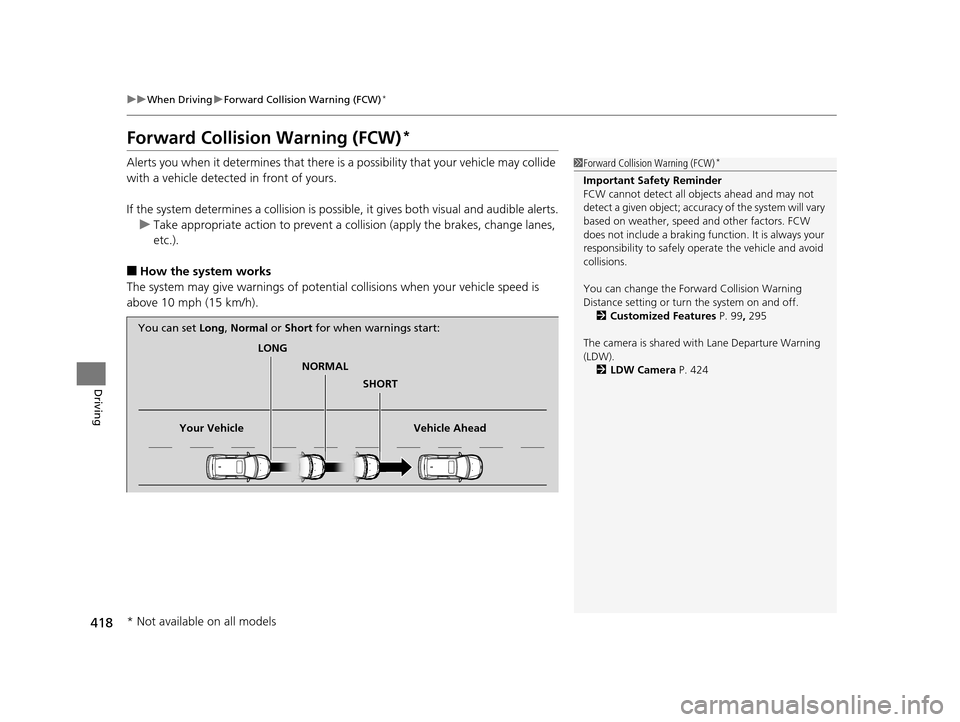
The system may give warnings of potential collisions when your vehicle speed is
above 10 mph (15 km/h).
1 Forward Collision Warning (FCW)*
Important Safety Reminder
FCW cannot detect all ob jects ahead and may not
detect a given object; accura cy of the system will vary
based on weather, speed and other factors. FCW
does not include a braking func tion. It is always your
responsibility to sa fely operate the vehicle and avoid
collisions.
You can change the Forward Collision Warning
Distance setting or turn the system on and off. 2 Customized Features P. 99, 295
The camera is shared with Lane Departure Warning
(LDW). 2 LDW Camera P. 424
LONG
NORMAL SHORT
Your Vehicle Vehicle Ahead
You can set
Long, Normal or Short for when warnings start:
* Not available on all models
17 US ODYSSEY (KA KC)-31TK86600.book 418 ページ 2016年10月24日 月曜日 午後4時2分
Page 422 of 565
421
uuWhen Driving uForward Collision Warning (FCW)*
Driving
FCW may not activate or may not detect a ve hicle in front of your vehicle, and may
activate even when you are aware of a ve hicle ahead of you, or when there is no
vehicle ahead under the following conditions.
■FCW Limitations
Condition
●The distance between your vehicle and the vehicle ahead of you is too short.●A vehicle cuts in front of you at a slow speed, and it brakes suddenly.●A vehicle suddenly crosses in front of you.●When either your vehicle or the vehicle ahead of you a ccelerates rapidly.●The vehicle ahead of you is a motorcycle, a small vehicle, or a unique vehicle such as a
tractor.
●When you drive off-road or on a mountain road, or curved and winding road for an
extended period that makes it difficult for the camera to properly dete ct a vehicle in front
of you.
●When there are pedestrians or an imals in front of your vehicle.●When you drive in bad weather (rain, fog, etc.).●A heavy load in the rear or modificati ons to the suspension tilts your vehicle.●An abnormal tire condition is detected (wrong tire size, flat tire, etc.).●When the windshield is blocked by dirt, mud, leaves, wet snow, etc.●When the temperature inside the system is high.●A sudden change between light and dark such as an entrance or exit of a tunnel.●You drive into the sunlight (e.g. at dawn or dusk).●When the windshield is dirty or cloudy.●When streetlights are perceived as the ta illight of a vehicle in front of yours.●When driving at night, the vehi cle ahead of you is running with either taillight bulb burned
out.
●When you drive in the shadows of trees, buildings, etc.●When your vehicle is towing a trailer.
17 US ODYSSEY (KA KC)-31TK86600.book 421 ページ 2016年10月24日 月曜日 午後4時2分
Page 427 of 565

426
uuWhen Driving uVehicle Stability Assist (VSA® ), aka Electronic Stability Control (ESC), System
Driving
Vehicle Stability Assist (VSA®), aka Electronic
Stability Control (ESC), System
VSA ® helps to stabilize the vehicle during cornering if the vehicle turns more or less
than what was intended. It also assists in maintaining traction on slippery surfaces.
It does so by regulating engine output and selectively applying the brakes.
When VSA® activates, you may notice that the
engine does not respond to the accelerator.
You may also notice some noise from the
hydraulic system. You will also see the
indicator blink.
■VSA ® Operation
1 Vehicle Stability Assist (VSA ®), aka Electronic Stability Control
(ESC), System
The VSA ® may not function properl y if tire type and
size are mixed. Make sure to use the same size and
type of tire, and the air pressures as specified.
When the VSA ® indicator comes on and stays on
while driving, there may be a problem with the
system. While this may not interfere with normal
driving, have your vehi cle checked by a dealer
immediately.
VSA ® cannot enhance stability in all driving situations
and does not control the entire braking system. You
still need to drive and corner at speeds appropriate
for the conditions and always leave a sufficient
margin of safety.
The main function of the VSA ® system is generally
known as Electronic Stab ility Control (ESC). The
system also includes a traction control function.
VSA®
System
Indicator
17 US ODYSSEY (KA KC)-31TK86600.book 426 ページ 2016年10月24日 月曜日 午後4時2分
Page 437 of 565
436
Driving
Braking
Brake System
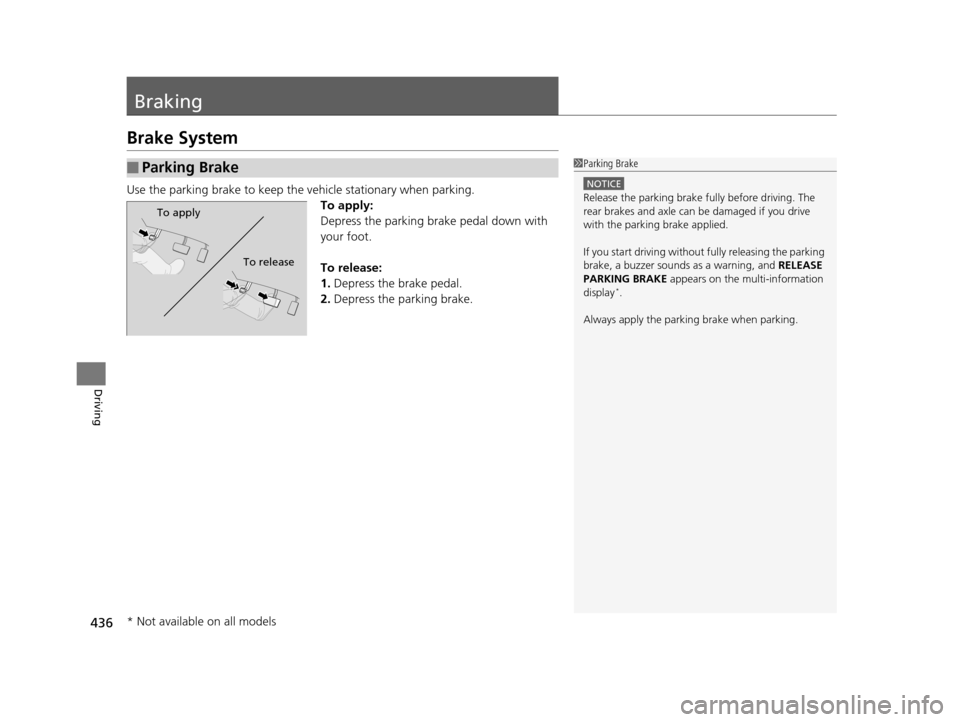
Use the parking brake to keep the vehicle stationary when parking.To apply:
Depress the parking brake pedal down with
your foot.
To release:
1.Depress the brake pedal.
2. Depress the parking brake.
■Parking Brake1Parking Brake
NOTICE
Release the parking brake fu lly before driving. The
rear brakes and axle can be damaged if you drive
with the parki ng brake applied.
If you start driving without fully releasing the parking
brake, a buzzer sounds as a warning, and RELEASE
PARKING BRAKE appears on the multi-information
display
*.
Always apply the parking brake when parking.
To apply
To release
* Not available on all models
17 US ODYSSEY (KA KC)-31TK86600.book 436 ページ 2016年10月24日 月曜日 午後4時2分