Page 194 of 565

193
uuInterior Lights/Interior Convenience Items uInterior Convenience Items
Controls
■To empty the canister or change the debris bag
1. Open the lower vacuum lid.
2. Push the lever in.
3. Pull the canister down, then slide out from the track.
4.Push the three lid tabs outward and remove
the canister lid.
u The debris bag and canister can be
accessed.
To reinstall the empty canister:
After sliding the canister into the track, push the lever in to lift the canister up.
Release the lever to lock the canister in position. u The orange unlocked decal should not be visible.1To empty the canister or change the debris bag
Both the debris bag and th e filter are replaceable.
Contact a dealer for component replacement
information.
The vacuum can be used with or without the bag.
If you find the vacuum performance poor or there is
no suction:
•Check if the canister is locked in position.
•Check if the hose is attached to the vacuum.•Empty the canister or change the bag.
•Clean or replace the filter.
•Check the hose for clogs or damage.
Lower Vacuum Lid
Lever
Canister
Canister Lid
Three Lid Tabs
17 US ODYSSEY (KA KC)-31TK86600.book 193 ページ 2016年10月24日 月曜日 午後4時2分
Page 195 of 565
194
Controls
Heating and Cooling*
Using Vents, Heating and A/C
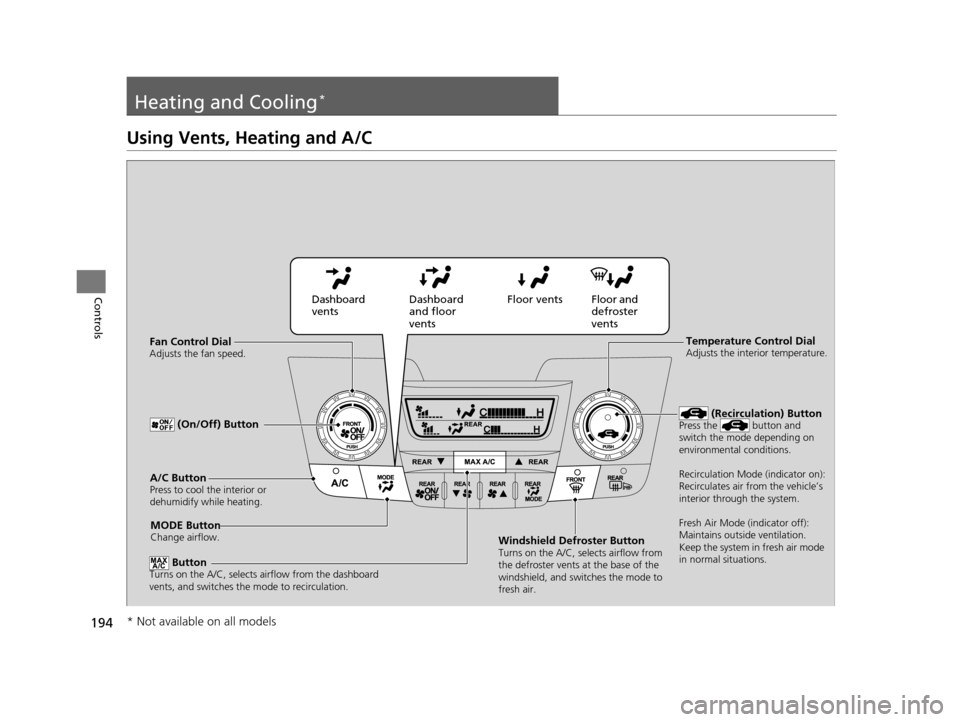
MODE ButtonChange airflow.
Floor and
defroster
vents
Floor vents
Dashboard
and floor
vents
Dashboard
vents
Fan Control Dial
Adjusts the fan speed.
ButtonTurns on the A/C, selects airflow from the dashboard
vents, and switches the mode to recirculation.
A/C ButtonPress to cool the interior or
dehumidify while heating.
Windshield Defroster ButtonTurns on the A/C, selects airflow from
the defroster vents at the base of the
windshield, and switches the mode to
fresh air.
Temperature Control DialAdjusts the interior temperature.
(Recirculation) ButtonPress the button and
switch the mode depending on
environmental conditions.
Recirculation Mode (indicator on):
Recirculates air from the vehicle’s
interior through the system.
Fresh Air Mode (indicator off):
Maintains outside ventilation.
Keep the system in fresh air mode
in normal situations. (On/Off) Button
* Not available on all models
17 US ODYSSEY (KA KC)-31TK86600.book 194 ページ 2016年10月24日 月曜日 午後4時2分
Page 196 of 565
Continued195
uuHeating and Cooling*uUsing Vents, Heating and A/C
Controls
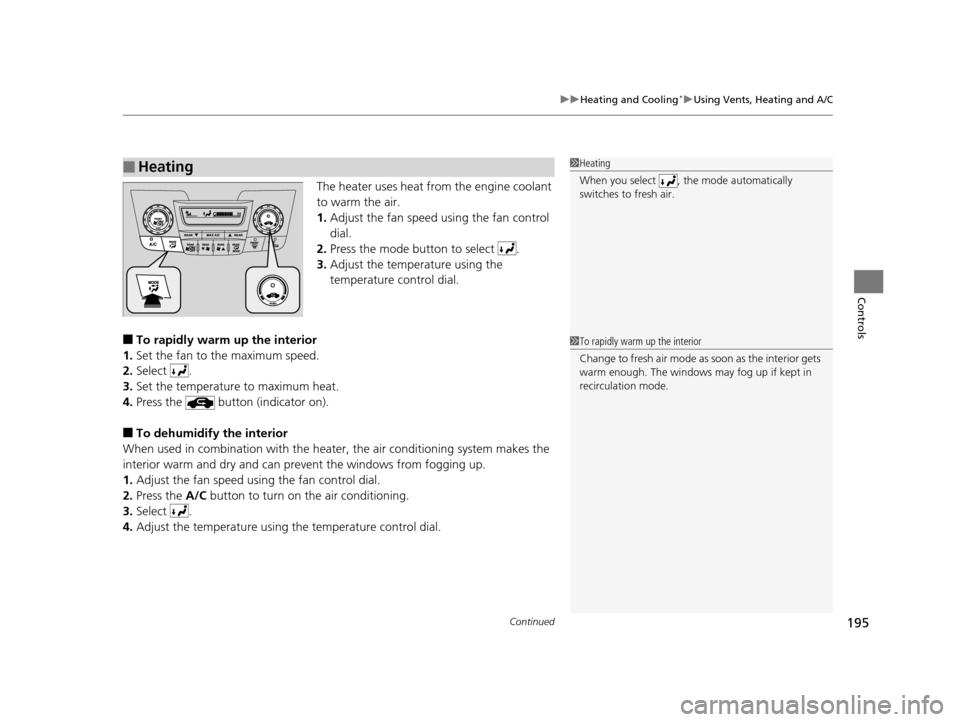
The heater uses heat from the engine coolant
to warm the air.
1. Adjust the fan speed using the fan control
dial.
2. Press the mode button to select .
3. Adjust the temperature using the
temperature control dial.
■To rapidly warm up the interior
1. Set the fan to the maximum speed.
2. Select .
3. Set the temperature to maximum heat.
4. Press the button (indicator on).
■To dehumidify the interior
When used in combination with the heat er, the air conditioning system makes the
interior warm and dry and can prev ent the windows from fogging up.
1. Adjust the fan speed using the fan control dial.
2. Press the A/C button to turn on the air conditioning.
3. Select .
4. Adjust the temperature using the temperature control dial.
■Heating1Heating
When you select , th e mode automatically
switches to fresh air.
1 To rapidly warm up the interior
Change to fresh air mode as soon as the interior gets
warm enough. The windows may fog up if kept in
recirculation mode.
17 US ODYSSEY (KA KC)-31TK86600.book 195 ページ 2016年10月24日 月曜日 午後4時2分
Page 199 of 565
198
Controls
Climate Control System*
Using Automatic Climate Control
The automatic climate control system maintains the interior temperature you select.
The system also selects the proper mix of heated or cooled air that raises or lowers
the interior temperature to your pr eference as quickly as possible.
Use the system when the engine is running.
1. Press the AUTO button.
2. Adjust the interior temperature us ing the temperature control dial.
3. Press the button to cancel.
■Switching between the recirculation and fresh air modes
Press the button and switch the mode depending on environmental
conditions.
Recirculation Mode (indicator on): Recirculates air from the vehicle’s interior through
the system.
Fresh Air Mode (indicator off): Maintains outside ventilation. Keep the system in
fresh air mode in normal situations.
1 Using Automatic Climate Control
If any buttons are presse d while using the climate
control system in auto, the function of the button
that was pressed will take priority.
The AUTO indicator will go off, but functions
unrelated to the button th at was pressed will be
controlled automatically.
The compressor may turn on to prevent window
fogging, even if the display reads A/C OFF.
To prevent cold air from bl owing in from outside, the
fan may not start i mmediately when the AUTO
button is pressed.
Once you have set the desi red temperature, do not use
the temperature control di als more than necessary.
Doing so may delay the time it takes to reach the set
temperature.
If the interior is very warm, you can cool it down
more rapidly by partial ly opening the windows,
turning the system on auto, and setting the
temperature to low. Change the fresh air mode to
recirculation mode until the temperature cools down.
When you set the temperat ure to the lower or upper
limit, Lo or Hi is displayed.
Pressing the button sw itches the climate
control system between on and off. When turned on,
the system returns to your last selection.
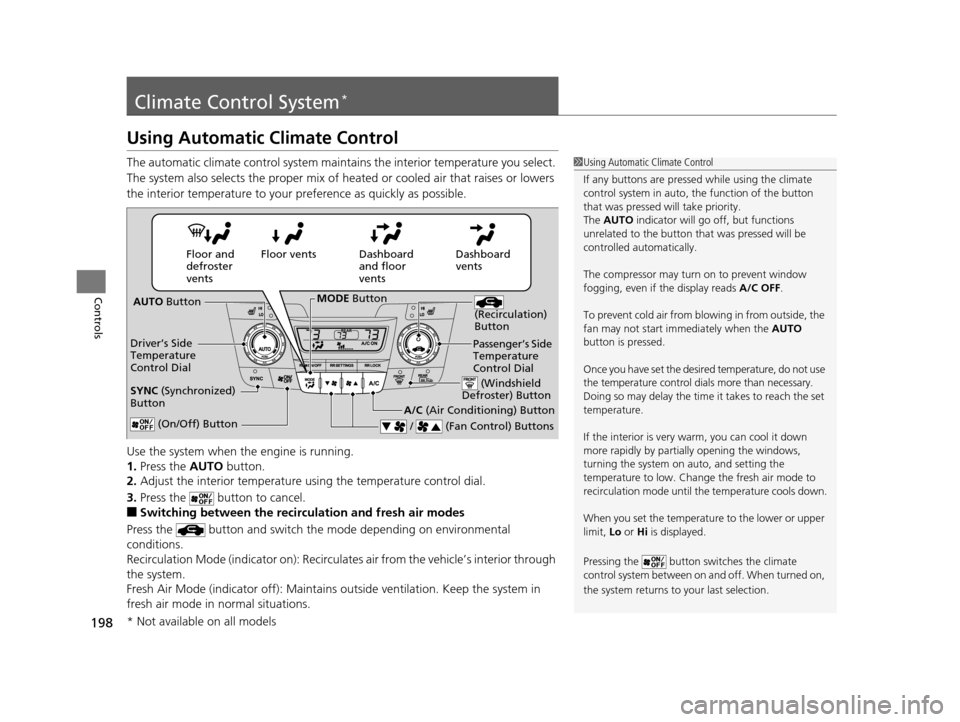
Dashboard
vents
Dashboard
and floor
vents
Floor vents
Floor and
defroster
vents
AUTO Button
Driver’s Side
Temperature
Control Dial
A/C (Air Conditioning) Button
/ (Fan Control) Buttons
(Recirculation)
Button
(On/Off) Button
SYNC (Synchronized)
Button
Passenger’s Side
Temperature
Control Dial
(Windshield
Defroster) Button
MODE Button
* Not available on all models
17 US ODYSSEY (KA KC)-31TK86600.book 198 ページ 2016年10月24日 月曜日 午後4時2分
Page 202 of 565
201
uuClimate Control System*uRear Climate Control System
Continued
Controls
Rear Climate Control System
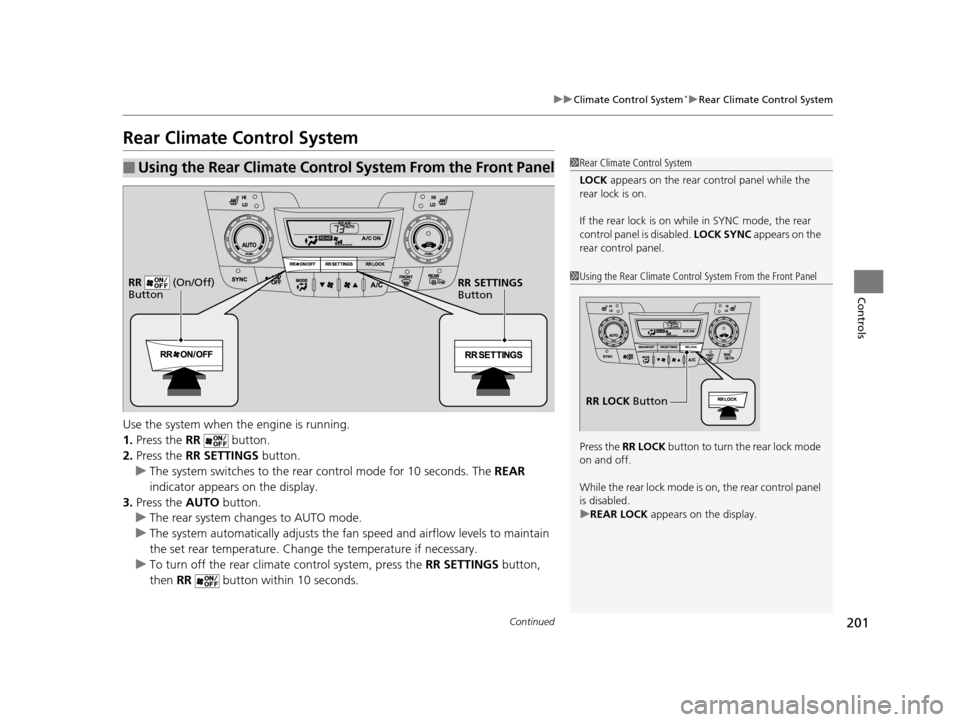
Use the system when the engine is running.
1. Press the RR button.
2. Press the RR SETTINGS button.
u The system switches to the rear control mode for 10 seconds. The REAR
indicator appears on the display.
3. Press the AUTO button.
u The rear system changes to AUTO mode.
u The system automatically adjusts the fan speed and airfl ow levels to maintain
the set rear temperature. Change the temperature if necessary.
u To turn off the rear climat e control system, press the RR SETTINGS button,
then RR button within 10 seconds.
■Using the Rear Climate Control System From the Front Panel1Rear Climate Control System
LOCK appears on the rear control panel while the
rear lock is on.
If the rear lock is on while in SYNC mode, the rear
control panel is disabled. LOCK SYNC appears on the
rear control panel.
1 Using the Rear Climate Control System From the Front Panel
Press the RR LOCK button to turn the rear lock mode
on and off.
While the rear lock mode is on, the rear control panel
is disabled.
u REAR LOCK appears on the display.
RR LOCK Button
RR SETTINGS
Button
RR (On/Off)
Button
17 US ODYSSEY (KA KC)-31TK86600.book 201 ページ 2016年10月24日 月曜日
午後4時2分
Page 208 of 565
207
uuAudio System uUSB Port
Features
USB Port
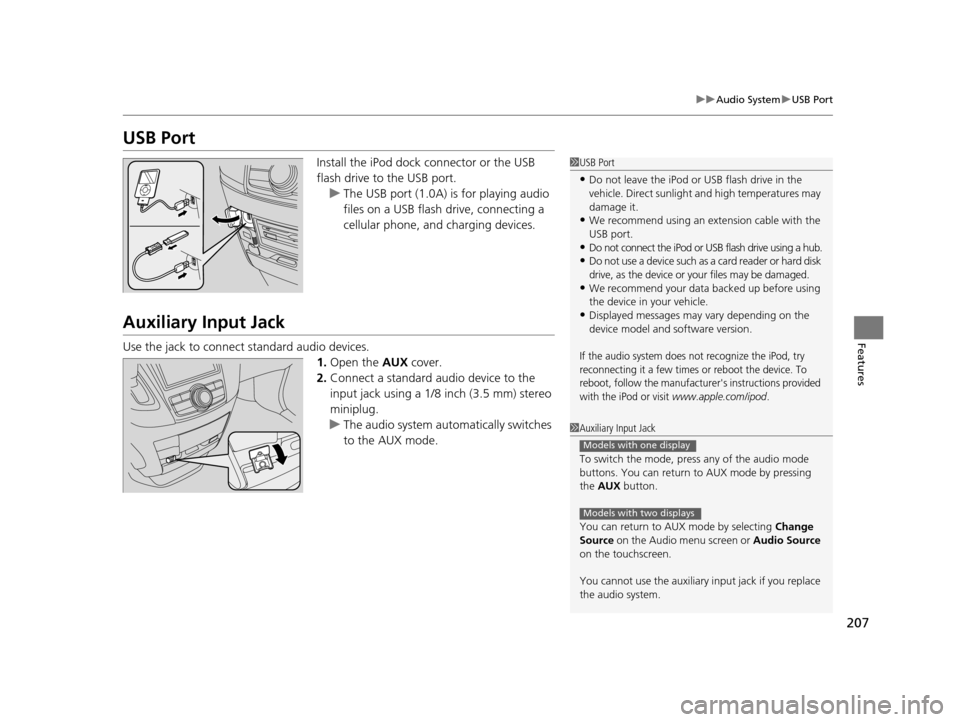
Install the iPod dock connector or the USB
flash drive to the USB port.
u The USB port (1.0A) is for playing audio
files on a USB flash drive, connecting a
cellular phone, and charging devices.
Auxiliary Input Jack
Use the jack to connect standard audio devices.
1.Open the AUX cover.
2. Connect a standard audio device to the
input jack using a 1/8 inch (3.5 mm) stereo
miniplug.
u The audio system auto matically switches
to the AUX mode.
1 USB Port
•Do not leave the iPod or USB flash drive in the
vehicle. Direct sunlight and high temperatures may
damage it.
•We recommend using an extension cable with the
USB port.
•Do not connect the iPod or USB flash drive using a hub.
•Do not use a device such as a card reader or hard disk
drive, as the device or your files may be damaged.
•We recommend your data backed up before using
the device in your vehicle.
•Displayed messages may vary depending on the
device model and software version.
If the audio system does not recognize the iPod, try
reconnecting it a few times or reboot the device. To
reboot, follow the manufacturer's instructions provided
with the iPod or visit
www.apple.com/ipod.
1 Auxiliary Input Jack
To switch the mode, pres s any of the audio mode
buttons. You can return to AUX mode by pressing
the AUX button.
You can return to AUX mode by selecting Change
Source on the Audio menu screen or Audio Source
on the touchscreen.
You cannot use the auxiliary input jack if you replace
the audio system.
Models with one display
Models with two displays
17 US ODYSSEY (KA KC)-31TK86600.book 207 ページ 2016年10月24日 月曜日 午後4時2分
Page 210 of 565
209
uuAudio System uRegion Setting
Features
Region Setting
The audio system’s region setting will be lo st when the battery is disconnected or
goes dead.
If the Region Select screen appears, you need to set the region for the audio
system. Follow the steps below:
1. Press to select OK.
2. Rotate to select the region you live in, then press .
3. You will receive a confirmation message on the screen. Rotate to select Yes,
then press .
Models with two displays
1 Region Setting
The region setting is require d only when the battery
power is tem porarily disconnected. It is set to your
vehicle’s region type by the factory.
You cannot change the setting once you have
completed the setting proced ure. Contact a dealer if
you selected an incorrect region.
17 US ODYSSEY (KA KC)-31TK86600.book 209 ページ 2016年10月24日 月曜日 午後4時2分
Page 212 of 565
211
Features
Audio System Basic Operation
To use the audio system function, the ignition swit ch must be in ACCESSORY (q or
ON
(w.
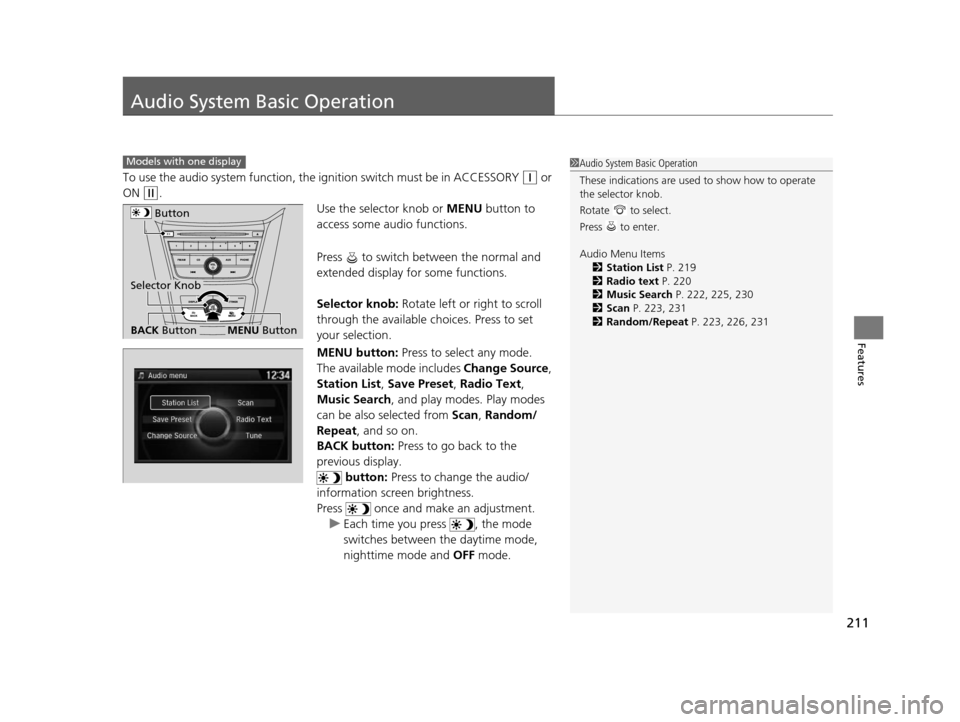
Use the selector knob or MENU button to
access some audio functions.
Press to switch between the normal and
extended display fo r some functions.
Selector knob: Rotate left or right to scroll
through the available ch oices. Press to set
your selection.
MENU button: Press to select any mode.
The available mode includes Change Source,
Station List , Save Preset , Radio Text,
Music Search , and play mode s. Play modes
can be also selected from Scan, Random/
Repeat , and so on.
BACK button: Press to go back to the
previous display. button: Press to change the audio/
information screen brightness.
Press once and make an adjustment. u Each time you press , the mode
switches between the daytime mode,
nighttime mode and OFF mode.
Models with one display1Audio System Basic Operation
These indications are used to show how to operate
the selector knob.
Rotate to select.
Press to enter.
Audio Menu Items
2 Station List P. 219
2 Radio text P. 220
2 Music Search P. 222, 225, 230
2 Scan P. 223, 231
2 Random/Repeat P. 223, 226, 231
Button
BACK ButtonMENU Button
Selector Knob
17 US ODYSSEY (KA KC)-31TK86600.book 211 ページ 2016年10月24日 月曜日 午後4時2分