2017 HONDA ODYSSEY change
[x] Cancel search: changePage 148 of 565

147
uuOperating the Switches Around the Steering Wheel uTurn Signals
Continued
Controls
Turn Signals
The turn signals can be used when the ignition
switch is in ON
(w*1.
■One-touch turn signal
When you lightly push up or down and release
the turn signal lever, th e exterior turn signals
and turn signal indicator blink three times.
The feature can be used when signaling for a
lane change.
Light Switches
Rotating the light switch turns the lights on
and off, regardless of the position of the
ignition switch
*1.
■High beams
Push the lever forward until you hear a click.
■Low beams
When in high beams, pull the lever back to
return to low beams.
■Flashing the high beams
Pull the lever back, and release it.
*1: Models with the smart entry system have an ENGINE START/STOP button instead of an
ignition switch.
Right Turn
Left Turn
■Manual Operation
1 Light Switches
If you leave the power mode in VEHICLE OFF (LOCK)
with the lights on, a light on reminder chime sounds
when you open the driver’s door.
If you remove the key from the ignition switch while
the lights are on, a chime sounds when the driver’s
door is opened.
When the lights are on, the lights on indicator in the
instrument pane l will be on.
2 Lights On Indicator P. 77
Repeatedly turning the he adlights on and off reduces
the life of the HID headlight bulbs. If you sense that
the level of the headlight s is abnormal, have the
vehicle inspected by a dealer.
Do not leave the lights on when the engine is off
because it will cause the battery to discharge.
Models with smart entry system
Models without smart entry system
Models with high voltage discharge tube bulb
High Beams
Flashing the high beams Low Beams
Turns on parking, side marker,
tail, and rear license plate lights
Turns on headlights, parking, side
marker, tail, and rear license plate
lights
17 US ODYSSEY (KA KC)-31TK86600.book 147 ページ 2016年10月24日 月曜日
午後4時2分
Page 149 of 565

uuOperating the Switches Around the Steering Wheel uLight Switches
148
Controls
Automatic lighting control can be used when
the ignition switch is in ON
(w*1.
When you turn the light switch to AUTO, the
headlights and other exterior lights will switch
on and off automatica lly depending on the
ambient brightness. u You can change the au to light sensitivity
setting.
2 Customized Features P. 99, 295
*1: Models with the smart entry system have an ENGINE START/STOP button instead of an
ignition switch.
■Automatic Lighting Control*1 Automatic Lighting Control*
We recommend that you tu rn on the lights manually
when driving at night, in a dense fog, or in dark areas
such as long tunnels or parking facilities.
The light sensor is in the location shown below.
Do not cover this light sensor with anything;
otherwise, the automatic lighting system may not
work properly.
Adjust the auto light sensitivity as follows:
SettingThe exterior lights come on
when the ambient light is at
MAX
HIGH
MID
LOW
MIN
Light Sensor
Bright
Dark
* Not available on all models
17 US ODYSSEY (KA KC)-31TK86600.book 148 ページ 2016年10月24日 月曜日 午後4時2分
Page 150 of 565
149
uuOperating the Switches Around the Steering Wheel uLight Switches
Controls
The headlights automatically come on when the wipers are used several times within
a certain intervals with the headlight switch in AUTO.
The headlights automatically go off a few minutes later if the wipers are stopped.
The headlights, all other exterior lights, a nd the instrument panel lights turn off 15
seconds after you remove the key or set the power mode to VEHICLE OFF (LOCK),
take the remote with you, and close the driver's door.
u You can change the headlight auto off timer setting.
2Customized Features P. 99, 295
If you turn the igniti on switch to LOCK (0*1 with the headlight switch on, but do
not open the door, the lights turn off afte r 10 minutes (three minutes, if the switch
is in the AUTO position).
The lights turn on again when you unlock or open the driver's door. If you unlock
the door, but do not open it within 15 seconds, the lights go off. If you open the
driver's door, you will hear a lights on reminder chime.
*1: Models with the smart entry system have an ENGINE START/STOP button instead of an
ignition switch.
■Headlight Integration with Wiper*
■Automatic Lighting Off Feature
1 Headlight Integration with Wiper*
This feature activates during the headlights are off in
AUTO .
The instrument panel br ightness does not change
when the headlights come on.
At dark ambient light levels, the automatic lighting
control feature turns on the headlights, regardless of
the number of wiper sweeps.
* Not available on all models
17 US ODYSSEY (KA KC)-31TK86600.book 149 ページ 2016年10月24日 月曜日 午後4時2分
Page 152 of 565
151
uuOperating the Switches Around the Steering Wheel uWipers and Washers
Continued
Controls
Wipers and Washers
The windshield wipers and washers can be
used when the ignition switch is in ON
(w*1.
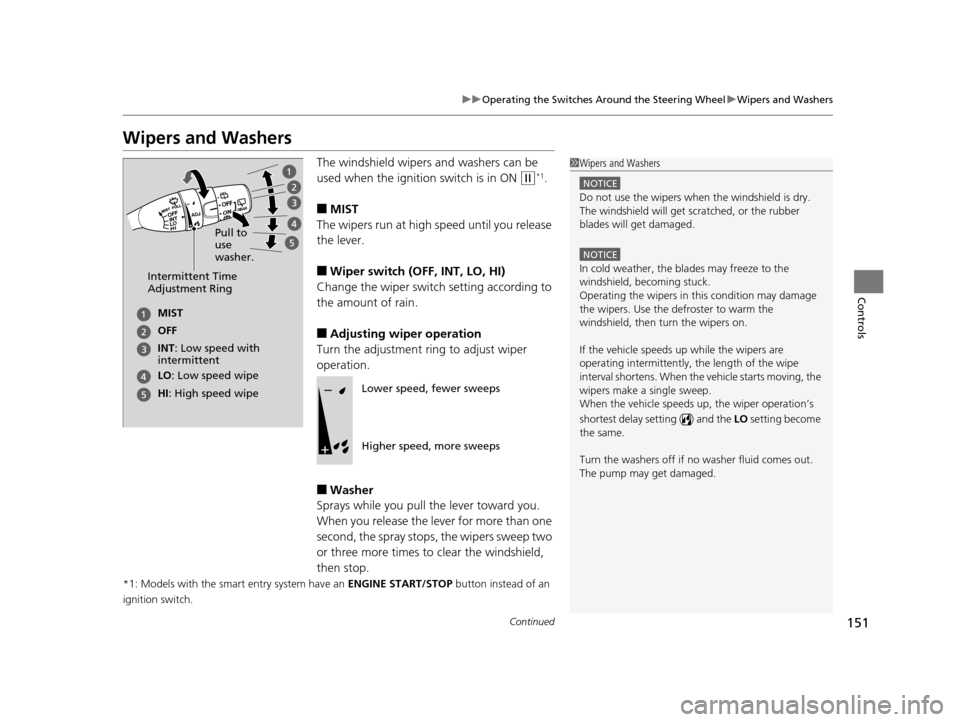
■MIST
The wipers run at high speed until you release
the lever.
■Wiper switch (OFF, INT, LO, HI)
Change the wiper switch setting according to
the amount of rain.
■Adjusting wiper operation
Turn the adjustment ring to adjust wiper
operation.
■Washer
Sprays while you pull the lever toward you.
When you release the le ver for more than one
second, the spray stops, the wipers sweep two
or three more times to clear the windshield,
then stop.
*1: Models with the smart entry system have an ENGINE START/STOP button instead of an
ignition switch.
1 Wipers and Washers
NOTICE
Do not use the wipers when the windshield is dry.
The windshield will get sc ratched, or the rubber
blades will get damaged.
NOTICE
In cold weather, the blades may freeze to the
windshield, becoming stuck.
Operating the wipers in th is condition may damage
the wipers. Use the defroster to warm the
windshield, then turn the wipers on.
If the vehicle speeds up while the wipers are
operating intermittently, the length of the wipe
interval shortens. When the vehicle starts moving, the
wipers make a single sweep.
When the vehicle speeds up, the wiper operation’s
shortest delay setting ( ) and the LO setting become
the same.
Turn the washers off if no washer fluid comes out.
The pump may get damaged.Intermittent Time
Adjustment Ring
MIST
INT: Low speed with
intermittent OFF
LO : Low speed wipe
HI: High speed wipe Pull to
use
washer.
Lower speed, fewer sweeps
Higher speed, more sweeps
17 US ODYSSEY (KA KC)-31TK86600.book 151 ページ 2016年10月24日 月曜日
午後4時2分
Page 154 of 565
153
uuOperating the Switches Around the Steering Wheel uBrightness Control
Controls
Brightness Control
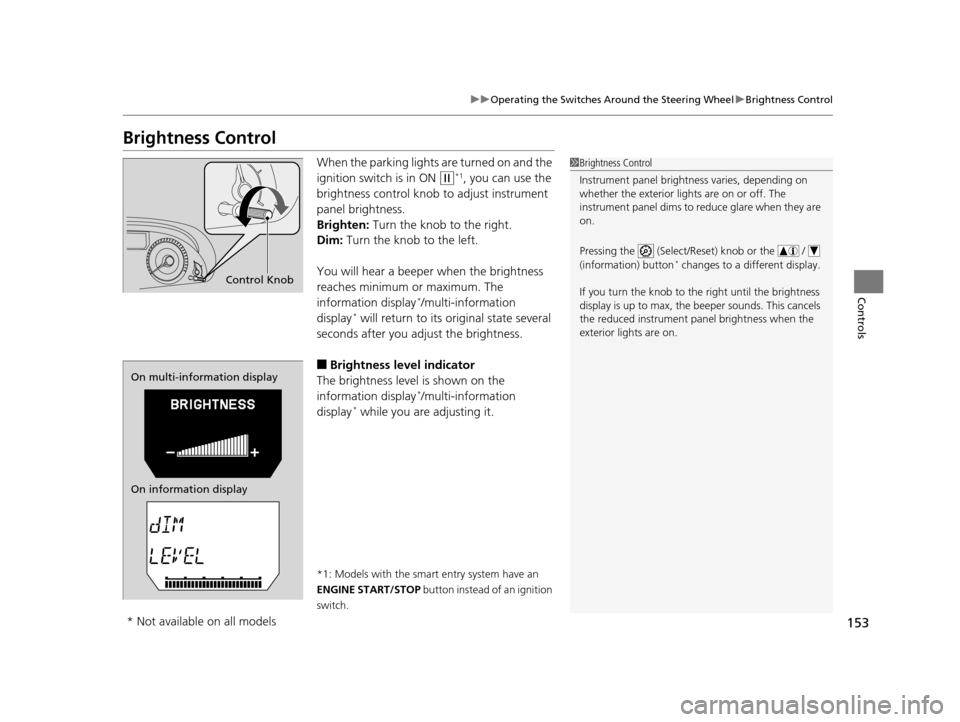
When the parking lights are turned on and the
ignition switch is in ON
(w*1, you can use the
brightness control knob to adjust instrument
panel brightness.
Brighten: Turn the knob to the right.
Dim: Turn the knob to the left.
You will hear a beeper when the brightness
reaches minimum or maximum. The
information display
*/multi-information
display* will return to its original state several
seconds after you adjust the brightness.
■Brightness level indicator
The brightness level is shown on the
information display
*/multi-information
display* while you are adjusting it.
*1: Models with the smart entry system have an
ENGINE START/STOP button instead of an ignition
switch.
1 Brightness Control
Instrument panel brightne ss varies, depending on
whether the exterior lights are on or off. The
instrument panel dims to reduce glare when they are
on.
Pressing the (Select/Reset) knob or the /
(information) button
* changes to a different display.
If you turn the knob to the right until the brightness
display is up to max, the beeper sounds. This cancels
the reduced instrument panel brightness when the
exterior lights are on.
Control Knob
On multi-information display
On information display
* Not available on all models
17 US ODYSSEY (KA KC)-31TK86600.book 153 ページ 2016年10月24日 月曜日 午後4時2分
Page 163 of 565
162
uuAdjusting the Seats uAdjusting the Seat Positions
Controls
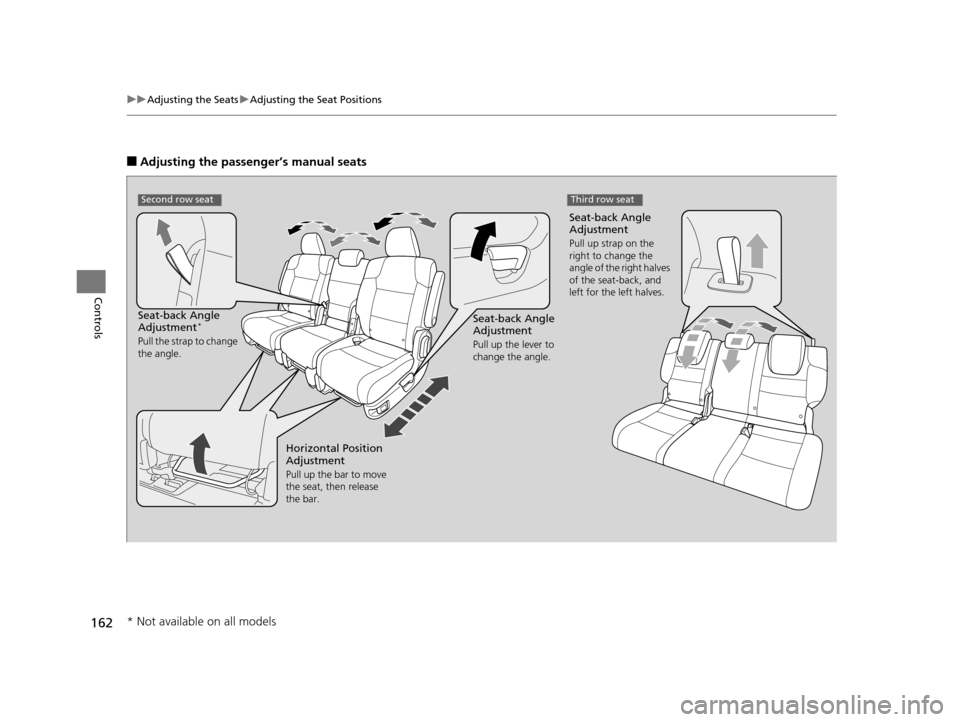
■Adjusting the passenger’s manual seats
Seat-back Angle
Adjustment
Pull up the lever to
change the angle.
Seat-back Angle
Adjustment*
Pull the strap to change
the angle.
Seat-back Angle
Adjustment
Pull up strap on the
right to change the
angle of the right halves
of the seat-back, and
left for the left halves.
Second row seat
Horizontal Position
Adjustment
Pull up the bar to move
the seat, then release
the bar.
Third row seat
* Not available on all models
17 US ODYSSEY (KA KC)-31TK86600.book 162 ページ 2016年10月24日 月曜日 午後4時2分
Page 177 of 565
176
Controls
Interior Lights/Interior Convenience Items
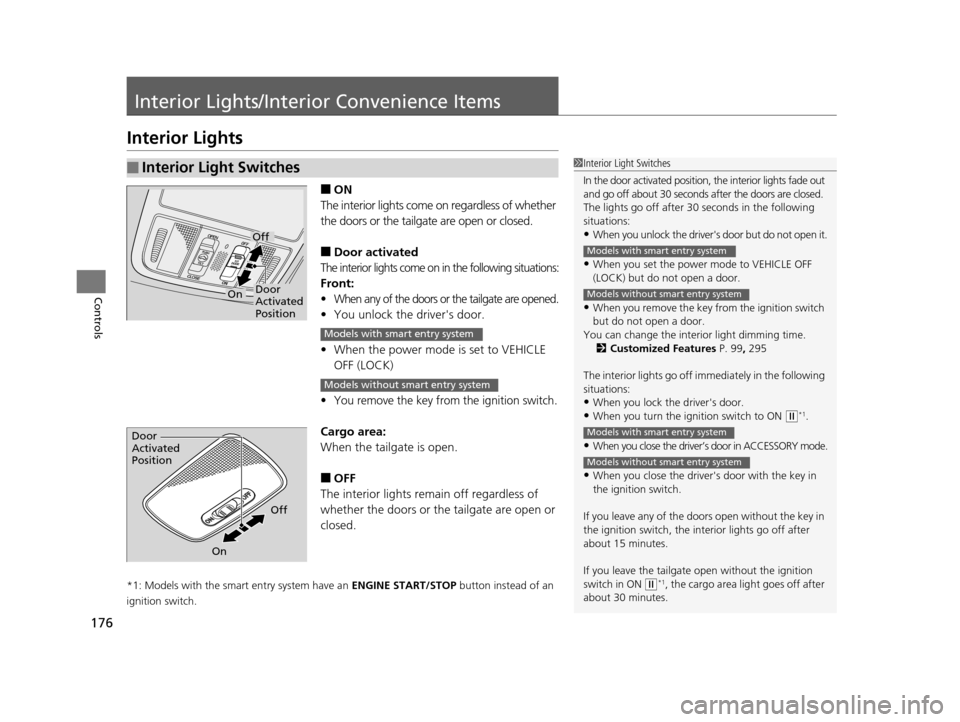
Interior Lights
■ON
The interior lights come on regardless of whether
the doors or the tailgat e are open or closed.
■Door activated
The interior lights come on in the following situations:
Front:
•When any of the doors or the tailgate are opened.
•You unlock the driver's door.
• When the power mode is set to VEHICLE
OFF (LOCK)
•You remove the key from the ignition switch.
Cargo area:
When the tailg ate is open.
■OFF
The interior lights remain off regardless of
whether the doors or the tailgate are open or
closed.
*1: Models with the smart entry system have an ENGINE START/STOP button instead of an
ignition switch.
■Interior Light Switches1 Interior Light Switches
In the door activated position, the interior lights fade out
and go off about 30 seconds after the doors are closed.
The lights go off after 30 seconds in the following
situations:
•When you unlock the driver's door but do not open it.
•When you set the power mode to VEHICLE OFF
(LOCK) but do not open a door.
•When you remove the key from the ignition switch
but do not open a door.
You can change the inte rior light dimming time.
2 Customized Features P. 99, 295
The interior lights go off i mmediately in the following
situations:
•When you lock the driver's door.
•When you turn the ignition switch to ON ( w*1.
•When you close the driver’s door in ACCESSORY mode.
•When you close the driver's door with the key in
the ignition switch.
If you leave any of the doors open without the key in
the ignition switch, the interior lights go off after
about 15 minutes.
If you leave the tailgate open without the ignition
switch in ON
( w*1, the cargo area light goes off after
about 30 minutes.
Models with smart entry system
Models without smart entry system
Models with smart entry system
Models without smart entry system
Door
Activated
Position
Off
On
Models with smart entry system
Models without smart entry system
Door
Activated
Position
Off
On
17 US ODYSSEY (KA KC)-31TK86600.book 176 ページ 2016年10月24日 月曜日 午後4時2分
Page 190 of 565
Continued189
uuInterior Lights/Interior Convenience Items uInterior Convenience Items
Controls
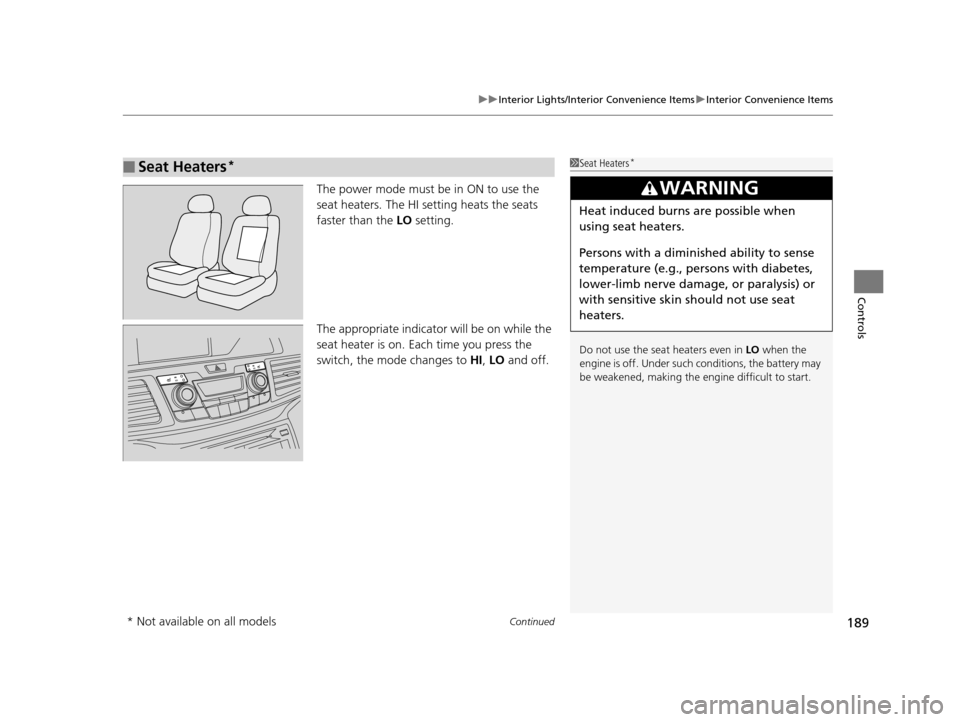
The power mode must be in ON to use the
seat heaters. The HI setting heats the seats
faster than the LO setting.
The appropriate indicato r will be on while the
seat heater is on. Each time you press the
switch, the mode changes to HI, LO and off.
■Seat Heaters*1Seat Heaters*
Do not use the seat heaters even in LO when the
engine is off. Under such conditions, the battery may
be weakened, making the engine difficult to start.
3WARNING
Heat induced burns are possible when
using seat heaters.
Persons with a diminished ability to sense
temperature (e.g., persons with diabetes,
lower-limb nerve damage, or paralysis) or
with sensitive skin should not use seat
heaters.
* Not available on all models
17 US ODYSSEY (KA KC)-31TK86600.book 189 ページ 2016年10月24日 月曜日 午後4時2分