2017 HONDA ODYSSEY change
[x] Cancel search: changePage 104 of 565
103
uuGauges and Displays uMulti-Information Display*
Continued
Instrument Panel
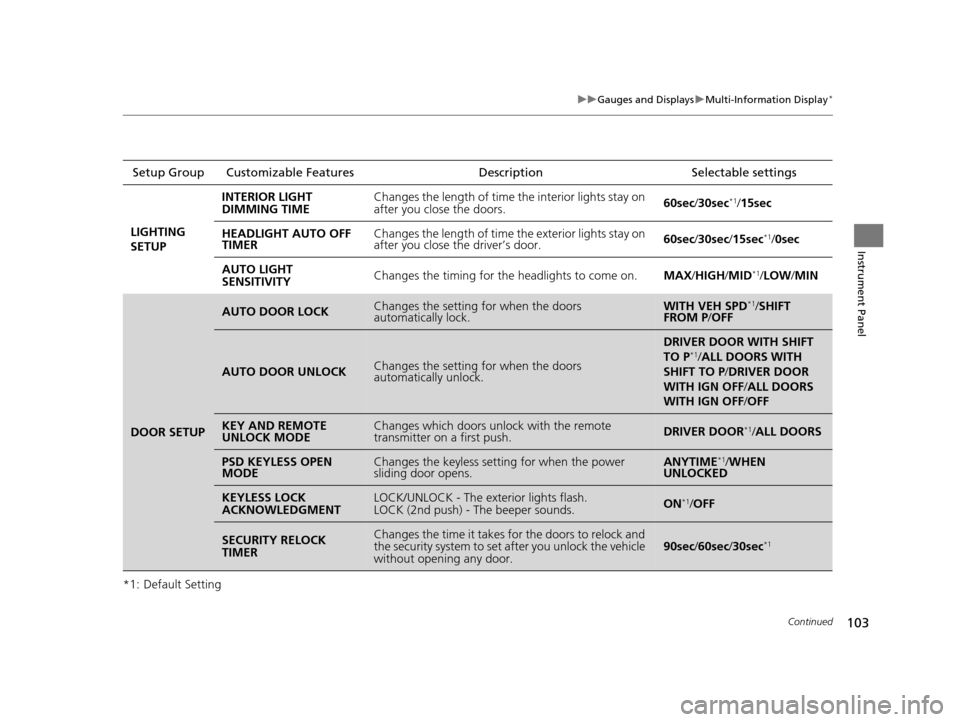
*1: Default SettingSetup Group Customizable Features
Description Selectable settings
LIGHTING
SETUP INTERIOR LIGHT
DIMMING TIME
Changes the length of time the interior lights stay on
after you close the doors.
60sec
/30sec
*1/15sec
HEADLIGHT AUTO OFF
TIMER Changes the length of time the exterior lights stay on
after you close the driver’s door.
60sec
/30sec/ 15sec
*1/0sec
AUTO LIGHT
SENSITIVITY Changes the timing for the headlights to come on.
MAX/HIGH/ MID
*1/LOW /MIN
DOOR SETUP
AUTO DOOR LOCKChanges the setting for when the doors
automatically lock.WITH VEH SPD*1/SHIFT
FROM P /OFF
AUTO DOOR UNLOCKChanges the setting for when the doors
automatically unlock.
DRIVER DOOR WITH SHIFT
TO P*1/ALL DOORS WITH
SHIFT TO P /DRIVER DOOR
WITH IGN OFF /ALL DOORS
WITH IGN OFF /OFF
KEY AND REMOTE
UNLOCK MODEChanges which doors unlock with the remote
transmitter on a first push.DRIVER DOOR*1/ALL DOORS
PSD KEYLESS OPEN
MODEChanges the keyless setting for when the power
sliding door opens.ANYTIME*1/ WHEN
UNLOCKED
KEYLESS LOCK
ACKNOWLEDGMENTLOCK/UNLOCK - The exterior lights flash.
LOCK (2nd push) - The beeper sounds.ON*1/OFF
SECURITY RELOCK
TIMERChanges the time it takes for the doors to relock and
the security system to set after you unlock the vehicle
without opening any door.90sec /60sec/ 30sec*1
17 US ODYSSEY (KA KC)-31TK86600.book 103 ページ 2016年10月24日 月曜日 午後4時2分
Page 105 of 565
104
uuGauges and Displays uMulti-Information Display*
Instrument Panel
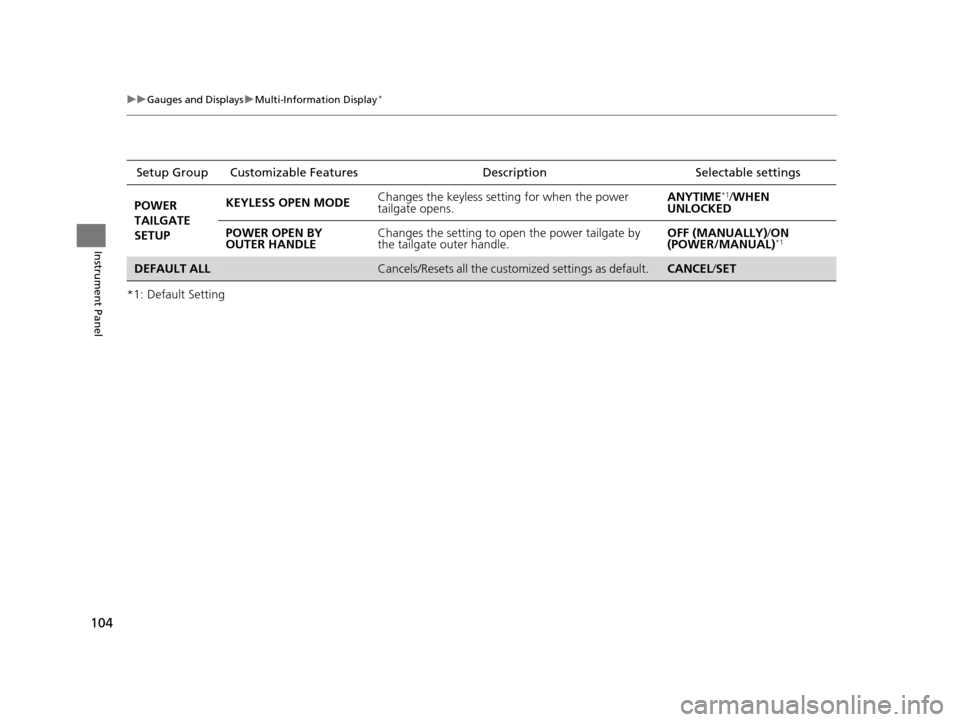
*1: Default SettingSetup Group Customizabl
e Features Description Selectable settings
POWER
TAILGATE
SETUP KEYLESS OPEN MODE
Changes the keyless setti
ng for when the power
tailgate opens. ANYTIME
*1/
WHEN
UNLOCKED
POWER OPEN BY
OUTER HANDLE Changes the setting to open the power tailgate by
the tailgate outer handle. OFF (MANUALLY)
/ON
(POWER/MANUAL)
*1
DEFAULT ALLCancels/Resets all the custom ized settings as default. CANCEL/SET
17 US ODYSSEY (KA KC)-31TK86600.book 104 ページ 2016年10月24日 月曜日 午後4時2分
Page 109 of 565

108
Controls
Clock
Adjusting the Clock
You can adjust the time in the clock display with the ignition switch is in ON (w *1.
■Using the Settings menu on the audio/information screen
1. Press the SETTINGS button.
2. Rotate to select System Settings, then
press .
u Repeat the procedure to select Clock,
then Clock Adjustment .
2. Move or to select Clock.
Rotate to select Clock Adjustment,
then press .
3. Rotate to change hour, then press .
4. Rotate to change minute, then press .
*1: Models with the smart entry system have an ENGINE START/STOP button instead of an
ignition switch.
■Adjusting the Time
1 Adjusting the Clock
The clock is automatica lly updated through the
navigation system, so the ti me does not need to be
adjusted.
These indications are used to show how to operate
the selector knob.
Rotate to select.
Press to enter.
These indications are used to show how to operate
the interface dial.
Rotate to select.
Press to enter.
Move , , or to select secondary menu.
You can customize the clock display to show the 12
hour clock or 24 hour clock.
2 Customized Features P. 295
You can turn the clock display on and off. 2 Customized Features P. 295
Models with navigation system
Models with one display
Models with two displays
All models
Models without navigation system
Models with one display
Models with two displays
All models
17 US ODYSSEY (KA KC)-31TK86600.book 108 ページ 2016年10月24日 月曜日 午後4時2分
Page 116 of 565
Continued115
uuLocking and Unlocking the Doors uLocking/Unlocking the Doors from the Outside
Controls
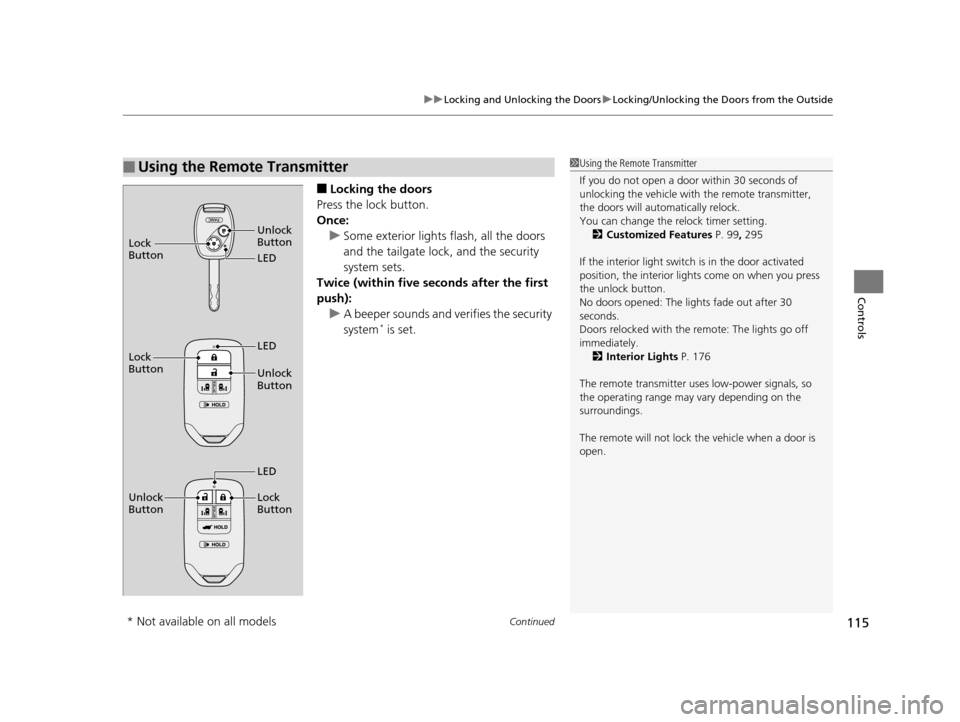
■Locking the doors
Press the lock button.
Once: u Some exterior lights flash, all the doors
and the tailgate lock , and the security
system sets.
Twice (within five se conds after the first
push):
u A beeper sounds and verifies the security
system
* is set.
■Using the Remote Transmitter1Using the Remote Transmitter
If you do not open a door within 30 seconds of
unlocking the vehicle with the remote transmitter,
the doors will auto matically relock.
You can change the relock timer setting. 2 Customized Features P. 99, 295
If the interior light switch is in the door activated
position, the interior light s come on when you press
the unlock button.
No doors opened: The li ghts fade out after 30
seconds.
Doors relocked with the remote: The lights go off
immediately. 2 Interior Lights P. 176
The remote transmitter us es low-power signals, so
the operating range may vary depending on the
surroundings.
The remote will not lock th e vehicle when a door is
open.
LED Unlock
Button
Lock
Button
Unlock
Button LED
Lock
Button
Unlock
Button Lock
Button
LED
* Not available on all models
17 US ODYSSEY (KA KC)-31TK86600.book 115 ページ 2016年10月24日 月曜日
午後4時2分
Page 124 of 565
123
uuOpening and Closing the Tailgate uOpening/Closing the Power Tailgate*
Continued
Controls
Opening/Closing the Power Tailgate*
The power tailgate can be operated by pr essing the power tailgate button on the
smart entry remote or instrument panel, or pressing the handle or button on the
tailgate.
■The power tailgate can be opened when:
• The tailgate is fully closed.
• The shift lever is in
(P.
• Press and hold the tailgate button on the smart entry remote for about one
second when the power mode is in VEHICLE OFF (LOCK).
u If you have changed the Power Tailgate Keyless Open Mode setting to
When Unlocked , you need to unlock the tailgate before you press the tailgate
button to open it.
2 Customized Features P. 99, 295
■The power tailgate ca n be closed when:
• The tailgate is fully open.
• The shift lever is in
(P.
• Press and hold the tailgate button on the smart entry remote for about one
second when the power mode is in VEHICLE OFF (LOCK).
1Opening/Closing the Power Tailgate*
NOTICE
Do not push or pull on the power tailgate when it is
being automatically opened or closed.
Forcibly opening or closing the power tailgate while
in operation can deform the tailgate frame.
The power tailgate may not open or close under the
following conditions:
•The vehicle is park ed on a steep hill.
•The vehicle is swayed in a strong wind.•The tailgate or the roof is covered with snow or ice.
If you close the power tail gate when all the doors are
locked, the power tailgate locks automatically.
If you replace the battery or the power tailgate fuse
while the tailgate is open, the power tailgate may be
disabled. The power tail gate resumes once you
manually close the tailgate.
Installing aftermarket components other than
genuine Honda a ccessories on the power tailgate
may prevent it from fully opening or closing.
Make sure the power tailgate is fully open before you
get your luggage in and out.
Make sure the power tailgat e is fully closed before
you start the vehicle.
* Not available on all models
17 US ODYSSEY (KA KC)-31TK86600.book 123 ページ 2016年10月24日 月曜日 午後4時2分
Page 137 of 565
uuSecurity System uSecurity System Alarm*
136
Controls
■Setting the security system alarm
The security system alarm automatically sets when the following conditions have
been met:
• The ignition switch is in LOCK
(0*1, and the key has been removed from the
ignition switch.
• The hood is closed.
• All doors and the tailgate are locked with the key, the remote transmitter or smart
entry system.
■When the security system alarm sets
The security system alarm indicator in the instrument panel blinks. When the
blinking interval changes after about 15 seconds, the security system alarm is set.
■To cancel the security system alarm
The security system alarm is canceled when the vehicle is unlocked using the key,
remote transmitter, or smart entry system, or the ignition switch is turned to ON
(w*1. The security system alarm indica tor goes off at the same time.
*1: Models with the smart entry system have an ENGINE START/STOP button instead of an
ignition switch.
1 Security System Alarm*
Do not set the security system alarm when someone
is in the vehicle or a window is open. The system can
accidentally activate when:
•Unlocking the door with the lock tab.
•Opening the tailgate with the power tailgate
button on the dashboard.
If the battery goes dead after you have set the
security system alarm, the security alarm may go off
once the battery is re charged or replaced.
If this occurs, deactivate the security system alarm by
unlocking a door using the ke y or remote transmitter.
Do not attempt to alter th is system or add another
device to it.
Models with power tailgate
* Not available on all models
17 US ODYSSEY (KA KC)-31TK86600.book 136 ページ 2016年10月24日 月曜日 午後4時2分
Page 142 of 565
141
Controls
Opening and Closing the Moonroof*
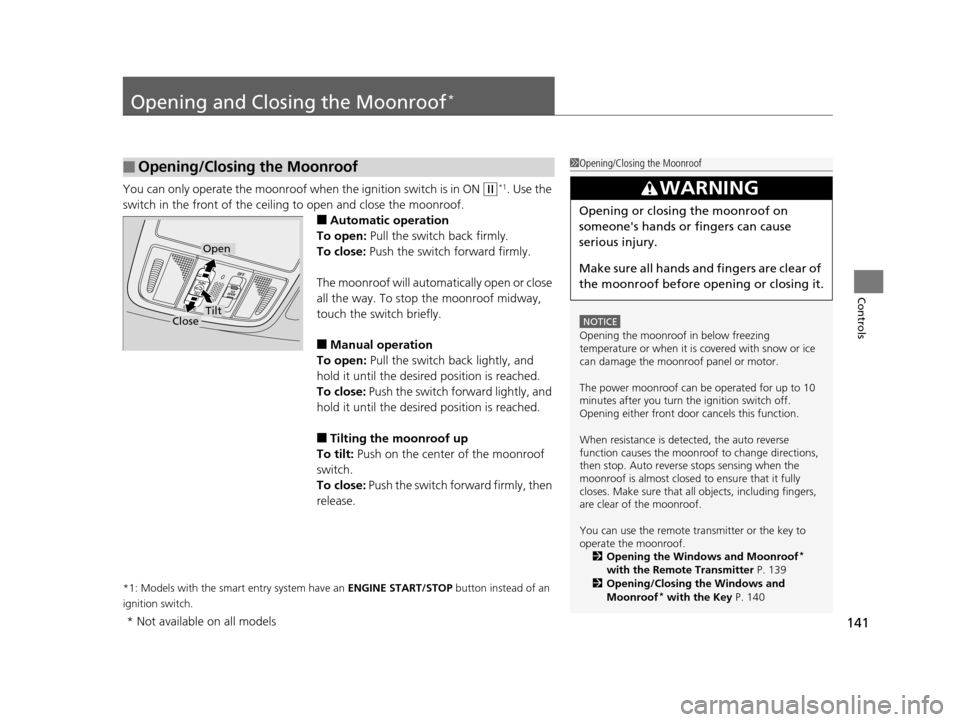
You can only operate the moonroof when the ignition switch is in ON (w*1. Use the
switch in the front of the ceiling to open and close the moonroof.
■Automatic operation
To open: Pull the switch back firmly.
To close: Push the switch forward firmly.
The moonroof will automatically open or close
all the way. To stop the moonroof midway,
touch the switch briefly.
■Manual operation
To open: Pull the switch back lightly, and
hold it until the desired position is reached.
To close: Push the switch forward lightly, and
hold it until the desired position is reached.
■Tilting the moonroof up
To tilt: Push on the center of the moonroof
switch.
To close: Push the switch forward firmly, then
release.
*1: Models with the smart entry system have an ENGINE START/STOP button instead of an
ignition switch.
■Opening/Closing the Moonroof1 Opening/Closing the Moonroof
NOTICE
Opening the moonroof in below freezing
temperature or when it is covered with snow or ice
can damage the moonr oof panel or motor.
The power moonroof can be operated for up to 10
minutes after you turn the ignition switch off.
Opening either front door cancels this function.
When resistance is detected, the auto reverse
function causes the moonroof to change directions,
then stop. Auto reverse stops sensing when the
moonroof is almost closed to ensure that it fully
closes. Make sure that al l objects, including fingers,
are clear of the moonroof.
You can use the remote transmitter or the key to
operate the moonroof. 2 Opening the Windows and Moonroof
*
with the Remote Transmitter P. 139
2 Opening/Closing the Windows and
Moonroof
* with the Key P. 140
3WARNING
Opening or closing the moonroof on
someone's hands or fingers can cause
serious injury.
Make sure all hands and fingers are clear of
the moonroof before opening or closing it.
Open
CloseTilt
* Not available on all models
17 US ODYSSEY (KA KC)-31TK86600.book 141 ページ 2016年10月24日 月曜日 午後4時2分
Page 146 of 565
145
uuOperating the Switches Around the Steering Wheel uENGINE START/STOP Button*
Controls
If you open the driver’s door when the power mode is set to ACCESSORY, a warning
buzzer sounds.
Warning buzzers may sound from inside or/
and outside the vehicle to remind you that the
smart entry remote is out of the vehicle. If the
buzzer continues even after the remote is put
back inside, place it to be within its
operational range.
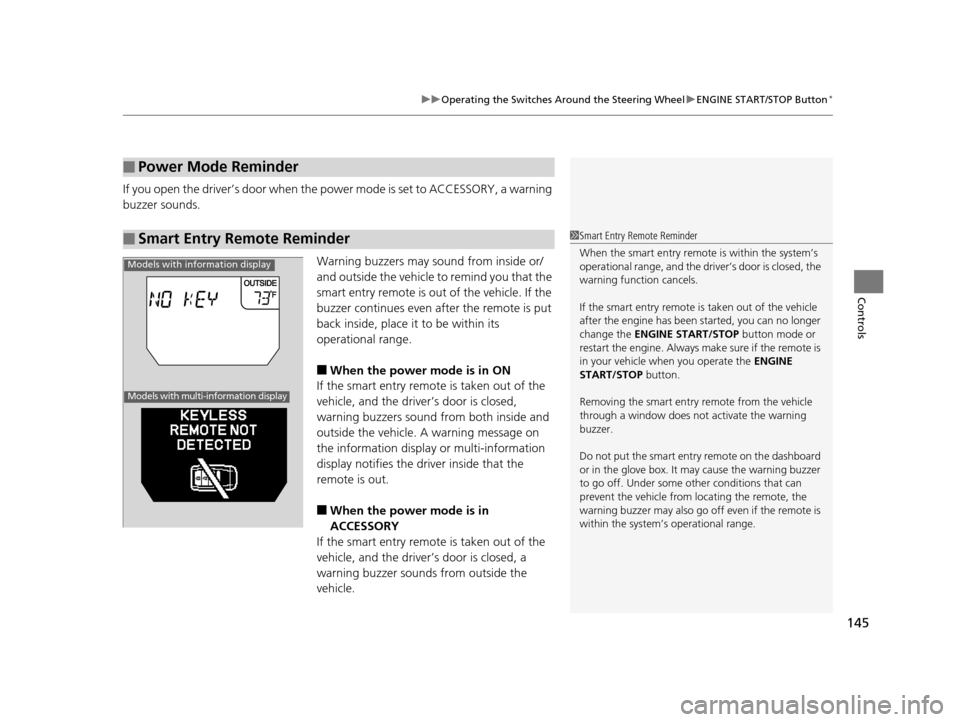
■When the power mode is in ON
If the smart entry remote is taken out of the
vehicle, and the driver’s door is closed,
warning buzzers sound from both inside and
outside the vehicle. A warning message on
the information display or multi-information
display notifies the driver inside that the
remote is out.
■When the power mode is in
ACCESSORY
If the smart entry remote is taken out of the
vehicle, and the driver’s door is closed, a
warning buzzer sounds from outside the
vehicle.
■Power Mode Reminder
■Smart Entry Remote Reminder1 Smart Entry Remote Reminder
When the smart entry remote is within the system’s
operational range, and the driv er’s door is closed, the
warning function cancels.
If the smart entry remote is taken out of the vehicle
after the engine has been started, you can no longer
change the ENGINE START/STOP button mode or
restart the engine. Always make sure if the remote is
in your vehicle when you operate the ENGINE
START/STOP button.
Removing the smart entry remote from the vehicle
through a window does not activate the warning
buzzer.
Do not put the smart entr y remote on the dashboard
or in the glove box. It may cause the warning buzzer
to go off. Under some other conditions that can
prevent the vehicle from locating the remote, the
warning buzzer may al so go off even if the remote is
within the system’s operational range.
Models with information display
Models with multi-information display
17 US ODYSSEY (KA KC)-31TK86600.book 145 ページ 2016年10月24日 月曜日 午後4時2分