Page 317 of 601
316
uuCustomized Features u
Features
■Customization flow
Models with Display Audio
Select Settings.Clock
Wallpaper
Others
Clock/Wallpaper Type*1/Clock Type*2
Clock Adjustment
Clock Format
ClockClock
Auto Time Zone*
Manual Time Zone*
Auto Daylight Saving Time
Clock Display
Overlay Clock Location
Clock Reset
Info Screen Preference
Clock
Wallpaper
Others
Clock/Wallpaper Type*1/Clock Type*2
Clock Adjustment
Clock Format
Clock
Auto Time Zone*
Manual Time Zone*
Auto Daylight Saving Time
Clock Display
Overlay Clock Location
Clock Reset
Info Screen Preference
Info
HondaLinkDiagnostic & Location Data
HondaLinkDiagnostic & Location Data
*1 : Does not appear when you chang e the screen interface design.
*2 : Appears only when you change the screen interface design.
* Not available on all models
17 CIVIC 4D HCM (KA KC KL)-31TBA6100.book 316 ページ 2016年8月31日 水曜日 午後6時5分
Page 319 of 601
318
uuCustomized Features u
Features
Audio Source Pop-Up
Cover Art
Tune Start
Sports Flash Setup
Traffic & Weather Setup
Other
SXM*
Default
Bluetooth Device ListBluetooth
Video
Multiple Channel Mix Preset
Home Screen Edit Order
Configuration of Instrument Panel
Tachometer Setting
Display Settings
Background Color*1
Display
System
Touch Panel Sensitivity
Brightness
Contrast
Black Level
Blue
Amber
Red
Violet
BlueGreen
Home
Menu icon position*2
*1 : Does not appear when you chang e the screen interface design.
*2 : Appears only when you change the screen interface design.
* Not available on all models
17 CIVIC 4D HCM (KA KC KL)-31TBA6100.book 318 ページ 2016年8月31日 水曜日 午後6時5分
Page 321 of 601
320
uuCustomized Features u
Features
ClockClock/Wallpaper Type*1/
Clock Type*2
Clock Adjustment
Clock Format
Auto Time Zone*
Manual Time Zone*
Auto Daylight Saving Time
Clock Display
Overlay Clock Location
Clock Reset
Clock
Wallpaper
*1 : Does not appear when you chang e the screen interface design.
*2 : Appears only when you change the screen interface design.
OthersLanguage
Voice Command Tips
Remember Last Screen*1
Memory Refresh
Refresh Time Adjustment
Swipe Direction
Change Skin
Factory Data Reset
Climate screen timeout
4way Switch Gesture
Volume Gestures
Detail Information
* Not available on all models
17 CIVIC 4D HCM (KA KC KL)-31TBA6100.book 320 ページ 2016年8月31日 水曜日 午後6時5分
Page 324 of 601
323
uuCustomized Features u
Continued
Features
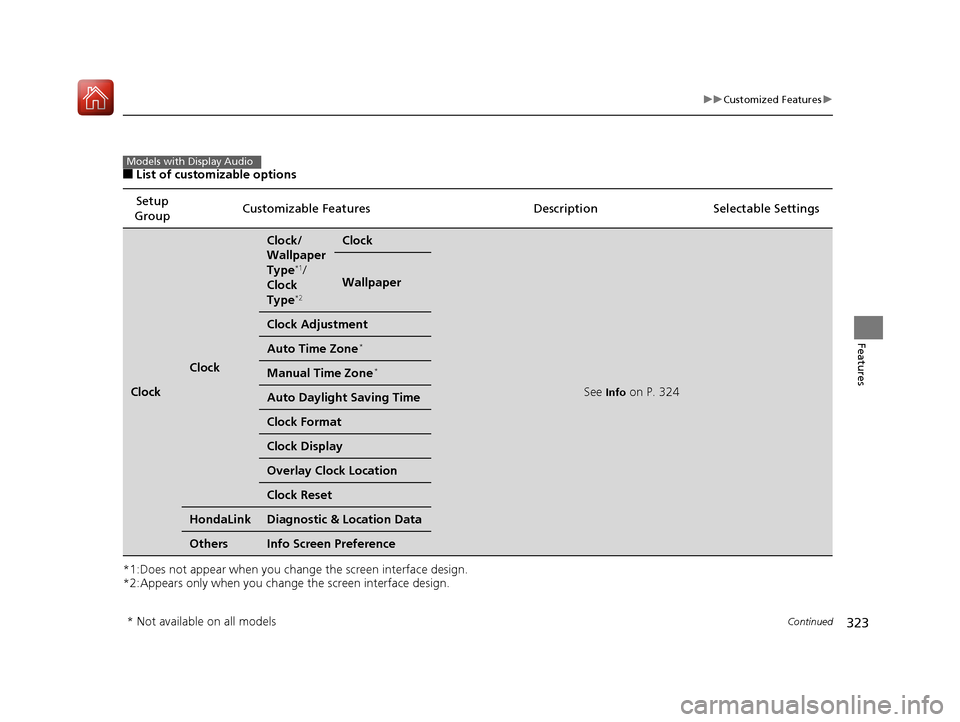
■List of customizable options
*1:Does not appear when you chan ge the screen interface design.
*2:Appears only when you change the screen interface design. Setup
Group Customizable Features
Description Selectable Settings
Clock
Clock
Clock/
Wallpaper
Type
*1/
Clock
Type
*2
Clock
See Info on P. 324
Wallpaper
Clock Adjustment
Auto Time Zone*
Manual Time Zone*
Auto Daylight Saving Time
Clock Format
Clock Display
Overlay Clock Location
Clock Reset
HondaLinkDiagnostic & Location Data
OthersInfo Screen Preference
Models with Display Audio
* Not available on all models
17 CIVIC 4D HCM (KA KC KL)-31TBA6100.book 323 ページ 2016年8月31日 水曜日 午後6時5分
Page 325 of 601
324
uuCustomized Features u
Features
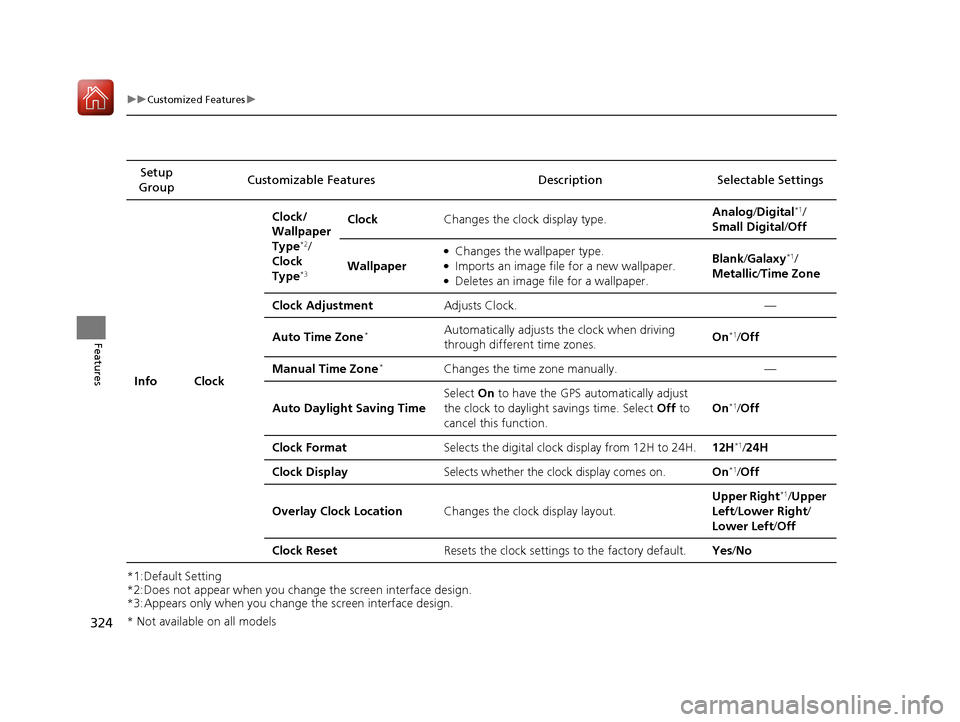
*1:Default Setting
*2:Does not appear when you change the screen interface design.
*3:Appears only when you change the screen interface design.Setup
Group Customizable Features Desc
ription Selectable Settings
Info Clock Clock/
Wallpaper
Type
*2/
Clock
Type
*3
Clock Changes the clock display type. Analog
/Digital*1/
Small Digital /Off
Wallpaper
●Changes the wallpaper type.●Imports an image file for a new wallpaper.●Deletes an image file for a wallpaper. Blank
/Galaxy
*1/
Metallic /Time Zone
Clock Adjustment Adjusts Clock. —
Auto Time Zone
*Automatically adjusts th e clock when driving
through different time zones. On*1/
Off
Manual Time Zone
*Changes the time zone manually. —
Auto Daylight Saving Time Select
On to have the GPS automatically adjust
the clock to daylight savings time. Select Off to
cancel this function. On
*1/
Off
Clock Format Selects the digital clock display from 12H to 24H. 12H
*1/24H
Clock Display Selects whether the clock display comes on. On
*1/Off
Overlay Clock Location Changes the clock display layout. Upper Right
*1/
Upper
Left/ Lower Right/
Lower Left /Off
Clock Reset Resets the clock settings to the factory default. Yes/No
* Not available on all models
17 CIVIC 4D HCM (KA KC KL)-31TBA6100.book 324 ページ 2016年8月31日 水曜日 午後6時5分
Page 326 of 601

325
uuCustomized Features u
Continued
Features
*1:Default SettingSetup
Group Customizable Features Desc
ription Selectable Settings
Info HondaLink
Diagnostic & Location
Data
Turns HondaLink
® on and off. On
*1/Off
Others Info Screen Preference Selects the top menu when the button is
pressed.
●Info Top
- A brief menu pops up.●Info Menu- A full menu pops up.●Off- A menu does not pop up. Info Top
/Info
Menu
*1/ Off
Camera
Rear
Camera
Fixed Guideline
Selects whether the fixed guidelines come on the
rear camera monitor.
2 Multi-View Rear Camera P. 474
On*1/Off
Dynamic Guideline
Selects whether the guidelines adjust to the
movement of the steering wheel.
2 Multi-View Rear Camera P. 474
On*1/Off
DefaultCancels/Resets all cust omized items in the Rear
Camera setting group as default.Yes/No
LaneWatch*
Show with Turn Signal
Selects whether the LaneWatch display comes on
when you move the turn signal lever to indicate a
right turn.
On*1/Off
Display Time after Turn
Signal OffChanges the length of time the LaneWatch
display stays on after the turn signal lever returns
to the center.
0 second*1/2 seconds
* Not available on all models
17 CIVIC 4D HCM (KA KC KL)-31TBA6100.book 325 ページ 2016年8月31日 水曜日 午後6時5分
Page 327 of 601

326
uuCustomized Features u
Features
*1:Default SettingSetup
Group Customizable Featur
es Description Sel ectable Settings
CameraLaneWatch*
Reference LineSelects whether the reference lines come on the
LaneWatch monitor.On*1/Off
DefaultCancels/Resets all customized items in the
LaneWatch group as default.Yes/No
Bluetooth
/Wi-Fi Bluetooth
Bluetooth On/Off Status
Changes the Bluetooth® status. On
*1/Off
Bluetooth Device List Pairs a new phone to HFL, edits or deletes a
paired phone.
2
Phone Setup P. 370
—
Edit Pairing Code Edits a pairing code.
2
To change the pairing code setting P. 371Random/Fixed*1
Wi-Fi Wi-Fi On/Off Status
Changes the Wi-Fi mode. On/Off
*1
Wi-Fi Device List Connects, disconnects, or deletes the Wi-Fi
device.
—
Wi-Fi Information Shows the Wi-Fi information of the head unit. —
Default Cancels/Resets all customized items in the
Bluetooth/Wi-Fi
group as default. Yes
/No
Smart-
phoneApple CarPlaySets up the Apple CarPlay connection.—
Android AutoSets up the Android Auto connection.—
* Not available on all models
17 CIVIC 4D HCM (KA KC KL)-31TBA6100.book 326 ページ 2016年8月31日 水曜日 午後6時5分
Page 329 of 601

328
uuCustomized Features u
Features
*1:Default SettingSetup
Group Customizable Features Descri
ption Selectable Settings
Audio
FM/AM
HD Radio Mode*Selects whether the audio system automatically
switches to the digital radio waves or receives the
analog waves only.
Auto*1/Analog
RDS INFOTurns on and off the RDS information.On*1/Off
SXM*
Tune StartTurns on and off, starts the song from the
beginning as you change preset stations.On*1/Off
Sports
Flash
Setup
InterruptTurns on and off the sports alert function.Off /On(one time) /
On(continue)*1
Favorite TeamSelects your favori te sports teams.
2Live Sports Alert P. 267—
Interrupt BeepCauses the system to beep when the sports alert
is notified.On*1/Off
Traffic & Weather SetupSelects the region you want to receive the
information.—
Multiple Channel Mix
PresetTurns multiple channel mix preset on and off.On /Off*1
FM/AM mode
SiriusXM® mode
* Not available on all models
17 CIVIC 4D HCM (KA KC KL)-31TBA6100.book 328 ページ 2016年8月31日 水曜日 午後6時5分