Page 375 of 601
uuBluetooth ® HandsFreeLink ®*uHFL Menus
374
Features
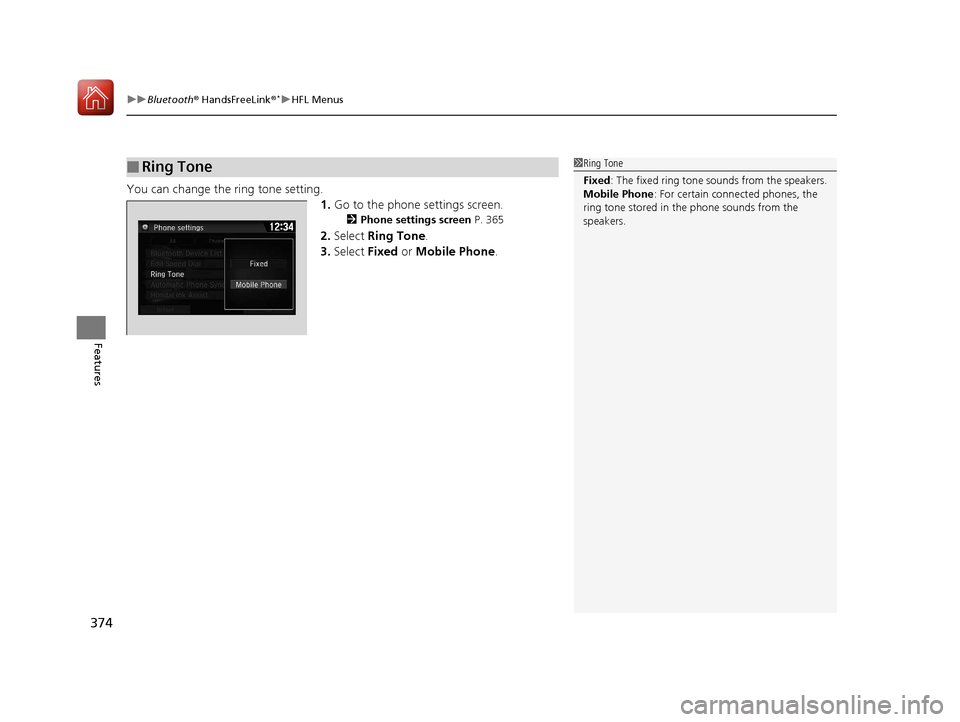
You can change the ring tone setting.
1.Go to the phone settings screen.
2 Phone settings screen P. 365
2.Select Ring Tone .
3. Select Fixed or Mobile Phone .
■Ring Tone1Ring Tone
Fixed: The fixed ring tone sounds from the speakers.
Mobile Phone : For certain conne cted phones, the
ring tone stored in the phone sounds from the
speakers.
17 CIVIC 4D HCM (KA KC KL)-31TBA6100.book 374 ページ 2016年8月31日 水曜日 午後6時5分
Page 394 of 601

Continued393
uuBluetooth ® HandsFreeLink ®*uHFL Menus
Features
■Automatic collis ion notification
If your vehicle’s airbags deploy or if the unit
detects that the vehicle is severely impacted,
your vehicle automatically will attempt to
connect to the HondaLink operator. If
connected, information about your vehicle, its
location, and its condition can be sent to the
operator
*1; you also can speak to the operator
when connected.
IMPORTANT: For vehicles equipped with HondaLink Assist, owner activation
constitutes authorization for Honda to collect information from your vehicle needed
to provide the service, and agreement to the Terms of Use at www.hondalink.com/
TermsAndConditions . In a crash, HondaLink Assist will attempt to notify emergency
services but NEITHER Honda-PRO NOR ITS SERVICE PROVIDERS GUARANTEE THAT
SUCH NOTIFICATION WILL OCCUR.
Honda reserves the right to terminate HondaLink Assist services at any time or for
any reason, and in the future may not be ab le to provide services due to changes in,
or obsolescence of, technology integral to the service or changes in governmental
regulation.
*1: Depending on your phone and adequate cellular coverage, your vehicle’s location may not
be sent to the operator.
■In Case of Emergency1 In Case of Emergency
Your vehicle may not be able to connect to the
operator if the battery level is low, the line is
disconnected, or you do not have adequate cellular
coverage.
You cannot use this emergency service when:
•You travel outside the HondaLink service coverage
areas.
•There is a problem with the connecting devices,
such as the microphones, speakers, or the unit
itself.
You cannot operate othe r phone-related functions
using the screen while talking to the operator.
Select Hang Up to terminate the connection to your
vehicle.
1 Automatic collision notification
If the unit fails to connect to the operator, it
repeatedly tries until it succeeds.
17 CIVIC 4D HCM (KA KC KL)-31TBA6100.book 393 ページ 2016年8月31日 水曜日 午後6時5分
Page 412 of 601
411
uuWhen Driving uShifting
Continued
Driving
Shifting
Change the shift position in accordance with your driving needs.
■Shift lever positions
*1: Models with the smart entry system have an ENGINE START/STOP button instead of an
ignition switch.
Continuously variable transmission models
1 Shifting
You cannot turn the ignition switch to LOCK
(0*1
and remove the key unless the shift lever is in
( P.
The vehicle may move forward very slightly even in
(N while the engine is cold.
Depress the brake pe dal firmly and, when necessary,
apply the parking brake.
Reverse
Used when reversing
Drive
Used for normal driving
Park
Used when parking or starting the
engine
Neutral
Used when idling
Release Button
Drive (S)
Used:
●For better acceleration●To increase engine braking●When going up or down hills
Low
●Used to further increase engine braking●Used when going up or down hills
17 CIVIC 4D HCM (KA KC KL)-31TBA6100.book 411 ページ 2016年8月31日 水曜日 午後6時5分
Page 413 of 601
uuWhen Driving uShifting
412
Driving
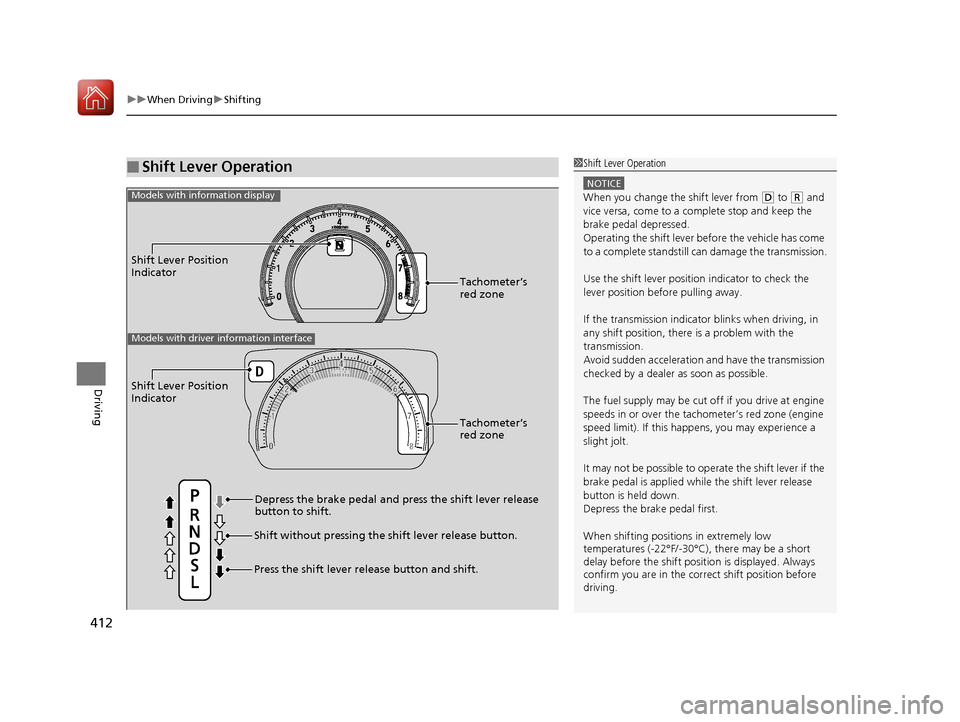
■Shift Lever Operation1Shift Lever Operation
NOTICE
When you change the shift lever from (D to (R and
vice versa, come to a complete stop and keep the
brake pedal depressed.
Operating the shift lever be fore the vehicle has come
to a complete standstill can damage the transmission.
Use the shift lever position indicator to check the
lever position befo re pulling away.
If the transmission indicator blinks when driving, in
any shift position, there is a problem with the
transmission.
Avoid sudden acceleration and have the transmission
checked by a dealer as soon as possible.
The fuel supply may be cut of f if you drive at engine
speeds in or over the tac hometer’s red zone (engine
speed limit). If this happe ns, you may experience a
slight jolt.
It may not be possible to operate the shift lever if the
brake pedal is applied while the shift lever release
button is held down.
Depress the brake pedal first.
When shifting positions in extremely low
temperatures (-22°F/-30°C), there may be a short
delay before the shift posit ion is displayed. Always
confirm you are in the corr ect shift position before
driving.
Shift Lever Position
Indicator
Depress the brake pedal and press the shift lever release
button to shift.
Shift without pressing the shift lever release button.
Press the shift lever re lease button and shift.Tachometer’s
red zone
Shift Lever Position
Indicator
Tachometer’s
red zone
Models with driver information interface
Models with information display
17 CIVIC 4D HCM (KA KC KL)-31TBA6100.book 412 ページ 2016年8月31日 水曜日 午後6時5分
Page 414 of 601
413
uuWhen Driving uShifting
Continued
Driving
Shifting
Fully depress the clutch pedal to operate the shift lever and change gears, then
slowly release the pedal.
Depress the clutch pedal, and pause fo r a few seconds before shifting into
(R, or
shift into one of the forward gears for a mo ment. This stops the gears so they do not
“grind.”
■Shift Lever Operation
Manual transmission models
1 Shifting
NOTICE
Do not shift to (R before the vehicle comes to a
complete stop.
Shifting to
( R before stopping can damage the
transmission.
NOTICE
Before downshifting, make sure the engine will not
go into the tachometer's red zone. Should this occur,
it can severely da mage your engine.
There is a metallic part on the shift lever. If you leave
the vehicle parked outside for a long time on a hot
day, be careful before movi ng the shift lever. Because
of heat, the shift lever may be extremely hot. If the
outside temperature is low, the shift lever may feel
cold.
17 CIVIC 4D HCM (KA KC KL)-31TBA6100.book 413 ページ 2016年8月31日 水曜日 午後6時5分
Page 418 of 601
417
uuWhen Driving uCruise Control*
Continued
Driving
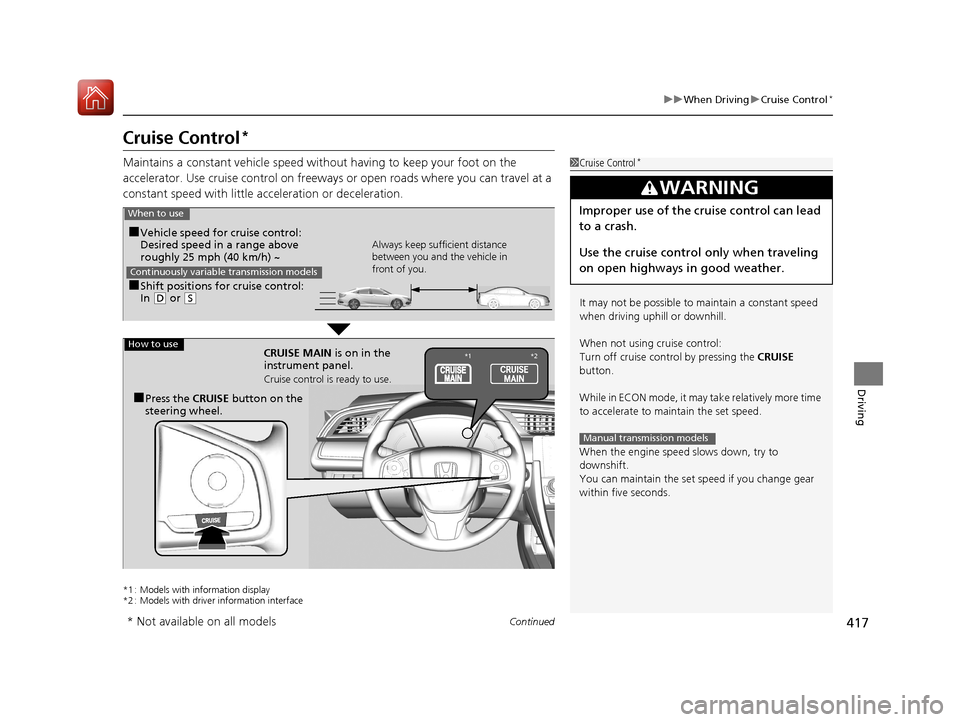
Cruise Control*
Maintains a constant vehicle speed without having to keep your foot on the
accelerator. Use cruise con trol on freeways or open roads where you can travel at a
constant speed with little ac celeration or deceleration.
*1 : Models with information display
*2 : Models with driver information interface
1Cruise Control*
It may not be possible to maintain a constant speed
when driving uphill or downhill.
When not using cruise control:
Turn off cruise control by pressing the CRUISE
button.
While in ECON mode, it may take relatively more time
to accelerate to maintain the set speed.
When the engine speed slows down, try to
downshift.
You can maintain the set sp eed if you change gear
within five seconds.
3WARNING
Improper use of the cruise control can lead
to a crash.
Use the cruise control only when traveling
on open highways in good weather.
Manual transmission models
■Shift positions for cruise control:
In ( D or (S Always keep sufficient distance
between you and the vehicle in
front of you.
Continuously variable transmission models
■Vehicle speed for cruise control:
Desired speed in a range above
roughly 25 mph (40 km/h) ~
When to use
CRUISE MAIN is on in the
instrument panel.
Cruise control is ready to use.
■Press the
CRUISE button on the
steering wheel.
How to use*1 *2
* Not available on all models
17 CIVIC 4D HCM (KA KC KL)-31TBA6100.book 417 ページ 2016年8月31日 水曜日 午後6時5分
Page 426 of 601

Continued425
uuWhen Driving uAdaptive Cruise Control (ACC) with Low Speed Follow (LSF)*
Driving
■There is a vehicle ahead
ACC with LSF monitors if a vehicle ahead of you enters the ACC with LSF range. If a
vehicle is detected doing so, the ACC with LSF system maintains or decelerates your
vehicle’s set speed in order to keep the vehicle’s set following interval from the
vehicle ahead.
2 To Set or Change Following Interval P. 430
When a vehicle whose speed is slower than
your set speed is detected in front of you, your
vehicle starts to slow down.
■When in Operation1 When in Operation
If the vehicle ahead of you slows down abruptly, or if
another vehicle cuts in front of you, the beeper
sounds, a message appears on the driver information
interface.
Depress the brake pedal, and keep an appropriate
interval from the vehicle ahead.
Even if the interval betw een your vehicle and the
vehicle ahead is short, ACC with LSF may start
accelerating your vehi cle under the following
circumstances:
•The vehicle ahead of you is going at almost the
same speed as, or faster than, your vehicle.
•A vehicle that cuts in front of you is going faster
than your vehicle, gradua lly increasing the interval
between the vehicles.
You can also set the system to beep when a vehicle in
front of you comes in and goes out of the ACC with
LSF detecting range. Change the ACC Forward
Vehicle Detect Beep setting. 2 Customized Features P. 118, 308
Beep
ACC with LSF Range: 394 ft. (120 m)
A vehicle icon appears on the
driver information interface
17 CIVIC 4D HCM (KA KC KL)-31TBA6100.book 425 ページ 2016年8月31日 水曜日 午後6時5分
Page 431 of 601
430
uuWhen Driving uAdaptive Cruise Control (ACC) with Low Speed Follow (LSF)*
Driving
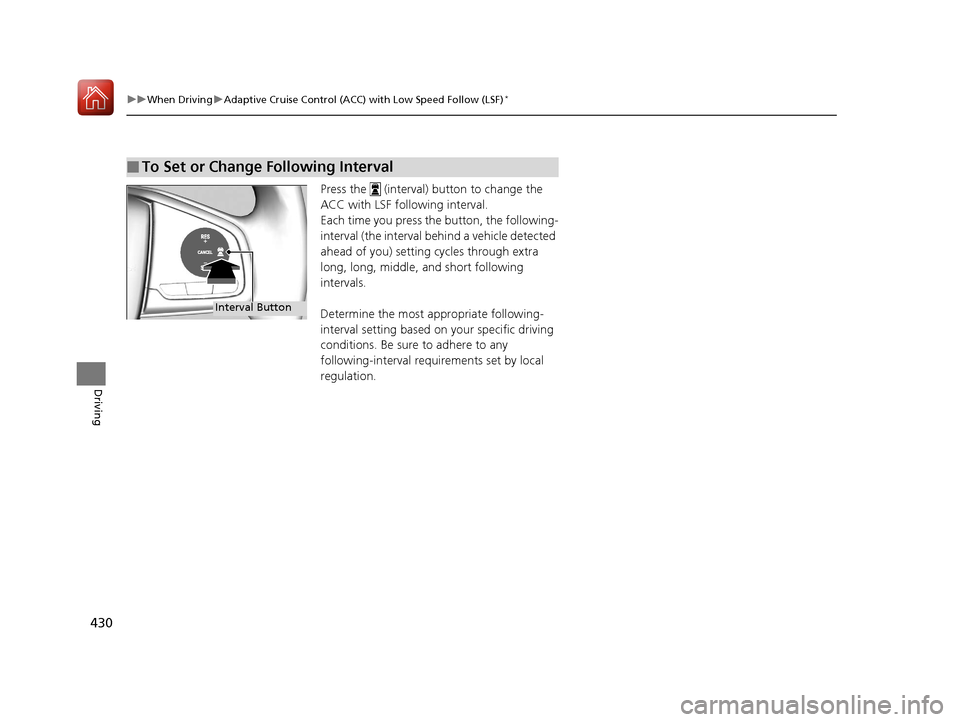
Press the (interval) button to change the
ACC with LSF following interval.
Each time you press the button, the following-
interval (the interval behind a vehicle detected
ahead of you) setting cycles through extra
long, long, middle, and short following
intervals.
Determine the most appropriate following-
interval setting based on your specific driving
conditions. Be sure to adhere to any
following-interval requ irements set by local
regulation.
■To Set or Change Following Interval
Interval Button
17 CIVIC 4D HCM (KA KC KL)-31TBA6100.book 430 ページ 2016年8月31日 水曜日 午後6時5分