2017 CHEVROLET EXPRESS CARGO VAN ECO mode
[x] Cancel search: ECO modePage 140 of 346
Chevrolet Express Owner Manual (GMNA-Localizing-U.S./Canada/Mexico-9967827) - 2017 - crc - 5/2/16
Infotainment System 139
2. Press FAV to display the pagewhere the station is to bestored.
3. Press and hold one of thesix softkeys until a beepsounds. When that softkey ispressed and released, thestation that was set, returns.
4. Repeat the steps for eachsoftkey radio station to bestored as a favorite.
The number of favorites pages canbe set up using the MENU button.To s e t u p t h e n u m b e r o f f a v o r i t e spages:
1. Press MENU to display theradio setup menu.
2. Press the softkey below theFAV 1 - 6 t a b .
3. Select the desired number offavorites pages by pressing thesoftkey below the displayedpage numbers.
4. Press FAV , or let the menutime out, to return to theoriginal main radio screenshowing the radio stationfrequency tabs and to begin
the process of programmingfavorites for the chosennumber of numbered pages.
Satellite Radio
SiriusXM®,ifequipped,isasatelliteradio service based in the UnitedStates and Canada only.
Finding a Category (CAT)
Station
CAT :The CAT button is used tofind SXM channels (if equipped)while the radio is in the SXM mode.
Finding a Channel
BAND or SRCE :Press to switchbetween FM1, FM2, AM, and SXM ifequipped. The selection displays.
f:Turn clockwise orcounterclockwise to increase ordecrease the station frequency.
©SEEK or¨SEEK :Press©
SEEK to go to the previous or¨
SEEK to go to the next station andstay there.
To s c a n s t a t i o n s , p r e s s a n d h o l deither button for two seconds until abeep sounds. The radio goes to astation, plays for a few seconds,then goes to the next station. Thestation frequency flashes while theradio is in the scan mode. Presseither button again to stop scanning.
The radio seeks and scans stationsonly with a strong signal that are inthe selected band.
To s c a n p r e s e t s w i t h i n t h e c u r r e n tselected band by pressing andholding either SEEK button forfour seconds until a double beepsounds. The radio goes to a storedpreset, plays for a few seconds if astrong signal is present, then goesto the next stored preset. Thestation frequency flashes while theradio is in the scan mode.
Storing a Radio Station as a
Favorite
Drivers are encouraged to set upradio station favorites while thevehicle is parked. Tune to favoritestations using the presets, favorites
Page 144 of 346
Chevrolet Express Owner Manual (GMNA-Localizing-U.S./Canada/Mexico-9967827) - 2017 - crc - 5/2/16
Infotainment System 143
4:Press to display additional textinformation related to the currentsong. If information is available, thesong title information displays onthe top line of the display and artistinformation displays on the bottomline. When information is notavailable, NO INFO displays.
f:Turn to select tracks on the CDthat is currently playing.
©SEEK :Press to go to the start ofthe current track if more than10 seconds on the CD have played.
Press to go to the previous track ifless than 10 seconds on the CDhave played.
Press and hold, or press multipletimes, to continue moving backwardthrough the tracks on the CD.
¨SEEK :Press to go to the nexttrack.
Press and hold, or press multipletimes, to continue moving forwardthrough the tracks on the CD.
sREV :Press and hold to reverseplayback quickly within a track.
\FWD :Press and hold toadvance playback quickly within atrack.
RDM :For Radios with CD/MP3.Press to listen to tracks in random,rather than sequential order.
To u s e r a n d o m :
1. Press the softkey under theRDM tab until Random CurrentDisc displays.
2. Press the softkey again to turnoff random play.
MP3-Supported Files
Radios with CD/MP3 have thecapability of playing an MP3 CD-Ror CD-RW disc.
Format
Radios that have the capability ofplaying MP3s can play .mp3 or .wmafiles that were recorded onto aCD-R or CD-RW disc. The files canbe recorded with the following fixedbit rates: 32 kbps, 40 kbps, 56 kbps,64 kbps, 80 kbps, 96 kbps, 112 kbps,128 kbps, 160 kbps, 192 kbps,224 kbps, 256 kbps, and 320 kbps oravariablebitrate.
Compressed Audio or Mixed ModeDiscs
The radio can play discs thatcontain both uncompressed CDaudio and MP3 files. If both formatsare on the disc, the radio reads allMP3 files first, then theuncompressed CD audio files.
CD-R- or CD-RW-Supported Fileand Folder Structure
The radio supports:
.Up to 50 folders.
.Up to eight folders in depth.
.Up to 50 playlists.
.Up to 255 files.
.Playlists with an .m3u or .wplextension.
.Files with an .mp3, .wma, or .cdafile extension.
Root Directory
The root directory is treated as afolder. Files are stored in the rootdirectory when the disc or storagedevice does not contain folders.
Page 149 of 346
Chevrolet Express Owner Manual (GMNA-Localizing-U.S./Canada/Mexico-9967827) - 2017 - crc - 5/2/16
148 Infotainment System
.FAT 3 2 .
Connecting a USB Storage
Device or iPod
The USB port can be used tocontrol an iPod or a USB storagedevice.
To c o n n e c t a U S B s t o r a g e d e v i c e ,connect the device to the USB porton the instrument panel.
To c o n n e c t a n i P o d , c o n n e c t o n eend of the USB cable that camewith the iPod to the iPod’sdockconnector and connect the otherend to the USB port on theinstrument panel. If the vehicle is onand the USB connection works,“OKto disconnect”and a GM logo mayappear on the iPod, and iPodappears on the radio display. TheiPod music appears on the radiodisplay and begins playing.
The iPod charges while it isconnected to the vehicle if thevehicle is in the ACC/ACCESSORYor ON/RUN position. When thevehicle is turned off, the iPod
automatically powers off and will notcharge or draw power from thevehicle's battery.
If you have an older iPod model thatis not supported, it can still be usedby connecting it to the auxiliaryinput jack using a standard 3.5 mm(1/8 in) stereo cable. See“Using theAuxiliary Input Jack”previously inthis section.
Using the Radio to Control a
USB Storage Device or iPod
The radio can control a USBstorage device or an iPod using theradio buttons and knobs, anddisplay song information on theradio display.
f:Turn to select files.
©SEEK :Press to go to the start ofthe track, if more than 10 secondshave played. Press and hold orpress multiple times to continuemoving backward through tracks.
¨SEEK :Press to go to the nexttrack. Press and hold or pressmultiple times to continue movingforward through tracks.
sREV :Press and hold to reverseplayback quickly. Sound is heard at
areducedvolume.ReleasesREV
to resume playing. The elapsed timeof the file displays.
\FWD :Press and hold toadvance playback quickly. Sound isheard at a reduced volume. Release\FWD to resume playing. Theelapsed time of the file displays.
4:Press to display additionalinformation about the selected track.
Using Softkeys to Control a
USB Storage Device or iPod
The five softkeys below the radiodisplay are used to control thefunctions listed below.
To u s e t h e s o f t k e y s :
1. Press the first or fifth softkeybelow the radio display todisplay the functions listedbelow, or press the softkeybelow the function if it iscurrently displayed.
2. Press the softkey below the tabwith the function on it to usethat function.
Page 152 of 346
Chevrolet Express Owner Manual (GMNA-Localizing-U.S./Canada/Mexico-9967827) - 2017 - crc - 5/2/16
Infotainment System 151
Call 1-888-4-ONSTAR(1-888-466-7827) to connect to anOnStar Advisor for assistance. Seewww.onstar.com for a detailedinstruction guide, vehicle availability,details, and system limitations.Services and apps vary by make,model, year, carrier, availability, andconditions. 4G LTE service isavailable in select markets. 4G LTEperformance is based on industryaverages and vehicle systemsdesign. Some services require adata plan.
Phone
Bluetooth
For vehicles equipped withBluetooth capability, the system caninteract with many cell phones,allowing:
.Placement and receipt of calls inahands-freemode.
.Sharing of the cell phone’saddress book or contact list withthe vehicle.
To m i n i m i z e d r i v e r d i s t r a c t i o n ,before driving, and with the vehicleparked:
.Become familiar with thefeatures of the cell phone.Organize the phone book andcontact lists clearly and deleteduplicate or rarely used entries.If possible, program speed dialor other shortcuts.
.Review the controls andoperation of the infotainmentsystem.
.Pair cell phone(s) to the vehicle.The system may not work withall cell phones. See“Pairing”inthis section for more information.
.If the cell phone has voicedialing capability, learn to usethat feature to access theaddress book or contact list. See“Vo i c e P a s s - T h r u”in this sectionfor more information.
.See“Storing and Deleting PhoneNumbers”in this section formore information.
{Warning
When using a cell phone, it can
be distracting to look too long or
too often at the screen of the
phone or the infotainment system.
Ta k i n g y o u r e y e s o f f t h e r o a d t o o
long or too often could cause a
crash resulting in injury or death.
Focus your attention on driving.
ABluetoothsystemcanuseaBluetooth-capable cell phone with aHands-Free Profile to make andreceive phone calls. The system
Page 163 of 346
Chevrolet Express Owner Manual (GMNA-Localizing-U.S./Canada/Mexico-9967827) - 2017 - crc - 5/2/16
162 Climate Controls
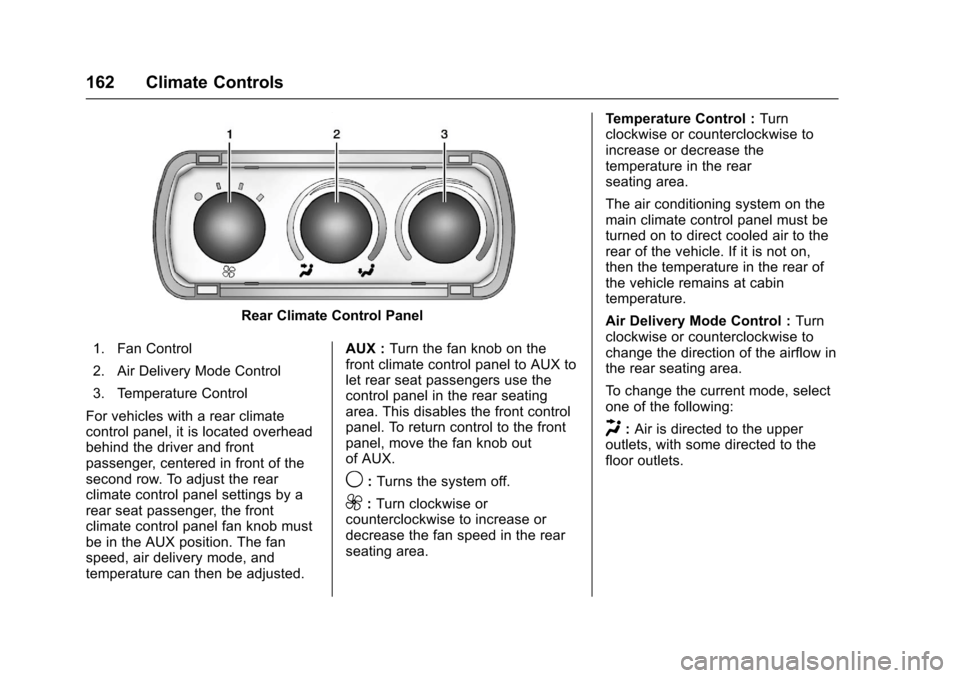
Rear Climate Control Panel
1. Fan Control
2. Air Delivery Mode Control
3. Temperature Control
For vehicles with a rear climatecontrol panel, it is located overheadbehind the driver and frontpassenger, centered in front of thesecond row. To adjust the rearclimate control panel settings by arear seat passenger, the frontclimate control panel fan knob mustbe in the AUX position. The fanspeed, air delivery mode, andtemperature can then be adjusted.
AUX :Turn the fan knob on thefront climate control panel to AUX tolet rear seat passengers use thecontrol panel in the rear seatingarea. This disables the front controlpanel. To return control to the frontpanel, move the fan knob outof AUX.
9:Turns the system off.
9:Turn clockwise orcounterclockwise to increase ordecrease the fan speed in the rearseating area.
Te m p e r a t u r e C o n t r o l :Turnclockwise or counterclockwise toincrease or decrease thetemperature in the rearseating area.
The air conditioning system on themain climate control panel must beturned on to direct cooled air to therear of the vehicle. If it is not on,then the temperature in the rear ofthe vehicle remains at cabintemperature.
Air Delivery Mode Control :Turnclockwise or counterclockwise tochange the direction of the airflow inthe rear seating area.
To c h a n g e t h e c u r r e n t m o d e , s e l e c tone of the following:
H:Air is directed to the upperoutlets, with some directed to thefloor outlets.
Page 165 of 346
Chevrolet Express Owner Manual (GMNA-Localizing-U.S./Canada/Mexico-9967827) - 2017 - crc - 5/6/16
164 Driving and Operating
Driving and
Operating
Driving Information
Distracted Driving . . . . . . . . . . . . 165Defensive Driving . . . . . . . . . . . . . 165Drunk Driving . . . . . . . . . . . . . . . . . 166Control of a Vehicle . . . . . . . . . . . 166Braking . . . . . . . . . . . . . . . . . . . . . . . 166Steering . . . . . . . . . . . . . . . . . . . . . . 166Off-Road Recovery . . . . . . . . . . . 167Loss of Control . . . . . . . . . . . . . . . 167Driving on Wet Roads . . . . . . . . 168Hill and Mountain Roads . . . . . 169Winter Driving . . . . . . . . . . . . . . . . 169If the Vehicle Is Stuck . . . . . . . . 171Vehicle Load Limits . . . . . . . . . . . 171
Starting and Operating
New Vehicle Break-In . . . . . . . . . 175Ignition Positions . . . . . . . . . . . . . 176Starting the Engine . . . . . . . . . . . 177Fast Idle System . . . . . . . . . . . . . 178Engine Heater . . . . . . . . . . . . . . . . 179Retained AccessoryPower (RAP) . . . . . . . . . . . . . . . . 180Shifting Into Park . . . . . . . . . . . . . 180Shifting out of Park . . . . . . . . . . . 181
Parking over ThingsThat Burn . . . . . . . . . . . . . . . . . . . 182
Engine Exhaust
Engine Exhaust . . . . . . . . . . . . . . 182Running the Vehicle WhileParked . . . . . . . . . . . . . . . . . . . . . . 183
Automatic Transmission
Automatic Transmission . . . . . . 183Manual Mode . . . . . . . . . . . . . . . . . 186To w / H a u l M o d e . . . . . . . . . . . . . . . 1 8 7
Brakes
Antilock BrakeSystem (ABS) . . . . . . . . . . . . . . . 188Parking Brake . . . . . . . . . . . . . . . . 189
Ride Control Systems
Traction Control/ElectronicStability Control . . . . . . . . . . . . . 190Locking Rear Axle . . . . . . . . . . . . 191
Cruise Control
Cruise Control . . . . . . . . . . . . . . . . 192
Driver Assistance Systems
Rear Vision Camera (RVC) . . . 194Parking Assist . . . . . . . . . . . . . . . . 197
Fuel
Fuel . . . . . . . . . . . . . . . . . . . . . . . . . . 198
California FuelRequirements . . . . . . . . . . . . . . . 199Fuels in Foreign Countries . . . 199Fuel Additives . . . . . . . . . . . . . . . . 199E85 or FlexFuel . . . . . . . . . . . . . . 199Filling the Tank . . . . . . . . . . . . . . . 200Filling a Portable FuelContainer . . . . . . . . . . . . . . . . . . . 202
Trailer Towing
General TowingInformation . . . . . . . . . . . . . . . . . . 202Driving Characteristics andTo w i n g T i p s . . . . . . . . . . . . . . . . . 2 0 2Trailer Towing . . . . . . . . . . . . . . . . 205To w i n g E q u i p m e n t . . . . . . . . . . . . 2 1 0
Conversions and Add-Ons
Add-On ElectricalEquipment . . . . . . . . . . . . . . . . . . 212
Page 186 of 346
Chevrolet Express Owner Manual (GMNA-Localizing-U.S./Canada/Mexico-9967827) - 2017 - crc - 5/6/16
Driving and Operating 185
By doing this, the vehicle shiftsdown to the next gear and hasmore power.
D(Drive) can be used when towingatrailer,carryingaheavyload,or driving on steep hills. You mightwant to shift the transmission to alower gear selection if thetransmission shifts too often.
Downshifting the transmission inslippery road conditions could resultin skidding. See“Skidding”underLoss of Control0167.
The vehicle has a shift stabilizationfeature that adjusts the transmissionshifting to the current drivingconditions in order to reduce rapidupshifts and downshifts. This shiftstabilization feature is designed todetermine, before making anupshift, if the engine is able tomaintain vehicle speed by analyzingthings such as vehicle speed,throttle position, and vehicle load.If the shift stabilization featuredetermines that a current vehiclespeed cannot be maintained, thetransmission does not upshift andinstead holds the current gear.
In some cases, this could appear tobe a delayed shift, however thetransmission is operating normally.
The transmission uses adaptiveshift controls. Adaptive shift controlscontinually compare key shiftparameters to pre-programmedideal shifts stored in thetransmission’scomputer.Thetransmission constantly makesadjustments to improve vehicleperformance according to how thevehicle is being used, such as withaheavyloadorwhenthetemperature changes. During thisadaptive shift control process,shifting might feel different as thetransmission determines the bestsettings.
The shift quality of a new vehiclemay not be ideal because theadaptive shift control process maynot have determined the bestsettings for a particular shift orcondition. Shift quality will improvewith continued driving.
When temperatures are very cold,the transmission's gear shiftingcould be delayed, providing more
stable shifts until the engine warmsup. Shifts could be more noticeablewith a cold transmission. Thisdifference in shifting is normal.
M:This position lets drivers selectthe range of gears appropriate forcurrent driving conditions. If thevehicle has this feature, see“RangeSelection Mode”underManualMode0186.
3:This position is also used fornormal driving. It reduces vehiclespeed more than D (Drive) withoutusing the brakes. You might choose3(Third) instead of D(Drive) whendriving on hilly, winding roads; whentowing a trailer, so there is lessshifting between gears; and whengoing down a steep hill. See“RangeSelection Mode”underManualMode0186.
2:This position reduces vehiclespeed even more than 3 (Third)without using the brakes. You canuse 2 (Second) on hills. It can helpcontrol vehicle speed as you godown steep mountain roads, butthen you would also want to use the
Page 187 of 346
Chevrolet Express Owner Manual (GMNA-Localizing-U.S./Canada/Mexico-9967827) - 2017 - crc - 5/6/16
186 Driving and Operating
brakes off and on. See“RangeSelection Mode”underManualMode0186.
If you manually select 2 (Second) inan automatic transmission, thetransmission will start insecond gear. You can use thisfeature for reducing the speed of therear wheels when trying to start thevehicle from a stop on slippery roadsurfaces.
1:This position reduces vehiclespeed without using the brakes.Yo u c a n u s e i t f o r m a j o r / s e v e r edowngrades where the vehiclewould otherwise accelerate due tosteepness of grade. When you shiftto 1 (First) it provides the lowestgear appropriate to current roadspeed and continues to downshiftas the vehicle slows, eventuallydownshifting to 1 (First) gear. Thetransmission can be held in 1 (First)gear using Range Selection Modeor the shift lever. See“RangeSelection Mode”underManualMode0186.
Caution
Spinning the tires or holding the
vehicle in one place on a hill
using only the accelerator pedal
may damage the transmission.
The repair will not be covered by
the vehicle warranty. If you are
stuck, do not spin the tires. When
stopping on a hill, use the brakes
to hold the vehicle in place.
Normal Mode Grade Braking
This mode is enabled when thevehicle is started, but is not enabledin Range Selection Mode. It assistsin maintaining desired vehiclespeeds when driving on downhillgrades by using the engine andtransmission to slow the vehicle.The first time the system activatesfor each ignition key cycle, a DICmessage will be displayed. SeeTr a n s m i s s i o n M e s s a g e s011 8.
To d i s a b l e o r e n a b l e N o r m a l M o d eGrade Braking within the currentignition key cycle, press and holdthe Tow/Haul button for
three seconds. A DIC messagedisplays. SeeTr a n s m i s s i o nMessages011 8.
For other forms of grade braking,seeTo w / H a u l M o d e0187andCruise Control0192.
Manual Mode
Range Selection Mode
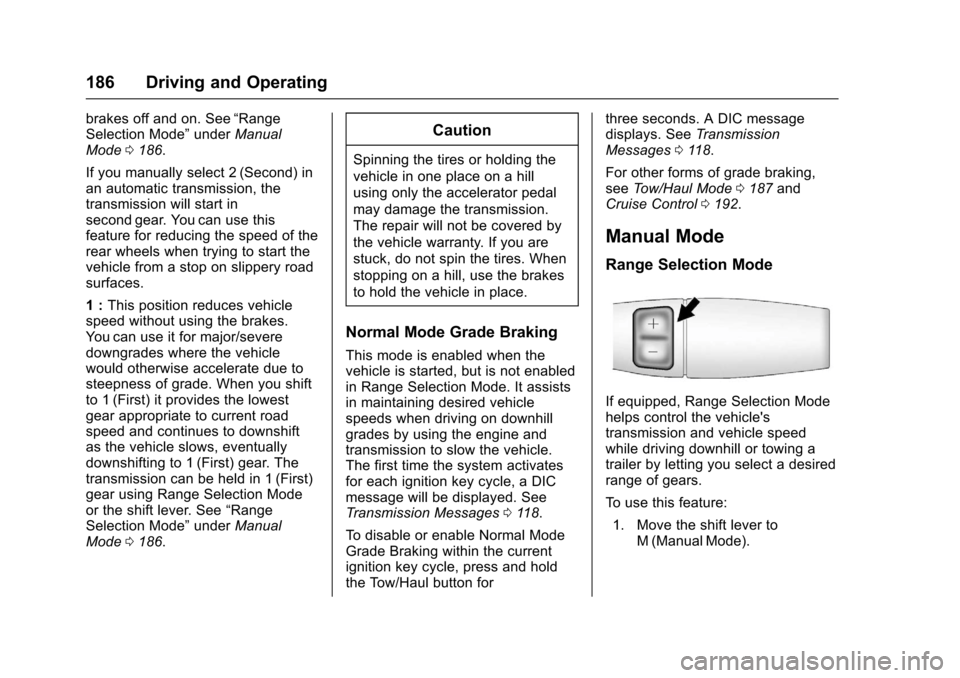
If equipped, Range Selection Modehelps control the vehicle'stransmission and vehicle speedwhile driving downhill or towing atrailer by letting you select a desiredrange of gears.
To u s e t h i s f e a t u r e :
1. Move the shift lever toM(ManualMode).