2017 AUDI TT ROADSTER ESP
[x] Cancel search: ESPPage 135 of 314
co
co
.... N
" N .... 0
" "' c:o
-It is only safe to use tablets, laptops, mo
bile devices and other similar devices when
the vehicle is stationary because, like all loose objects, they could be thrown around
the inside of the vehicle in a crash and cause
serious injuries. Store these types of devices
securely while driving.
- Do not use any wireless devices on the front
seats within range of the airbags while driv
ing. Also read the warnings in the chapter
¢page 196.
- Do not use any Wi-Fi devices within range of
the airbags while driving. Also read the
warnings in the chapter
¢page 196.
{[) Note
You are responsible for all precautions taken
for data protection , anti-virus protection and
protection against loss of data on mobile de
vices that are used to access the Internet
through the Wi-Fi hotspot .
@ Tips
-For more information on roaming fees, con
tact Audi connect customer service at 1
(877) SOS-AUDI (2834).
- The speed of the data connection may vary
depending on the vehicle location , the cov
erage area of your cell phone service provid
er and if the recommended provider is used
or not .
- A data connection cannot be established if
incorrect data is entered in the connection
settings.
- For more information on roaming charges,
contact your cell phone service provider .
- The Wi-Fi hotspot reception quality depends
on the signal strength and the availability of
the mobile network. For more information,
contact your current network provider.
- For additional information, visit
www.audiusa.com/connect.
Audi connect
About Audi connect
Audi connect services
Applies to : vehicles wit h Audi connect
(D Tips
- Audi connect services are only available with
an existing or separate cell phone contract
and only within the mobile network cover
age area. Depending on your cell phone
rates, there may be additional costs when
connecting to the Internet using data pack
ets, particularly with international service.
Based on the high data volume, using a flat
rate data plan is highly recommended.
- You can only use services supported by Audi
connect if you have the optional MMI Navi
gation plus equipment with MMI touch and
Audi connect.
- Use of the LTE* mobile network standard is
not available in every country . Contact your
authorized Audi dealer or authorized Audi
Service Facility or your cell phone service
provider for additional information .
- Using Audi connect services requires a mini
SIM card with data options and, when using
LTE*, it also requires LTE options.
- Usage of Audi connect services depends on
the availability of services through third par
ty providers.
- Also note the information in the chapter
¢page 114, Telephone.
-Audi connect is designed for use only with
the provided SIM card . Receiving data pack
ets from the Internet will quickly increase
the volume of data used. For more informa
tion, contact Audi connect customer service
at 1 (877) SOS-AUDI (2834).
- The Audi connect services are available in
the USA. Audi connect services are currently
not available in Canada or in Mexico.
- Availability, scope, providers, screen display
and costs of services may vary depending on
the country, model, model year, end device and rates . Additional information can be
found under
www.audiusa.com/audicon
nect .
133
Page 136 of 314
Audi connect
-An initial registration/activation on the
myAudi platform at
my.audiusa.com is re
quired to use individual services. You can
contact an authorized Audi dealer or Audi
connect customer service at 1 (877) SOS
AUDI (2834) to receive information on op
tions for expanding your usage and any
costs that may result.
- It is only possible to use Audi connect serv
ices with a valid Audi connect SIM card.
- To ensure all of the Audi connect features
work correctly, Audi recommends setting up
data service and a Wi-Fi package with your
network service provider. Your network
service provider can be authorized by law,
through a judicial order or other lawful in
structions, to disclose the position of your
vehicle. Additional information on your cell phone service provider's privacy policies can
be found in their Terms of Use.
- The Audi connect services are a Wi-Fi/Inter
net-based system.
If the system does not
function correctly even though all of the re
quirements are met, please try again later
or contact Audi connect customer service at 1 (877) SOS-AUDI (2834).
- For detailed information on Audi connect
and the Terms of Use, visit
www.audiusa.com/audiconnect.
Data protection
A ppl ies to: ve hicles with Audi co nnect
(D Tips
-You can find additional information in your
MMI in the options menu¢
page 98 for the
selected Audi connect service and also on
the Internet at
www.audiusa.com/audicon
nect.
- Your privacy is important to us.
- AUDI AG collects, processes, shares and
transmits your personal information in ac
cordance with legal regulations in order to
ensure proper function and availability of
the individual Audi connect services. You
can view the complete, current and valid
Audi connect data protection policy in your
134
MMI. The myAudi website is available for to
you to activate additional Audi connect serv
ices and to transfer data with your vehicle,
among other services. A one-time registra
tion is required to establish a connection to
your vehicle. For this purpose, AUDI AG col lects, processes, transmits and uses your re
quired personal information as required for
you to use the services provided by AUDI
AG. Your information is not distributed to
third parties. Using your cell phone with the
help of your myAudi platform, you can
transfer information for Audi connect serv
ices functions to your vehicle and allow spe
cific information to be transmitted from
your vehicle.
- By activating special information services
that are part of your Audi connect portfolio,
you can use these functions directly in your
vehicle by entering data to confirm your
identity (to use social networks, for exam
ple). To do this, the identification informa
tion you provided is forwarded with the re
quest to the respective service provider.
T hen you can access your personal content
using a secure connection. This content is
displayed in the vehicle for your use. Your
personal content is not stored within Audi
AG. The necessary connection information is
processed and used for providing services
and the proper function of the services in
accordance with applicable legal guidelines.
- By providing Audi connect services, Audi of America is authorized to collect, process,
transmit and transfer information about
you and your vehicle. Additional information can also be found in your MMI in the options
menu¢
page 98 for the selected Audi con
nect service.
- Information on our data protection meas
ures in conjunction with the mobile Audi
connect application can be found in the ap
plication's privacy policy. For additional in
formation about the
my.audiusa.com web
site or other applications, websites or on line
services connected to Audi, visit
www.audiusa.com/privacy.
Page 151 of 314
co
co
.... N
" N .... 0
" "' c:o
© Color-coded markings along the route indi-
cate the traffic flow@.
Traffic d isplay
Gr een:
traffic is flowing freely
Red : congest ion
Orang e: stop-and-go traffic
Shaded markings i nd icate the length of the area
with congest ion.
Co lor ed warning symbol s: there is a t raff ic inci
dent immed iate ly ahe ad on the ro ute.
Gra yed out wa rning symbo ls: traffic inc idents
that are not on your route .
Red warn ing s ymbo ls: all warning symbols will
be red when route guidance is not active .
T he display of colored markings , warning sym
bols, etc . can be set in the
Map content menu
c:::;, page 147
You can switch off the reception of on line traffic
information at any time
c:::;, page 148.
Sw itching the traff ic map display on
F or a n optimum traffic informa tion display:
I NAV /MAP I butto n > right control but ton> Map
setting s > Map di sp la y> Traff ic .
You can a lso display the o nlin e traffic inf orma
tion
in the o n line map view c:::;, page 147 or i n the
standa rd map view
c:::;, page 144, fig. 129.
(D Tips
- Online t raff ic information is not available in
Canada.
- Always read the chap ter
c:::;, page 133, About
Audi connect.
- Every vehicle with the Online traffic d ata
funct ion sw itched on has the most accu rate
r eports of traffic s ituations as well as t raff ic
forecasting. Yo ur vehicle transmits and
processes its anonymous, encrypted posi
tion information at regular intervals to the
traffic data provide r. If yo u do not want to
use this, you can switch off the
online traf
fic information
function at any time.
Na vigation
- The online traffic information network is
currently not available in all countries, and
the coverage is not nationwide . Addit ional
information can be found under
www .audiusa .com /audiconnect .
Traffic information (TMC)
Applies to : vehicles wi th navigat io n syste m
.,. Press the INAV /MAPI button repeatedly until
the map is displayed .
"' Select: left control button >
Traffic m essages .
TMC traffic messages are switched on at the fac
tory.
Mult iple traffic messages are summari zed in the
overview under the corresponding street names
or highway names .
-Displ aying all traffi c me ssage s for a street /
highwa y:
select and conf irm the [ill symbol. A
list of all the traff ic messages for the selected
street/highway is disp layed .
-Ope ning the detailed view of a t raff ic mes
sage :
if you select an entry from the lis t, the
traffic i nformat io n w ill be shown as a map pre
view @¢
page 148, fig. 133 . Select and con
fi rm a traff ic message to d isplay the details fo r
tha t message .
-Di splaying the select ed traffic message on the
map :
select and confi rm the r ight con trol b ut
ton>
Show on map .
- Displ aying the ne xt traffic me ssage on the
map :
press the control knob.
Traffic information display
Colored warning s ymbols :
traffic incidents o n
your route are shown in the upper sect ion of the
l ist and are sorted acco rding to d istance.
Warning symbols with~: avo ided traff ic inci
dents.
Grayed out wa rning symbol s: traffic incidents
that are not on your route. They are sorted ac
cording to road type (expressway, h ighway, other
road), country and name .
S haded markings indicate the length of the area
with congest ion. ..,.
149
Page 158 of 314
Media
Media
Introduction
There are various media drives and connections
available in the MMI. You can play , for example,
audio/video files from the Jukebox* or connect
your mobile device to the Audi music interface*
and operate it through the MMI.
Notes
General information
Media and format restrictions:
the MMI (includ
ing the SD card reader and the USB storage de
vice connection*) was tested with a variety of products and media on the market. However,
there may be cases where individual devices or media and audio/video* files may not be recog
nized, may play only with restrictions or may not
play at all.
Digital Rights Management: please note that
t he audio/video files are subject to copyright pro
tection .
The media drives do not play files that are pro
tected by ORM and that are identified with the
symbol
!'.TI.
Data security: never store important data on SD
cards, the Jukebox*, CDs/DVDs or mobile devices.
Audi AG is not responsible for damaged or lost
files and media .
Loading times: the more files/folders/playlists
that are on a storage medium, the longer it will
take to load the audio/video files* . Audi recom
mends using storage media tha t only contain au
dio/video files* . To decrease the time it takes to
load audio/video files*, create subfolders (for ex
ample , for the artist or album). The loading time
will also increase when importing files.
Additional information: when playing, audio
files are automatically displayed with any addi
tional information that is stored (such as the ar
tist, track and album cover).
If this information is
not available on the storage medium, the MMI
will check the Grace note metadata database.
156
However, in some cases, the additional informa
tion may not be displayed.
Restricted functionality: reset the Media set
tings
to the factory default settings if functional
ity is restricted
¢ page 176.
Reset the Jukebox* to the factory default set
tings if functionality is restricted
¢page 176.
For information about the properties of support
ed media and file formats, see
¢ page 169 .
((D} Note
You are responsible for all precautions taken
for data protection, anti-virus protection and
protection against loss of data on mobile de
vices that are used to access the Internet
through the Wi-Fi hotspot.
CD/DVD operation
CD/DVD and format restrictions:
the functionali
ty of individual storage media may be limited due
to the variety of blank CDs/DVDs available and
the various capacities . Aud io CDs or video DVDs
with copy protection, CDs/DVDs that do not con
form to the standard and multisession CDs may
have limited playback or may not play at all. Audi
recommends finalizing the recording process
when creating multisession CDs . Multisession is
not supported for DVDs .
Using CDs/DVDs, the CD drive or the DVD drive:
to ensure correct, high-quality playback and to
prevent damage to the drive or disc reading er
rors, always store CDs/DVDs in a protective
sleeve and do not expose them to direct sunlight.
Do
not use:
- Damaged, dirty or scratched CDs/DVDs
- Single CDs/DVDs (3 inch/8 cm diameter)
- CD/DVDs that are not round
- CDs/DVDs with labels
- Protective rings
- Cleaning CDs
Thermal protection switch : CD/DVD playback
may be temporarily unavailable if outside tem
peratures are extremely hot or cold. A thermal
Page 163 of 314
co
co
.... N
" N .... 0
" "' c:o
-The loading times for the audio data depend
on the media player used and the number of
files that it contains.
- A maximum of 2,000 entries per directory
are displayed in the MMI.
- Songs downloaded for offline use using mu
sic streaming services are stored on your mobile device (such as a smartphone) and
may be DRM protected. The Wi-Fi audio
player will not play DRM protected files.
- Contact your authorized Audi dealer or au
thorized Audi Service Facility for additional
information on the Wi-Fi audio player.
Online media and
Internet radio
Applies to: vehicles with Audi connect
You can playback and operate various online me
dia services and Internet radio using the MMI.
• Press the I MEDIAi button. Press the left control
button until the sources overview<>
page 164,
fig. 145
is displayed .
Applies to: using online media and Internet radio
Requirement:
- The
Audi MMI connect app must be installed
and open on your mobile device.
- You must be logged into your my Audi account
in the
Audi MMI connect app and you must
have selected your vehicle.
- The Wi-Fi function on the mobile device and on
the MMI must be switched on.
- If necessary, check in the connection manager
<=> page 176 if the mobile device you connected
is selected under the
MMI connect app (~).
-The MMI must be connected to the network.
- The symbol for the
Online media* source @
<=> page 164, fig . 145 is shown in the MMI.
Applies to: using online media
Additional requirement:
- A supported online media service must be avail
able in your country.
- You must have an account with a supported on
line media service.
- Depending on the online media service, you
must install and open an app on your mobile
device .
Media
Starting Online media
- Press the I MEDIA i button. Press the left control
button until the sources overview
c:> page 164
is displayed.
- Select and confirm an online media service.
Starting Internet radio
- Press the I MEDIA ! button. Press the left control
button until the sources overview
c:> page 164
is displayed.
- Select and confirm
Internet radio . The Internet
radio browser or the last station that was play
ing is shown.
- Selecting the station : if necessary, select and
confirm a category in the Internet radio
Brows
er
> a station.
Online media and Internet radio: additional op
tions
- Press the right control button.
The following options may be available, depend
ing on the information shown (such as the sta
tion/track that is currently playing):
-Sound settings: see<> page 179.
-Wi-Fi settings: see <> page 131, Wi-Fi hotspot.
-Connection manager : see<> page 176.
-Additional options may be available, depending
on the active online media service or Internet
radio.
A WARNING
- It is only safe to use tablets, laptops, mo
bile devices and other similar devices when
the vehicle is stationary because, like all loose objects, they could be thrown around
the inside of the vehicle in a crash and cause
serious injuries . Store these types of devices
securely while driving.
- Do not use any Wi-Fi devices within range of
the airbags while driving . Also read the
warnings in the chapter <>
page 196.
Q) Note
Please note that there generally are addition
al costs when using an online media service
account, especially when it is used interna
tionally.
-
161
Page 164 of 314
Media
@ Tips
-Depending on the Internet connection and
network traffic, a connection loss can occur
during p layback of on line media serv ices.
- Online media and Internet radio usage de·
pends on the service avai lability of the third
party provider.
- Audi AG simply makes the access to online
media serv ices possible th rough the MMI
and does not take any respons ibility for the
contents of the online med ia services.
- Always read the chapter <=>page 133, About
Audi connect.
- Depending on the mobile device used, the re
may be interrupt ions during media playback
and when using the
Audi MMI connect app .
To avoid interruptions when usi ng a mob ile
d evice, do not loc k the sc reen on yo ur mo
bile devi ce and keep the
Audi MMI connect
a pp in the foreground.
- Contact you r authorized Audi dea ler or au
thorized Audi Se rvice F acili ty for a ddi tional
i n format io n a bout o n line medi a.
Multimedia connections
USB adapter for Audi music interface or
USB charging port
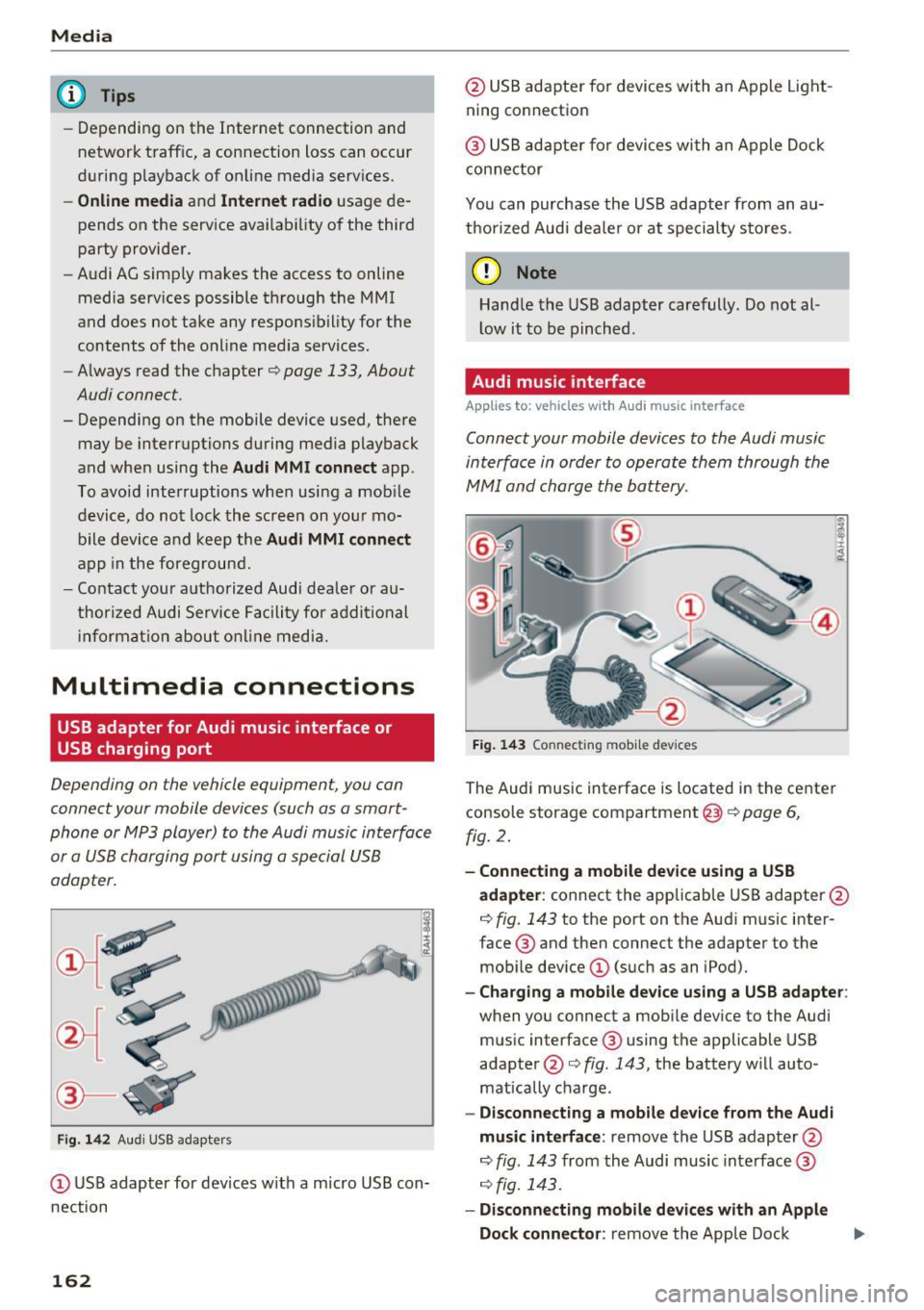
Depending on the vehicle equipment , you can
connect your mobile devices (such as a smart
phone or MP3 player) to the Audi music interface
or a USB charging port using a special USB
adapter.
Fig . 14 2 Aud i USS ada pte rs
CD US B adapter for dev ices w it h a m icro USB con
nection
162
@ USB adapte r fo r devi ces wi th an Apple Light
ning connection
@ USB ad ap ter fo r devices wi th an Apple Dock
con nector
You can purchase the USB adapter from an au
tho rized Audi dea ler or at specialty s to res.
(D Note
Hand le the USB adapter carefully. Do not al
l ow it to be pinched .
Audi music interface
Applies to: vehicles with Aud i music interface
Connect your mobile devices to the Audi music
interface in order to operate them through the
MMI and charge the battery.
Fi g. 14 3 Connect ing mob ile devic es
The Audi music interface is located in the center
console storage compartment @
~ page 6,
fig. 2.
- Connecting a mobile device using a USB
adapter :
connect the applicab le USB adapter @
c:!) fig. 143 to the port on the Audi music inter
face ® and then connect the adapter to the
mob ile dev ice
CD (suc h as an iPod).
- Charging a mobile device using a USB adapter :
when you connect a mobile device to the Audi
mus ic interface ® using the applicable USB
adapter @<=> fig . 143 , the battery w ill auto
mat ically cha rge.
- Disconnecting a mobile d evice from the Audi
music interface :
remove the USB adapter @
<=> fig . 143 from the Audi music interface ®
r=;, fig. 143.
-Disconn ecting mobile devices with an Apple
Dock connecto r:
remove the Apple Dock .,..
Page 165 of 314
co
co
.... N
" N .... 0
" "' c:o
connector from the Apple device with the re
lease tabs pressed in@
¢page 162, fig. 142.
The media are started and operated through the
mobile device or the MMI, depending on the de
vice being used
q page 164.
Connecting two mobile devices: if two mobile
devices (for example iPod and smartphone) are
connected at the same time, then both devices
can be used as playback sources.
You can connect mobile devices using the analog
AUX port.
-Connecting a mobile device to the AUX input:
connect the cable®¢ fig. 143 to the AUX in
put @ on the Audi music interface and then to
the mobile device © (such as an MP3 player or
smartphone) .
-Disconnecting a mobile device from the AUX
input:
remove the cable®¢ fig. 143 from the
Audi music interface.
-Operation: select and confirm the External au
dio player
source @¢ page 164, fig. 144 . The
media are started and operated through the
mobile device@~
fig. 143.
.8, WARNING
Driving requires your complete and undivided
attention. As the driver, you have complete
responsibility for safety in traffic. Never oper
ate mobile devices while driving, because this
increases the risk of an accident.
@ Note
- Remove the connector from the Audi music
interface carefully so it is not damaged.
- Use a USB extension cable to connect devi
ces that have an integrated USB connector
(such as a USB stick) to prevent damage to
your USB device and the Audi music inter
face.
- Extremely high or low temperatures that
can occur inside vehicles can damage mobile
devices and/or impair their performance.
Never leave mobile devices in the vehicle in
extremely high or low temperatures .
Media
{!) Tips
-Do not use an additional adapter or USB ex
tension cable to connect mobile devices to
the Audi music interface that already have a
cable or that must be connected with a USB
adapter( ¢
page 162). They may impair the
functionality .
- You can purchase the AUX connector cable
from an authorized Audi dealer or at spe
cialty stores .
- Functionality is not guaranteed for mobile
devices that do not conform to the USB 2.0
standard.
- USB hubs are not supported .
- Some versions of the iPod such as the iPod
shuffle cannot be connected to the USB
adapter for devices with Apple Dock connec
tor . Connect these devices using a AUX con
nector cable.
- Video playback through the Audi music in
terface is only supported if the connected
device is recognized as a USB storage device
(for example a USB stick). Apple devices and
MTP devices (such as smartphones) are not
recognized as USB storage devices .
- iPod/iPhone malfunctions also affect the
operation of the MMI. Reset your iPod/
iPhone if this happens.
- For important information on operating
your iPod/iPhone, refer to the user guide for
the device. Audi recommends updating the
iPod/iPhone software to the latest version.
- For more information about the Audi music
interface and supported devices, check the
Audi database for mobile devices at
www.audiusa.com/bluetooth or contact an
authorized Audi dealer or authorized Audi
Service Facility.
163
Page 177 of 314
"' "'
System settings
Setting the date and
time
You can set the clock time manually or using the
C PS .
.,. Se lect : I MENU I button> Settings > left co ntro l
button >
MMI settings > Date & time .
.,. Or :
select : IMENU I button> Vehicle > left con-
t ro l button >
Vehicle settings > Date & time .
Automatic setting
When th is function is sw itched on~. the time
a n d date are a utomat ically set.
Time
R equ irement: the Automatic setting must be
switched off .
Pr ess the cont ro l kn ob . You ca n se t the
Time
manu ally by turning and press ing the con trol
k nob.
Date
R equi remen t: the Automatic setting must be
s witche d off .
Pr ess the cont rol knob . You can set the
Date
manually by turn ing and press ing the con trol
knob.
Time zone
When se lecting the approp riate t ime zone, a
sampling of countr ies in this zone will be listed .
Automatic time zone*
When t his function is sw itched on~' the t ime
will automatically a djust to the correspon ding
time zone .
Time format
If yo u selec t 24h, the clock will disp lay, for ex
ample,
13:00. If yo u se lect AM/PM , the clock
wi ll disp lay, for e xamp le,
1:00 PM .
Date format
....
~ I f yo u sele ct DD.MM.YYYY , the da te di spl ay w ill
N 8 s how, for ex amp le, 31 .08 .2017 . If you se le ct
~ MM/DD/YYYY , the d ate disp lay wi ll s how, fo r ex -
System settings
amp le, 08/31/2017. If you select YYYY-MM
DD ,
the date display wi ll sh ow, fo r exam ple,
2017-08-31.
MMI settings
.,. Select: iME NUI button> Settings > left control
button >
MMI settings .
Language
Yo u ca n cha nge the displ ay la ngu age as well as
t h e la ngu age fo r th e v oic e gui dance* and voi ce
recognition system *.
T he number of language s avai lab le de pend s on
t h e m arket .
Measurement units
The following units ca n be selected:
- Speed (mph o r km/h)
- Distance (miles o r kilomete rs)
- Temperature (°For 0
( )
-Fuel consumption (l/ l0 0k m, mpg ( US), m pg
( UK ) or km/l )
-Volume (li te rs, ga llon s)
Tool tips
When this f unct ion is switched on~' your MMI
s h ows you t ips fo r input. The freq uency of how
often it display s dec reases w ith time . You can
swi tch off the operati ng tips a t any ti me.
Speech dialog system
Applies to : vehicles with voice recogn it ion system
Command display : when this function is sw itch
ed on~ , the MMI w ill show yo u the possible
commands for voice input in the res pect ive
me nu. You ca n sw itch the f unct io n off a t any
t im e.
Short dialog : when th is function is sw itched on
~ . a sho rter form of the prompts is used . You
can sw itch the func tion off at any t ime .
Speech dialog system volume : you can adjust
the volume of t he p rompts by turning the contro l
k nob. .,,.
175