2017 AUDI TT ROADSTER park assist
[x] Cancel search: park assistPage 65 of 314

co
co
.... N
" N .... 0
" "' c:o
-Always take the vehicle key with you when
leaving your vehicle, even for a short period
of time. This applies particularly when chil
dren remain in the vehicle. Otherwise chil
dren could start the engine, release the
parking brake or operate electrical equip
ment such as power windows, which in
creases the risk of an accident.
- No one should remain in the vehicle when it
is locked - especially children. Locked doors
make it more difficult for emergency work
ers to get into the vehicle, which puts lives
at risk.
(D Tips
When stopping at a traffic signal or stopping
in city traffic, you can set the parking brake
manually. The vehicle does not have to be
held with the brake pedal. The parking brake
eliminates the tendency to creep when a se
lector lever position is engaged. As soon as
you press the accelerator pedal, the parking brake releases automatically and your vehicle
starts to move ~page 63.
(D Tips
- Occasional noises when the parking brake is
set and released are normal and are not a
cause for concern.
- The parking brake goes through a self-test
cycle at regular intervals when the vehicle is
stopped. Any noises associated with this are
normal.
- If there is a power failure, the parking brake
will not set if it is released, and it will not
release if it is set
q Li::,.. See an authorized
Audi dealer or authorized Audi Service Fa
cility for assistance.
Starting from a stop
Various convenience and safety functions may be
available when the vehicle begins driving, de
pending on vehicle equipment.
Starting on hills with the parking brake set
Requirement: the driver's door must be closed.
Driving
.. To start driving comfortably when on a hill, set
the parking brake and begin driving as usual.
The braking force of the parking brake does not
release automatically until the wheels build up
enough driving force.
Starting on hills with hill hold assist
Hill hold assist makes it easier to start on hills.
Requirement: the driver's door must be closed
and the engine must be running.
.. To activate hill hold assist, press and hold the
brake pedal for several seconds. The vehicle
must be in an uphill direction of travel.
After releasing the brake pedal, the braking pow er is maintained for a brief moment
q & to pre
vent the vehicle from rolling back when starting .
During this time, you can easily begin to move
your vehicle.
& WARNING ~
App lies to: veh icles with hill hold assist
- If you do not begin driving immediately or
the engine stalls after releasing the brake
pedal, your vehicle may begin to roll back
ward. Press the brake pedal or set the park
ing brake immediately.
- The intelligent technology of hill hold assist
cannot overcome the limitations imposed by
natural physical laws. The increased comfort
offered by hill hold assist should not cause
you to take safety risks.
- Hill hold assist cannot hold the vehicle in
place on all hills (for example, if the ground
is slippery or icy).
- To reduce the risk of an accident, always
make sure the vehicle is situated safely
while stationary.
Automatic transmission
Introduction
Your vehicle is equipped with an electronically
controlled DSG transmission called S tronic. Two
independent clutches transfer the power be-
tween the engine and transmission. It allows the .,..
63
Page 68 of 314
Driving
Interlock button
The interloc k but to n in the selector lever handle
prevents you from moving the selector lever i n
advertently while in some se lector lever posi
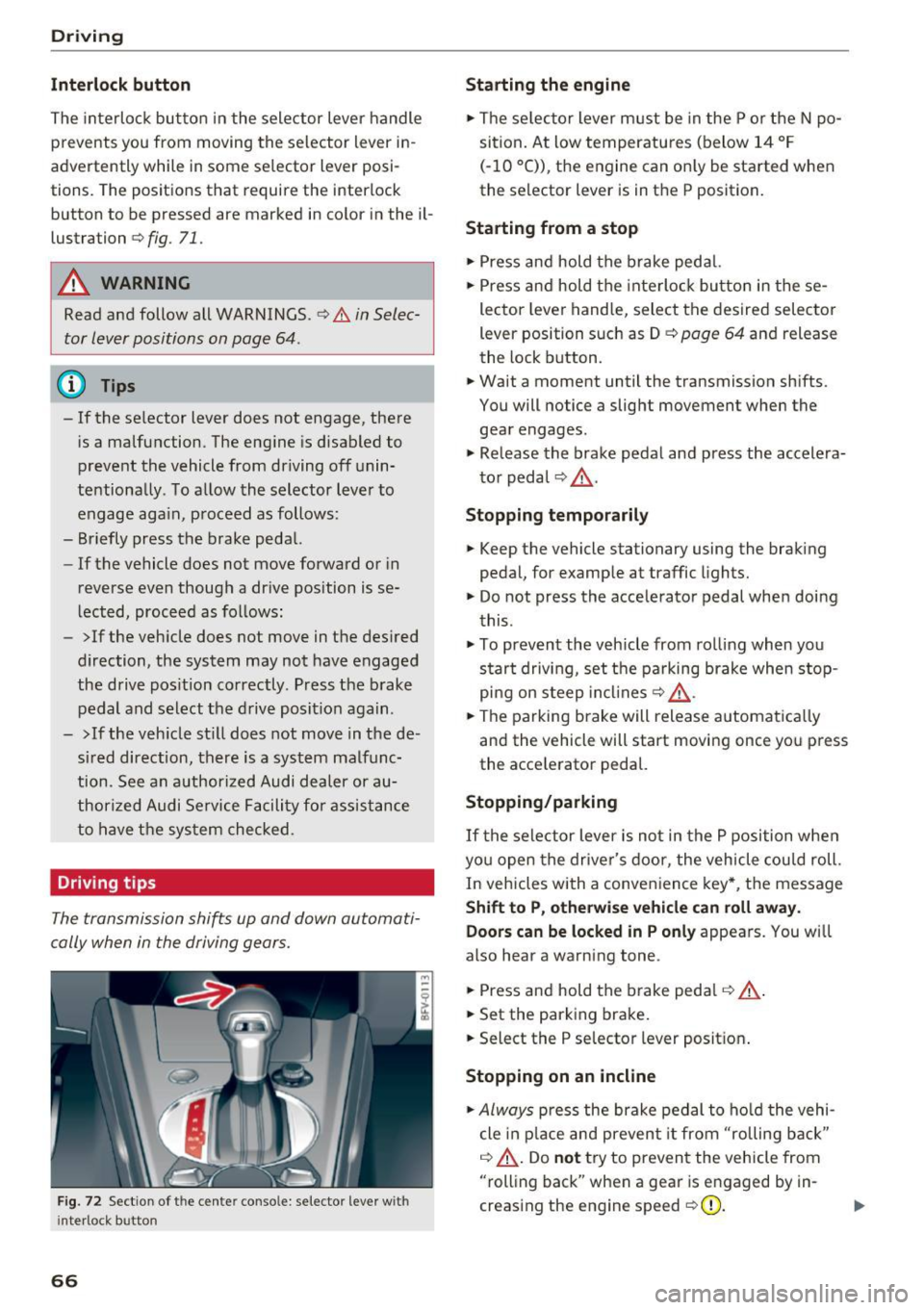
tions. The posit ions that require the interlock
button to be pressed a re marked in co lor in the il
lustration
c> fig. 71.
A WARNING
Read and follow all WARNINGS.¢.&. in Selec
tor lever positions on page 64 .
(D Tips
- If the selector lever does not engage, there
is a malfunction . The eng ine is disabled to
prevent the vehicle from driving off unin
te ntionally . To a llow the selector lever to
engage aga in , proceed as follows :
- Briefly press the b rake pedal.
- If the vehicle does not move forward or in
reverse even though a dr ive pos ition is se
l ected, procee d as follows :
- >If the veh icle does not move in the des ired
direction, the system may not have engaged
the drive pos ition correctly . P ress the b rake
pedal and sel ect t he d rive posit ion again .
- >If the veh icle st ill does not move in the de
s ir ed direction, there is a system malfunc
tion. See a n authori zed Audi dea ler or au
thori zed Audi Service Facili ty for assistance
to have t he sys te m c hecked.
Driving tips
The transmission shifts up and down automati
cally when in the driving gear s.
F ig . 7 2 Sect io n of the cente r conso le: se lecto r lever w it h
i nte rlock b utton
66
Starting the engine
.. The se lec to r lever m ust be in the P o r the N po
si tion. At low temperatu res (below 14 ° F
(- 10 °C)), the e ngine can o nly be sta rted when
the selector lever is in t he P position .
Starting from a stop
.. Press and hold the b rake peda l.
.. Press an d hold the inte rlo ck button in these
lector leve r handle, select the desired selector
lever position such as D
c> page 64 and release
th e lock button.
.. Wait a moment until the transmission sh ifts.
You will notice a slight movement when the gea r engages .
.. Re lease the brake pedal and press the accelera
t o r pedal
c> ,& .
Stopping temporarily
.. Keep the vehicle stationary using the braking
pedal, for examp le at traffic lights.
.. Do not press the acce lerator pedal whe n doi ng
t his .
.. To prevent the vehicle from ro lling when you
s tar t drivi ng, set t he pa rking brake when stop
pi ng on s teep in cli ne s
c:> ,& .
.. The pa rking brake will release a utomat ic all y
and the vehicle will start moving once yo u press
the acce le rator pedal.
Stopping /parking
If the sele ctor lever is not in the P position w he n
yo u open the drive r's door, the vehicle cou ld roll.
In vehicles with a conve nience key*, the message
Shift to P, otherwi se vehicle can roll away.
Doors can be locked in P only
appea rs. You wi ll
also hear a warning tone .
.. Press and hold the brake peda l
c:> .&, .
.. Set the parking brake .
.. Select the P selector lever posit io n.
Stopping on an incline
.. Always press the brake pedal to ho ld the vehi
cle in p lace and preven t it from "rolling back"
c:> .&, . Do not try to preven t the vehicle from
"rolling back" when a gea r is e ngaged by in
creas ing the eng ine speed
c> (D .
Page 70 of 314

Driving - The transmission can overheat and be dam
aged under certain driving and traffic condi
tions such as frequent starts, creeping for a
long time, or stop -and-go traffic. When the
@] or. indicator light turns on, stop the
vehicle at the next opportunity and let the
transmission cool
r=;, page 70 .
-Allowing the vehicle to roll when the engine
is stopped will damage the S tronic trans
mission because it is not lubricated
¢ page 286, Towing with a tow truck.
@ Tips
For safety reasons, the parking brake is re
leased automatically only when the driver's
safety belt is engaged in the buckle.
Hill descent control
The hill descent control system assists the driver
when driving down hills .
Hill descent control is ac tivated when the selec
tor lever is in the Dor S position and you press
the brake pedal. The transmission automatically
selects a gear that is suitable for the hill. Hill de
scent control tries to maintain the speed ach
ieved at the time of braking, within physical and
technical limitations.
If may still be necessary to
adjust the speed with the brakes. Because hill de
scent control cannot shift down farther than 3rd
gear, it may be necessary to shift into tiptronic
mode in very steep areas. In this case, shift man
ually into 1st or 2nd gear in tiptronic mode to
use the engine's braking force to relieve the
brakes .
Hill descent control switches off once the hill lev
els out or you press the accelerator pedal.
On vehicles with a cruise control system*
¢ page 72, hill descent control is also activated
when the speed is set.
A WARNING
Hill descent control cannot overcome physical
limitations, so it may not be able to maintain
a constant speed under all conditions. Always
be ready to apply the brakes.
68
Shifting manually (tiptronic mode)
The tiptronic mode allows the driver to shi~ the
gears manually .
Fig. 73 C enter conso le: sh ift ing ma nuall y wi th the selecto r
lever
Fig. 74 Steering whee l: ma nual shifting wit h the shift pad
dles•
Shifting with the selector lever
You can shift into tiptronic mode while stationary
and whi le driving.
.,. To shift into tiptronic mode, push the selector
lever from the D/S setting to the right in the
tiptronic shift gate. Once the transmission has
sw itched modes, the selector lever position
M
is shown in the Infotainment system display
r=;, page 64, fig. 70 . For example M4 means the
fourth gear is engaged .
.,. To shift up a gear, tap the selector lever for
ward
G) ¢ fig. 73.
.,. To shift down a gear, tap the selector lever to
back
0 .
Shifting with the shift paddles*
You can operate the shift paddles in the D/S or
M
(tiptronic shift gate) selector lever positions.
.,. To shift up one gear, tap the shift paddle
0
r=;, fig. 7 4.
Page 72 of 314
Driving
-When acce lerating using the launch control
program, all vehicle parts are subject to
heavy loads . Th is can lead to increased
wear.
Emergency mode
In the event of a system malfunction, there is on
emergency program.
If all of the se lecto r lever posit ions are h ighlight
ed wit h a light background in the Infotainment
d isp lay, there is a system malfunction and the S
tron ic transmiss ion is running in the emergency
program . The vehicle can still be driven in emer
gency mode, but only with reduced speed and not in a ll gears . In some cases, the vehicle
can
not drive in rever se.
(D Note
If the transmission runs in emergency mode,
drive to an aut ho rized Aud i deale r or a uthor
ized Aud i Service Fac ility immediately to have
the malfunction corrected.
Transmission malfunction
• Tran smis sion: malfun ction! Please stop ve
hicle and shift to P
There is a malfunc tion in the transmiss ion. Pa rk
the vehicle se curely and do not continue driving.
See an autho rized Au di dea ler o r autho rized Aud i
Serv ice Facility for assistance .
• Transmission: too hot . Please stop vehicle
The transm ission is too hot and can become dam
aged . Stop and let the transm ission cool with the
engine run ning (at id le) in t he P selector leve r po
sition. Then the indicato r ligh t an d the message
tur n off, drive to an a uthorized Aud i dea le r or au
t hor ized Audi Se rvice Facility immed iate ly to have
the ma lfunction co rrected . If the ind icator light
and the driver message do not turn off, do not
continue dr iv ing. See an authorized A udi d ealer
or author ized Audi Se rvice Facility for assistance .
[O] Transmission: malfunction! You can contin
ue driv ing. See owner' s manual
70
Drive to an au thori zed A udi dealer or authori zed
Audi Se rvice Facility immediate ly to have the
malfunction cor rected.
[O] Tran smission: malfunction! You may contin
ue dr iving. No reverse gear
Drive to an authorized A udi dealer or au thorized
Audi Se rvice Fa cility immed iate ly to have the
malfunc tion cor rec ted .
ml Tran smiss ion: malfunction! You may contin
ue driving in D until engine off
Drive the vehicle away from mov ing traff ic and
park . See an author ized Audi dealer or author ized
Audi Se rvice Facility for assis tance.
ml Transmission: too hot . Please adapt driving
style
Continu e driving moderate ly. When the indicator
li ght turns off, you can cont inue driving norma l
l y.
ml Tran smission: Plea se press brake pedal and
select gear again
I f the transm iss ion m alfu nct io ns bec ause the
temperat ure is too high, a message appe ars
when the t ransmission is cooled .
Page 84 of 314
Parking systems
Parking systems
General information
A ppl ies to: ve hicles w ith rear pa rk in g sys te m /p ark in g system
p lus
Depending on your vehicle's equipment , various
parking aids will help you when parking and ma
neuvering.
The
rear park ing system is an audible parking aid
that warns you of obstacles
behind the vehicle
c:> poge 83.
The parking system plus assists you when park
ing by audibly and visually indicating objects de
tected
in front of and behind the veh icle
c:> poge83.
The rearview camera shows the area behind the
vehicle in the Infotainment system display . The
lines in the rearview camera image help you to
park or maneuver
c:> page 84. The parking sys
tem plus functions are also available
c:> page83.
& WARNING
-Always look for traffic and check the area
around your vehicle by looking at it directly
as well. The parking system cannot replace
the driver's attention. The driver is always
responsible when entering or leaving a park
ing space and during similar maneuvers .
- Please note that some surfaces , such as
clothing, are not detected by the system .
- Sensors and cameras have blind spots in
which people and objects cannot be detect
ed . Be especially cautious of small children
and animals .
- The sensors can be displaced by impacts or
damage to the radiator gr ille, bumper,
wheel housing and the underbody . The park
ing system may be impaired as a result.
Have an authorized Audi dealer or author
ized Audi Service Facility check their func
tion .
- Make sure the sensors are not obstructed by
stickers, deposits or other materials. If they
are, the sensor function could be impaired.
For additional information on cleaning, see
c:> page266.
82
(D Note
-Some objects are not detected or displayed
by the system under certain circumstances:
- Objects such as barrier chains, trailer draw
bars, vertical poles or fences
- Objects above the sensors such as wall ex
tensions
- Objects with certain surfaces or structures
such as chain link fences or powder snow
- If you continue driving closer to a low ob
ject, it may disappear from the sensor range. Note that you will no longer be
warned about th is obstacle.
- Keep enough distance from the curb to re
duce the risk of damage to the rims .
@ Tips
-The system may provide a warning even
though there are no obstacles in the cover
age area in some situations, such as :
- certain road surfaces or when there is tall
grass.
- external ultrasonic sources such as from
cleaning vehicles .
- in heavy rain, snow, or thick vehicle ex
haust.
- We recommend that you practice parking in
a traffic -free location or parking lot to be
come familiar with the system . When doing
this, there should be good light and weath
er conditions.
- You can change the volume of the signals.
- What appears in the display is slightly de-
layed.
- The sensors must be kept clean and free of
snow and ice for park aid to operate .
Page 85 of 314
CD
CD
.... N
" N .... 0
" V, co
Rear parking system
Description
Applies to: vehicles with rear parking system
The rear parking system is an audible parking
aid .
Descrip tion
There is a sensor in the rear bumper cover. If
these detect an obstacle, audible signals warn
you .
Make sure the sensors are not covered by stick
ers, deposits or any other obstructions as it may
impair the sensor function. For information on
cleaning, see
¢page 266.
The range at which the sensors begin to measure
is approximately:
side 3 ft (0 .90 m)
rear
center 5.2
ft (1.60 m)
The closer you get to the obstacle, the shorter
the interval between the audible signals . A con
tinuous tone sounds when the obstacle is less
than approximately 1 foot (0.30 meters) away. Do not continue backing up
c:::;, &. in General infor
mation on page 82,
c:::;,(D in General information
on page 82!
If the distance to an obstacle remains constant,
the volume of the distance warning gradually drops after about four seconds (this does not ap
ply in the continuous tone range).
Act ivat in g
The rear parking assist activates automatically
when the reverse gear is engaged. A brief confir
mation tone will sound.
Parking systems
Park ing system plus
Description
Applies to: veh icles w ith park ing system plus
Parking system plus provides audio and visual
signals when parking.
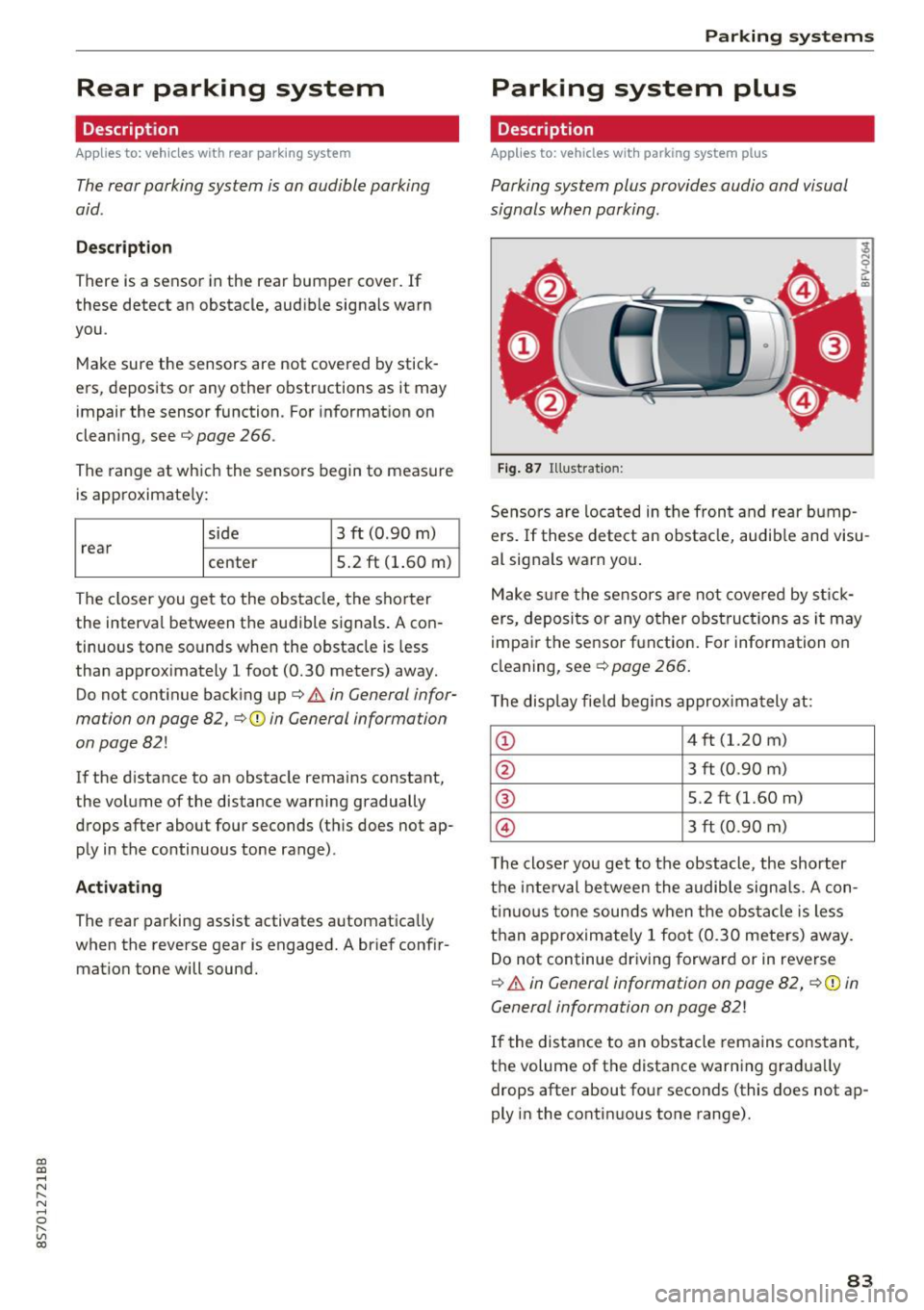
Fig. 87 Illustration :
Sensors are located in the front and rear bump
ers. If these detect an obstacle, audible and visu
al signals warn you.
Make sure the sensors are not covered by st ick
ers, deposits or any other obstructions as it may
impair the sensor function. For information on
cleaning, see
c:::;, page 266.
The display field beg ins approximately at:
CD 4 ft (1.20 m)
0 3 ft (0.90 m)
® 5.2 ft (1.60 m)
© 3 ft (0.90 m)
T he closer you get to the obstacle, the shorter
the interval between the audible signa ls . A con
t inuous tone sounds when the obstacle is less
than approximately 1 foot (0.30 meters) away.
Do not continue driving forward or in reverse
c:::;, &. in General information on page 82, c:::;,(D in
General information on page 82!
If the distance to an obstacle remains constant,
the volume of the distance warning gradually
drops after about four seconds (this does not ap
ply in the continuous tone range).
83
Page 88 of 314
Parking systems
Switching off
.. Drive faster than 6 mph (10 km/h), or
.. Press the
P"1A button, or
.. Switch the ignition
off.
(D) Tips
- The visual display in the left part of the dis
play should help you detect the critical vehi
cle areas .
- You can change the volume of the sig nals
and the display
¢page 86.
Perpendicular parking
Appl ies to: ve hicles with rea rview ca mera
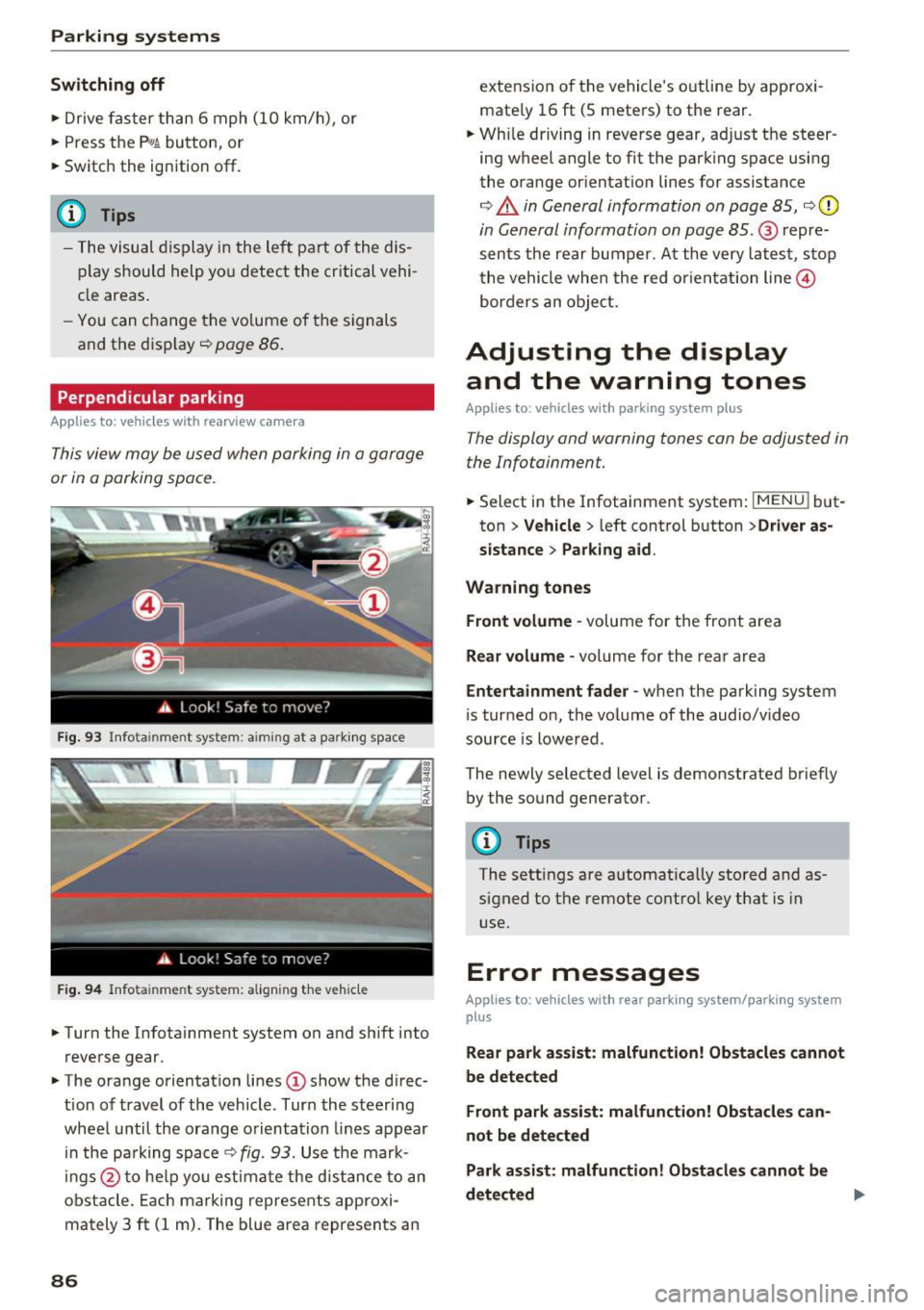
This view may be used when parking in a garage
or in a parking space.
Fig. 93 Info ta inment syste m: aim ing at a pa rking space
Fig. 94 Infota inme nt sys tem: aligning the vehicle
.. Turn the Infotainment system on and shift into
reverse gear.
.. The orange orientation lines
(I) show the direc
tion of travel of the vehicle . Turn the steering
wheel until the orange orientation lines appear
in the pa rking space
c:!;> fig. 93. Use the mark
ings @to help you estimate the d istance to an
obstacle. Each marking represents approxi
mately 3
ft (1 m). The blue area represents an
86
extension of the vehicle 's outline by approxi
mate ly 16
ft (5 meters) to the rear .
.. Wh ile driving in reverse gear, adjust the steer
ing wheel angle to fit the parking space using
the orange orientation lines for assistance
¢ &. in General information on page 85, ¢(D
in General information on page 85. @ repre
sents the rear bumper. At the very latest, stop
the vehicle when the red or ientation line@
borders an object.
Adjusting the display
and the warning tones
Applies to: vehicles with parkin g sys tem plus
The display and warning tones can be adjusted in
the Infotainment.
.. Select in the Infotainment system : IMENUj but
ton
> Vehicle > left control button >Driver as
sistance> Parking aid .
Warning tones Front volume -
volume for the front area
Rear volume -volume for the rear area
Entertainment fader -when the parking system
is turned on, the volume of the audio/video
source is lowered .
The newly selected level is demonstrated briefly by the sound generator.
{!) Tips
The settings are automat ically stored and as
signed to the remote control key that is in
use.
Error messages
App lies to : vehicles wit h rear parking system/parking system
plus
Rear park assist: malfunction! Obstacles cannot
be detected
Front park assist: malfunction! Obstacles can
not be detected
Park assist: malfunction! Obstacles cannot be
detected ..,._
Page 110 of 314

Voice recognition system
Voice recognition system Operating
Applies to: vehicles with vo ice recognition system
You con operate many Infotainment functions
conveniently by speaking.
Req uirement: the ignition and the MMI must be
sw itched on, there m ust be no p hone call in p rog
ress and the park ing system must not be active .
... Switching on : briefly press the~ but ton @
¢page 21, fig. 10 on the mu ltifunction stee r
ing whee l an d say the desired command after
the
Beep .
... Switching off :
press and hold the l2!J button.
Or: say the command C ancel.
.., Pause :
say the command Pause . To resume,
press the
l2!I button .
... Corre cting : press the ~ button one t ime
@ ¢
page 20, fig. 8. Or: say the command Cor
r ec tion .
Input assistance
The system gu ides you through the input with
visual and audio feedback .
-Visual input assistance : after switching on
vo ice recognit ion, a display with a se lection of
poss ible commands appea rs. The command
display can be sw itched on/off under
I M ENU !>
Setting s> left control bu tton > MMI setting s>
Speech dialog sy stem .
-Audio input as sistance :
to have the poss ible
comma nds read, press the
10, I button on the
mul tifunction steering wheel briefly and say
Help .
For the syst em to understand you:
Speak clearly and dist inctly at a normal volume .
Speak louder when d riving faster .
Emphasize the words in the commands evenly
and do not leave long pauses .
Do not speak a command when the voice recogni
tion system is making an announcement .
Close the doors, the windows and the sunroof* to reduce bac kground noise. Make sure t hat passen-
108
gers are not speaking when you are giv ing a voice
command .
Do no t direc t the air ve nts toward the handsfree
micropho ne, which is nea r the fron t interior
li ghts on the roof headliner/on thedriver's safety
belt*. For additional information on the safety
belt m icrophone, see ¢
page 125.
Only use the system from the dr ive r's seat be
ca use the hands free microphone is directed to
ward that seat .
Additional settings
See ¢ page 180, Voice recognition system.
.&_ WARNING
-Dire ct yo ur full attention to dr iv ing . As the
driver, you have complete responsibility fo r
safety in traffic. Only use the functions in
such a way that yo u always maintain com
plete contro l over your vehicle in a ll traffic
situations.
- Do not use the voice recognition system in
emergencies beca use your voice may change
in stressful s ituations. It may take longer to
dia l the number or the system may not be
ab le to dial it at all. Dial the emergency
number manually .
(D Tips
-The d ialog pauses when there is an incom
ing phone call and will continue if you ig
nore the call. The dia log ends if you answer
the ca ll.
- There are no navigation prompts* when a di alog is act ive .
- You can select an item in the list using ei
ther the vo ice recognit ion system or the
control knob .
Command overview
information
Appl ies to: vehicles with voice recognition system
The following overv iews describe the comma nds
that can be used to operate the MMI using the
voice recognition system. ..,.