2017 AUDI A7 door lock
[x] Cancel search: door lockPage 35 of 284
co
co
.... N
" N .... 0
00
<.,;) 'SI'
.. Remove the integrated mechanical key
¢
page 29 or use the separate mechan ical key .
.. Pull the cap out of the opening
¢ fig. 23 .
.. Insert the key in the inside slot and turn it all
the way to the right (right door) or left (left
door).
A WARNING
Read and heed all WARNINGS¢ A in Descrip
tion on page
27.
Anti-theft alarm system
If the anti-theft alarm system detects a vehicle
b reak-in, audio and visual warning signals are
triggered. The anti-theft alarm system is activat
ed when the vehicle is locked as usual. It
switches
off when the vehicle is unlocked.
If the alarm is triggered, it w ill shut off automat
ically after a ce rtain amount of time. Switch the
ignition on or press the~ button on the remote
control key to turn
off the alarm.
Luggage compartment
Lid
Automatic luggage compartment lid
Applies to: vehicles with automat ic luggage compartment lid
The luggage compartment lid can be opened and
closed electrically.
Fig. 24 Drive r's door : opening the luggage compartment
lid
Open ing and closing
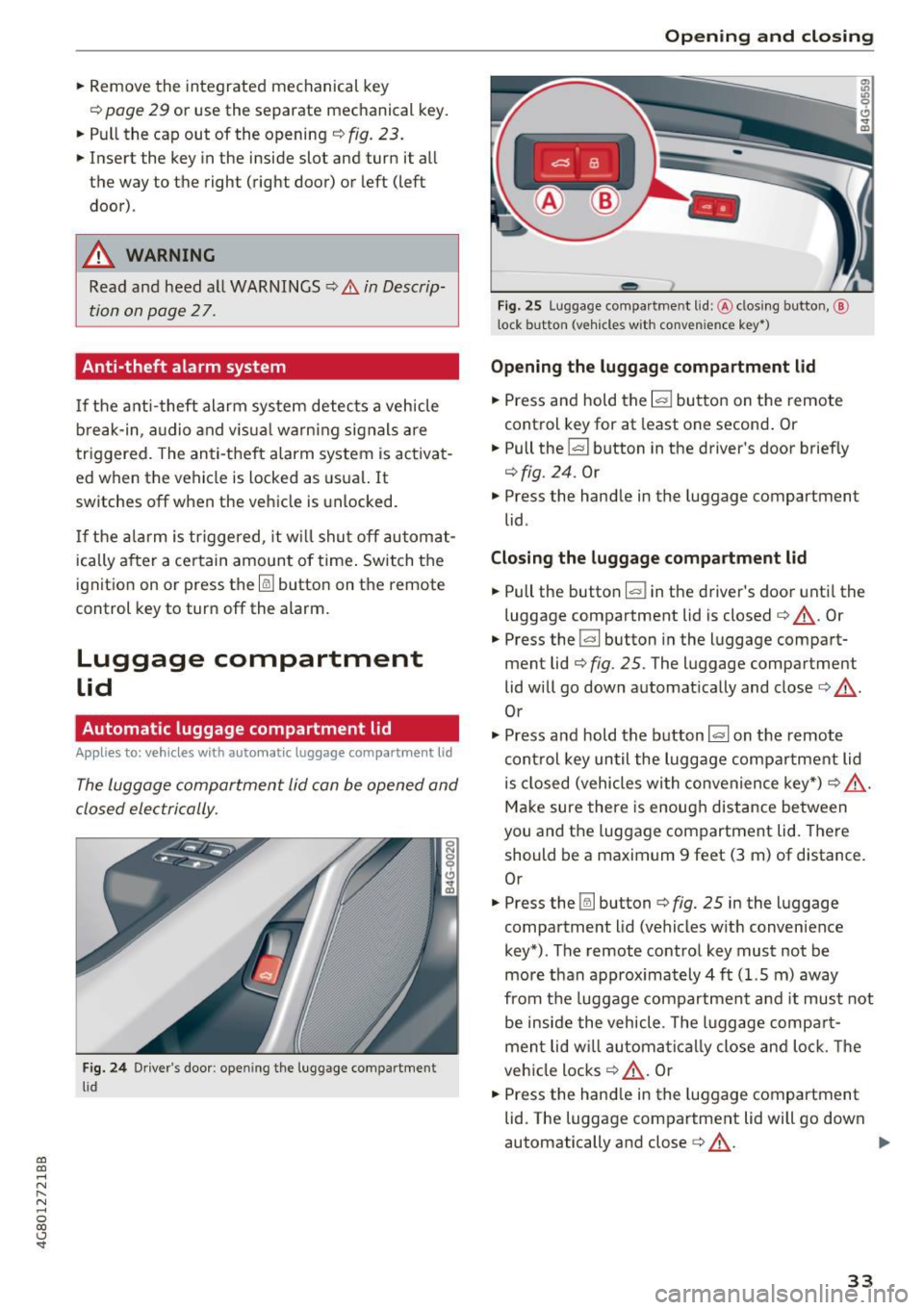
Fig. 25 Luggage compa rt me nt lid: @clos ing butto n,@
l ock button (vehicles w ith conve nie nce key• )
Opening the luggage compartment lid
.. Press and hold the lal button on the remote
control key for at least one second. Or
.. Pull the~ button in the driver's door briefly
¢fig. 24 . Or
" Press the handle in the luggage compartment
lid .
Closing the luggage compartment lid
.. Pull the button lal in the driver's door until the
luggage compartment lid is closed¢,&. . Or
.. Press the
la l button in the luggage compart
ment lid¢
fig. 25 . The luggage compartment
lid will go down automatically and close¢,&. .
Or
" Press and hold the button
la l on the remote
control key until the luggage compartment lid
is closed (vehicles with convenience key*) ¢ ,&. .
Make sure there is enough distance between
you and the luggage compartment lid. There
should be a maximum 9 feet (3 m) of distance.
Or
" Press the~ button ¢
fig. 25 in the luggage
compartment lid (vehicles with convenience
key*) . The remote control key must not be
more than approx imately 4 ft (1.5 m) away
from the luggage compartment and it must not
be inside the vehicle . The luggage compart
ment lid w ill automatically close and lock. The
vehicle locks¢,&. . Or
.. Press the hand le in the luggage compartment
lid. The luggage compartment lid will go down
automatically and close¢,&. .
Ill>
33
Page 36 of 284

Opening and closin g
Setting th e lugg age c ompartm ent lid open
p os itio n
~ Bring the luggage compartment lid into the de
sired open position
c::> (D . The position must be
at a certain height or higher to store.
~ Press and hold the~ button for at least four
seconds to store the new open position . A visu
al and aud io signal w ill follow.
~ To set a higher open position, wait at least five
seconds and then carefully press the luggage
compartment lid upward.
~ Press and hold the~ button again for at least
four seconds to store the new open position .
The opening/closing p rocess w ill stop immedi
ately if:
- You pull/release the
la! button in the driver 's
doo r, or
- You press/release the~ button on the remote
contro l key (vehicles wit h convenience key*) , or
- You press the
!a l or [®] button (vehicles with
convenience key*) in the luggage compartment
li d, or
- You push the handle in the luggage compart
ment lid , or
- You press against the luggage compartment l id
against the d irect ion it is mov ing, or
- When something blocks the luggage compart
ment l id or makes it diff icult for the lid to
move .
If you press the handle or one of the~ or[®] but
tons (vehicles with convenience key*) now , the
luggage compartment lid will either open or
close, depending on what ang le it is at .
.&_ WARNING
-Read and follow all WARNINGS c::> &. in De
scription on page 2
7.
- After closing the luggage compartment lid,
always pull up on it to make sure that it is
properly closed . Otherwise it co uld open
suddenly when the vehicle is moving.
- T o help prevent poisonous exhaust gas from
being drawn into the veh icle, always keep
the luggage compartment lid closed while
driv ing. Never transport objects larger than
those which fit completely into the luggage
34
area, because then the luggage compart
ment lid cannot be fully closed.
- Never leave your vehicle unattended espe
cially with the luggage compartment lid left
open. A child could craw l into the car
through the luggage compartment and pull
the lid shut, becoming trapped and unable
to get out. To reduce the risk of personal in
jury, never let children play in or around
your veh icle. Always keep t he luggage com
pa rtment lid as well as the veh icle doors
closed when not in use.
- Never close the luggage compartment lid
inattentive ly or without checking first. Al
though the closing force of the luggage compartment lid is limited, you can still se
rious ly injure yourself or others .
- Always ensu re that no one is within range of
the luggage compartment lid when it is moving, in particular close to the hinges and
the upper and lower edges -fingers or
hands can be pinched.
- Never try to interfere with the luggage com
partment lid or help it when it is be ing
opened or closed automat ically .
(D Note
The l uggage compartment lid can bump into
objects s uch as the garage ceiling when open
ing and become damaged .
(D Tips
-The settings in the Infotainment system de
termine if the luggage compartment lid can
be opened using the handle
c::> page 32 .
-There are audio signa ls when closing the
luggage compartment lid with the remote
control key (vehicles with conven ience key*)
or with the
l a! button in the driver's door .
- When the vehicle is locked, the luggage
compartment lid can be unlocked separately
by press ing the
!a l button o n the remote
control key . The luggage compa rtment lid
locks automat ica lly when it is closed again.
- You can close the l uggage compartment lid
using the remote contro l key (vehicles with
Page 38 of 284

Opening and closing
Child safety lock
The child safety lock prevents the rear doors
from being opened from the inside and the rear
power windows from be operated .
Fig. 28 Sect ion of driver's doo r: c hil d safety lock butto ns
• To activate/deactivate the inner doo r handle
and the power w indow switch for the respective
rear door, press the left/right
[!I button in the
driver's door~
fig. 28. The ind icator light in the
button t urns on/blinks.
• To activate/deactivate the child safety lock on
both sides, you must press the
[±l buttons one
after the other.
.&_ WARNING
Always take the vehicle key with you when
leaving the vehicle, even for a short period of
time. This applies particularl y when children
remain in the vehicle. Otherwise children
could start the engine or operate electrical
equipment (such as power windows), which
increases the risk of an accident.
36
Power windows
Controls
The driver can control all power windows .
Fig. 29 D river 's doo r: power win dow controls
All power window switches are equipped with a
two -stage function :
Opening and closing the windows
a, ~ M 0 ::, a, m
• To open or close the window completely, press
the switch down or pull the switch up briefly to
the second level. The operat io n will stop if the
sw itch is pressed/pulled again .
• To select a position in between opened and
closed, press/pu ll the switch to the first level
until the desired window position is reached.
Power window switches
@ Left front door
@ Right front door
@ Left rear door
@ Right rear door
.&_ WARNING
-Always take the vehicle key with you when
leaving the vehicle, even for a short period
of time. This applies particularly when chil
dren remain in the vehicle. Otherwise chil
dren could start the engine or operate elec
tr ical equipment (such as power windows),
which increases the risk of an accident. The
power windows continue to function until
the driver's door or front passenger's door
has been opened.
- Pay careful attention when clos ing the win
dows. Pinching could cause serious injuries .
-
Page 39 of 284

co
co
.... N
" N .... 0
00
<.,;) 'SI"
-When locking the vehicle from outside, the
vehicle must be unoccupied since the win
dows can no longer be opened in an emer
gency .
(D Tips
-The windows will automatica lly lower ap
prox imately 0 .4 inches (10 mm) when you
open the doors.
- When the window in the dr iver's or front
passenger 's doo r is comp letely open, it w ill
raise approximate ly 1 inch (25 mm) when
t h e door is opened. The w indow w ill lower
again when you close the door .
- You can still open and close t he windows for
appro ximately 10 mi nutes after tur ning the
i gni tion off . The power w indows do not
swi tch off until t he d river's doo r o r front
passenger 's doo r has been opened.
Convenience opening
All of the windows and th e sunroof* can be
opened at once.
The settings in the Infotainment system spec ify
which windows will open .
Convenience opening feature
• Press and hold the~ button on the remote
contro l key unt il all of the windows reach the
desired position and the su nroof* is ti lted open .
Setting convenien ce open ing in the
Infotainment system
• Se lect : the ICARI function button > (Car )* Sys
tems control button > Vehicle settings > Cen
tra l locking
> Long-pre ss to open windows .
To enable convenience opening of the w indows
and the roof*, the
Front windows , Rear windows
and Roof functions must be sw itched On .
.&_ WARNING
For security reason s, the windows a nd th e
sunroof* ca n only be opened w ith t he re m ote
co ntrol key a t a maxim um dis tanc e of app rox
imate ly 6 f eet (2 m) from the vehicle .
Opening and closing
Correct ing power window malfunctions
You can reactivate the one-touch up/down func
tion if it malfunctions .
• Pull the power window switch up until the win
dow is completely raised .
"' Release the switch and p ull it up aga in fo r at
least one second .
Sunroof
Description
Applies to: vehicles with sliding/tilt ing sunroof
Fig. 30 Sectio n of head lin er: sunroof butto n
@ Tilting/sliding
"'To tilt the su nroof co mplete ly, press the switch
briefly to the second level.
• To o pen t he su nroof com plete ly, pull the sw itc h
briefly to the sec ond level
c:> _& .
• To select an intermedi ate position, p ress/p ull
the switch to the f irst level until the desired po
sition is reached .
@ Opening/sliding (version 1)
• To move the roo f into t he reduced w ind no ise
posi tion, p ress t he but ton back briefly to t he
second level. The roof will open all the way if
you press the b utton back to the second level
aga in.
"' To close the sunroof completely, press the
sw itch forward b riefly to the second level
c:> &.
"' To select an intermediate posi tion, p ress/p ull
t h e switch fo rwa rd/back to the first level unt il
t he de sired pos ition is re ache d.
@ Opening/sliding (version 2)
"' To open the su nroof complete ly , press the
sw itch back to just before the second level.
37
Page 44 of 284

Lights and Vision
Messages in the instrument clu ster display
Headlight a ssis t: System fault !
Drive to an authorized Aud i dealer or a uthorized
Aud i Serv ice Facility immediately to have t he
malfunct io n corrected. You can still switc h the
h igh beams on or off manually.
Headlight as sist: Unavailable No camera view
The camera view is blocked, for example by a
sticker or debris.
The senso r is located between the interior rear
view mirror and the windshield. Do not place any stickers in th is area on the windshield.
A WARNING
H igh beam assistant is only i ntended to assist
the driver . The dr iver is still responsible for
cont ro ll in g the head ligh ts a nd switc hing
t hem manually depend ing on light and v isibil
i t y condition s. It may be necessary to operate
th em m anually i n situ ations such as:
- In adve rse weathe r cond it ions s uch as fog,
he avy ra in, b low ing snow or sp raying wa te r.
- On roads w here oncoming traffi c may be
pa rtiall y obscu red, s uch as ex pressways.
- Whe n there are road users t hat do not have
s ufficient ligh ting, s uc h as bicycle rs o r
vehicles wi th dirty ta il lamps.
- In tight cu rv es and o n steep hills.
- In poorly lit areas .
- With strong reflectors , such as signs.
- If the area of the windshield near the senso r
is fogged over, dirty, icy or covered with a
sticker.
Adjusting the exterior l ighting
The funct ions are adjusted in the Infotainment
system.
~ Se lect : I CAR I functio n button> (Car) * Systems
contro l button > Vehicle settings > Exterior
light ing .
Automatic headlights
You can adj ust the fo ll ow ing settings in the Au
tomatic headlight s
menu:
42
Activation sensitivity -you can adjust if the
headlights switch on
Early , Medium or Late ac
cording to the sensit ivity of the light sensor.
Auto-dimming high beams * -yo u can switch t he
high beam assistant *
On and Off .
Daytime running lights*
USA models :
the daytime running lights can be
swi tched on/off. Select
On or Off .
Canada models:
this function cannot be sw itched
off . They act ivate automatically each time the ig
nit ion is switched on .
Coming home, Leaving home
The coming home function illuminates the area
outside the vehicle when you turn the ig nit ion off
and open the d river's door . To turn the function
o n, select
Lights when leaving car > On .
The leaving home illum inates the area outside
the vehicle when you unlock the vehicle . To turn
the function on, se lect
Lights when unlocking
car > On .
The coming home and leav ing home functions
on ly operate when it is dark and the light switch
i s in the
AUTO pos ition .
Emergency flashers
-------
Fig. 35 Cente r conso le : emergency f las her bu tton
The emergency flashe rs makes other d rivers
aware of your veh icle in dangerous situations.
~ Press the~ button to switch the emergency
flashers on or off .
You can indicate a lane change or a tur n w hen the
emergency flashers are switched o n by using the "'
Page 46 of 284

Lights and Vision
Vision
Adjusting the exterior mirrors
Fig. 39 Drive r's door: knob for the exterior mirrors
Turn the knob to the desired position:
Q/ P -adjusts the left/right exterior mirror.
M ove the knob in the desired direction.
®-Heat the mir ror glass depend ing on the o ut
side temperature .
~ -Folds the exterio r m irrors* . In the Infotain
men t sys tem, yo u can selec t if the mirrors fold in
automatically when you lock the vehicle
q page 32 .
Front passenger's exterior mirror tilt
function*
To help you see the curb w hen back ing into a
parking space, the surface of the mirror tilts
slightly. Fo r thi s to happen, the knob must be in
the posit io n for the front passenger's outside
mirror .
You can adjust the t ilted mi rror surface by turn
ing the knob in the desired direction. When you
move out of reverse and into anothe r gear, the
new mirror position is stored and assigned to the
key you are us ing.
The mirror goes back into its o rigina l position
once yo u drive forward faster than 9 mph
(15 km/h) or turn the ignition off.
A WARNING
Curved mirror surfaces (convex or aspheric*)
enlarge the field of vision . However, they
ma ke objects i n the mirror appear smaller
and farther away. Your may estimate i ncor-
44
rect ly w hen you use these mirro rs to gauge
your d istance from t he veh icles beh ind you
when chang ing lanes, which inc reases the risk
of an acc ident.
(D Note
- If the mi rror housing was moved by fo rce
( f or example, by runn ing into an object
when maneuvering the vehicle), the m irror
must be fo lded a ll the way in us ing the pow
er folding fu nction . T he m irror hous ing
must not be moved back into place by hand
because t his wo uld impair the func tion of
t he mir ror mechani sm.
- If you wash the vehicle in an automatic ca r
wash, you mus t fold t he ex ter ior mirro rs in
to reduce the r is k of damage to the m irro rs.
N ever fold power fo ld ing exterior mi rrors *
by hand . On ly fold them in and out using
the power controls .
(D Tips
-If the power adjusting func tion malfunc
tions, the glass in both mirrors can be ad
justed by p ressing on the edge of it by hand.
- The e xte rior m irro r settings are stored w it h
the memory fu nctio n* ¢
page 5 0.
Dimming the mirrors
Your vehicle is equipped with a manual or auto
matic* dimming rearview mirror.
Fi g. 40 A utomat ic dimming rearv iew mirr or*
Manual dimming rearview mirror
.,. Pull the lever on the bottom of the mirror back. Iii>-
Page 51 of 284

from 1 through 5. You can switch the selected massage on/off using the button @~
page 48,
fig. 45.
Lumbar support -you can ad just the lumbar sup
port up/down and to be stronge r/weaker .
Side section seat * -you can inc rease/decrease
the latera l s u pport in the seat using the side bol
sters a t the seat su rface and the back res t.
Upp er thigh support * -yo u can increase/de
crease the upper t high suppo rt.
@ Tips
- The massage function switches off a uto
matically after approx imately 10 minutes.
- The air in the s ide bolsters* is released as
soon as the driver's door opens. This makes i s possibl e to enter and exit the vehicl e
more comfortab ly. As soon as you s tart driv
i ng the ve hicle, the s ide bo lsters fi ll.
Center armrest
There is a storage compartment under the arm
rest.
F ig. 47 Center armrest between the driver 's/fron t pas
se nge r's seats.
Adjusting the center armr est
... To adjust the ang le, raise the armrest from the
sta rt ing pos it ion .
... To bri ng the armrest bac k into t he starting po
s it ion, ra ise it o ut of the top notch and fold it
back down.
co Opening the storage compartment co ....
~ ... Press the b utton -a rrow- upward . N .... 0
00
<.,;) 'SI"
Seats and storag e
Head restraints
Front head restraints
Applies to: vehicles with adjustable head restraints
Fig. 4 8 Front seat: adj ust ing the head restra int
Adjust the head restraints so t he upper edge is as
even as possible with the top of yo ur head . If that
is not possible, try to adjust as close to th is posi
t ion as poss ible. Push the head restraint as close
as possible to the back of the head.
" To
move the head restraint up or forward
~ fig . 48, s lide it un til it locks into place .
" To
move the head restra int down or back, press
t he button on the side -ar row- and s lide the
head rest raint until it locks into pla ce.
A WARNING
- Always read and follow the app licab le warn
ings~
& in Proper adjustment of head re
straints on page 133 .
-Driving w ith the head restra ints no t in the
up right position increases the r is k of se rious
in jury.
49
Page 52 of 284

Sea ts and stor age
Rear head restraints
Applies to: vehicles with adjustable head restraints
/
Fig. 49 Rear seat: adjust ing t he head restra int
F ig. SO Rear seat: remov ing the head restraint, release
point
The rea r seat head restraints must be raised to
the highest posit io n when passenge rs ride in the
rear seats
¢ A in Proper adjustment of head re
straints on page 133
Adjusting the head rest raints
"' To move the head rest rai nt up, ho ld it at the
s ides wi th both hands a nd slide it upward unt il
yo u fee l it click into place.
"' To move the head restraint down, press the
button (arrow)
¢fig . 49 and slide the head re
straint downward.
Remov ing th e head re st ra ints
.. Fo ld the backrest forward ¢ page 55.
.. Move the head restraint upward as far as it can
go .
.. Press the release point
c> fig. 50 using the me
chanical key and press the button
c> fig. 49. Pull
the head restraint out of the backrest at the
same time ¢_&. .
50
Installing the head r estraints
"'Slide the pos ts on the head restra int down into
the guides until the posts click into place.
"' Press the button (arrow)
¢ fig. 49 and sli de the
head restraint all the way down . You shou ld not
be able to pull the head restraint out of the
backrest without pressing the button.
A WARNING
-Always read and follow the applicable warn
ings
c> A::. in Proper adjustment of head re
straints on page 133.
- Only remove the rear seat head restra ints
when necessary in orde r to insta ll a ch ild
seat. In stall the head restraint again imme
diately once the child sea t is removed . Driv
ing with the head restraints removed or no t
in the upright position increases the risk of
ser ious inju ry.
Memory function
Description
App lies to : vehicles with memory function
Using the memory function, you can quickly and
easily store a persona l seat p rofile for the driver
and front passenge r and recall the sett ings. The
memory funct ion is co ntro lled using the remote
contro l key and the memory buttons in the driv
er's/front passenger's door *.
The driver's seat prof ile is stored again and as
s igned to the remote control key each t ime the
vehicle is locked . When you open the door, the
seat profile is automatically recalled . If two peo
ple use the vehicle, it is recommended that each
person always uses their "own" remote control
key .
Two seat profiles can be stored using the memo ry buttons in the driver's/front passenge r's
door *. Once they are stored, these seat profiles
can be selected at any time.
The following settings are stored: