Page 117 of 275

LC200_Navi_OM60N15U_(U)
15.07.15 16:32
Audio/visual system
4
1172. Radio operation
■Control screen
Top screen
Option screen
■Control panelAM/FM radio
Overview
The radio operation screen can be
reached by the following methods:
Press the “AUDIO” button to display
the audio control screen.
Select “Source” and select “AM” or
“FM” to change the radio mode.
No.Function
Select to display the audio source se-
lection screen.
Select to display HD) multicast chan-
nels available.
Select to display the cache radio op-
eration buttons.
Select to display the audio setting
screen.
Select to display the sound setting
screen.
Select to display the option screen.
Select to store artist and song title in-
formation.
Select to turn HD Radio mode on/
off.
When the “HD Radio” indicator is
off, the station list shows only ana-
log broadcasts.
Select to scan for receivable stations.
Select to tune to preset stations/
channels.
Select to change the page of preset
buttons.
Select to display text messages.
Select to display a list of receivable
stations.
Select to seek a receivable station of
the selected category.
Page 118 of 275

LC200_Navi_OM60N15U_(U)
15.07.15 16:32
1182. Radio operation
1Tune in the desired station.
2Select “(add new)”.
To change the preset station to a different
one, select and hold the preset station.
3Select “Yes” on the confirmation
screen.
4Select “OK” after setting the new pre-
set station.
Select to select a program type/chan-
nel category.
FM only: Select to display traffic mes-
sages.
Analog FM only: Select to display
RBDS text messages.
Turn to step up/down frequencies.
Turn to move up/down the list.
Press to select a preset station.
Press and hold to seek for a sta-
tion.
Turn to adjust volume.
Press to turn the audio system on/
off.
Press and hold to restart the audio
system.
Cache radio only: Press to turn mute
on/off.
INFORMATION
●The radio automatically changes to ste-
reo reception when a stereo broadcast
is received.
No.FunctionPresetting a station
Radio mode has a mix preset function,
which can store up to 36 stations (6
stations per page x 6 pages) from any
of the AM, FM or SAT bands.
INFORMATION
●The number of preset radio stations dis-
played on the screen can be changed.
(P.174)
Page 119 of 275
LC200_Navi_OM60N15U_(U)
15.07.15 16:32
Audio/visual system
4
1192. Radio operation
1Select “Options”.
2Select “Station List”.
3FM radio only: Select the desired pro-
gram type.
4Select the desired station and select
“OK”.
■Refreshing the station list
1Select “Refresh” on the “Station List”
screen and the following screen will be
displayed.
“Cancel Refresh”: Select to cancel the
refresh.
“Source”: Select to change to another au-
dio source while refreshing.
1Select on the right side of the
screen.
Selecting a station from the list
A station list can be displayed.
INFORMATION
●The audio system sound is muted during
refresh operation.
●In some situations, it may take some
time to update the station list.
Caching a radio program
A radio program can be cached and
played back in a time-shifted manner.
Playing back the cache
manually
The broadcast cached in the program
cache can be played back manually.
Page 120 of 275
LC200_Navi_OM60N15U_(U)
15.07.15 16:32
1202. Radio operation
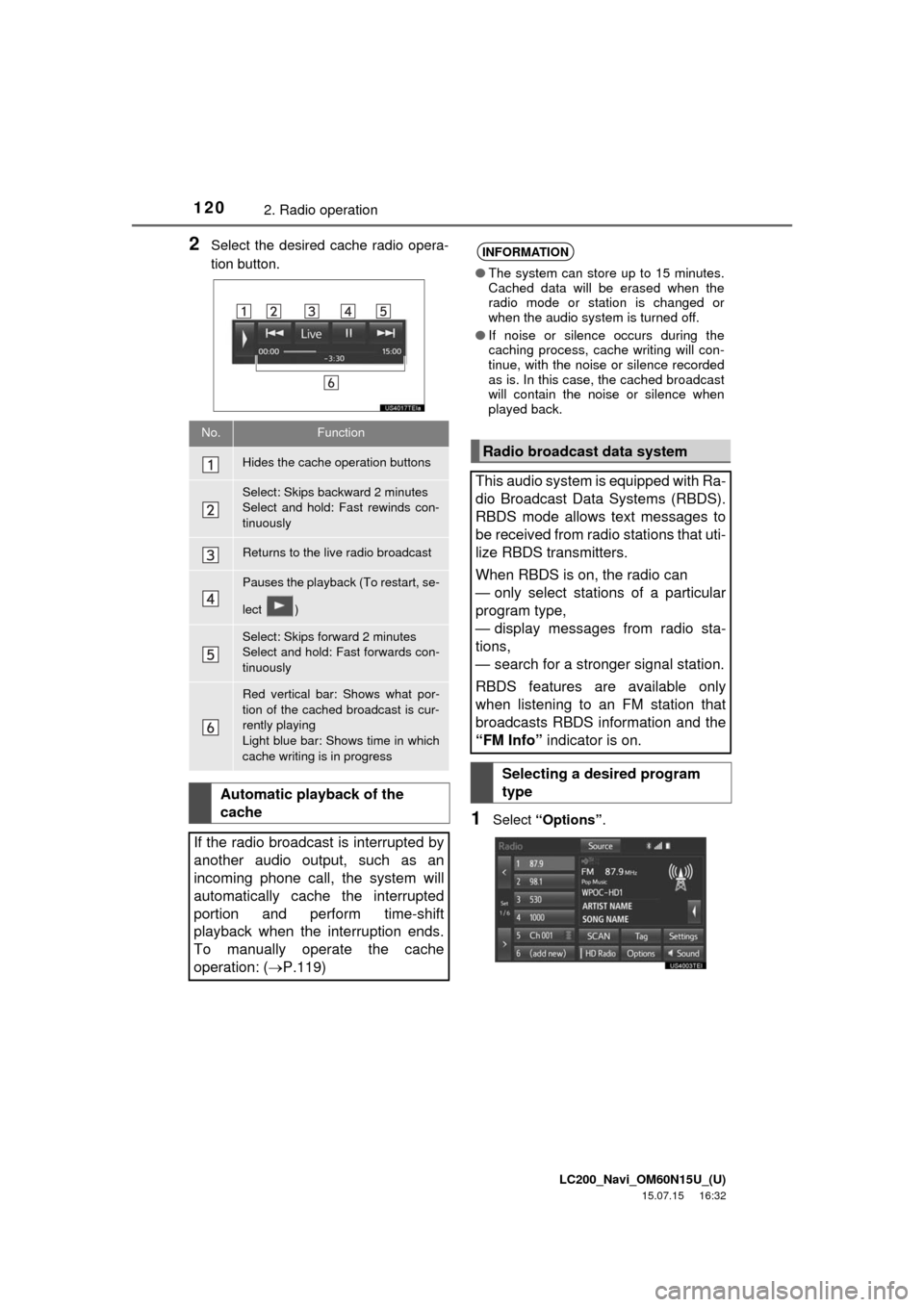
2Select the desired cache radio opera-
tion button.
1Select “Options”.
No.Function
Hides the cache operation buttons
Select: Skips backward 2 minutes
Select and hold: Fast rewinds con-
tinuously
Returns to the live radio broadcast
Pauses the playback (To restart, se-
lect )
Select: Skips forward 2 minutes
Select and hold: Fast forwards con-
tinuously
Red vertical bar: Shows what por-
tion of the cached broadcast is cur-
rently playing
Light blue bar: Shows time in which
cache writing is in progress
Automatic playback of the
cache
If the radio broadcast is interrupted by
another audio output, such as an
incoming phone call, the system will
automatically cache the interrupted
portion and perform time-shift
playback when the interruption ends.
To manually operate the cache
operation: (P.119)
INFORMATION
●The system can store up to 15 minutes.
Cached data will be erased when the
radio mode or station is changed or
when the audio system is turned off.
●If noise or silence occurs during the
caching process, cache writing will con-
tinue, with the noise or silence recorded
as is. In this case, the cached broadcast
will contain the noise or silence when
played back.
Radio broadcast data system
This audio system is equipped with Ra-
dio Broadcast Data Systems (RBDS).
RBDS mode allows text messages to
be received from radio stations that uti-
lize RBDS transmitters.
When RBDS is on, the radio can
— only select stations of a particular
program type,
— display messages from radio sta-
tions,
— search for a stronger signal station.
RBDS features are available only
when listening to an FM station that
broadcasts RBDS information and the
“FM Info” indicator is on.
Selecting a desired program
type
Page 121 of 275

LC200_Navi_OM60N15U_(U)
15.07.15 16:32
Audio/visual system
4
1212. Radio operation
2Select “TYPE ” or “ TYPE” to
move forward and backward through
the program list.
Once a program type has been set,
“TYPE SEEK” will appear on the screen.
The program list is in the following order:
• “Classical”
• “Country”
• “EasyLis” (Easy Listening)
• “Inform” (Information)
• “Jazz”
• “News”
• “Oldies”
•“Other”
•“Pop Music”
•“Religion”
• “Rock”
• “R&B” (Rhythm and Blues)
• “Sports”
•“Talk”
• “Traffic” (Not available when “HD Radio”
indicator is off.)
• “Alert” (Emergency Alert)
3Select “TYPE SEEK” and the system
will start to seek for stations in the rele-
vant program type.
1Select “Options”.
2Select “Traffic” to seek a traffic pro-
gram station. “TRAF SEEK” will appear
on the screen.
INFORMATION
●If no relevant program can be found, “no
type” will appear on the screen.
Traffic announcement (FM radio)
A station that regularly broadcasts traf-
fic information is automatically located.
INFORMATION
●If no traffic program station is found, “No
Traffic” will appear on the screen.
●If a traffic program station is found, the
name of the traffic program station will
be displayed for a while.
Page 122 of 275

LC200_Navi_OM60N15U_(U)
15.07.15 16:32
1222. Radio operation
1Select the “HD)” logo.
2Select the desired channel.
Turning the “TUNE·SCROLL” knob can
also select the desired multicast channel.
Using HD Radio™
technology
HD Radio™
Technology is the digital
evolution of analog AM/FM radio. Your
radio product has a special receiver
which allows it to receive digital broad-
casts (where available) in addition to
the analog broadcasts it already re-
ceives. Digital broadcasts have better
sound quality than analog broadcasts
as digital broadcasts provide free,
crystal clear audio with no static or dis-
tortion. For more information, and a
guide to available radio stations and
programming, refer to www.hdra-
dio.com.
HD Radio features included in Toyo-
ta radios:
Digital Sound HD Radio broadcasts
deliver crystal-clear, digital audio quality
to listeners.
HD2/HD3 Channels FM stations can
provide additional digital only audio pro-
gramming with expanded content and
format choices on HD2/HD3 channels.
PSD Program Service Data (PSD)
gives you on-screen information such as
artist name and song title.
iTunes Tagging Listeners can tag
(store) songs they like for later review
and purchase through iTunes.
Artist Experience Images related to
the broadcast are displayed on the radio
screen, such as album cover art and sta-
tion logos.
HD Radio Technology manufactured
under license from iBiquity Digital
Corporation. U.S. and Foreign
Patents. HD Radio™
and the HD, HD
Radio, and “Arc” logos are proprietary
trademarks of iBiquity Digital Corp.
Available HD Radio™
technology
Multicast
On the FM radio frequency most digital
stations have “multiple” or supplemen-
tal programs on one FM station.
Page 123 of 275

LC200_Navi_OM60N15U_(U)
15.07.15 16:32
Audio/visual system
4
1232. Radio operation
1Select “Tag” to bookmark the music
information.
2Connect an iPod. (P.113)
Turn on the power of the iPod if it is not
turned on.
Once an iPod is connected, the music tag
moves from the radio into the iPod.
When the iPod is connected to iTunes, the
“tagged” information of the songs which
were tagged while listening to the radio
can be viewed. Then a user may decide to
purchase the song or CD/Album which
had been listened to on their radio.
Preserving a music information
Tag information in the music broad-
casting is preserved in the system and
transmits to an iPod.INFORMATION
●The tag information can not be pre-
served while scanning or caching the
radio station.
●If tagging the music information fails,
“Saving the HD Radio tag failed.” will be
displayed on the screen. If this occurs,
tag the information again.
●HD Radio™ stations can be preset.
●An orange “HD)” logo indicator will be
displayed on the screen when in digital.
The “HD)” logo will first appear in a gray
color indicating the station is indeed (an
analog and) a digital station. Once the
digital signal is acquired, the logo will
change to a bright orange color.
●The song title, artist name and music
genre will appear on the screen when
available by the radio station. In addi-
tion, radios stations may send album
cover pictures when available.
●As a user works through the analog
radio stations, (where applicable) the
radio receiver will automatically tune
from an analog signal to a digital signal
within 5 seconds.
Page 124 of 275

LC200_Navi_OM60N15U_(U)
15.07.15 16:32
1242. Radio operation
Troubleshooting guide
ExperienceCauseAction
Mismatch of time align-
ment- a user may hear a
short period of program-
ming replayed or an echo,
stutter or skip.The radio stations analog
and digital volume is not
properly aligned or the sta-
tion is in ballgame mode.
None, radio broadcast issue. A
user can contact the radio station.
Sound fades, blending in
and out.Radio is shifting between
analog and digital audio.
Reception issue, may clear-up as
the vehicle continues to be driven.
Turning the indicator of the “HD
Radio” button off can force radio in
an analog audio.
Audio mute condition when
an HD2/HD3 multicast
channel had been playing.The radio does not have
access to digital signals at
the moment.This is normal behavior, wait until
the digital signal returns. If out of
the coverage area, seek a new
station.
Audio mute delay when se-
lecting an HD2/HD3 multi-
cast channel preset.
The digital multicast con-
tent is not available until
HD Radio™ broadcast can
be decoded and make the
audio available. This takes
up to 7 seconds.
This is normal behavior, wait for
the audio to become available.
Text information does not
match the present song au-
dio.Data service issue by the
radio broadcaster.
Broadcaster should be notified.
Complete the form;
www.ibiquity.com/automotive/
report_radio_station_experiences.
No text information shown
for the present selected fre-
quency.Data service issue by the
radio broadcaster.Broadcaster should be notified.
Complete the form;
www.ibiquity.com/automotive/
report_radio_station_experiences.
