Page 109 of 275

LC200_Navi_OM60N15U_(U)
15.07.07 11:02
109
4
Bluetooth® audio ..................... 144
Overview ................................... 144
Connecting a Bluetooth®
device ..................................... 146
Listening to Bluetooth
® audio .... 146
AUX......................................... 147
Overview ................................... 147
VTR ......................................... 148
Overview ................................... 148
VTR options............................... 149
4. Rear seat entertainment
system operation
Rear seat entertainment
system features .................... 150
Display....................................... 151
Rear seat entertainment system
controller ................................. 152
Headphone jacks....................... 153
Headphones .............................. 153
Caution screen .......................... 153
Turning the rear display on/off... 153
Changing the display to be
operated .................................. 154
Turning on/off the display .......... 154
Changing the source ................. 154
Changing the speaker output .... 155
Operation from the front seats... 157
Using the radio .......................... 157
Using the radio (internet radio
broadcast) ............................... 159Playing an audio CD/
a CD-TEXT disc ..................... 159
Playing MP3/WMA/
AAC discs ............................... 159
Playing DVD video .................... 160
Playing a USB memory ............. 164
Playing iPod .............................. 165
Playing Bluetooth
® audio .......... 166
Using the external devices ........ 167
Rear seat entertainment
system settings....................... 168
If the rear seat entertainment
system malfunctions ............... 170
5. Audio/visual remote
controls
Steering switches .................... 171
6. Setup
Audio settings .......................... 173
Audio settings screen................ 173
7. Tips for operating the
audio/visual system
Operating information .............. 178
Radio......................................... 178
DVD player and disc ................. 179
iPod ........................................... 184
File information ......................... 185
Terms ........................................ 188
Error messages......................... 190
Audio/visual system
Page 110 of 275
LC200_Navi_OM60N15U_(U)
15.07.08 16:49
1101. Basic operation
■Control screen
■Control panelQuick reference
Operations such as selecting a preset
station and adjusting the sound bal-
ance are carried out on the screen.
Press the “AUDIO” button to display
the audio/visual screen.
*: If equipped
FunctionPage
Using the radio11 7
Playing an audio CD or MP3/WMA/
AAC disc131
Playing a DVD134
Playing a USB memory138
Playing an iPod140
Playing a Bluetooth® device144
Using the AUX port147
Playing the VTR148
Using the rear seat entertainment
system*150
Using the steering wheel audio
switches171
Audio system settings173
INFORMATION
●The display and button positions will dif-
fer depending on the type of the system.
Page 111 of 275

LC200_Navi_OM60N15U_(U)
15.07.08 16:49
Audio/visual system
4
1111. Basic operation
“PWR·VOL” knob: Press to turn the au-
dio/visual system on and off. The system
turns on in the last mode used. Turn this
knob to adjust the volume.
“AUDIO” button: Press to display screen
buttons for the audio/visual system.
1Press the “AUDIO” button.
2Select “Source” on the audio screen
or press “AUDIO” button again.
3Select the desired source.
Some basics
This section describes some of the ba-
sic features of the audio/visual system.
Some information may not pertain to
your system.
Your audio/visual system works when
the engine switch is turned to ACCES-
SORY or IGNITION ON mode.
NOTICE
●To prevent the battery from being dis-
charged, do not leave the audio/visual
system on longer than necessary when
the engine is not running.
Certification
CAUTION:
USE OF CONTROL OR ADJUSTMENT
OR PERFORMANCE OF PROCE-
DURES OTHER THAN THOSE SPECI-
FIED HEREIN MAY RESULT IN
HAZARDOUS RADIATION EXPO-
SURE.
THE USE OF OPTICAL INSTRU-
MENTS WITH THIS PRODUCT WILL
INCREASE EYE HAZARD.
Turning the system on and off
A function that enables automatic return
to the previous screen from the audio/
visual screen can be selected. (P. 4 3 )
Selecting an audio source
INFORMATION
●Dimmed screen buttons cannot be oper-
ated.
●When there are two pages, select “ ” or
“ ” to change the page.
Page 112 of 275
LC200_Navi_OM60N15U_(U)
15.07.08 16:49
1121. Basic operation
1Select “Source”.
2Select “Reorder”.
3Select the desired audio source then
or to reorder.
1Insert a disc into the disc slot.
After insertion, the disc is automatically
loaded.
1Press the “” button and remove the
disc.
Reordering the audio sourceDisc slot
Inserting a disc
Ejecting a disc
NOTICE
●Never try to disassemble or oil any part
of the DVD player. Do not insert any-
thing other than a disc into the slot.
INFORMATION
●The player is intended for use with 4.7
in. (12 cm) discs only.
●When inserting a disc, gently insert the
disc with the label facing up.
Page 113 of 275
LC200_Navi_OM60N15U_(U)
15.07.08 16:49
Audio/visual system
4
1131. Basic operation
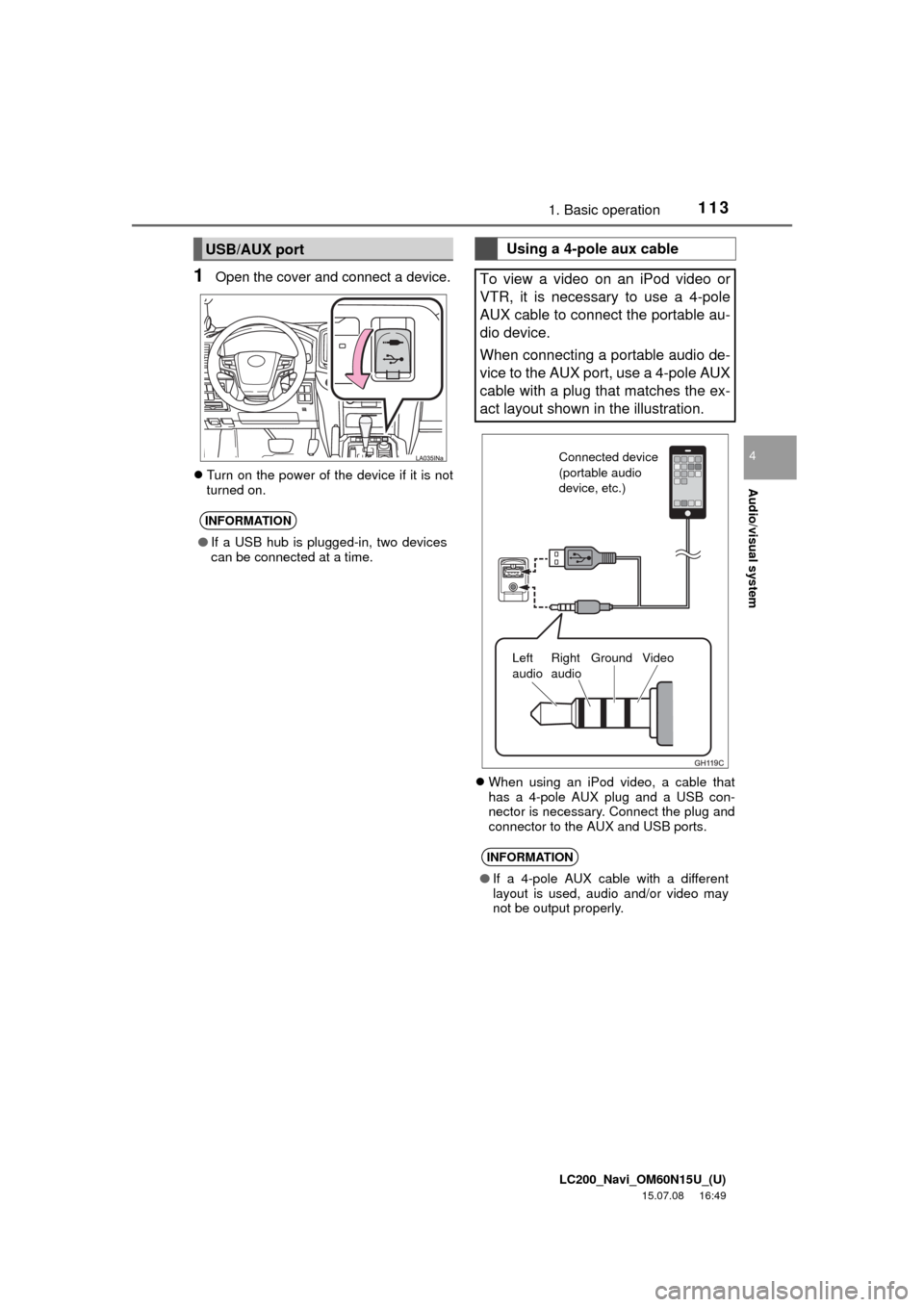
1Open the cover and connect a device.
Turn on the power of the device if it is not
turned on.
When using an iPod video, a cable that
has a 4-pole AUX plug and a USB con-
nector is necessary. Connect the plug and
connector to the AUX and USB ports.
USB/AUX port
INFORMATION
●If a USB hub is plugged-in, two devices
can be connected at a time.
Using a 4-pole aux cable
To view a video on an iPod video or
VTR, it is necessary to use a 4-pole
AUX cable to connect the portable au-
dio device.
When connecting a portable audio de-
vice to the AUX port, use a 4-pole AUX
cable with a plug that matches the ex-
act layout shown in the illustration.
INFORMATION
●If a 4-pole AUX cable with a different
layout is used, audio and/or video may
not be output properly.
Connected device
(portable audio
device, etc.)
Left
audioRight
audioGround Video
Page 114 of 275
LC200_Navi_OM60N15U_(U)
15.07.08 16:49
1141. Basic operation
1Select “Sound”.
2Select the “DSP” tab.
3Select the desired items to be set.
1Select “Sound”.
2Select the “Sound” tab.
Sound settings
DSP control
No.Function
The system adjusts to the optimum
volume and tone quality according to
vehicle speed to compensate for in-
creased vehicle noise.
This function can create a feeling of
presence.
Tone and balance
Tone:
How good an audio program sounds is
largely determined by the mix of the
treble, mid and bass levels. In fact, dif-
ferent kinds of music and vocal pro-
grams usually sound better with
different mixes of treble, mid and bass.
Balance:
A good balance of the left and right ste-
reo channels and of the front and rear
sound levels is also important.
Keep in mind that when listening to a
stereo recording or broadcast, chang-
ing the right/left balance will increase
the volume of 1 group of sounds while
decreasing the volume of another.
Page 115 of 275
LC200_Navi_OM60N15U_(U)
15.07.08 16:49
Audio/visual system
4
1151. Basic operation
3Select the desired screen button.
DVD video/iPod video/VTR
1Select “Options” on the control
screen.
2Select “Wide” on the options screen.
3Select the desired item to be adjusted.
No.Function
Select “+” or “-” to adjust high-
pitched tones.
Select “+” or “-” to adjust mid-
pitched tones.
Select “+” or “-” to adjust low-
pitched tones.
Select to adjust the sound balance
between the front and rear speakers.
Select to adjust the sound balance
between the left and right speakers.
Audio screen adjustment
Screen size settings
The screen size can be selected for
each type of media.
No.Function
Select to display a 4 : 3 screen, with
either side in black.
Select to enlarge the image horizon-
tally and vertically to full screen.
Select to enlarge the image by the
same ratio horizontally and vertically.
Page 116 of 275

LC200_Navi_OM60N15U_(U)
15.07.08 16:49
1161. Basic operation
DVD video/iPod video/VTR
1Select “Options” on the control
screen.
2Select “Display” on the option screen.
3Select the desired item to be adjusted.
1Press this switch to operate the voice
command system.
Contrast, brightness, color and
tone adjustment
The brightness, contrast, color and
tone of the screen can be adjusted.
Screen buttonFunction
“Color” “R”Select to strengthen the
red color of the screen.
“Color” “G”
Select to strengthen the
green color of the
screen.
“Tone” “+”Select to strengthen the
tone of the screen.
“Tone” “-”Select to weaken the
tone of the screen.
“Contrast” “+”Select to strengthen the
contrast of the screen.
“Contrast” “-”Select to weaken the
contrast of the screen.
“Brightness” “+”Select to brighten the
screen.
“Brightness” “-”Select to darken the
screen.
INFORMATION
●Depending on the audio source, some
functions may not be available.
Voice command system
The voice command system and its list
of commands can be operated.
(P.192)