Page 113 of 716
1133-1. Key information
3
Operation of each component
HIGHLANDER_U (OM48F09U)
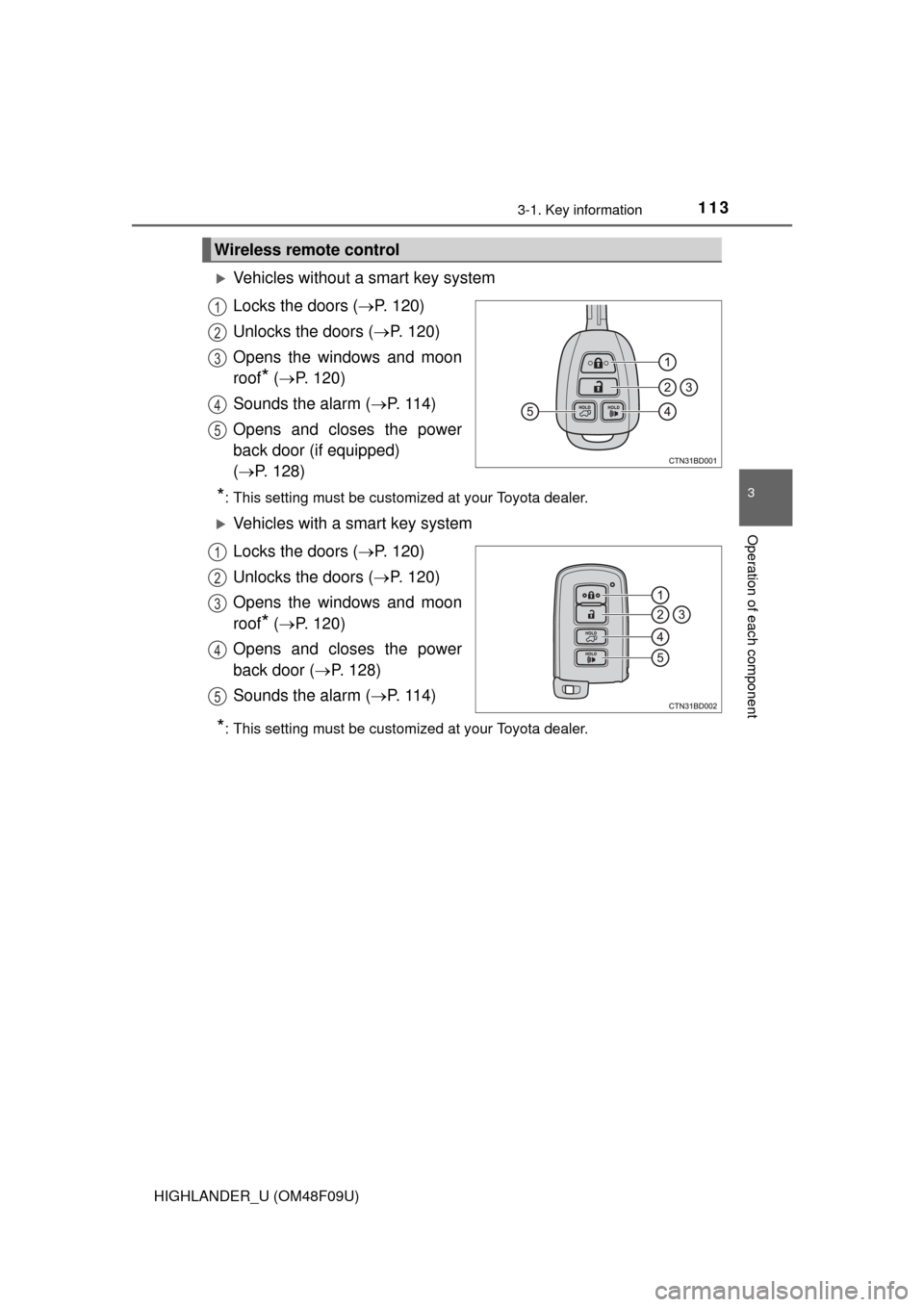
Vehicles without a smart key system
Locks the doors (P. 120)
Unlocks the doors ( P. 120)
Opens the windows and moon
roof
* ( P. 120)
Sounds the alarm ( P. 114)
Opens and closes the power
back door (if equipped)
( P. 128)
*: This setting must be customized at your Toyota dealer.
Vehicles with a smart key system
Locks the doors ( P. 120)
Unlocks the doors ( P. 120)
Opens the windows and moon
roof
* ( P. 120)
Opens and closes the power
back door ( P. 128)
Sounds the alarm ( P. 114)
*: This setting must be customized at your Toyota dealer.
Wireless remote control
1
2
3
4
5
1
2
3
4
5
Page 119 of 716
119
3
Operation of each component
HIGHLANDER_U (OM48F09U)
3-2. Opening, closing and locking the doors
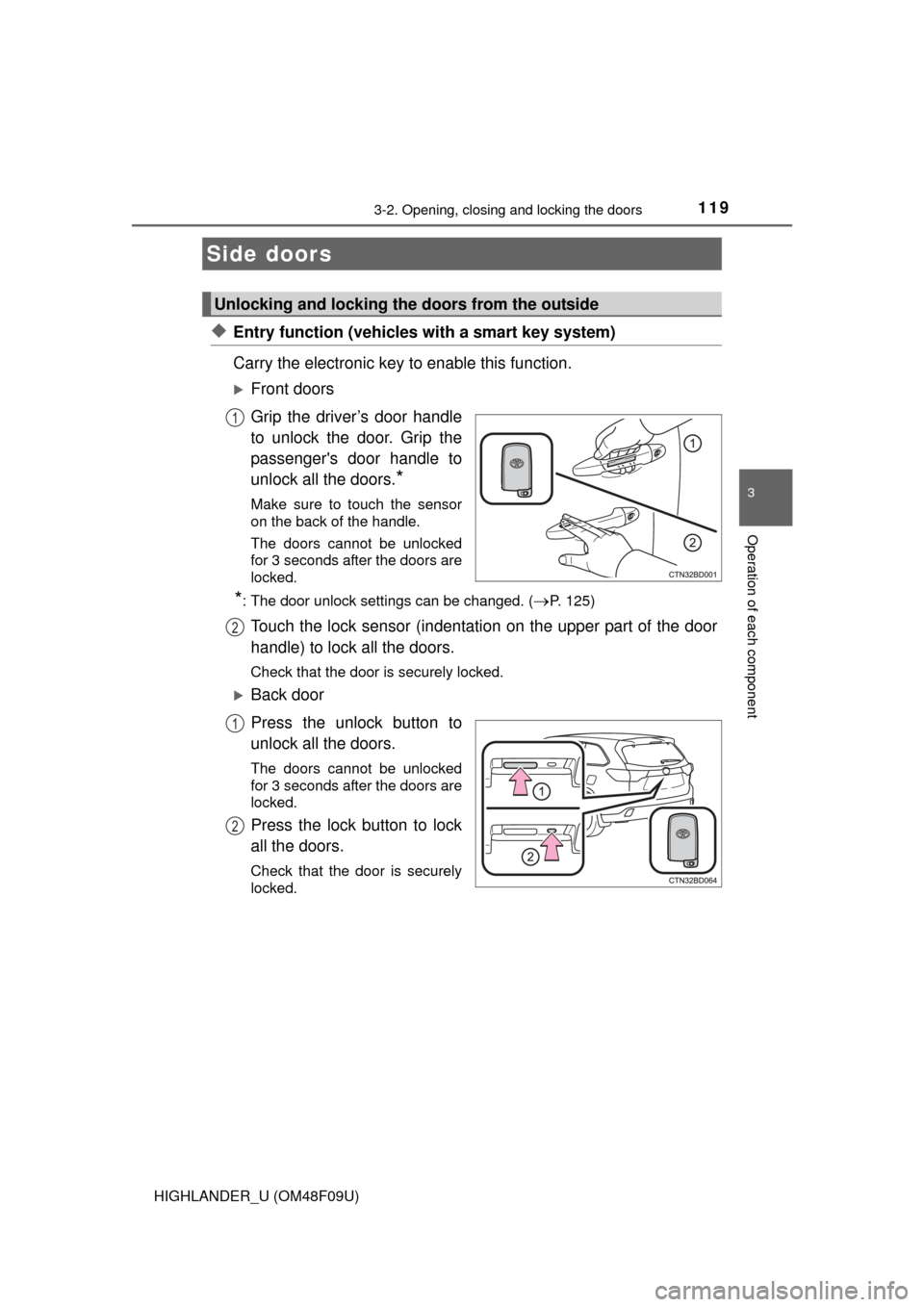
◆Entry function (vehicles with a smart key system)
Carry the electronic key to enable this function.
Front doors
Grip the driver’s door handle
to unlock the door. Grip the
passenger's door handle to
unlock all the doors.
*
Make sure to touch the sensor
on the back of the handle.
The doors cannot be unlocked
for 3 seconds after the doors are
locked.
*: The door unlock settings can be changed. (P. 125)
Touch the lock sensor (indentation on the upper part of the door
handle) to lock all the doors.
Check that the door is securely locked.
Back door
Press the unlock button to
unlock all the doors.
The doors cannot be unlocked
for 3 seconds after the doors are
locked.
Press the lock button to lock
all the doors.
Check that the door is securely
locked.
Side doors
Unlocking and locking the doors from the outside
1
2
1
2
Page 122 of 716
1223-2. Opening, closing and locking the doors
HIGHLANDER_U (OM48F09U)■
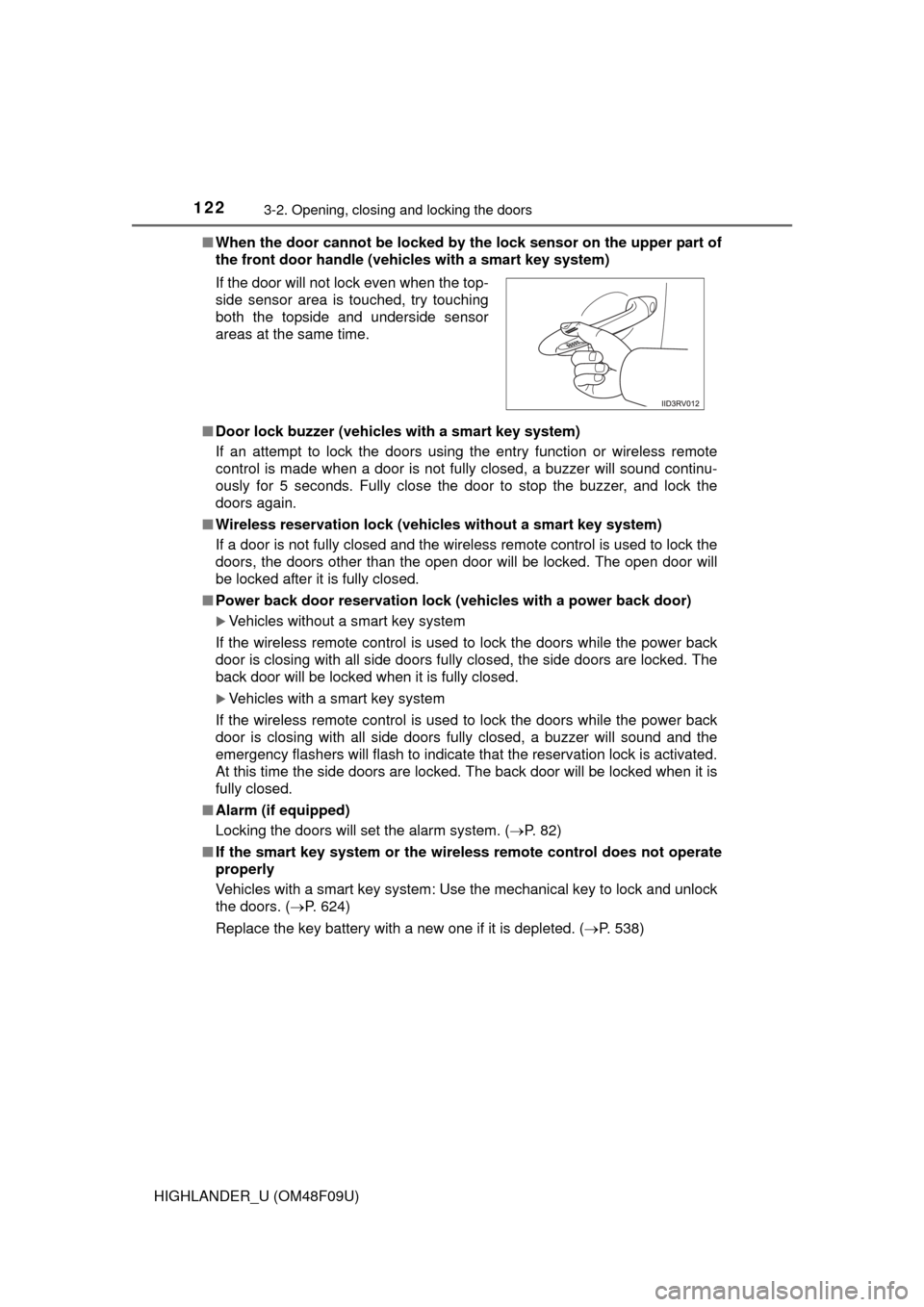
When the door cannot be locked by the lock sensor on the upper part of
the front door handle (vehicles with a smart key system)
■ Door lock buzzer (vehicles with a smart key system)
If an attempt to lock the doors using the entry function or wireless remote
control is made when a door is not fully closed, a buzzer will sound continu-
ously for 5 seconds. Fully close the door to stop the buzzer, and lock the
doors again.
■ Wireless reservation lock (vehicles without a smart key system)
If a door is not fully closed and the wireless remote control is used to lock the
doors, the doors other than the open door will be locked. The open door will
be locked after it is fully closed.
■ Power back door reservat ion lock (vehicles with a power back door)
Vehicles without a smart key system
If the wireless remote control is used to lock the doors while the power back
door is closing with all side doors fully closed, the side doors are locked. The
back door will be locked when it is fully closed.
Vehicles with a smart key system
If the wireless remote control is used to lock the doors while the power back
door is closing with all side doors fully closed, a buzzer will sound and the
emergency flashers will flash to indicate that the reservation lock is activated.
At this time the side doors are locked. The back door will be locked when it is
fully closed.
■ Alarm (if equipped)
Locking the doors will set the alarm system. ( P. 82)
■ If the smart key system or the wireless remote control does not operate
properly
Vehicles with a smart key system: Use the mechanical key to lock and unlock
the doors. ( P. 624)
Replace the key battery with a new one if it is depleted. ( P. 538)
If the door will not lock even when the top-
side sensor area is touched, try touching
both the topside and underside sensor
areas at the same time.
Page 127 of 716
1273-2. Opening, closing and locking the doors
3
Operation of each component
HIGHLANDER_U (OM48F09U)■
Door lock switch
P. 1 2 3
■Entry function (vehicles with a smart key system)
P. 1 1 9
■Wireless remote control
P. 1 2 0
■Key
P. 1 2 1
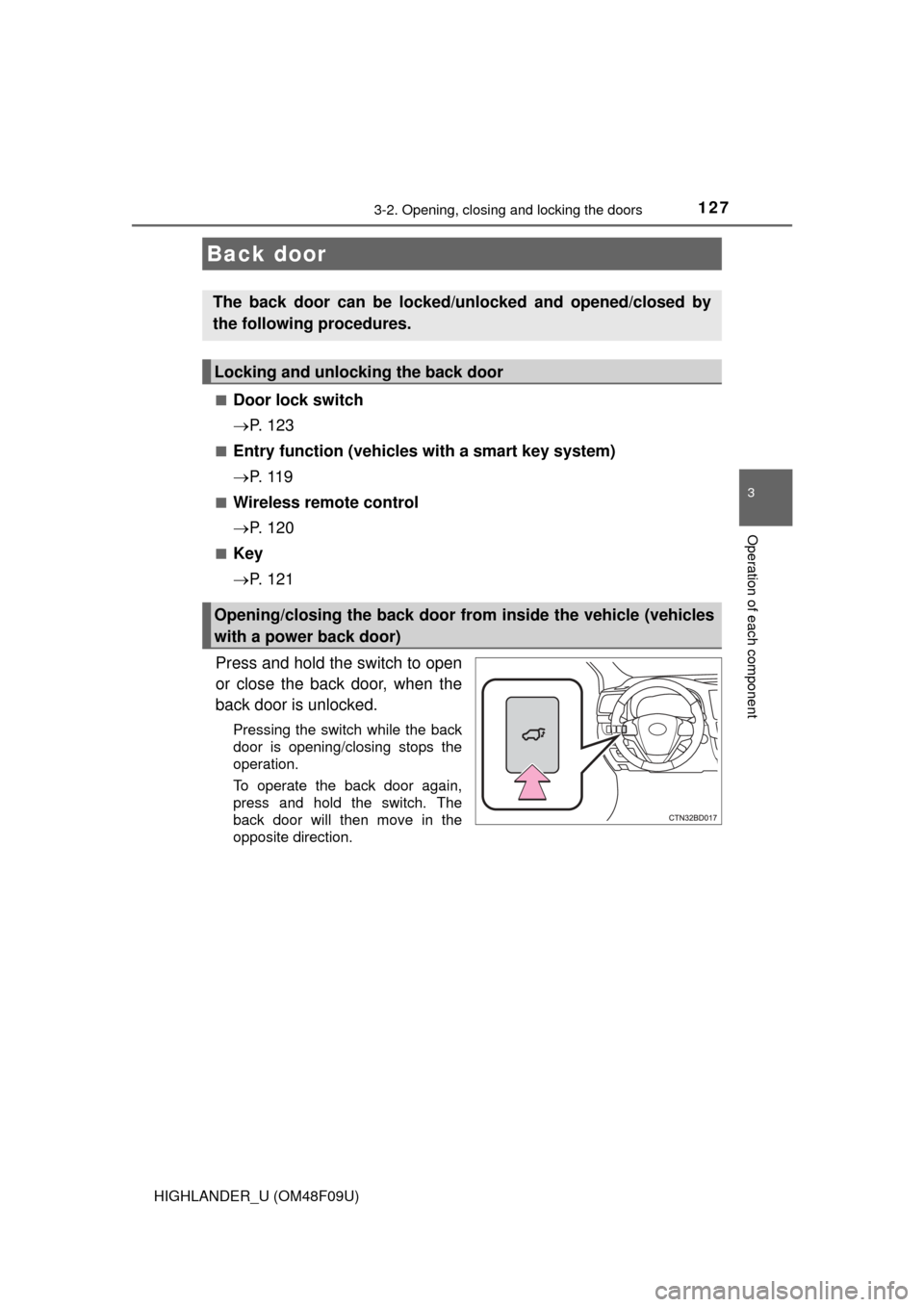
Press and hold the switch to open
or close the back door, when the
back door is unlocked.
Pressing the switch while the back
door is opening/closing stops the
operation.
To operate the back door again,
press and hold the switch. The
back door will then move in the
opposite direction.
Back door
The back door can be locked/unl ocked and opened/closed by
the following procedures.
Locking and unlocking the back door
Opening/closing the back door from inside the vehicle (vehicles
with a power back door)
Page 128 of 716
1283-2. Opening, closing and locking the doors
HIGHLANDER_U (OM48F09U)
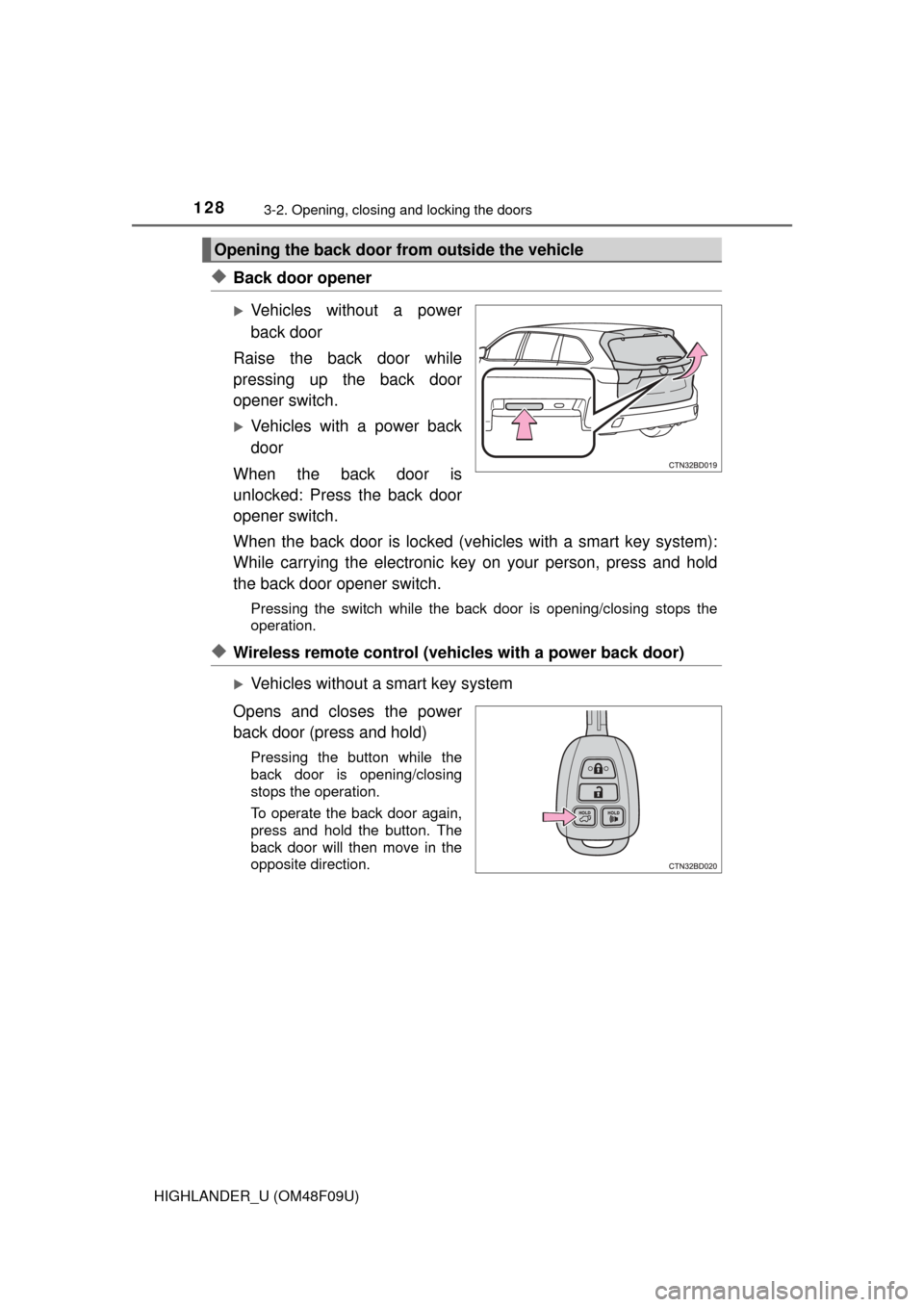
◆Back door opener
Vehicles without a power
back door
Raise the back door while
pressing up the back door
opener switch.
Vehicles with a power back
door
When the back door is
unlocked: Press the back door
opener switch.
When the back door is locked (vehicles with a smart key system):
While carrying the electronic key on your person, press and hold
the back door opener switch.
Pressing the switch while the back door is opening/closing stops the
operation.
◆Wireless remote control (vehicles with a power back door)
Vehicles without a smart key system
Opens and closes the power
back door (press and hold)
Pressing the button while the
back door is opening/closing
stops the operation.
To operate the back door again,
press and hold the button. The
back door will then move in the
opposite direction.
Opening the back door from outside the vehicle
Page 129 of 716
1293-2. Opening, closing and locking the doors
3
Operation of each component
HIGHLANDER_U (OM48F09U)
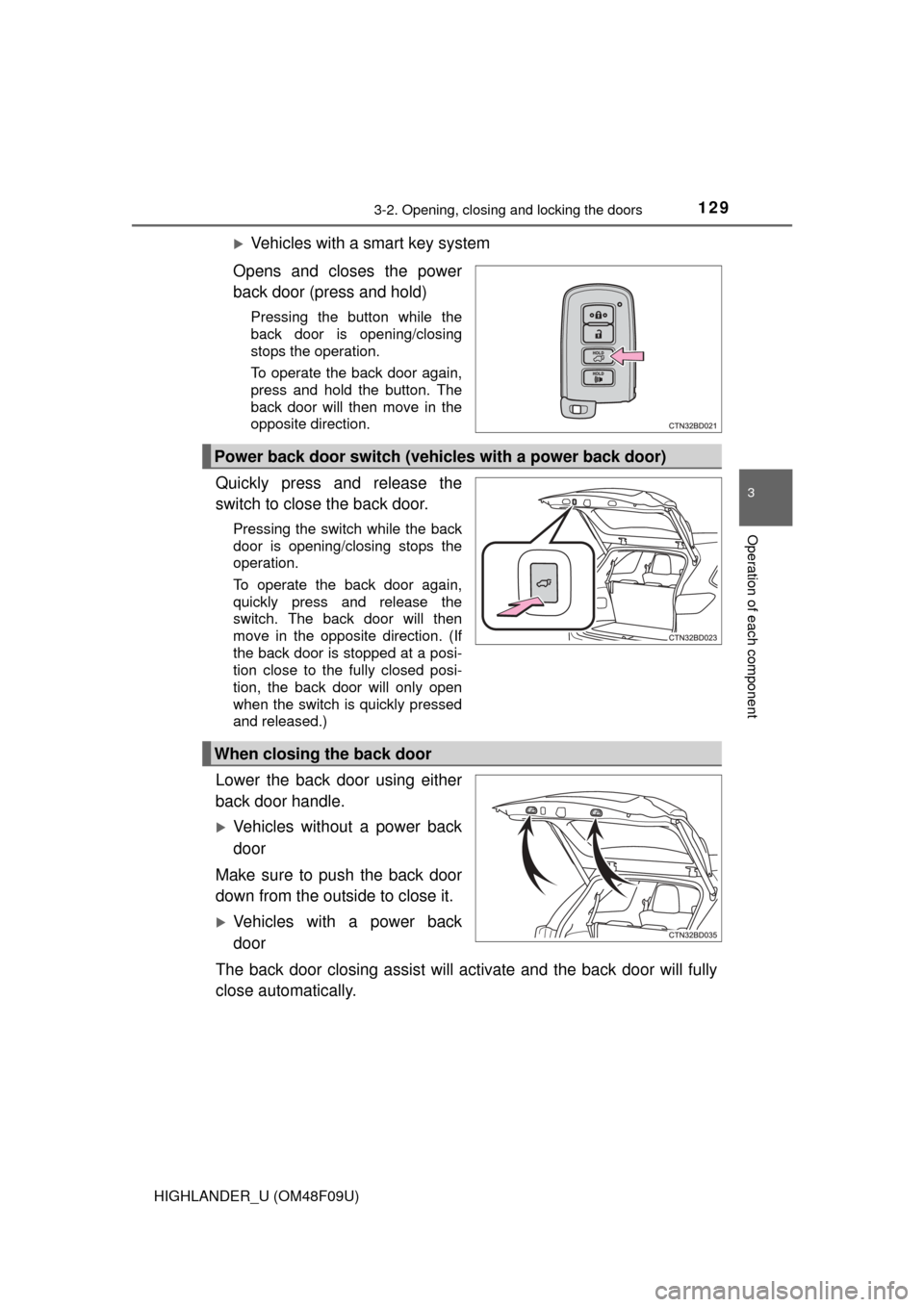
Vehicles with a smart key system
Opens and closes the power
back door (press and hold)
Pressing the button while the
back door is opening/closing
stops the operation.
To operate the back door again,
press and hold the button. The
back door will then move in the
opposite direction.
Quickly press and release the
switch to close the back door.
Pressing the switch while the back
door is opening/closing stops the
operation.
To operate the back door again,
quickly press and release the
switch. The back door will then
move in the opposite direction. (If
the back door is stopped at a posi-
tion close to the fully closed posi-
tion, the back door will only open
when the switch is quickly pressed
and released.)
Lower the back door using either
back door handle.
Vehicles without a power back
door
Make sure to push the back door
down from the outside to close it.
Vehicles with a power back
door
The back door closing assist will activate and the back door will fully
close automatically.
Power back door switch (vehicles with a power back door)
When closing the back door
Page 130 of 716
1303-2. Opening, closing and locking the doors
HIGHLANDER_U (OM48F09U)
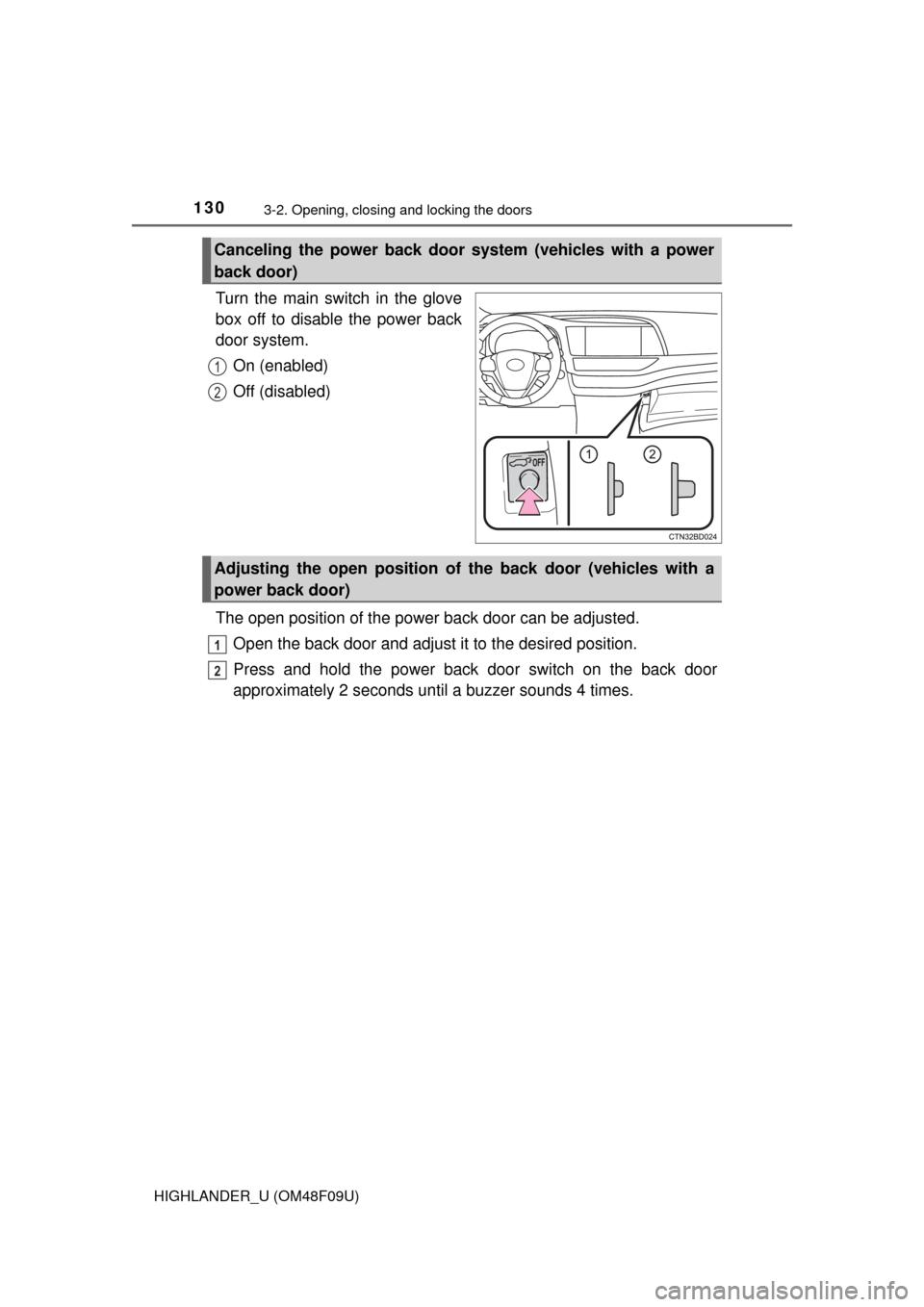
Turn the main switch in the glove
box off to disable the power back
door system.On (enabled)
Off (disabled)
The open position of the powe r back door can be adjusted.
Open the back door and adjust it to the desired position.
Press and hold the power back door switch on the back door
approximately 2 seconds until a buzzer sounds 4 times.
Canceling the power back door system (vehicles with a power
back door)
1
2
Adjusting the open position of the back door (vehicles with a
power back door)
1
2
Page 131 of 716
1313-2. Opening, closing and locking the doors
3
Operation of each component
HIGHLANDER_U (OM48F09U)
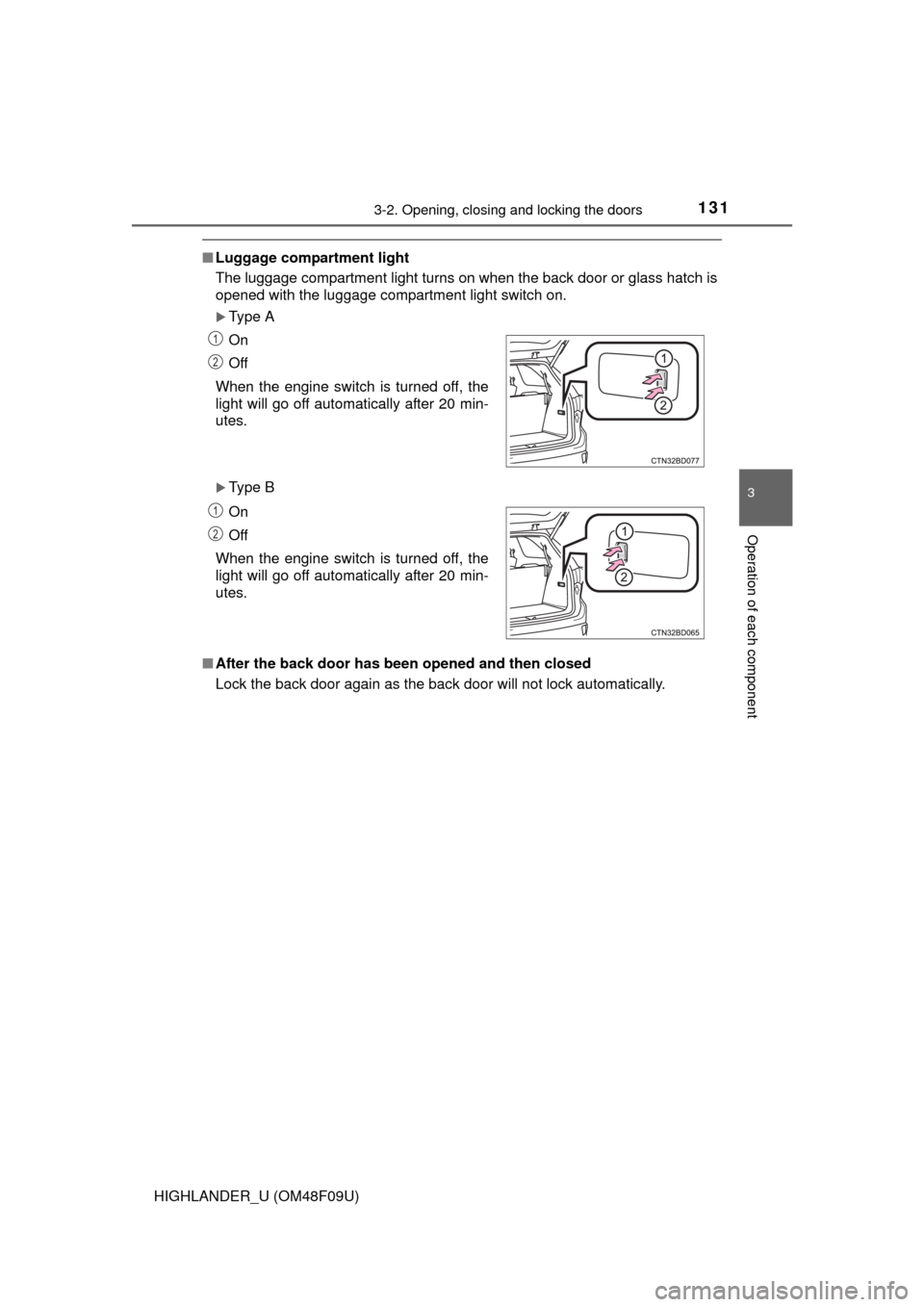
■Luggage compartment light
The luggage compartment light turns on when the back door or glass hatch is
opened with the luggage compartment light switch on.
Type A
Type B
■ After the back door has been opened and then closed
Lock the back door again as the back door will not lock automatically.On
Off
When the engine switch is turned off, the
light will go off automatically after 20 min-
utes.
On
Off
When the engine switch is turned off, the
light will go off automatically after 20 min-
utes.
1
2
1
2