2016 TOYOTA HIGHLANDER Back door
[x] Cancel search: Back doorPage 140 of 716

1403-2. Opening, closing and locking the doors
HIGHLANDER_U (OM48F09U)
NOTICE
■To prevent back door closer malfun ction (vehicles with a power back
door)
Do not apply excessive force to the back door while the back door closer is
operating.
■ To prevent damage to the po wer back door (if equipped)
● Make sure that there is no ice between the back door and frame that
would prevent movement of the back door. Operating the power back door
when excessive load is present on the back door may cause a malfunc-
tion.
● Do not apply excessive force to the back door while the power back door
is operating.
● Take care not to damage the sensors (installed on the right and left edges
of the power back door) with a knife or other sharp object. If the sensor is
disconnected, the power back door will not close automatically.
Page 141 of 716
1413-2. Opening, closing and locking the doors
3
Operation of each component
HIGHLANDER_U (OM48F09U)
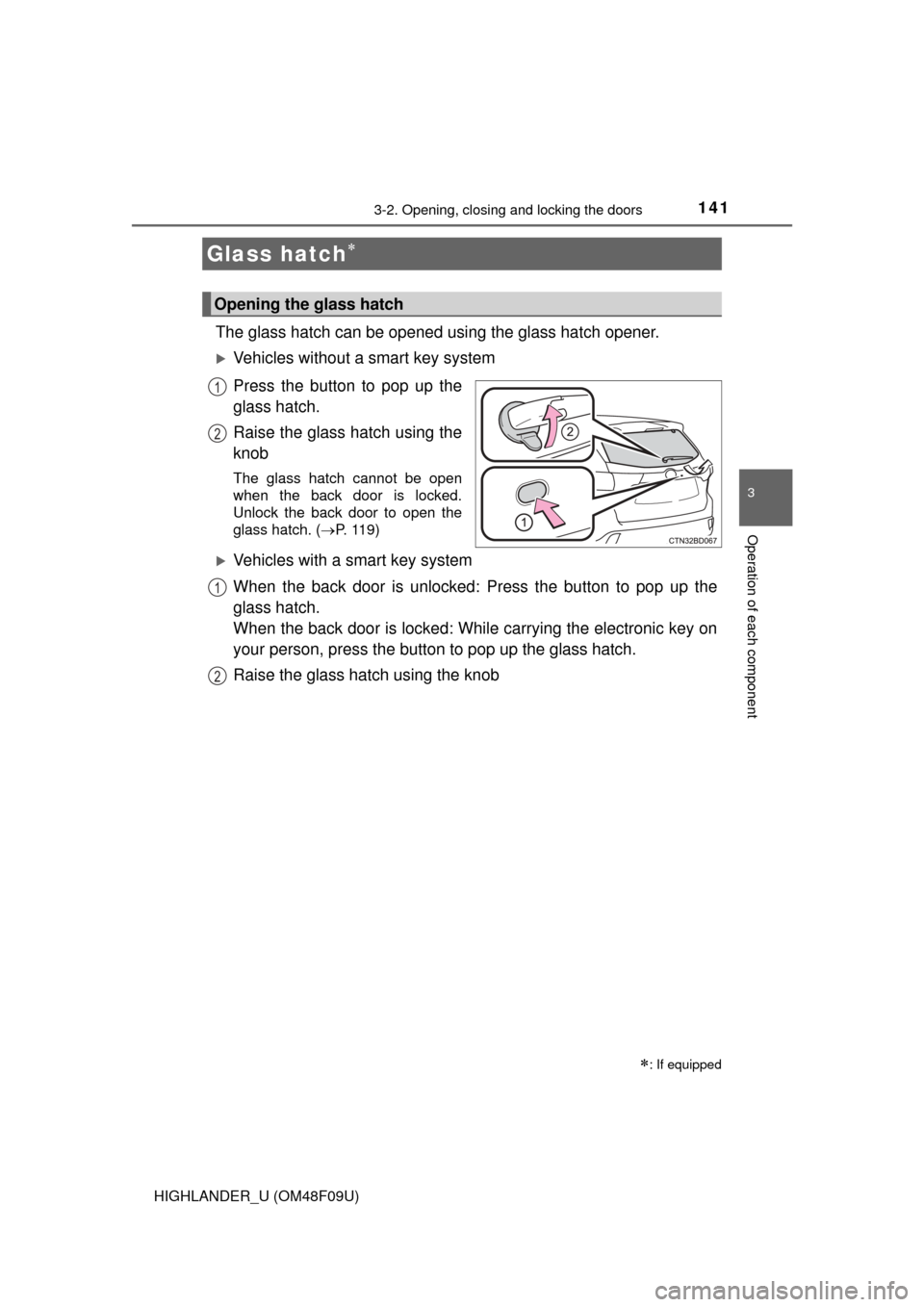
The glass hatch can be opened using the glass hatch opener.
Vehicles without a smart key system
Press the button to pop up the
glass hatch.
Raise the glass hatch using the
knob
The glass hatch cannot be open
when the back door is locked.
Unlock the back door to open the
glass hatch. (P. 119)
Vehicles with a smart key system
When the back door is unlocked: Press the button to pop up the
glass hatch.
When the back door is locked: While carrying the electronic key on
your person, press the butto n to pop up the glass hatch.
Raise the glass hatch using the knob
Glass hatch
: If equipped
Opening the glass hatch
1
2
1
2
Page 142 of 716

1423-2. Opening, closing and locking the doors
HIGHLANDER_U (OM48F09U)
■Luggage compartment light
P. 131
■ The glass hatch can be opened when
The back door is closed.
■ Opening and closing the glass hatch
●Open the glass hatch slowly and carefully.
● Make sure that the rear window wiper is switched off.
● Do not rotate the rear wiper arm when the glass hatch is open. (If the rear
wiper arm is rotated, turn the wiper switch on after closing the glass hatch.
The rear wiper arm will return to the correct position automatically after
operating once.)
● Make sure that the back door is closed before closing the glass hatch.
■ After closing the glass hatch
Check that the glass hatch is firmly closed. If it is not firmly closed, the rear
window wiper and washer will not operate correctly.
■ Function to prevent the glass hatch being locked with the electronic key
inside (vehicles with a smart key system)
● When all doors are locked, closing the glass hatch with the electronic key
left inside the luggage compartment will sound an alarm.
In this case, the glass hatch can be opened by pressing the glass hatch
opener.
● If the spare electronic key is put in the luggage compartment with all the
doors locked, the key confinement prevention function will activate and the
glass hatch can be opened. In order to prevent theft, take all electronic keys
with you when leaving the vehicle.
● If the electronic key is put in the luggage compartment with all the doors
locked, the key may not be detected depending on the location of the key
and the surrounding radio wave conditions. In this case, the key confine-
ment prevention function cannot be activated, causing the doors to lock
when the glass hatch is closed. Make sure to check where the key is before
closing the glass hatch.
Page 146 of 716
1463-2. Opening, closing and locking the doors
HIGHLANDER_U (OM48F09U)
●Locking and unlocking the doors ( P. 119)
● Opening the back door ( P. 128)
● Opening the glass hatch ( P. 141)
● Starting the engine ( P. 228)
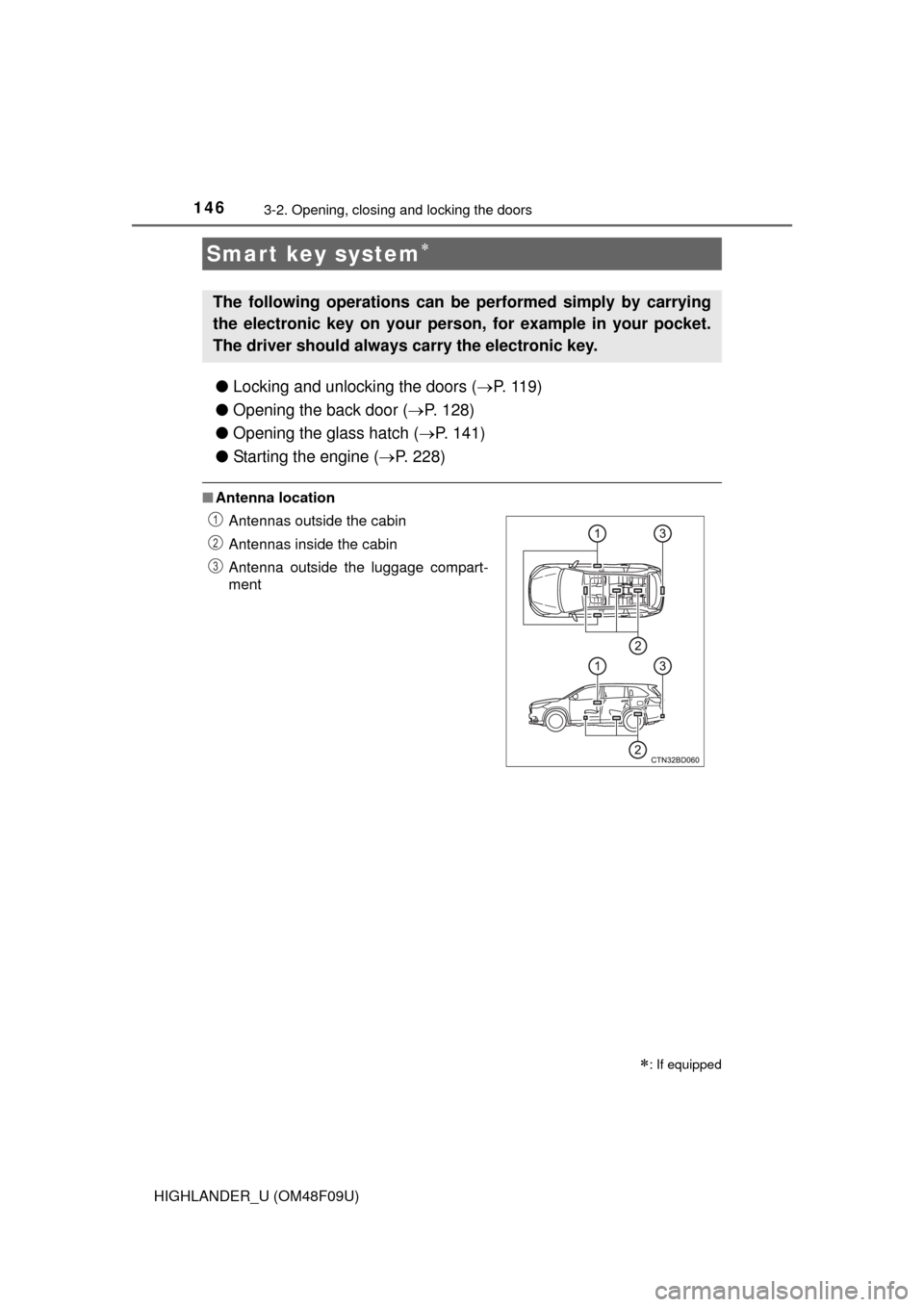
■Antenna location
Smart key system
: If equipped
The following operations can be performed simply by carrying
the electronic key on your person, for example in your pocket.
The driver should always carry the electronic key.
Antennas outside the cabin
Antennas inside the cabin
Antenna outside the luggage compart-
ment1
2
3
Page 147 of 716
1473-2. Opening, closing and locking the doors
3
Operation of each component
HIGHLANDER_U (OM48F09U)■
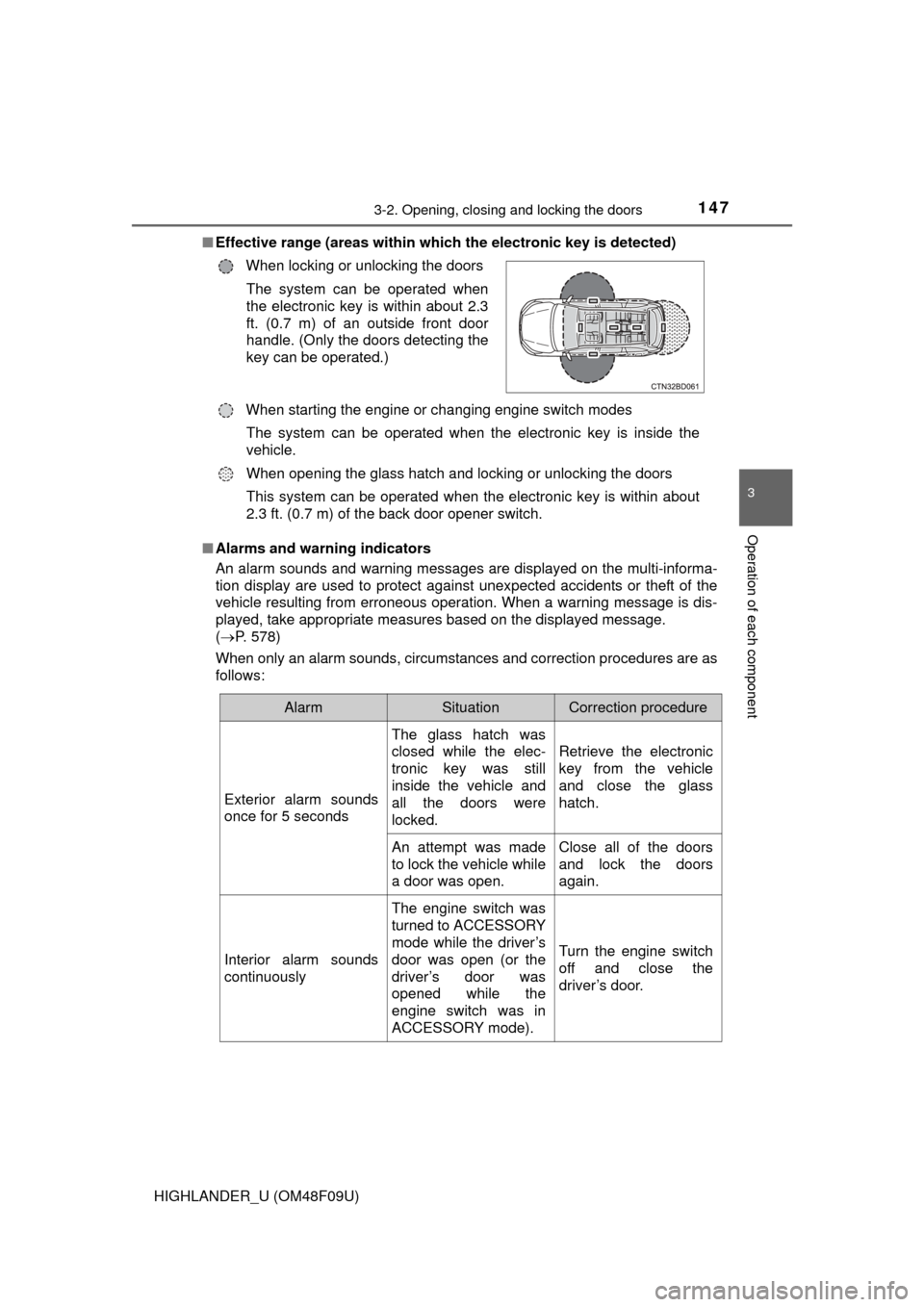
Effective range (areas within whic h the electronic key is detected)
■ Alarms and warning indicators
An alarm sounds and warning messages are displayed on the multi-informa-
tion display are used to protect against unexpected accidents or theft of the
vehicle resulting from erroneous operation. When a warning message is dis-
played, take appropriate measures based on the displayed message.
( P. 578)
When only an alarm sounds, circumstances and correction procedures are as
follows: When locking or unlocking the doors
The system can be operated when
the electronic key is within about 2.3
ft. (0.7 m) of an outside front door
handle. (Only the doors detecting the
key can be operated.)
When starting the engine or changing engine switch modes The system can be operated when the electronic key is inside the
vehicle.
When opening the glass hatch and locking or unlocking the doors
This system can be operated when the electronic key is within about
2.3 ft. (0.7 m) of the back door opener switch.
AlarmSituationCorrection procedure
Exterior alarm sounds
once for 5 seconds
The glass hatch was
closed while the elec-
tronic key was still
inside the vehicle and
all the doors were
locked.
Retrieve the electronic
key from the vehicle
and close the glass
hatch.
An attempt was made
to lock the vehicle while
a door was open.Close all of the doors
and lock the doors
again.
Interior alarm sounds
continuously
The engine switch was
turned to ACCESSORY
mode while the driver’s
door was open (or the
driver’s door was
opened while the
engine switch was in
ACCESSORY mode).
Turn the engine switch
off and close the
driver’s door.
Page 150 of 716

1503-2. Opening, closing and locking the doors
HIGHLANDER_U (OM48F09U)■
Note for the entry function
●Even when the electronic key is within the effective range (detection areas),
the system may not operate properly in the following cases:
• The electronic key is too close to the window or outside door handle, near
the ground, or in a high place when the doors are locked or unlocked.
• The electronic key is near the ground or in a high place, or too close to
the rear bumper center when the back door is opened.
• The electronic key is on the instrument panel or floor, or in the auxiliary box of the driver's side instrument panel, door pockets or glove box when
the engine is started or engine switch modes are changed.
● Do not leave the electronic key on top of the instrument panel or near the
door pockets when exiting the vehicle. Depending on the radio wave recep-
tion conditions, it may be detected by the antenna outside the cabin and the
door will become lockable from the outside, possibly trapping the electronic
key inside the vehicle.
● As long as the electronic key is within the effective range, the doors may be
locked or unlocked by anyone. However, only the doors detecting the elec-
tronic key can be used to unlock the vehicle.
● Even if the electronic key is not inside the vehicle, it may be possible to start
the engine if the electronic key is near the window.
● The doors may unlock or lock if a large amount of water splashes on the
door handle, such as in the rain or in a car wash when the electronic key is
within the effective range. (The doors will automatically be locked after
approximately 60 seconds if the doors are not opened and closed.)
● If the wireless remote control is used to lock the doors when the electronic
key is near the vehicle, there is a possibility that the door may not be
unlocked by the entry function. (Use the wireless remote control to unlock
the doors.)
● Touching the door lock or unlock sensor while wearing gloves may prevent
lock or unlock operation. Remove the gloves and touch the lock or unlock
sensor again.
● When the lock operation is performed using the lock sensor, recognition sig-
nals will be shown up to two consecutive times. After this, no recognition
signals will be given.
● If the door handle becomes wet while the electronic key is within the effec-
tive range, the door may lock and unlock repeatedly. In that case, follow the
following correction procedures to wash the vehicle:
• Place the electronic key in a location 6 ft. (2 m) or more away from the
vehicle. (Take care to ensure that the key is not stolen.)
• Set the electronic key to battery-saving mode to disable the smart key system. ( P. 148)
Page 186 of 716
1863-5. Opening and closing the windows
HIGHLANDER_U (OM48F09U)■
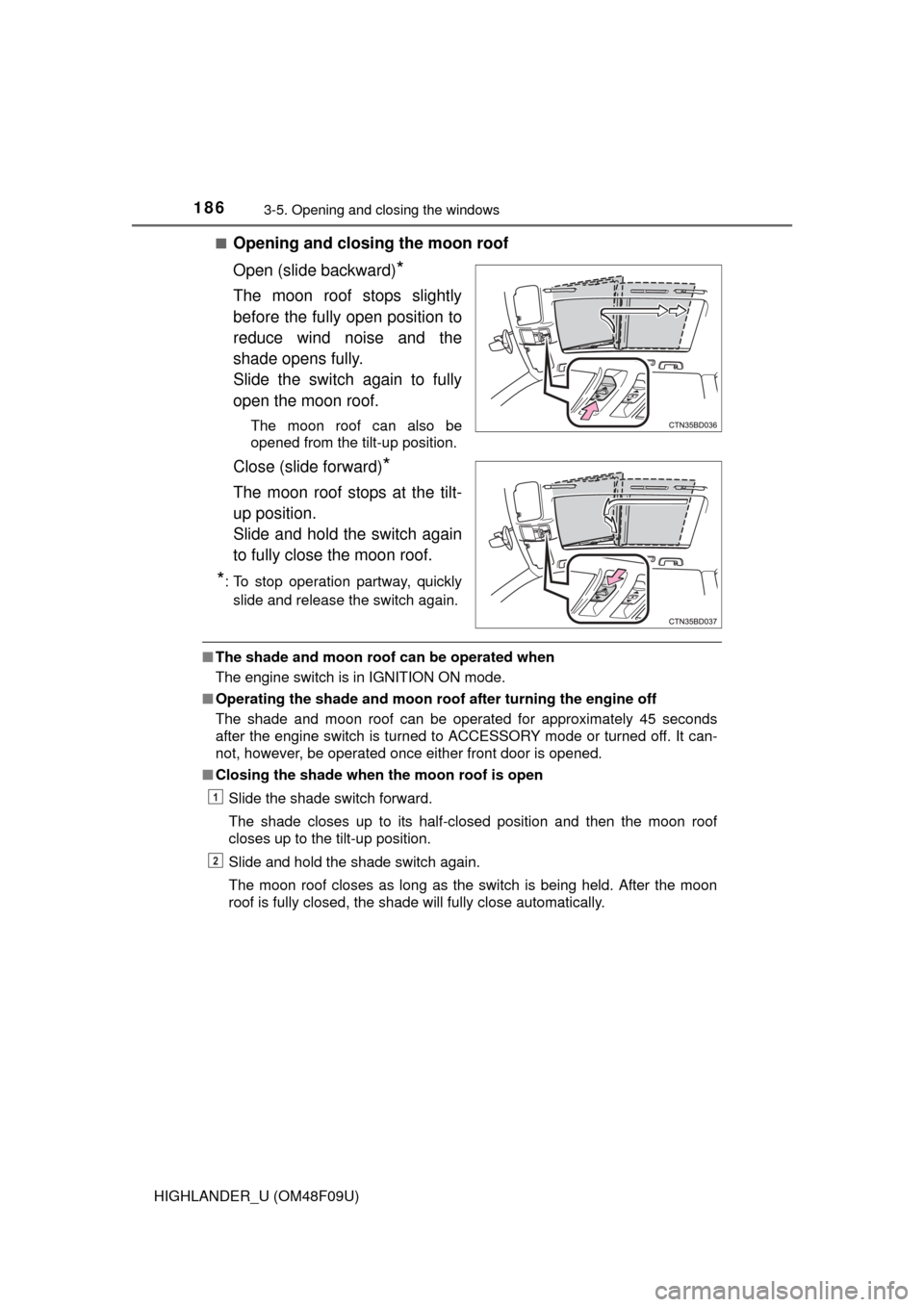
Opening and closing the moon roof
Open (slide backward)
*
The moon roof stops slightly
before the fully open position to
reduce wind noise and the
shade opens fully.
Slide the switch again to fully
open the moon roof.
The moon roof can also be
opened from the tilt-up position.
Close (slide forward)*
The moon roof stops at the tilt-
up position.
Slide and hold the switch again
to fully close the moon roof.
*: To stop operation partway, quickly
slide and release the switch again.
■ The shade and moon roof can be operated when
The engine switch is in IGNITION ON mode.
■ Operating the shade and moon roof after turning the engine off
The shade and moon roof can be operated for approximately 45 seconds
after the engine switch is turned to ACCESSORY mode or turned off. It can-
not, however, be operated once either front door is opened.
■ Closing the shade when the moon roof is open
Slide the shade switch forward.
The shade closes up to its half-closed position and then the moon roof
closes up to the tilt-up position.
Slide and hold the shade switch again.
The moon roof closes as long as the switch is being held. After the moon
roof is fully closed, the shade will fully close automatically.
1
2
Page 243 of 716
2434-3. Operating the lights and wipers
4
Driving
HIGHLANDER_U (OM48F09U)■
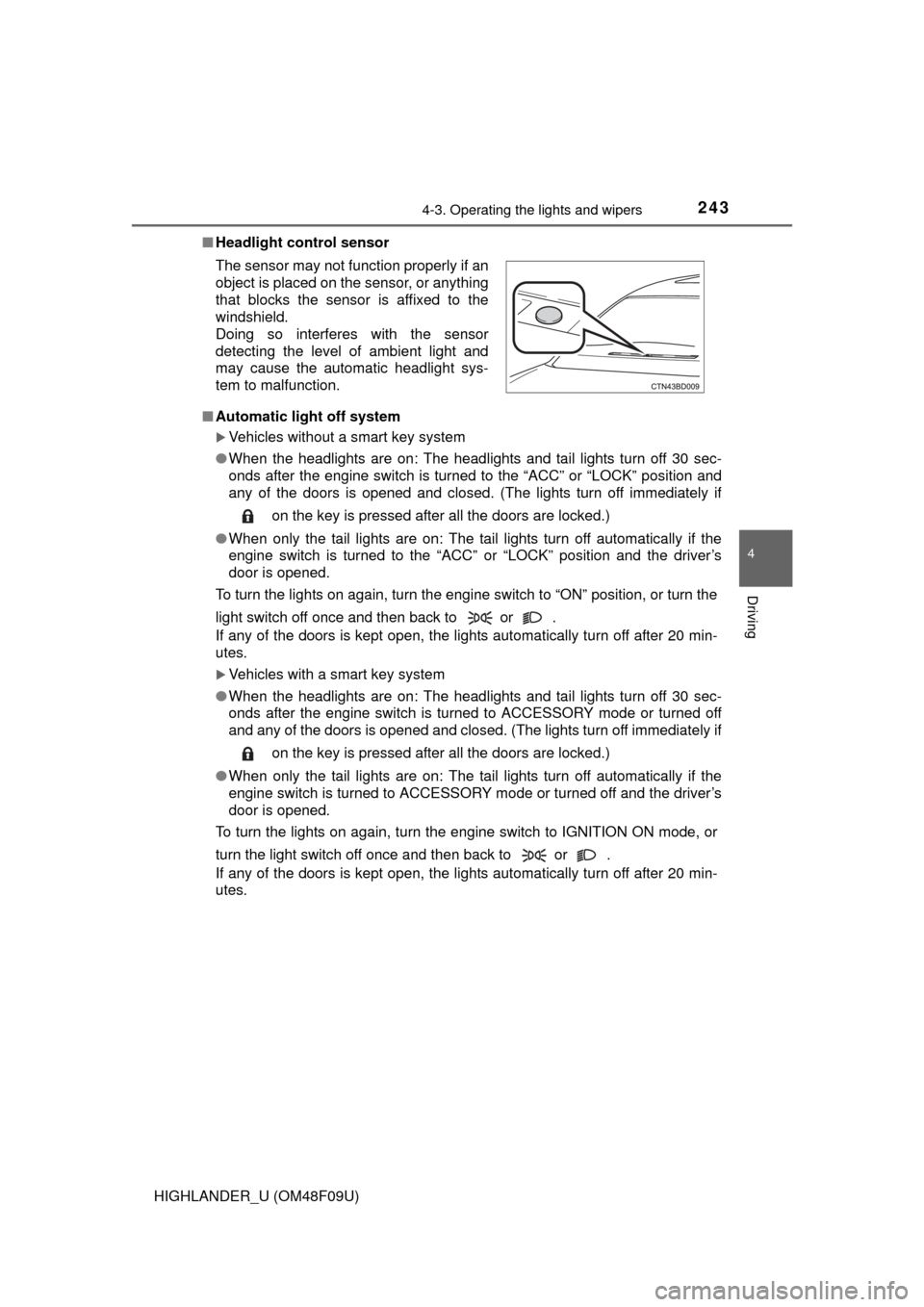
Headlight control sensor
■ Automatic light off system
Vehicles without a smart key system
● When the headlights are on: The headlights and tail lights turn off 30 sec-
onds after the engine switch is turned to the “ACC” or “LOCK” position and
any of the doors is opened and closed. (The lights turn off immediately if
on the key is pressed after all the doors are locked.)
● When only the tail lights are on: The tail lights turn off automatically if the
engine switch is turned to the “ACC” or “LOCK” position and the driver’s
door is opened.
To turn the lights on again, turn the engine switch to “ON” position, or turn the
light switch off once and then back to or .
If any of the doors is kept open, the lights automatically turn off after 20 min-
utes.
Vehicles with a smart key system
● When the headlights are on: The headlights and tail lights turn off 30 sec-
onds after the engine switch is turned to ACCESSORY mode or turned off
and any of the doors is opened and closed. (The lights turn off immediately if
on the key is pressed after all the doors are locked.)
● When only the tail lights are on: The tail lights turn off automatically if the
engine switch is turned to ACCESSORY mode or turned off and the driver’s
door is opened.
To turn the lights on again, turn the engine switch to IGNITION ON mode, or
turn the light switch off once and then back to or .
If any of the doors is kept open, the lights automatically turn off after 20 min-
utes. The sensor may not function properly if an
object is placed on the sensor, or anything
that blocks the sensor is affixed to the
windshield.
Doing so interferes with the sensor
detecting the level of ambient light and
may cause the automatic headlight sys-
tem to malfunction.