Page 261 of 716
2614-4. Refueling
4
Driving
HIGHLANDER_U (OM48F09U)
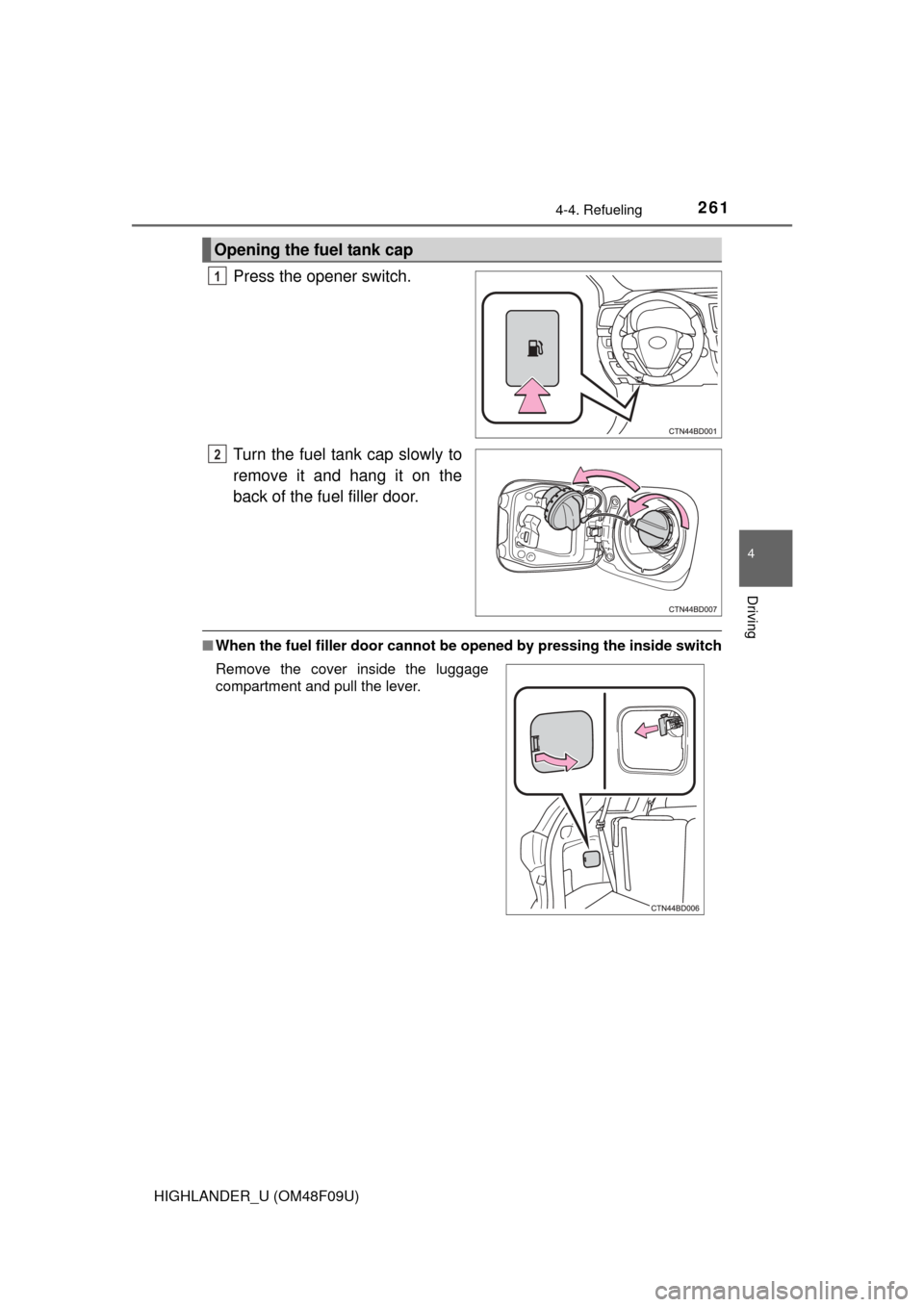
Press the opener switch.
Turn the fuel tank cap slowly to
remove it and hang it on the
back of the fuel filler door.
■When the fuel filler door cannot be opened by pressing the inside switch
Opening the fuel tank cap
1
2
Remove the cover inside the luggage
compartment and pull the lever.
Page 298 of 716
2984-5. Using the driving support systems
HIGHLANDER_U (OM48F09U)
The fixed guide lines are very far out of alignment
• The vehicle is tilted (there is a
heavy load on the vehicle, tire
pressure is low due to a tire punc-
ture, etc.)
• The vehicle is used on an incline.If this happens due to these causes,
it does not indicate a malfunction.
Back up while visually checking the
vehicle's surroundings.
The camera position is out of align-
ment.Have the vehicle inspected by your
Toyota dealer.
WARNING
■ When using the rear view monitor system
The rear view monitor system is a supplemental device intended to assist
the driver when backing up. When backing up, be sure to check visually
behind and all around the vehicle before proceeding.
Observe the following precautions to avoid an accident that could result in
death or serious injuries.
● Never depend on the rear view monitor system entirely when backing up.
The image and the position of the guide lines displayed on the screen may
differ from the actual state.
Use caution, just as you would when backing up any vehicle.
● Be sure to back up slowly, depressing the brake pedal to control vehicle
speed.
● The instructions given are only guidelines.
When and how much to turn the steering wheel will vary according to traf-
fic conditions, road surface conditions, vehicle condition, etc. when park-
ing. It is necessary to be fully aware of this before using the rear view
monitor system.
● When parking, be sure to check that the parking space will accommodate
your vehicle before maneuvering into it.
● Do not use the rear view monitor system in the following cases:
• On icy or slick road surfaces, or in snow
• When using tire chains or the compact spare tire
• When the back door is not closed completely
• On roads that are not flat or straight, such as curves or slopes.
Likely causeSolution
Page 451 of 716
4516-3. Using the storage features
6
Interior features
HIGHLANDER_U (OM48F09U)
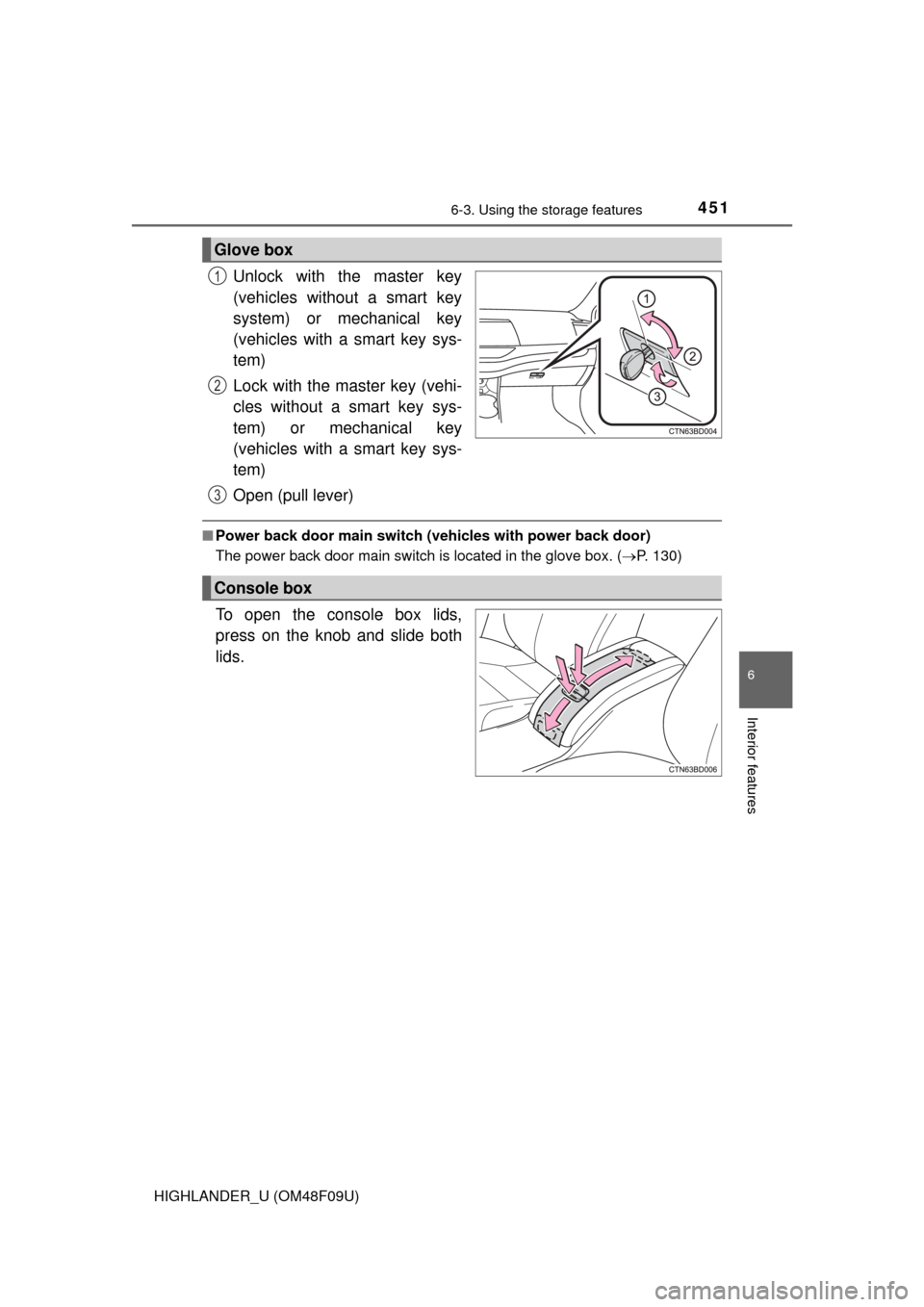
Unlock with the master key
(vehicles without a smart key
system) or mechanical key
(vehicles with a smart key sys-
tem)
Lock with the master key (vehi-
cles without a smart key sys-
tem) or mechanical key
(vehicles with a smart key sys-
tem)
Open (pull lever)
■Power back door main switch (vehicles with power back door)
The power back door main switch is located in the glove box. ( P. 130)
To open the console box lids,
press on the knob and slide both
lids.
Glove box
1
2
3
Console box
Page 474 of 716
4746-4. Using the other interior features
HIGHLANDER_U (OM48F09U)
Press the appropriate HomeLink® button. The HomeLink® indicator
light should turn on.
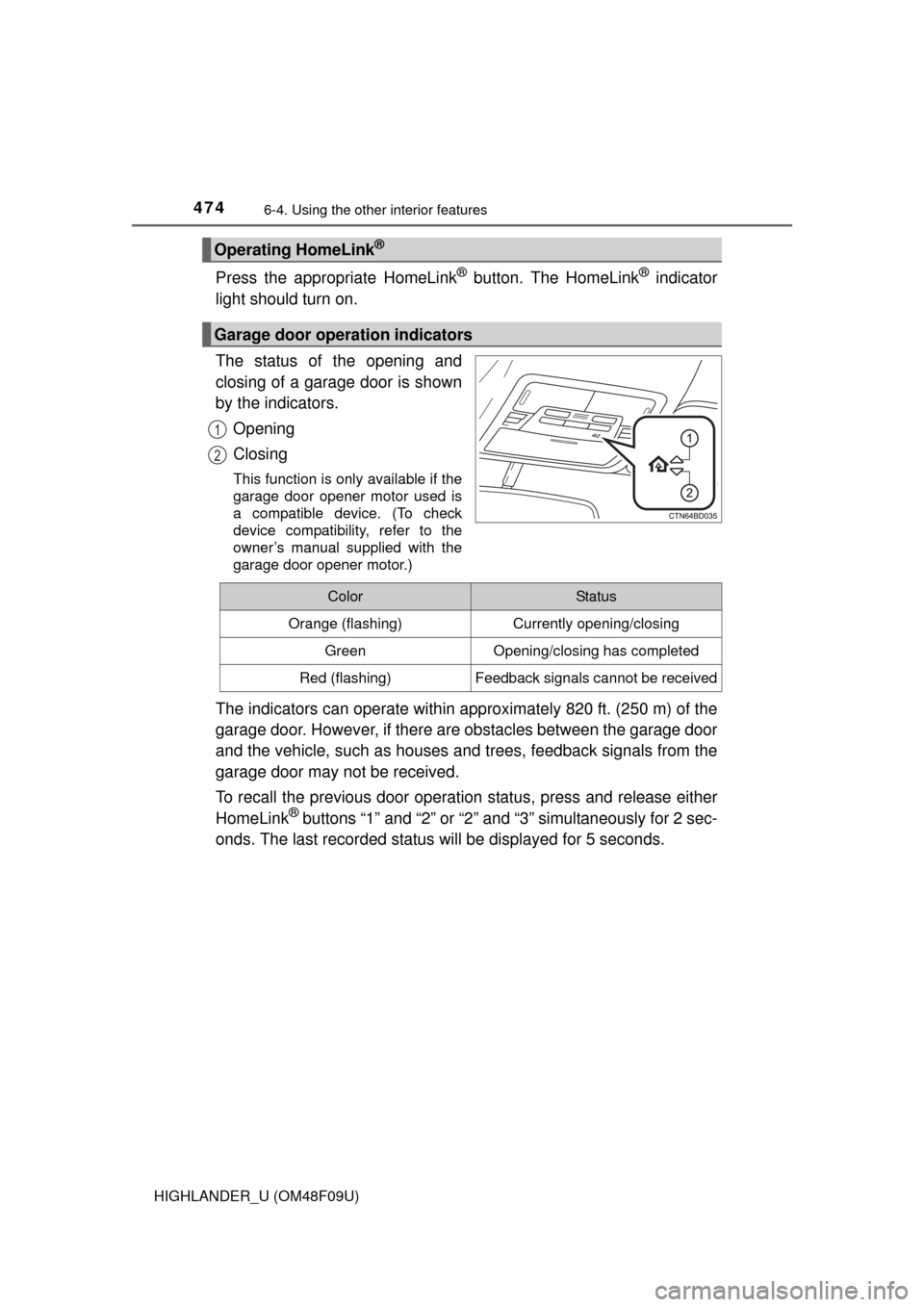
The status of the opening and
closing of a garage door is shown
by the indicators.
Opening
Closing
This function is only available if the
garage door opener motor used is
a compatible device. (To check
device compatibility, refer to the
owner’s manual supplied with the
garage door opener motor.)
The indicators can operate within approximately 820 ft. (250 m) of the
garage door. However, if there are obstacles between the garage door
and the vehicle, such as houses a nd trees, feedback signals from the
garage door may not be received.
To recall the previous door operat ion status, press and release either
HomeLink
® buttons “1” and “2” or “2” and “3” simultaneously for 2 sec-
onds. The last recorded status will be displayed for 5 seconds.
Operating HomeLink®
Garage door operation indicators
1
2
ColorStatus
Orange (flashing)Currently opening/closing
GreenOpening/closing has completed
Red (flashing)Feedback signals cannot be received
Page 488 of 716
488
HIGHLANDER_U (OM48F09U)
7-1. Maintenance and care
●Working from top to bottom, liber ally apply water to the vehicle
body, wheel wells and underside of the vehicle to remove any dirt
and dust.
● Wash the vehicle body using a sponge or soft cloth, such as a
chamois.
● For hard-to-remove marks, use car wash soap and rinse thoroughly
with water.
● Wipe away any water.
● Wax the vehicle when the wate rproof coating deteriorates.
If water does not bead on a clean surface, apply wax when the vehicle
body is cool.
■Automatic car washes
●Before washing the vehicle:
• Fold the mirrors.
• Turn off the power back door (if equipped).
Start washing from the front of the vehicle. Make sure to extend the mirrors
before driving.
● Brushes used in automatic car washes may scratch the vehicle surface and
harm your vehicle’s paint.
■ High pressure car washes
●Do not allow the nozzles of the car wash to come within close proximity of
the windows.
● Before using the car wash, check that the fuel filler door on your vehicle is
closed properly.
Cleaning and prot ecting the vehicle
exterior
Perform the following to protect the vehicle and maintain it in
prime condition:
Page 545 of 716
5457-3. Do-it-yourself maintenance
7
Maintenance and care
HIGHLANDER_U (OM48F09U)
Check the wattage of the light bulb to be replaced. (P. 651)
P. 1 3 0
Light bulbs
You may replace the following bulbs by yourself. The difficulty
level of replacement varies de pending on the bulb. If necessary
bulb replacement seems difficul t to perform, contact your
Toyota dealer.
For more information about repl acing other light bulbs, contact
your Toyota dealer.
Preparing for light bulb replacement
Turning off the power back door main switch (if equipped)
Page 554 of 716
5547-3. Do-it-yourself maintenance
HIGHLANDER_U (OM48F09U)■
Stop/tail lights and rear side mar
ker lights, and rear turn signal
lights
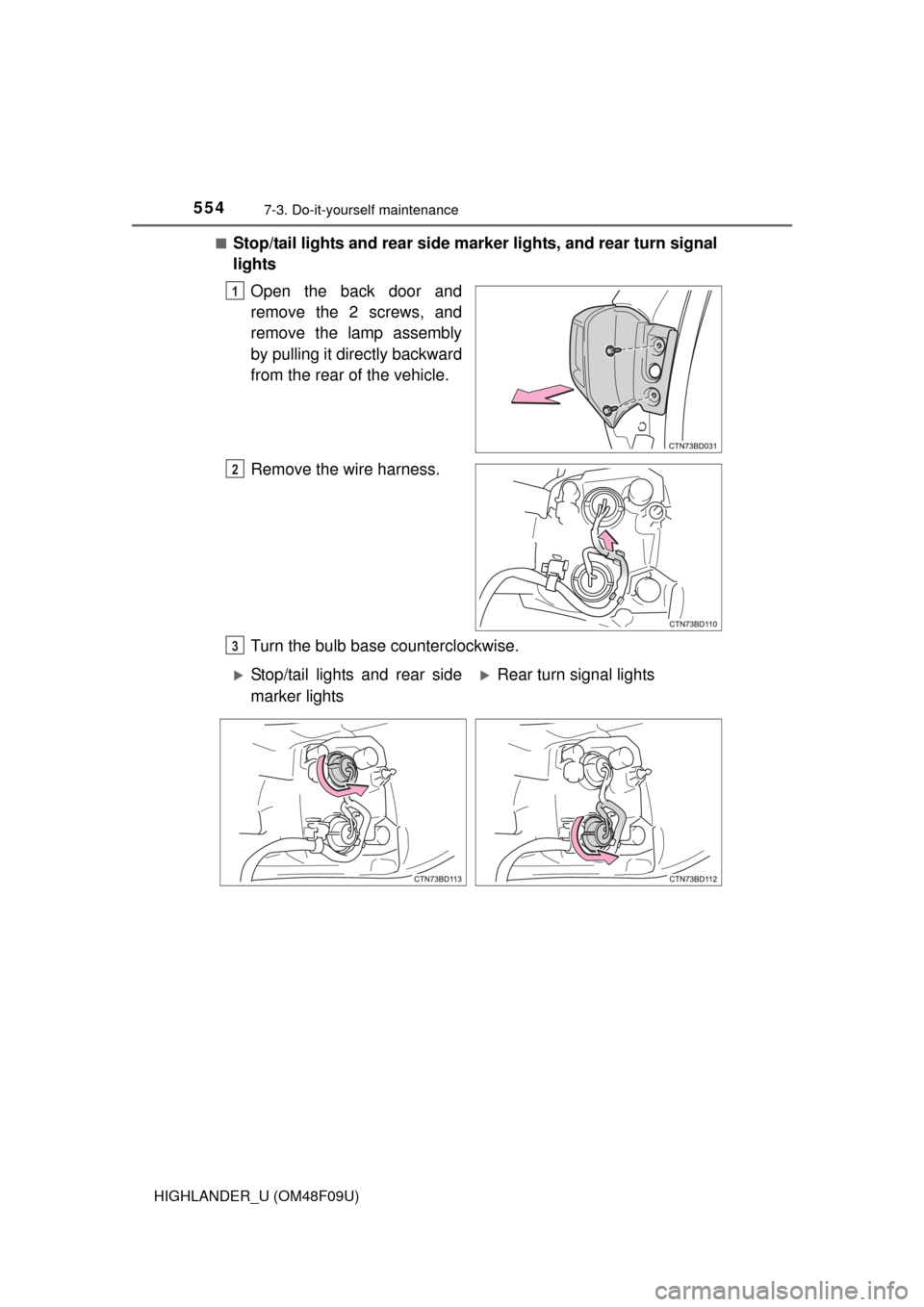
Open the back door and
remove the 2 screws, and
remove the lamp assembly
by pulling it directly backward
from the rear of the vehicle.
Remove the wire harness.
Turn the bulb base counterclockwise.
1
2
3
Stop/tail lights and rear side
marker lightsRear turn signal lights
Page 556 of 716
5567-3. Do-it-yourself maintenance
HIGHLANDER_U (OM48F09U)■
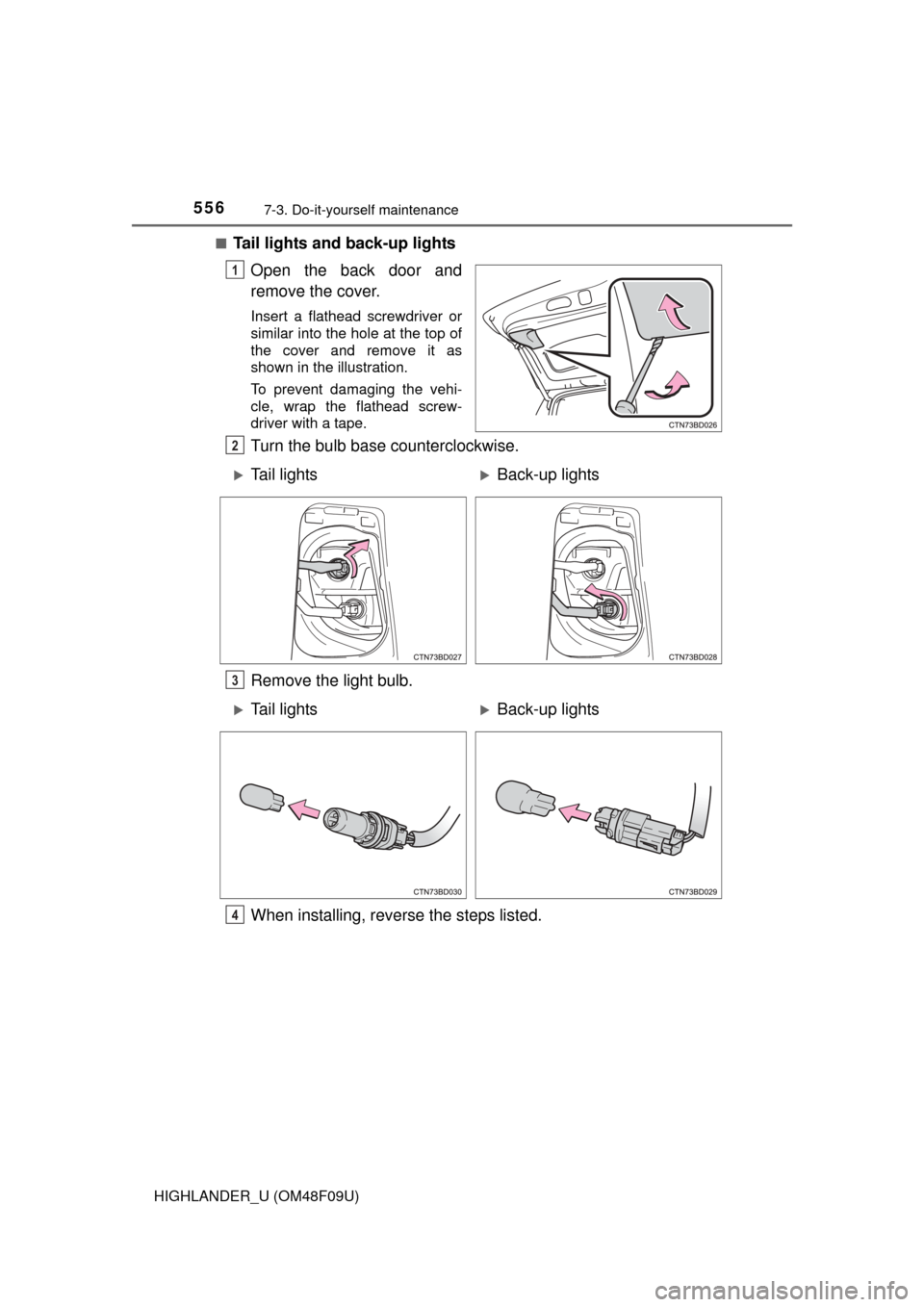
Tail lights and back-up lights
Open the back door and
remove the cover.
Insert a flathead screwdriver or
similar into the hole at the top of
the cover and remove it as
shown in the illustration.
To prevent damaging the vehi-
cle, wrap the flathead screw-
driver with a tape.
Turn the bulb base counterclockwise.
Remove the light bulb.
When installing, reverse the steps listed.
1
2
Tail lightsBack-up lights
3
Tail lightsBack-up lights
4