Page 207 of 304
207
3. WHAT TO DO IF...
AVA L O N _ N a v i _ U
PHONE
7
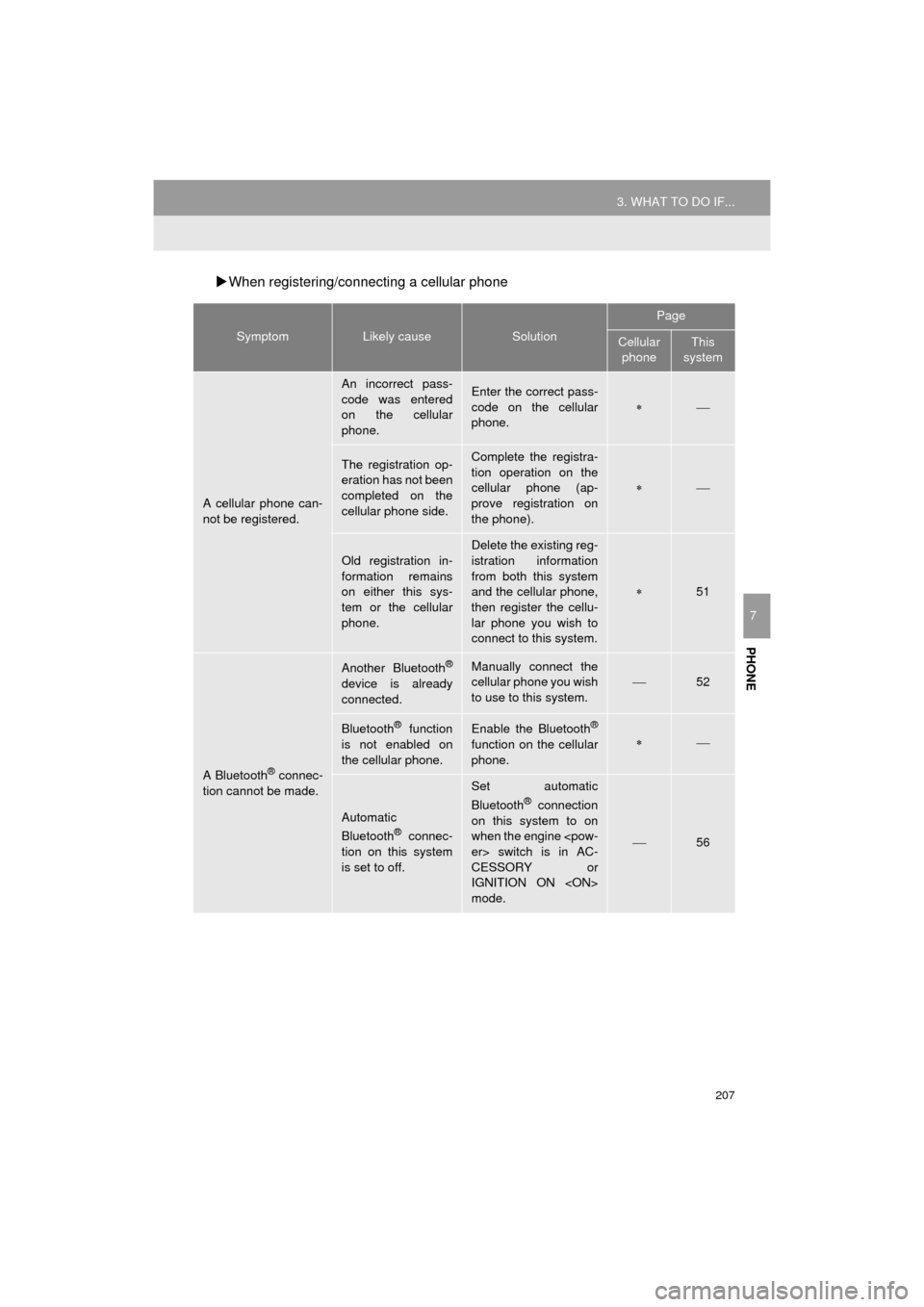
When registering/connecting a cellular phone
SymptomLikely causeSolution
Page
Cellular
phoneThis
system
A cellular phone can-
not be registered.
An incorrect pass-
code was entered
on the cellular
phone.Enter the correct pass-
code on the cellular
phone.
The registration op-
eration has not been
completed on the
cellular phone side.Complete the registra-
tion operation on the
cellular phone (ap-
prove registration on
the phone).
Old registration in-
formation remains
on either this sys-
tem or the cellular
phone.
Delete the existing reg-
istration information
from both this system
and the cellular phone,
then register the cellu-
lar phone you wish to
connect to this system.
51
A Bluetooth® connec-
tion cannot be made.
Another Bluetooth®
device is already
connected.
Manually connect the
cellular phone you wish
to use to this system.
52
Bluetooth® function
is not enabled on
the cellular phone.Enable the Bluetooth®
function on the cellular
phone.
Automatic
Bluetooth® connec-
tion on this system
is set to off.
Set automatic
Bluetooth® connection
on this system to on
when the engine
er> switch is in AC-
CESSORY or
IGNITION ON
mode.
56
Page 209 of 304
209
3. WHAT TO DO IF...
AVA L O N _ N a v i _ U
PHONE
7
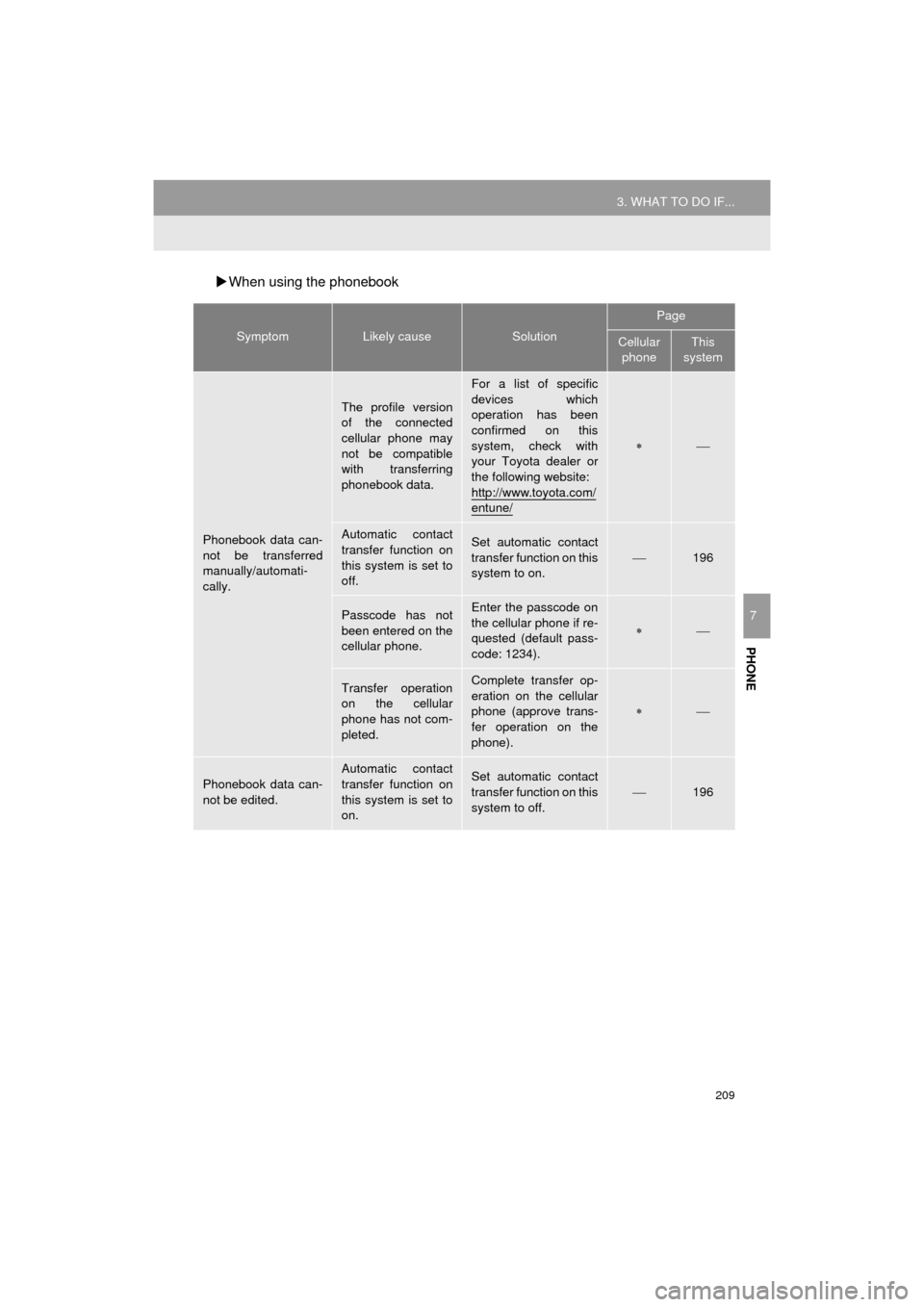
When using the phonebook
SymptomLikely causeSolution
Page
Cellular
phoneThis
system
Phonebook data can-
not be transferred
manually/automati-
cally.
The profile version
of the connected
cellular phone may
not be compatible
with transferring
phonebook data.
For a list of specific
devices which
operation has been
confirmed on this
system, check with
your Toyota dealer or
the following website:
http://www.toyota.com/
entune/
Automatic contact
transfer function on
this system is set to
off.Set automatic contact
transfer function on this
system to on.
196
Passcode has not
been entered on the
cellular phone.Enter the passcode on
the cellular phone if re-
quested (default pass-
code: 1234).
Transfer operation
on the cellular
phone has not com-
pleted.Complete transfer op-
eration on the cellular
phone (approve trans-
fer operation on the
phone).
Phonebook data can-
not be edited.
Automatic contact
transfer function on
this system is set to
on.Set automatic contact
transfer function on this
system to off.196
Page 210 of 304
210
3. WHAT TO DO IF...
AVA L O N _ N a v i _ U
When using the Bluetooth® message function
SymptomLikely causeSolution
Page
Cellular
phoneThis
system
Messages cannot be
viewed.
Message transfer is
not enabled on the
cellular phone.
Enable message trans-
fer on the cellular
phone (approve mes-
sage transfer on the
phone).
Automatic transfer
function on this sys-
tem is set to off.Set automatic transfer
function on this system
to on.
204
New message notifi-
cations are not dis-
played.
Notification of SMS/
MMS/E-mail recep-
tion on this system
is set to off.Set notification of SMS/
MMS/E-mail reception
on this system to on.
204
Automatic message
transfer function is
not enabled on the
cellular phone.Enable automatic
transfer function on the
cellular phone.
Page 217 of 304
217
1. BASIC OPERATION
AVA L O N _ N a v i _ U
NAVIGATION SYSTEM
8
2. MAP SCREEN OPERATION
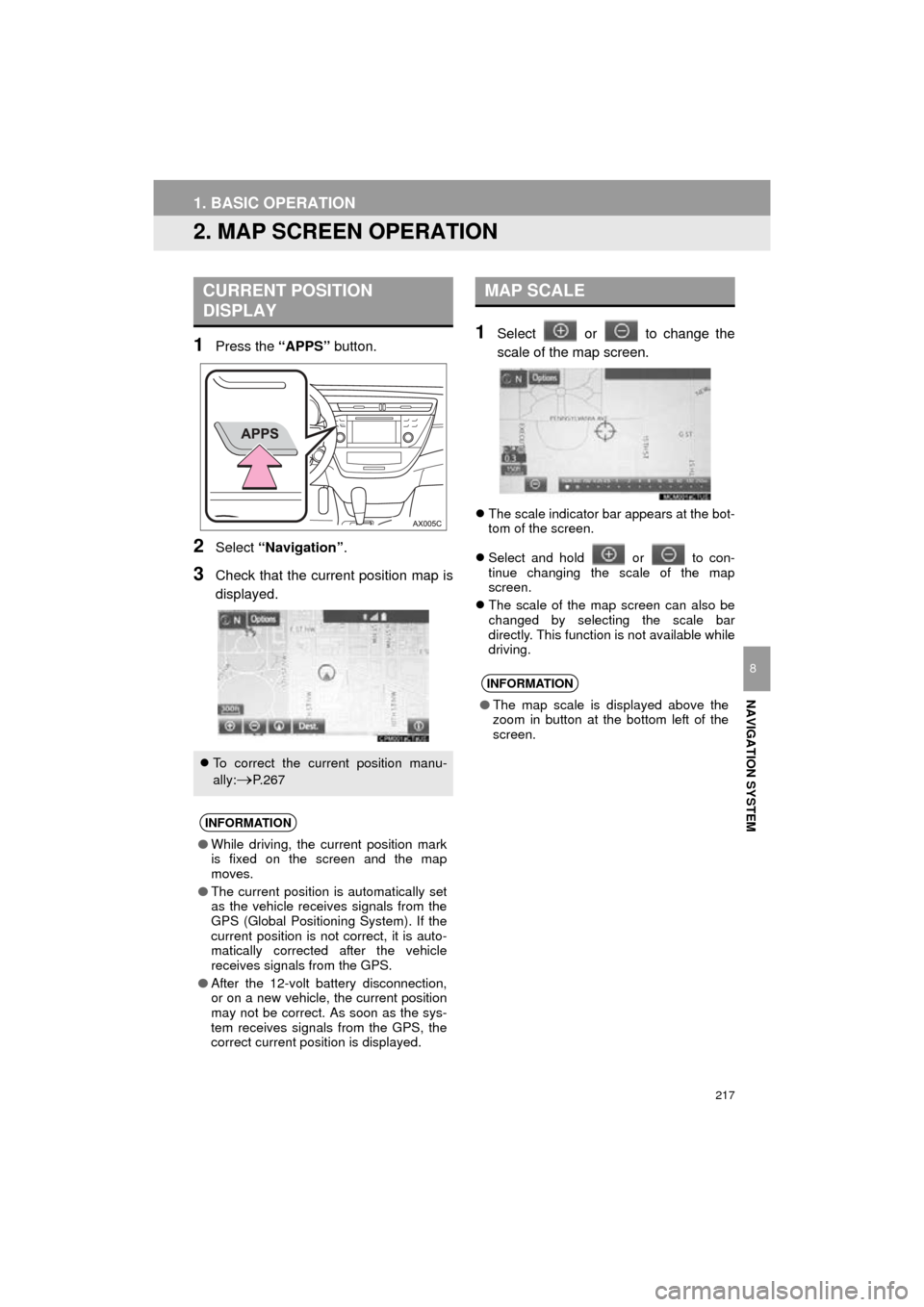
1Press the “APPS” button.
2Select “Navigation” .
3Check that the current position map is
displayed.
1Select or to change the
scale of the map screen.
The scale indicator bar appears at the bot-
tom of the screen.
Select and hold or to con-
tinue changing the scale of the map
screen.
The scale of the map screen can also be
changed by selecting the scale bar
directly. This function is not available while
driving.
CURRENT POSITION
DISPLAY
To correct the current position manu-
ally:
P. 2 6 7
INFORMATION
●While driving, the current position mark
is fixed on the screen and the map
moves.
● The current position is automatically set
as the vehicle receives signals from the
GPS (Global Positioning System). If the
current position is not correct, it is auto-
matically corrected after the vehicle
receives signals from the GPS.
● After the 12-volt battery disconnection,
or on a new vehicle, the current position
may not be correct. As soon as the sys-
tem receives signals from the GPS, the
correct current position is displayed.
MAP SCALE
INFORMATION
● The map scale is displayed above the
zoom in button at the bottom left of the
screen.
Page 241 of 304

241
2. DESTINATION SEARCH
AVA L O N _ N a v i _ U
NAVIGATION SYSTEM
8
3. STARTING ROUTE GUIDANCE
1Select “OK” to start guidance.
When the destination is set, the entire
route map from the current position to
the destination is displayed.
STARTING ROUTE
GUIDANCE
No.Information/Function
Select the desired route from 3 pos-
sible routes. ( P.242)
Select to change the route.
( P.243)
Select to display a list of the turns re-
quired to reach the destination.
( P.243)
Current position
Destination point
Type of route and its distance
Distance of the entire route
Select to start guidance.
If “OK” is selected and held until a
beep sounds, demo mode will start.
Press the “HOME” or “APPS” but-
ton to end demo mode.
WA R N I N G
● Be sure to obey traffic regulations and
keep road conditions in mind while driv-
ing. If a traffic sign on the road has been
changed, the route guidance may not
indicate such changed information.
INFORMATION
●The route for returning may not be the
same as that for going.
● The route guidance to the destination
may not be the shortest route or a route
without traffic congestion.
● Route guidance may not be available if
there is no road data for the specified
location.
● When setting the destination on a map
with a scale more than 0.5 mile (800 m),
the map scale changes to 0.5 miles (800
m) automatically. If this occurs, set the
destination again.
● If a destination that is not located on a
road is set, the vehicle will be guided to
the point on a road nearest to the desti-
nation. The road nearest to the selected
point is set as the destination.
Page 243 of 304

243
2. DESTINATION SEARCH
AVA L O N _ N a v i _ U
NAVIGATION SYSTEM
8
1Select “Turn List” .
2Check that the turn list is displayed.
1Select “Edit Route” .
2Select the desired item.
DISPLAYING TURN LIST
A list of turn information from the cur-
rent position to the destination can be
displayed.
No.Information
Current position
Distance to the next turn
Turn direction at the intersection
Select to display the map of the se-
lected point.
INFORMATION
● However, not all road names on the
route may appear on the list. If a road
changes its name without requiring a
turn (such as on a street that runs
through 2 or more cities), the name
change will not appear on the list. The
street names will be displayed in order
from the starting point, along with the
distance to the next turn.
EDITING ROUTE
Destinations can be added, reordered
or deleted, and conditions for the route
to the destination can be changed.
No.FunctionPage
Select to add destinations.252
Select to delete destina-
tions. 252
Select to reorder destina-
tions. 252
Select to set route prefer-
ences. 253
Select to change route
type.253
INFORMATION
● Even if the “Freeways” indicator is
dimmed, the route cannot avoid includ-
ing a freeway in some cases. ( P.253)
● If the calculated route includes a trip by
ferry, the route guidance shows a sea
route. After traveling by ferry, the current
position may be incorrect. Upon recep-
tion of GPS signals, it is automatically
corrected.
Page 267 of 304
267
5. SETUP
AVA L O N _ N a v i _ U
NAVIGATION SYSTEM
8
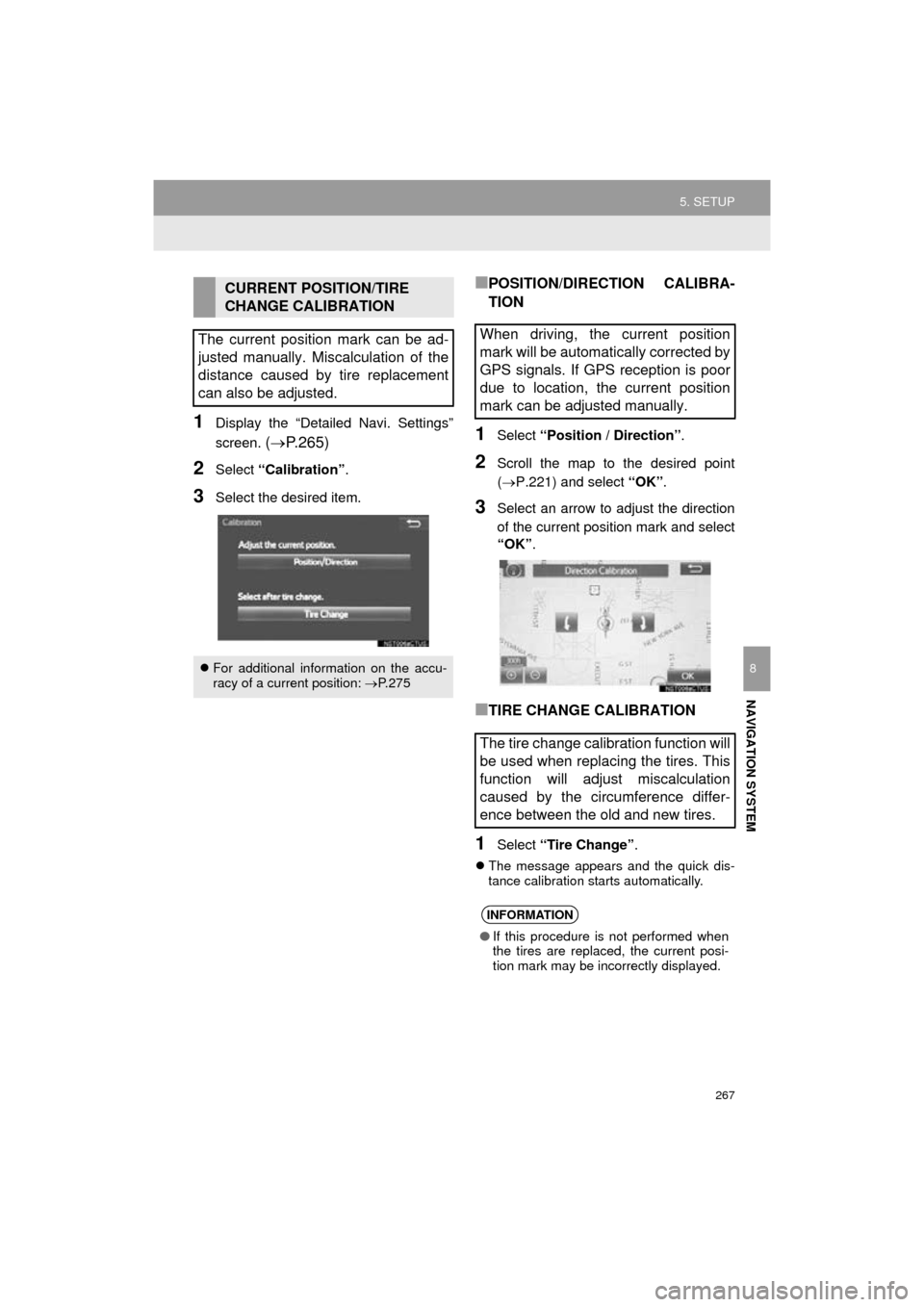
1Display the “Detailed Navi. Settings”
screen.
( P.265)
2Select “Calibration” .
3Select the desired item.
■POSITION/DIRECTION CALIBRA-
TION
1Select “Position / Direction” .
2Scroll the map to the desired point
(P.221) and select “OK”.
3Select an arrow to adjust the direction
of the current position mark and select
“OK” .
■TIRE CHANGE CALIBRATION
1Select “Tire Change” .
The message appears and the quick dis-
tance calibration starts automatically.
CURRENT POSITION/TIRE
CHANGE CALIBRATION
The current position mark can be ad-
justed manually. Miscalculation of the
distance caused by tire replacement
can also be adjusted.
For additional information on the accu-
racy of a current position: P. 2 7 5
When driving, the current position
mark will be automatically corrected by
GPS signals. If GPS reception is poor
due to location, the current position
mark can be adjusted manually.
The tire change calibration function will
be used when replacing the tires. This
function will adjust miscalculation
caused by the circumference differ-
ence between the old and new tires.
INFORMATION
● If this procedure is not performed when
the tires are replaced, the current posi-
tion mark may be incorrectly displayed.
Page 270 of 304
270
5. SETUP
AVA L O N _ N a v i _ U
1Display the “Traffic Settings” screen.
(P.269)
2Select “Avoid Traffic” .
3Select the desired item.
4Select “OK”.
■CHANGING THE ROUTE MANUAL-
LY
1Select the desired item.
AUTO AVOID TRAFFIC
No.Function
Select to automatically change
routes when congestion information
of the guidance route has been re-
ceived.
Select to select manually whether or
not to change routes when conges-
tion information of the guidance
route has been received. In this
mode, a screen will appear to ask if
you wish to reroute.
Select to not reroute when conges-
tion information for the guidance
route has been received.
When the navigation system calcu-
lates a new route, the following screen
will be displayed.
No.Function
Select to start route guidance using
the new route.
Select to confirm the new route and
current route on the map.
Select to continue the current route
guidance.

