Page 76 of 304
76
1. BASIC OPERATION
AVA L O N _ N a v i _ U
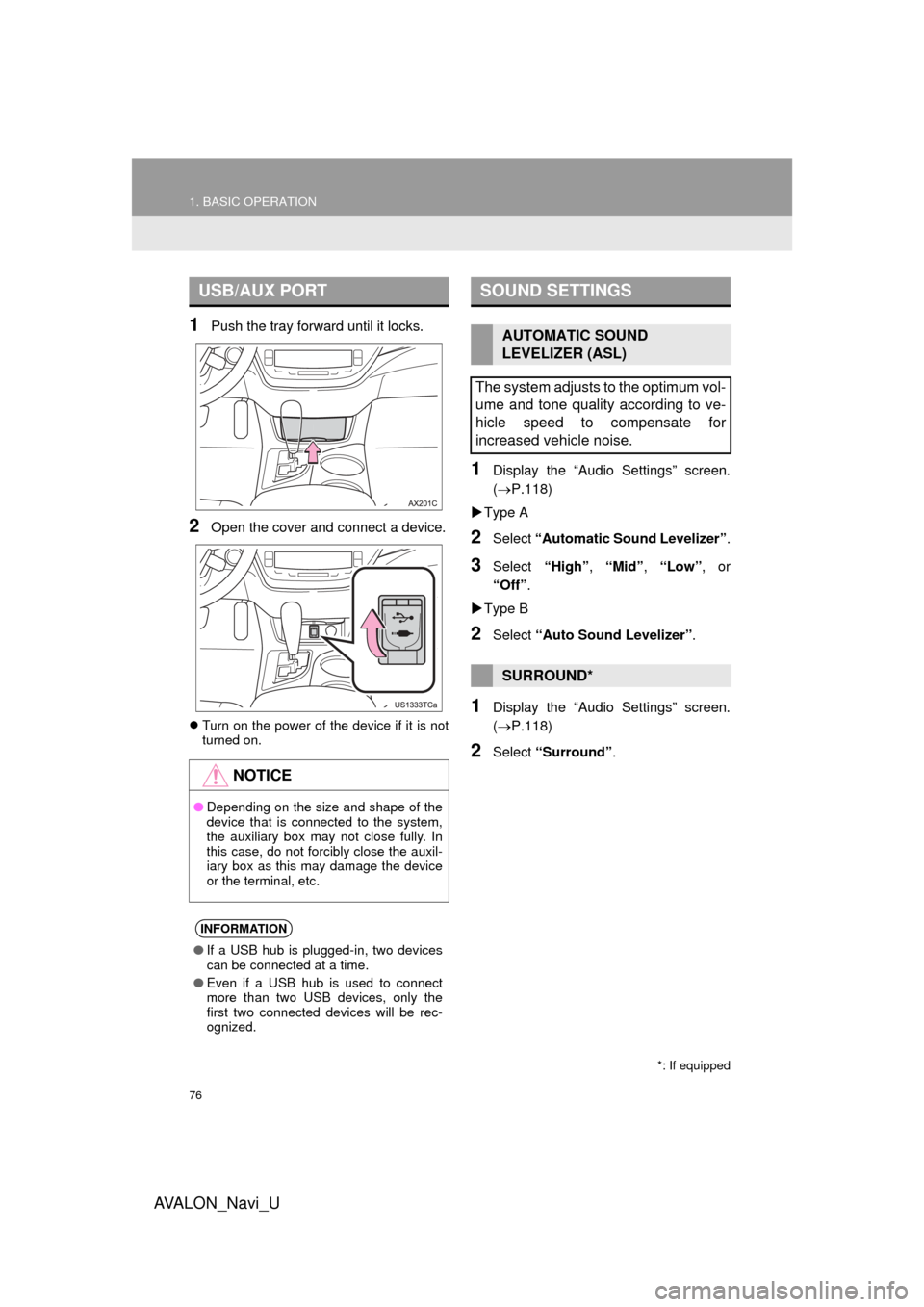
1Push the tray forward until it locks.
2Open the cover and connect a device.
Turn on the power of the device if it is not
turned on.
1Display the “Audio Settings” screen.
(P.118)
Type A
2Select “Automatic Sound Levelizer” .
3Select “High”, “Mid” , “Low” , or
“Off” .
Type B
2Select “Auto Sound Levelizer” .
1Display the “Audio Settings” screen.
(P.118)
2Select “Surround” .
USB/AUX PORT
NOTICE
●Depending on the size and shape of the
device that is connected to the system,
the auxiliary box may not close fully. In
this case, do not forcibly close the auxil-
iary box as this may damage the device
or the terminal, etc.
INFORMATION
●If a USB hub is plugged-in, two devices
can be connected at a time.
● Even if a USB hub is used to connect
more than two USB devices, only the
first two connected devices will be rec-
ognized.
SOUND SETTINGS
AUTOMATIC SOUND
LEVELIZER (ASL)
The system adjusts to the optimum vol-
ume and tone quality according to ve-
hicle speed to compensate for
increased vehicle noise.
SURROUND*
*: If equipped
Page 81 of 304
81
2. RADIO OPERATION
AVA L O N _ N a v i _ U
AUDIO SYSTEM
3
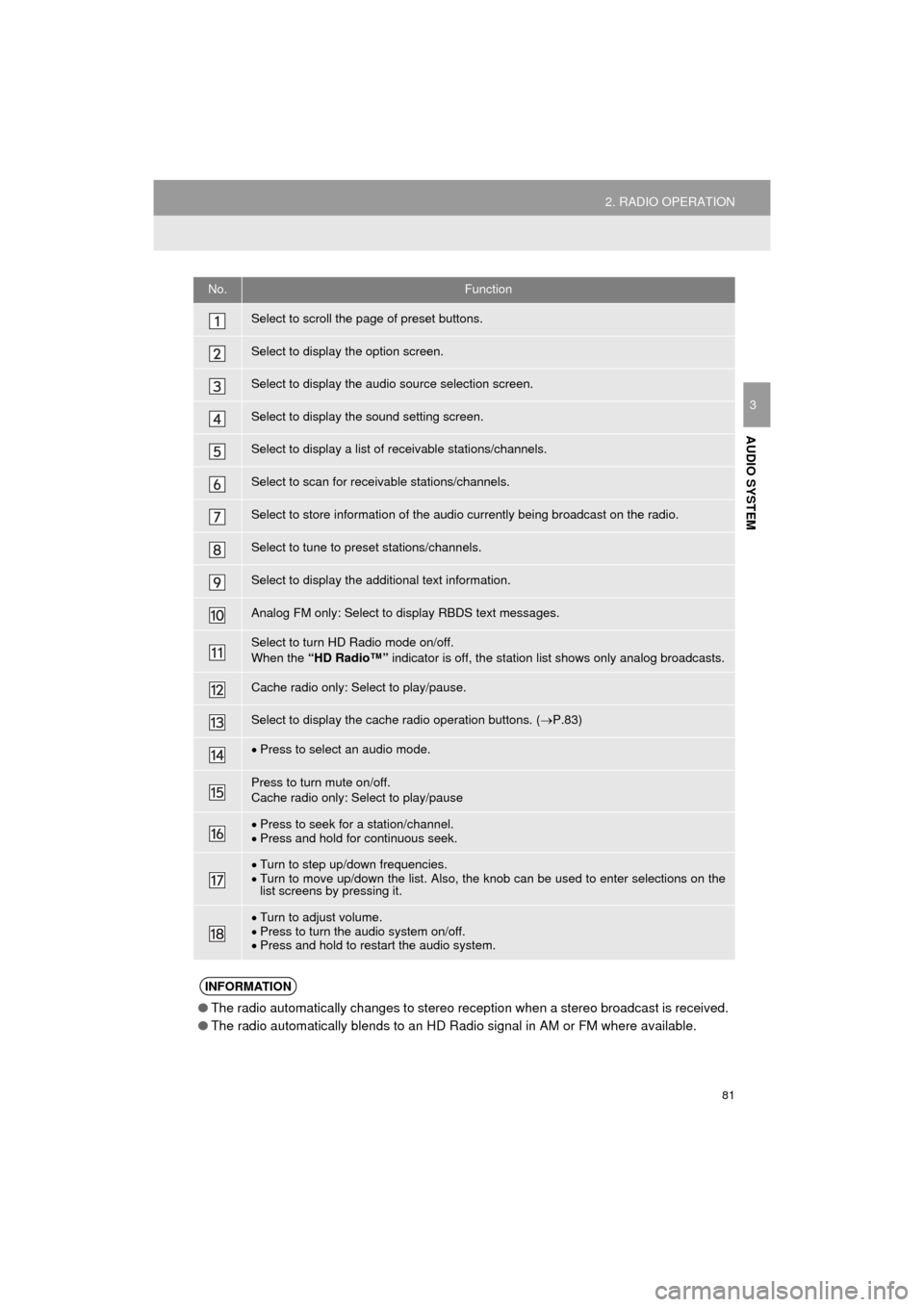
No.Function
Select to scroll the page of preset buttons.
Select to display the option screen.
Select to display the audio source selection screen.
Select to display the sound setting screen.
Select to display a list of receivable stations/channels.
Select to scan for receivable stations/channels.
Select to store information of the audio currently being broadcast on the radio.
Select to tune to preset stations/channels.
Select to display the additional text information.
Analog FM only: Select to display RBDS text messages.
Select to turn HD Radio mode on/off.
When the “HD Radio™” indicator is off, the station list shows only analog broadcasts.
Cache radio only: Select to play/pause.
Select to display the cache radio operation buttons. ( P.83)
Press to select an audio mode.
Press to turn mute on/off.
Cache radio only: Select to play/pause
Press to seek for a station/channel.
Press and hold for continuous seek.
Turn to step up/down frequencies.
Turn to move up/down the list. Also, the knob can be used to enter selections on the
list screens by pressing it.
Turn to adjust volume.
Press to turn the audio system on/off.
Press and hold to restart the audio system.
INFORMATION
● The radio automatically changes to stereo reception when a stereo broadcast is received.
● The radio automatically blends to an HD Radio signal in AM or FM where available.
Page 84 of 304
84
2. RADIO OPERATION
AVA L O N _ N a v i _ U
1Select “Station List” .
2FM radio only: Select a desired genre
of station and select a desired station.
The genre list is in the following order:
• Classical
• Country
• EasyLis (Easy Listening)
• Inform (Information)
•Jazz
•News
•Oldies
• Other
• Pop Music
• Religion
•Rock
• R&B (Rhythm and Blues)
• Sports
•Talk
• Traffic (Not available when “HD Radio™”
indicator is off.)
• Alert (Emergency Alert)
AUTOMATIC PLAYBACK OF
THE CACHE
If the radio broadcast is interrupted by
another audio output, such as an
incoming phone call, the system will
automatically cache the interrupted
portion and perform time-shift
playback when the interruption ends.
To manually operate the cache
operation: ( P.83)
INFORMATION
● The system can store up to 20 minutes.
Cached data will be erased when the
radio mode or station is changed or
when the audio system is turned off.
● If noise or silence occurs during the
caching process, cache writing will con-
tinue, with the noise or silence recorded
as is. In this case, the cached broadcast
will contain the noise or silence when
played back.
RADIO BROADCAST DATA
SYSTEM
This audio system is equipped with Ra-
dio Broadcast Data Systems (RBDS).
RBDS mode allows text messages to
be received from radio stations that uti-
lize RBDS transmitters.
When RBDS is on, the radio can
— only select stations of a particular
program type,
— display messages from radio sta-
tions.
RBDS features are available only
when listening to an FM station that
broadcasts RBDS information and the
“FM Info” indicator is on.
SELECTING A DESIRED
GENRE
Page 85 of 304
85
2. RADIO OPERATION
AVA L O N _ N a v i _ U
AUDIO SYSTEM
31Select “Station List” .
2Select the desired traffic program sta-
tion.
TRAFFIC ANNOUNCEMENT
(FM RADIO)
A station that regularly broadcasts traf-
fic information is automatically located.
INFORMATION
●If a traffic program station is found, the
name of the traffic program station will
be displayed for a while.
USING HD Radio ™
TECHNOLOGY
HD Radio ™
Technology is the digital
evolution of analog AM/FM radio. Your
radio product has a special receiver
which allows it to receive digital
broadcasts (where available) in
addition to the analog broadcasts it
already receives. Digital broadcasts
have better sound quality than analog
broadcasts as digital broadcasts
provide free, crystal clear audio with no
static or distortion. For more
information, and a guide to available
radio stations and programming, refer
to www.hdradio.com
.
HD Radio Technology manufactured
under license from iBiquity Digital
Corporation. U.S. and Foreign
Patents. HD Radio ™
and the HD, HD
Radio, and “Arc” logos are proprietary
trademarks of iBiquity Digital Corp.
Page 87 of 304
87
2. RADIO OPERATION
AVA L O N _ N a v i _ U
AUDIO SYSTEM
3
INFORMATION
●The tag information can not be pre-
served while scanning or caching the
radio station.
● If tagging the music information fails,
“Saving the HD Radio tag was unsuc-
cessful.” will be displayed on the screen.
If this occurs, tag the information again.
● HD Radio™ stations can be preset.
● An orange “HD)” logo indicator will be
displayed on the screen when in digital.
The “HD)” logo will first appear in a gray
color indicating the station is indeed (an
analog and) a digital station. Once the
digital signal is acquired, the logo will
change to a bright orange color.
● The song title and artist name will
appear on the screen when available by
the radio station. The radio station can
send album pictures when available.
● As a user works through the analog
radio stations, (where applicable) the
radio receiver will automatically tune
from an analog signal to a digital signal
within 5 seconds.
Page 94 of 304

94
2. RADIO OPERATION
AVA L O N _ N a v i _ U
IF THE SATELLITE RADIO TUNER MALFUNCTIONS
When problems occur with the XM tuner, a message will appear on the screen. Re-
ferring to the table below to identify the problem, take the suggested c\
orrective ac-
tion.
MessageExplanation
“Check Antenna”
The XM antenna is not connected. Check whether the XM antenna
cable is attached securely.
A short circuit occurs in the antenna or the surrounding antenna ca-
ble. See a Toyota certified dealer for assistance.
“Ch Unauthorized”
You have not subscribed to XM Satellite Radio. The radio is being
updated with the latest encryption code. Contact XM Satellite Radio
for subscription information. When a contract is canceled, you can
choose “Ch 000” and all free-to-air channels.
The premium channel you selected is not authorized. Wait for about
2 seconds until the radio returns to the previous channel or “Ch 001”.
If it does not change automatically, select another channel. To listen
to the premium channel, contact XM Satellite Radio.
“No Signal”The XM signal is too weak at the current location. Wait until your ve-
hicle reaches a location with a stronger signal.
“Loading”The unit is acquiring audio or program information. Wait until the unit
has received the information.
“Channel Off Air”The channel you selected is not br oadcasting any programming. Se-
lect another channel.
-----There is no song/program title or artist name/feature associated with
the channel at that time. No action is required.
“Chan Unavailable”
The channel you selected is no longer available. Wait for about 2
seconds until the radio returns to the previous channel or “Ch 001”.
If it does not change automatically, select another channel.
INFORMATION
● Contact the XM Listener Care Center at 1-877-447-0011 (U.S.A.) or 1-877-438-9677
(Canada).
Page 95 of 304
95
2. RADIO OPERATION
AVA L O N _ N a v i _ U
AUDIO SYSTEM
3
3. INTERNET RADIO*
1Select the internet radio application.
The internet radio application screen is
displayed.
Perform operations according to the dis-
played application screen.
For the instrument panel operation
method: P. 7 4
If a compatible phone is already regis-
tered, it will be connected automatically.
LISTENING TO INTERNET
RADIO
One of Entune App Suite features is
the ability to listen to internet radio. In
order to use this service, a compatible
phone and the system needs to be set
up. For details: P.285
*: Entune Premium Audio only
INFORMATION
●Other applications can be activated
while listening to internet radio.
● Some parts of applications can be
adjusted using the switches on the
steering wheel.
● For additional information, refer to
http://www.toyota.com/entune/
or call
1-800-331-4331.
Page 98 of 304
98
3. MEDIA OPERATION
AVA L O N _ N a v i _ U
1Select the repeat button to change on/
off.
1Select the random button to change
on/off.
1Select the repeat button to change on/
off.
1Select the random button to change
on/off.
PLAYING AN AUDIO CD
REPEATING
The track currently being listened to
can be repeated.
RANDOM ORDER
Tracks can be automatically and ran-
domly selected.
PLAYING AN MP3/WMA/AAC
DISC
REPEATING
The file currently being listened to can
be repeated.
RANDOM ORDER
Files can be automatically and ran-
domly selected.