Page 102 of 304
102
3. MEDIA OPERATION
AVA L O N _ N a v i _ U
1Select the repeat button to change on/
off.
1Select the random button to change
on/off.
PLAYING A USB AUDIO
REPEATING
The file/track currently being listened
to can be repeated.
RANDOM ORDER
Files/tracks can be automatically and
randomly selected.
Page 106 of 304
106
3. MEDIA OPERATION
AVA L O N _ N a v i _ U
1Select the repeat button to change on/
off.
1Select the shuffle button to change on/
off.
iPod AUDIO
REPEATING
The track currently being listened to
can be repeated.
RANDOM ORDER
Tracks can be automatically and ran-
domly selected.
Page 111 of 304
111
3. MEDIA OPERATION
AVA L O N _ N a v i _ U
AUDIO SYSTEM
3
INFORMATION
●If the Bluetooth® device is disconnected due to poor reception from the Bluetooth® net-
work when the engine switch is in ACCESSORY or IGNITION ON mode,
the system will automatically reconnect to the portable player.
● If the Bluetooth
® device is disconnected on purpose, such as it was turned off, this does
not happen. Reconnect the portable player manually.
● Bluetooth
® device information is registered when the Bluetooth® device is connected to
the Bluetooth® audio system. When selling or disposing of the vehicle, remove the
Bluetooth® audio information from the system. ( P.62)
Page 112 of 304
112
3. MEDIA OPERATION
AVA L O N _ N a v i _ U
Registering an additional device
1Select “Select Device” on the
Bluetooth
® audio control screen.
2For more in formation: P.50
Selecting a registered device
1Select “Select Device” on the
Bluetooth
® audio control screen.
2For more in formation: P.52
1Select the repeat button to change on/
off.
1Select the random button to change
on/off.
CONNECTING A Bluetooth®
DEVICE
To use the Bluetooth® audio system, it
is necessary to register a Bluetooth
®
device with the system.
LISTENING TO Bluetooth®
AUDIO
REPEATING
The track currently being listened to
can be repeated.
RANDOM ORDER
Tracks can be automatically and ran-
domly selected.
Page 118 of 304
118
AVA L O N _ N a v i _ U
5. SETUP
1. AUDIO SETTINGS
1Press the “APPS” button.
2Select “Setup” .
3Select “Audio” .
4Select the items to be set.
Detailed audio settings can be pro-
grammed.AUDIO SETTINGS SCREEN
No.FunctionPage
Select to change the num-
ber of preset radio sta-
tions/channels displayed
on the screen.
11 9
Select to set cover art set-
tings on/off.
Select to set automatic
sound levelizer.76
*1Select to create a feeling
of presence.76
*2Select to enable cache ra-
dio.
Select to reset all setup
items.
*
1: If equipped
*2: Entune Premium Audio only
Page 139 of 304
139
Camry_Navi_U
VOICE COMMAND SYSTEM
4
2. MOBILE ASSISTANT OPERATION
1. MOBILE ASSISTANT
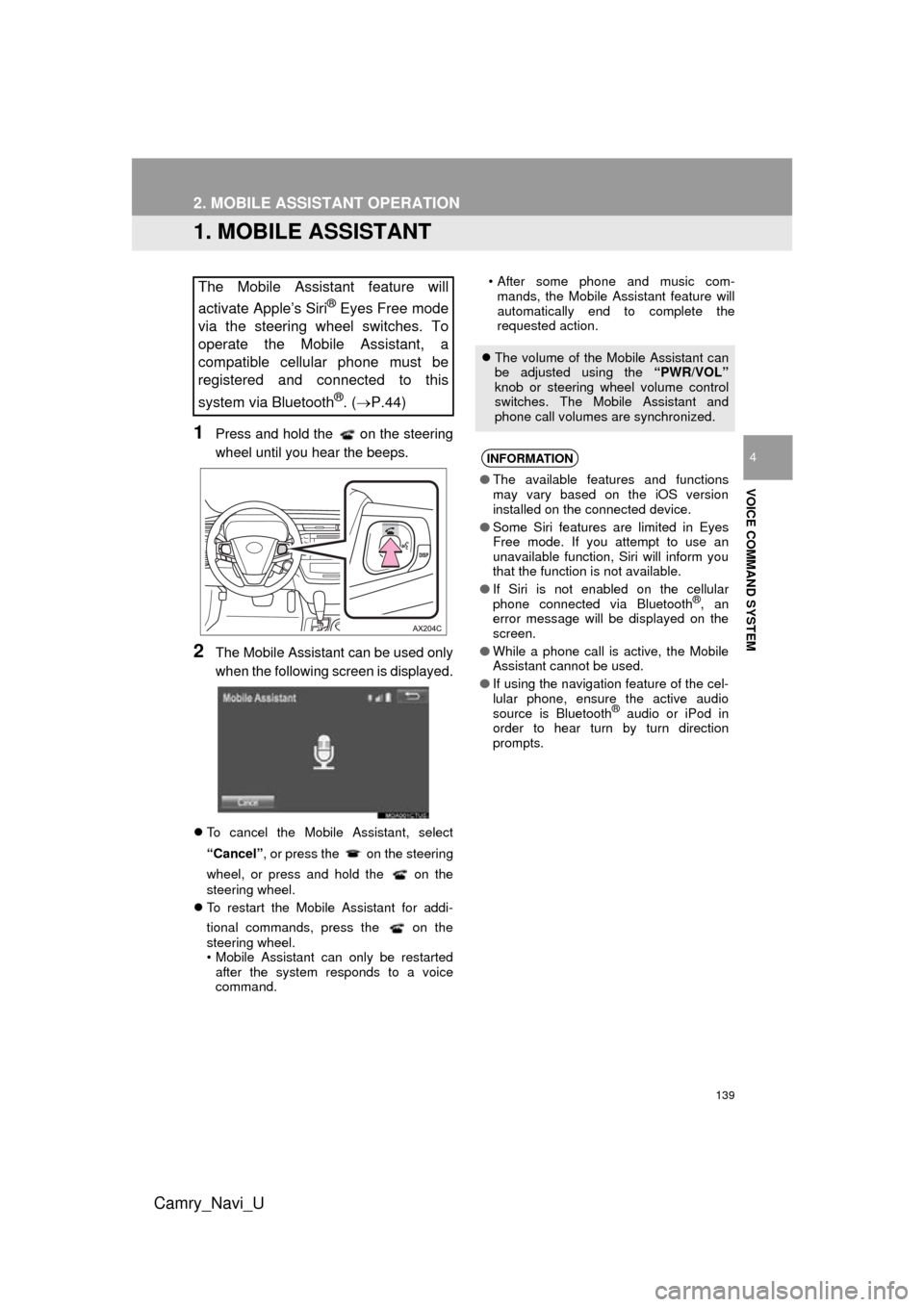
1Press and hold the on the steering
wheel until you hear the beeps.
2The Mobile Assistant can be used only
when the following screen is displayed.
To cancel the Mobile Assistant, select
“Cancel”, or press the on the steering
wheel, or press and hold the on the
steering wheel.
To restart the Mobile Assistant for addi-
tional commands, press the on the
steering wheel.
• Mobile Assistant can only be restarted
after the system responds to a voice
command. • After some phone and music com-
mands, the Mobile Assistant feature will
automatically end to complete the
requested action.
The Mobile Assistant feature will
activate Apple’s Siri
® Eyes Free mode
via the steering wheel switches. To
operate the Mobile Assistant, a
compatible cellular phone must be
registered and connected to this
system via Bluetooth
®. ( P.44)
The volume of the Mobile Assistant can
be adjusted using the “PWR/VOL”
knob or steering wheel volume control
switches. The Mobile Assistant and
phone call volumes are synchronized.
INFORMATION
● The available features and functions
may vary based on the iOS version
installed on the connected device.
● Some Siri features are limited in Eyes
Free mode. If you attempt to use an
unavailable function, Siri will inform you
that the function is not available.
● If Siri is not enabled on the cellular
phone connected via Bluetooth
®, an
error message will be displayed on the
screen.
● While a phone call is active, the Mobile
Assistant cannot be used.
● If using the navigation feature of the cel-
lular phone, ensure the active audio
source is Bluetooth
® audio or iPod in
order to hear turn by turn direction
prompts.
Page 182 of 304
182
1. PHONE OPERATION (HANDS-FREE SYSTEM FOR CELLULAR PHONES)
AVA L O N _ N a v i _ U
■FOR PBAP COMPATIBLE
Bluetooth
® PHONES
When “Automatic Transfer” is set to on
(P.196)
Contacts are transferred automatically.
When “Automatic Transfer” is set to off
(P.196)
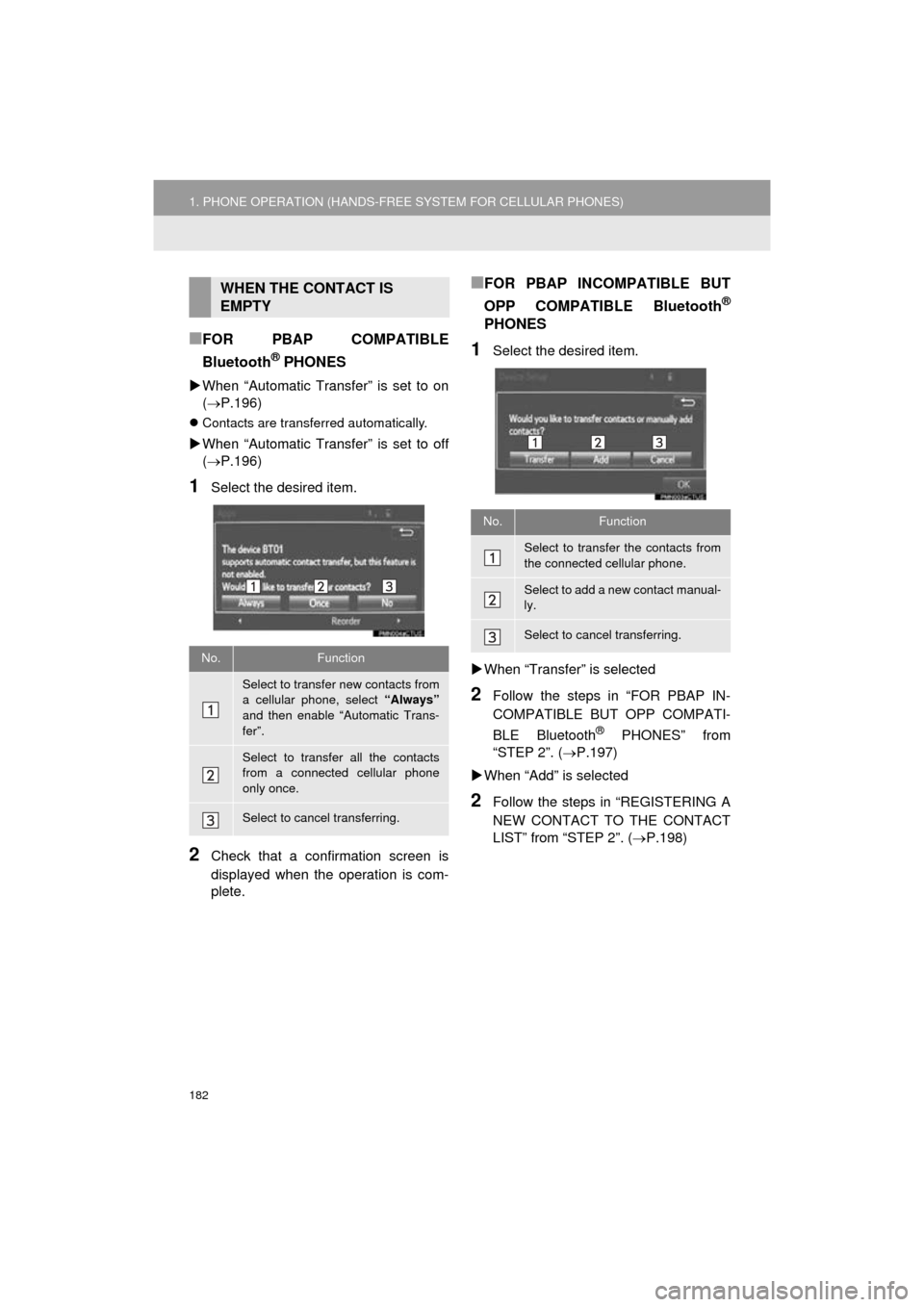
1Select the desired item.
2Check that a confirmation screen is
displayed when the operation is com-
plete.
■FOR PBAP INCOMPATIBLE BUT
OPP COMPATIBLE Bluetooth
®
PHONES
1Select the desired item.
When “Transfer” is selected
2Follow the steps in “FOR PBAP IN-
COMPATIBLE BUT OPP COMPATI-
BLE Bluetooth
® PHONES” from
“STEP 2”. ( P.197)
When “Add” is selected
2Follow the steps in “REGISTERING A
NEW CONTACT TO THE CONTACT
LIST” from “STEP 2”. ( P.198)
WHEN THE CONTACT IS
EMPTY
No.Function
Select to transfer new contacts from
a cellular phone, select “Always”
and then enable “Automatic Trans-
fer”.
Select to transfer all the contacts
from a connected cellular phone
only once.
Select to cancel transferring.
No.Function
Select to transfer the contacts from
the connected cellular phone.
Select to add a new contact manual-
ly.
Select to cancel transferring.
Page 187 of 304

187
1. PHONE OPERATION (HANDS-FREE SYSTEM FOR CELLULAR PHONES)
AVA L O N _ N a v i _ U
PHONE
7
■BY SELECTING “Release Tones”
1Select “Release Tones” .
1Select “Transmit Volume”.
2Select the desired level for the transmit
volume.
3Select “OK”.
“Release Tones” appear when a con-
tinuous tone signal(s) containing a (w)
is registered in the contact list.
This operation can be performed while
driving.
INFORMATION
● A continuous tone signal is a character
string that consists of numbers and the
characters p or w. (e.g.
056133w0123p#1 )
● When the “p” pause tone is used, the
tone data up until the next pause tone
will be automatically sent after 2 sec-
onds have elapsed. When the “w” pause
tone is used, the tone data up until the
next pause tone will be automatically
sent after a user operation is performed.
● Release tones can be used when auto-
mated operation of a phone based ser-
vice such as an answering machine or
bank phone service is desired. A phone
number with continuous tone signals
can be registered in the contact list.
● Tone data after a “w” pause tone can be
operated on voice command during a
call.
TRANSMIT VOLUME SETTING
INFORMATION
● The sound quality of the voice heard
from the other party’s speaker may be
negatively impacted.
● To reset the transmit volume, select
“Default” .
● “Transmit Volume” is dimmed when
mute is on.


