Page 39 of 398

37
308_en_Chap01_instruments-de-bord_ed02-2015
touch screen
It gives access to:
- the heating/air conditioning controls,
-
me
nus for adjusting settings for vehicle
functions and systems,
-
au
dio and display configuration menus,
-
au
dio system and telephone controls and
the display of associated information.
For reasons of safety, the driver
should only carr y out operations
that require close attention, with the
vehicle stationary.
Some functions are not accessible
when driving.General operation
Recommendations
It is necessary to press firmly, particularly for
"flick" gestures (scrolling through lists, moving
the map...).
A light wipe is not enough.
the s
creen does not recognise pressing with
more than one finger.
thi
s technology allows use at all temperatures
and when wearing gloves.
Do not use pointed objects on the touch
screen.
Do not touch the touch screen with wet hands.
use
s a soft clean cloth to clean the touch
screen.
And, depending on equipment, it allows:
-
th
e display of alert messages and the
visual parking sensors information,
-
ac
cess to the controls for the navigation
system and Internet services, and the
display of associated information.
State of indicator lamps
Some buttons contain an indicator lamp that
gives the state of the corresponding function.
gre
en indicator: you have switched on the
corresponding function.
Orange indicator: you have switched off the
corresponding function.
1
Instruments
Page 41 of 398
39
308_en_Chap01_instruments-de-bord_ed02-2015
"Driving assistance" menu
the systems with settings that can be adjusted are detailed in the table below.
Bu tton Corresponding function Comments
Speed settings Memorisation of speeds for use with the speed limiter or cruise control.
Under-inflation initialisation Reinitialisation of the under-inflation system.
Blind spot sensors Activation of the function.
1
Instruments
Page 42 of 398

40
ButtonCorresponding function Comments
Vehicle settings Access to other functions with settings that can be adjusted.
Select or deselect the tabs at the bottom of the screen to display the functions required.
-
"D
riving assistance"
-
"[
Automatic rear wiper in reverse]" (activation of rear wiper coupled to reverse gear).
For more information on the wiper control stalk, refer to the corresponding section. -
"[
Collision risk alert]" (activation of the collision risk alert system).
For more information on Collision Risk Alert, refer to the corresponding section.
-
"
[Lighting ]"
-
"[gui
de-me-home lighting]" (automatic guide me home lighting),
-
"[
Welcome lighting]" (exterior welcome lighting).
For more information on the lighting control stalk, refer to the corresponding section. -
"[
Mood lighting]" (interior mood lighting).
For more information on mood lighting, refer to the corresponding section.
-
" V
ehicle access"
-
"[
Driver plip action]" (selective unlocking of the driver's door).
For more information on the remote control or Keyless
ent
ry and Starting, refer to the corresponding
section. -
"[unl
ocking boot]" (selective unlocking of the boot).
For more information on the boot, refer to the corresponding section.
Diagnostic List of current alerts.
Parking sensors Activation/Deactivation of the function.
Active cruise control Choice of the standard cruise control or the active cruise control.
the c
hoice of active cruise control is retained on condition that the steering mounted control thumb
wheel is on the "CR
uISe" p
osition.
Instruments
Page 43 of 398
41
308_en_Chap01_instruments-de-bord_ed02-2015
State of adjustable systems
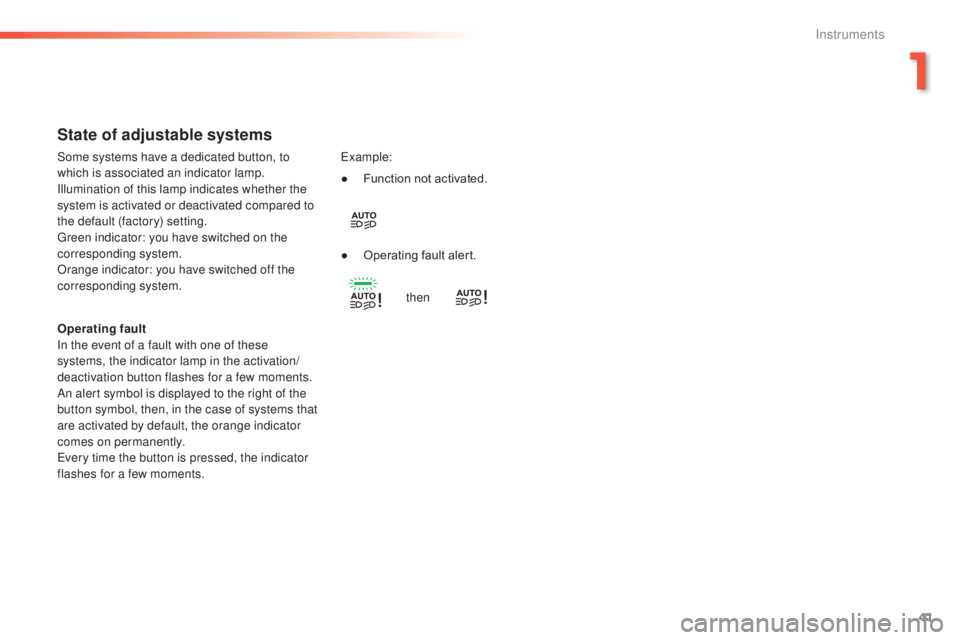
Operating fault
In the event of a fault with one of these
systems, the indicator lamp in the activation/
deactivation button flashes for a few moments.
An alert symbol is displayed to the right of the
button symbol, then, in the case of systems that
are activated by default, the orange indicator
comes on permanently.
eve
ry time the button is pressed, the indicator
flashes for a few moments.
exa
mple:
Some systems have a dedicated button, to
which is associated an indicator lamp.
Illumination of this lamp indicates whether the
system is activated or deactivated compared to
the default (factory) setting.
gre
en indicator: you have switched on the
corresponding system.
Orange indicator: you have switched off the
corresponding system. ●
Fu
nction not activated.
●
Op
erating fault alert.
then
1
Instruments
Page 44 of 398
42
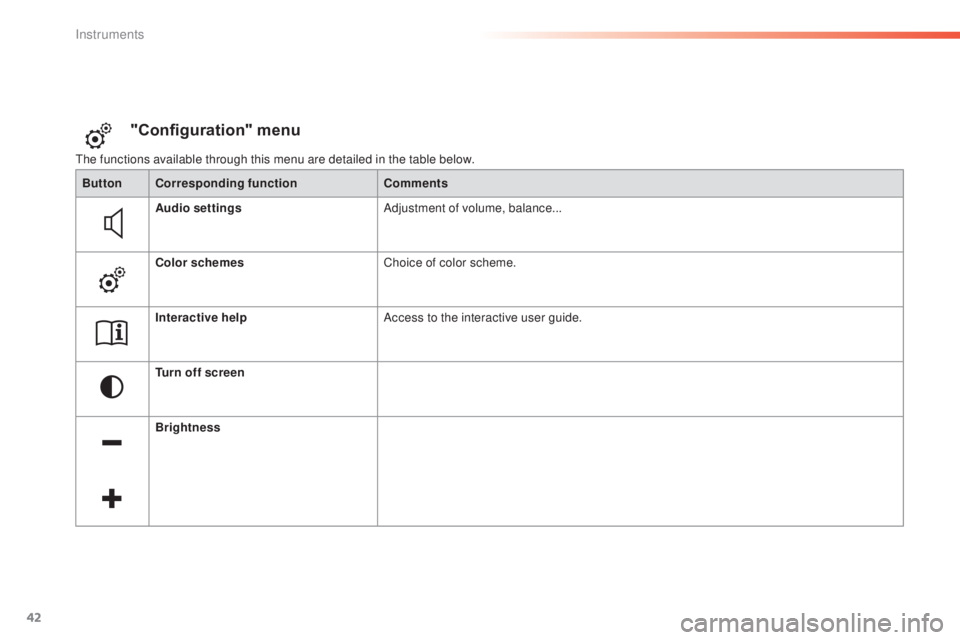
the functions available through this menu are detailed in the table below.
"Configuration" menu
ButtonCorresponding function Comments
Audio settings Adjustment of volume, balance...
Color schemes Choice of color scheme.
Interactive help Access to the interactive user guide.
Turn off screen
Brightness
Instruments
Page 45 of 398
43
308_en_Chap01_instruments-de-bord_ed02-2015
ButtonCorresponding function Comments
System Settings Choice of units:
-
te
mperature (°Celsius or °Fahrenheit)
-
di
stance and fuel consumption (l/100 km, mpg or km/l).
Time/Date Setting the date and time.
Languages Choice of language used: French,
eng
lish, Italian, Spanish,
ger
man, Dutch, Portuguese,
Polish,
tur
kish, Russian.
Screen settings Adjustment of the display settings (scrolling of text, animations...).
Calculator
Calendar
1
Instruments
Page 48 of 398
46
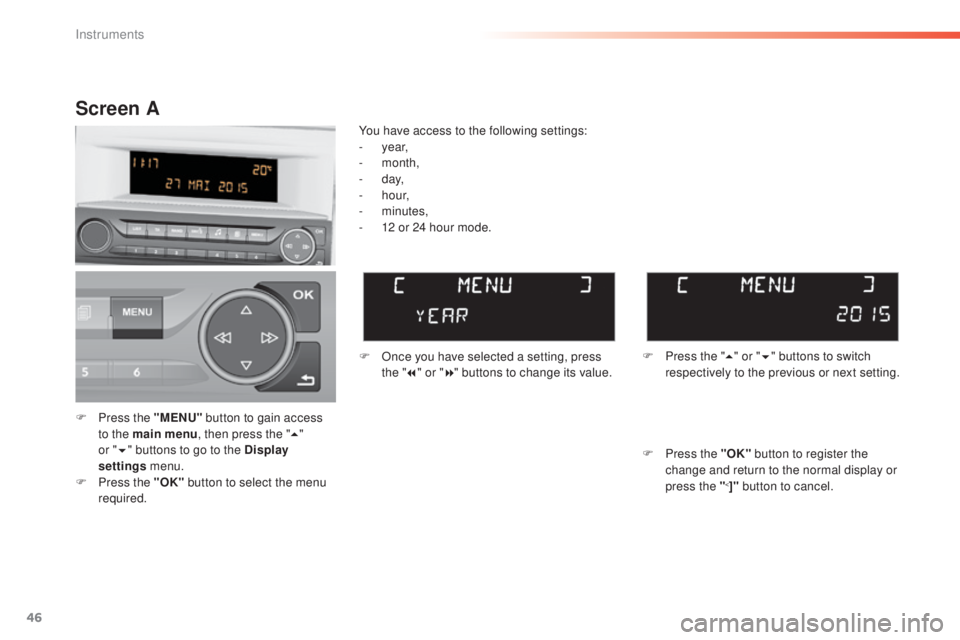
F Press the "MENU" b utton to gain access
to the main menu , then press the "5"
or
" 6 " b
uttons to go to the Display
settings menu.
F
Pr
ess the "OK" button to select the menu
required. F
On
ce you have selected a setting, press
the " 7" or " 8" buttons to change its value.
You have access to the following settings:
- ye
ar,
-
m
onth,
-
d
ay,
-
h
o u r,
-
m
inutes,
-
12 o
r 24 hour mode.
Screen A
F Press the " 5" o r "6 " buttons to switch
respectively to the previous or next setting.
F
Pr
ess the "OK" button to register the
change and return to the normal display or
press the "
<]" button to cancel.
Instruments
Page 63 of 398

61
308_en_Chap02_ouvertures_ed02-2015
Back-up key
Unlocking/locking using the
integral key with Keyless
Entry and Starting
the integral key is used to lock and unlock the
v ehicle when the electronic key cannot operate:
-
ce
ll battery flat, vehicle battery discharged
or disconnected, ...
-
ve
hicle located in an area with strong
electromagnetic signals.
F
Ma
intain a pull on button 1 , to extract the
integral key 2 .
Locking the driver's door
F Insert the integral key in the door lock, then
t
urn it to the rear.
Unlocking the driver's door
F Insert the integral key in the door lock, then
turn it to the front.
Locking the passenger doors
F Open the doors.
F Fo r the rear doors, check that the child lock
is not on.
F
In
sert the integral key in the latch located
on the edge of the door and turn it an
eighth of a turn to the right for the right
hand door, and to the the left for the left
hand door.
F
Cl
ose the doors and check that the vehicle
has locked correctly from the outside.
If the alarm is activated, the audible
signal on opening a door with the key
(integral with the remote control) will
stop when the ignition is switched on.
Unlocking the passenger doors
F Pull the interior door opening control.
F
or more information on the child lock,
refer to the corresponding section.
2
Access