2016 NISSAN NOTE lock
[x] Cancel search: lockPage 3499 of 3641
![NISSAN NOTE 2016 Service Repair Manual TM-258
< REMOVAL AND INSTALLATION >[CVT: RE0F11A]
CVT FLUID FILTER
3. Turn fluid filter cover (1) counterclockwise and remove it from
transaxle.
CAUTION:
Do not reuse fluid filter cover.
4. Remove CVT](/manual-img/5/57363/w960_57363-3498.png "NISSAN NOTE 2016 Service Repair Manual TM-258
< REMOVAL AND INSTALLATION >[CVT: RE0F11A]
CVT FLUID FILTER
3. Turn fluid filter cover (1) counterclockwise and remove it from
transaxle.
CAUTION:
Do not reuse fluid filter cover.
4. Remove CVT")
TM-258
< REMOVAL AND INSTALLATION >[CVT: RE0F11A]
CVT FLUID FILTER
3. Turn fluid filter cover (1) counterclockwise and remove it from
transaxle.
CAUTION:
Do not reuse fluid filter cover.
4. Remove CVT fluid filter (1) from transaxle. CAUTION:
Do not reuse CVT fluid filter.
INSTALLATION
Note the following and install in the reverse order of removal.
NOTE:
Inspect the CVT fluid level. Refer to TM-228, "
Inspection".
CAUTION:
• Never reuse CVT fluid filter and fluid filter cover.
• Apply CVT fluid to O-ring of fluid filter cover.
InspectionINFOID:0000000012431222
INSPECTION AFTER INSTALLATION
Start the engine and check visually that there is no leakage of CVT fluid.
ADJUSTMENT AFTER INSTALLATION
Adjust CVT fluid level. Refer to TM-229, "Adjustment".
JSDIA5048ZZ
JSDIA5049ZZ
JSDIA5450ZZ
Revision: August 2015 2016 Versa Note
cardiagn.com
Page 3501 of 3641
![NISSAN NOTE 2016 Service Repair Manual TM-260
< UNIT REMOVAL AND INSTALLATION >[CVT: RE0F11A]
TRANSMISSION ASSEMBLY
• Primary speed sensor harness connector
• Secondary speed sensor harness connector
• Output speed sensor harness con](/manual-img/5/57363/w960_57363-3500.png "NISSAN NOTE 2016 Service Repair Manual TM-260
< UNIT REMOVAL AND INSTALLATION >[CVT: RE0F11A]
TRANSMISSION ASSEMBLY
• Primary speed sensor harness connector
• Secondary speed sensor harness connector
• Output speed sensor harness con")
TM-260
< UNIT REMOVAL AND INSTALLATION >[CVT: RE0F11A]
TRANSMISSION ASSEMBLY
• Primary speed sensor harness connector
• Secondary speed sensor harness connector
• Output speed sensor harness connector
• Ground
3. Rotate the crankshaft and remove the nuts that secure the drive plate to the torque converter from the sta- tor motor mount.
CAUTION:
When turning crankshaft, turn it clockwise as viewed from the front of the engine.
4. Remove the bolts (engine to transaxle) that fasten the transaxle assembly and engine assembly.
5. Remove transaxle assembly from engine. CAUTION:
• Secure torque converter to prevent it from dropping.
• Secure transaxle assembly to a suitable jack.
INSTALLATION
Installation is in the reverse order of removal.
CAUTION:
• Do not reuse O-rings.
• Apply Genuine NISSAN CVT Fluid NS-3 to the O-rings.
• When installing the transaxle assembly onto the engine assembly,
check the engagement of the dowel pins ( ).
• When using suitable tool (A) for alignment, install it to the align- ment stud bolt used to align the torque converter to the drive plate.
JSDIA1839ZZ
Bolt position ABC D
Direction of insertion Transaxle assembly
⇒
Engine assembly Engine assembly
⇒ Transaxle assembly
Q ua ntit y 2213
JSDIA1184ZZ
JPDIA0683ZZ
Revision: August 2015 2016 Versa Note
cardiagn.com
Page 3502 of 3641
![NISSAN NOTE 2016 Service Repair Manual TRANSMISSION ASSEMBLYTM-261
< UNIT REMOVAL AND INSTALLATION > [CVT: RE0F11A]
C
EF
G H
I
J
K L
M A
B
TM
N
O P
• Rotate the crankshaft so that the alignment hole (A) of drive plate aligns with the pos](/manual-img/5/57363/w960_57363-3501.png "NISSAN NOTE 2016 Service Repair Manual TRANSMISSION ASSEMBLYTM-261
< UNIT REMOVAL AND INSTALLATION > [CVT: RE0F11A]
C
EF
G H
I
J
K L
M A
B
TM
N
O P
• Rotate the crankshaft so that the alignment hole (A) of drive plate aligns with the pos")
TRANSMISSION ASSEMBLYTM-261
< UNIT REMOVAL AND INSTALLATION > [CVT: RE0F11A]
C
EF
G H
I
J
K L
M A
B
TM
N
O P
• Rotate the crankshaft so that the alignment hole (A) of drive plate aligns with the position of the torque converter alignment stud bolt.
CAUTION:
• Rotate the crankshaft clockwise (as viewed from the front of
the engine).
• Be careful that torque converter stud bolts are aligned to the
drive plate holes. Otherwise the stud bolts contact the drive
plate.
• Insert the alignment stud bolt of torque converter into the align-
ment hole of the drive plate, ali gning the drive plate holes with the
torque converter stud bolts.
CAUTION:
Be careful not to strike the drive plate with the torque converter stud bolts.
• When installing the torque converter nuts, temporarily tighten the nuts. Then, after installing the engine and transaxle assembly bolts tighten the nuts to the specified torque.
CAUTION:
• Rotate the crankshaft clockwise (as vi ewed from the front of the engine).
• Check the tightening torque for the crankshaft pulley bolts after th e bolts fastening the drive plate
and torque converter have been tightened an d the crankshaft pulley bolts have been secured.
Refer to EM-51, "
Removal and Installation".
• Install the transaxle assembly and engine assembly bolts accord- ing to the following standards.
Inspection and AdjustmentINFOID:0000000012431225
INSPECTION BEFORE INSTALLATION
Check the distance (A) between the converter housing and torque
converter. Tightening torque : 51 N·m (5.2 kg-m, 38 ft-lb)
JPDIA0684ZZ
JSDIA1839ZZ
Bolt position
ABC D
Direction of insertion Transaxle assembly
⇒
Engine assembly Engine assembly
⇒ Transaxle assembly
Q uan tit y 2213
Nominal length [mm (in)] 40 (1.57) 44 (1.73)69 (2.72) 49 (1.93)
Tightening torque
N·m (kg-m, ft-lb) 48.0 (4.9, 35)
(B)
: Scale
(C) : Straightedge
Dimension (A) : TM-265, "Torque Converter"
JSDIA1840ZZ
Revision: August 2015 2016 Versa Note
cardiagn.com
Page 3506 of 3641
![NISSAN NOTE 2016 Service Repair Manual SERVICE DATA AND SPECIFICATIONS (SDS)TM-265
< SERVICE DATA AND SPECIFICATIONS (SDS) [CVT: RE0F11A]
C
EF
G H
I
J
K L
M A
B
TM
N
O P
SERVICE DATA AND SPECIFICATIONS (SDS)
SERVICE DATA AND SPECIFICATION](/manual-img/5/57363/w960_57363-3505.png "NISSAN NOTE 2016 Service Repair Manual SERVICE DATA AND SPECIFICATIONS (SDS)TM-265
< SERVICE DATA AND SPECIFICATIONS (SDS) [CVT: RE0F11A]
C
EF
G H
I
J
K L
M A
B
TM
N
O P
SERVICE DATA AND SPECIFICATIONS (SDS)
SERVICE DATA AND SPECIFICATION")
SERVICE DATA AND SPECIFICATIONS (SDS)TM-265
< SERVICE DATA AND SPECIFICATIONS (SDS) [CVT: RE0F11A]
C
EF
G H
I
J
K L
M A
B
TM
N
O P
SERVICE DATA AND SPECIFICATIONS (SDS)
SERVICE DATA AND SPECIFICATIONS (SDS)
General SpecificationINFOID:0000000012431230
Shift CharacteristicsINFOID:0000000012431231
Unit: rpm
CAUTION:
Lock-up is engaged at the vehicle speed of approximately 10 km/h (11 MPH) to 90 km/h (56 MPH).
Stall SpeedINFOID:0000000012431232
Unit: rpm
Line PressureINFOID:0000000012431233
Unit: MPa (bar, kg/cm2, psi)
Torque ConverterINFOID:0000000012431234
Applied model Engine HR16DE
Axle
2WD
Transaxle model RE0F11A
Stall torque ratio 1.91 : 1
Pulley ratio Forward
2.200 – 0.550
Reverse 2.200
Auxiliary gearbox gear ratio 1GR
1.821
2GR 1.000
Reverse 1.714
Counter gear 0.967
Final drive 3.882
Recommended fluid Refer to MA-11, "
Fluids and Lubricants".
Fluid capacity
Throttle position Shift pattern Engine speed
At 40 km/h (25 MPH) At 60 km/h (37 MPH)
2/8 “D” position (Overdrive control OFF)
1,300 – 3,1001,400 – 3,400
“D” position (Overdrive control ON) 2,200 – 3,1002,700 – 3,500
“L” position 3,000 – 3,8003,500 – 4,300
8/8 “D” position (Overdrive control OFF)
3,600 – 4,4004,300 – 5,100
“D” position (Overdrive control ON) 3,600 – 4,4004,300 – 5,100
“L” position 3,600 – 4,4004,300 – 5,100
Stall speed 2,420 – 2,870
Shift selector positionEngine speed Line pressure
“P” and “N” At idle 0.40 (4, 4.1, 58)
“R” and “D” At idle
0.40 (4, 4.1, 58) – 1.39 (13.9, 14.2, 201.6)
At stall 4.20 (42, 42.8, 609) – 4.70 (47, 47.9, 681.5)
Distance (A) between the converter housing and torque converter 16.2 mm
Revision: August 2015 2016 Versa Note
cardiagn.com
Page 3515 of 3641
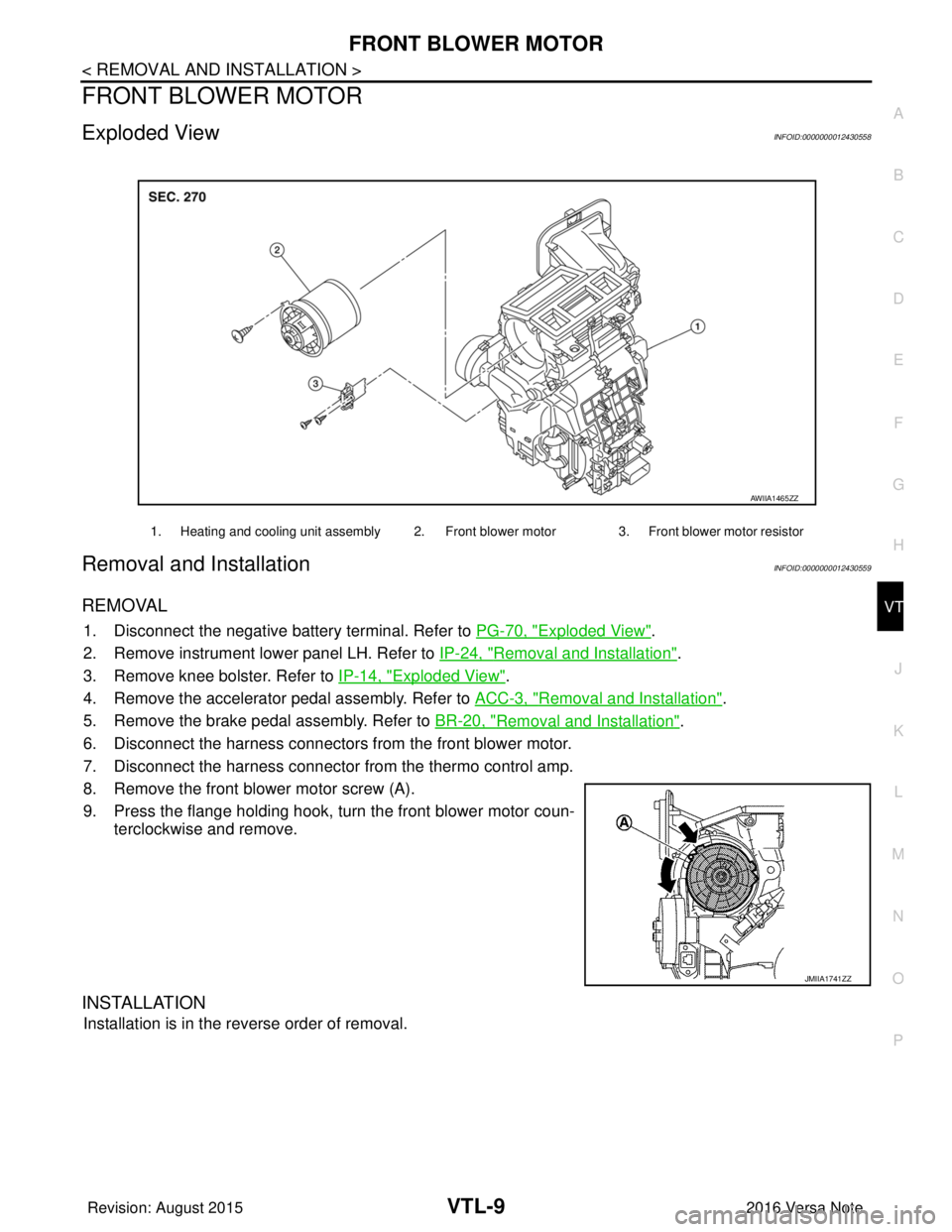
FRONT BLOWER MOTORVTL-9
< REMOVAL AND INSTALLATION >
C
DE
F
G H
J
K L
M A
B
VTL
N
O P
FRONT BLOWER MOTOR
Exploded ViewINFOID:0000000012430558
Removal and InstallationINFOID:0000000012430559
REMOVAL
1. Disconnect the negative battery terminal. Refer to PG-70, "Exploded View".
2. Remove instrument lower panel LH. Refer to IP-24, "
Removal and Installation".
3. Remove knee bolster. Refer to IP-14, "
Exploded View".
4. Remove the accelerator pedal assembly. Refer to ACC-3, "
Removal and Installation".
5. Remove the brake pedal assembly. Refer to BR-20, "
Removal and Installation".
6. Disconnect the harness connectors from the front blower motor.
7. Disconnect the harness connector from the thermo control amp.
8. Remove the front blower motor screw (A).
9. Press the flange holding hook, turn the front blower motor coun- terclockwise and remove.
INSTALLATION
Installation is in the reverse order of removal.
1. Heating and cooling unit assembly 2. Front blower motor 3. Front blower motor resistor
AWIIA1465ZZ
JMIIA1741ZZ
Revision: August 2015 2016 Versa Note
cardiagn.com
Page 3536 of 3641

WCS
DIAGNOSIS SYSTEM (BCM) (WITH INTELLIGENT KEY SYSTEM)
WCS-21
< SYSTEM DESCRIPTION >
C
D E
F
G H
I
J
K L
M B A
O P
DIAGNOSIS SYSTEM (BCM) (WIT H INTELLIGENT KEY SYSTEM)
COMMON ITEM
COMMON ITEM : CONSULT Function (BCM - COMMON ITEM)INFOID:0000000012542986
APPLICATION ITEM
CONSULT performs the following functions via CAN communication with BCM.
SYSTEM APPLICATION
BCM can perform the following functions.
Direct Diagnostic Mode Description
ECU Identification The BCM part number is displayed.
Self Diagnostic Result The BCM self diagnostic results are displayed.
Data Monitor The BCM input/output data is displayed in real time.
Active Test The BCM activates outputs to test components.
Work support The settings for BCM functions can be changed.
Configuration • The vehicle specification can be read and saved.
• The vehicle specification can be written when replacing BCM.
CAN DIAG SUPPORT MNTR The result of transmit/receive diagnosis of CAN communication is displayed.
System Sub System Direct Diagnostic Mode
ECU Identification
Self Diagnostic Result
Data Monitor
Active Test
Work support
Configuration
CAN DIAG SUPPORT MNTR
Door lock
DOOR LOCK ×××
Rear window defogger REAR DEFOGGER ××
Warning chime BUZZER ××
Interior room lamp timer INT LAMP ×××
Exterior lamp HEAD LAMP ×××
Wiper and washer WIPER ×××
Turn signal and hazard warning lamps FLASHER ×××
Air conditioner AIR CONDITIONER ×
Intelligent Key system INTELLIGENT KEY ××××
Combination switch COMB SW ×
BCM BCM× × ×××
Immobilizer IMMU ××××
Interior room lamp battery saver BATTERY SAVER ×××
Vehicle security system THEFT ALM ××
RAP system RETAINED PWR ×
Signal buffer system SIGNAL BUFFER ×
TPMS AIR PRESSURE MONITOR ××××
Panic alarm system PANIC ALARM ×
Revision: August 2015 2016 Versa Note
cardiagn.com
Page 3537 of 3641
![NISSAN NOTE 2016 Service Repair Manual WCS-22
< SYSTEM DESCRIPTION >
DIAGNOSIS SYSTEM (BCM) (WITH INTELLIGENT KEY SYSTEM)
BUZZER
BUZZER : CONSULT Function (BCM - BUZZER)INFOID:0000000012542987
DATA MONITOR
ACTIVE TEST
Monitor Item [Unit] D](/manual-img/5/57363/w960_57363-3536.png "NISSAN NOTE 2016 Service Repair Manual WCS-22
< SYSTEM DESCRIPTION >
DIAGNOSIS SYSTEM (BCM) (WITH INTELLIGENT KEY SYSTEM)
BUZZER
BUZZER : CONSULT Function (BCM - BUZZER)INFOID:0000000012542987
DATA MONITOR
ACTIVE TEST
Monitor Item [Unit] D")
WCS-22
< SYSTEM DESCRIPTION >
DIAGNOSIS SYSTEM (BCM) (WITH INTELLIGENT KEY SYSTEM)
BUZZER
BUZZER : CONSULT Function (BCM - BUZZER)INFOID:0000000012542987
DATA MONITOR
ACTIVE TEST
Monitor Item [Unit] Description
PUSH SW [On/Off] Indicates condition of push-button ignition switch.
UNLK SEN -DR [On/Off] Indicates condition of door unlock sensor.
VEH SPEED 1 [km/h] Indicates vehicle speed signal received from ABS on CAN communication line.
TAIL LAMP SW [On/Off] Indicates condition of combination switch.
FR FOG SW [On/Off] Indicates condition of front fog lamp switch.
DOOR SW-DR [On/Off] Indicates condition of front door switch LH.
CDL LOCK SW [On/Off] Indicates condition of lock signal from door lock and unlock switch.
Test Item Description
ID REGIST WARNING This test is able to check TPMS transmitter ID regist warning chime operation [On/Off].
SEAT BELT WARN TEST This test is able to check seat belt warning chime operation [On/Off].
LIGHT WARN ALM This test is able to check light warning chime operation [On/Off].
Revision: August 2015 2016 Versa Note
cardiagn.com
Page 3538 of 3641

WCS
DIAGNOSIS SYSTEM (BCM) (WITHOUT INTELLIGENT KEY SYSTEM)WCS-23
< SYSTEM DESCRIPTION >
C
DE
F
G H
I
J
K L
M B A
O P
DIAGNOSIS SYSTEM (BCM) (WITHO UT INTELLIGENT KEY SYSTEM)
COMMON ITEM
COMMON ITEM : CONSULT Function (BCM - COMMON ITEM)INFOID:0000000012542988
APPLICATION ITEM
CONSULT performs the following functions via CAN communication with BCM.
SYSTEM APPLICATION
BCM can perform the following functions.
Direct Diagnostic Mode Description
ECU Identification The BCM part number is displayed.
Self Diagnostic Result The BCM self diagnostic results are displayed.
Data Monitor The BCM input/output data is displayed in real time.
Active Test The BCM activates outputs to test components.
Work support The settings for BCM functions can be changed.
Configuration • The vehicle specification can be read and saved.
• The vehicle specification can be written when replacing BCM.
CAN DIAG SUPPORT MNTR The result of transmit/receive diagnosis of CAN communication is displayed.
System Sub System Direct Diagnostic Mode
ECU Identification
Self Diagnostic Result
Data Monitor
Active Test
Work support
Configuration
CAN DIAG SUPPORT MNTR
Door lock
DOOR LOCK ×××
Rear window defogger REAR DEFOGGER ××
Warning chime BUZZER ××
Interior room lamp timer INT LAMP ×××
Remote keyless entry system MULTI REMOTE ENT ×××
Exterior lamp HEAD LAMP ×××
Wiper and washer WIPER ×××
Turn signal and hazard warning lamps FLASHER ××
Air conditioner AIR CONDITIONER ×
Combination switch COMB SW ×
BCM BCM× × ×××
Immobilizer IMMU ×××
Interior room lamp battery saver BATTERY SAVER ×××
Vehicle security system THEFT ALM ××
RAP system RETAINED PWR ××
Signal buffer system SIGNAL BUFFER ×
TPMS AIR PRESSURE MONITOR ××××
Panic alarm system PANIC ALARM ×
Revision: August 2015 2016 Versa Note
cardiagn.com