Page 2640 of 3641
PG
HARNESSPG-53
< WIRING DIAGRAM >
C
DE
F
G H
I
J
K L
B A
O P
N
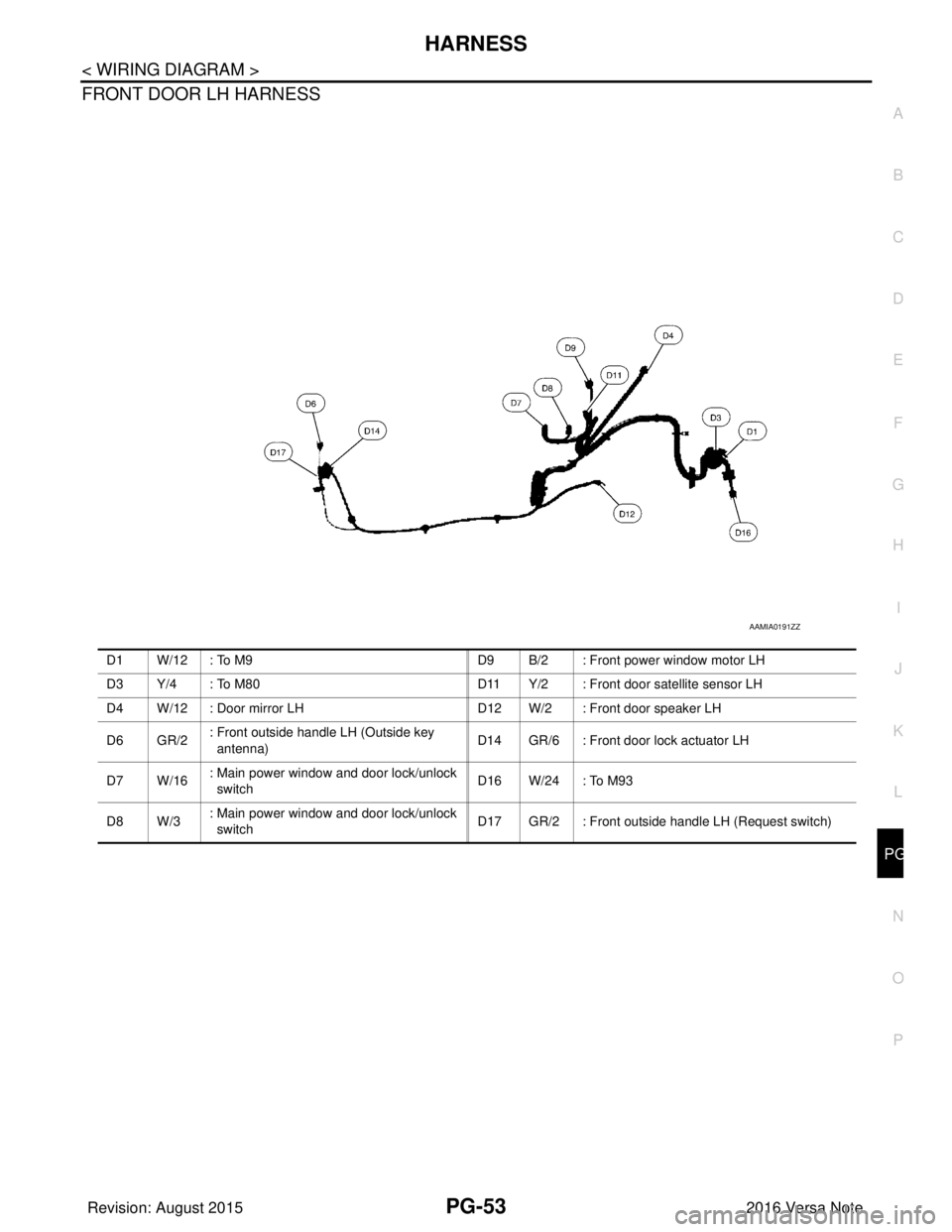
FRONT DOOR LH HARNESS
AAMIA0191ZZ
D1 W/12 : To M9
D9 B/2 : Front power window motor LH
D3 Y/4 : To M80 D11 Y/2 : Front door satellite sensor LH
D4 W/12 : Door mirror LH D12 W/2 : Front door speaker LH
D 6 G R / 2 : Front outside handle LH (Outside key
antenna)
D14 GR/6 : Front door lock actuator LH
D 7 W / 1 6 : Main power window and door lock/unlock
switch D 1 6 W / 2 4 : To M 9 3
D 8 W / 3 : Main power window and door lock/unlock
switch D17 GR/2 : Front outside handle LH (Request switch)
Revision: August 2015
2016 Versa Note
cardiagn.com
Page 2641 of 3641
PG-54
< WIRING DIAGRAM >
HARNESS
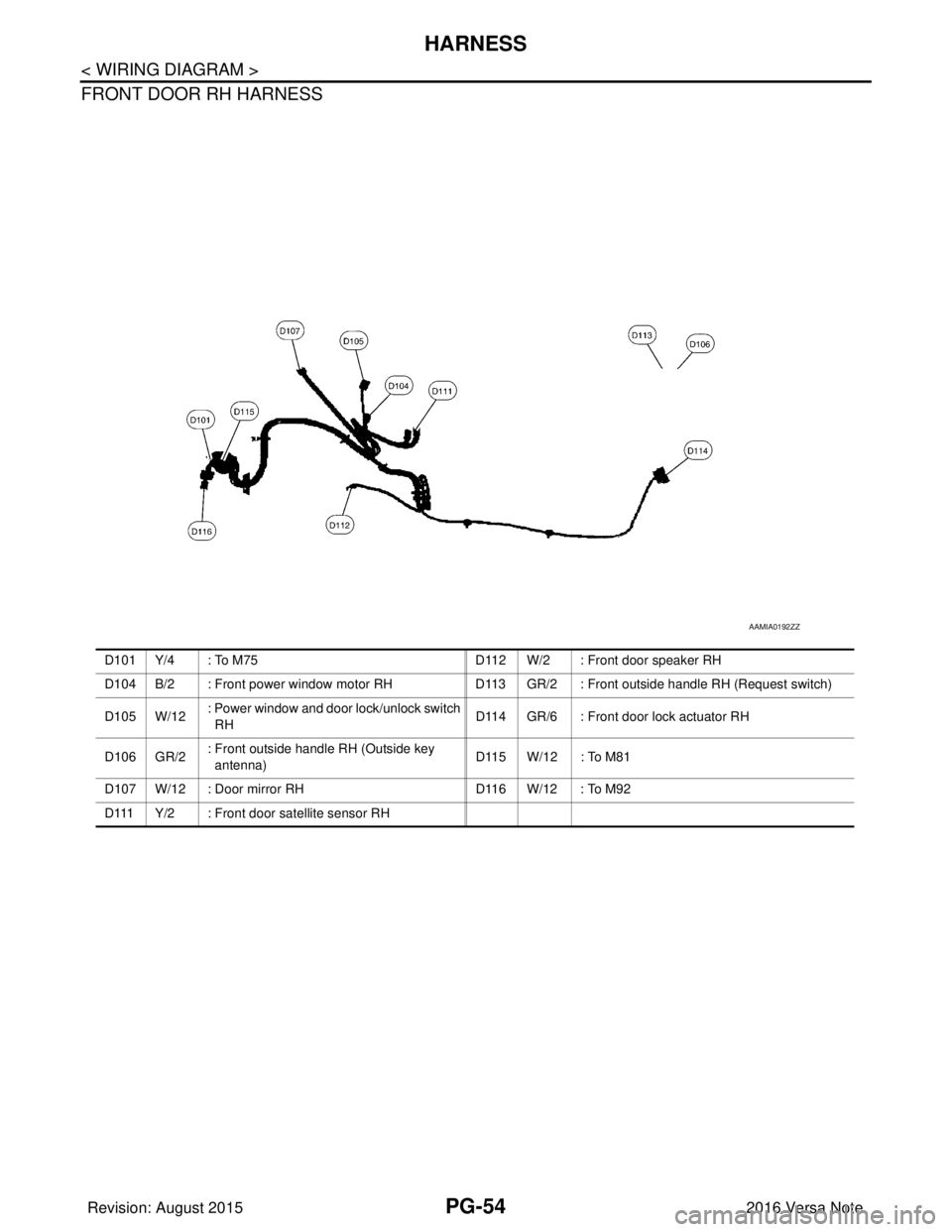
FRONT DOOR RH HARNESS
AAMIA0192ZZ
D101 Y/4 : To M75D112 W/2 : Front door speaker RH
D104 B/2 : Front power window motor RH D113 GR/2 : Front outside handle RH (Request switch)
D 1 0 5 W / 1 2 : Power window and door lock/unlock switch
RH
D114 GR/6 : Front door lock actuator RH
D 1 0 6 G R / 2 : Front outside handle RH (Outside key
antenna) D115 W/12 : To M81
D107 W/12 : Door mirror RH D116 W/12 : To M92
D111 Y/2 : Front door satellite sensor RH
Revision: August 2015 2016 Versa Note
cardiagn.com
Page 2642 of 3641
PG
HARNESSPG-55
< WIRING DIAGRAM >
C
DE
F
G H
I
J
K L
B A
O P
N
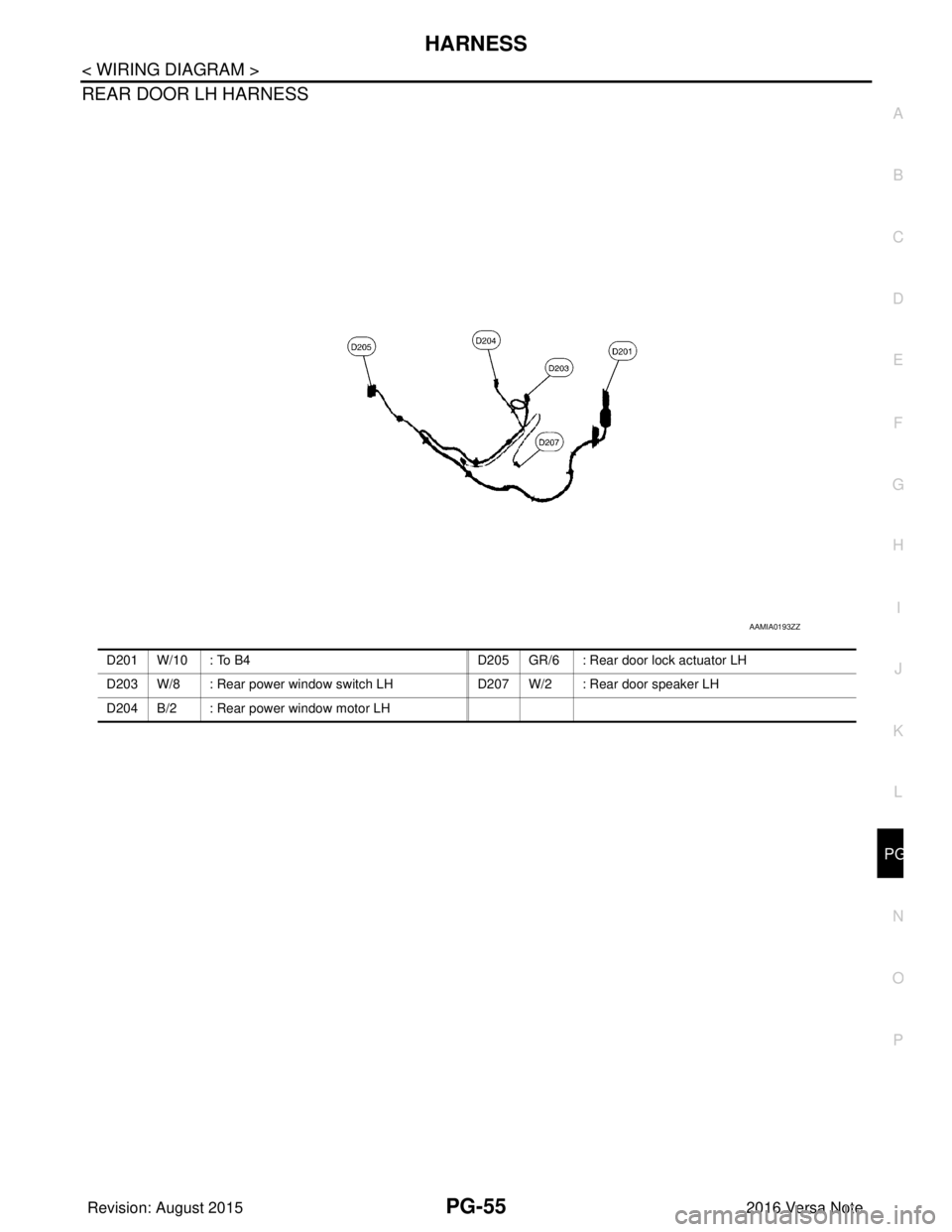
REAR DOOR LH HARNESS
AAMIA0193ZZ
D201 W/10 : To B4
D205 GR/6 : Rear door lock actuator LH
D203 W/8 : Rear power window switch LH D207 W/2 : Rear door speaker LH
D204 B/2 : Rear power window motor LH
Revision: August 2015 2016 Versa Note
cardiagn.com
Page 2643 of 3641
PG-56
< WIRING DIAGRAM >
HARNESS
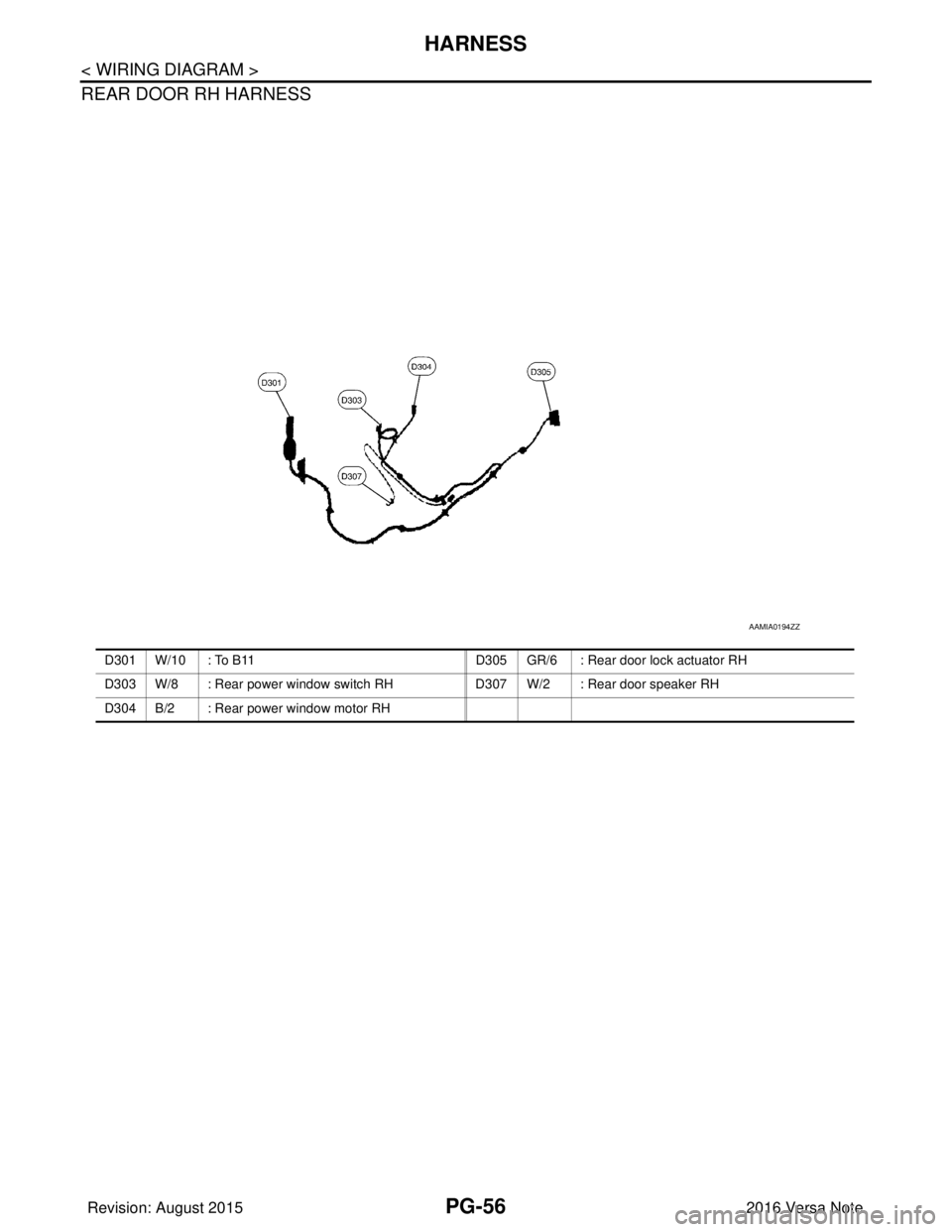
REAR DOOR RH HARNESS
AAMIA0194ZZ
D301 W/10 : To B11D305 GR/6 : Rear door lock actuator RH
D303 W/8 : Rear power window switch RHD307 W/2 : Rear door speaker RH
D 3 0 4 B / 2 : R e a r power window motor RH
Revision: August 2015 2016 Versa Note
cardiagn.com
Page 2644 of 3641
PG
HARNESSPG-57
< WIRING DIAGRAM >
C
DE
F
G H
I
J
K L
B A
O P
N
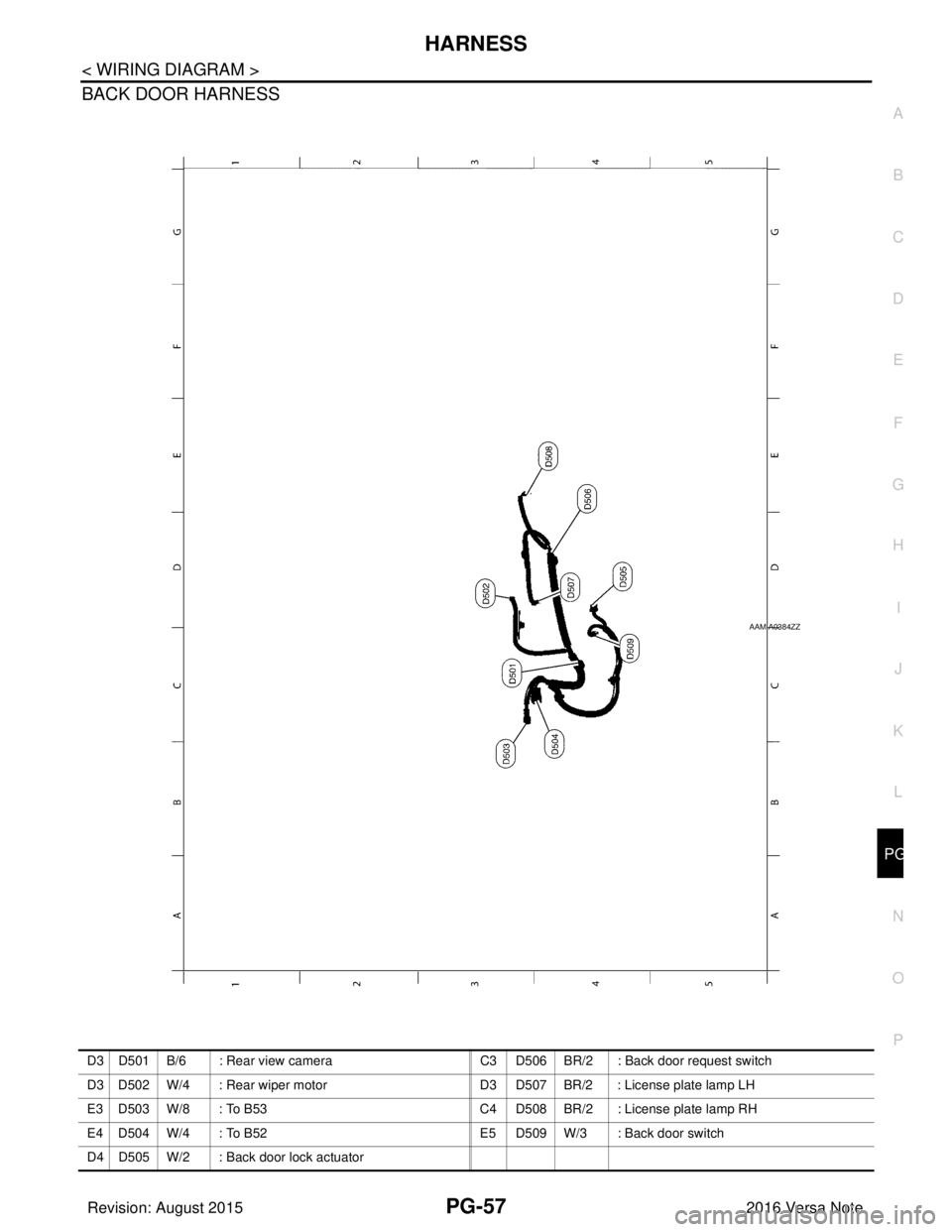
BACK DOOR HARNESS
AAMIA0384ZZ
D3 D501 B/6 : Rear view camera
C3 D506 BR/2 : Back door request switch
D3 D502 W/4 : Rear wiper motor D3 D507 BR/2 : License plate lamp LH
E3 D503 W/8 : To B53 C4 D508 BR/2 : License plate lamp RH
E 4 D 5 0 4 W / 4 : T o B 5 2 E 5 D 5 0 9 W / 3 : B a c k d o o r s w i t c h
D4 D505 W/2 : Back door lock actuator
Revision: August 2015 2016 Versa Note
cardiagn.com
Page 2645 of 3641
PG-58
< WIRING DIAGRAM >
FUSE BLOCK - JUNCTION BOX (J/B)
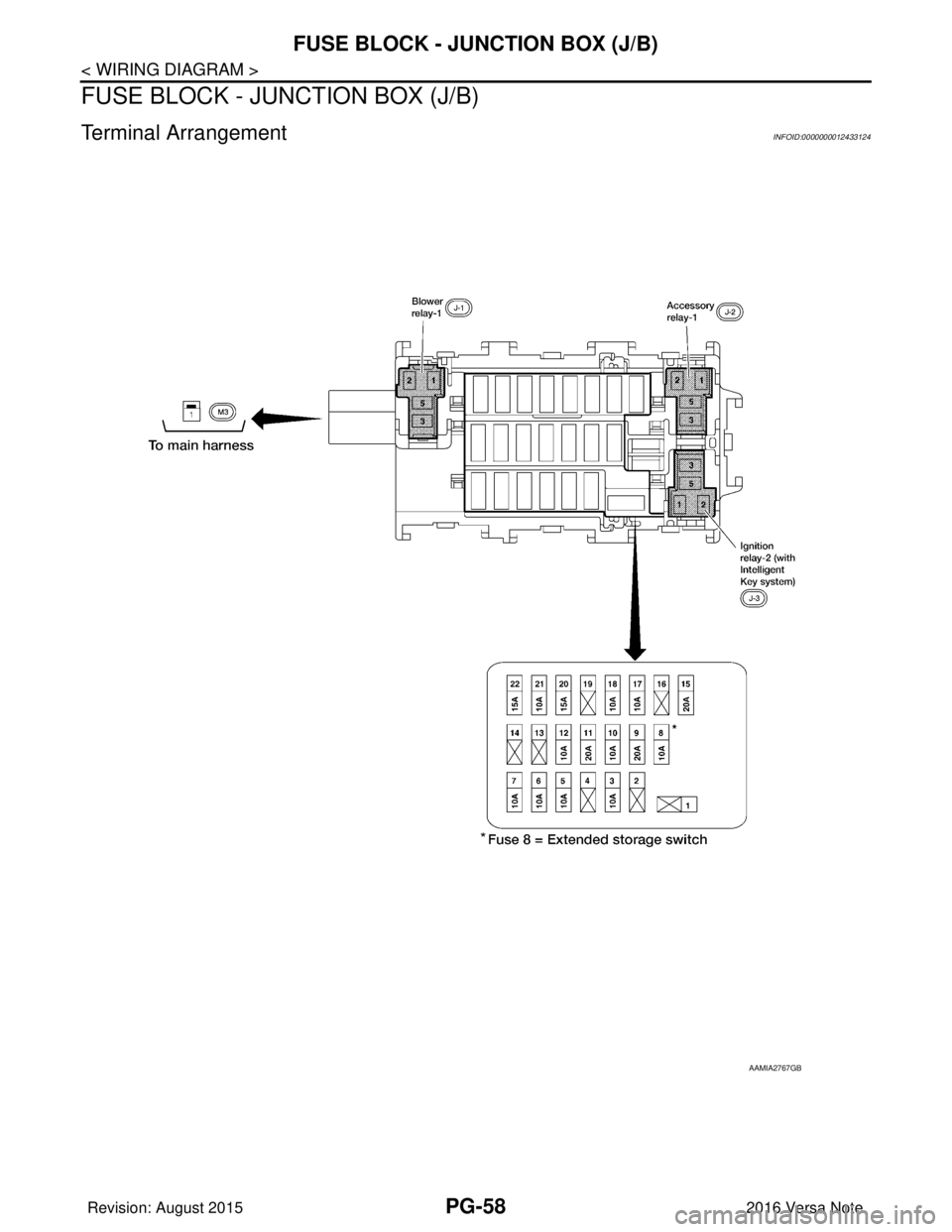
FUSE BLOCK - JUNCTION BOX (J/B)
Terminal ArrangementINFOID:0000000012433124
AAMIA2767GB
Revision: August 20152016 Versa Note
cardiagn.com
Page 2652 of 3641
PG
FUSE INSPECTIONPG-65
< BASIC INSPECTION >
C
DE
F
G H
I
J
K L
B A
O P
N
FUSE INSPECTION
How To CheckINFOID:0000000012433130
• If fuse is blown, be sure to eliminate cause of malfunction before
installing new fuse.
• Use fuse of specified rating. Never use fuse of more than specified
rating.
• Do not partially install fuse; always insert it into fuse holder prop- erly.
• Remove fuse for “ELECTRICAL PARTS (BAT)” if vehicle is not used for a long period of time.
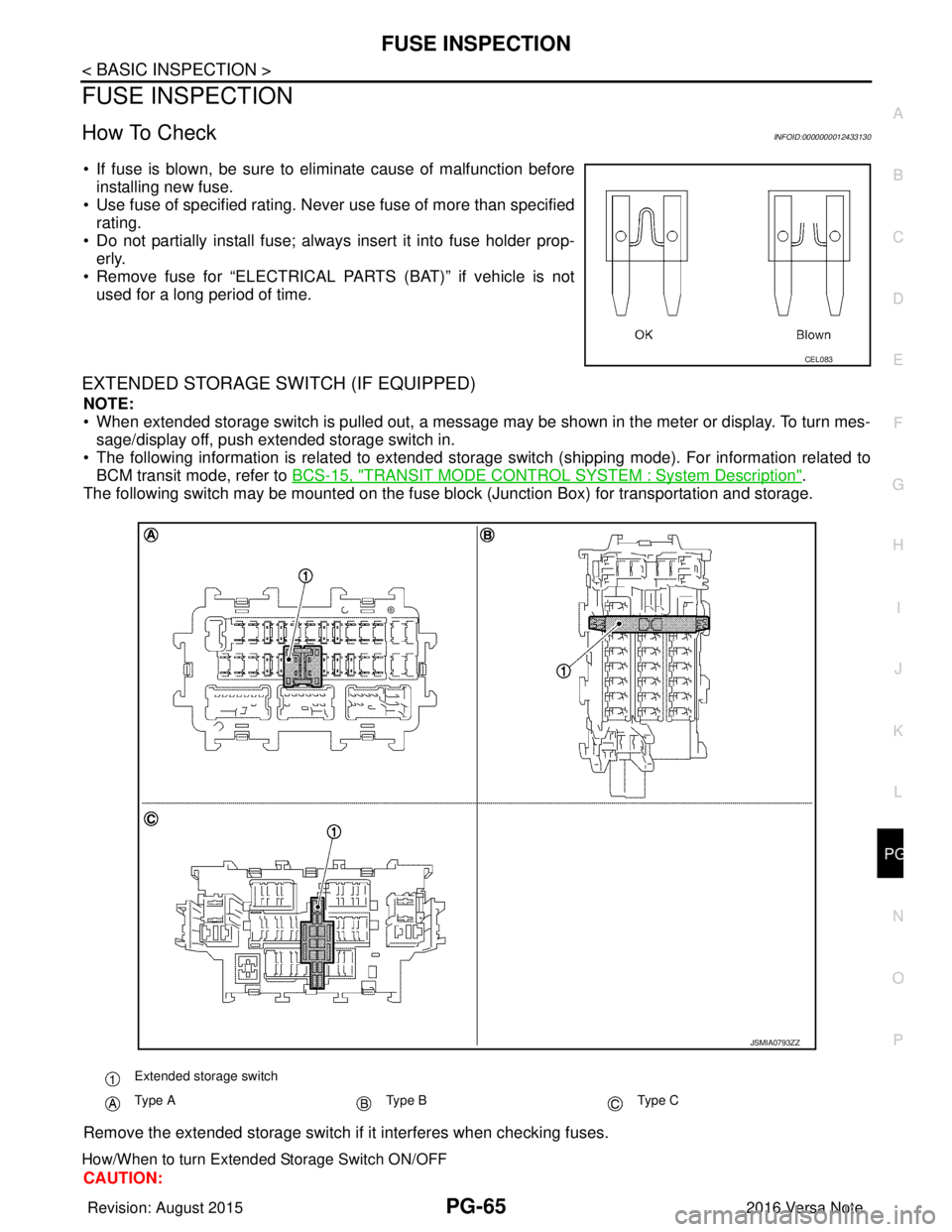
EXTENDED STORAGE SWITCH (IF EQUIPPED)
NOTE:
• When extended storage switch is pulled out, a message may be shown in the\
meter or display. To turn mes-sage/display off, push extended storage switch in.
• The following information is related to extended storage switch (shipping mode). For information related to BCM transit mode, refer to BCS-15, "
TRANSIT MODE CONTROL SYSTEM : System Description".
The following switch may be mounted on the fuse block (Junction Box) for transportation and storage.
Remove the extended storage switch if it interferes when checking fuses.
How/When to turn Extended Storage Switch ON/OFF
CAUTION:
CEL083
Extended storage switch
Type AType BType C
JSMIA0793ZZ
Revision: August 2015 2016 Versa Note
cardiagn.com
Page 2654 of 3641
PG
FUSE INSPECTIONPG-67
< BASIC INSPECTION >
C
DE
F
G H
I
J
K L
B A
O P
N
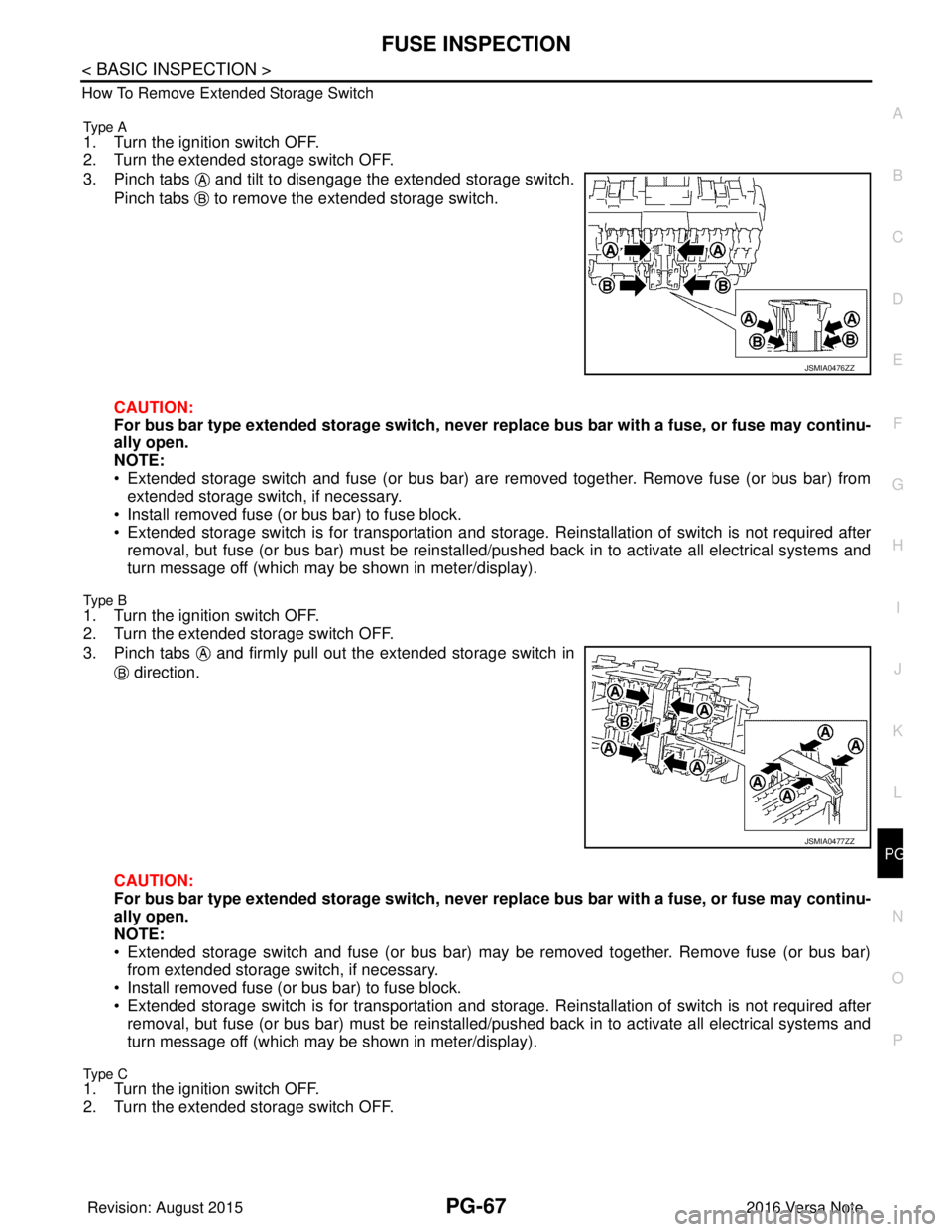
How To Remove Extended Storage Switch
Type A
1. Turn the ignition switch OFF.
2. Turn the extended storage switch OFF.
3. Pinch tabs and tilt to disengage the extended storage switch.
Pinch tabs to remove the extended storage switch.
CAUTION:
For bus bar type extended storage switch, never replace bus bar with a fuse, or fuse may continu-
ally open.
NOTE:
• Extended storage switch and fuse (or bus bar) are removed together. Remove fuse (or bus bar) from extended storage switch, if necessary.
• Install removed fuse (or bus bar) to fuse block.
• Extended storage switch is for transportation and storage. Reinstallation of switch is not required after
removal, but fuse (or bus bar) must be reinstalled/ pushed back in to activate all electrical systems and
turn message off (which may be shown in meter/display).
Type B
1. Turn the ignition switch OFF.
2. Turn the extended storage switch OFF.
3. Pinch tabs and firmly pull out the extended storage switch in
direction.
CAUTION:
For bus bar type extended storage switch, never replace bus bar with a fuse, or fuse may continu-
ally open.
NOTE:
• Extended storage switch and fuse (or bus bar) may be removed together. Remove fuse (or bus bar) from extended storage switch, if necessary.
• Install removed fuse (or bus bar) to fuse block.
• Extended storage switch is for transportation and storage. Reinstallation of switch is not required after
removal, but fuse (or bus bar) must be reinstalled/ pushed back in to activate all electrical systems and
turn message off (which may be shown in meter/display).
Type C1. Turn the ignition switch OFF.
2. Turn the extended storage switch OFF.
JSMIA0476ZZ
JSMIA0477ZZ
Revision: August 2015 2016 Versa Note
cardiagn.com