2016 NISSAN NOTE sensor
[x] Cancel search: sensorPage 1638 of 3641
![NISSAN NOTE 2016 Service Repair Manual LU-8
< PERIODIC MAINTENANCE >[HR16DE]
ENGINE OIL
2. Disconnect harness connector at
oil pressure sensor. Remove
oil pressure sensor using suitable tool and install suitable tools
(A/B).
CAUTION:
Do n](/manual-img/5/57363/w960_57363-1637.png "NISSAN NOTE 2016 Service Repair Manual LU-8
< PERIODIC MAINTENANCE >[HR16DE]
ENGINE OIL
2. Disconnect harness connector at
oil pressure sensor. Remove
oil pressure sensor using suitable tool and install suitable tools
(A/B).
CAUTION:
Do n")
LU-8
< PERIODIC MAINTENANCE >[HR16DE]
ENGINE OIL
2. Disconnect harness connector at
oil pressure sensor. Remove
oil pressure sensor using suitable tool and install suitable tools
(A/B).
CAUTION:
Do not drop or shock oil pressure sensor.
3. Start engine and warm it up to normal operating temperature.
4. Check engine oil pressure with engine running under no-load. NOTE:
• When engine oil temperature is low, engine oil pressure becomes high.
• If difference is extreme, check oil passage and oil pump for engine oil leaks.
5. After the inspections, install oil pressure sensor as follows:
a. Remove old liquid gasket adhering to oil pressure sensor and engine.
b. Apply liquid gasket and tighten oil pressure sensor to specification. Use Genuine Liquid Gasket or equivalent. Refer to GI-22, "
Recommended Chemical Products and
Sealants".
6. Check engine oil level.
7. After warming up engine, check that ther e is no engine oil leaks with the running engine.
DrainingINFOID:0000000012432201
WARNING:
• Be careful not to get burned, as engine oil may be hot.
• Prolonged and repeated contact with used engine oil may cause ski n cancer. Try to avoid direct skin
contact with used engine oil. If skin contact is made, wash thoroughly with soap or hand cleaner as
soon as possible.
1. Warm up the engine, park the vehicle on a level surface and check for engine oil leaks. Refer to LU-7,
"Inspection".
2. Stop the engine and wait for 10 minutes.
3. Loosen oil filler cap.
4. Remove drain plug and then drain engine oil.
RefillingINFOID:0000000012432202
1. Install drain plug with new copper sealing washer. Refer to EM-34, "Exploded View".
CAUTION:
• Be sure to clean drain plug.
• Do not reuse copper sealing washer.
2. Refill with new engine oil.
CAUTION:
• The refill capacity depends on the engine oi l temperature and drain time. Use these specifica-
tions for reference only.
• Always use oil level gauge to determine the pr oper amount of engine oil in the engine.
JPBIA0074ZZ
Engine oil pressure : Refer to LU-15, "Engine Oil Pressure".
Tightening torque : Refer to EM-93, "
Exploded View".
Engine oil capacity and viscosity : Refer to MA-11, "
Fluids and Lubricants".
Revision: August 2015 2016 Versa Note
cardiagn.com
Page 1647 of 3641

EX-2
< PRECAUTION >
PRECAUTIONS
PRECAUTION
PRECAUTIONS
Precaution for Supplemental Restraint System (SRS) "AIR BAG" and "SEAT BELT
PRE-TENSIONER"
INFOID:0000000012432298
The Supplemental Restraint System such as “A IR BAG” and “SEAT BELT PRE-TENSIONER”, used along
with a front seat belt, helps to reduce the risk or severity of injury to the driver and front passenger for certain
types of collision. Information necessary to service the system safely is included in the SR and SB section of
this Service Manual.
WARNING:
• To avoid rendering the SRS inopera tive, which could increase the risk of personal injury or death in
the event of a collision which would result in air bag inflation, all maintenance must be performed by
an authorized NISSAN/INFINITI dealer.
• Improper maintenance, including in correct removal and installation of the SRS, can lead to personal
injury caused by unintent ional activation of the system. For re moval of Spiral Cable and Air Bag
Module, see the SR section.
• Do not use electrical test equipmen t on any circuit related to the SRS unless instructed to in this
Service Manual. SRS wiring harn esses can be identified by yellow and/or orange harnesses or har-
ness connectors.
PRECAUTIONS WHEN USING POWER TOOLS (AIR OR ELECTRIC) AND HAMMERS
WARNING:
• When working near the Airbag Diagnosis Sensor Unit or other Airbag System sensors with the Igni-
tion ON or engine running, DO NOT use air or electri c power tools or strike near the sensor(s) with a
hammer. Heavy vibration could activate the sensor( s) and deploy the air bag(s), possibly causing
serious injury.
• When using air or electric power tools or hammers , always switch the Ignition OFF, disconnect the
battery and wait at least three minutes before performing any service.
Revision: August 2015 2016 Versa Note
cardiagn.com
Page 1648 of 3641
PREPARATIONEX-3
< PREPARATION >
C
DE
F
G H
I
J
K L
M A
EX
NP
O
PREPARATION
PREPARATION
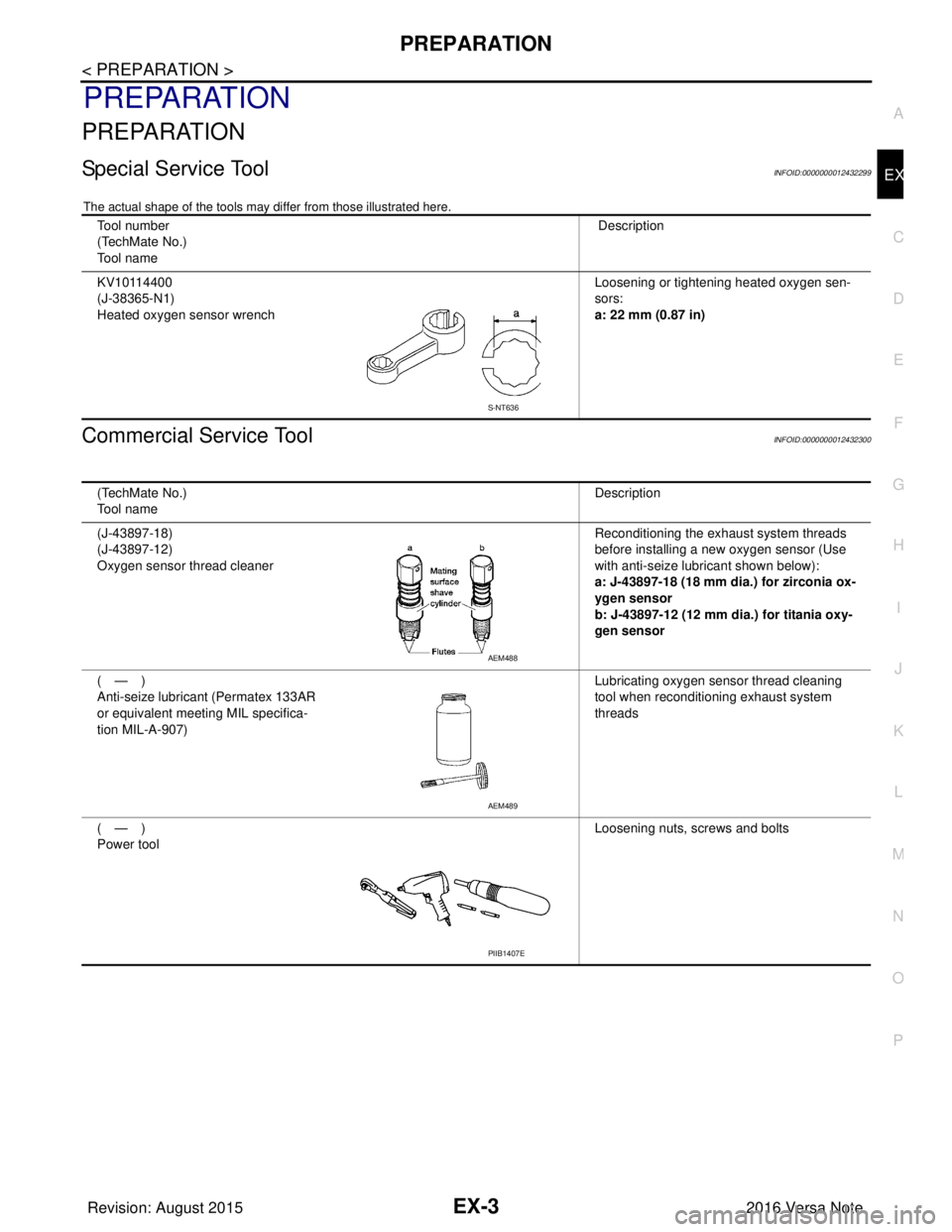
Special Service ToolINFOID:0000000012432299
The actual shape of the tools may differ from those illustrated here.
Commercial Service ToolINFOID:0000000012432300
Tool number
(TechMate No.)
Tool name
Description
KV10114400
(J-38365-N1)
Heated oxygen sensor wrench Loosening or tightening heated oxygen sen-
sors:
a: 22 mm (0.87 in)
S-NT636
(TechMate No.)
Tool name
Description
(J-43897-18)
(J-43897-12)
Oxygen sensor thread cleaner Reconditioning the exhaust system threads
before installing a new oxygen sensor (Use
with anti-seize lubricant shown below):
a: J-43897-18 (18 mm dia.) for zirconia ox-
ygen sensor
b: J-43897-12 (12 mm dia.) for titania oxy-
gen sensor
(—)
Anti-seize lubricant (Permatex 133AR
or equivalent meeting MIL specifica-
tion MIL-A-907) Lubricating oxygen sensor thread cleaning
tool when reconditioning exhaust system
threads
(—)
Power tool Loosening nuts, screws and bolts
AEM488
AEM489
PIIB1407E
Revision: August 2015
2016 Versa Note
cardiagn.com
Page 1650 of 3641
EXHAUST SYSTEMEX-5
< REMOVAL AND INSTALLATION >
C
DE
F
G H
I
J
K L
M A
EX
NP
O
REMOVAL AND INSTALLATION
EXHAUST SYSTEM
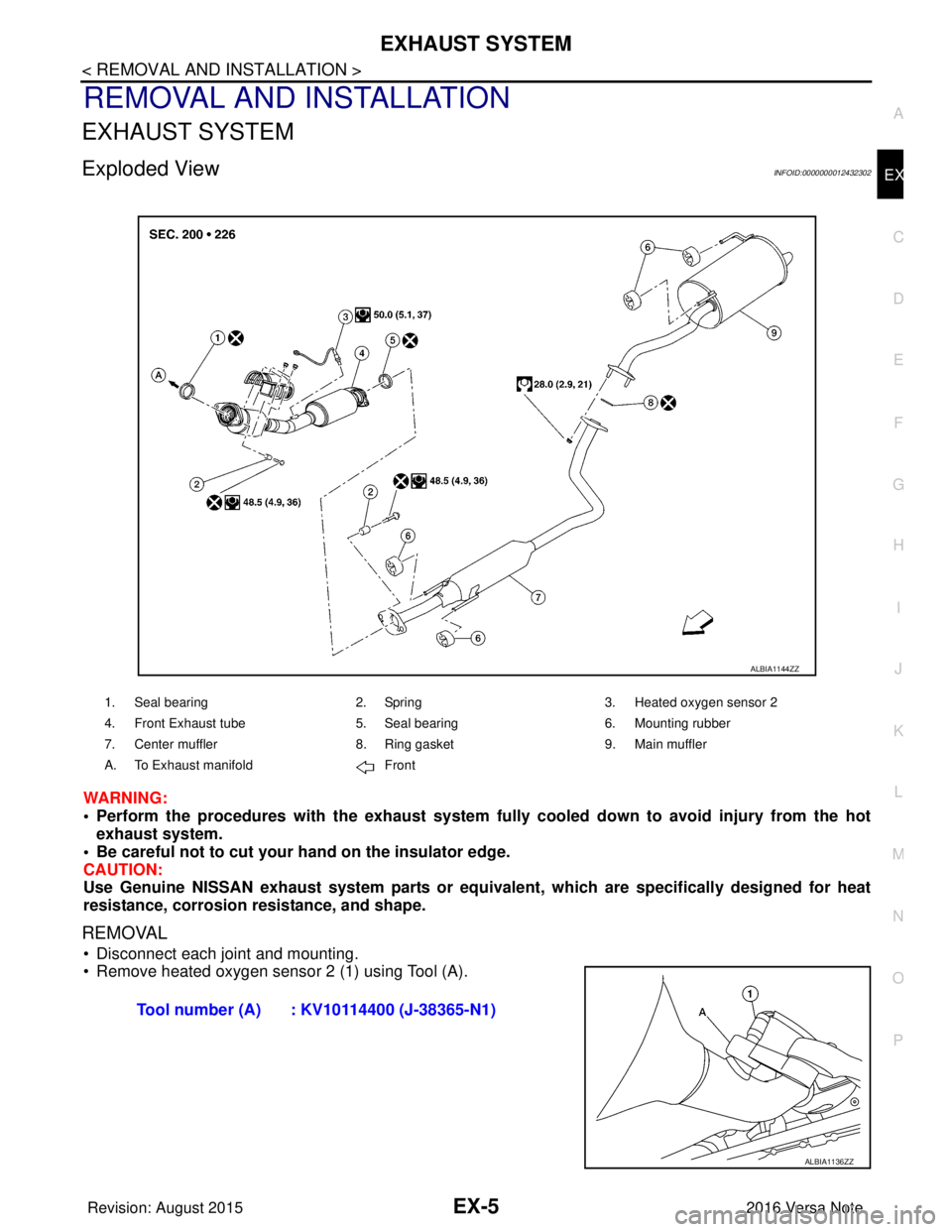
Exploded ViewINFOID:0000000012432302
WARNING:
• Perform the procedures with the exhaust system full
y cooled down to avoid injury from the hot
exhaust system.
• Be careful not to cut your hand on the insulator edge.
CAUTION:
Use Genuine NISSAN exhaust system parts or equivalent, which are specifically designed for heat
resistance, corrosion resistance, and shape.
REMOVAL
• Disconnect each joint and mounting.
• Remove heated oxygen sensor 2 (1) using Tool (A).
1. Seal bearing 2. Spring3. Heated oxygen sensor 2
4. Front Exhaust tube 5. Seal bearing6. Mounting rubber
7. Center muffler 8. Ring gasket9. Main muffler
A. To Exhaust manifold Front
ALBIA1144ZZ
Tool number (A) : KV10114400 (J-38365-N1)
ALBIA1136ZZ
Revision: August 2015 2016 Versa Note
cardiagn.com
Page 1651 of 3641
EX-6
< REMOVAL AND INSTALLATION >
EXHAUST SYSTEM
INSTALLATION
Installation is in the reverse order of removal.
CAUTION:
• Do not reuse gasket.
• Do not reuse seal bearing.
• Discard any heated oxygen sensor 2 which has been dropped from a height of more than 0.5 m (19.7
in) onto a hard surface such as a concrete floor. Use a new one.
• Before installing a new heated o xygen sensor 2, clean exhaust system threads using a suitable tool
and apply anti-seize lubricant.
• Do not over tighten heated oxygen sensor 2. Doin g so may cause damage to the heated oxygen sen-
sor 2, resulting in the “MIL” coming on.
• Prevent rust preventives from adhering to the sensor body.
• If heat insulator is badly deformed, repair or re place it. If deposits such as mud pile up on the heat
insulator, remove them.
• When installing heat insulator avoid large gaps or interference between heat insulator and each
exhaust pipe.
• Remove deposits from the sealing surface of each connection. Connect them securely to avoid
exhaust gas leaks.
• When installing each mounting rubber, use silicon oil to avoid twisting.
• Temporarily tighten nuts and bolts. Check each part for unusual interference and mounting rubber interference, and then tighten them to the specified torque.
• When installing each mounting rubber, avoid twisting or unus ual extension in up/down, front/rear
and right/left directions.
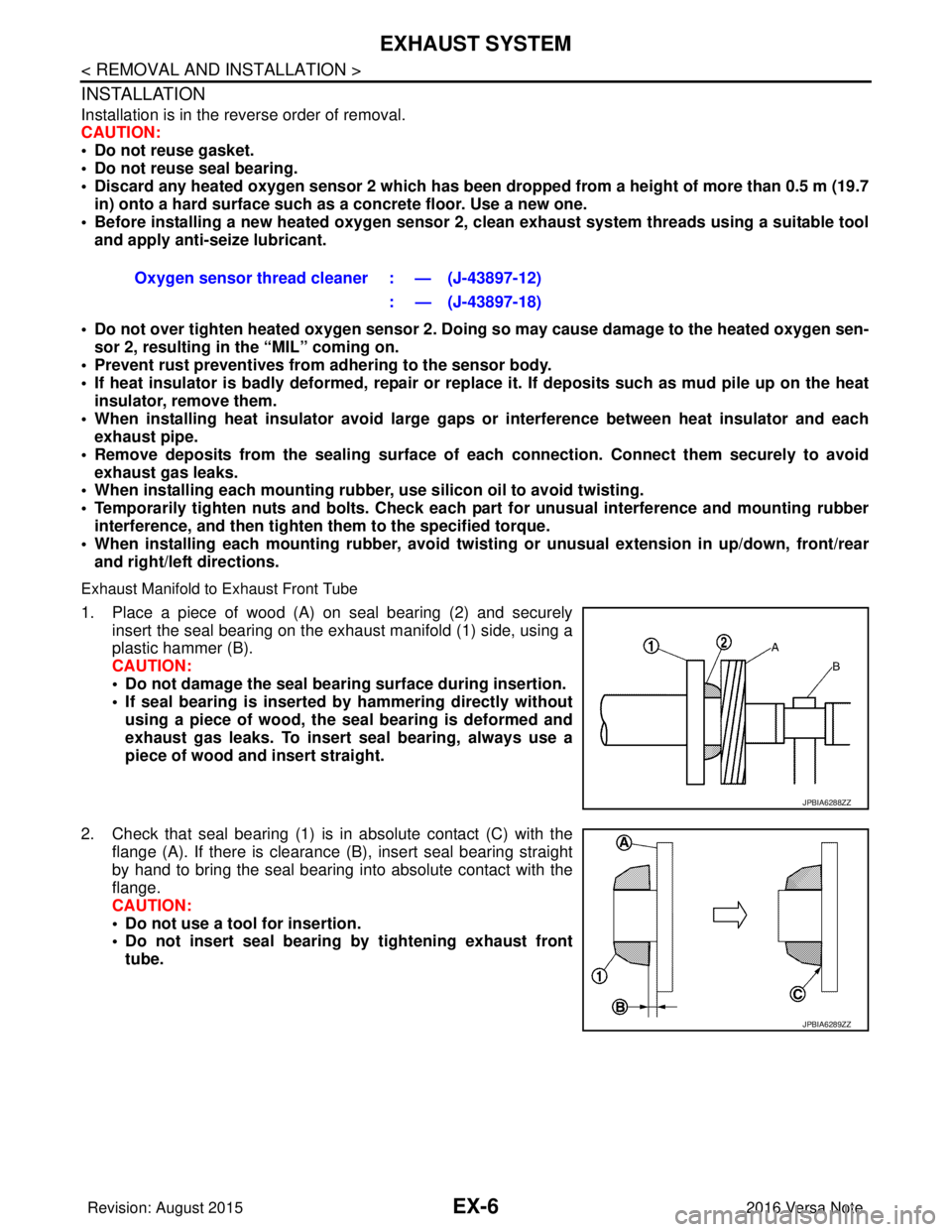
Exhaust Manifold to Exhaust Front Tube
1. Place a piece of wood (A) on seal bearing (2) and securely insert the seal bearing on the exhaust manifold (1) side, using a
plastic hammer (B).
CAUTION:
• Do not damage the seal bearing surface during insertion.
• If seal bearing is inserted by hammering directly without
using a piece of wood, the seal bearing is deformed and
exhaust gas leaks. To insert seal bearing, always use a
piece of wood and insert straight.
2. Check that seal bearing (1) is in absolute contact (C) with the flange (A). If there is clearance (B), insert seal bearing straight
by hand to bring the seal bearing into absolute contact with the
flange.
CAUTION:
• Do not use a tool for insertion.
• Do not insert seal bearing by tightening exhaust front
tube. Oxygen sensor thread cleaner : — (J-43897-12)
: — (J-43897-18)
JPBIA6288ZZ
JPBIA6289ZZ
Revision: August 2015 2016 Versa Note
cardiagn.com
Page 1656 of 3641

EXL-4
< PRECAUTION >
PRECAUTIONS
PRECAUTION
PRECAUTIONS
Precaution for Supplemental Restraint System (SRS) "AIR BAG" and "SEAT BELT
PRE-TENSIONER"
INFOID:0000000012432764
The Supplemental Restraint System such as “A IR BAG” and “SEAT BELT PRE-TENSIONER”, used along
with a front seat belt, helps to reduce the risk or severity of injury to the driver and front passenger for certain
types of collision. Information necessary to service the system safely is included in the SR and SB section of
this Service Manual.
WARNING:
• To avoid rendering the SRS inopera tive, which could increase the risk of personal injury or death in
the event of a collision which would result in air bag inflation, all maintenance must be performed by
an authorized NISSAN/INFINITI dealer.
• Improper maintenance, including in correct removal and installation of the SRS, can lead to personal
injury caused by unintent ional activation of the system. For re moval of Spiral Cable and Air Bag
Module, see the SR section.
• Do not use electrical test equipmen t on any circuit related to the SRS unless instructed to in this
Service Manual. SRS wiring harn esses can be identified by yellow and/or orange harnesses or har-
ness connectors.
PRECAUTIONS WHEN USING POWER TOOLS (AIR OR ELECTRIC) AND HAMMERS
WARNING:
• When working near the Airbag Diagnosis Sensor Unit or other Airbag System sensors with the Igni-
tion ON or engine running, DO NOT use air or electri c power tools or strike near the sensor(s) with a
hammer. Heavy vibration could activate the sensor( s) and deploy the air bag(s), possibly causing
serious injury.
• When using air or electric power tools or hammers , always switch the Ignition OFF, disconnect the
battery and wait at least three minutes before performing any service.
Precaution for WorkINFOID:0000000012432765
• When removing or disassembling each component, be careful not to damage or deform it. If a component may be subject to interference, be sure to protect it with a shop cloth.
• When removing (disengaging) components with a screwdriver or similar tool, be sure to wrap the component with a shop cloth or vinyl tape to protect it.
• Protect the removed parts with a shop cloth and prevent them from being dropped.
• Replace a deformed or damaged clip.
• If a part is specified as a non-reusable part, always replace it with a new one.
• Be sure to tighten bolts and nuts securely to the specified torque.
• After installation is complete, be sure to check that each part works properly.
• Follow the steps below to clean components:
- Water soluble dirt:
• Dip a soft cloth into lukewarm water, wring the water out of the cloth and wipe the dirty area.
• Then rub with a soft, dry cloth.
- Oily dirt:
• Dip a soft cloth into lukewarm water with mild detergent (concentration: within 2 to 3%) and wipe the dirty area.
• Then dip a cloth into fresh water, wring the water out of the cloth and wipe the detergent off.
• Then rub with a soft, dry cloth.
- Do not use organic solvent such as thinner, benzene, alcohol or gasoline.
- For genuine leather seats, use a genuine leather seat cleaner.
Revision: August 2015 2016 Versa Note
cardiagn.com
Page 1667 of 3641

DIAGNOSIS SYSTEM (BCM) (WITH INTELLIGENT KEY SYSTEM)
EXL-15
< SYSTEM DESCRIPTION >
C
D E
F
G H
I
J
K
M A
B
EXL
N
O P
BATTERY SAVER
BATTERY SAVER : CONSULT Function (BCM - BATTERY SAVER)INFOID:0000000012542307
DATA MONITOR
ACTIVE TEST
WORK SUPPORT
*: Initial setting HI BEAM SW [On/Off]
Indicates condition of Hi beam switch operation of combination switch.
HEAD LAMP SW 1 [On/Off] Indicates condition of head lamp switch 1 operation of combination switch.
HEAD LAMP SW 2 [On/Off] Indicates condition of head lamp switch 2 operation of combination switch.
PASSING SW [On/Off] Indicates condition of passing switch operation of combination switch.
FR FOG SW [On/Off] Indicates condition of front fog lamp switch operation of combination switch.
Monitor Item [Unit]
Description
Monitor Item [Unit]Description
REQ SW -DR [On/Off] Indicates condition of door request switch LH.
REQ SW -AS [On/Off] Indicates condition of door request switch RH.
PUSH SW [On/Off] Indicates condition push-button ignition switch.
UNLK SEN -DR [On/Off] Indicates condition of door unlock sensor.
DOOR SW-DR [On/Off] Indicates condition of front door switch LH.
DOOR SW-AS [On/Off] Indicates condition of front door switch RH.
DOOR SW-RR [On/Off] Indicates condition of rear door switch RH.
DOOR SW-RL [On/Off] Indicates condition of rear door switch LH.
DOOR SW-BK [On/Off] Indicates condition of back door switch.
CDL LOCK SW [On/Off] Indicates condition of lock signal from door lock and unlock switch.
CDL UNLOCK SW [On/Off] Indicates condition of unlock signal from door lock and unlock switch.
KEY CYL LK-SW [On/Off] Indicates condition of lock signal from door key cylinder switch.
KEY CYL UN-SW [On/Off] Indicates condition of unlock signal from door key cylinder switch.
RKE-LOCK [On/Off] Indicates condition of lock signal from Intelligent Key.
RKE-UNLOCK [On/Off] Indicates condition of unlock signal from Intelligent Key.
Test item Description
BATTERY SAVER This test is able to check battery saver operation [On/Off].
Support ItemSetting Description
BATTERY SAVER SET ON*
Exterior lamp battery saver function ON.
OFF Exterior lamp battery saver function OFF.
ROOM LAMP TIMER SET MODE 3* 10 min.
Sets interior room lamp battery saver timer operating time.
MODE 2 60 min.
MODE 1 15 min.
Revision: August 2015 2016 Versa Note
cardiagn.com
Page 1770 of 3641
PRECAUTIONSEXT-3
< PRECAUTION >
C
DE
F
G H
I
J
L
M A
B
EXT
N
O P
PRECAUTION
PRECAUTIONS
Precaution for Supplemental Restraint System (SRS) "AIR BAG" and "SEAT BELT
PRE-TENSIONER"
INFOID:0000000012432151
The Supplemental Restraint System such as “AIR BAG” and “SEAT BELT PRE-TENSIONER”, used along
with a front seat belt, helps to reduce the risk or severi ty of injury to the driver and front passenger for certain
types of collision. Information necessary to service the system safely is included in the SR and SB section of
this Service Manual.
WARNING:
• To avoid rendering the SRS inoper ative, which could increase the risk of personal injury or death in
the event of a collision which would result in air bag inflation, all maintenance must be performed by
an authorized NISSAN/INFINITI dealer.
• Improper maintenance, including in correct removal and installation of the SRS, can lead to personal
injury caused by unintentional act ivation of the system. For removal of Spiral Cable and Air Bag
Module, see the SR section.
• Do not use electrical test equipm ent on any circuit related to the SRS unless instructed to in this
Service Manual. SRS wiring harnesses can be identi fied by yellow and/or orange harnesses or har-
ness connectors.
PRECAUTIONS WHEN USING POWER TOOLS (AIR OR ELECTRIC) AND HAMMERS
WARNING:
• When working near the Airbag Diagnosis Sensor Un it or other Airbag System sensors with the Igni-
tion ON or engine running, DO NOT use air or el ectric power tools or strike near the sensor(s) with a
hammer. Heavy vibration could activate the sensor( s) and deploy the air bag(s), possibly causing
serious injury.
• When using air or electric power tools or hammers, always switch the Ignition OFF, disconnect the
battery and wait at least three mi nutes before performing any service.
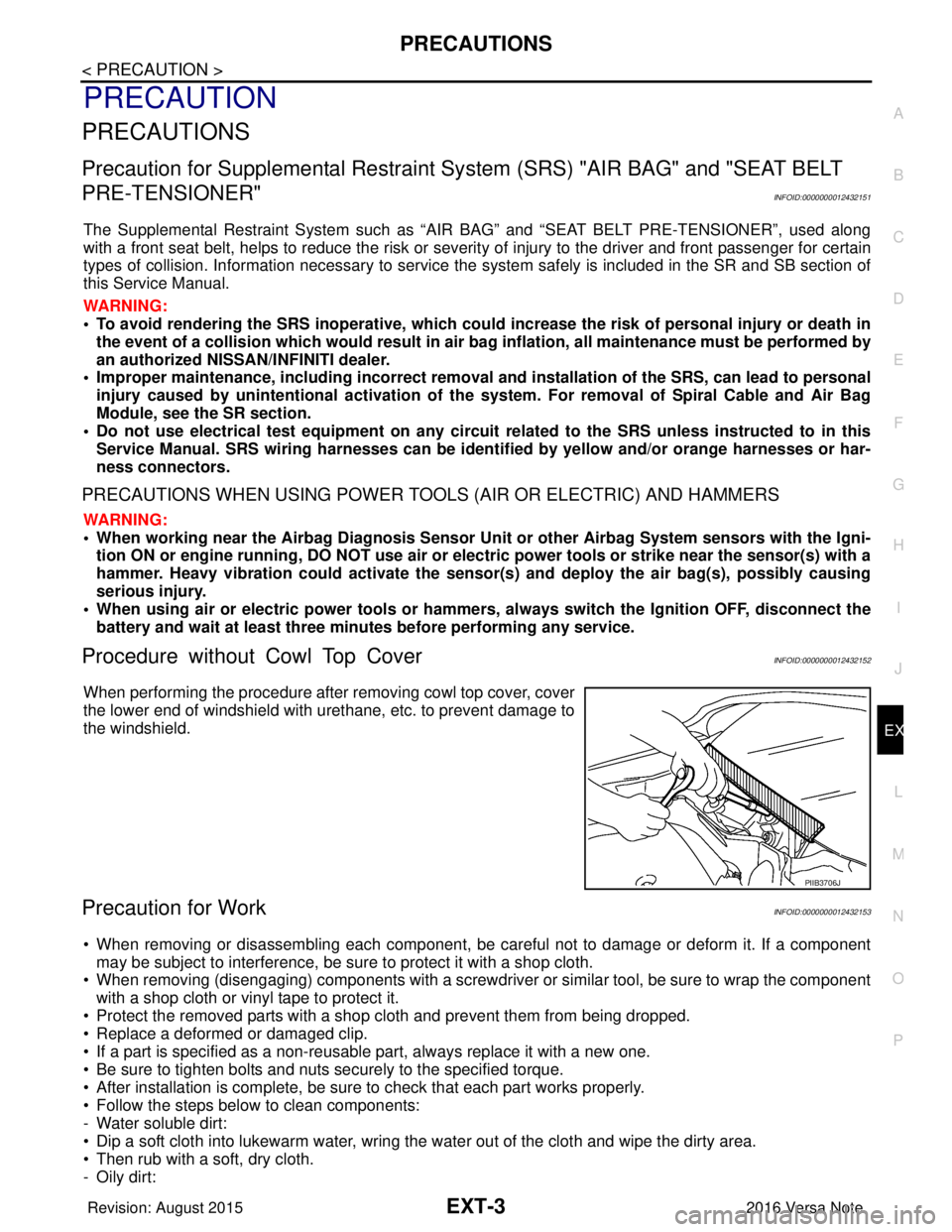
Procedure without Cowl Top CoverINFOID:0000000012432152
When performing the procedure after removing cowl top cover, cover
the lower end of windshield with urethane, etc. to prevent damage to
the windshield.
Precaution for WorkINFOID:0000000012432153
• When removing or disassembling each component, be ca reful not to damage or deform it. If a component
may be subject to interference, be sure to protect it with a shop cloth.
• When removing (disengaging) components with a screwdriver or similar tool, be sure to wrap the component with a shop cloth or vinyl tape to protect it.
• Protect the removed parts with a shop cloth and prevent them from being dropped.
• Replace a deformed or damaged clip.
• If a part is specified as a non-reusabl e part, always replace it with a new one.
• Be sure to tighten bolts and nuts securely to the specified torque.
• After installation is complete, be sure to check that each part works properly.
• Follow the steps below to clean components:
- Water soluble dirt:
• Dip a soft cloth into lukewarm water, wring the water out of the cloth and wipe the dirty area.
• Then rub with a soft, dry cloth.
-Oily dirt:
PIIB3706J
Revision: August 2015 2016 Versa Note
cardiagn.com