2016 NISSAN NOTE lock
[x] Cancel search: lockPage 2167 of 3641
INT-16
< REMOVAL AND INSTALLATION >
FRONT DOOR FINISHER
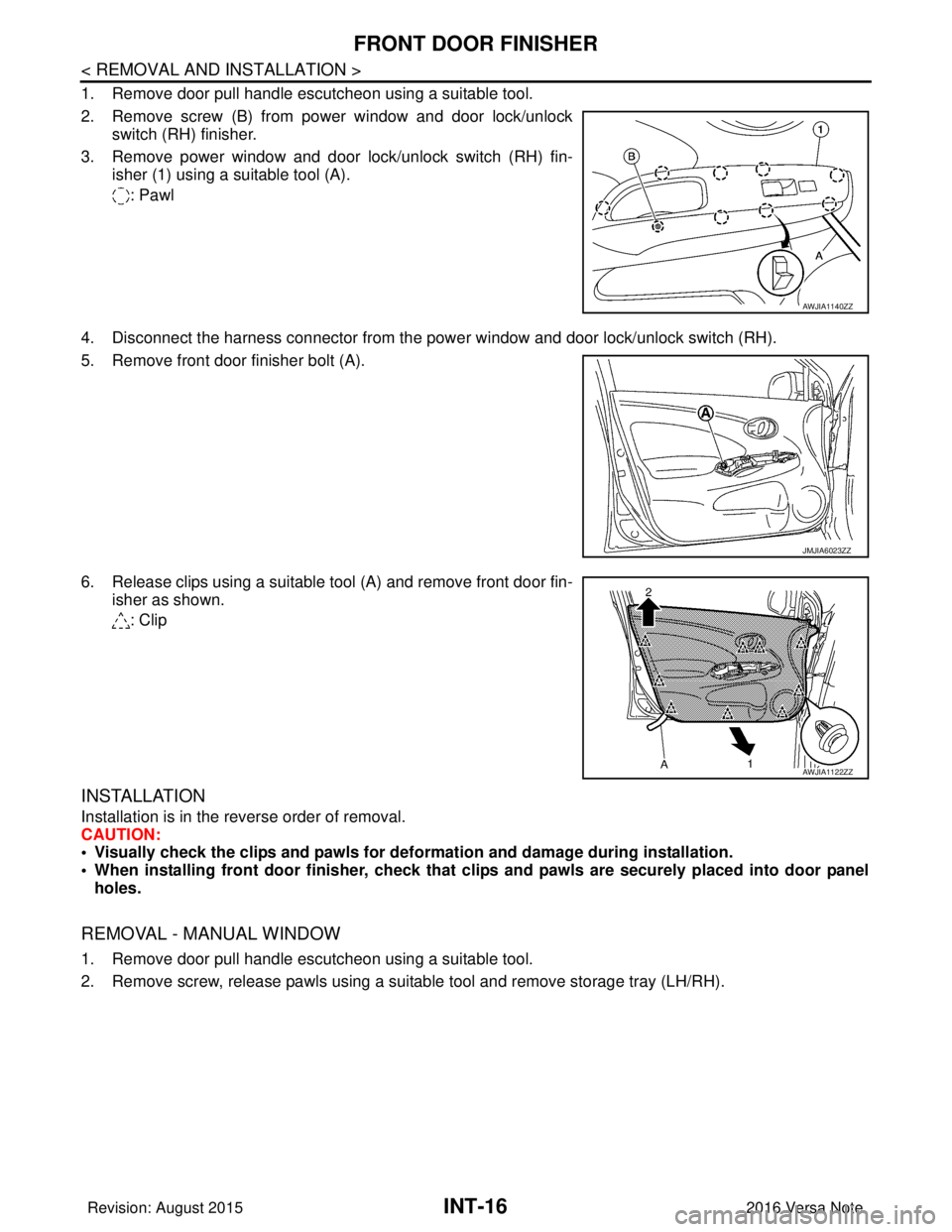
1. Remove door pull handle escutcheon using a suitable tool.
2. Remove screw (B) from power window and door lock/unlockswitch (RH) finisher.
3. Remove power window and door lock/unlock switch (RH) fin- isher (1) using a suitable tool (A).
: Pawl
4. Disconnect the harness connector from the pow er window and door lock/unlock switch (RH).
5. Remove front door finisher bolt (A).
6. Release clips using a suitable tool (A) and remove front door fin- isher as shown.
: Clip
INSTALLATION
Installation is in the reverse order of removal.
CAUTION:
• Visually check the clips and pawls for deformation and damage during installation.
• When installing front door finisher, check that cl ips and pawls are securely placed into door panel
holes.
REMOVAL - MANUAL WINDOW
1. Remove door pull handle escutcheon using a suitable tool.
2. Remove screw, release pawls using a suitable tool and remove storage tray (LH/RH).
AWJIA1140ZZ
JMJIA6023ZZ
AWJIA1122ZZ
Revision: August 2015 2016 Versa Note
cardiagn.com
Page 2170 of 3641
REAR DOOR FINISHERINT-19
< REMOVAL AND INSTALLATION >
C
DE
F
G H
I
K L
M A
B
INT
N
O P
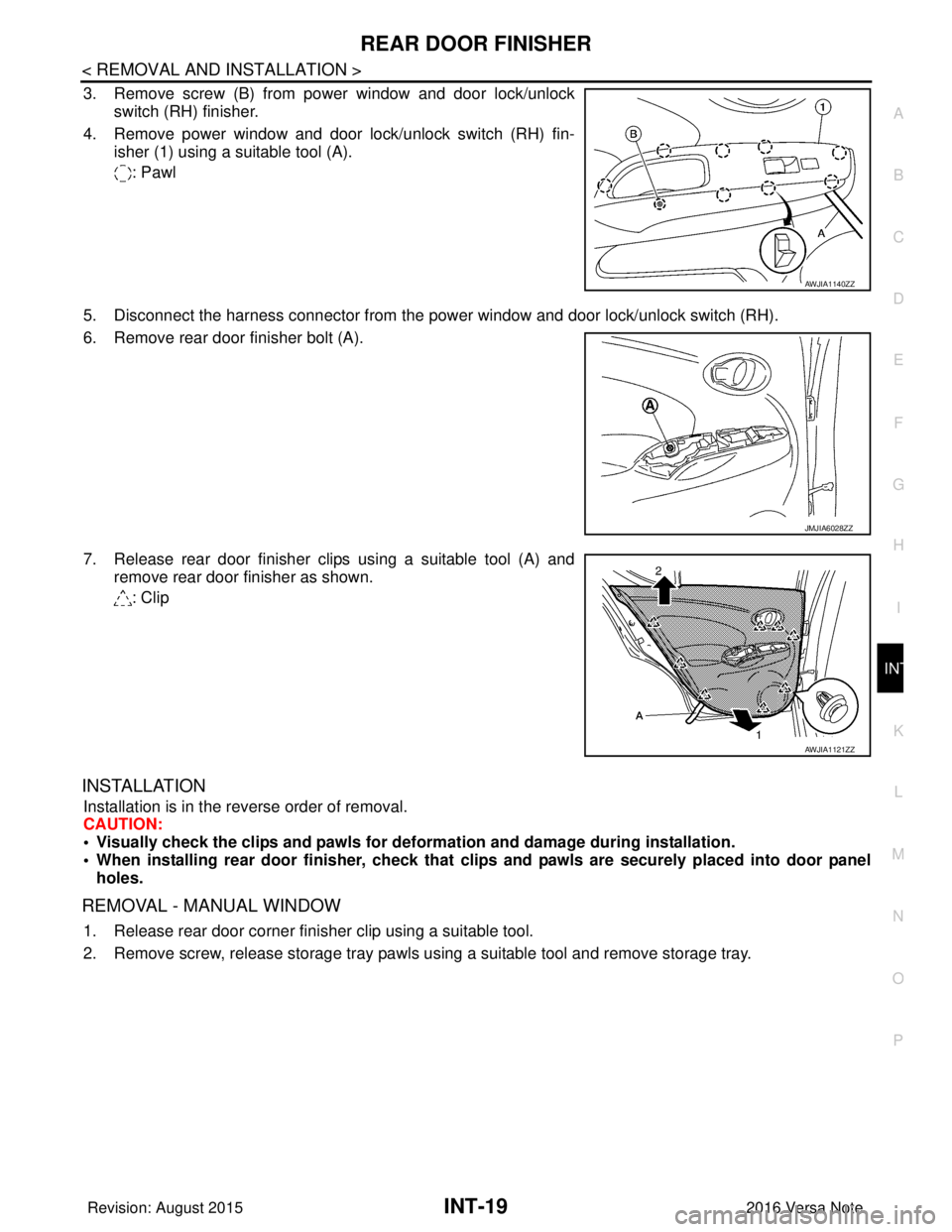
3. Remove screw (B) from power window and door lock/unlock switch (RH) finisher.
4. Remove power window and door lock/unlock switch (RH) fin- isher (1) using a suitable tool (A).
: Pawl
5. Disconnect the harness connector from the power window and door lock/unlock switch (RH).
6. Remove rear door finisher bolt (A).
7. Release rear door finisher clips using a suitable tool (A) and remove rear door finisher as shown.
: Clip
INSTALLATION
Installation is in the reverse order of removal.
CAUTION:
• Visually check the clips and pawls for defo rmation and damage during installation.
• When installing rear door finisher , check that clips and pawls are securely placed into door panel
holes.
REMOVAL - MANUAL WINDOW
1. Release rear door corner finisher clip using a suitable tool.
2. Remove screw, release storage tray pawls using a suitable tool and remove storage tray.
AWJIA1140ZZ
JMJIA6028ZZ
AWJIA1121ZZ
Revision: August 2015 2016 Versa Note
cardiagn.com
Page 2179 of 3641
INT-28
< REMOVAL AND INSTALLATION >
FLOOR TRIM
6. Disconnect negative and positive battery terminals, then wait at least three minutes. Refer to PG-70,
"Removal and Installation (Battery)".
WARNING:
Before servicing the SRS, turn th e ignition switch off, disconnect both battery terminals then wait
at least three minutes.
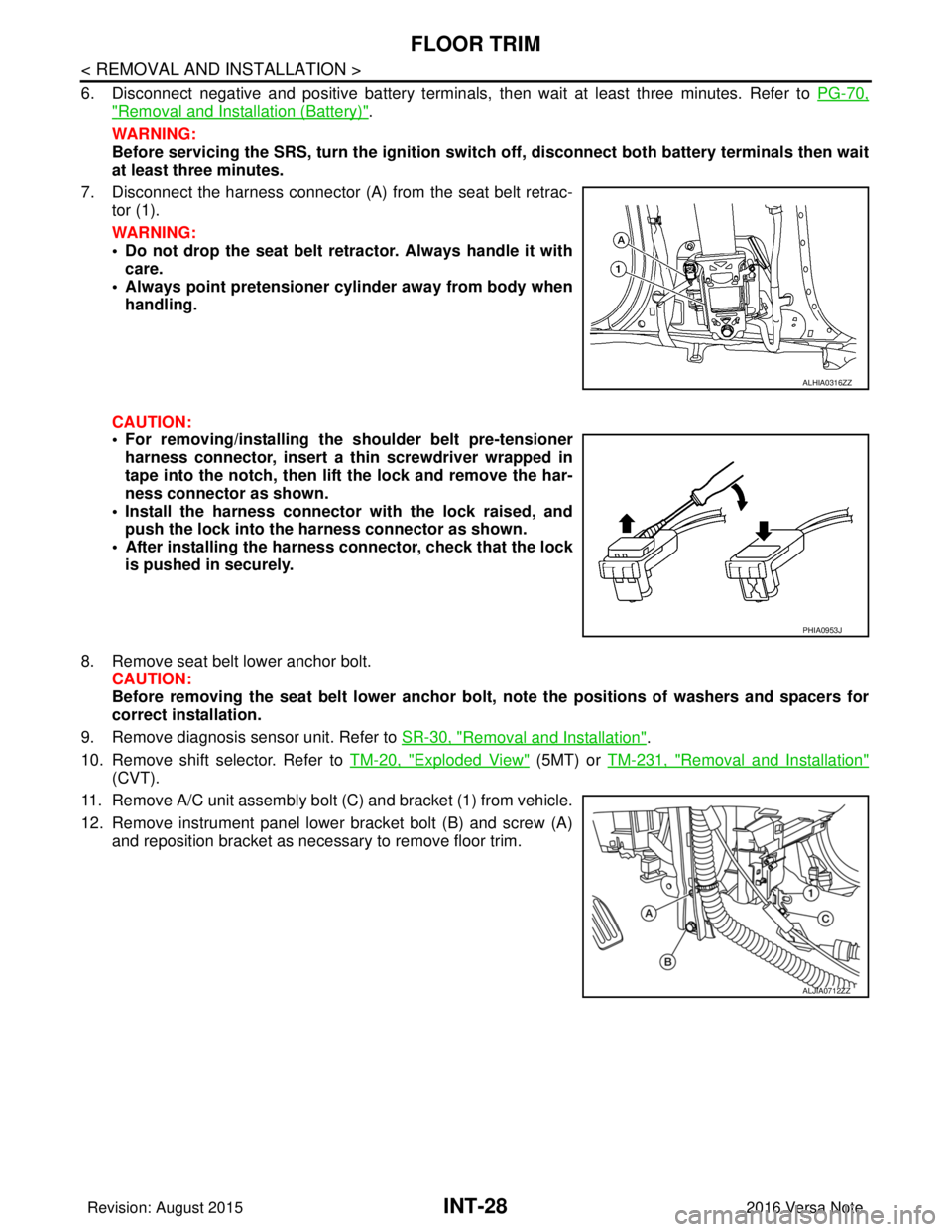
7. Disconnect the harness connector (A ) from the seat belt retrac-
tor (1).
WARNING:
• Do not drop the seat belt retractor. Always handle it with care.
• Always point pretensioner cylinder away from body when handling.
CAUTION:
• For removing/installing the shoulder belt pre-tensioner harness connector, insert a thin screwdriver wrapped in
tape into the notch, then lift the lock and remove the har-
ness connector as shown.
• Install the harness connector with the lock raised, and push the lock into the harness connector as shown.
• After installing the harness connector, check that the lock
is pushed in securely.
8. Remove seat belt lower anchor bolt. CAUTION:
Before removing the seat belt lower anchor bolt , note the positions of washers and spacers for
correct installation.
9. Remove diagnosis sensor unit. Refer to SR-30, "
Removal and Installation".
10. Remove shift selector. Refer to TM-20, "
Exploded View" (5MT) or TM-231, "Removal and Installation"
(CVT).
11. Remove A/C unit assembly bolt (C) and bracket (1) from vehicle.
12. Remove instrument panel lower bracket bolt (B) and screw (A) and reposition bracket as necessary to remove floor trim.
ALHIA0316ZZ
PHIA0953J
ALJIA0712ZZ
Revision: August 2015 2016 Versa Note
cardiagn.com
Page 2182 of 3641
HEADLININGINT-31
< REMOVAL AND INSTALLATION >
C
DE
F
G H
I
K L
M A
B
INT
N
O P
Removal and InstallationINFOID:0000000012431874
REMOVAL
1. Remove front pillar finishers (LH/RH). Refer to INT-21, "FRONT PILLAR FINISHER : Removal and Instal-
lation".
2. Remove sun visor screws and sun visors (LH/RH).
3. Remove map lamp. Refer to INL-51, "
Removal and Installation".
4. Remove interior room lamp. Refer to INL-53, "
Removal and Installation".
5. Remove microphone (if equipped). Refer to AV-59, "
Removal and Installation".
6. Remove center pillar upper finishers (LH/RH). Refer to INT-25, "
CENTER PILLAR UPPER FINISHER :
Removal and Installation".
7. Remove luggage side upper finishers (LH/RH). Refer to INT-35, "
LUGGAGE SIDE UPPER FINISHER :
Removal and Installation".
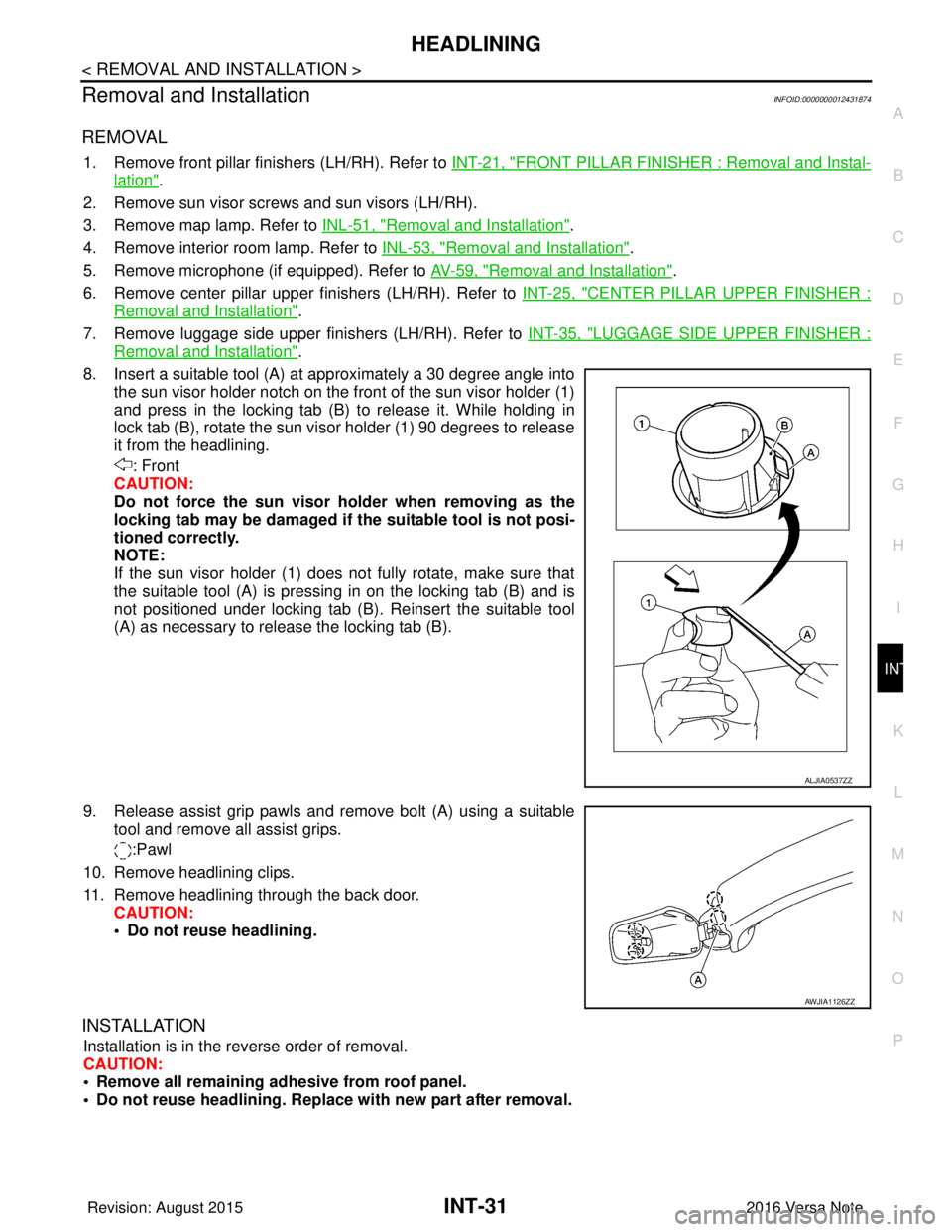
8. Insert a suitable tool (A) at approximately a 30 degree angle into the sun visor holder notch on the front of the sun visor holder (1)
and press in the locking tab (B) to release it. While holding in
lock tab (B), rotate the sun visor holder (1) 90 degrees to release
it from the headlining.
: Front
CAUTION:
Do not force the sun visor ho lder when removing as the
locking tab may be damaged if the suitable tool is not posi-
tioned correctly.
NOTE:
If the sun visor holder (1) does not fully rotate, make sure that
the suitable tool (A) is pressing in on the locking tab (B) and is
not positioned under locking tab (B). Reinsert the suitable tool
(A) as necessary to release the locking tab (B).
9. Release assist grip pawls and remove bolt (A) using a suitable tool and remove all assist grips.
:Pawl
10. Remove headlining clips.
11. Remove headlining through the back door. CAUTION:
• Do not reuse headlining.
INSTALLATION
Installation is in the reverse order of removal.
CAUTION:
• Remove all remaining adhesive from roof panel.
• Do not reuse headlini ng. Replace with new part after removal.
ALJIA0537ZZ
AWJIA1126ZZ
Revision: August 2015 2016 Versa Note
cardiagn.com
Page 2200 of 3641
![NISSAN NOTE 2016 Service Repair Manual LAN-12
< SYSTEM DESCRIPTION >[CAN FUNDAMENTAL]
TROUBLE DIAGNOSIS
NOTE:
When data link connector branch line is open, transmiss
ion and reception of CAN communication signals are
not affected. Therefor](/manual-img/5/57363/w960_57363-2199.png "NISSAN NOTE 2016 Service Repair Manual LAN-12
< SYSTEM DESCRIPTION >[CAN FUNDAMENTAL]
TROUBLE DIAGNOSIS
NOTE:
When data link connector branch line is open, transmiss
ion and reception of CAN communication signals are
not affected. Therefor")
LAN-12
< SYSTEM DESCRIPTION >[CAN FUNDAMENTAL]
TROUBLE DIAGNOSIS
NOTE:
When data link connector branch line is open, transmiss
ion and reception of CAN communication signals are
not affected. Therefore, no symptoms occur. However, be sure to repair malfunctioning circuit.
Example: CAN-H, CAN-L Harness Short Circuit
CAN Diagnosis with CONSULTINFOID:0000000012433335
CAN diagnosis on CONSULT extracts the root c ause by receiving the following information.
Unit name Major symptom
ECM
Normal operation.
BCM
EPS control unit
Combination meter
ABS actuator and electric unit (control unit)
TCM
IPDM E/R
JSMIA0445GB
Unit name
Major symptom
ECM • Engine torque limiting is affected, and shift harshness increases.
• Engine speed drops.
BCM • Reverse warning buzzer does not sound.
• The front wiper moves under continuous operation mode even though the front
wiper switch being in the intermittent position.
• The room lamp does not turn ON.
• The engine does not start (if an error or malfunction occurs while turning the igni- tion switch OFF.)
• The steering lock does not release (if an error or malfunction occurs while turning the ignition switch OFF.)
EPS control unit The steering effort increases.
Combination meter • The tachometer and the speedometer do not move.
• Warning lamps turn ON.
• Indicator lamps do not turn ON.
ABS actuator and electric unit (control unit) Normal operation.
TCM No impact on operation.
IPDM E/R When the ignition switch is ON,
• The headlamps (Lo) turn ON.
• The cooling fan continues to rotate.
Revision: August 2015
2016 Versa Note
cardiagn.com
Page 2219 of 3641
![NISSAN NOTE 2016 Service Repair Manual LAN
SYSTEMLAN-31
< SYSTEM DESCRIPTION > [CAN]
C
D
E
F
G H
I
J
K L
B A
O P
N
Vehicle speed signal (ABS)
TR R R R R
Brake warning lamp signal TR
Detention switch signal TR
Front wiper stop position sign](/manual-img/5/57363/w960_57363-2218.png "NISSAN NOTE 2016 Service Repair Manual LAN
SYSTEMLAN-31
< SYSTEM DESCRIPTION > [CAN]
C
D
E
F
G H
I
J
K L
B A
O P
N
Vehicle speed signal (ABS)
TR R R R R
Brake warning lamp signal TR
Detention switch signal TR
Front wiper stop position sign")
LAN
SYSTEMLAN-31
< SYSTEM DESCRIPTION > [CAN]
C
D
E
F
G H
I
J
K L
B A
O P
N
Vehicle speed signal (ABS)
TR R R R R
Brake warning lamp signal TR
Detention switch signal TR
Front wiper stop position signal TR
High beam status signal RT
Ignition switch ON signal TR
RT
Interlock/PNP switch signal TR
RT
Low beam status signal RT
Push-button ignition switch status signal TR
OD OFF indicator signal RT
RT
Starter control relay signal TR
RT
Starter relay status signal TR
RT
Sleep-ready signal TR
TR
Wake up signal TR
Input shaft revolution signal RT
O/D OFF indicator signal TR
Output shaft revolution signal RT
Shift position signal RT RR
Target gear ratio signal RT
EPS warning lamp signal TR
Overdrive control switch signal RT
Fuel filler cap warning reset signal RT
O/D OFF switch signal RT
Odometer signal TR
Vehicle speed signal (Meter) RR TR
Wake up signal TR
Steering angle sensor signal RR T
A/C ON signal R T
Blower fan ON signal R T
Buzzer output signal RT
Dimmer signal RT
Door switch signal RRT
Engine start operation indicator lamp signal RT
Front wiper request signal RT
High beam request signal RRT
Key warning lamp signal RT
Low beam request signal RRT
Signal name
ECM
ABS
IPDM-E
TCMAV M
EPS
M&A
STRG
BCM
Revision: August 2015 2016 Versa Note
cardiagn.com
Page 2317 of 3641

MA-2
BRAKE FLUID LEVEL AND LEAKS ........................34
BRAKE FLUID LEVEL AND LEAKS : Inspection ...34
BRAKE LINES AND CABLES ............................... ...34
BRAKE LINES AND CABLES : Inspection .............34
BRAKE FLUID ....................................................... ...35
BRAKE FLUID : Inspection .....................................35
BRAKE FLUID : Draining ........................................35
BRAKE FLUID : Refilling ........................................35
BRAKE FLUID : Bleeding Brake System ................36
DISC BRAKE ......................................................... ...36
DISC BRAKE : Inspection ......................................36
DISC BRAKE : Brake Burnishing ...........................37
DISC BRAKE : Inspection ......................................37
DRUM BRAKE ....................................................... ...37
DRUM BRAKE : Inspection ....................................38
DRUM BRAKE : Brake Burn ishing .........................38
DRUM BRAKE : Inspection ....................................38
STEERING GEAR AND LINKAGE ........................ ...39
STEERING GEAR AND LINKAGE : Inspection ......39
AXLE AND SUSPENSION PARTS ........................ ...39
AXLE AND SUSPENSION PARTS : Inspection .....39
DRIVE SHAFT ........................................................ ...39
DRIVE SHAFT : Inspection .....................................40
LOCKS, HINGES AND HOOD LATCH .................. ...40
LOCKS, HINGES AND HOOD LATCH : Exploded
View ..................................................................... ...
40
LOCKS, HINGES AND HOOD LATCH : Exploded
View ..................................................................... ...
41
LOCKS, HINGES AND HOOD LATCH : Exploded
View ..................................................................... ...
42
LOCKS, HINGES AND HOOD LATCH : Exploded
View ..................................................................... ...
42
SEAT BELT, BUCKLES, RETRACTORS, AN-
CHORS AND ADJUSTERS ................................... ...
43
SEAT BELT, BUCKLES, RETRACTORS, AN-
CHORS AND ADJUSTERS : Inspection .................
43
Revision: August 2015 2016 Versa Note
cardiagn.com
Page 2320 of 3641
GENERAL MAINTENANCEMA-5
< PERIODIC MAINTENANCE >
C
DE
F
G H
I
J
K L
M B
MA
N
O A
PERIODIC MAINTENANCE
GENERAL MAINTENANCE
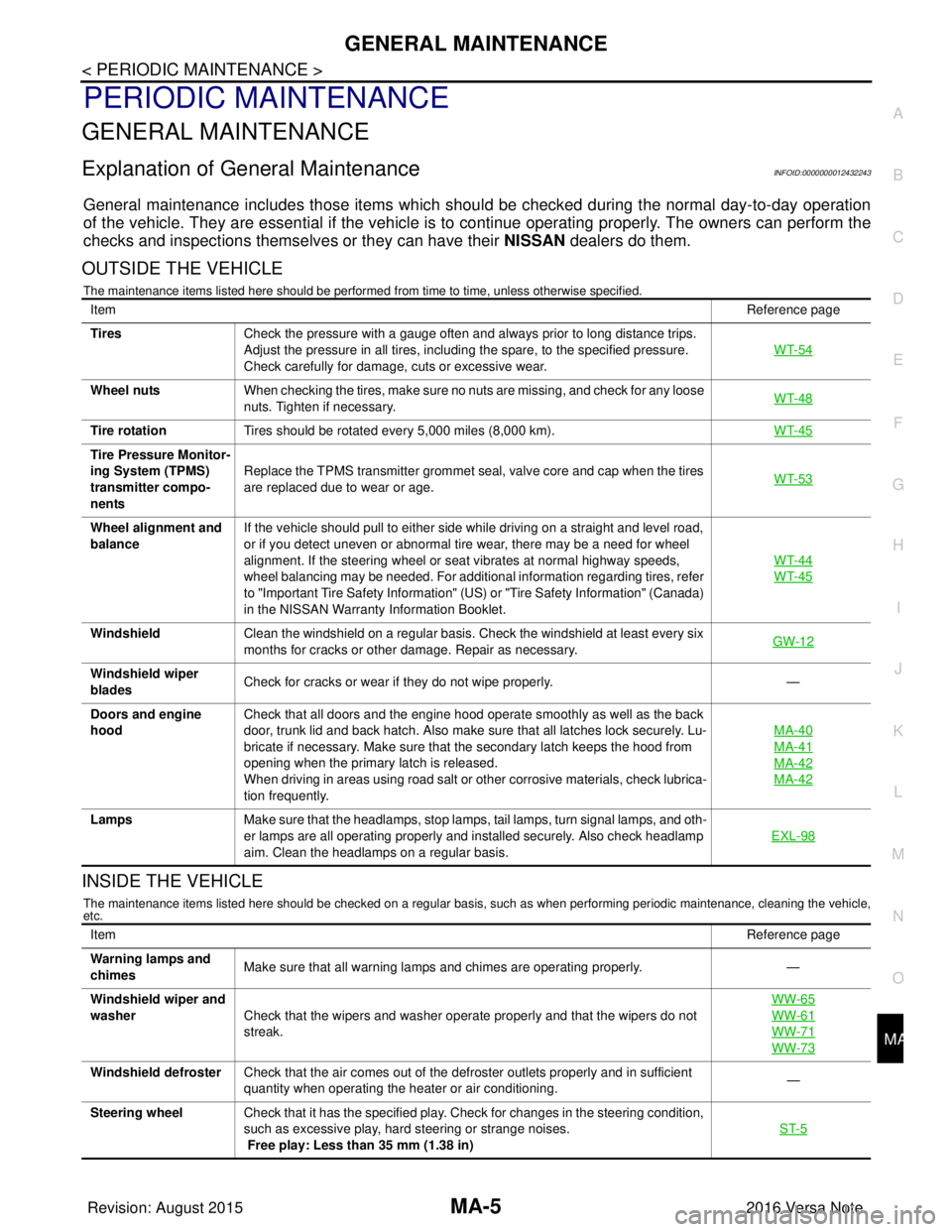
Explanation of Gene
ral MaintenanceINFOID:0000000012432243
General maintenance includes those items which shoul d be checked during the normal day-to-day operation
of the vehicle. They are essential if the vehicle is to continue operati ng properly. The owners can perform the
checks and inspections themselves or they can have their NISSAN dealers do them.
OUTSIDE THE VEHICLE
The maintenance items listed here should be performed from time to time, unless otherwise specified.
INSIDE THE VEHICLE
The maintenance items listed here should be checked on a regular basis, such as when performing periodic maintenance, cleaning the vehicle,
etc.
Item Reference page
Tires Check the pressure with a gauge often and always prior to long distance trips.
Adjust the pressure in all tires, including the spare, to the specified pressure.
Check carefully for damage, cuts or excessive wear. WT-54
Wheel nuts
When checking the tires, make sure no nuts are missing, and check for any loose
nuts. Tighten if necessary. WT-48
Tire rotation
Tires should be rotated every 5,000 miles (8,000 km). WT-45
Tire Pressure Monitor-
ing System (TPMS)
transmitter compo-
nentsReplace the TPMS transmitter grommet seal, valve core and cap when the tires
are replaced due to wear or age.
WT-53
Wheel alignment and
balanceIf the vehicle should pull to either side while driving on a straight and level road,
or if you detect uneven or abnormal tire wear, there may be a need for wheel
alignment. If the steering wheel or seat vibrates at normal highway speeds,
wheel balancing may be needed. For additional information regarding tires, refer
to "Important Tire Safety Information" (US) or "Tire Safety Information" (Canada)
in the NISSAN Warranty
Information Booklet. WT-44
WT-45
Windshield
Clean the windshield on a regular basis. Check the windshield at least every six
months for cracks or other damage. Repair as necessary. GW-12
Windshield wiper
bladesCheck for cracks or wear if they do not wipe properly.
—
Doors and engine
hood Check that all doors and the engine hood operate smoothly as well as the back
door, trunk lid and back hatch. Also make sure that all latches lock securely. Lu-
bricate if necessary. Make sure that the secondary latch keeps the hood from
opening when the primary latch is released.
When driving in areas using road salt or other corrosive materials, check lubrica-
tion frequently. MA-40
MA-41
MA-42
MA-42
Lamps
Make sure that the headlamps, stop lamps, tail lamps, turn signal lamps, and oth-
er lamps are all operating properly and installed securely. Also check headlamp
aim. Clean the headlamps on a regular basis. EXL-98
Item
Reference page
Warning lamps and
chimes Make sure that all warning lamps and chimes are operating properly.
—
Windshield wiper and
washer Check that the wipers and washer operate properly and that the wipers do not
streak. WW-65
WW-61
WW-71
WW-73
Windshield defroster
Check that the air comes out of the defroster outlets properly and in sufficient
quantity when operating the heater or air conditioning. —
Steering wheel Check that it has the specified play. Check for changes in the steering condition,
such as excessive play, hard steering or strange noises.
Free play: Less than 35 mm (1.38 in) ST-5
Revision: August 2015
2016 Versa Note
cardiagn.com