2016 NISSAN NOTE ignition
[x] Cancel search: ignitionPage 3605 of 3641

WW-40
< DTC/CIRCUIT DIAGNOSIS >
FRONT WIPER AUTO STOP SIGNAL CIRCUIT
FRONT WIPER AUTO STOP SIGNAL CIRCUIT
Component Function CheckINFOID:0000000012433219
1. CHECK FRONT WIPER (AUTO STOP) SIGNAL
1. Select FR WIPER STOP of BCM (WIPER) data monitor item.
2. Operate the front wiper.
3. Check that FR WIPER STOP changes from ON to OFF according to the wiper position.
Is the inspection result normal?
YES >> Front wiper auto stop signal circuit is normal.
NO >> Refer to WW-40, "
Diagnosis Procedure".
Diagnosis ProcedureINFOID:0000000012433220
Regarding Wiring Diagram information, refer to WW-22, "Wiring Diagram".
1. CHECK FRONT WIPER MOTOR (AUTO STOP) OUTPUT VOLTAGE
1. Turn the ignition switch ON.
2. Check voltage between IPDM E/R harness connector and ground.
Is the inspection result normal?
YES >> Check for intermittent failure.
NO >> GO TO 2.
2. CHECK FRONT WIPER MOTOR (AUTO STOP) SHORT CIRCUIT
1. Turn the ignition switch OFF.
2. Disconnect IPDM E/R and front wiper motor.
3. Check continuity between IP DM E/R harness connector and ground.
Is the inspection result normal?
YES >> GO TO 3.
NO >> Repair or replace harness.
3. CHECK FRONT WIPER MOTOR (AUTO STOP) CIRCUIT CONTINUITY
Check continuity between IPDM E/R harness c onnector and front wiper motor harness connector.
Is the inspection result normal?
Data monitor ConditionStatus
FR WIPER STOP Front wiper motor Stop position
ON
Except stop position OFF
IPDM E/R
GroundFRONT WIPER
Vo l ta g e
(Approx.)
Connector Terminal
E46 74 Except stop position
Battery voltage
Stop position 0 V
IPDM E/R
GroundContinuity
Connector Terminal
E46 74 No
IPDM E/R Front wiper motor
Continuity
Connector TerminalConnector Terminal
E46 74E1 4Yes
Revision: August 2015 2016 Versa Note
cardiagn.com
Page 3607 of 3641

WW-42
< DTC/CIRCUIT DIAGNOSIS >
FRONT WIPER MOTOR GROUND CIRCUIT
FRONT WIPER MOTOR GROUND CIRCUIT
Diagnosis ProcedureINFOID:0000000012433221
Regarding Wiring Diagram information, refer to WW-22, "Wiring Diagram".
1. CHECK FRONT WIPER MOTOR GROUND CIRCUIT
1. Turn the ignition switch OFF.
2. Disconnect front wiper motor.
3. Check continuity between front wiper motor harness connector and ground.
Is the inspection result normal?
YES >> Front wiper motor ground circuit is normal.
NO >> Repair or replace harness.
Front wiper motor
GroundContinuity
Connector Terminal
E1 2 Yes
Revision: August 2015 2016 Versa Note
cardiagn.com
Page 3608 of 3641
WASHER MOTOR CIRCUITWW-43
< DTC/CIRCUIT DIAGNOSIS >
C
DE
F
G H
I
J
K
M A
B
WW
N
O P
WASHER MOTOR CIRCUIT
Diagnosis ProcedureINFOID:0000000012433222
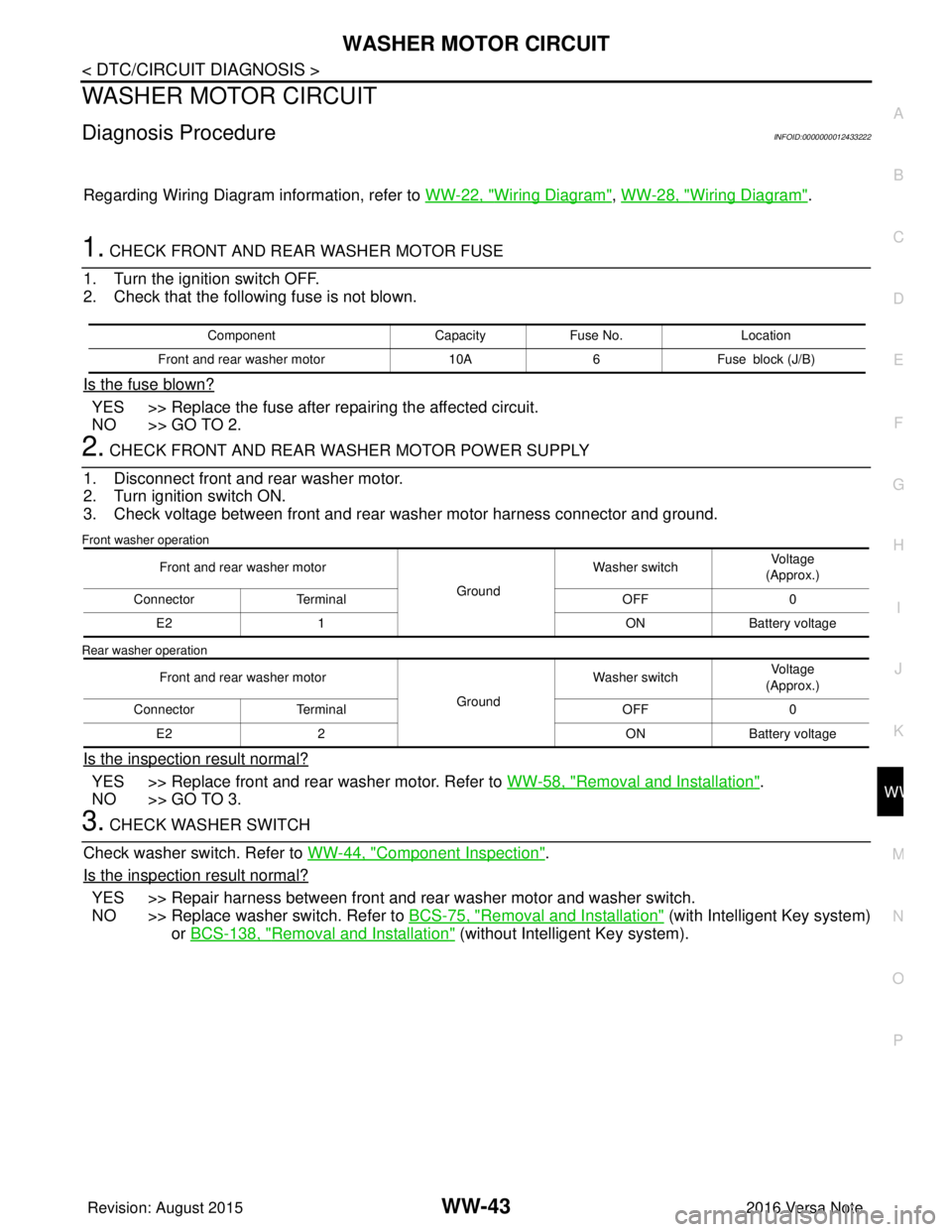
Regarding Wiring Diagram information, refer to WW-22, "Wiring Diagram", WW-28, "Wiring Diagram".
1. CHECK FRONT AND REAR WASHER MOTOR FUSE
1. Turn the ignition switch OFF.
2. Check that the following fuse is not blown.
Is the fuse blown?
YES >> Replace the fuse after repairing the affected circuit.
NO >> GO TO 2.
2. CHECK FRONT AND REAR WASHER MOTOR POWER SUPPLY
1. Disconnect front and rear washer motor.
2. Turn ignition switch ON.
3. Check voltage between front and rear washer motor harness connector and ground.
Front washer operation
Rear washer operation
Is the inspection result normal?
YES >> Replace front and rear washer motor. Refer to WW-58, "Removal and Installation".
NO >> GO TO 3.
3. CHECK WASHER SWITCH
Check washer switch. Refer to WW-44, "
Component Inspection".
Is the inspection result normal?
YES >> Repair harness between front and rear washer motor and washer switch.
NO >> Replace washer switch. Refer to BCS-75, "
Removal and Installation" (with Intelligent Key system)
or BCS-138, "
Removal and Installation" (without Intelligent Key system).
Component CapacityFuse No. Location
Front and rear washer motor 10A6Fuse block (J/B)
Front and rear washer motor
GroundWasher switch
Voltage
(Approx.)
Connector Terminal OFF0
E2 1 ONBattery voltage
Front and rear washer motor GroundWasher switch
Voltage
(Approx.)
Connector Terminal OFF0
E2 2 ONBattery voltage
Revision: August 2015 2016 Versa Note
cardiagn.com
Page 3609 of 3641
WW-44
< DTC/CIRCUIT DIAGNOSIS >
WASHER SWITCH
WASHER SWITCH
DescriptionINFOID:0000000012433223
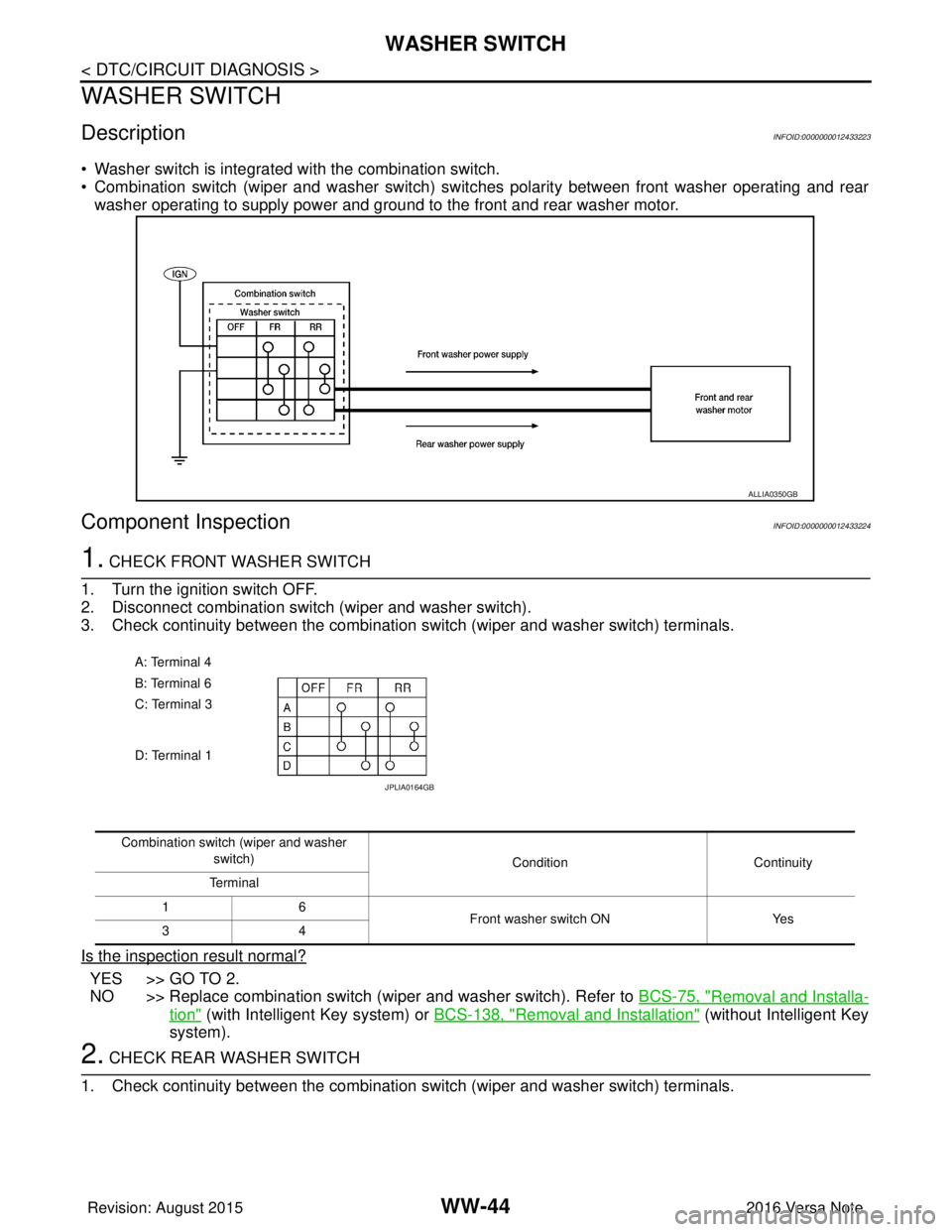
• Washer switch is integrated with the combination switch.
• Combination switch (wiper and washer switch) switches polarity between front washer operating and rear
washer operating to supply power and ground to the front and rear washer motor.
Component InspectionINFOID:0000000012433224
1. CHECK FRONT WASHER SWITCH
1. Turn the ignition switch OFF.
2. Disconnect combination switch (wiper and washer switch).
3. Check continuity between the combination switch (wiper and washer switch) terminals.
Is the inspection result normal?
YES >> GO TO 2.
NO >> Replace combination switch (wiper and washer switch). Refer to BCS-75, "
Removal and Installa-
tion" (with Intelligent Key system) or BCS-138, "Removal and Installation" (without Intelligent Key
system).
2. CHECK REAR WASHER SWITCH
1. Check continuity between the combination switch (wiper and washer switch) terminals.
ALLIA0350GB
A: Terminal 4
B: Terminal 6
C: Terminal 3
D: Terminal 1
JPLIA0164GB
Combination switch (wiper and washer
switch) Condition Continuity
Terminal
16 Front washer switch ONYes
34
Revision: August 2015 2016 Versa Note
cardiagn.com
Page 3611 of 3641
WW-46
< DTC/CIRCUIT DIAGNOSIS >
REAR WIPER MOTOR CIRCUIT
REAR WIPER MOTOR CIRCUIT
Component Function CheckINFOID:0000000012433225
1. CHECK REAR WIPER ON OPERATION
CONSULT ACTIVE TEST
1. Select "RR WIPER" of BCM active test item.
2. While operating the test item, check rear wiper operation.
Is rear wiper operation normal?
YES >> Rear wiper motor circuit is normal.
NO >> Refer to WW-46, "
Diagnosis Procedure".
Diagnosis ProcedureINFOID:0000000012433226
Regarding Wiring Diagram information, refer to WW-28, "Wiring Diagram".
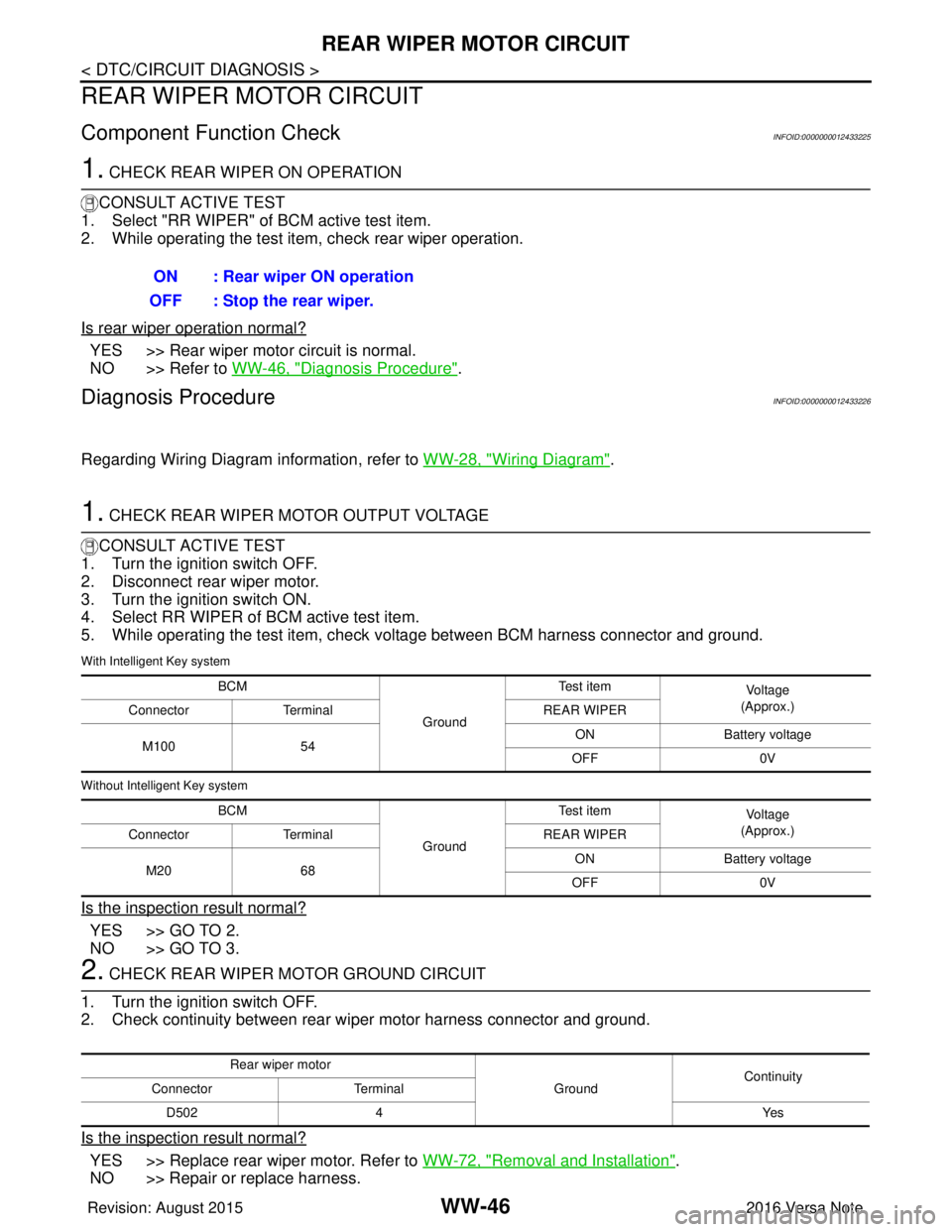
1. CHECK REAR WIPER MOTOR OUTPUT VOLTAGE
CONSULT ACTIVE TEST
1. Turn the ignition switch OFF.
2. Disconnect rear wiper motor.
3. Turn the ignition switch ON.
4. Select RR WIPER of BCM active test item.
5. While operating the test item, check voltage between BCM harness connector and ground.
With Intelligent Key system
Without Intelligent Key system
Is the inspection result normal?
YES >> GO TO 2.
NO >> GO TO 3.
2. CHECK REAR WIPER MOTOR GROUND CIRCUIT
1. Turn the ignition switch OFF.
2. Check continuity between rear wiper motor harness connector and ground.
Is the inspection result normal?
YES >> Replace rear wiper motor. Refer to WW-72, "Removal and Installation".
NO >> Repair or replace harness. ON : Rear wiper ON operation
OFF : Stop the rear wiper.
BCM
GroundTe s t i t e m
Vo l ta g e
(Approx.)
Connector Terminal REAR WIPER
M100 54 ON
Battery voltage
OFF 0V
BCM GroundTe s t i t e m
Vo l ta g e
(Approx.)
Connector Terminal REAR WIPER
M20 68 ON
Battery voltage
OFF 0V
Rear wiper motor
GroundContinuity
Connector Terminal
D502 4 Yes
Revision: August 2015 2016 Versa Note
cardiagn.com
Page 3613 of 3641

WW-48
< DTC/CIRCUIT DIAGNOSIS >
REAR WIPER AUTO STOP SIGNAL CIRCUIT
REAR WIPER AUTO STOP SIGNAL CIRCUIT
Component Function CheckINFOID:0000000012433227
1. CHECK REAR WIPER (AUTO STOP) OPERATION
CONSULT DATA MONITOR
1. Select WIPER of BCM data monitor item.
2. Operate the rear wiper.
3. Check that RR WIPER STOP changes to ON and OFF linked with the wiper operation.
Is the inspection result normal?
YES >> Rear wiper auto stop signal circuit is normal.
NO >> Refer to WW-48, "
Diagnosis Procedure".
Diagnosis ProcedureINFOID:0000000012433228
Regarding Wiring Diagram information, refer to WW-28, "Wiring Diagram".
1. CHECK REAR WIPER MOTOR AUTO STOP CIRCUITS FOR OPEN
1. Turn ignition switch OFF.
2. Disconnect BCM and rear wiper motor.
3. Check continuity between BCM harness connector terminal and rear wiper motor harness connector ter- minal.
With Intelligent Key system
Without Intelligent Key system
Is inspection result normal?
YES >> GO TO 2.
NO >> Repair or replace harness.
2. CHECK AUTO STOP CIRCUITS FOR SHORT TO GROUND
Check continuity between BCM harness connector terminal and ground.
With Intelligent Key system
Without Intelligent Key system
Monitor item ConditionMonitor status
RR WIPER STOP Rear wiper motorStop position
ON
Except stop position OFF
BCM Rear wiper motor
Continuity
Connector Terminal Connector Terminal
M100 44D502 3Yes
BCM Rear wiper motor
Continuity
Connector Terminal Connector Terminal
M20 56D502 3Yes
BCM
GroundContinuity
Connector Terminal
M100 44 No
BCM GroundContinuity
Connector Terminal
M20 56 No
Revision: August 2015 2016 Versa Note
cardiagn.com
Page 3617 of 3641
WW-52
< SYMPTOM DIAGNOSIS >
WIPER AND WASHER SYSTEM SYMPTOMS
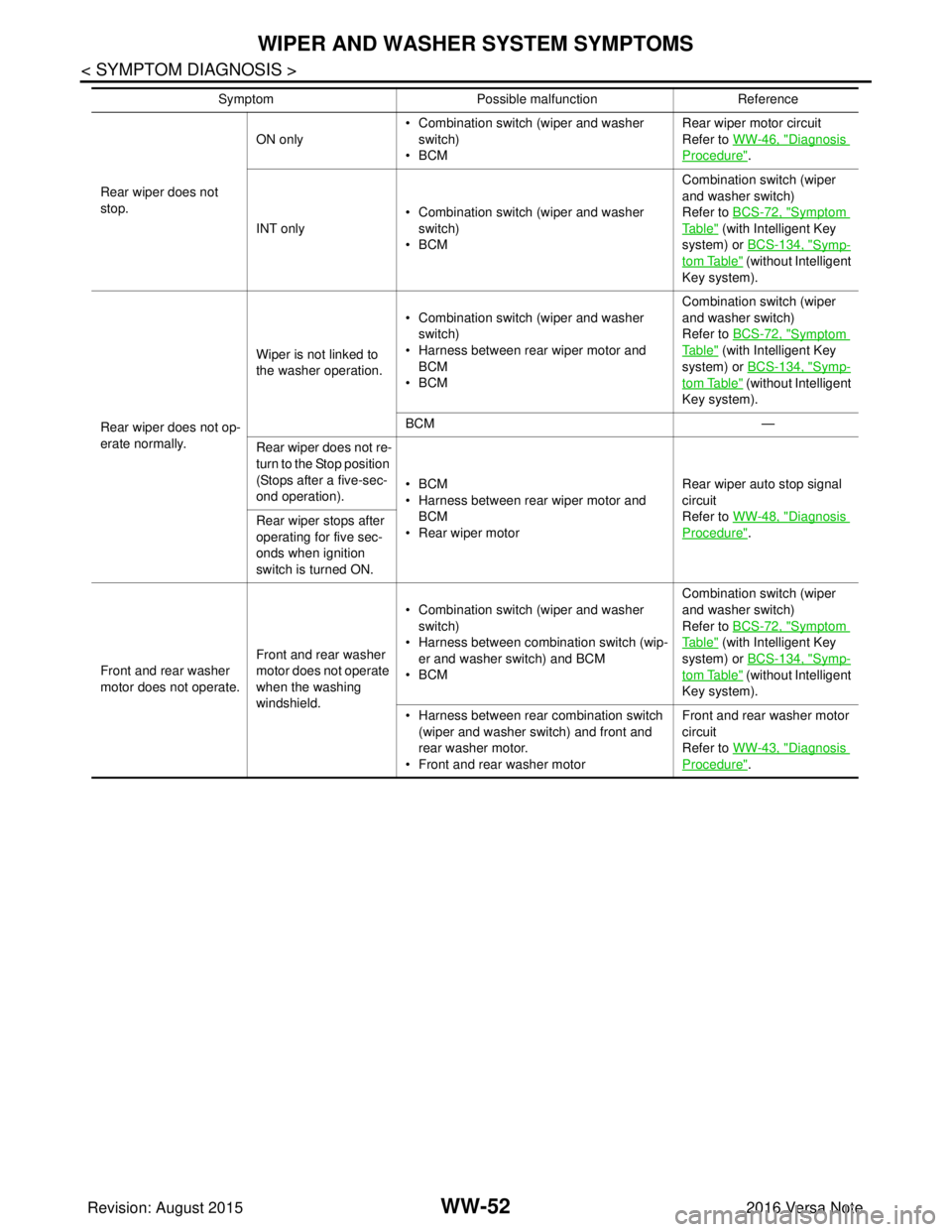
Rear wiper does not
stop.ON only
• Combination switch (wiper and washer
switch)
•BCM Rear wiper motor circuit
Refer to WW-46, "
Diagnosis
Procedure".
INT only • Combination switch (wiper and washer
switch)
•BCM Combination switch (wiper
and washer switch)
Refer to BCS-72, "
Symptom
Ta b l e" (with Intelligent Key
system) or BCS-134, "
Symp-
tom Table" (without Intelligent
Key system).
Rear wiper does not op-
erate normally. Wiper is not linked to
the washer operation.
• Combination switch (wiper and washer
switch)
• Harness between rear wiper motor and BCM
•BCM Combination switch (wiper
and washer switch)
Refer to BCS-72, "
Symptom
Ta b l e" (with Intelligent Key
system) or BCS-134, "
Symp-
tom Table" (without Intelligent
Key system).
BCM —
Rear wiper does not re-
turn to the Stop position
(Stops after a five-sec-
ond operation). •BCM
• Harness between rear wiper motor and
BCM
• Rear wiper motor Rear wiper auto stop signal
circuit
Refer to WW-48, "
Diagnosis
Procedure".
Rear wiper stops after
operating for five sec-
onds when ignition
switch is turned ON.
Front and rear washer
motor does not operate. Front and rear washer
motor does not operate
when the washing
windshield.• Combination switch (wiper and washer
switch)
• Harness between combination switch (wip- er and washer switch) and BCM
•BCM Combination switch (wiper
and washer switch)
Refer to BCS-72, "
Symptom
Ta b l e" (with Intelligent Key
system) or BCS-134, "
Symp-
tom Table" (without Intelligent
Key system).
• Harness between rear combination switch (wiper and washer switch) and front and
rear washer motor.
• Front and rear washer motor Front and rear washer motor
circuit
Refer to WW-43, "
Diagnosis
Procedure".
Symptom
Possible malfunction Reference
Revision: August 2015 2016 Versa Note
cardiagn.com
Page 3618 of 3641
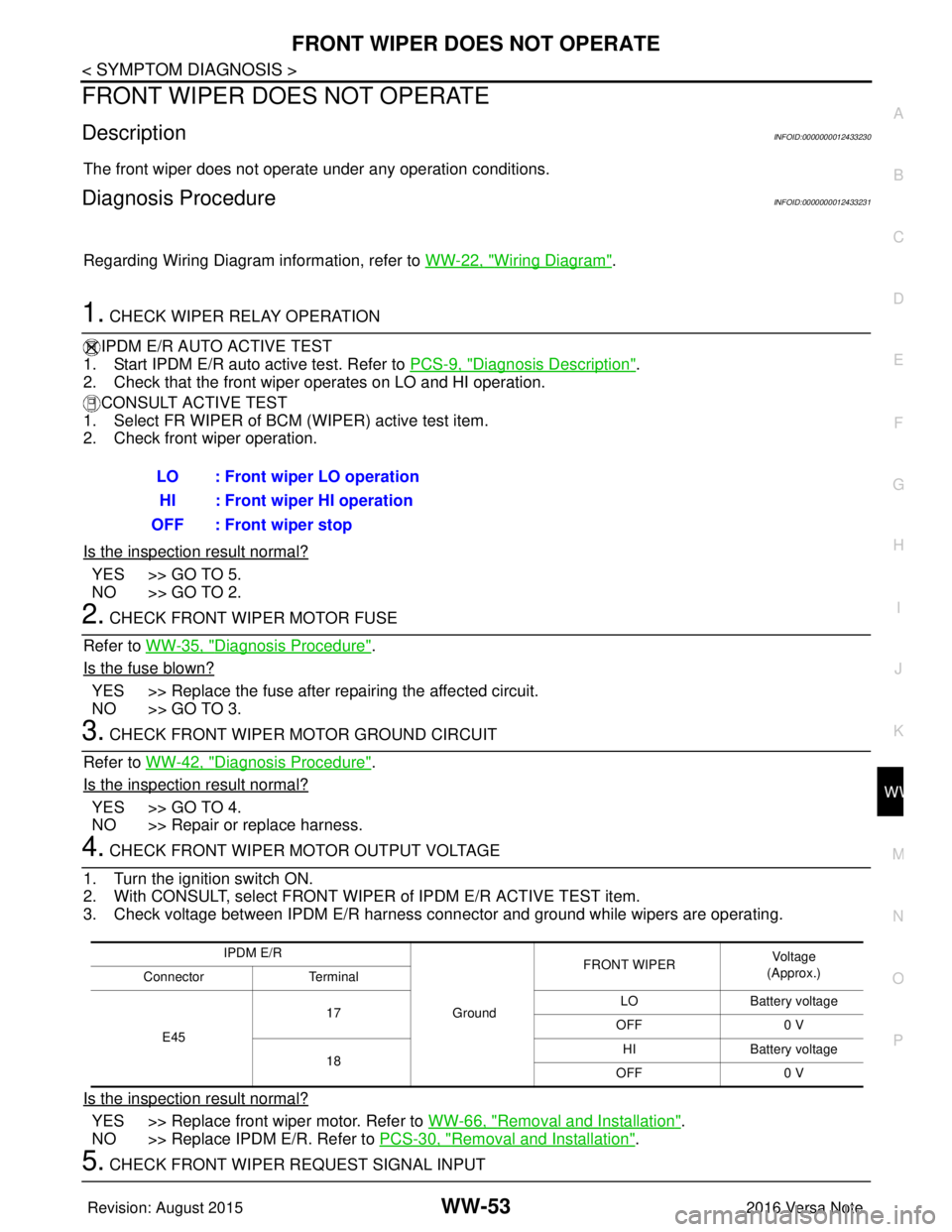
FRONT WIPER DOES NOT OPERATEWW-53
< SYMPTOM DIAGNOSIS >
C
DE
F
G H
I
J
K
M A
B
WW
N
O P
FRONT WIPER DO ES NOT OPERATE
DescriptionINFOID:0000000012433230
The front wiper does not operate under any operation conditions.
Diagnosis ProcedureINFOID:0000000012433231
Regarding Wiring Diagram information, refer to WW-22, "Wiring Diagram".
1. CHECK WIPER RELAY OPERATION
IPDM E/R AUTO ACTIVE TEST
1. Start IPDM E/R auto active test. Refer to PCS-9, "
Diagnosis Description".
2. Check that the front wiper operates on LO and HI operation.
CONSULT ACTIVE TEST
1. Select FR WIPER of BCM (WIPER) active test item.
2. Check front wiper operation.
Is the inspection result normal?
YES >> GO TO 5.
NO >> GO TO 2.
2. CHECK FRONT WIPER MOTOR FUSE
Refer to WW-35, "
Diagnosis Procedure".
Is the fuse blown?
YES >> Replace the fuse after repairing the affected circuit.
NO >> GO TO 3.
3. CHECK FRONT WIPER MOTOR GROUND CIRCUIT
Refer to WW-42, "
Diagnosis Procedure".
Is the inspection result normal?
YES >> GO TO 4.
NO >> Repair or replace harness.
4. CHECK FRONT WIPER MOTOR OUTPUT VOLTAGE
1. Turn the ignition switch ON.
2. With CONSULT, select FRONT WIPER of IPDM E/R ACTIVE TEST item.
3. Check voltage between IPDM E/R harness connector and ground while wipers are operating.
Is the inspection result normal?
YES >> Replace front wiper motor. Refer to WW-66, "Removal and Installation".
NO >> Replace IPDM E/R. Refer to PCS-30, "
Removal and Installation".
5. CHECK FRONT WIPER REQUEST SIGNAL INPUTLO : Front wiper LO operation
HI : Front wiper HI operation
OFF : Front wiper stop
IPDM E/R
GroundFRONT WIPER
Vo l ta g e
(Approx.)
Connector Terminal
E45 17
LO
Battery voltage
OFF 0 V
18 HI
Battery voltage
OFF 0 V
Revision: August 2015 2016 Versa Note
cardiagn.com