2016 MITSUBISHI LANCER Check
[x] Cancel search: CheckPage 195 of 392

Turn signal lever
Features and controls 5-133
5
N00522601545
When changing lanes, or to making a gradual turn, hold the lever in
the “lane change” posi-
tion (1). It will return to the neutral positionwhen you let go. Use the full position (2) when making a normal turn. The lever will return to the neutral position when the turn iscomplete. There may be times when the lever does not return to the neutral position. This usually happens when the steering wheel isturned only slightly. You can easily return the lever by hand. Also, when you move the lever to (1) slightlythen release it, the turn signal lights and indi- cator light in the instrument cluster will flash three times.
N00522700217
If you press the flasher switch, the front andrear turn signals will flash intermittently, and so will the hazard warning lights. This is an emergency warning system and should not beused when the vehicle is in motion, except foremergencies. If you need to leave your vehicle, the flashers will keep working afte
r the ignition key is
removed.
NOTE
Start adjusting when the knob is at the “0” position (when the beam is at its highest). Keep the knob in the “0” position except when using the knob to lower the headlightbeam angle. Always return the knob to the “0” position when the load is removed and the people have left the vehicle.
Turn signal lever
NOTE
A light in the instrument panel flashes to show when the front and rear turn signal lights are working properly.If this light flashes faster than usual, check for a burned out light bulb or malfunctioning connection.If the panel light does not come on when the lever is moved, check for a blown fuse or a burned out bulb in the panel.Have the vehicle inspected by an authorized Mitsubishi Motors dealer or a repair facility of your choice. The turn signal light 3-flash function for lane changes can be deactivated.See your authorized Mitsubishi Motors dealer for details. You can adjust the time required to operate the lever for the 3-flash function. See your authorized Mitsubishi Motorsdealer for details.
Hazard warning flasher switch
NOTE
If you keep the flashers on for several hours with the engine turned off, the battery will run down.
BK0230300US.book
133 ページ 2015年7月30日 木曜日 午後8時38分
Page 198 of 392

Wiper and washer switch 5-136 Features and controls
5
Keep the lever in the “OFF” position if the windshield is dirty and the weather is dry. Wiper operation under these conditions can scratch the windshield and damage the wip-ers.
N00569601038
With the lever in the “AUTO” (rain sensor)position, it is possible to adjust the sensitivityof the rain sensor by turning the knob (C).
CAUTION With the ignition switch in the “ON” posi- tion and the lever in the “AUTO” position, the wipers may automatically operate in thesituations described below.• When cleaning the outside surface of thewindshield, if you touch the rain sensor.• When cleaning the outside surface of thewindshield, if you wipe with a cloth the rain sensor.• When using an automatic car wash.• A physical shock is applied to the wind- shield.• A physical shock is applied to the rain sen-sor.
If your hands get trapped, you could suffer injuries or the wipers could malfunction. To deactivate the rain sensor, place the lever in the “OFF” position.NOTE
To protect the rubber parts of the wipers, this operation of the wipers does not take placeeven if the lever is put in the “AUTO” posi- tion when the vehicle is stationary and the ambient temperature is about 32 °F (0 °C) orlower. Do not cover the sensor by affixing a sticker or label to the windshield. Also, do not put any water-repellent coating on the wind- shield. The rain sensor would not be able todetect the extent of rain, and the wipers might stop working normally. In the following cases, the rain sensor may be malfunctioning. Have the vehicle checked at an authorized Mitsubishi Motors dealer ora repair facility of your choice. • When the wipers operate at a constant inter- val despite changes in the extent of rain. • When the wipers do not operate even though it is raining.CAUTION
The wipers may automatically operate when things such as insects or foreign objects are affixed to the windshield on top of the rain sensor or when the windshield is frozen. Objects affixed to the windshield will stopthe wipers when the wipers cannot remove them. To operate the wipers again, move the lever to the “LO” or “HI” position. Also, thewipers may operate automatically due to strong direct sunlight or electromagnetic wave. To stop the wipers, move the lever tothe “OFF” position. Contact an authorized Mitsubishi Motors dealer or a repair
facility of your choice
when replacing the windshield glass.
To adjust the sensitivity of the rain sensor
NOTE
BK0230300US.book
136 ページ 2015年7月30日 木曜日 午後8時38分
Page 200 of 392
Electric rear window defogger switch 5-138 Features and controls
5
By releasing the lever soon after pulling it toward you, the washer fluid will be sprayed several times while the wipers are operating several times.Intelligent washer will stop operating with any operation of the lever.
N00523501293
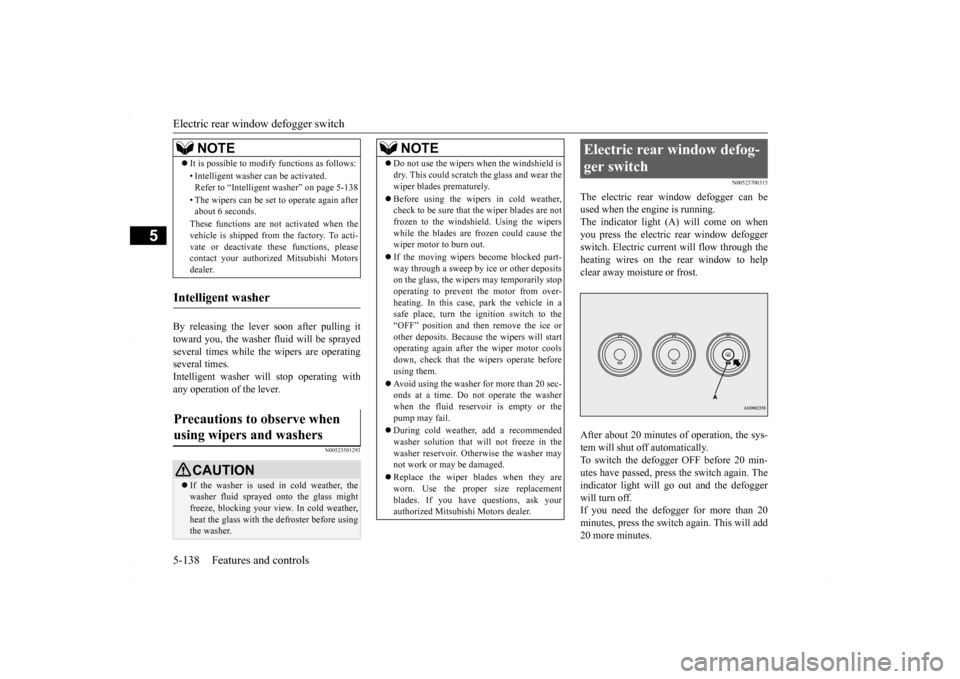
N00523700315
The electric rear window defogger can be used when the engine is running.The indicator light (A) will come on when you press the electric rear window defogger switch. Electric current will flow through theheating wires on the rear window to help clear away moisture or frost. After about 20 minutes of operation, the sys- tem will shut off automatically.To switch the defogger OFF before 20 min- utes have passed, press the switch again. The indicator light will go out and the defoggerwill turn off. If you need the defogger for more than 20 minutes, press the switch again. This will add20 more minutes.
It is possible to modify functions as follows: • Intelligent washer can be activated. Refer to “Intelligent washer” on page 5-138 • The wipers can be set to operate again after about 6 seconds. These functions are not activated when the vehicle is shipped from the factory. To acti- vate or deactivate these functions, pleasecontact your authorized Mitsubishi Motors dealer.
Intelligent washer Precautions to observe when using wipers and washers
CAUTION If the washer is used in cold weather, the washer fluid sprayed onto the glass might freeze, blocking your view. In cold weather, heat the glass with the defroster before usingthe washer.NOTE
NOTE
Do not use the wipers when the windshield is dry. This could scratch the glass and wear the wiper blades prematurely. Before using the wipers in cold weather, check to be sure that the wiper blades are not frozen to the windshield. Using the wipers while the blades are frozen could cause thewiper motor to burn out. If the moving wipers become blocked part- way through a sweep by ice or other deposits on the glass, the wipers may temporarily stop operating to prevent the motor from over-heating. In this case, park the vehicle in a safe place, turn the ignition switch to the “OFF” position and then remove the ice orother deposits. Because the wipers will start operating again after the wiper motor cools down, check that the wipers operate beforeusing them. Avoid using the washer for more than 20 sec- onds at a time. Do not operate the washer when the fluid reservoir is empty or the pump may fail. During cold weather, add a recommended washer solution that will not freeze in thewasher reservoir. Otherwise the washer may not work or may be damaged. Replace the wiper blades when they are worn. Use the proper size replacementblades. If you have questions, ask your authorized Mitsubishi Motors dealer.
Electric rear window defog- ger switch
BK0230300US.book
138 ページ 2015年7月30日 木曜日 午後8時38分
Page 206 of 392

Bluetooth® 2.0 interface (if so equipped) 5-144 Features and controls
5
N00564601118
It is possible to use a passcode as a security function by setting a passcode of your choice for the Bluetooth
® 2.0 interface.
When the security function is turned on, it is necessary to make a voice input of a 4-digitpasscode in order to use all functions of the Bluetooth
® 2.0 interface, except for recep-
tion. Use the following procedure to turn on the security function by setting a passcode. 1. Press the SPEECH button (except for vehicles with Mitsubishi Multi-Commu- nication System) or PICK-UP button (forvehicles with Mitsubishi Multi-Commu- nication System). 2. Say “Setup.”3. Say “Passcode.” 4. The voice guide will say “Passcode is dis- abled. Would you like to enable it?”Answer “Yes.” Answer “No” to cancel the setting of the passcode and return to the main menu. 5. The voice guide will say “Please say a 4- digit passcode. Remember this passcode. It will be required to use this system.”
Say a 4-digit number which you want to set as a passcode. 6. For confirmation purposes, the voice guide will say “Passcode <4-digit pass-code>. Is this correct?” Answer “Yes.” Answer “No” to return to the passcode input in Step 5. 7. When the registration of the passcode is completed, the voice guide will say “Pass- code is enabled” and the system willreturn to the main menu.
If a passcode has been set and the security function is enabled, the voice guide will say “Hands-free system is locked. State the pass-code to continue” when the SPEECH button (except for vehicles with Mitsubishi Multi- Communication System) or PICK-UP button(for vehicles with Mitsubishi Multi-Commu-
nication System) is pressed to enter voice rec- ognition mode. Say the 4-digit passcode number to enter the passcode. If the entered passcode is wrong, the voice guide will say “<4-digit passcode>, Incorrectpasscode. Please try again.” Enter the correct passcode. Use the following procedure to turn off the security function by disabling the passcode. 1. Press the SPEECH button (except for vehicles with Mitsubishi Multi-Commu- nication System) or PICK-UP button (for vehicles with Mitsubishi Multi-Commu-nication System).2. Say “Setup.”
Security function
Setting the passcode
NOTE
Passcode will be required to access the sys- tem after the next ignition cycle. It is required for a little time after engine stop that the entered passcode is actually recorded in the system. If the ignition switchis made to “ACC” or “ON” or the engine is started immediately after engine stop, there is a case when the entered passcode is notrecorded in the system. At this time, please try to enter the passcode again.
Entering the passcode
NOTE
You can reenter the passcode as many times as you want. If you have forgotten your passcode, say “Cancel” to quit the voice input mode and then check with an authorized Mitsubishi Motors dealer.
Disabling the passcode
NOTE
System must be unlocked to disable the pass- code.
BK0230300US.book
144 ページ 2015年7月30日 木曜日 午後8時38分
Page 213 of 392

Bluetooth® 2.0 interface (if so equipped)
Features and controls 5-151
5
5. The selected music player will be con- nected to the Bluetooth
® 2.0 interface.
The voice guide will say “
Use the following procedure to delete a paired Bluetooth
® device from the Blue-
tooth
® 2.0 interface.
1. Press the SPEECH button (except for vehicles with Mitsubishi Multi-Commu- nication System) or PICK-UP button (for vehicles with Mitsubishi Multi-Commu-nication System). 2. Say “Setup.” 3. Say “Pairing Options.”4. The voice guide will say “Select one of the following: pair, edit, delete, or list.” Say “Delete.”
5. After the voice guide says “Please say,” tags of corresponding devices will be read out in order, starting with the device thathas been most recently connected. After it completes reading all pairs, the voice guide will say “or all.”Say the number of the device that you want to delete from the system. If you want to delete all paired phonesfrom the system, say “All.” 6. For confirmation purposes, the voice guide will say “Deleting
N00565201023
You can check a paired Bluetooth
® device by
following the steps below. 1. Press the SPEECH button (except for vehicles with Mitsubishi Multi-Commu-nication System) or PICK-UP button (for vehicles with Mitsubishi Multi-Commu- nication System).2. Say “Setup.”3. Say “Pairing Options.” 4. The voice guide will say “Select one of the following: pair, edit, delete, or list.”Say “List.” 5. The voice guide will read out device tags of corresponding devices in order, starting with the Bluetooth
® device that has been
most recently connected. 6. After the device tags of all paired Blue- tooth
® devices have been read, the system
will say “End of list, would you like to start from the beginning?”To hear the list again from the beginning, answer “Yes.” When you are done, answer “No” toreturn to the main menu.
NOTE
You can connect to a music player at any time by pressing the SPEECH button and saying the number, even before all of the paired numbers and device tags of corre- sponding music players are read out by thesystem.
Deleting a device
NOTE
If the device deletion process fails for some reason, the voice guide will say “Delete failed” and then the system will cancel delet- ing the device.
To check a paired Bluetooth
®
device
BK0230300US.book
151 ページ 2015年7月30日 木曜日 午後8時38分
Page 216 of 392

Bluetooth® 2.0 interface (if so equipped) 5-154 Features and controls
5
3. After the voice guide says “Name please,” say the name you want to call, from those registered in the phonebook.4. If there is only 1 match, the system will proceed to Step 5. If there are 2 or more matches, the voiceguide will say “More than one match was found, would you like to call
5. If only 1 telephone number is registered under the name you just said, the voice guide will proceed to Step 6. If 2 or more telephone numbers are regis-tered that match the name you just said, the voice guide will say “Would you like to call
6. The voice guide will say “Calling
You can redial the last number called, based on the history of dialed calls in the paired cel- lular phone. Use the following procedure to redial. 1. Press the SPEECH button (except for vehicles with Mitsubishi Multi-Commu- nication System) or PICK-UP button (for vehicles with Mitsubishi Multi-Commu-nication System). 2. Say “Redial.”
N00565700018
During a call, press the SPEECH button toenter voice recognition mode, then say
NOTE
If you say “Call” when the vehicle phone- book and the mobile phonebook are empty, the voice guide will say “The vehicle phone- book is empty. Would you like to add a new entry now?”Answer “Yes,” and the voice guide will say “Entering the phonebook - new entry menu.” You can now create data in the vehiclephonebook. Answer “No,” the system will return to the main menu.NOTE
If you say “No” to all names read by the sys- tem, the voice guide will say “Name notfound, returning to main menu” and the sys- tem will return to the main menu.
NOTE
If the name you selected has matching data in the vehicle phonebook but no telephone number is registered under the selected loca-tion, the voice guide will say “{home/work/mobile/other} not found for
NOTE
When the confirmation function is on, the system will check if the name and location of the receiver are correct. If the name is cor-rect, answer “Yes.” To change the name or location to call, answer “No.” The system will return to Step3.
RedialingSend function
BK0230300US.book
154 ページ 2015年7月30日 木曜日 午後8時38分
Page 220 of 392

Bluetooth® 2.0 interface (if so equipped) 5-158 Features and controls
5
8. The voice guide will say “Adding
10. The voice guide will say “Would you like
to import another contact?”Answer “Yes” if you want to continue with the registration. You can continue to register a new phonebook entry from Step5. Answer “No,” the system will return to the main menu.
N00579800023
You can change or delete a name or telephone number registered in the vehicle phonebook. You can also listen to the list of names regis-tered in the vehicle phonebook.
N00579900024
1. Press the SPEECH button (except forvehicles with Mitsubishi Multi-Commu-nication System) or PICK-UP button (for vehicles with Mitsubishi Multi-Commu- nication System).2. Say “Phonebook.” 3. The voice guide will say “Select one of the following: new entry, edit number,edit name, list names, delete, erase all, orimport contact”. Say “Edit number.” name of the entry you would like to edit,or say list names.” Say the name of the phonebook entry you want to edit. 5. The voice guide will say “Home, work, mobile or other?” Select and say the loca- tion where the telephone number youwant to change or add is registered. When the confirmation function is on, the system will check the target name andlocation again. Answer “Yes” if you want to continue with the editing.
Answer “No,” the system will return to Step 3. 6. The voice guide will say “Number, please.” Say the telephone number youwant to register. 7. The voice guide will repeat the telephone number. When the confirmation function is on, thesystem will ask if the number is correct. Answer “Yes.” Answer “No,” the system will return tothe Step 3. 8. Once the telephone number is registered, the voice guide will say “Number saved”and then the system will return to the main menu.
To change the content registered in the vehicle phonebook NOTE
The system must have at least one entry.
Editing a telephone number
NOTE
Say “List names,” and the names registered in the phonebook will be read out in order. Refer to “Listening to the list of registered names” on page 5-159.
NOTE
If the telephone number is already registered in the selected location, the voice guide willsay “The current number is
If the location where a telephone number was already registered has been overwritten with a new number, the voice guide will say“Number changed” and then the system will return to the main menu.
BK0230300US.book
158 ページ 2015年7月30日 木曜日 午後8時38分
Page 221 of 392

Bluetooth® 2.0 interface (if so equipped)
Features and controls 5-159
5
N00580100026
1. Press the SPEECH button (except for vehicles with Mitsubishi Multi-Commu-nication System) or PICK-UP button (for vehicles with Mitsubishi Multi-Commu- nication System).2. Say “Phonebook.” 3. The voice guide will say “Select one of the following: new entry, edit number,edit name, list names, delete, erase all, orimport contact.” Say “Edit name.” 4. The voice guide will say “Please say the name of the entry you would like to edit,or say list names.” Say the name you want to edit. 5. The voice guide will say “Changing
6. The voice guide will say “Name please.” Say the new name you want to register. 7. The registered name will be changed. When the change is complete, the systemwill return to the main menu.
N00580200027
1. Press the SPEECH button (except forvehicles with Mits
ubishi Multi-Commu-
nication System) or PICK-UP button (for vehicles with Mits
ubishi Multi-Commu-
nication System).2. Say “Phonebook.” 3. The voice guide will say “Select one of the following: new entry, edit number,edit name, list names, delete, erase all, or import contact.” Say “List names.” 4. Bluetooth
® 2.0 interface will read out the
entries in the phonebook in order. 5. When the voice guide is done reading the list, it will say “End of list, would you liketo start from the beginning?” When you want to check the list again from the beginning, answer “Yes.”When you are done, answer “No” to return to the previous or main menu.
N00580300028
1. Press the SPEECH button (except for vehicles with Mitsubishi Multi-Commu- nication System) or PICK-UP button (for vehicles with Mitsubishi Multi-Commu-nication System). 2. Say “Phonebook.” 3. The voice guide will say “Select one ofthe following: new entry, edit number, edit name, list names, delete, erase all, or import contact.” Say “Delete.”
Editing a name
NOTE
Say “List names,” and the names registered in the phonebook are read out in order. Refer to “Listening to the list of registered names” on page 5-159.
Listening to the list of registered names
NOTE
You can call, edit or delete a name that is being read out. Press the SPEECH button and say “Call” to call the name, “Edit name” to edit it, or “Delete” to delete it.The system will beep and then execute your command. If you press the SPEECH button and say “Continue” or “Previous” while the list is being read, the system will advance orrewind the list. Say “Continue” to proceed to the next entry or “Previ
ous” to return to the
previous entry.
Deleting a telephone number
BK0230300US.book
159 ページ 2015年7月30日 木曜日 午後8時38分