Page 121 of 565
#
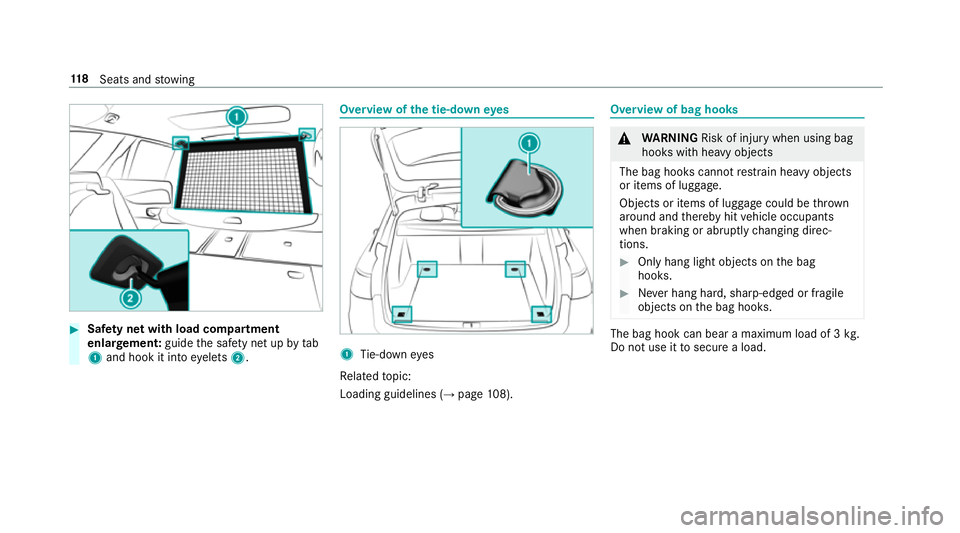
Safety net with load compartment
enlar gement: guidethe saf ety net up bytab
1 and hook it into eyelets 2. Overview of
the tie-down eyes 1
Tie-down eyes
Re lated topic:
Loading guidelines (→ page108). Overview of bag hoo
ks &
WARNING Risk of inju rywhen using bag
hooks with heavy objects
The bag hooks cannot restra in heavy objects
or items of luggage.
Objects or items of luggage could be thrown
around and thereby hit vehicle occupants
when braking or abruptly changing direc‐
tions. #
Onlyhang light objects on the bag
hooks. #
Never hang hard, sharp-edged or fragile
objects on the bag hooks. The bag hook can bear a maximum load of 3
kg.
Do not use it tosecure a load. 11 8
Seats and stowing
Page 124 of 565
#
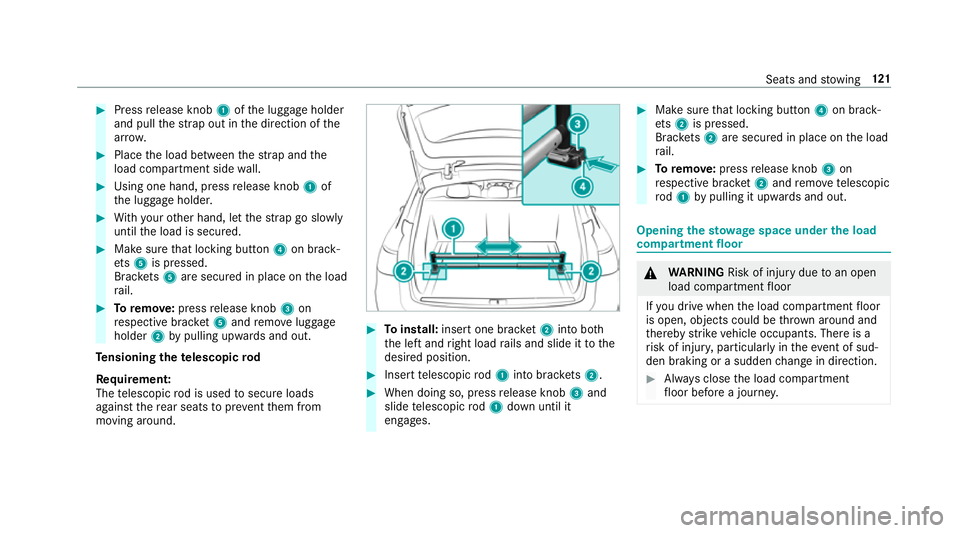
Press release knob 1ofthe luggage holder
and pull thest ra p out in the direction of the
ar row. #
Place the load between thest ra p and the
load compartment side wall. #
Using one hand, press release knob 1of
th e luggage holder. #
With your other hand, let thest ra p go slowly
until the load is secured. #
Make sure that locking button 4on brack‐
et s5 is pressed.
Brac kets 5 are secured in place on the load
ra il. #
Toremo ve:press release knob 3on
re spective brac ket5 and remo veluggage
holder 2bypulling upwards and out.
Te nsioning thete lescopic rod
Re quirement:
The telescopic rod is used tosecure loads
against there ar seats topreve ntthem from
moving around. #
Toinstall: insert one brac ket2 into bo th
th e left and right load rails and slide it tothe
desired position. #
Insert telescopic rod1 into brac kets 2. #
When doing so, press release knob 3and
slide telescopic rod1 down until it
engages. #
Make sure that locking button 4on brack‐
et s2 is pressed.
Brac kets 2 are secured in place on the load
ra il. #
Toremo ve: press release knob 3on
re spective brac ket2 and remo ve te lescopic
ro d1 bypulling it upwards and out. Opening
thesto wage space under the load
compa rtment floor &
WARNING Risk of inju rydue toan open
load compartment floor
If yo u drive when the load compartment floor
is open, objects could be thro wn around and
th ereby strike vehicle occupants. There is a
ri sk of injur y,particular lyin theeve nt of sud‐
den braking or a sudden change in direction. #
Alw ays close the load compartment
fl oor before a journe y. Seats and
stowing 121
Page 125 of 565
#
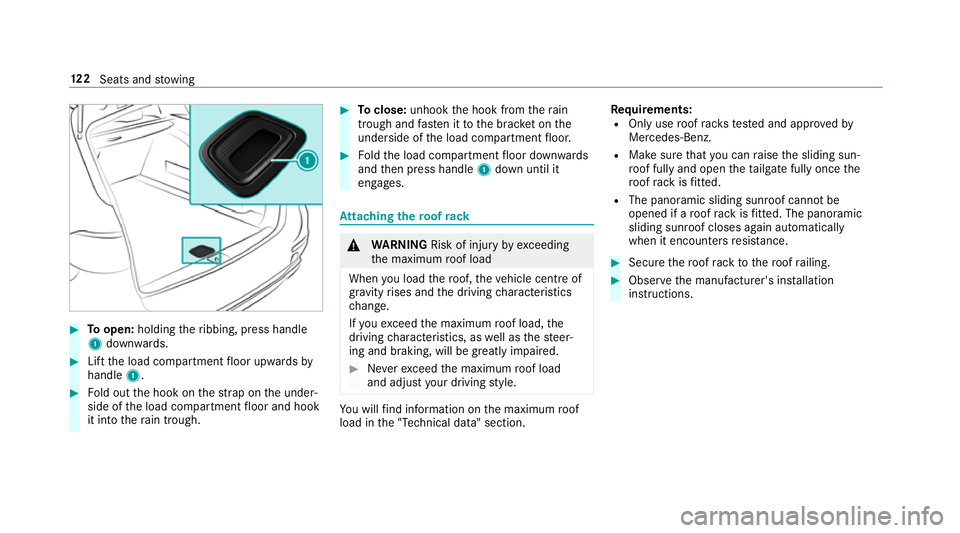
Toopen: holding theribbing, press handle
1 down wards. #
Lift the load compartment floor upwards by
handle 1. #
Fold out the hook on thest ra p on the under‐
side of the load compartment floor and hook
it into thera in trough. #
Toclose: unhook the hook from thera in
trough and fasten it tothe brac ket on the
underside of the load compartment floor. #
Foldthe load compartment floor down wards
and then press handle 1down until it
engages. At
taching thero of rack &
WARNING Risk of inju ryby ex ceeding
th e maximum roof load
When you load thero of, theve hicle centre of
gr av ity rises and the driving characteristics
ch ange.
If yo uexc eed the maximum roof load, the
driving characteristics, as well as thesteer‐
ing and braking, will be greatly impaired. #
Neverexc eed the maximum roof load
and adjust your driving style. Yo
u will find information on the maximum roof
load in the "Technical data" section. Re
quirements:
R Only use roof rack ste sted and appr ovedby
Mercedes-Benz.
R Make sure that you can raise the sliding sun‐
ro of fully and open theta ilgate fully once the
ro of rack isfitted.
R The panoramic sliding sunroof cann otbe
opened if a roof rack isfitted. The panoramic
sliding sunroof closes again au tomatically
when it encounters resis tance. #
Secu rethero of rack tothero of railing. #
Obser vethe manufacturer's ins tallation
instructions. 12 2
Seats and stowing
Page 126 of 565
Cup holders
Fi
tting or removing the cup holder in the
centre console &
WARNING ‑ Risk of accident or inju ry
when using the cup holder while the
ve hicle is in motion
The cup holder cannot hold a container
secure while theve hicle is in motion.
If yo u use a cup holder while theve hicle is in
motion, the conta iner may be flung around
and liquids could be spilled. The vehicle
occupants may come into contact with the
liquid and if it is hot, they could be scalded.
Yo u could be distracted from traf fic condi‐
tions and you may lose cont rol of theve hicle. #
Only use the cup holder when theve hi‐
cle is stationar y. #
Only use the cup holder for containers
of theright size. #
Alw ays close the conta iner, particularly
if th e liquid is hot. #
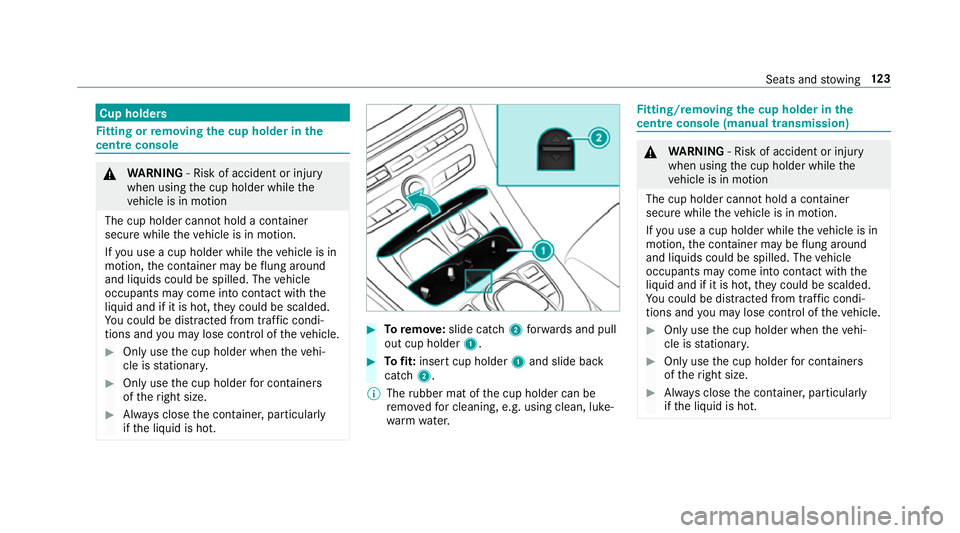
Toremo ve:slide catch 2forw ards and pull
out cup holder 1. #
Tofit: inse rtcup holder 1and slide ba ck
catch 2.
% The rubber mat of the cup holder can be
re mo vedfo r cleaning, e.g. using clean, luke‐
wa rm wate r. Fi
tting/ removing the cup holder in the
centre console (manual transmission) &
WARNING ‑ Risk of accident or inju ry
when using the cup holder while the
ve hicle is in motion
The cup holder cannot hold a container
secure while theve hicle is in motion.
If yo u use a cup holder while theve hicle is in
motion, the conta iner may be flung around
and liquids could be spilled. The vehicle
occupants may come into contact with the
liquid and if it is hot, they could be scalded.
Yo u could be distracted from traf fic condi‐
tions and you may lose cont rol of theve hicle. #
Only use the cup holder when theve hi‐
cle is stationar y. #
Only use the cup holder for containers
of theright size. #
Alw ays close the conta iner, particularly
if th e liquid is hot. Seats and
stowing 12 3
Page 129 of 565
Using
the cigar ette lighter &
WARNING ‑ Risk of fire and injury from
th e hot cigar ette lighter
Yo u can burn yourself if youto uch the hot
heating element or the soc ket of the ciga‐
re tte lighter.
In addition, flammable materials may ignite
if:
R you drop the hot cigar ette lighter
R ach ild holds the hot cigar ette lighter to
objects, forex ample #
Alw ays hold the cigar ette lighter bythe
knob. #
Alw ays make sure that the cigar ette
lighter is out of reach of children. #
Never lea vechildren unat tended in the
ve hicle. #
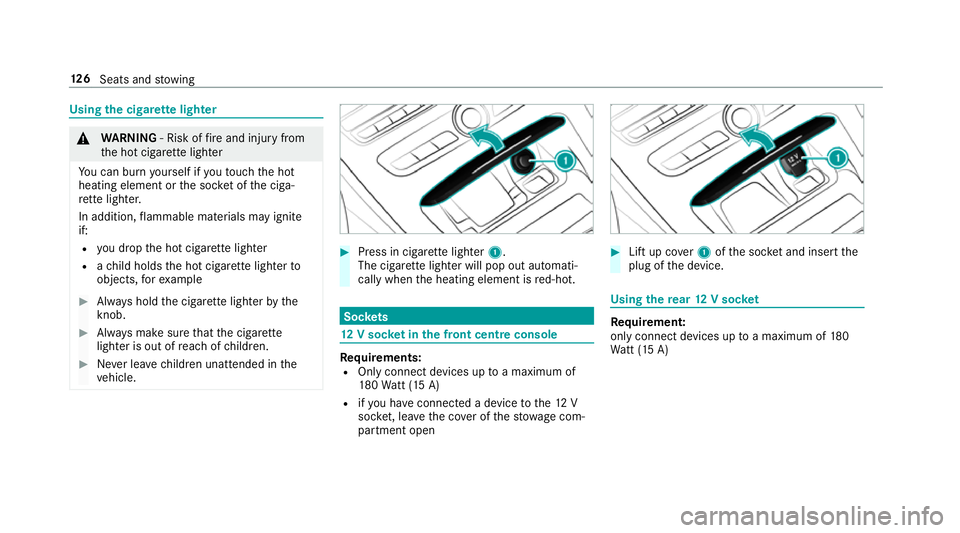
Press in cigar ette lighter 1.
The cigar ette lighter will pop out automati‐
cally when the heating element is red-hot. Soc
kets 12
V so cket inthe front centre console Re
quirements:
R Only connect devices up toa maximum of
18 0Wa tt (15 A)
R ifyo u ha veconnected a device tothe12 V
soc ket, le aveth e co ver of thestow age com‐
partment open #
Lift up co ver1 ofthe soc ket and insert the
plug of the device. Using
there ar 12 V so cket Re
quirement:
only connect devices up toa maximum of 180
Wa tt (15 A) 12 6
Seats and stowing
Page 131 of 565
#
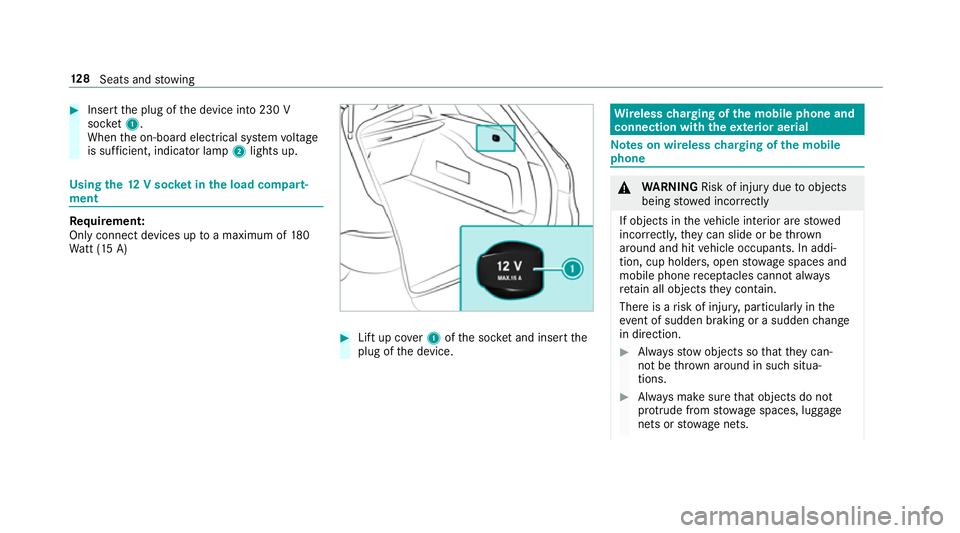
Insert the plug of the device into 230 V
soc ket1.
When the on-board electrical sy stem voltage
is suf ficient, indicator la mp2lights up. Using
the12 V so cket inthe load compa rt‐
ment Re
quirement:
Only connect devices up toa maximum of 180
Wa tt (15 A) #
Lift up co ver1 ofthe soc ket and insert the
plug of the device. Wire
lesscharging of the mobile phone and
connection with theex terior aerial Note
s on wireless charging of the mobile
phone &
WARNING Risk of inju rydue toobjects
being stowed inco rrectly
If objects in theve hicle interior are stowed
incor rectly, they can slide or be thrown
around and hit vehicle occupants. In addi‐
tion, cup holders, open stowage spaces and
mobile phone recep tacles cannot al ways
re tain all objects they contain.
The reis a risk of injur y,particularly in the
ev ent of sudden braking or a sudden change
in direction. #
Alw aysstow objects so that they can‐
not be throw n around in su chsitua‐
tions. #
Alw ays make sure that objects do not
pr otru de from stowage spaces, luggage
nets or stowage nets. 12 8
Seats and stowing
Page 132 of 565
#
Close the loc kable stow age spaces
before starting a journe y. #
Alw aysstow and secure heavy, hard,
poin ted, sharp-edged, fragile or bulky
objects in the boot/load compartment. Obser
vethe no tes on loading theve hicle. &
WARNING Risk offire from placing
objects in the mobile phone stowage
compartment
If yo u place objects in the mobile phone
stow age compartment, they may heat up
exc essively and even catch fire. #
Do not place additional objects, espe‐
cially those mode of me tal, in the
mobile phone stowage compartment. *
NO
TEDama getoobjects caused by
placing them in the mobile phone stow‐
age compartment If
yo u place objects in the mobile phone
stow age compartment, these may be dam‐
aged byelectromagnetic fields. #
Do not place credit cards, storage
media or other objects sensitive to
electromagnetic fields in the mobile
phone stowage compartment. *
NO
TEDama getothe mobile phone
stow age compartment caused byliquids If liquid is spilled in
the mobile phone stow‐
age compartment, the mobile phone stowage
compartment may be damaged. #
Do not spill liquids into the mobile
phone stowage compartment. R
Depending on theve hicle equipment, the
mobile phone is connected totheve hicle's
ex terior aerial via thech arging module. R
The charging function and wireless connec‐
tion of the mobile phone totheve hicle's
ex terior aerial are only available if the ignition
is switched on.
R Small mobile phones may not be able tobe
ch arge d in everyposition of the mobile
phone stowage compartment.
R Largemobile phones which do not rest flat in
th e mobile phone stowage compartment may
not be able tobe charge d or connec ted with
th eve hicle's exterior aerial.
R The mobile phone may heat up during the
ch arging process. The mobile phone can be
cooled in the mobile phone stowage com‐
partment when the air conditioning sy stem is
switched on. The cooling output in the
mobile phone stowage compartment is high‐
est when the controller in theglove box is
closed. Wire
lesscharging of the mobile phone Re
quirements:
R Your mobile phone must be suitable for wire‐
less charging (Qi-compatible mobile phone). Seats and
stowing 12 9
Page 133 of 565
Yo
u can find a li stof Qi-compatible mobile
phones online at:
http://www.mercedes-benz.com/connect
R Toensure more ef ficient charging and con‐
nection with theve hicle's exterior aerial,
re mo vethe pr otective co ver from the mobile
phone.
R If possible, use the mat when charging. #
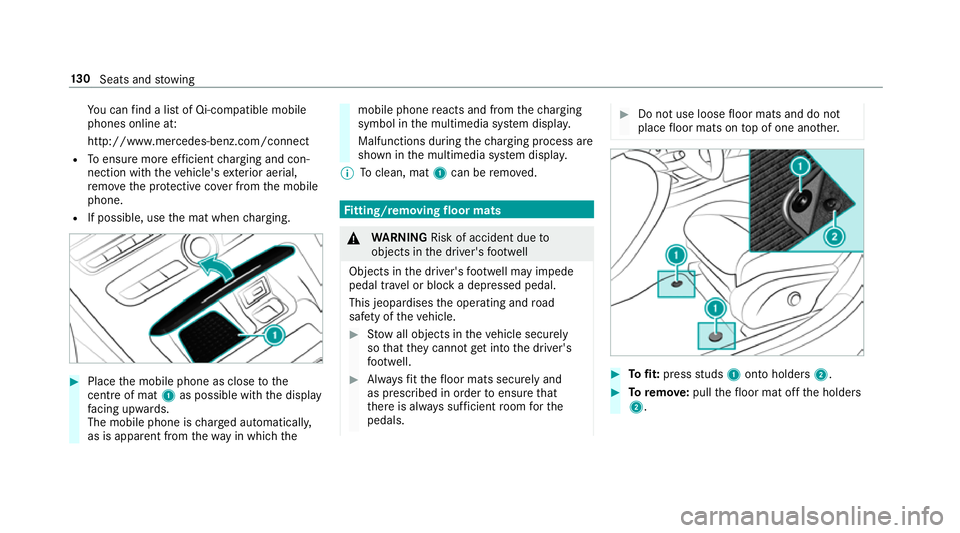
Place the mobile phone as close tothe
centre of mat 1as possible wi th the display
fa cing up wards.
The mobile phone is charge d automatically,
as is apparent from thewa y in which the mobile phone
reacts and from thech arging
symbol in the multimedia sy stem displa y.
Malfunctions during thech arging process are
shown in the multimedia sy stem displa y.
% Toclean, mat 1can be remo ved. Fi
tting/ removing floormats &
WARNING Risk of accident due to
objects in the driver's foot we ll
Objects in the driver's foot we ll may impede
pedal tr avel or block a depressed pedal.
This jeopardises the operating and road
saf ety of theve hicle. #
Stow all objects in theve hicle securely
so that they cannot getinto the driver's
fo ot we ll. #
Alw aysfit th efloor mats securely and
as prescribed in order toensure that
th ere is alw ays suf ficient room forthe
pedals. #
Do not use loose floor mats and do not
place floor mats on top of one ano ther. #
Tofit: press studs 1onto holders 2. #
Toremo ve:pull thefloor mat off the holders
2. 13 0
Seats and stowing