Page 268 of 565
R
Display content #
Toselect the setting: swipe upwards or
down wards on the left-hand Touch Control. #
Press the left-hand Touch Control. #
Toadjust theva lue: swipe upwards or
down wards on the left-hand Touch Control. #
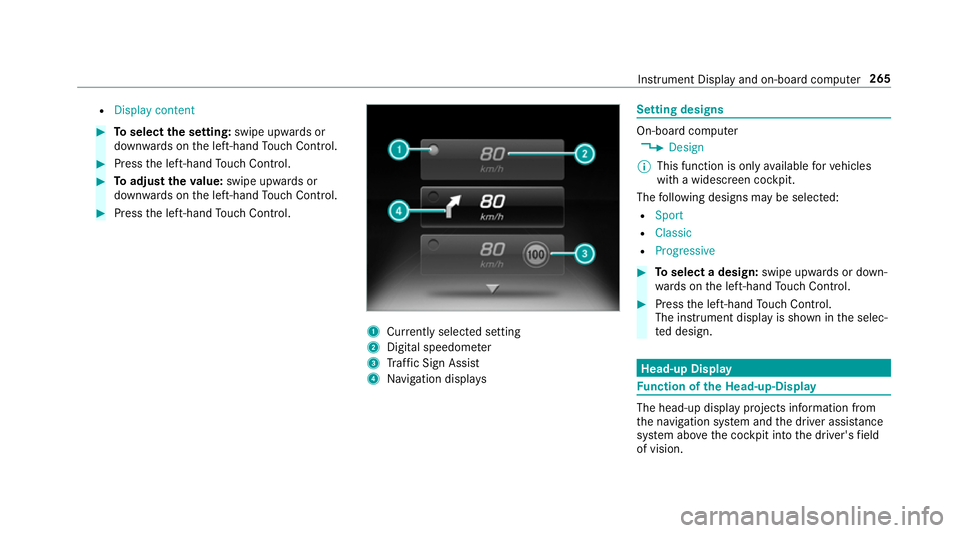
Press the left-hand Touch Control. 1
Currently selected setting
2 Digital speedome ter
3 Traf fic Sign Assi st
4 Navigation displa ys Setting designs
On-board computer
, Design
% This function is only available forve hicles
with a widescreen cockpit.
The following designs may be selec ted:
R Sport
R Classic
R Progressive #
Toselect a design: swipe upwards or down‐
wa rds on the left-hand Touch Control. #
Press the left-hand Touch Control.
The instrument displ ayis shown in the selec‐
te d design. Head-up Display
Fu
nction of the Head-up-Display The head-up display projects information from
th
e navigation sy stem and the driver assis tance
sy stem abo vethe cockpit into the driver's field
of vision. Instrument Display and on-board computer
265
Page 269 of 565
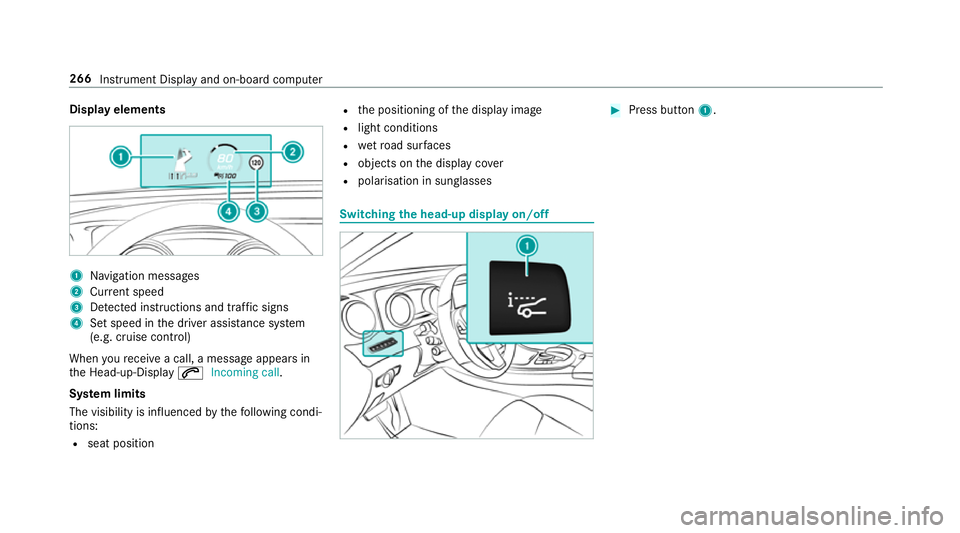
Display elements
1
Navigation messa ges
2 Current speed
3 Detected instructions and traf fic signs
4 Set speed in the driver assis tance sy stem
(e.g. cruise control)
When youre cei vea call, a message appears in
th e Head-up-Display 6Incoming call.
Sy stem limits
The visibility is influenced bythefo llowing condi‐
tions:
R seat position R
the positioning of the display image
R light conditions
R wetro ad sur faces
R objects on the display co ver
R polarisation in sunglasses Switching
the head-up display on/off #
Press button 1. 266
Instru ment Display and on-board computer
Page 271 of 565
Vo
ice prom pting #
Tostart or continue a dialogue: pressthe
ó button on the multifunction steering
wheel.
Yo u can say a command af ter an acou stic
signal. #
Tocor rect an ent ry:say theCorrection
command. #
Toselect an entry from the selection lis t:
say the line number or the conte nts. #
Tobrows eth e selection lis t:say theCon-
tinue orBack command. #
Tointer rupt the dialogue: saythePause
command. #
Tocancel the dialogue: saytheCancel
command. Operable functions
Yo
u can use the LINGU ATRO NIC voice control
sy stem tooperate thefo llowing equipment
re ga rdless of thefe atures:
R Telephone R
Text messa ges
R Navigation
R Address book
R Radio
R Audio (memory card, Media Inter face, USB
and Blu etoo th®
audio)
R TV
R Vehicle Command types
A distinction is made between
thefo llowing
command types:
R Global commands can be said at any time
and rega rdless of the cur rent application,
e.g. theNavigate to, CallorText message to
commands.
R Application-specific commands are only
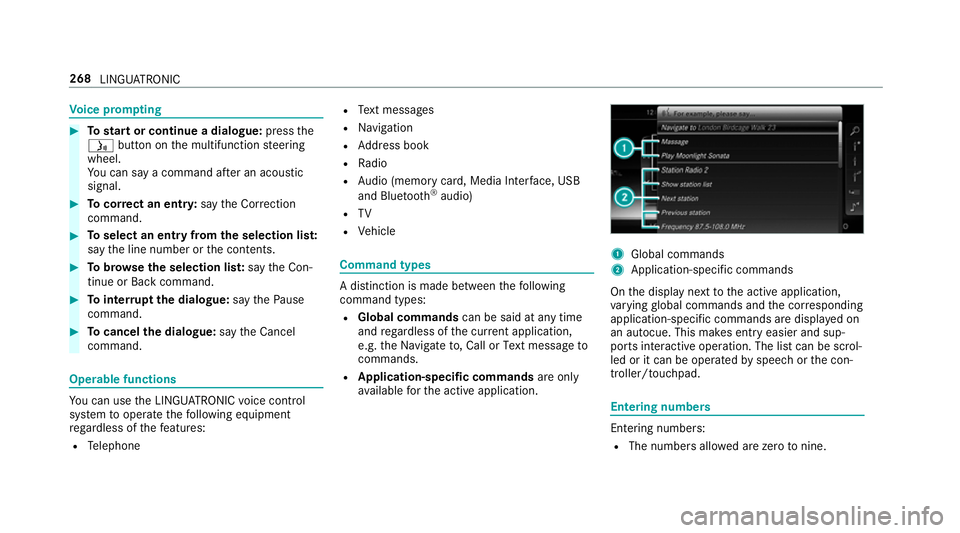
av ailable forth e active application. 1
Global commands
2 Application-specific commands
On the display next tothe active application,
va rying global commands and the cor responding
application-specific commands are displa yed on
an autocue. This makes ent ryeasier and sup‐
ports interactive operation. The list can be scrol‐
led or it can be operated byspeech or the con‐
troller/touchpad. Entering numbers
Ente
ring numbe rs:
R The numbers allo wed are zerotonine . 268
LINGUATRONIC
Page 273 of 565
Command
Function
Navigation To
switch tonavigation mode
Map To
switch tomap display
Address book To
switch toaddress book
Telephone To
switch totelephone mode
Text message To
switch totext messa ges
Radio To
switch toradio mode
TV To
switch toTV mode
Media To
switch tomedia mode
USB To
switch toUSB
Memory card To
switch tomemory card
Internet application To
start a Mercedes-Benz online application. The application must be called up bytouch once prior
to use.
Mercedes-Benz Apps To
switch toMercedes-Benz Apps
Connect To
switch toInternet mode 270
LINGU ATRO NIC
Page 274 of 565
Command
Function
Vehicle To
switch tovehicle settings
System settings To
switch tosystem settings Na
vigation commands Wi
th th e navigation commands, you can en ter
POIs or con ventional addresses as well as make
impor tant navigation settings. Command
Function
Navigate to
Uni
versal sear chfor destinations of all types. A search is also per form ed in the address book con‐
ta cts, in the navigation database and on the Internet (POIs). The order of the de tails, e.g. cit y,stre et
or house number, can be changed.
Address in De
stination ent ryin a desired countr y,e.g. address in France
POI De
stination ent ryfor a POI, e.g. POI Brandenburg Gate . A search is also per form ed in the navigation
database and on the Internet.
POI online search To
conduct a POI sea rch on the Internet only
Navigate to contact Destination entry
toa con tact in the address book LINGU
ATRO NIC 271
Page 281 of 565
Overview and operation
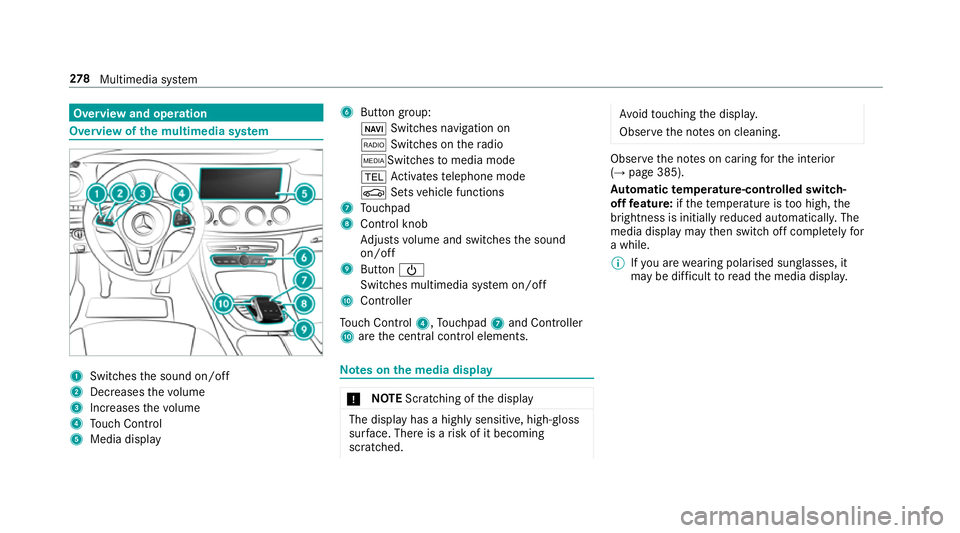
Overview of
the multimedia sy stem 1
Swit ches the sound on/off
2 Decre asesthevo lume
3 Increases thevo lume
4 Touch Control
5 Media displ ay 6
Button group:
ß Switches navigation on
$ Switches on thera dio
ÕSwit ches tomedia mode
% Activates telephone mode
Ø Setsvehicle functions
7 Touchpad
8 Control knob
Adjusts volume and switches the sound
on/off
9 Button Ü
Switches multimedia sy stem on/off
A Controller
To uch Control 4,Touchpad 7and Controller
A are the cent ral control elements. Note
s onthe media display *
NO
TEScratching of the display The display has a highly sensitive, high-gloss
sur
face. The reis a risk of it becoming
scratched. Av
oid touching the displa y.
Obser vethe no tes on cleaning. Obser
vethe no tes on caring forth e interior
(→ page 385).
Au tomatic temperature-cont rolled switch-
off feature: ifth ete mp erature is too high, the
brightness is initially reduced automatically. The
media display may then switch off comple tely for
a while.
% Ifyo u are wearing polarised sun glasses, it
may be dif ficult toread the media displa y.278
Multimedia sy stem
Page 284 of 565
Yo
u can navigate in menus and lists via touch-
sensitive sur face 1 byusing a single-finger
swipe. #
Toselect the menu item: swipe up, down,
left or right. #
Press touchpad 1. #
Toopen or close lists: swipe left orright. #
Tomo vethe digital map: swipe in any
direction.
Use thefo llowing functions with a two-finger
swipe: #
Tocall up main functions and favo urites:
swipe down with two fingers. #
Tozoom in and out of the map: movetwo
fi ngers toget her or apart.
Setting the sensitivity
Multimedia sy stem:
, System .
w Input #
Select Touchpad sensitivity .#
Select Fast,Medium orSlow . Handwriting
recognition: swit ching there ad-
aloud function on/off
Multimedia sy stem:
, System .
õ Audio #
Switch Read out handwriting recognition on
O or off ª.
Handwriting recognition: selecting an input
langua ge #
Select B. #
Select an input language. Main functions
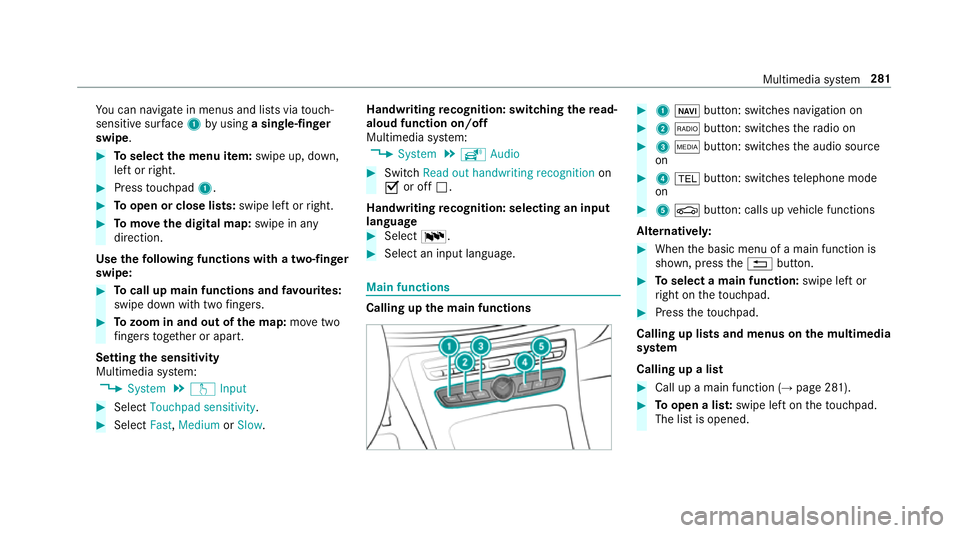
Calling up the main functions #
1 ß button: switches navigation on #
2 $ button: switches thera dio on #
3 Õ button: switches the audio source
on #
4 % button: switches telephone mode
on #
5 Ø button: calls up vehicle functions
Alternativel y: #
When the basic menu of a main function is
shown, press the% button. #
Toselect a main function: swipe left or
ri ght on theto uchpad. #
Press theto uchpad.
Calling up lists and menus on the multimedia
sy stem
Calling up a list #
Call up a main function (→ page 281). #
Toopen a lis t:swipe left on theto uchpad.
The list is opened. Multimedia sy
stem 281
Page 285 of 565
#
Toselect a menu item: swipe up or down
on theto uchpad. #
Press theto uchpad. Favo
urites Overview of
favo urites
Fa vourites of feryo uqu ick access tofrequently
used applications. It is possible tocrea te20
fa vo urites in tota l.
The following functions are available:
R add pre-defined favo urites fromthefo llow‐
ing categories:
- Navigation
- Entertainment
- Telephone
- Connect
- Vehicle
- System settings
R add your ow nfa vo urites
R rename a favo urite
R moveafa vo urite R
dele teafa vo urite
R restore all favo urites settings
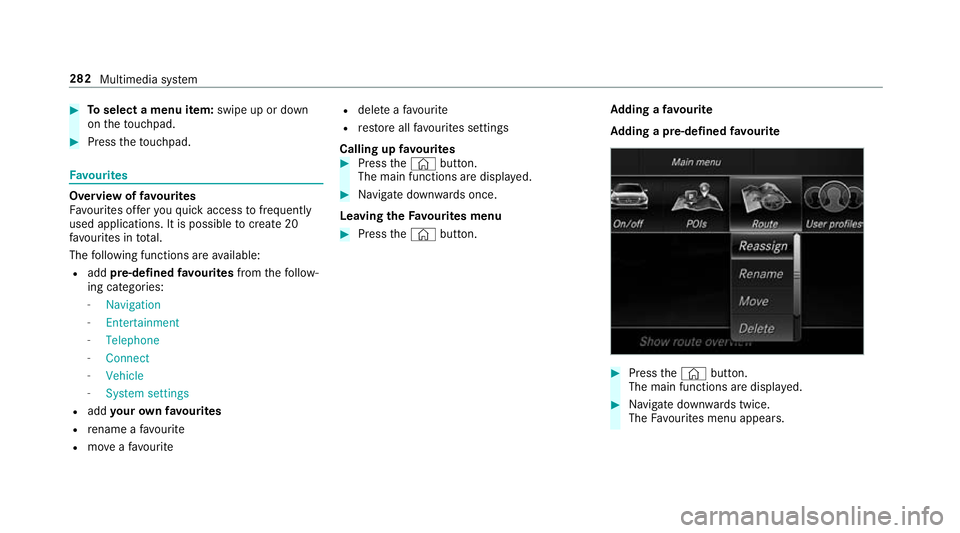
Calling up favo urites #
Press the© button.
The main functions are displa yed. #
Navigate down wards once.
Leaving theFavo urites menu #
Press the© button. Ad
ding a favo urite
Ad ding a pre-de fined favo urite #
Press the© button.
The main functions are displa yed. #
Navigate down wards twice.
The Favourites menu appears. 282
Multimedia sy stem