Page 246 of 534

Downloaded from www.Manualslib.com manuals search engine 4159
Features of your vehicle
Using RADIO, SETUP, VOLUME
and AUDIO CONTROL
1. Button
Turns to FM mode and toggles FM1and
FM2 when the button is pressed each
time.
2. Button
Pressing the button selects the
AM band. AM Mode is displayed on the
LCD.
3. Button
When the button is pressed,it increases the band frequency to
automatically select channel. Stops at
the previous frequency if no channel is
found.
When the button is pressed, it reduces the band frequency to auto-
matically select channel. Stops at the
previous frequency if no channel is
found.
4. Button & Knob
Turns the audio system on/off when
the ignition switch is on ACC or ON.
If the knob is turned clockwise/counter- clockwise, the volume will increase
/decrease.
5. PRESET Buttons
Press ~ buttons lessthan 0.8 seconds to play the station
saved in each button.
Press ~
button more
than 0.8 seconds or longer to save the
current station to the respective button
with a beep.
61
61
VOLPOWER
SEEK
TRACK
SEEK
TRACK
SEEK
AM
AM
FM
VF_GEN_RADIOVF_GEN_RADIO
VF_GEN_RADIO
Page 247 of 534
Downloaded from www.Manualslib.com manuals search engine Features of your vehicle
160
4
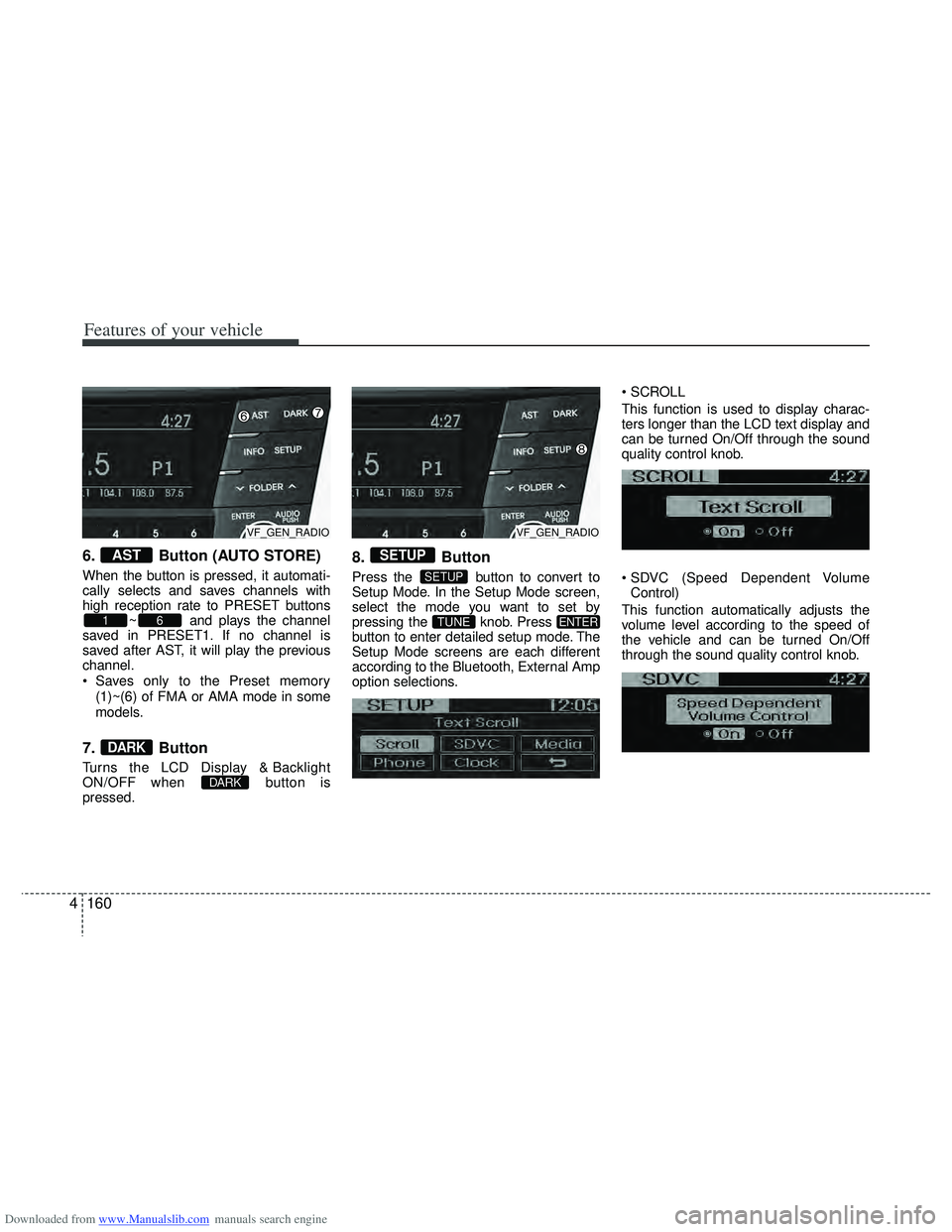
6. Button (AUTO STORE)
When the button is pressed, it automati-
cally selects and saves channels with
high reception rate to PRESET buttons
~ and plays the channel
saved in PRESET1. If no channel is
saved after AST, it will play the previous
channel.
Saves only to the Preset memory
(1)~(6) of FMA or AMA mode in some
models.
7. Button
Turns the LCD Display & Backlight
ON/OFF when button is
pressed.
8. Button
Press the button to convert to
Setup Mode. In the Setup Mode screen,
select the mode you want to set by
pressing the knob. Press
button to enter detailed setup mode. The
Setup Mode screens are each different
according to the Bluetooth, External Amp
option selections.
This function is used to display charac-
ters longer than the LCD text display and
can be turned On/Off through the sound
quality control knob.
Control)
This function automatically adjusts the
volume level according to the speed of
the vehicle and can be turned On/Off
through the sound quality control knob.
ENTERTUNE
SETUP
SETUP
DARK
DARK
61
AST
VF_GEN_RADIOVF_GEN_RADIO
Page 267 of 534
Downloaded from www.Manualslib.com manuals search engine Features of your vehicle
180
4
CAUTION IN USING
BLUETOOTH®CELLULAR
PHONE
Do not use a cellular phone or
perform Bluetooth®settings (e.g.
pairing a phone) while driving.
Some Bluetooth
®-enabled phones
may not be recognized by the system or fully compatible withthe system.
Before using Bluetooth
®related
features of the audio system, refer your phone’s User’s Manual for phone-side Bluetooth
®opera-
tions.
The phone must be paired to the audio system to use Bluetooth
®
related features.
You will not be able to use the hands-free feature when yourphone (in the car) is outside ofthe cellular service area (e.g. in atunnel, in a underground, in amountainous area, etc.).
If the cellular phone signal is poor or the vehicles interior noise istoo loud, it may be difficult to hearthe other person’s voice during a call.
(Continued)
(continued) Do not place the phone near or inside metallic objects, otherwise
communications with Bluetooth
®
system or cellular service sta- tions can be disturbed.
While a phone is connected through Bluetooth
®your phone
may discharge quicker than usual for additional Bluetooth
®-related
operations.
Some cellular phones or other devices may cause interferencenoise or malfunction to audiosystem. In this case, store thedevice in a different location mayresolve the situation.
Please save your phone name in English, or your phone name maynot be displayed correctly.
If Priority is set upon vehicle igni- tion (IGN/ACC ON), the Bluetoothphone will be automatically con-nected. Even if you are outside,the Bluetooth phone will be auto-matically connected once you arein the vicinity of the vehicle.
If you do not want automaticBluetooth power off.
(Continued)
(continued) Bluetooth connection may become intermittently discon-nected in some mobile phones.Follow the following steps to try again.
1) Turn the Bluetooth Function within the mobile phoneON/OFF and try to connect again.
2) Turn the mobile phone power ON/OFF and try to connectagain.
3) Completely remove the mobile phone battery, reboot, and thentry to connect again.
4) Reboot the Audio and try to connect again.
5) Delete all paired devices from the mobile phone and Audioand re-pair for use.
The hands-free call volume and quality may differ depending onthe mobile phone.
Page 269 of 534

Downloaded from www.Manualslib.com manuals search engine Features of your vehicle
182
4
Using RADIO, SETUP, VOLUME
and AUDIO CONTROL
1. Button
Turns to FM mode and toggles FM1 and
FM2 when the button is pressed each
time. FM1
\b FM1 \b FMA
2. Button
Pressing the button selects the
AM band. AM Mode is displayed on the
LCD. AM
\bAMA
3. Button
TA(Traffic announcement) Channels in
FM, CD, AUX mode, turns on/off the
reception of TA channels of RDS.
4. Button
When the is pressed, it will
automatically tune to the next lower
station.
When the is pressed, it will automatically tune to the next higher
station.
5. Button & Knob
Turns the audio system on/off whenthe ignition switch is on ACC or ON.
If the knob is turned clockwise/counter- clockwise, the volume will increase
/decrease.
Depending on the model if the ignition switch is not on ACC or ON position.
the “Battery Discharge” warning appears
on LCD after 10 seconds of power-up,
and automatically turns off after 1 hours
of operation.
6. PRESET Buttons
Press ~ buttons lessthan 0.8 seconds to play the station
saved in each button. Press ~ buttons more
than 0.8 seconds or longer to save the
current station to the respective button
with a beep.
7. Button (AUTO STORE)
When the button is pressed, it automati-
cally selects and saves channels with
high reception rate to PRESET buttons ~ and plays the channel
saved in PRESET1. If no channel is
saved after AST, it will play the previous
channel.
Saves only the Preset memory (1)~(6)
of FMA or AMA mode in some models.
8. Button
Turn the LCD Display & Backlight
ON/OFF when button press.DARK
DARK
61
AST
61
61
SEEK
TRACK
SEEK
TRACKSEEK
TA
AM
AM
FM
VF_EU_RADIO
VF_EU_RADIO
VF_EU_RADIO
Page 270 of 534
Downloaded from www.Manualslib.com manuals search engine 4183
Features of your vehicle
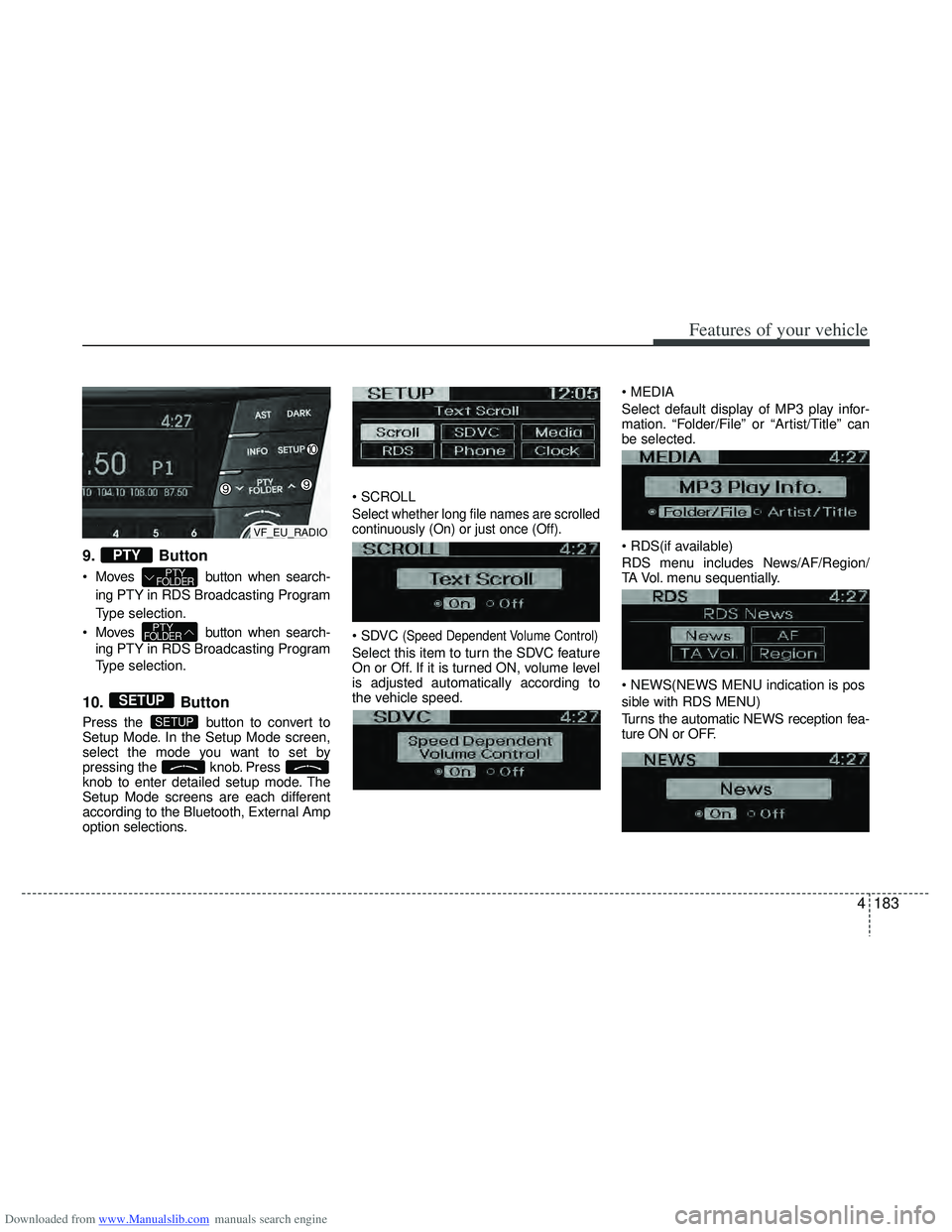
9. Button
Moves button when search-ing PTY in RDS Broadcasting Program
Type selection.
Moves button when search- ing PTY in RDS Broadcasting Program
Type selection.
10. Button
Press the button to convert to
Setup Mode. In the Setup Mode screen,
select the mode you want to set by
pressing the knob. Press
knob to enter detailed setup mode. The
Setup Mode screens are each different
according to the Bluetooth, External Amp
option selections.
Select whether long file names are scrolled
continuously (On) or just once (Off).
(Speed Dependent Volume Control)
Select this item to turn the SDVC feature
On or Off. If it is turned ON, volume level
is adjusted automatically according to
the vehicle speed.
Select default display of MP3 play infor-
mation. “Folder/File” or “Artist/Title” can
be selected.
RDS menu includes News/AF/Region/
TA Vol. menu sequentially.
sible with RDS MENU)
Turns the automatic NEWS reception fea-
ture ON or OFF.
SETUP
SETUP
PTYFOLDER
PTYFOLDER
PTY
VF_EU_RADIO
Page 271 of 534

Downloaded from www.Manualslib.com manuals search engine Features of your vehicle
184
4
AF(AF MENU indication is possible with
RDS MENU)
Select this item to turn the AF(Alternate
Frequency) feature ON or OFF.
MENU indication is
possible with RDS MENU)
Adjusts the TA (Traffic Announcement) vol-
ume level according to normal audio vol-
ume level.
MENU indication is
possible with RDS MENU)
Selects whether REGION code is used
(ON) or not (OFF) once the radio deter-
mines the AF jump condition. If AUTO is
selected, AF jump condition is determined
automatically via PI reception status.
Select this item to enter Clock setup
mode.(12/24Hr., Auto, Time)
Select “12/24 Hr.” button to enter Time
Format menu.
Select “Auto” button to enter Automatic
RDS Time menu.
Select “Time” button to enter Time setting.
Adjust the hour and press the
knob to set. Adjust the minute and press
the
knob to complete and exit
from clock adjustment mode. Pressing the button more than 0.8 seconds
while in power off, screen will allow the
user to make immediately adjustments to
the clock.
(if equipped)
Select this item to enter PHONE setup
mode.Refer to “BLUETOOTH PHONE
OPERATION” section for detailed infor-
mation.
❈ “PHONE” menu is not available if the
audio does not support Bluetooth features.
SETUP
Page 274 of 534

Downloaded from www.Manualslib.com manuals search engine 4187
Features of your vehicle
7. Button
Displays the information of the current
song.
Audio CD : Disc Title/Artist, Track Title/Artist, Total Track.
MP3 CD : File Name, Title, Artist, Album, Folder, Total Files (Not dis-
played if the information is unavailable
on the CD or file.)
8. Button
Press button to move to
child folder of the current folder and
display the first song in the folder.
Press knob to move to the
folder displayed. It will play the first
song in the folder.
Press button to move to par- ent folder of the current folder and dis-
play the first song in the folder. Press knob to move to the
folder displayed.
9.& Knob
Turn this knob clockwise to browse
songs after current song, or counter-
clockwise to browse songs before cur-
rent song. To play the displayed song,
press the knob.
Pressing this knob without turning enters to AUDIO CONTROL mode.
10. CD Eject Button
Push button for less than 0.8
seconds to eject the CD during CD play-
back. This button is enabled when igni-
tion switch is off.
ALL EJECT (CD Changer : AC600DFE/
AC610DFE)
Press this button for more than 0.8 sec-
onds to eject all discs inside the deck in
respective order.
11. CD Slot
Insert a CD with the label side up and
gently push in while ignition switch is on
ACC or ON. The audio automatically
switches to CD mode and begins to play
the CD.
If the audio was turned off, audio power
will automatically turn on as the CD is
inserted.
This audio only recognizes 12cm-size, CD-DA (Audio CD) or ISO data-CD
(MP3 CD).
If UDF data-CD or non-CD (e.g. DVD) is inserted, "Reading Error" message
will be displayed and the disc will be
ejected.
12. CD Indicator (CD Player : AC100 DFE /AC110DFE)
When car ignition switch is in ACC or ON
and if the CD is loaded, this indicator is
lighted. If the CD is ejected the light is
turned off.
PTYFOLDER
PTYFOLDER
FOLDER
INFO
CAUTION
Do not insert a CD if CD indicator is
lit.
VF_AC100DFE_CDP
VF_AC600DFE_CDC
VF_EU_CD
Page 294 of 534
Downloaded from www.Manualslib.com manuals search engine 5
Before driving / 5-3
Key positions / 5-4
Engine start/stop button / 5-8
ISG (Idle Stop and Go) system / 5-14
Manual transaxle / 5-19
Automatic transaxle / 5-22
Brake system / 5-29
Cruise control system / 5-48
Speed limit control system / 5-53
Lane keeping assist system (LKAS) / 5-56
Economical operation / 5-63
Special driving conditions / 5-65
Winter driving / 5-69
Trailer towing / 5-73
Vehicle weight / 5-82
Driving your vehicle