2016 HYUNDAI I40 automatic
[x] Cancel search: automaticPage 124 of 534

Downloaded from www.Manualslib.com manuals search engine 437
Features of your vehicle
Tilting the sunroof
When the sunshade is closed
If you push the sunroof control lever
upward, the sunshade will slide all the
way open then the sunroof glass will tilt.
To stop the sunroof movement at any
point, pull or push the sunroof control
lever momentarily.
When the sunshade is opened
If you push the sunroof control lever
upward, the sunroof glass will tilt.
To stop the sunroof movement at any
point, pull or push the sunroof control
lever momentarily.
Closing the sunroof
To close the sunroof glass only
Push the sunroof control lever forward to
the first detent position or pull the lever
downward.
To close the sunroof glass with thesunshade
Push the sunroof control lever forward to
the second detent position. The sunroof
glass will close then the sunshade close
automatically.
To stop the sunroof movement at any
point, pull or push the sunroof control
lever momentarily.
Automatic reversal
If an object or part of the body is detect-
ed while the sunroof glass or sunshade is
closing automatically, it will reverse the
direction, and then stop.
The auto reverse function does not work
if a tiny obstacle is between the sliding
glass or sunshade and the sunroof sash.
You should always check that all passen-
gers and objects are away from the sun-
roof before closing it.
OYF049215OVF041029
Page 127 of 534

Downloaded from www.Manualslib.com manuals search engine Features of your vehicle
40
4
Recalling positions from memory
1. Change the ignition switch to the ON
position.
2. To recall the position in the memory, press the desired memory button (1 or
2). The system will beep once, then the
driver’s seat will automatically adjust to
the stored position.
Adjusting the control switch for the dri-
ver’s seat while the system is recalling
the stored position will cause the move-
ment to stop and move in the direction
that the control switch is moved.
Easy access function
(if equipped)
The system will move the driver's seat
automatically as follows:
Without smart key system - It will move the driver’s seat rearwardwhen the ignition key is removed.
- It will move the driver’s seat forward when the ignition key is inserted.
With smart key system - It will move the driver’s seat rearwardwhen the engine start/stop button is
changed to the OFF position.
- It will move the driver’s seat forward when the engine start/stop button is
changed to the ACC or START posi-
tion.
You can activate or deactivate this feature.
Refer to "User setting" in this section.
WARNING
Use caution when recalling the
adjustment memory while sitting in
the vehicle. Push the seat position
control switch to the desired posi-
tion immediately if the seat moves
too far in any direction.
Page 129 of 534
Downloaded from www.Manualslib.com manuals search engine Features of your vehicle
42
4
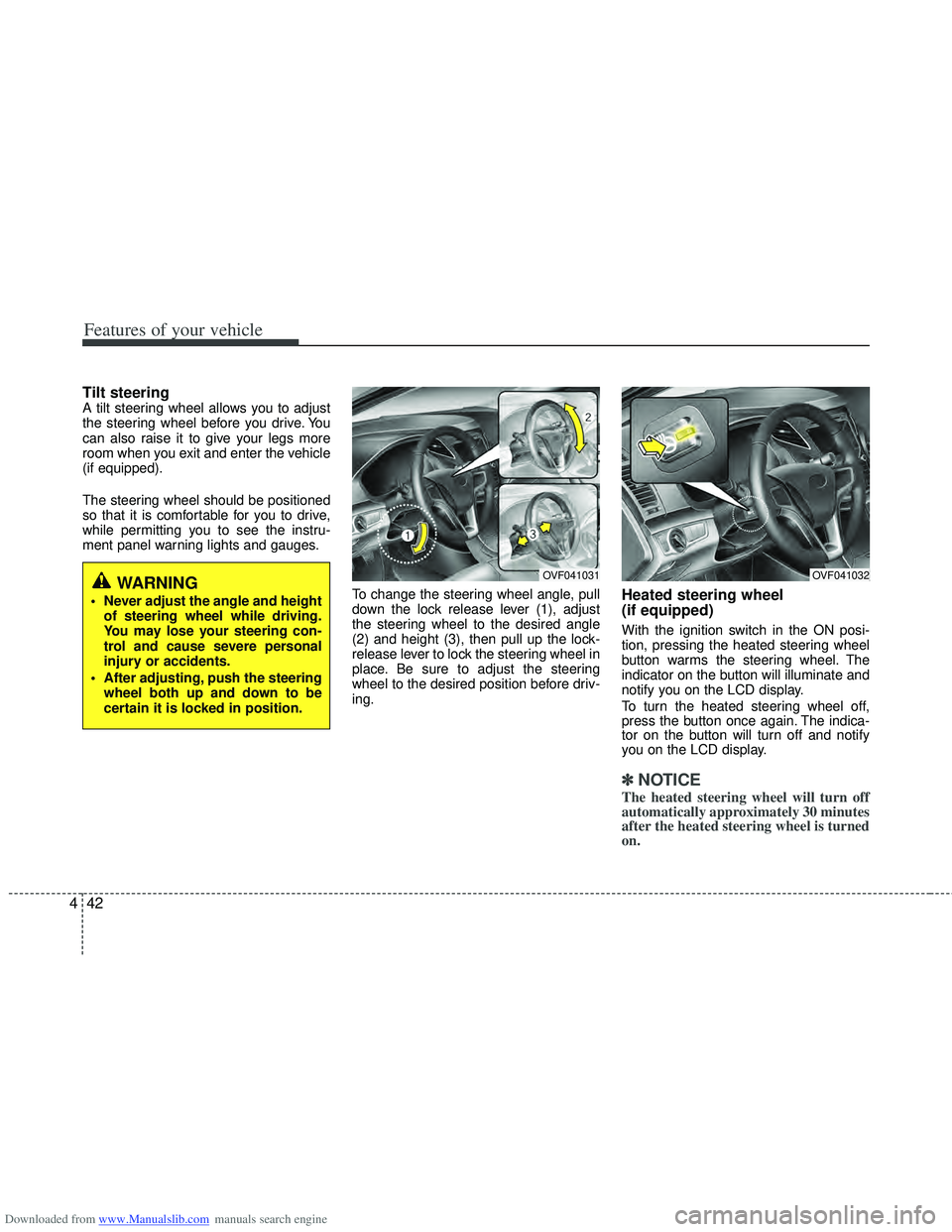
Tilt steering A tilt steering wheel allows you to adjust
the steering wheel before you drive. You
can also raise it to give your legs more
room when you exit and enter the vehicle
(if equipped).
The steering wheel should be positioned
so that it is comfortable for you to drive,
while permitting you to see the instru-
ment panel warning lights and gauges.
To change the steering wheel angle, pull
down the lock release lever (1), adjust
the steering wheel to the desired angle
(2) and height (3), then pull up the lock-
release lever to lock the steering wheel in
place. Be sure to adjust the steering
wheel to the desired position before driv-
ing.
Heated steering wheel
(if equipped)
With the ignition switch in the ON posi-
tion, pressing the heated steering wheel
button warms the steering wheel. The
indicator on the button will illuminate and
notify you on the LCD display.
To turn the heated steering wheel off,
press the button once again. The indica-
tor on the button will turn off and notify
you on the LCD display.
✽ ✽NOTICE
The heated steering wheel will turn off
automatically approximately 30 minutes
after the heated steering wheel is turned
on.
WARNING
Never adjust the angle and height
of steering wheel while driving.
You may lose your steering con-
trol and cause severe personal
injury or accidents.
After adjusting, push the steering wheel both up and down to be
certain it is locked in position.
OVF041031OVF041032
Page 131 of 534

Downloaded from www.Manualslib.com manuals search engine Features of your vehicle
44
4
Inside rearview mirror
Adjust the rearview mirror so that the
center view through the rear window is
seen. Make this adjustment before you
start driving.
Day/night rearview mirror (if equipped)
Make this adjustment before you start
driving and while the day/night lever is in
the day position.
Pull the day/night lever toward you to
reduce glare from the headlights of vehi-
cles behind you during night driving.
Remember that you lose some rearview
clarity in the night position. Electric chromic mirror (ECM)
(if equipped)
The electric rearview mirror automatical-
ly controls the glare from the headlights
of the car behind you in nighttime or low
light driving conditions. The sensor
mounted in the mirror senses the light
level around the vehicle, and automati-
cally controls the headlight glare from
vehicles behind you.
When the engine is running, the glare is
automatically controlled by the sensor
mounted in the rearview mirror.
Whenever the shift lever is shifted into R
(Reverse), the mirror will automatically
go to the brightest setting in order to
improve the drivers view behind the vehi-
cle.
MIRRORS
WARNING - Rear visibility
Do not place objects in the rear
seat or cargo area which would
interfere with your vision out the
rear window.
OVF041034
CAUTION
When cleaning the mirror, use a paper towel or similar materialdampened with glass cleaner. Donot spray glass cleaner directly onthe mirror as that may cause the liq- uid cleaner to enter the mirror hous-ing.
Day
Night
WARNING
Do not adjust the rearview mirror
while the vehicle is moving. This
could result in loss of control, and
an accident which could cause
death, serious injury or property
damage.
WARNING
Do not modify the inside mirror and
do not install a wide mirror. It could
result in injury, during an accident
or deployment of the air bag.
Page 132 of 534

Downloaded from www.Manualslib.com manuals search engine 445
Features of your vehicle
To operate the electric rearview mirror:
Press the ON/OFF button (1) to turnthe automatic dimming function on.
The mirror indicator light will illuminate.
Press the ON/OFF button to turn the
automatic dimming function off. The
mirror indicator light will turn off.
The mirror defaults to the ON position whenever the ignition switch is turned
on.
Outside rearview mirror
Be sure to adjust mirror angles before
driving.
Your vehicle is equipped with both left-
hand and right-hand outside rearview
mirrors. The mirrors can be adjusted
remotely with the remote switch. The mir-
ror heads can be folded back to prevent
damage during an automatic car wash or
when passing in a narrow street.CAUTION
Do not scrape ice off the mirrorface; this may damage the surfaceof the glass. If ice should restrict movement of the mirror, do notforce the mirror for adjustment. Toremove ice, use a deicer spray, or a sponge or soft cloth with very warmwater.
OVF041202WARNING - Rearview mir-
rors
The outside rearview mirror is convex. Objects seen in the mir-
ror are closer than they appear.
Use your interior rearview mirror or direct observation to deter-
mine the actual distance of fol-
lowing vehicles when changing
lanes.
CAUTION
If the mirror is jammed with ice, donot adjust the mirror by force. Usean approved spray de-icer (not radi- ator antifreeze) to release thefrozen mechanism or move thevehicle to a warm place and allow the ice to melt.
WARNING
Do not adjust or fold the outside
rearview mirrors while the vehicle
is moving. This could result in loss
of control, and an accident which
could cause death, serious injury
or property damage.
S S
S
S
e
e
e
e
n
n
n
n
s
s
s
s
o
o
o
o
r
r
r
r
I
I
I
I
n
n
n
n
d
d
d
d
i
i
i
i
c
c
c
c
a
a
a
a
t
t
t
t
o
o
o
o
r
r
r
r
Page 139 of 534

Downloaded from www.Manualslib.com manuals search engine Features of your vehicle
52
4
Manual transaxle shift indicator
(if equipped)
This indicator informs you which gear is
desired while driving to save fuel.
For example
: Indicates that shifting up to the 3rdgear is desired (currently the shift
lever is in the 2nd or 1st gear).
: Indicates that shifting down to the 3rd gear is desired (currently the
shift lever is in the 4th or 5th gear).
When the system is not working proper-
ly, the indicator is not displayed.
Automatic transaxle shift position
indicator (if equipped)
The indicator displays which automatic
transaxle shift lever is selected.
Icy road warning light
(if equipped)
This warning light is to warn the driver
the road may be icy when:
Ignition ON
Temperature range: approximately below 4°C (39.2°F).
The warning light will blink for 10 sec-
onds and then illuminate. Also, the warn-
ing chime will sound.
✽ ✽ NOTICE
If the icy road warning light appears
while driving, you should drive more
attentively and safely refraining from
over-speeding, rapid acceleration, sud-
den braking or sharp turning, etc.
OVF041048OVF041049OVF041090
Page 144 of 534

Downloaded from www.Manualslib.com manuals search engine 457
Features of your vehicle
Door
Auto Door Lock
Off - The auto door lock operation will becanceled.
Speed - All doors will be automatically locked when the vehicle speed
exceeds 15km/h (9.3mph).
Shift Lever - All doors will be automati- cally locked if the shift lever
is shifted from the P(Park)
position to the R(Reverse),
N(Neutral) or D(Drive) posi-
tion. (for automatic
transaxle shift lever)
Auto Door Unlock
Off - The auto door unlock operation will
be canceled.
Key Out - All doors will be automatically unlocked when the ignition key
is removed from ignition switch
(or smart key is in the OFF
position).
Shift Lever - All doors will be automati- cally unlocked if the shift
lever is shifted to the
P(Park) position. (for auto-
matic transaxle shift lever)
Lamp
Headlamp Escort
If the Headlamp Escort is checked:
The Headlamp Escort and Headlamp
Welcome function will be activated.
For details, refer to “Lighting” in section 4.
OVF041061
■
Type A ■
Type BOVF041062
■
Type A ■
Type B
Page 145 of 534

Downloaded from www.Manualslib.com manuals search engine Features of your vehicle
58
4
Settings
Language
Choose a language you prefer within the
LCD display.
AVG Fuel Economy
Auto Reset - The average fuel economy
will reset automatically
when you drive after refuel-
ing.
Alarm Function
If the Alarm Function is checked:
The Alarm function on the transmitter
and smart key will be activated.
Welcome Sound
(for instrument cluster type B)
On - The Welcome Sound function will be activated.
Off - The Welcome Sound function will be inactivated.
Maintenance
If the Maintenance is checked:
A message will appear to notify the driv-
er maintenance service is required.
Seat Easy Access (for Driver Position
Memory System equipped vehicle)
If the Seat Easy Access is chcked:
The driver's seat will automatically move
forward or rearward for the driver to enter
or exit the vehicle comfortably. LKAS Mode (for instrument cluster type B)
(if equipped)
LKA -
The Lane Keeping Assistance
System (LKAS) will be activated.
LDW - The Lane Departure Warning System (LDWS) will be activated.
For more details, refer to LKAS in section 5.
OVF041063
■
Type A ■
Type BOVF041064