Page 181 of 534

Downloaded from www.Manualslib.com manuals search engine Features of your vehicle
94
4
REARVIEW CAMERA (IF EQUIPPED)
The rearview camera will activate when
the back-up light is ON with the ignition
switch ON and the shift lever in the R
(Reverse) position.
Type B
The rearview camera may be turned off
by pressing the ON/OFF button when the
rearview camera is activated.
To turn the camera on again, press the
ON/OFF button again when the ignition
switch is on and the shift lever in R
(Reverse). Also, the camera will turn on
automatically whenever the ignition
switch is turned off and on again.
✽ ✽
NOTICE
The warning "Warning ! Check sur-
roundings for safety " will appear on the
rearview display when the rearview
camera is activated.
OVF041101
OVF041106
■Type BOVF041102
■Type A
Rear view display
Rear view display
WARNING
This system is a supplementary
function only. It is the responsibili-
ty of the driver to always check the
inside/outside rearview mirror and
the area behind the vehicle before
and while backing up because
there is a dead zone that cannot
be seen through the camera.
Always keep the camera lens clean. If the lens is covered with
foreign matter, the camera may
not operate normally.
Page 183 of 534

Downloaded from www.Manualslib.com manuals search engine Features of your vehicle
96
4
Battery saver function
The purpose of this feature is to pre-
vent the battery from being dis-
charged. The system automatically
turns off the parking lights when the
driver removes the ignition key and
opens the driver- side door.
With this feature, the parking lights will be turned off automatically if the driver
parks on the side of road at night.
If necessary, to keep the lights on
when the ignition key is removed, per-
form the following :
1) Open the driver-side door.
2) Turn the parking lights OFF and ON again using the light switch on the
steering column.
Headlight (Headlamp) escort
function (if equipped)
The headlights (and/or taillights) remain
on for approximately 20 minutes after the
ignition key is removed or turned to the
ACC or LOCK position. However, if the
driver’s door is opened and closed, the
headlights are turned off after 30 sec-
onds.
The headlights can be turned off by
pressing the lock button on the transmit-
ter or smart key twice or turning off the
light switch from the headlight or Auto
light position.
Headlight (Headlamp) welcome
function (if equipped)
When the headlight switch is in the ON or
AUTO position and all doors (and tail-
gate) are closed and locked, if you press
the door unlock button on the transmitter
or smart key, the headlights will come on
for about 15 seconds.
If the headlight switch is in the AUTO
position, the function can only operate at
night.
At this time, if you press the door unlock
button again or door lock button on the
transmitter or smart key, the headlights
will turn off immediately.
LIGHTING
CAUTION
If the driver gets out of the vehiclethrough other doors (except dri-ver’s door), the battery saver func-tion does not operate and the head-light escort function does not turnoff automatically. Therefore, it caus-es the battery to be discharged. Inthis case, make sure to turn off thelamp before getting out of the vehi- cle.
Page 184 of 534

Downloaded from www.Manualslib.com manuals search engine 497
Features of your vehicle
Smart cornering light
While driving the corner, for your sight
and safety, the smart cornering light
turns on automatically. The system will
operate automatically as follows:
When vehicle speed is under 10km/hand steering wheel angle approximate-
ly 80 degrees.
When vehicle speed is over 10km/h and steering wheel angle approximate-
ly 35 degrees.
When the vehicle is at a standstill.
When moving rearwards with one of the above conditions satisfied the lights
will light up the opposite direction.
The smart corning light will operate only when the light switch is in the
AUTO position. (vehicles equipped with
AFLS)
Lighting control
The light switch has a Headlight and a
Parking light position.
To operate the lights, turn the knob at the
end of the control lever to one of the fol-
lowing positions:
(1) OFF position
(2) Auto light position (if equipped)
(3) Parking light position
(4) Headlight positionParking light position ( )
When the light switch is in the parking
light position, the tail, position, license
and instrument panel lights are ON.
OVF041120OVF041122
Page 185 of 534
Downloaded from www.Manualslib.com manuals search engine Features of your vehicle
98
4
Headlight position ( )
When the light switch is in the headlight
position the head, tail, position, license
and instrument panel lights are ON.
✽ ✽
NOTICE
The ignition switch must be in the ON
position to turn on the headlights.
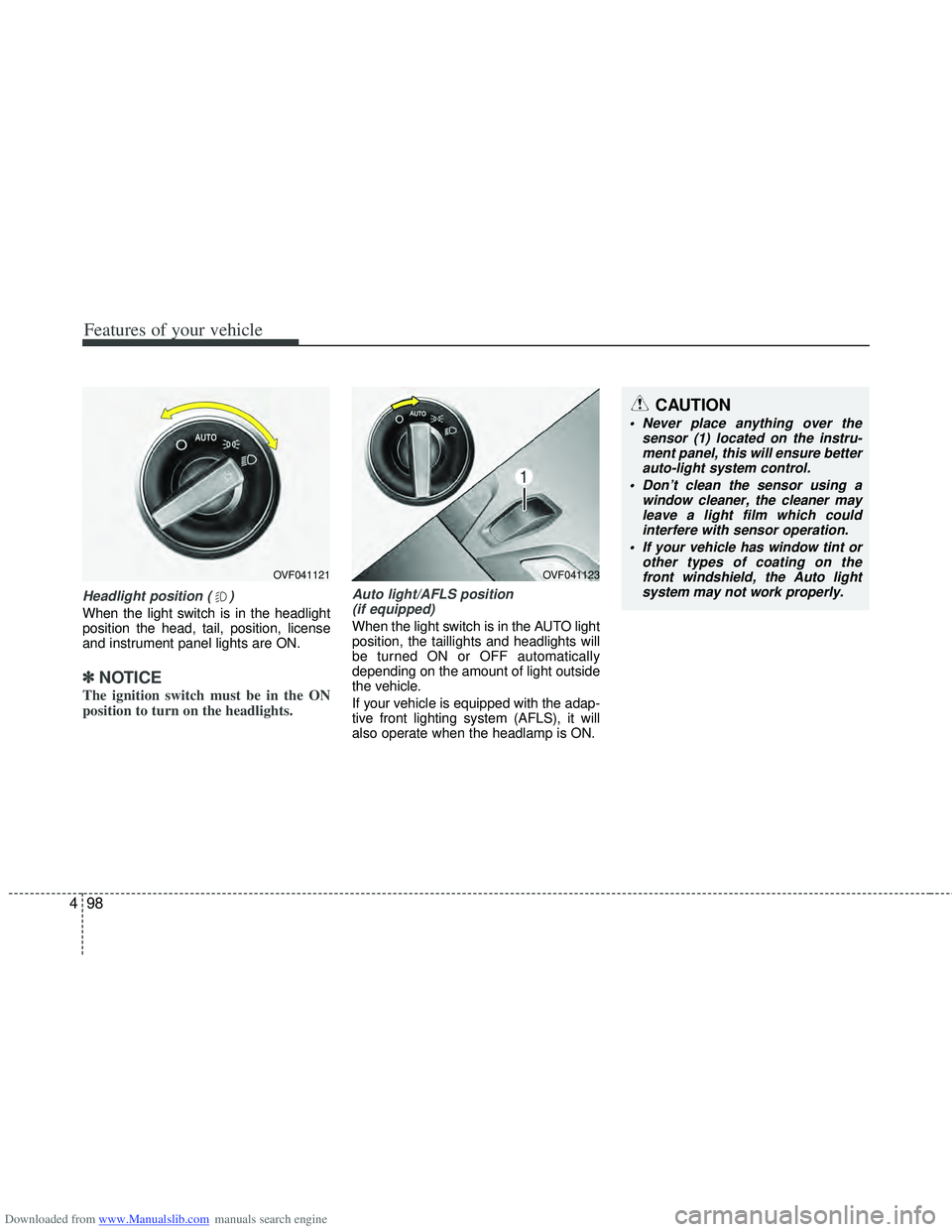
Auto light/AFLS position
(if equipped)
When the light switch is in the AUTO light
position, the taillights and headlights will
be turned ON or OFF automatically
depending on the amount of light outside
the vehicle.
If your vehicle is equipped with the adap-
tive front lighting system (AFLS), it will
also operate when the headlamp is ON.
OVF041123
CAUTION
Never place anything over the sensor (1) located on the instru-ment panel, this will ensure better auto-light system control.
Don’t clean the sensor using a window cleaner, the cleaner mayleave a light film which could interfere with sensor operation.
If your vehicle has window tint or other types of coating on thefront windshield, the Auto light system may not work properly.
OVF041121
Page 190 of 534

Downloaded from www.Manualslib.com manuals search engine 4103
Features of your vehicle
Automatic type
It automatically adjusts the headlight
beam level according to the number of
passengers and loading weight in the
luggage area.
And it offers proper headlight beam
under various conditions.
AFLS (Adaptive Front Lighting
System) (if equipped)
Adaptive front lighting system uses the
steering angle and vehicle speed, to
keep your field of vision wide by swiveling
and leveling the headlamp.
Change the switch to the AUTO position
when the engine is running. The adaptive
front lighting system will operate when
the headlamp is ON. To turn off the
AFLS, change the switch to other posi-
tions. After turning the AFLS off, head-
lamp swiveling no longer occurs, but lev-
eling operates continuously.If the AFLS malfunction indicator comes
on, the AFLS is not working properly.
Drive to the nearest safe location and
restart the engine. If the indicator contin-
uously remains on, take your vehicle to
an authorized HYUNDAI dealer and have
the system checked.
OVF041132
■Type A
OVF041123
■Type B
WARNING
If it does not work properly even
though your car is inclined back-
ward according to passenger's
posture, or the headlight beam is
irradiated to the high or low posi-
tion, have your vehicle inspected
by an authorized HYUNDAI dealer.
Do not attempt to inspect or
replace the wiring yourself.
Page 196 of 534
Downloaded from www.Manualslib.com manuals search engine 4109
Features of your vehicle
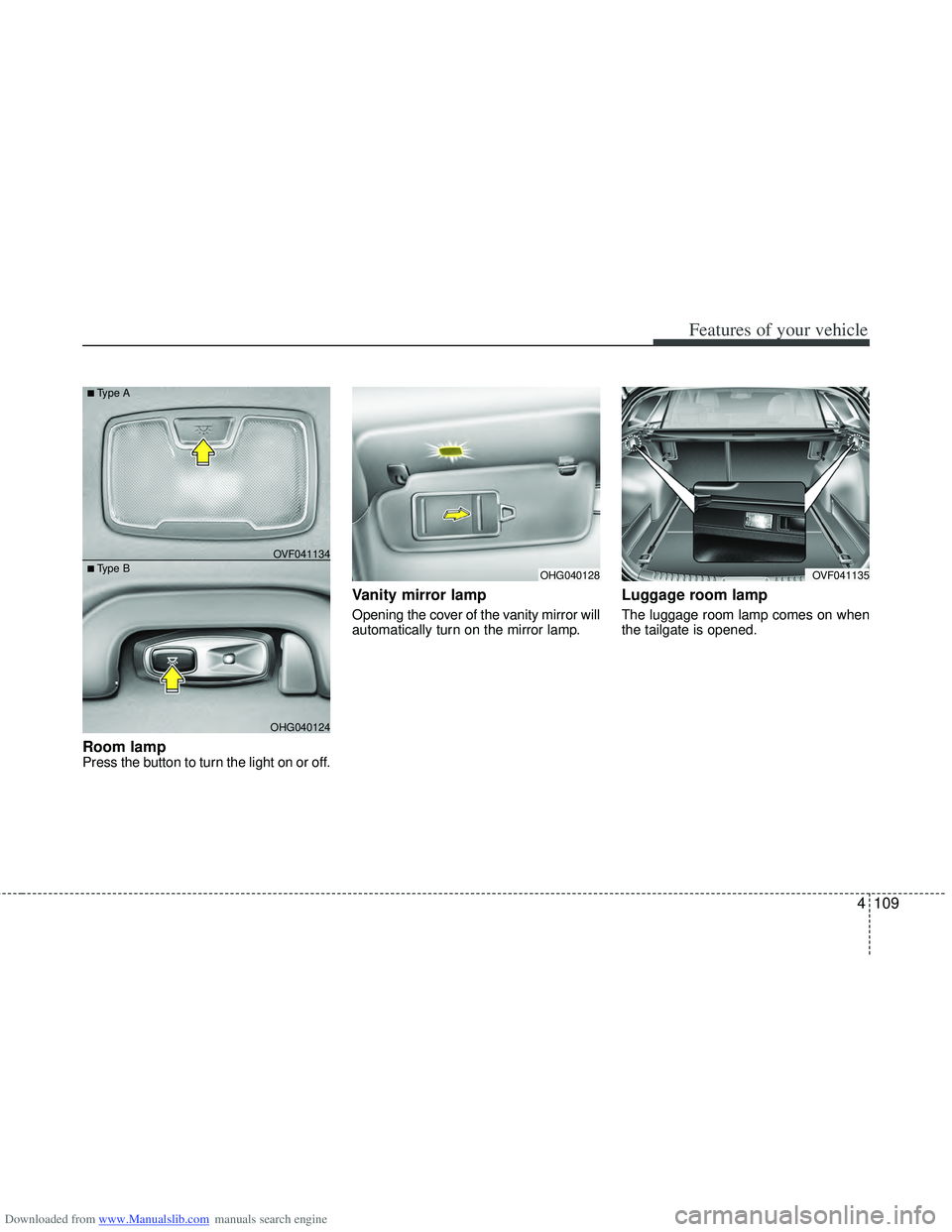
Room lamp Press the button to turn the light on or off.
Vanity mirror lamp
Opening the cover of the vanity mirror will
automatically turn on the mirror lamp.
Luggage room lamp
The luggage room lamp comes on when
the tailgate is opened.
OHG040128OVF041135
OHG040124
■Type BOVF041134
■Type A
Page 201 of 534
Downloaded from www.Manualslib.com manuals search engine Features of your vehicle
114
4
Face-Level (B, D, F)
Air flow is directed toward the upper body
and face. Additionally, each outlet can be
controlled to direct the air discharged
from the outlet.
Bi-Level (B, D, C, E, F)
Air flow is directed towards the face and
the floor.
Floor-Level (A, C, E, D)
Most of the air flow is directed to the
floor, with a small amount of the air being
directed to the windshield and side win-
dow defrosters.
-
Floor/Defrost-Level (A, C, D, E, F)
Most of the air flow is directed to the floor
and the windshield with a small amount
directed to the side window defrosters.
Defrost-Level (A, D)
Most of the air flow is directed to the
windshield with a small amount of air
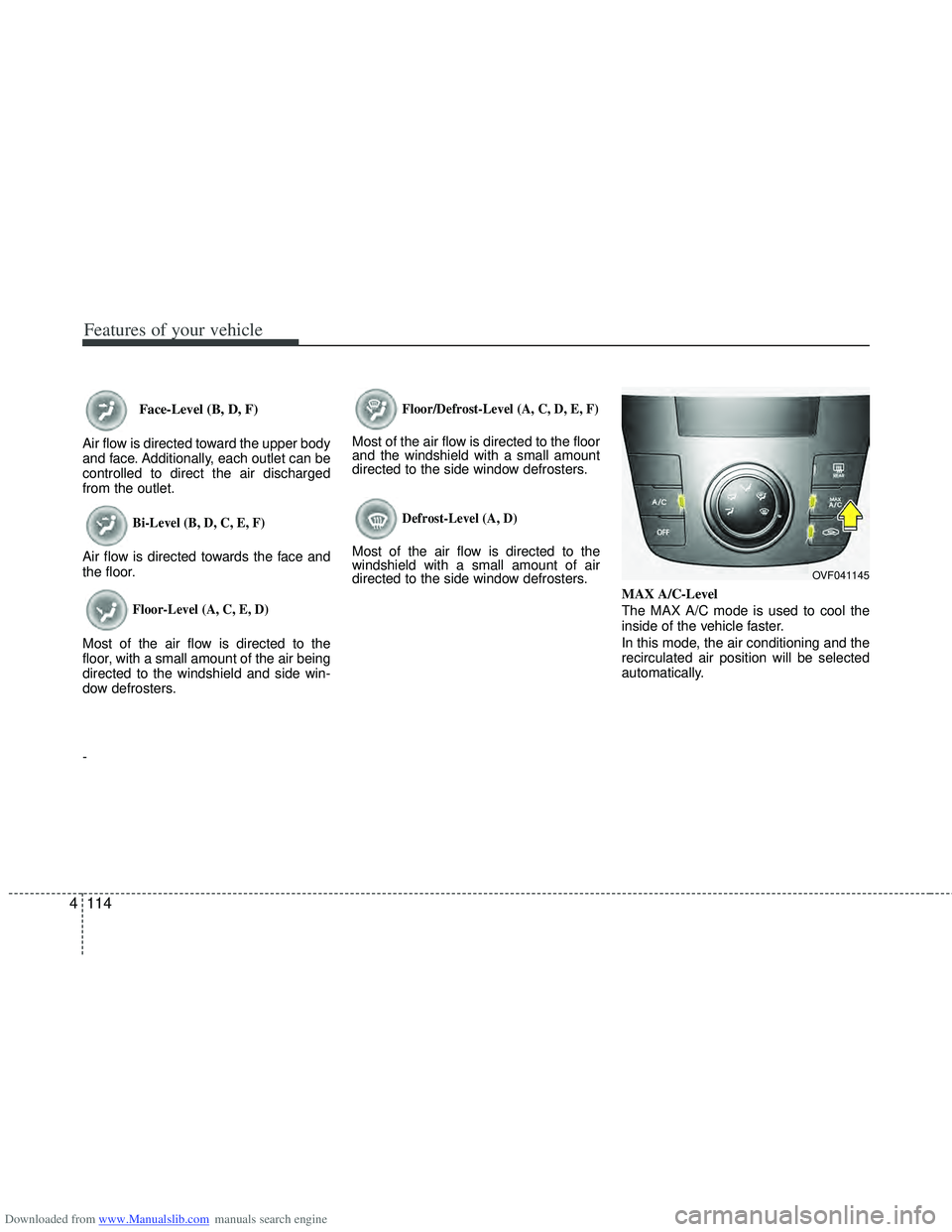
directed to the side window defrosters. MAX A/C-Level
The MAX A/C mode is used to cool the
inside of the vehicle faster.
In this mode, the air conditioning and the
recirculated air position will be selected
automatically.
OVF041145
Page 208 of 534
Downloaded from www.Manualslib.com manuals search engine 4121
Features of your vehicle
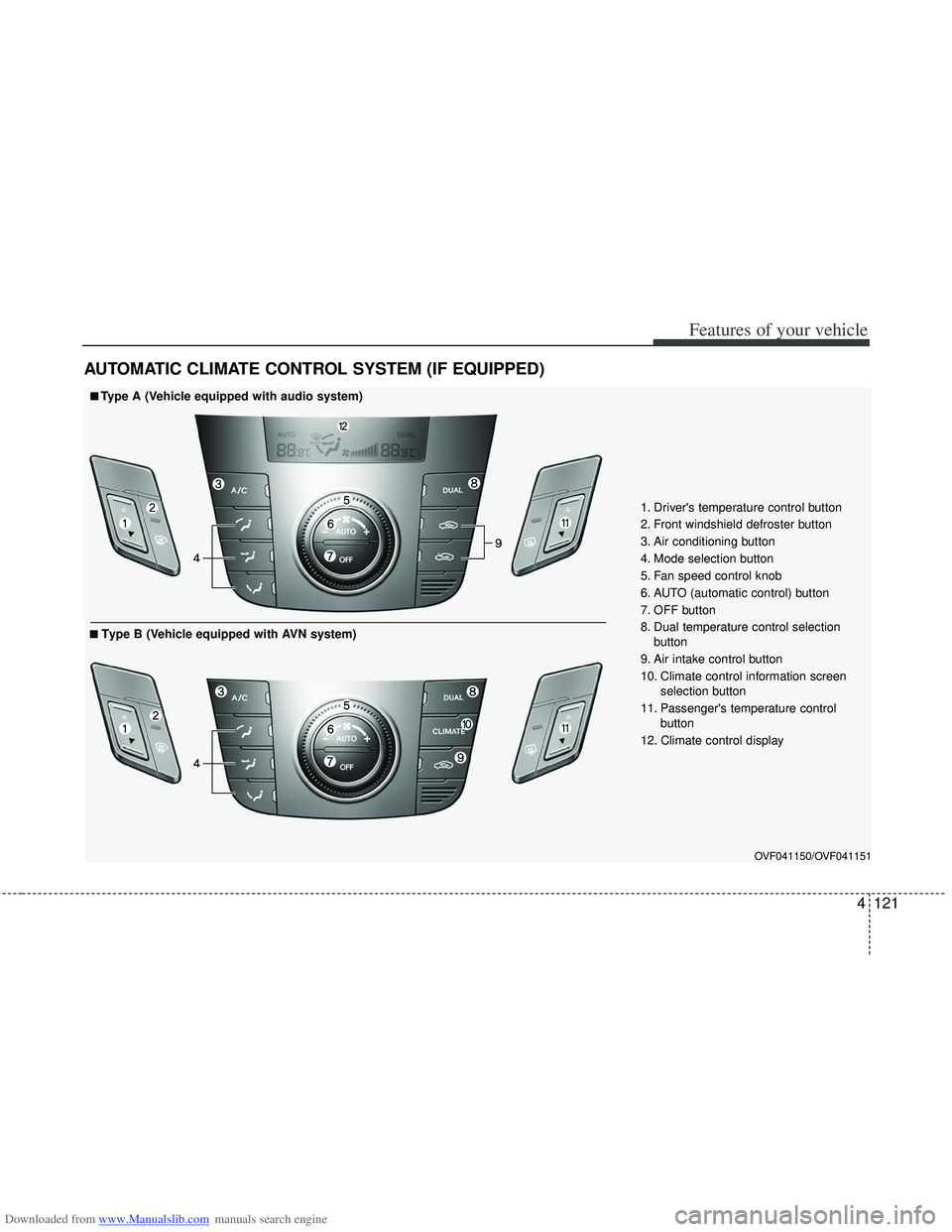
AUTOMATIC CLIMATE CONTROL SYSTEM (IF EQUIPPED)
OVF041150/OVF041151
1. Driver's temperature control button
2. Front windshield defroster button
3. Air conditioning button
4. Mode selection button
5. Fan speed control knob
6. AUTO (automatic control) button
7. OFF button
8. Dual temperature control selection button
9. Air intake control button
10. Climate control information screen selection button
11. Passenger's temperature control button
12. Climate control display
■
■Type A (Vehicle equipped with audio system)
■
■Type B (Vehicle equipped with AVN system)