Page 150 of 534

Downloaded from www.Manualslib.com manuals search engine 463
Features of your vehicle
Low key battery
If the engine start/stop button changes to
the OFF position when the smart key in
the vehicle discharges, the warning illu-
minates on the LCD display for about 10
seconds. Also, the warning chime
sounds once.
Replace the battery with a new one.Press brake pedal to start engine
(for automatic transaxle)
If the engine start/stop button changes to
the ACC position twice by pressing the
button repeatedly without depressing the
brake pedal, the warning illuminates on
the LCD display for about 10 seconds to
indicate that you should depress the
brake pedal to start the engine.Press clutch pedal to start engine
(for manual transaxle)
If the engine start/stop button turns to the
ACC position twice by pressing the but-
ton repeatedly without depressing the
clutch pedal, the warning illuminates on
the LCD display for about 10 seconds to
indicate that you should depress the
clutch pedal to start the engine.
OVF041078
■
Type A ■Type BOVF041079
■
Type A ■Type BOVF041080
■
Type A ■Type B
Page 153 of 534

Downloaded from www.Manualslib.com manuals search engine Features of your vehicle
66
4
Warnings and indicators
(Instrument cluster)
All warning lights are checked by turning
the ignition switch ON (do not start the
engine). Any light that does not illuminate
should be checked by an authorized
HYUNDAI dealer.
After starting the engine, check to make
sure that all warning lights are off. If any
are still on, this indicates a situation that
needs attention. The following warning and indicators are
introduced in the previous pages.
Automatic transaxle shift lever indica-
tor
Manual transaxle shift indicator
Icy road warning
Door/tailgate open (LCD display)
Heated steering wheel ON/OFF (LCD display)
Parking assist warning (LCD display)
Low tire pressure (LCD display)
Seat belt warning and chime light
As a reminder to the driver, the seat belt
warning light will blink or illuminate for
approximately 6 seconds each time you
turn the ignition switch ON regardless of
belt fastening.
For more details, refer to the “Seat belt”
in section 3.
Page 159 of 534

Downloaded from www.Manualslib.com manuals search engine Features of your vehicle
72
4
ESP (Electronic Stability
Program) indicator
The ESP indicator will illuminate when
the ignition switch is turned ON, but
should go off after approximately 3 sec-
onds. When the ESP is on, it monitors the
driving conditions. Under normal driving
conditions, the ESP indicator will remain
off. When a slippery or low traction con-
dition is encountered, the ESP will oper-
ate, and the ESP indicator will blink to
indicate the ESP is operating.
But, if the ESP system malfunctions the
indicator illuminates and stays on. Take
your vehicle to an authorized HYUNDAI
dealer and have the system checked.
ESP OFF indicator
The ESP OFF indicator will illuminate
when the ignition switch is turned ON,
but should go off after approximately 3
seconds. To switch to ESP OFF mode,
press the ESP OFF button. The ESP
OFF indicator will illuminate indicating
the ESP is deactivated.
Auto stop indicator(if equipped)
This indicator will illuminate when the
engine enters the Idle Stop mode of the
ISG (Idle Stop and Go) system.
When the automatic starting occurrs, the
auto stop indicator on the cluster will
blink for 5 seconds.
For more details, refer to the ISG (Idle
Stop and Go) system in section 5.
For vehicles equipped with instrument
cluster type B, the indicator illuminates
on the LCD display.
✽ ✽ NOTICE
When the engine automatically starts by
the ISG system, some warning lights
(ABS, ESP, ESP OFF, EPS or Parking
brake warning light) may turn on for a
few seconds.
This happens because of low battery
voltage. It does not mean the system is
malfunctioning.
SPORT indicator
(if equipped)
The SPORT indicator light will illuminate
when the SPORT button is pressed. The
indicator light turns off when the SPORT
button is pressed again.
For more details, refer to "Automatic
transaxle" in section 5.
SPORT
Page 166 of 534
Downloaded from www.Manualslib.com manuals search engine 479
Features of your vehicle
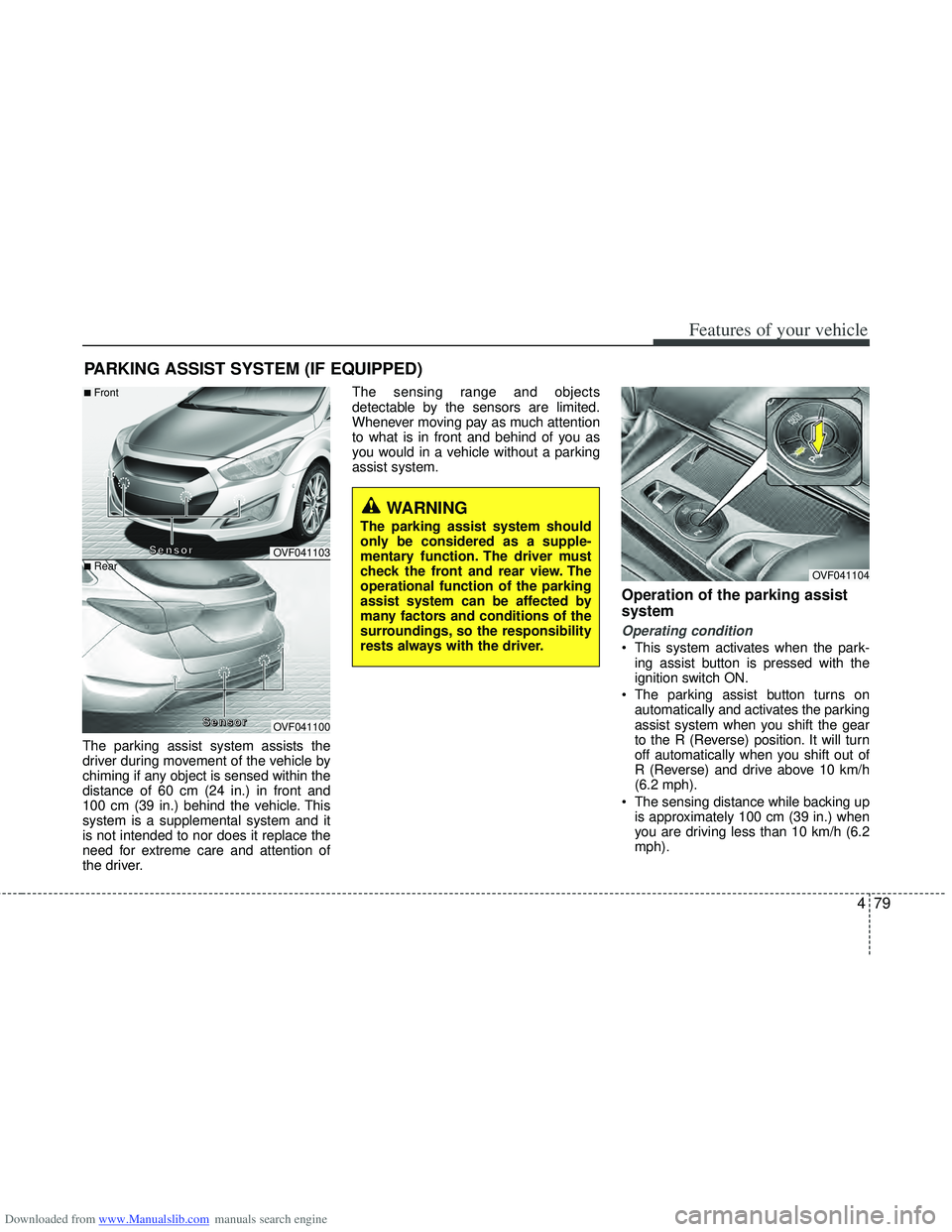
The parking assist system assists the
driver during movement of the vehicle by
chiming if any object is sensed within the
distance of 60 cm (24 in.) in front and
100 cm (39 in.) behind the vehicle. This
system is a supplemental system and it
is not intended to nor does it replace the
need for extreme care and attention of
the driver.The sensing range and objects
detectable by the sensors are limited.
Whenever moving pay as much attention
to what is in front and behind of you as
you would in a vehicle without a parking
assist system.
Operation of the parking assist
system
Operating condition
This system activates when the park-
ing assist button is pressed with the
ignition switch ON.
The parking assist button turns on automatically and activates the parking
assist system when you shift the gear
to the R (Reverse) position. It will turn
off automatically when you shift out of
R (Reverse) and drive above 10 km/h
(6.2 mph).
The sensing distance while backing up is approximately 100 cm (39 in.) when
you are driving less than 10 km/h (6.2
mph).
PARKING ASSIST SYSTEM (IF EQUIPPED)
WARNING
The parking assist system should
only be considered as a supple-
mentary function. The driver must
check the front and rear view. The
operational function of the parking
assist system can be affected by
many factors and conditions of the
surroundings, so the responsibility
rests always with the driver.
OVF041104
OVF041103
OVF041100
■Front
■Rear
S
S
S
S
e
e
e
e
n
n
n
n
s
s
s
s
o
o
o
o
r
r
r
r
S
S
S
S
e
e
e
e
n
n
n
n
s
s
s
s
o
o
o
o
r
r
r
r
Page 174 of 534
Downloaded from www.Manualslib.com manuals search engine 487
Features of your vehicle
How the system works
1. Activate the Smart Parking AssistSystem
2. Select parking assist mode
3. Search for parking space (slowly move forward.)
4. Search complete (automatic search by sensor.)
5. Steering wheel control (1) Shift according to the instruction on the LCD display.
(2) Drive slowly with the brake pedal applied.
6. Smart Parking Assist System com- plete
7. If necessary, manually adjust position of vehicle.✽ ✽NOTICE
• Before activating the system check if
the conditions are possible to use the
system.
• For your safety, always apply the brake pedal except for when driving.(Continued)
7. Obstacle in parking space
The system may search for a park-
ing space even though an obstacle
is in the parking space. An accident
may occur if you continue to park
the vehicle with the system.
Do not solely rely on the Smart
Parking Assist System.
OLM041272
Page 175 of 534

Downloaded from www.Manualslib.com manuals search engine Features of your vehicle
88
4
1. Activate Smart Parking Assist
System
Press the Smart Parking AssistSystem button (the button indicator will
illuminate).
The Parking Assist System will be acti- vated (the button indicator will illumi-
nate).
A warning sound will be heard if an
obstacle is detected.
Press the Smart Parking Assist System button again for more than 2
seconds to turn off the system.
The Smart Parking Assist System defaults to the OFF position whenever
the ignition switch is turned on.
2. Select parking assist mode
Select the parking assist mode bypressing the Smart Parking Assist
System button with the shift lever in N
(Neutral) or D(Drive) and the brake
pedal depressed.
The right side parallel mode is select- ed automatically when the Smart
Parking Assist System is activated.
To select the left side parallel mode press the Smart Parking Assist System
button once more.
If the button is pressed again, the sys- tem will turn off.
3. Search for parking space
Slowly drive forward maintaining thedistance of approximately 50cm ~
150cm (19.6in.~59.0in.) with the
parked vehicles. The side sensors will
search for a parking space.
If the vehicle speed is over 30km/h (18.6mph), a message will appear to
notify to reduce speed.
If the vehicle speed is over 40km/h (24.8mph), the system will cancel.
OVF041105OVF041107
■
Right side
- parallel mode ■
Left side
-parallel modeOVF041203
■
Right side
- parallel mode ■
Left side
-parallel mode
Page 177 of 534
Downloaded from www.Manualslib.com manuals search engine Features of your vehicle
90
4
4. Search complete
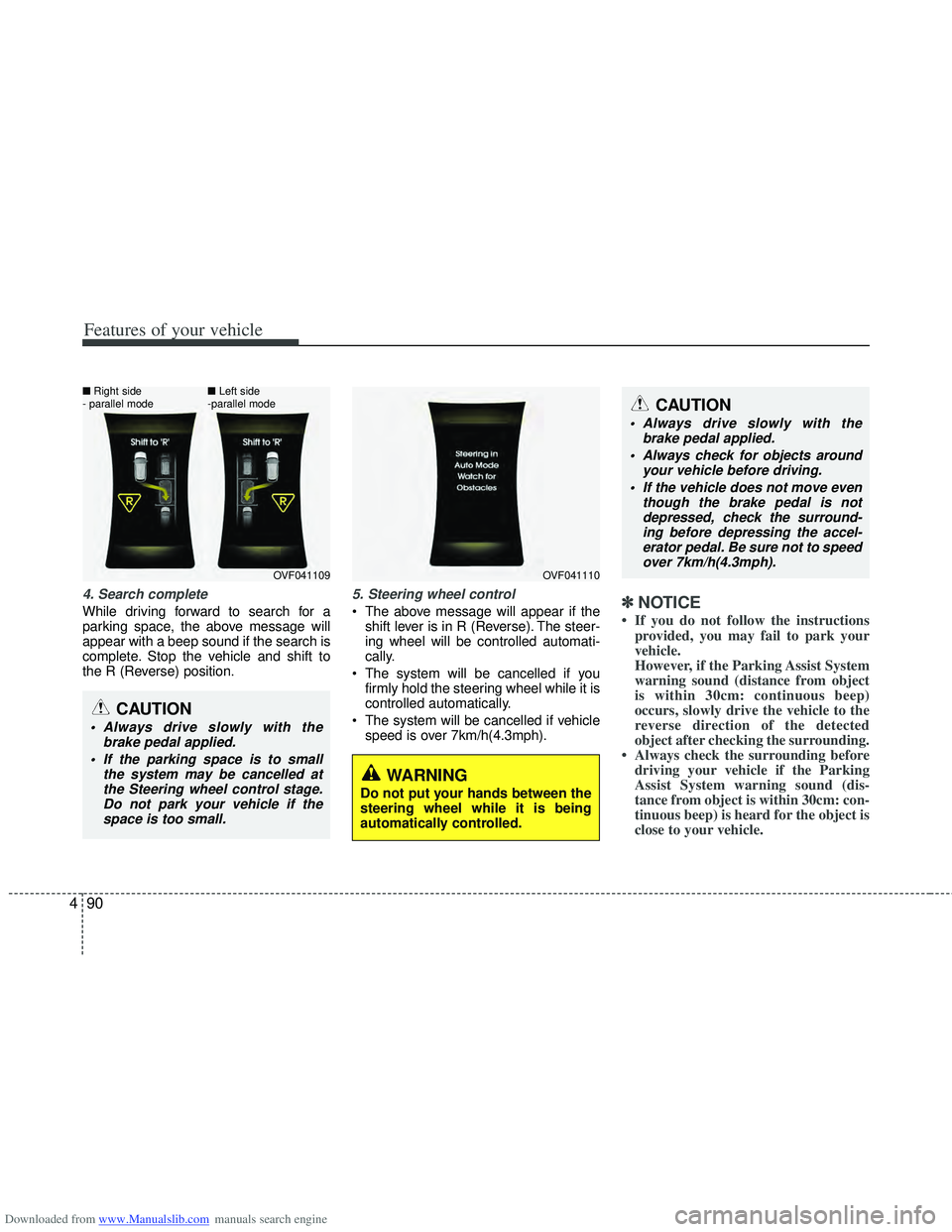
While driving forward to search for a
parking space, the above message will
appear with a beep sound if the search is
complete. Stop the vehicle and shift to
the R (Reverse) position.
5. Steering wheel control
The above message will appear if the
shift lever is in R (Reverse). The steer-
ing wheel will be controlled automati-
cally.
The system will be cancelled if you firmly hold the steering wheel while it is
controlled automatically.
The system will be cancelled if vehicle speed is over 7km/h(4.3mph).✽ ✽ NOTICE
• If you do not follow the instructions
provided, you may fail to park your
vehicle.
However, if the Parking Assist System
warning sound (distance from object
is within 30cm: continuous beep)
occurs, slowly drive the vehicle to the
reverse direction of the detected
object after checking the surrounding.
• Always check the surrounding before driving your vehicle if the Parking
Assist System warning sound (dis-
tance from object is within 30cm: con-
tinuous beep) is heard for the object is
close to your vehicle.
CAUTION
Always drive slowly with the
brake pedal applied.
Always check for objects around your vehicle before driving.
If the vehicle does not move even though the brake pedal is notdepressed, check the surround-ing before depressing the accel- erator pedal. Be sure not to speedover 7km/h(4.3mph).
CAUTION
Always drive slowly with the brake pedal applied.
If the parking space is to small the system may be cancelled atthe Steering wheel control stage.Do not park your vehicle if thespace is too small.
OVF041109
■
Right side
- parallel mode ■
Left side
-parallel modeOVF041110
WARNING
Do not put your hands between the
steering wheel while it is being
automatically controlled.
Page 178 of 534
Downloaded from www.Manualslib.com manuals search engine 491
Features of your vehicle
To cancel the system while parking
Press the Smart Parking Assist System
button or turn the steering wheel to the
left or right.Gear shift while steering wheel control
When the above message appears with a
beep sound, shift the gear and drive the
vehicle with the brake pedal depressed.
OVF041114
OVF041111
WARNING
Always be careful while parking for
other vehicles or pedestrians.
■Manual transaxle
■Automatic transaxle
CAUTION
Always check the surroundingbefore releasing the brake pedal.

