2016 AUDI RS7 SPORTBACK key
[x] Cancel search: keyPage 38 of 282

Opening and closing
Emergency locking
Each door must be locked separately if the pow
er locking system fails.
Fig . 27 Door: Emergency lock ing
.,,
0 9 Cl
the passenger's door and the rear doors (only
visib le when door is open).
~ Remove the mechan ical key¢ page 30.
~ Pull the cover cap out of the opening ¢ fig. 2 7.
~ Insert the key in the inside slot and turn it a ll
the way to the right (right door) or left (left
door).
Once the door has been closed, it can no longer
be opened from the outside. The door can be
opened from the inside by pulling the door han
d le. If the child safety tock in a rear door is acti
vated, you must first pull the door handle on the
inside . Then you can open the door from the out
side.
36
Luggage compartment
Lid
Automatic luggage compartment lid
The luggage comportment lid can be opened and
closed automatically.
Fig. 28 Driver 's doo r: ope ning the lu ggage compartment
lid
-- -
' c::::s @
--
e,
Fig. 29 Luggage co mpartment lid : @ clos ing button ,@
lock butto n (veh icles w it h convenie nce key* )
Opening the luggage compartment lid
~ Press and hold the I<=:< ! button on the remote
control key for at least one second. Or
~ Putt the button~ in the driver's door¢ fig. 28
briefly . Or
~ Press the handle in the luggage compartment
lid .
Closing the luggage compartment lid
~ Pull the button~ in the driver's door until the
luggage compartment lid is closed ¢
_A. Or
~ Press the button in the luggage compartment
lid~ ¢
fig. 29. The luggage compartment lid
w ill automatically close and lock¢
_A. Or
~ Press and hold the button !""" I on the master key
un til the luggage compartment lid is closed
(veh icles wi th conv enience key*) ¢
_A. Make
sure there is enough distance between you and
Ill-
Page 39 of 282

the luggage compartment lid. There should be
at least 9 ft (3) of distance. Or
~ Press the Im button in the luggage compart
ment lid
c> fig. 29 (vehicles with convenience
key*). The remote control key must not be
more than approximately 4 ft (1.5 m) away
from the luggage compartment and it must not
be inside the vehicle . The luggage compart
ment lid will automatically close and lock. The
vehicle locks
c> & . Or
~ Press the handle in the luggage compartment
lid . The luggage compartment lid will automat
ica lly close and lock¢.&, .
Setting the luggage compartment lid open
po sit ion
~ Bring the l uggage compartment lid into the de
sired open position
c> (D. The position can be
stored at only one specific height.
~ Press and hold the~ button for at least four
seconds to store the new open posit ion. A visu
al and audio signal w ill follow.
~ T o set a higher open position, wait at least five
seconds and then carefully press the luggage
compartmen t lid upward.
~ Press and hold the l= I button again for at least
f o ur seconds and this wi ll store the new open
position .
The opening/closing p rocess w ill stop immed i
ately if:
- You pull the~ button in the d river's doo r, o r
- You release the
l = I button on the remote con-
trol master key (veh icles with convenience
key*), or
- You press the~ button or
Im button (veh icles
with convenience key*) in the luggage compart
ment l id , or
- You push the hand le in the luggage compart
me nt l id, or
- You press against the luggage compartment l id
against the d irect ion it is mov ing, or
- when someth ing blocks the luggage compart
ment lid or makes it diff icult for the lid to
move .
If you press the handle or one of the~ or
Im but
tons (vehicles w it h convenience key *) now, the
Op ening and cl osing
luggage compartment lid will either open or
close, depending on what angle it was at .
A WARNING
-Read and follow all WARNINGS ¢ page 31,
General description.
- After closing the rear lid, always pull up on
it to make sure that it is p roperly closed.
Otherw ise it could open s uddenly when the
veh icle is moving.
- To help prevent po isonous exha ust gas from
be ing drawn into the vehicle, a lways keep
the rear lid closed whi le dr iving . Never
transport objects larger than those which fit
comp lete ly into the l uggage area, beca use
t hen the rea r lid can not be f ully closed.
- Never leave your ve hicle unattended espe
cially with t he rear lid left ope n. A c hild
could craw l in to the car th rough the luggage
compa rtment and pull the lid shut, becom
in g trapped and unab le to get o ut. To re
duce the risk of pe rsonal inj ury, never let
chi ldren play in or aro und yo ur vehicle . Al
ways keep the rea r lid as we ll as the veh icle
doors closed when not in use .
- Never close the rear lid inattentive ly or with
out checking first. Although the closing
force of the rear lid is limited, you can still
serio usly injure you rself or others .
- Always ensure t hat no one is w ith in range of
the rea r lid when it is moving, in part ic ul ar
close to the hi nges and the uppe r and lower
edges -finge rs or hands can be pinc hed.
- Never try to i nte rfere with the rear lid or
he lp it whe n it is be ing opened o r closed au
tomatically.
@ Note
The luggage compartment lid can bump into
objects s uch as the garage ceiling when open
i ng and become damaged .
(D Tips
-The settings in the Infotainment system de
termine if the luggage compartment lid can
-
be opened using the hand le ¢page 33. 11111-
37
Page 40 of 282

Opening and clo sin g
- There are audio si gnals when closing the
l uggage compartment lid with the remote
contro l key (veh icles w ith convenience key*)
or with the~ button in the driver's door.
- When the vehicle is locked, the luggage
compartment lid can be unlocked separately by pressing the button
!a l on the remote
control key. The luggage compartment lid locks automatically after it is closed aga in.
- You can close the luggage compartment lid
us ing the master key (veh icles with conven
i ence key*) up to a distance of approximate
l y 9 ft (3 m).
- The luggage compa rtment lid ca n be oper
ated by hand if the vehicle battery is low. It
i s necessary to use more fo rce whe n doing
th is. Move the lid slowly to red uce the
amoun t of force needed.
Luggage compartment with movement
activated opening
Applies to: vehicles with conven ience key and sensor-control·
led luggage compartmen t lid
Fig . 30 Rear of the vehicle: foot movement
Req uirements: you must be carrying your ve hicle
key with you. You must be stand ing at the cente r
behind the luggage compartment lid. There
should be a d istance of approximate ly 20 cm
from the rear of the vehicle. The ignition must be
sw itched off . Make sure you have firm footing .
~ Swing your foot back and forth below the
bumper~
fig. 30. D o not to uc h the bumper.
Once the system recogni zes the movement, t he
l u ggage compartment lid will open .
The luggage compartment lid will only open if
you make the movement as described . This pre
vents the luggage compartment lid from opening
38
due to s imilar movements such as when you wa lk
between the rear of the vehicle and yo ur garage
door.
General information
In some situat io ns, the f un ct ion is limi ted or
tempora rily unavailable. Th is may happen if:
- the luggage compartment lid was closed be
forehand.
- you park close to a hedge and the branches
move back and fo rth under the veh icle for a
long per iod of t ime.
- you clean your ve hicle, for example w ith a pres
sure washer or in a c ar wash .
- there is heavy ra in .
- the bumper is very dirty, for example after dr iv-
ing on salt-covered roads .
- there is interference to the radio sig nal from
the vehicle key, such as from cel l phones or re
mote co ntrols.
Luggage compartment lid emergency
release
Th e luggage compartment lid can be released in
an emergen cy from inside the luggage compart
ment.
Fi g. 31 Inner luggage compartment lid: access to the
e m ergency release
~ Remove the emerge ncy key Q page 30 .
~ Pry the cove r out using the emerge ncy key
Q fig.31.
~ Press the lever in the direction of the arrow to
re lease the luggage compartment lid.
Page 41 of 282
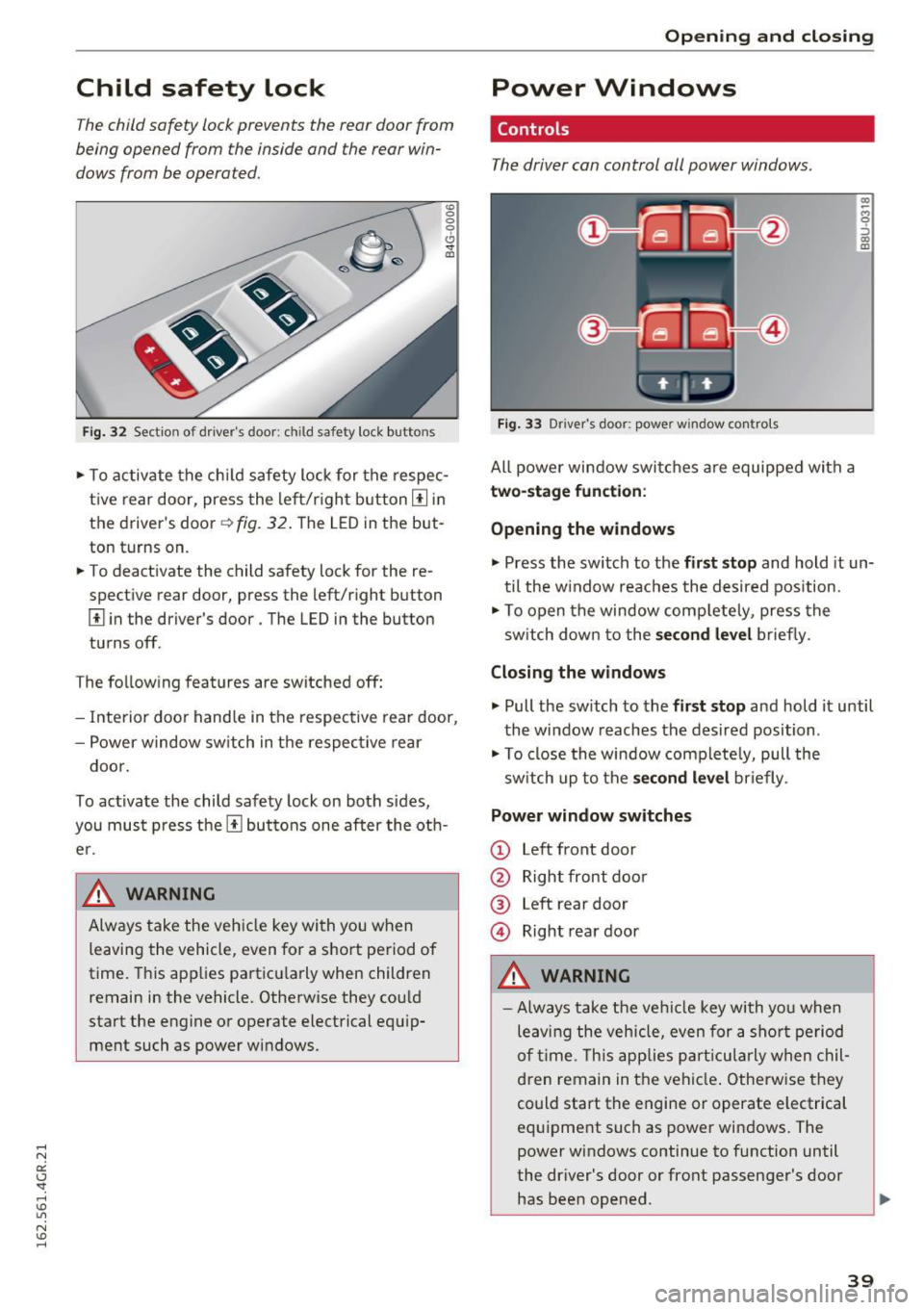
Child safety lock
The child safety lock prevents the rear door from
being opened from the inside and the rear win
dows from be operated.
Fi g. 32 Section of d river's doo r: ch ild safety lock buttons
"' 0
0
0
0 ,,. !II
"'T o activate the ch ild safety lock for the respec
t ive rear door, press the le ft/r igh t button
III in
the driver's door~
fig. 32 . The LED in the but
ton turns on.
"' To deact ivate the child safety lock for the re
spect ive rear door, press the left/r ight button
III i n the driver's door . The LED in the button
tu rns off.
T he fo llow ing features are switched
off:
- Interior doo r hand le in t he respec tive rear door,
- Power w ind ow sw itch in t he respec tive rear
doo r.
To activate the child safe ty lock on both sides,
you mu st press the
III bu ttons one after the ot h
e r.
A WARNING ~
Alw ays take the veh icle key wi th you w hen
leaving the vehicle, even for
a s hort pe riod of
time . This app lies pa rt icu la rly when children
remain in the ve hicle. Otherw ise they co uld
sta rt the engine o r ope rate electrical equ ip
ment such as power wi ndows .
Open ing and closing
Power Windows
Controls
The driver can control all power windows .
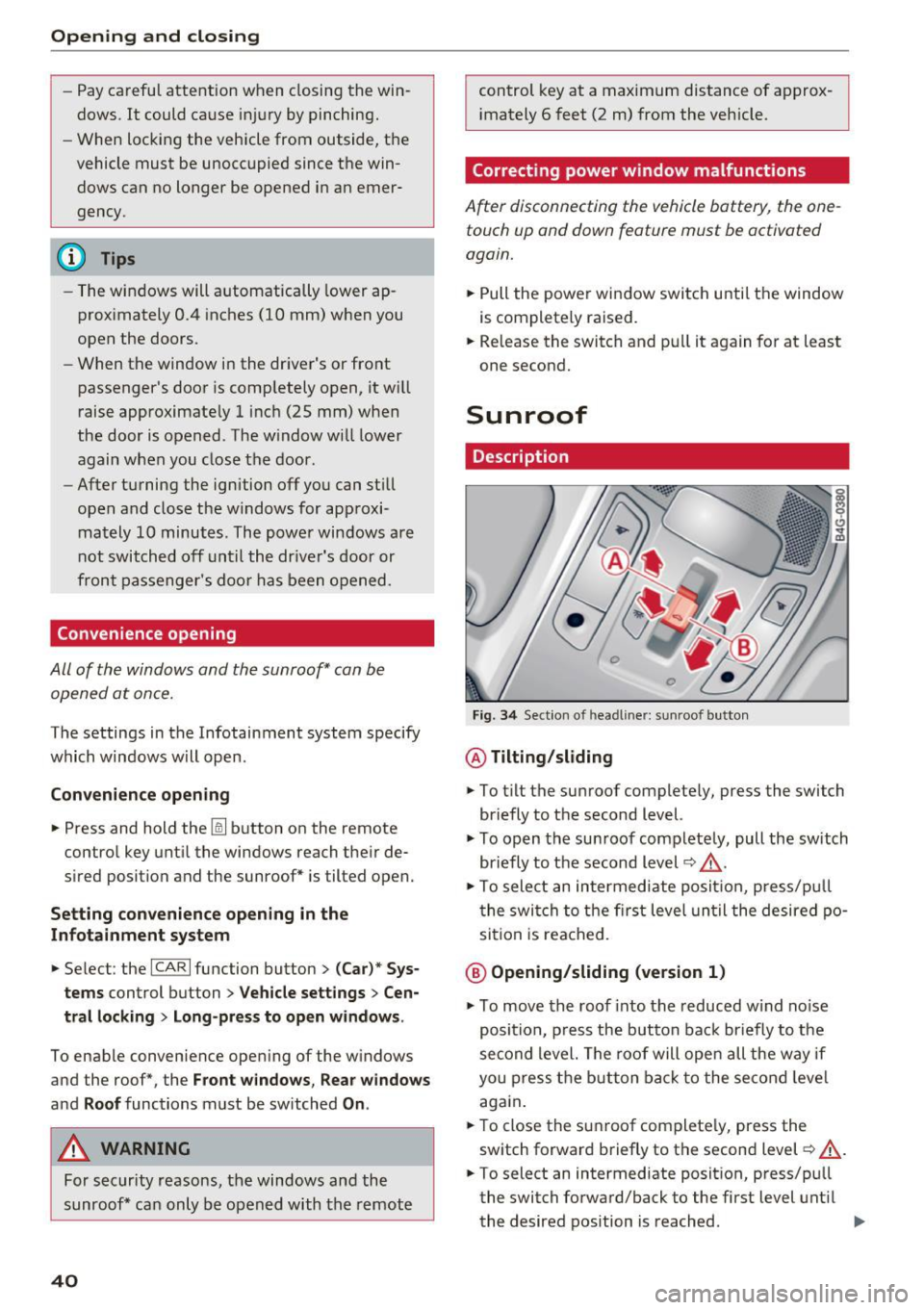
Fig. 33 Driver 's door: power w indow co ntro ls
All powe r window swi tches are equipped with a
two-stage function :
Opening the windows
(0 ~ M 0 :::, (0 m
"' Press the switch to t he first stop and hold it un
t il the w indow reaches the desired position.
"' To op en the window comp letely, press the
sw itch dow n to the
second level briefly .
Closing the windows
"' Pull the sw itch to the first stop and hold it until
the window reaches the desired position .
"' To close the window com plete ly, pull the
sw itch up to the
second level briefly .
Power window switches
CD Left front door
@ Right front doo r
® Left rear door
@ Right rear door
A WARNING
=
- Always take the ve hicl e key with yo u when
le av in g the vehicle, even for a sh ort p eriod
o f time . T his app lies par tic ula rly whe n chil
d ren remain in t he ve hicl e. Otherwise they
could start the engine or operate e lectrical
equ ipment such as powe r windows . The
power wi ndows continue to f unction until
the dr iver's door or front passenge r's door
has bee n opened .
-
39
Page 42 of 282
Opening and closing
-Pay careful attention when closing the win
dows. It could cause injury by pinching.
- When locking the vehicle from outside, the
vehicle must be unoccupied since the win
dows can no longer be opened in an emer
gency.
(D Tips
- The windows will automatically lower ap
proximately 0.4 inches (10 mm) when you
open the doors.
- When the window in the driver's or front
passenger's door is comp letely open, it will
raise approximately 1 inch (25 mm) when
the door is opened. The w indow will lower
again when you close the door .
- After turning the ignition off you can still
open and close the windows for approxi mately 10 minutes. The power windows are
not switched off until the driver's door or
front passenger's door has been opened.
Convenience opening
All of the windows and the sunroof* can be
opened at once.
The settings in the Infotainment system specify
which windows w ill open.
Convenience opening
.,. Press and hold the~ button on the remote
control key until the windows reach the ir de
sired position and the sunroof* is tilted open.
Setting convenience opening in the
Infotainment system
.,. Select : the ICARI function button > (Car)* Sys
tems
control button > Vehicle settings > Cen
tral locking
> Long-press to open windows.
To enable convenience open ing of the windows
and the roof*, the
Front windows , Rear windows
and Roof functions must be switched On.
A WARNING
For security reasons, the windows and the
sunroof* can only be opened with the remote
40
control key at a maximum distance of approx
i mately 6 feet (2 m) from the veh icle.
Correcting power window malfunctions
After disconnecting the vehicle battery, the one
touch up and down feature must be activated
again.
.,. Pull the powe r window switch until the window
is completely raised.
.,. Release the switch and pull it again for at least
one second.
Sunroof
Description
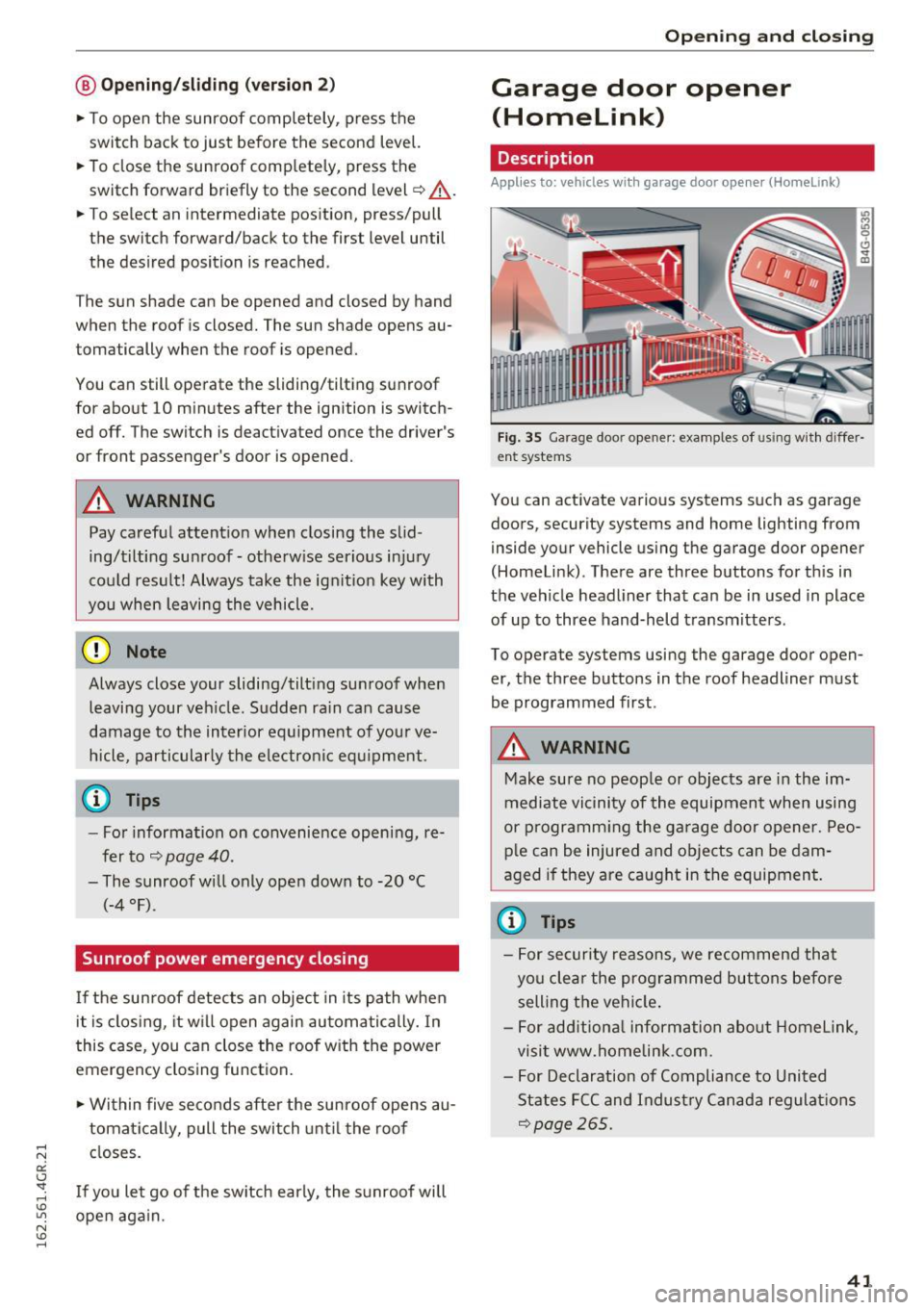
Fig. 34 Sect ion of head liner: sun roof button
@ Tilting/sliding
.,. To t ilt the sunroof complete ly, press the switch
briefly to the second level.
.,. To open the sunroof completely, pull the switch
briefly to the second level~.&_ .
.,. To select an intermediate posit ion, press/pu ll
the switch to the first level until the desired po
sition is reached .
@ Opening/sliding (version 1)
.,. To move the roof into the reduced w ind noise
position, press the but ton back briefly to the
second level. The roof will open all the way if
you press the button back to the second level
again.
.,. To close the sunroof complete ly, press the
switch forward briefly to the second level~.&_ .
.,. To select an intermediate posit ion, press/pu ll
the switch forward/back to the first level until
the desired position is reached . ..,.
Page 43 of 282
@ Opening/sliding (ver sion 2 )
• To open the sunroof completely , press the
switch back to just before the second level.
• To close the sunroof comp letely, press the
switch forward briefly to the second level¢
A_.
• To select an intermediate position, press/pull
the switch forward/back to the first level until
the desired position is reached .
T he sun shade can be opened and closed by hand
when the roof is closed. The sun shade opens au
tomatically when the roof is opened.
You can still operate the sliding/tilting sunroof
for about 10 minutes after the ignition is switch
ed off. The switch is deactivated once the driver's
or front passenger 's door is opened.
A WARNING
Pay careful attention when closing the slid
ing/tilting sunroof - otherwise serious injury
cou ld result! Always take the ign ition key with
you when leaving the vehicle .
0 Note
Always close your sliding/tilting sunroof when
leaving your veh icle. Sudden ra in can cause
damage to the interior eq uipment of your ve
hicle, particularly the electronic equ ipment.
a) Tips
- For information on convenie nce opening, re
fer to¢
page 40.
- The sunroof will only open down to -20 °C
(-4 °F) .
Sunroof power emergency closing
I f the sunroof detects an object in its path when
it is clos ing, it w il l open again automatically. In
this case, you can close the roof w ith the power
emergency closing function.
• Wi thin five seconds after the sunroof opens au
tomat ically, pull the switch until the roof
closes.
I f you let go of the sw itch early, the sunroof will
open again.
Op enin g an d clos ing
Garage door opener
(Homelink)
Description
Applies to: vehicles with garage door opener (Home link)
F ig. 35 Garage door opener: examples of using w it h differ
en t systems
You can activate various systems such as garage
doors, security systems and home lighting from
inside your vehicle using the garage door opener
(Homelink) . There are three buttons for th is in
the vehicle headliner that can be in used in place
of up to three hand-held transmitters .
To operate systems using the garage door open er, the three buttons in the roof headliner must
be programmed first.
A WARNING
-Make sure no peop le or objects are in the im-
mediate vicinity of the equipment when using
or p rogramm ing the ga rage door opener. Peo
p le can be injured and objects can be dam
aged if they are caught in the equipment.
(¼} Tips
- For security reasons, we recommend that
you clear the programmed buttons befo re
selling the vehicle .
- For add itiona l information about Homelink,
visit www.homelink.com.
- For Declaration of Compliance to United
States FCC and Indust ry Canada regulations
¢page 265.
4 1
Page 49 of 282

.. To increase or reduce the brightness, turn the
knob and press it.
The interior lig hting turns on when you switch
the headlights on whi le the ignition is on .
(D Tips
The setting is automat ically stored and as
signed to the remote control key that is in
use.
Instrument illumination
The brightness of the illumination for the instru
ments, display and head-up display* can
be ad
justed .
Fig. 43 Instrument illum ination
.. Press the knob to release it .
.. Turn the knob toward " -" or" +" to reduce or in
crease the brightness .
.. Press the knob aga in to return it to its o riginal
pos it ion.
@ Tips
The instrument illumination for the need les
and d ia ls t urns on when the ignition is turned
on and the lights are turned off. The illumina
tion for the dials reduces automatically and
eventua lly turns off as brightness outside in
creases . This function reminds the driver to
turn the headlights on at the appropriate
time.
Lights and V ision
Vision
Adjusting the exterior mirrors
Fig. 44 Driver 's doo r: knob fo r the exterio r mirrors
Turn the knob to the desired position:
Q/P -adjusting the left/right exterior mirror.
Move the knob in the des ired direct ion .
Qill -Heating the mir ror glass depend ing on the
outside temperature .
8- Folding exte rior mirro rs* . In the Infota in
ment system , you can se lect if t he mirro rs fo ld in
automat ica lly when you lock the vehicle
~ page 33.
Front passenger 's e xterior mirror tilt
function *
To help you see the curb when backing into a parking space, the surface of the mirro r tilts
slight ly . For this to happen, the knob must be in
the position for the front passenger's outside
mirror.
You can adjust the tilted mir ror surface by turn
ing the knob in the desired direction . When you
move out of reverse and into another gear, the
new mirror position is stored and assigned to the
key you are using.
The m irror goes back into its or iginal pos ition
once you drive forward faster than 9 mph (15
km/h) or switch the ignition off.
A WARNING
-Curved (i .e. convex) m irror surfaces increase
your f ield of view. Remember that vehicles or
other objects will appear smaller and farther
away than when seen in a flat m irro r. If yo u
47
Page 58 of 282
Sea ts and stor age
Rear head restraints
Applies to: ve hicles w ith adj ustable head restra ints
/
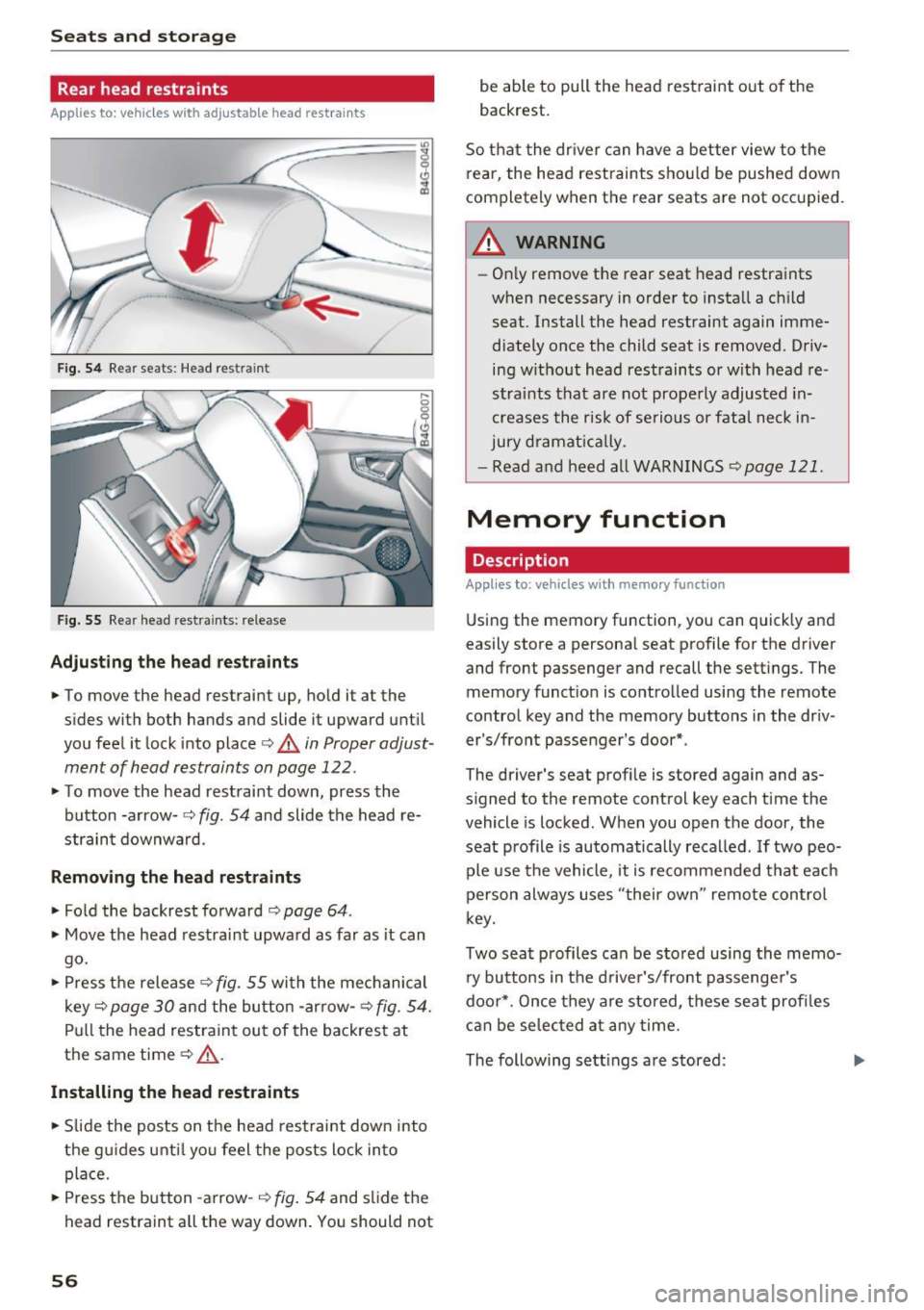
Fig. 54 Re ar seats: Head res train t
Fig . 5 5 Re ar head rest ra in ts: re lease
Adjust ing th e he ad rest raints
• To move the head restraint up, ho ld i t a t the
s ides with both hands and slide it upward unt il
you feel it lock into place
c::> A in Proper adjust
ment of head restraints on page 122.
• To move the head rest raint down, press the
button -arrow -
c::> fig. 54 and slide the head re
strain t downward .
Removing the head restraints
• Fold the backrest forward o page 64 .
• Move the head restrai nt upwa rd as far as it can
go.
• Press the release
c::> fig . 55 with the mechanical
key
c::> page 30 and the button -arrow-c::> fig . 54.
Pull the head restraint out of the backrest at
the same time
o .&_ .
Installing the head rest ra ints
• Slide the posts on t he head restraint down into
the gu ides unti l yo u feel the posts lock in to
place.
• Press the button -a rrow-
c::> fig. 54 and slide the
head restraint all the way down. You should not
56
be able to pull the head restraint out o f the
backrest.
So that the dr ive r can have a better view to the
rear, the head rest raints shou ld be pushed down
completely when the rear seats are not occupied .
A WARNING
-On ly remove the rear seat head restraints
when necessary in order to install a ch ild
seat . Install the head restraint again imme
diately once the child seat is removed . Driv
ing without head restraints or with head re
stra ints that are not prope rly adjusted in
creases the risk of serio us or fata l neck in
jury d ramat ica lly .
- Read and heed all WARN INGS
<=> page 121.
Memory function
Description
Applies to : vehicles wi th memo ry function
Using the memory function, you can quick ly and
easily store a personal seat profile for the dr iver
and front passenger and recall the sett ings. The
memory funct io n is co ntrolled using the remote
control key and the memory buttons in the dr iv
er's/front passenger's door* .
-
The driver' s seat prof ile is sto red aga in and as
s igned to the remote control key each time the
vehicle is locked . When you open the door, the
seat profile is automatically recalled .
If two peo
ple use the vehicle , it is recommended that eac h
person always uses "t heir own" remote control
k ey.
Two sea t profiles can be stored using the memo
ry bu ttons in the d rive r's/front passenge r's
doo r*. Once they are stored, these seat profi les
can be selec ted at any time.
The following sett ings are stored :