2016 AUDI A7 lane assist
[x] Cancel search: lane assistPage 97 of 294

M N <( I.J "". rl I.O
"' N I.O rl
Switching on and off
Applies to vehicles: with Audi active lane assist
Fig. 100 Turn signal lever: active lane assist button
Fig. 101 Windshield: camera w indow for active lane assis t
... Press the¢ fig. 100 button to switch the sys
tem on and off. The. or. indicator light in
the instrument cluster turns on or off .
Indicator lights
• Ready:
The indicator light turns on when the
system is ready for use. The system can now be
operated .
• Not ready: The indicator light turns on if the
system is switched on but is inoperable . This may
be due to the following reasons :
- There is no lane marker line.
- The relevant lane marker lines are not detected
(for example, markings in a construction zone
or because they are obstructed by snow, dirt,
water or backlighting).
- The vehicle's speed is below the speed needed
to activate it, which is about 40 mph (65 km/
h).
- The lane is narrower than about 8 ft. (2.5 m) or
wider than 15
ft (4.5 m).
- The curve is too sharp.
Audi active lane assist
- The driver's hands are not on the steering
wheel.
(D Tips
Make sure the camera's field of view
¢
fig. 101 is not obstructed by stickers or any
thing else. For information on cleaning, refer
to ¢ page
205.
Lane assist display in the instrument
cluster
Applies to vehicles: wit h Audi active lane ass ist
Fig. 102 Instrument cluster: active lane assist is switched
on and providing warnings
Fig. 103 Instrumen t cluster: act ive lane assist is sw itched
on but not ready to provide warn ings
You can call up the active lane assist display using
the buttons in the multifunction steering wheel
¢ page
23.
An additional indicato r appears in the Head-up
display* .
95
Page 98 of 294

Audi active lane assist
White line(s)
Active lane assist is activated
and ready to provide warn ings.
Red line(s) Active lane assist warns you
(left or right) before leav ing a lane
¢fig . 102 . In addit ion, the
steering wheel vibrates lightly .
Gray line(s) Active lane assist is activated, but not ready to give warning
¢fig. 103.
Messages in the instrument cluster display
If the active lane assist switches off automatical
ly, the indicator light in the display turns off and
one of the following messages appears:
Audi active lane a ssist: Currently unavailable .
No camera view
This message appea rs if the came ra is unab le to
detect the lines . Thi s co uld happen if:
- The camera field of view ¢
page 95, fig. 101 is
dirty or covered in ice. Clean this area o n the
winds hield.
- The camera field of view is fogged over. Wait
until the fog has cleared before switching the
active lane assist on again.
- T he system has been unable to detect the lanes
for an extended period of time due to road con
ditions. Switch the active lane assist back on
when the lines are more visible.
Audi active lane assist : currently unavailable
There is a temporary active lane ass ist malfunc
tion . Try switching the active lane assist on again
later .
Audi active lane assist : system fault!
Drive to an a uthorized Aud i dea ler or authorized
Audi Service Faci lity immediately to have the
malfunct ion corrected.
Audi active lane assist: Please take over steering
This message appears if you are not steering by
yourse lf. If this is the case, active lane assist does
not swi tch off, but it is "not ready" to provide a
warn ing. The system can help you keep the vehi
cle in the lane. However, yo u are responsible for
driving the vehicle and must steer it yourself.
96
· Adjusting the vibration warning
Applies to veh icles: with Audi active lane assist
.,. Select: the I CARI function button > (Car) * Sys
tems
control button > Driver assistan ce > Audi
ac tive lane assist .
You can switch the add itiona l vibrating war ning
in the steering wheel on or off.
(D Tips
Your settings are automat ical ly stored and as
signed to the remote control key being used.
Page 99 of 294
M N <( I.J ""'. rl I.O
"' N I.O rl
Audi side assist Side assist
Description
Applies to vehicles: with Audi side assist
Fig. 104 Sensor detection range
F ig. 105 Display on the exterio r mirro r
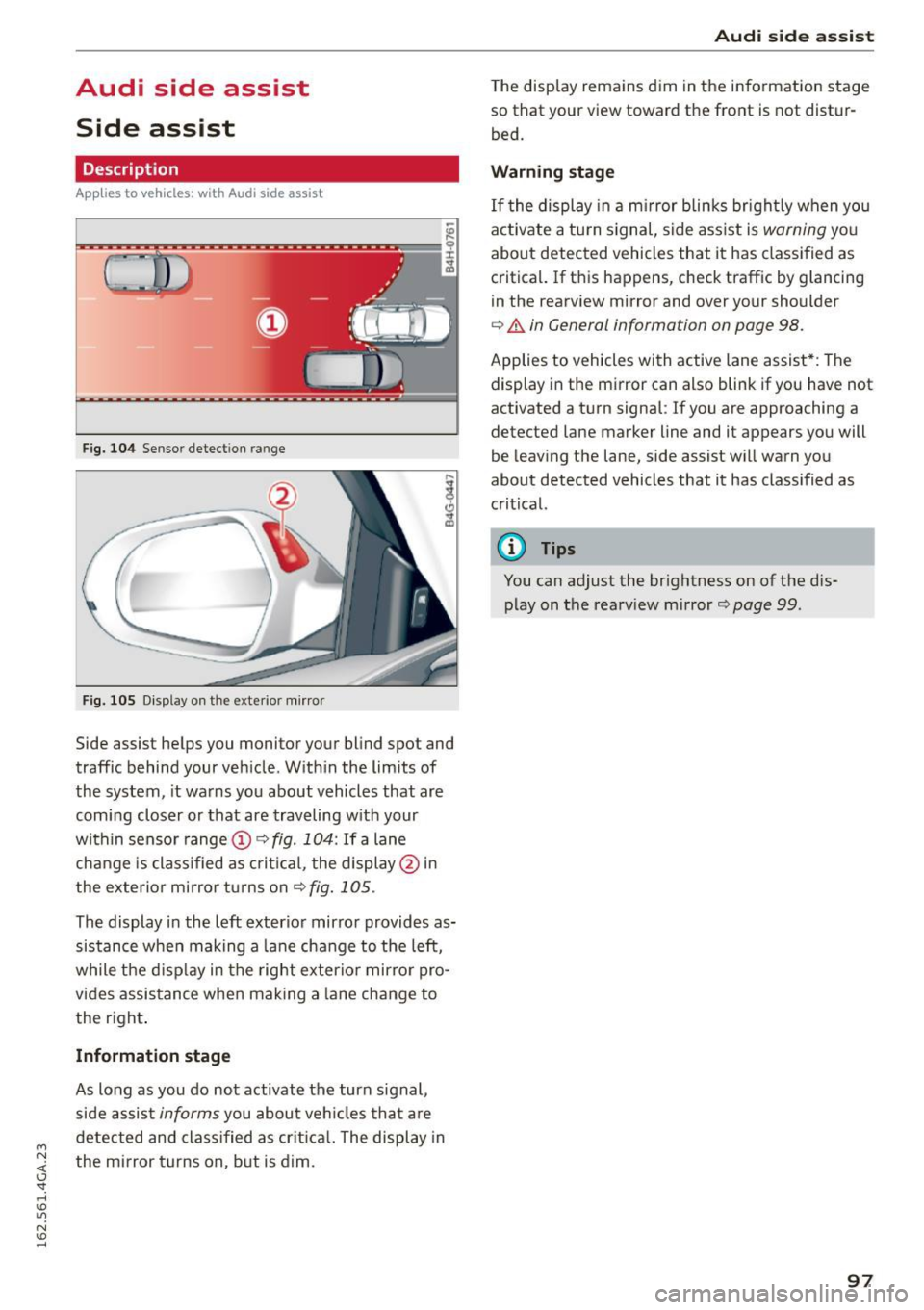
Side ass ist helps you monitor your blind spot and
traffic behind your veh icle . With in the limits of
the system, it wa rns you about vehicles that are
coming closer or that are traveling w ith your
within sensor range
(D c> fig. 104: If a lane
change is class ified as critical, the display@in
the exterior mirror turns on
c> fig. 105 .
The display i n the left exterior mirror provides as
sistance when making a lane cha nge to the left,
while the d isp lay in the right exterio r mirror pro
vides assistance when making a lane change to
the right .
Information stage
As long as you do not activate the turn signal,
side assis t
informs you about ve hicles that a re
detected and classified as crit ica l. The display in
the mirror turns on, but is dim.
Aud i side assist
The display remains d im in the information stage
so that your view toward the front is not d istur
bed.
Warning stage
If the display in a m irror blinks bright ly when you
act ivate a tu rn s ignal, s ide ass ist is
warning you
about detected vehicles that it has classified as
critica l. If this happens, check traffic by glancing
in the rearview mirror and over your shoulder
c> .&. in General informa tion on page 98.
Applies to vehicles w ith active lane assist* : The
display in the mirror can also blink if you have not
activated a turn signal : If you are app roaching a
detected lane marker line and it appears you will
be leaving the lane, side assist w ill warn you
about detected vehicles that it has class ified as
critical.
@ Tips
You can adjust the brightness on of the dis
play on the rearview mirror
c>page 99.
97
Page 100 of 294

Audi side assist
General information
App lies to vehicles: with sid e assist
®
@
©
Fig. 106 Driving s itua tions
~ AUD I
• 0 0 •
Fig. 107 Rear of the ve hicle: pos it io n of t he sensors
Side assist functions at speeds above approx i
mately 19 mph (30 km/h).
(D Vehicles that are approaching
In certain cases, a vehicle will be classified as
critical for a lane change even if it is still some
what far away . The faste r a vehicle approaches,
the sooner t he d isplay in the exter io r mirro r will
turn on.
@Vehicles traveling with you
Vehicles traveling w ith you are indicated in the
exterior mirror if they are classified as critical for
a lane change. All vehicles detected by side assist
98
are indicated by the time they enter your "blind
spot", at the latest.
@ Vehicles left behind
If you slowly pass a veh icle that side assist has
detected (the difference in speed between the ve
hicle and your vehicle is less than 9 mph or 1S
km/h), the display in the exterior mirror turns on
as soon as the vehicle enters your blind spot.
T he display will not turn on if you quickly pass a
vehicle that side ass ist has detected (the differ
ence in speed between the vehicle and your vehi
cle is greater than 9 mph or 15 km/h).
Functional limitations
The radar sensors are designed to detect the left
and right adjacent lanes when the road lanes are
the normal width. In certain s ituations, the dis
play in the exterior mirror may turn on even
though there is no vehicle located in the area that
i s cr itical for a lane change. For example:
- if the lanes are narrow or if your are dr iving on
the edge of your lane. If this is the case, the
system may have detected the vehicle in anoth
er lane that is
not adjacent to your current lane.
- if yo u are driving through a c urve . Side assist
may react to a vehicle that is one lane over from
the adjacent lane.
- if side assist reacts to other objects (such as
high or displaced guard rails).
- In poor weather conditions . The side assist
functions are limited.
Do not cover the radar sensors
q fig. 107 with
stickers, deposits, bicycle wheels or other ob
jects, because this will affect the function . Do not
use side assist when towing a trailer . For infor
mation on cleaning, refer to
q page 205 .
A WARNING
-Always pay attention to traffic and to the
area around your veh icle. S ide ass ist cannot
replace a dr iver's attention . The driver alone
is always responsible for lane changes and
sim ila r driv ing maneuvers.
Page 101 of 294

M N <( I.J "". rl I.O
"' N I.O rl
-Improper reliance on the side assist system
can cause collisions and serious personal in
jury:
- Never rely only on side assist when chang
ing lanes .
- Always check rear view mirrors to make
sure that it is safe to change lanes.
- Sid e assist cannot detect a ll vehicles under
all conditions- danger of accident!
- Please note that side assist indicates there
are approaching vehicles, or vehicles in your
blind spot, only after your vehicle has
reached a driving speed of at least 19 mph
(30 km/h).
- In certain situations, the system may not
function or its function may be limited. For
example:
- if vehicles are approaching or being left
behind very quickly. The display may not
turn on in time.
- in poor weather conditions such as heavy
rain, snow or heavy m ist .
- on very wide lanes, in tight curves or if
there is a rise in the road surface . Vehicles
in the adjacent lane may not be detected
because they are outside of the sensor
range.
(D Note
The sensors can be displaced by impacts or damage to the bumper, wheel housing and
underbody. This can affect the system . Have
your authorized Audi dealer or authorized
Audi Service Facility check their function.
(D Tips
-If the window g lass in the driver's door or
front passenger's door has been tinted, the
display in the exterior mirror may be misin
terpreted.
- For Declarat ion of Compliance to United
States FCC and Industry Canada regulations
c:>page277 .
Audi side assist
Switching on and off
Applies to vehicles: wit h Audi side ass ist
Fig. 108 Driver 's door : side assist button
" Press the c:> A in General information on
page 98
button to switch the system on and
off. The LED in the button turns on when side
assist is switched on .
Adjusting the display brightness
Applies to vehicles: wit h Audi side ass ist
The display brightness can be adjusted in the In
fotainment system .
.,. Select: the I CAR I function button > (Car)* Sys
tems
control button > Driver assistance > Audi
side assist .
The display brightness adjusts automatically to
the brightness of the surroundings, both in the
information and in the warning stage. In very
dark or very bright surroundings, the display is al
ready set to the m inimum or maximum level by
the automatic adjustment. In such cases, you
may not ice no change when adjusting the bright
ness, or the change may only be noticeable once
the surroundings change.
Adjust the br ightness to a level where the display
in the info rmation stage will not disrupt your
view forward. If you change the brightness, the
display in the exterior mirror will briefly show the
brightness level in the information stage . The
brightness of the warning stage is linked to the
brightness in the information stage and is adjust
ed along with the information stage adjustment.
Ill>
99
Page 107 of 294

M N <( I.J "". rl I.O
"' N I.O rl
Disp lay in th e in st rum ent clu ste r/head-up
di splay *
If there are pedestrians or wild animals in an area
in front of your vehicle that is classified as criti
cal, the system will direct your attention to this:
- Pedestrians or wi ld animals are highlighted in
red and the corresponding symbol. or.
turns on
¢fig. 112.
-There is also a tone.
The area classified as cr itical is based on the vehi
cle speed and the steering w heel angle. Pedes
tr ian and wild animal warning encourages you to
pay more attention.
I f the nigh t vision assist image is replaced by an
o ther d isp lay (such as the on-board computer),
the red ind icator light . or. will appear if
there is a pedestrian or wild animal warning
¢ fig . 113.
If the head- up display* is sw itched on and the
n ight vision assist content is activated, . or.
will appear in the head-up display*.
Ma rking light*
To direct the driver's attention to a pedestr ian,
the headlights can flash on the pedestr ian th ree
times in a row when the re is a pedes trian warn
ing .
This happens at speeds above approximate ly
35 mph (60 km/h) when you are traveling ou t
side of we ll-lit areas and when flashing the head
lights will not create glare for a vehicle detected
in the oncoming lane. The marker light* is con
trolled by the high beam assist* ¢
page 44, High
beam assist.
The marking light is not used for wi ld animals .
Nig ht v is io n as sist
General information
App lies to vehicles : wit h night vision assist
Fig. 114 Fro nt of the veh icle: night vi sion camera
The following situat ions may affect the function
of the night vision assist system:
- Poor visibility such as snow , rain, fog or heavy
spray
- Dirty lens on the night vision assist camera
Make sure the night vision ass ist camera
¢
fig. 114 is not covered by stickers, depos its or
any other obstructions because that can affect
the camera function . For information on clean
ing, refer to¢
page 205.
Pedestria n and wild anima l detect ion depends on
the difference in temperature between the per son/wild animal and the background area. Pedes
trians/wild anima ls may not be detected if the
difference is too small. Pedestrian and wild ani
mal mark ing and the marker light* are deactivat
ed at temperatures above approximately 77 °F
(25 °C) and when it is light outside . When the
night vision assistant image is selected in the in
str ument cl uster d isplay, the
Ill symbo l appears
i n the upper right.
A WARNING
Pay attention to traffic and the area a round
your vehicle when night vision assist is sw itch
ed on. As the driver, yo u are a lways responsi
ble for assessing the traffic situat ion.
- Night vision assist can only warn about peo
ple and wi ld animals located within the visu
al range of the infrared camera. The visual
range corresponds to the image in the in
strument cluster display .
-
105
Page 190 of 294

Intelligent Technology
shared, p le a se see yo ur contract with the
wireless telecomm unications provider and the
"About Aud i connect" tab in your vehicle's
MMI:
! MENUI button> Audi connect > About
Audi connect .
Electronic Stabilization
Control (ESC)
Description
ESC helps to improve road holding and vehicle
dynamics to help reduce the probability of sk id
d ing and loss of veh icle control.
It works only
when the engine is runn ing. ESC detects certa in
d ifficult d riving situations, including when the ve
h icle is beginn ing to sp in (yaw) o ut of control and
he lps you to ge t the veh icle back u nder cont ro l b y
selec tively braking the whee ls, and/or reduc ing
engine power and providing steering assistance
to help hold the vehicle on the driver's i ntended
course. The indicator light
DJ in the instrument
cluster blinks when ESC is taking action to help
you control t he veh icle.
ESC has lim itations. It is important to remember
that ESC cannot overcome the laws of physics. It
will not a lways be ab le to he lp out under all con
d itions you may come up against. For example,
ESC may not always be able to help you master
situations where there is a sudden change in the
coefficient of friction of the road surface. Whe n
there is a section of d ry road tha t is s udden ly cov
ere d wi th wa ter, s lush or snow, ESC ca nnot per
form the same way it wou ld on the d ry s urface . If
the vehicle hydroplanes ( rides on a cushion of wa
ter instead of t he road surface), ESC wi ll not be
ab le to he lp you steer the veh icle because contact
with the pavement has been i nterrupted and the
ve hicle cannot be b raked or steered. Dur ing fast
cor ne ring, particula rly o n w inding roads, ESC
cannot a lways deal as eff ect ively wi th d iff icu lt
d riving situat ions than at lowe r speeds.
Always ad just your speed and dr iv ing style to
road, traffic and weather conditions. ESC ca nnot
over ride the vehicle's physical limi ts, increase t he
ava ilab le tract io n, or keep a vehi cle on t he road if
roa d de pa rture is a res ult o f driver in att enti on.
I nstead, ESC improves the poss ibility of keeping
188
the veh icle unde r control and on the road dur ing
extreme maneuve rs by using the dr iver's stee ring
i nputs to help keep the vehicle going in the in
tended direction. If yo u are traveling at a speed
that causes you to run off the road before ESC
can p rov ide any assistance, you may not experi
ence the benefits of ESC.
ESC is switc hed on all the time. In certain s itua
tions when you need less tracti on, you can switch
off ASR by press ing the button
[ru c:> page 189,
fig . 178. Be sure to sw itch ASR on aga in when
you no longer need l ess traction.
The following systems are integrated in the ESC:
Anti -lock braking system (ABS )
ABS prevents the whee ls from locki ng when brak
i ng . T he veh icle can st ill be stee red even during
hard braking. App ly steady pressure to the brake
pedal. Do not pump the pedal. A puls ing in the
brake pedal indicates that the system is acting to
stab ilize the veh icle.
Brake assist sy stem
The bra ke ass ist system can decrease braking dis
tance. It increases bra king power when the driver
presses the brake peda l quickly in emergency sit
uat ions. You must press and hold the b rake peda l
u nt il the dange rous situat io n is over . In vehicles
with adaptive cruise co ntro l*, the brake ass ist
system is more sensitive if t he d ista nce detected
to t he veh icle a head is too sma ll.
Anti-slip regulation (ASR)
ASR red uces eng ine power when the drive wheels
begin spin ning and adapts the force to the road
cond it ions . Th is makes it eas ier to sta rt, acce ler
ate a nd dr ive up incl ines.
Electronic differential lock (EDL)
EDL applies t he brakes to a whee l that starts
sp inning a nd tra nsfe rs the d rive power to the
othe r drivi ng whee ls. This function is not ava ila
ble at hig he r speeds.
In extreme cases, EDL automatically sw itches off
to keep the brake o n the braked whee l from over
hea ting. The vehicle is st ill work ing cor rect ly. EDL ..,.
Page 286 of 294

Index
l
Jac k 253
265
266
J
ump-starting .. .. ... .... .... .. ... ... .
J umper cables .. .. ............. .. .. .. .
K
Key ... .. .. .. .... ... . ...... ... .. .. .... 30
Eme rgency key . . . . . . . . . . . . . . . . . . . . . . . 30
Indicator light . . . . . . . . . . . . . . . . . . . . . . . 77
Key not recogni zed . . . . . . . . . . . . . . . . . . . . 77
K ey replacement . . . . . . . . . . . . . . . . . . . . . 30
Maste r key . . . . . . . . . . . . . . . . . . . . . . . . . . 30
M echanical key . . . . . . . . . . . . . . . . . . . . . . . 30
R eplacing th e batte ry . . . . . . . . . . . . . . . . . 3 1
Kick-down (a utomat ic transm ission) . . . . . . 111
Knee airbags . . . . . . . . . . . . . . . . . . . . . . . . . 1 59
D escript ion . . . . . . . . . . . . . . . . . . . . . . . . . 159
H ow they wo rk . . . . . . . . . . . . . . . . . . . . . . 160
Important safety instructions . . . . . . . . . . 161
L
Lane assist
refer to Act ive lane assist . . . . . . . . . . . . . . 94
L A T CH . . . . . . . . . . . . . . . . . . . . . . . . . . . . . . 180
D escr ip ti on . . . . . . . . . . . . . . . . . . . . . . . . . 18 1
I nstal ling a child restraint . . . . . . . . . . . . . 18 2
L ocation . . . . . . . . . . . . . . . . . . . . . . . . . . . 181
M ounting and re leasing the ancho rage
hook . . . . . . . . . . . . . . . . . . . . . . . . . . . . . . 182
L aunch cont ro l program . . . . . . . . . . . . . . . . 111
Leather care/cleaning . . . . . . . . . . . . . . . . . . 208
L eaving home . . . . . . . . . . . . . . . . . . . . . . . . . 45
Lifting jack . . . . . . . . . . . . . . . . . . . . . . . . . . 257
Light Ambient lighting . . . . . . . . . . . . . . . . . . . . . 46
Com ing/Leavi ng home. ..... ... .. .. .. .. 45
Daytime r unning lights . . . . . . . . . . . . . . . . 43
E me rg ency flashers . . . . . . . . . . . . . . . . . . . 46
H eadlig ht ass ist . . . . . . . . . . . . . . . . . . . . . . 44
H igh beam . . . . . . . . . . . . . . . . . . . . . . . . . . 44
I nter ior/ readi ng lights . . . . . . . . . . . . . . . . . 46
L ow beams . . . . . . . . . . . . . . . . . . . . . . . . . . 43
Parking lights . . . . . . . . . . . . . . . . . . . . . . . . 43
Rear fog lights . . . . . . . . . . . . . . . . . . . . . . . 43
T u rn signa ls . . . . . . . . . . . . . . . . . . . . . . . . . 44
284
Light/ rain senso r
Hea dlights . . . . . . . . . . . . . . . . . . . . . . . . . . 43
Ind icator light . . . . . . . . . . . . . . . . . . . . . . . 22
Intermittent (w indshie ld wipers) . . . . . . . . 49
L ight ing
Exterior . . . . . . . . . . . . . . . . . . . . . . . . . . . . . 43
Interio r . . . . . . . . . . . . . . . . . . . . . . . . . . . . . 46
L ights
Head light r ange control system . . . . . . . . . 43
Load ing the roof rack . . . . . . . . . . . . . . . . . . . 62
Locking Power locking switch . . . . . . . . . . . . . . . . . . 35
Remote contro l . . . . . . . . . . . . . . . . . . . . . . 33
U sing the key . . . . . . . . . . . . . . . . . . . . . . . . 35
Low beam In dicator light ..... .. ... . .... ... .. .. . 21
Low beams . . . . . . . . . . . . . . . . . . . . . . . . . . . 43
Lower universa l anchorages (Canada) . . . . . 180
Luggage compar tment
12 Volt so cket . . . . . . . . . . . . . . . . . . . . . . . 59
Cargo net . . . . . . . . . . . . . . . . . . . . . . . . . . . 65
Cove r.. ... .. .... .. .. .. .. .. .... ... .. . 63
E nlarging . . . . . . . . . . . . . . . . . . . . . . . . . . . 64
Load ing . . . . . . . . . . . . . . . . . . . . . . . . . . . . . 63
Reve rsible mat . . . . . . . . . . . . . . . . . . . . . . . 65
Ski sack . . . . . . . . . . . . . . . . . . . . . . . . . . . . . 66
Stor ing cargo co rrectly . . . . . . . . . . . . . . . 132
Stow ing luggage . . . . . . . . . . . . . . . . . . . . 132
T ie-downs . . . . . . . . . . . . . . . . . . . . . . . . . . . 65
T ru nk p ass- through . . . . . . . . . . . . . . . . . . . 66
Luggage compartment l id
Clos ing button . . . . . . . . . . . . . . . . . . . . . . . 36
Emergency re lease . . . . . . . . . . . . . . . . . . . . 38
movement -act ivated opening . . . . . . . . . . . 38
Open ing/closing . . . . . . . . . . . . . . . . . . . . . . 36
Lumbar suppor t
Front seats . . . . . . . . . . . . . . . . . . . . . . . . . . 54
M
Maintenance .. .. .. ... ............. ... 274
Maintenance interva ls . . . . . . . . . . . . . . . . . . 26
Malfunction Ind icator Lamp (M IL) . . . . . 20 , 28
Manual shift program. ............... ..
111
M assage func tion
Front seats . . . . . . . . . . . . . . . . . . . . . . . . . . 54
Mechan ica l key . . . . . . . . . . . . . . . . . . . . . . . . 30