Page 396 of 664

3965-10. Bluetooth®
SIENNA_OM_01999-08001_(U)■
Compatible models
The Bluetooth
® audio system supports portable audio players with the follow-
ing specifications
● Bluetooth
® specifications:
Ver. 2.0, or higher (Recommended: Ver. 3.0+EDR or higher)
● Profiles:
• A2DP (Advanced Audio Distribution Profile) Ver. 1.0, or higher
(Recommended: Ver. 1.2 or higher)
This is a profile to transmit stereo audio or high quality sound to the audio
system.
• AVRCP (Audio/Video Remote Contro l Profile) Ver. 1.0 or higher
(Recommended: Ver. 1.4 or higher)
This is a profile to allow remote control the A/V equipment.
However, please note that some functions may be limited depending on the
type of portable audio player connected.
The hands-free system supports cellular phones with the following specifica-
tions.
● Bluetooth
® specification:
Ver. 2.0 or higher (Recommended: Ver. 3.0+EDR or higher)
● Profiles:
• HFP (Hands Free Profile) Ver. 1.0 or higher (Recommended: Ver. 1.6 or
higher)
This is a profile to allow hands-free phone calls using a cellular phone or
head set. It has outgoing and incoming call functions.
• OPP (Object Push Profile) Ver. 1.1 or higher (Recommended: Ver. 1.2) This is a profile to transfer contact data. When a Bluetooth
® compatible
cellular phone has both PBAP and OPP, OPP cannot be used.
• PBAP (Phone Book Access Profile) Ver. 1.0 or higher (Recommended: Ver. 1.1)
This is a profile to transfer contact data.
• MAP (Message Access Profile) Ver.1.0 or higher This is a profile to using phone message.
If the cellular phone does not support HFP, you cannot register it with the
hands-free system. OPP, PBAP or MAP services must be selected individu-
ally.
Page 397 of 664
SIENNA_OM_01999-08001_(U)
3975-10. Bluetooth®
5
Audio system
■Certifications for the Bluetooth (caution)
For vehicles sold in the U.S.A.
FCC ID: AJDK068
NOTE:
This device complies with Part 15 of the FCC Rules.
Operation is subject to the following two conditions:
(1) this device may not cause harmful interference, and
(2) this device must accept any interference received, including interfer- ence that may cause undesired operation.
CAUTION:
Radio Frequency Radiation Exposure
This equipment complies with FCC radiation exposure limits set forth for an
uncontrolled environment and meets the FCC radio frequency (RF) Expo-
sure Guidelines. This equipment has very low levels of RF energy that it
deemed to comply without maximum permissive exposure evaluation
(MPE). But it is desirable that it should be installed and operated keeping
the radiator at least 20 cm or more away from person’s body in normal use
position.
FCC WARNING:
Changes or modifications not expressly approved by the party responsible
for compliance could void the user’s authority to operate the equipment.
Co-Location:
This transmitter must not be co-located or operated in conjunction with any
other antenna or transmitter.
For vehicles sold in Canada
IC: 775E-K068
• This device complies with Industry Canada licence-exempt RSS stan- dard(s). Operation is subject to the following two conditions: (1) this
device may not cause interference, and (2) this device must accept any
interference, including interference that may cause undesired operation
of the device.
• Le présent appareil est conforme aux CNR d’Industrie Canada
applicables aux appareils radio exempts de licence. L’exploitation est
autorisée aux deux conditions suivantes : (1) l’appareil ne doit pas
produire de brouillage, et (2) l’utilisateur de l’appareil doit accepter tout
brouillage radioélectrique subi, même si le brouillage est susceptible d’en
compromettre le fonctionnement.
Page 399 of 664
SIENNA_OM_01999-08001_(U)
3995-10. Bluetooth®
5
Audio system
■Reconnecting the portable audio player
If the portable audio player is disconnected due to poor reception, the system
automatically reconnects the portable audio player.
If you have switched off the portable audio player yourself, follow the instruc-
tions below to reconnect:
●Select the portable audio player again
● Enter the portable audio player
■ When you sell your car
Be sure to delete your personal data. ( P. 327)
WARNING
■While driving
Do not operate the portable audio player, cellular phone or connect a device
to the Bluetooth
® system.
■ Caution regarding interfer ence with electronic devices
● Your audio unit is fitted with Bluetooth
® antennas. People with implantable
cardiac pacemakers, cardiac resynchronization therapy-pacemakers or
implantable cardioverter defibrillators should maintain a reasonable dis-
tance between themselves and the Bluetooth
® antennas. The radio waves
may affect the operation of such devices.
● Before using Bluetooth
® devices, users of any electrical medical device
other than implantable cardiac pacemakers, cardiac resynchronization
therapy-pacemakers or implantable cardioverter defibrillators should con-
sult the manufacturer of the device for information about its operation
under the influence of radio waves. Radio waves could have unexpected
effects on the operation of such medical devices.
NOTICE
■ When leaving the vehicle
Do not leave your portable audio player or cellular phone in the vehicle. The
inside of the vehicle may become hot, causing damage to the portable
audio player or cellular phone.
Page 401 of 664
SIENNA_OM_01999-08001_(U)
4015-11. Using the voice command system
5
Audio system
Due to natural language speech recognition technology, this system
enables recognition of a command when spoken naturally. However,
the system cannot recognize every variation of each command.
In some situations, it is possibl e to omit the command for the proce-
dure and directly state the desired operation.
Not all voice commands are displayed in the short cut menu.
This function is available in English, Spanish and French.
■Expression examples for each function
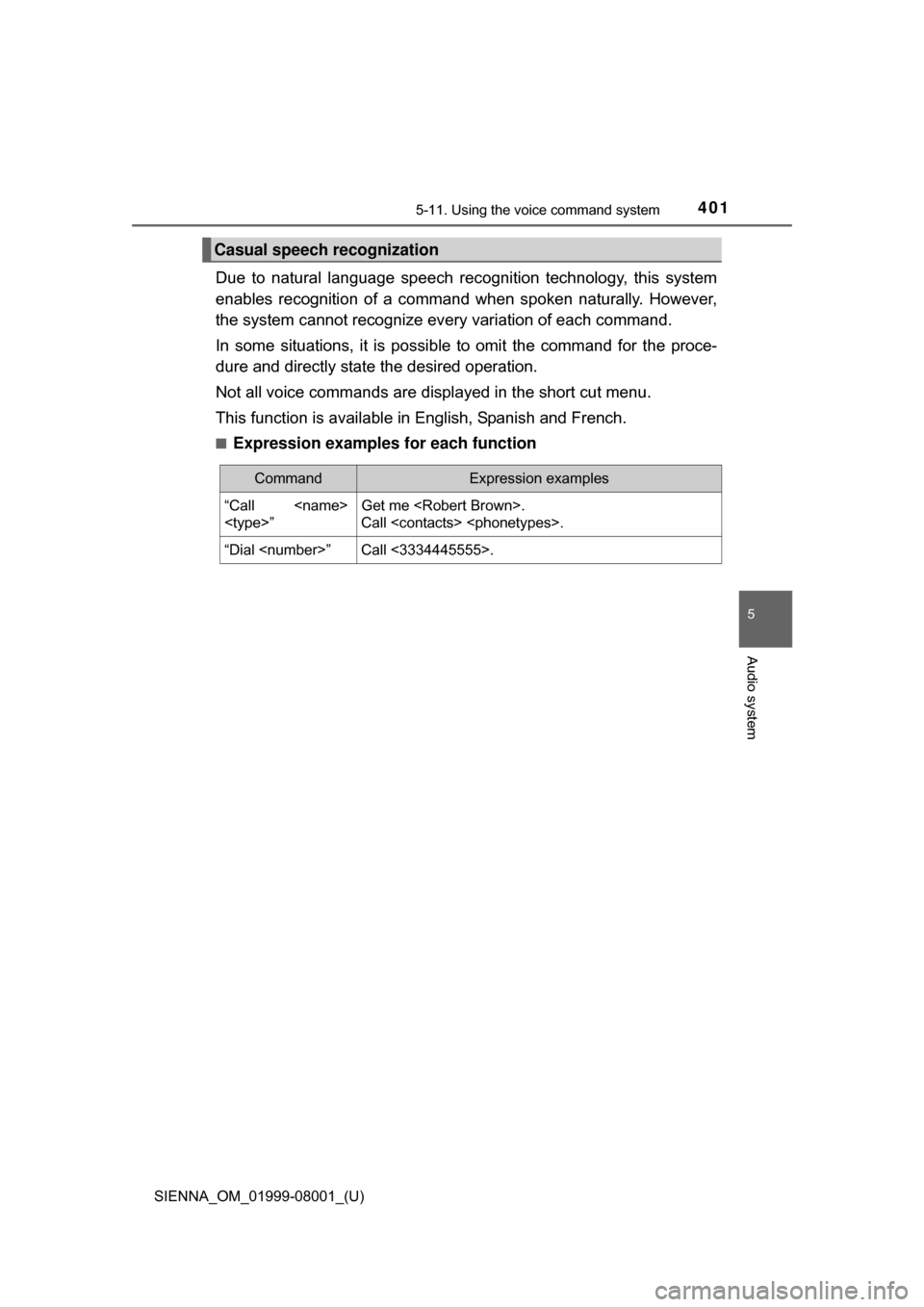
Casual speech recognization
CommandExpression examples
“Call
”Get me .
Call .
“Dial ”Call <3334445555>.
Page 436 of 664
436
SIENNA_OM_01999-08001_(U)
6-4. Using the other interior features
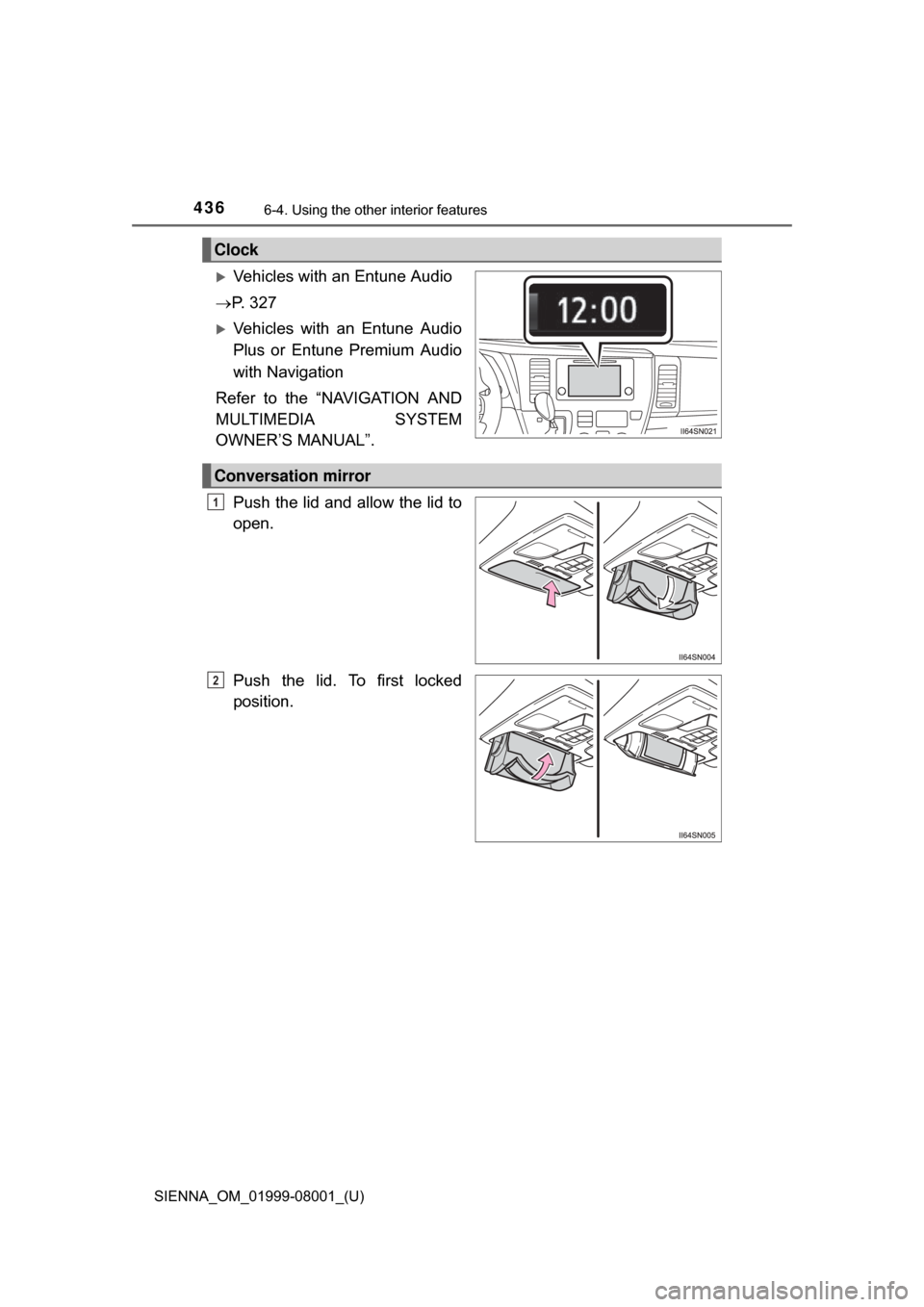
Vehicles with an Entune Audio
P. 3 2 7
Vehicles with an Entune Audio
Plus or Entune Premium Audio
with Navigation
Refer to the “NAVIGATION AND
MULTIMEDIA SYSTEM
OWNER’S MANUAL”.
Push the lid and allow the lid to
open.
Push the lid. To first locked
position.
Clock
Conversation mirror
1
2
Page 465 of 664
SIENNA_OM_01999-08001_(U)
4657-1. Maintenance and care
7
Maintenance and care
NOTICE
■Water on the floor
Do not wash the vehicle floor with water.
Vehicle systems such as the audio system may be damaged if water comes
into contact with electrical components such as the audio system above or
under the floor of the vehicle. Water may also cause the body to rust.
■ Cleaning the inside of the rear window and the rear quarter windows
● Do not use glass cleaner to clean the rear window and the rear quarter
windows, as this may cause damage to the rear window defogger heater
wires or antenna. Use a cloth dampened with lukewarm water to gently
wipe the windows clean. Wipe the windows in strokes running parallel to
the heater wires or antenna.
● Be careful not to scratch or damage the heater wires or antenna.
Page 542 of 664
5428-2. Steps to take in an emergency
SIENNA_OM_01999-08001_(U)■
When a tire is replaced with a spare tire (vehicles with compact spare
tire)
The compact spare tire is not equipped with a tire pressure warning valve
and transmitter. If a tire goes flat,
the tire pressure warning light will not
turn off even though the flat tire has been replaced with the spare tire.
Replace the spare tire with the repaired tire and adjust the tire inflation
pressure. The tire pressu re warning light will go off after a few minutes.
■Conditions that the tire pressure warning system may not function
properly
P. 4 9 3
■If the tire pressure warning light frequently comes on after blinking
for 1 minute
If the tire pressure warning light frequently comes on after blinking for 1
minute when the engine switch is turned to the “ON” position (vehicles
without a smart key system) or IGNI TION ON mode (vehicles with a
smart key system), have it checked by your Toyota dealer.
■ Customization that can be co nfigured at Toyota dealer
The vehicle speed linked seat belt reminder buzzer can be disabled.
(Customizable features P. 626) However, Toyota recommends that the seat
belt reminder buzzer be operational to alert the driver and front passenger
when seat belts are not fastened.
■ Warning buzzer
In some cases, the buzzer may not be heard because of noisy place or an
audio sound.
Page 585 of 664
5858-2. Steps to take in an emergency
SIENNA_OM_01999-08001_(U)
8
When trouble arises
■Starting the engine when the battery is discharged
The engine cannot be started by push-starting.
■ To prevent battery discharge
●Turn off the headlights and the audio system while the engine is off.
● Turn off any unnecessary electrical components when the vehicle is running
at a low speed for an extended period, such as in heavy traffic.
■ When the battery is removed or discharged
●The power sliding door (if equipped) must be initialized. ( P. 128)
● The power back door (if equipped) must be initialized. ( P. 137)
● Make sure that the key is not inside the vehicle when recharging or replac-
ing the battery. The key may be locked in the vehicle if the alarm is acti-
vated. ( P. 78)
■ Charging the battery
The electricity stored in the battery will discharge gradually even when the
vehicle is not in use, due to natural discharge and the draining effects of cer-
tain electrical appliances. If the vehicle is left for a long time, the battery may
discharge, and the engine may be unable to start. (The battery recharges
automatically during driving.)