2015 Peugeot 308 h7 change
[x] Cancel search: h7 changePage 102 of 416

100
308_en_Chap03_confort_ed01-2015
In order for these systems to be fully effective, follow the operation and maintenance
guidelines below:
F t
o o
btain an even air distribution, take care not to obstruct the exterior air intake grilles
located at the base of the windscreen, the nozzles, the vents and the air outlets, as well
as the air extractor located in the boot.
F
D
o not cover the sunshine sensor, located on the dashboard; this is used for regulation
of the air conditioning system.
F
O
perate the air conditioning system for at least 5 to 10 minutes, once or twice a month
to keep it in per fect working order.
F
e
n
sure that the passenger compartment filter is in good condition and have the filter
elements replaced regularly.
W
e recommend the use of a combined passenger compartment filter. t
h
anks to its
special active additive, it contributes to the purification of the air breathed by the
occupants and the cleanliness of the passenger compartment (reduction of allergic
symptoms, bad odours and greasy deposits).
F
t
o e
nsure correct operation of the air conditioning system, you are also advised to have
it checked regularly as recommended in the warranty and maintenance record.
F
I
f the system does not produce cold air, switch it off and contact a P
e
uge
Ot
dealer or
a qualified workshop.
Recommendations for ventilation and air conditioning
If after an extended stop in sunshine,
the interior temperature is very high, first
ventilate the passenger compartment for
a few moments.
Put the air flow control at a setting high
enough to quickly change the air in the
passenger compartment.
th
e air conditioning system does not
contain chlorine and does not present
any danger to the ozone layer.
th
e condensation created by the air
conditioning results in a discharge
of water under the vehicle which is
perfectly normal.
When towing the maximum load on a steep gradient in high temperatures, switching off the
air conditioning increases the available engine power and so improves the towing ability.
Stop & Start
the heating and air conditioning
systems only work when the engine
is running. t
o m
aintain a comfortable
temperature in the passenger
compartment, you can temporarily
deactivate the Stop & Start system (see
the corresponding section).
Comfort
Page 108 of 416

106
308_en_Chap03_confort_ed01-2015
In cold conditions and when the engine
is cold, to limit distribution of cold air
in the passenger compartment, the
air flow will change gradually until the
comfort setting is reached.
On entering the vehicle, if the interior
temperature is much colder or warmer
than the comfort value setting, there
is no need to alter the value displayed
in order to reach more quickly the
required level of comfort. t
h
e system
compensates automatically and
corrects the temperature difference as
quickly as possible.
th
is setting is associated with A
u
t
O m
ode
only. However, on deactivation of A
u
t
O m
ode,
the indicator for the last setting remains on.
Changing the setting does not reactivate A
u
t
O
mode if deactivated.
When the indicator lamp in the button is on, the
air conditioning system operates automatically:
the system manages the temperature, air
flow and air distribution in the passenger
compartment in an optimum way according to
the comfort level you have selected. F
P
ress the "AUTO"
button
to activate or deactivate the
automatic mode of the air
conditioning system.
Automatic comfort
programme
to change the current setting, shown by the
green indicator lamp, press the button for the
desired mode:
"Soft": provides soft and quiet
operation by limiting air flow.
"Normal": offers the best compromise
between a comfortable temperature
and quiet operation (default setting).
"Fast": provides strong and effective
air f low.
It is possible to modulate the intensity
of the automatic comfort programme
by choosing one of three mode
settings offered in a secondary page
of the "
Air conditioning " menu.
Comfort
Page 132 of 416

130
308_en_Chap04_conduite_ed01-2015
gear shift indicator
Depending on the driving situation and your
vehicle's equipment, the system may advise
you to skip one or more gears.
You can follow this instruction without going
through the intermediate gears.-
Y
ou are in third gear.example:
-
Y
ou press the accelerator pedal.-
t
h
e system may suggest that you engage
a higher gear.
th
e information appears in the instrument
panel in the form of an arrow.
On vehicles with manual gearbox, the arrow
can be accompanied by the recommended
g e a r.
th
e system adapts its gear change
recommendation according to the
driving conditions (slope, load,
...) and
the demands of the driver (power,
acceleration, braking,
...).
th
e system never suggests:
-
e
ngaging first gear,
-
enga
ging reverse gear,
System which reduces fuel consumption by recommending the most suitable gear.
Operation
On certain Diesel versions with
manual gearbox, the system may
suggest changing into neutral (
N is
displayed in the instrument panel) so
that the engine can go into standby
(Stop mode with Stop & Start), in
certain driving conditions.
the
gear engagement recommendations must
not be considered compulsory.
th
is is because the configuration of the road,
traffic density and safety remain important
factors in the choice of the best gear.
th
e gear shift indicator system does not
replace the need for vigilance on the part of the
driver.
th
is function cannot be deactivated.
Driving
Page 133 of 416
131
308_en_Chap04_conduite_ed01-2015
Automatic gearbox
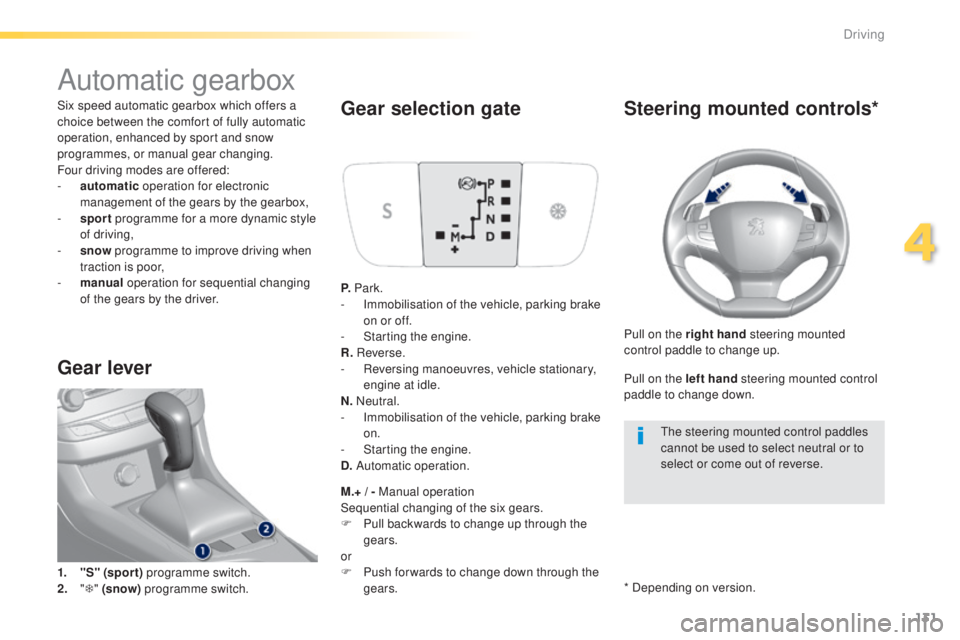
Six speed automatic gearbox which offers a
choice between the comfort of fully automatic
operation, enhanced by sport and snow
programmes, or manual gear changing.
Four driving modes are offered:
-
a
utomatic operation for electronic
management of the gears by the gearbox,
-
sp
ort programme for a more dynamic style
of driving,
-
s
now programme to improve driving when
traction is poor,
-
m
anual operation for sequential changing
of the gears by the driver.
Gear lever
1. "S" (spor t) programme switch.
2. " T "
(snow) programme switch.
Gear selection gate
P. Park.
- I mmobilisation of the vehicle, parking brake
on or off.
-
S
tarting the engine.
R. Reverse.
-
R
eversing manoeuvres, vehicle stationary,
engine at idle.
N. Neutral.
-
I
mmobilisation of the vehicle, parking brake
on.
-
S
tarting the engine.
D. Automatic operation.
M.+ / - Manual operation
Sequential changing of the six gears.
F
P
ull backwards to change up through the
gears.
or
F
P
ush for wards to change down through the
gears.
Steering mounted controls*
Pull on the right hand steering mounted
control paddle to change up.
Pull on the left hand steering mounted control
paddle to change down.
th
e steering mounted control paddles
cannot be used to select neutral or to
select or come out of reverse.
* Depending on version.
4
Driving
Page 135 of 416
133
308_en_Chap04_conduite_ed01-2015
Automatic operation
F Select position D for automatic changing
of the six gears.
th
e gearbox then operates in auto-adaptive
mode, without any intervention on the part
of the driver. It continuously selects the most
suitable gear according to the style of driving,
the profile of the road and the load in the
vehicle.
For maximum acceleration without touching
the lever, press the accelerator pedal down
fully (kick down).
t
h
e gearbox changes down
automatically or maintains the gear selected
until the maximum engine speed is reached.
On braking, the gearbox changes down
automatically to provide efficient engine
braking.
If you release the accelerator sharply, the
gearbox will not change to a higher gear for
safety reasons.
Never select position N while the
vehicle is moving.
Never select positions P or R unless the
vehicle is completely stationary.
Sport and snow programmes
these two special programmes supplement the
automatic operation in very specific conditions of use.
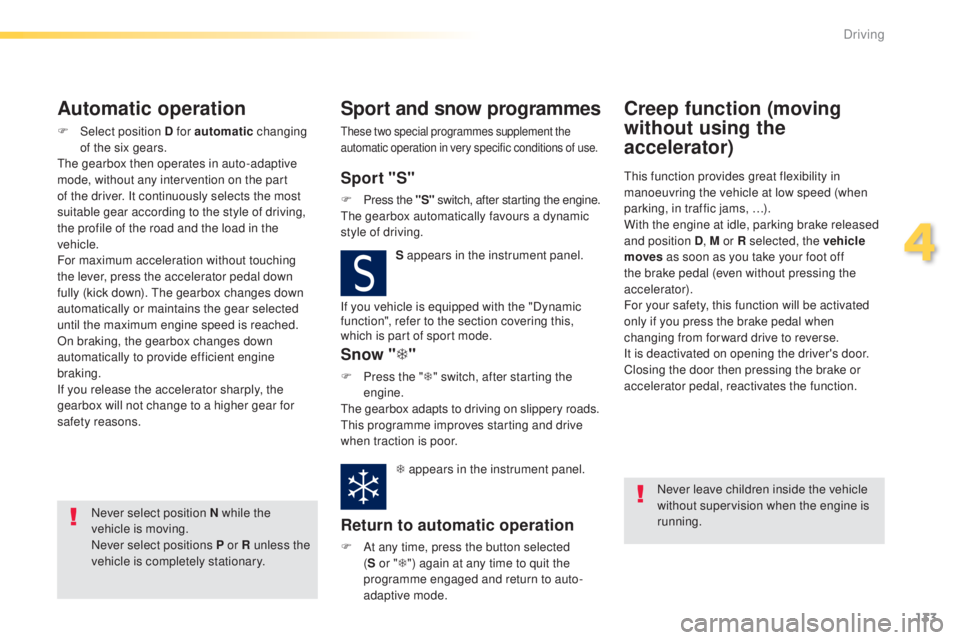
Sport "S"
F Press the "S" switch, after starting the engine.th
e gearbox automatically favours a dynamic
style of driving.
S appears in the instrument panel.
Snow "T"
F Press the " T" switch, after starting the
engine.
th
e gearbox adapts to driving on slippery roads.
th
is programme improves starting and drive
when traction is poor.
T appears in the instrument panel.
Return to automatic operation
F At any time, press the button selected (S or " T") again at any time to quit the
programme engaged and return to auto-
adaptive mode.
Creep function (moving
without using the
accelerator)
this function provides great flexibility in
manoeuvring the vehicle at low speed (when
parking, in traffic jams, …).
With the engine at idle, parking brake released
and position D , M or R selected, the vehicle
moves
as soon as you take your foot off
the brake pedal (even without pressing the
accelerator).
For your safety, this function will be activated
only if you press the brake pedal when
changing from forward drive to reverse.
It is deactivated on opening the driver's door.
Closing the door then pressing the brake or
accelerator pedal, reactivates the function.
Never leave children inside the vehicle
without supervision when the engine is
running.
If you vehicle is equipped with the "Dynamic
function", refer to the section covering this,
which is part of sport mode.
4
Driving
Page 136 of 416
134
308_en_Chap04_conduite_ed01-2015
F Select position M for sequential changing
of the six gears.
F
P
ull the lever towards the + sign to change
up a gear.
F
P
ush the lever towards the - sign to change
down a gear.
It is only possible to change from one gear to
another if the vehicle speed and engine speed
permit; otherwise, the gearbox will operate
temporarily in automatic mode.
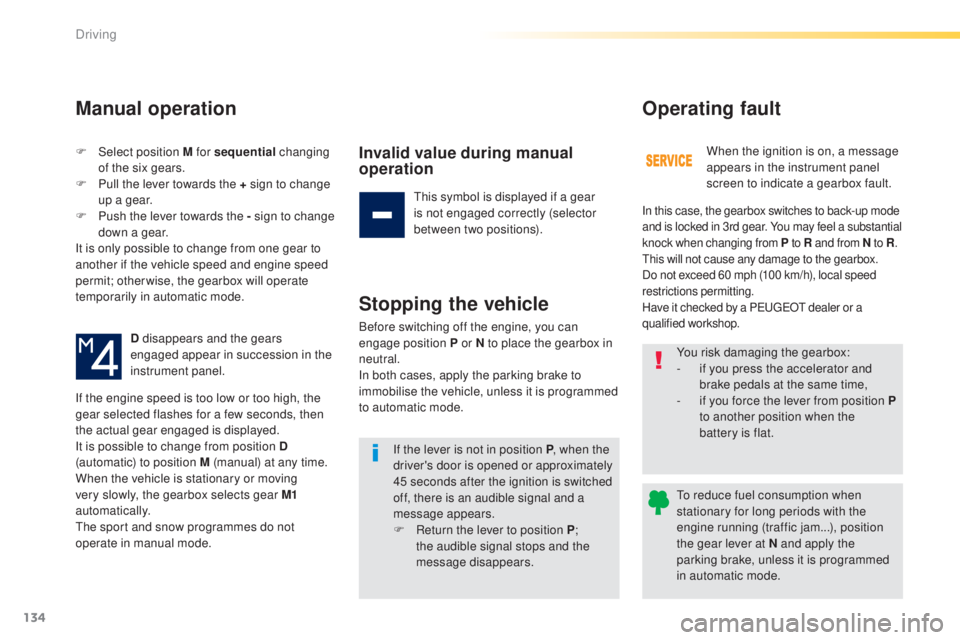
D disappears and the gears
engaged appear in succession in the
instrument panel.
If the engine speed is too low or too high, the
gear selected flashes for a few seconds, then
the actual gear engaged is displayed.
It is possible to change from position D
(automatic) to position M (manual) at any time.
When the vehicle is stationary or moving
very slowly, the gearbox selects gear M1
automatically.
th
e sport and snow programmes do not
operate in manual mode.
Manual operation
Invalid value during manual
operation
this symbol is displayed if a gear
is not engaged correctly (selector
between two positions).
Stopping the vehicle
Before switching off the engine, you can
engage position P or N to place the gearbox in
neutral.
In both cases, apply the parking brake to
immobilise the vehicle, unless it is programmed
to automatic mode.
If the lever is not in position P , when the
driver's door is opened or approximately
45 seconds after the ignition is switched
off, there is an audible signal and a
message appears.
F
R
eturn the lever to position P ;
the audible signal stops and the
message disappears. When the ignition is on, a message
appears in the instrument panel
screen to indicate a gearbox fault.
Operating fault
In this case, the gearbox switches to back-up mode
and is locked in 3rd gear. You may feel a substantial
knock when changing from P
to R and from N to R.
th
is will not cause any damage to the gearbox.
Do not exceed 60 mph (100 km/h), local speed
restrictions permitting.
Have it checked by a P
e
uge
Ot
dealer or a
qualified workshop.
You risk damaging the gearbox:
- i f you press the accelerator and
brake pedals at the same time,
-
i
f you force the lever from position P
to another position when the
battery is flat.
to r
educe fuel consumption when
stationary for long periods with the
engine running (traffic jam...), position
the gear lever at N and apply the
parking brake, unless it is programmed
in automatic mode.
Driving
Page 137 of 416

135
308_en_Chap04_conduite_ed01-2015
Dynamic pack
this pack conditions:
- t he visual ambience, with specific back-
lighting for the instrument panel,
-
t
he acoustic ambience of the engine,
-
t
he power assistance for the steering,
-
acceleration,
-
i
nformation to the driver in the instrument
panel on dynamic settings.
th
is function is only available when
Park Assist is not selected and snow
mode in the automatic gearbox is not
selected.
If Park Assist
is switched on, this
automatically deactivates the function.
Activation
F Press the end of the wiper control stalk to display in the instrument panel the different
information on dynamic settings.
th
e telemetry data (longitudinal and
lateral acceleration, power produced,
turbocharger pressure, ...) are given as
an indication only.
F
P
ress nd hold the button until the back-
lighting in the instrument panel changes.
th
e L
eD i
n the button stays on.
Display
F Press repeatedly to go from one screen to another.
If the L
eD f
lashes, activation is not
possible (for example if Park Assist or
snow mode is selected) and so the back-
lighting returns to its normal mode.
If the L
eD c
ontinues flashing for a long
time, contact a P
e
uge
Ot
dealer or a
qualified workshop.
With an automatic gearbox, gear
changes are faster.
4
Driving
Page 147 of 416

145
308_en_Chap04_conduite_ed01-2015
Flashing of the dashes indicates a fault with the
cruise control.
Have it checked by a P
e
uge
Ot
dealer or a
qualified workshop.
Operating fault
Exceeding the programmed
speed
Switching off
When the cruise control is switched on,
be careful if you maintain the pressure
on one of the programmed speed
changing buttons: this may result in a
very rapid change in the speed of your
vehicle.
Do not use the cruise control on
slippery roads or in heavy traffic.
On a steep descent, the cruise control
will not be able to prevent the vehicle
from exceeding the programmed speed.
On steep climbs or when towing, the
programmed speed may not be reached
or maintained.
th
e use of mats not approved by
P
e
uge
Ot
may inter fere with the
operation of the cruise control.
to a
void any risk of jamming of the
pedals:
-
e
nsure that the mat is secured
c o r r e c t l y,
-
n
ever fit one mat on top of another.
If the programmed speed is exceeded, the
displayed speed flashes.
Once the vehicle returns to the programmed
speed, the display becomes steady again.
F
t
u
rn wheel 1 to the "0" position.
t
h
e display of information related to the
cruise control disappears.
4
Driving