Page 4 of 416

.
.
308_en_Chap00a_sommaire_ed01-2015
Visual search
Instrument panel 12
Indicator and warning lamps
1
3
ga
uges and indicators
2
8
Adjustment buttons
3
3
tr
ip computer
3
5
to
uch screen
3
9
Setting the date and time
4
6Remote control key
5
0
"Keyless e
n
try and Starting"
with remote control
5
7
"Keyless e
n
try and Starting"
on your person
5
9
Boot
6
2
Alarm
6
9
el
ectric windows
7
3
Panoramic sunroof
7
5
Fuel tank
7
6
Diesel misfuel prevention
7
7
Steering wheel adjustment
7
9
Front seats
8
0
Rear seats (saloon) 8 5
Rear seats (SW) 8 6
Interior fittings
8
8
Front armrest
9
0
Boot fittings (saloon)
9
4
Boot fittings (SW)
9
5
Heating and Ventilation
9
9
Heating
101
Manual air conditioning
1
01
Manual air conditioning (
to
uch screen)
1
03
Dual-zone digital air conditioning (
to
uch screen)
1
05
Front demist - defrost
1
10
Rear screen demist - defrost
1
11Driving recommendations
1
12
Starting-switching off the engine
1
13
Manual parking brake
1
20
el
ectric parking brake
1
21
Hill start assist
1
28
5-speed manual gearbox
1
29
6-speed manual gearbox
1
29
ge
ar shift indicator
1
30
Automatic gearbox
1
31
Dynamic pack
1
35
Stop & Start
1
36
Memorising speeds
1
39
Speed limiter
1
40
Cruise control
1
43
Active cruise control
1
46
Display of inter-vehicle time
1
54em
ergency collision alert system,
emergency collision braking system 1 58
Blind spot sensors 1 63
Parking sensors
1
66
Reversing camera
1
69
Park Assist
1
70
eco-driving
M onitoring Access
Comfort Driving
Contents
Page 9 of 416
7
308_en_Chap00b_aide-visuelle_ed01-2015
Instruments and controls
Courtesy lamps 193
Interior mood lighting, footwell lighting
194
Rear view mirror
1
80
P
e
uge
Ot
Connect SOS,
PeugeOt Connect Assistance 196, 298
uS
B port / Auxiliary
socket(s)
9
1, 318, 382 / 91, 322, 384
5/6-speed manual gearbox
1
29
ge
ar shift
indic ator
13 0
Automatic gear box
13
1-13 4
Dynamic function
1
35
Stop & Start
1
36 -138
Hill start assist
1
28
Dashboard fuses
2
53-256
Heating, ventilation
9
9-102
Manual air conditioning
1
01-102
Manual air conditioning (
to
uch screen)
10
3 -104
Dual-zone air conditioning (
to
uch screen)
10
5 -108
Air recirculation
1
09
Front demisting / defrosting
1
10
Rear screen demist/defrost
1
11
Manual parking brake
1
20
el
ectric parking
brake
121-127
to
uch screen
3
9 - 45, 301-371
Setting the date and time
4
6 - 49
Opening the bonnet
2
75
PeugeO t C onnect Sound (RD5) 373 -393
.
Visual search
Page 10 of 416
8
308_en_Chap00b_aide-visuelle_ed01-2015
Hazard warning lamps 195
Locking/unlocking from inside 6 8
Lighting
181-187
Direction indicators
1
95
Instrument panel
1
2-13
Warning lamps
1
3-27
Indicators
28-33
ge
ar shift
indic ator
13 0
P
e
uge
Ot
i- Cockpit
7
9
Steering wheel adjustment
7
9
Horn
19 6
Headlamp beam adjustment
1
88
Memorising speeds
1
39
Speed limiter
1
40-142
Cr uise c ontrol
14
3 -145
Active cruise control
1
46 -153 W ip e r s
18 9 -19 2
tr
ip computer
3
5 -38
Instruments and controls (cont.)
trip computer
3 5 -36, 38tr
ip computer
(
to
uch screen)
3
7, 38
Setting the date/time (
to
uch screen)
4
6
Setting the date/time (screens C, A, A
without audio system)
4
7- 49
Reversing camera
1
69
Display of inter-vehicle time
1
54-157
Collision risk alert
1
58-162
Automatic emergency braking
161-162
Stop & Start
1
36 -138
Alarm
69-72
Visual search
Page 17 of 416

15
308_en_Chap01_controle-de-marche_ed01-2015
Warning / indicator lamp State Cause Action / Observations
Rear foglamps fixed.
th
e rear foglamps are on.
tu
rn the ring on the stalk rear ward to switch off the
rear foglamps.
Diesel engine
pre-heating fixed.
th
e ignition switch is at the
2
nd position (ignition on) or the
ST ART/STOP button has been
pressed.Wait until the warning lamp goes off before starting.
Once it goes off, starting is immediate, on condition that:
- the clutch pedal is pressed fully down with a manual
gearbox,
- pressure is maintained on the brake pedal with an automatic gearbox.
th
e period of illumination of the warning lamp is determined by
the ambient conditions (up to about thirty seconds in extreme
conditions).
If the engine does not start, switch the ignition off and then on,
wait until the warning lamp goes off again, then start the engine.
Parking brake fixed.th e parking brake is applied or not
fully released.to s witch off the warning lamp: with your foot on the
brake pedal, release the parking brake.
If your vehicle has an electric parking brake: with your
foot on the brake pedal, push the brake control lever.
Observe the safety recommendations.
For more information on the parking brake, refer to the
corresponding section.
1
Monitoring
Page 18 of 416

16
308_en_Chap01_controle-de-marche_ed01-2015
Warning / indicator lamp State Cause Action / Observations
Automatic
wiping fixed.
th
e wiper control is pushed
downwards. Automatic front wiping is activated.
to d
eactivate automatic wiping, operate the control
stalk downwards or put the stalk into another position.
Passenger
airbag system fixed.
the control switch, located at the
passenger's end of the dashboard, is in
the
"ON " position.
the
passenger's front airbag is activated.
In this case, do not install a rear ward
facing child seat on the front
passenger seat.
tu
rn the control switch to the "
OFF" position to
deactivate the front passenger's airbag.
In this case you can install a rear ward facing child
seat.
Stop & Star t fixed. When the vehicle stops (red lights,
traffic jams,
...) the Stop & Start
system has put the engine into
S
t
OP
mode.
th
e warning lamp goes off and the engine restarts
automatically in S
tA
R
t
mode, as soon as you want to
move off.
flashes for a few
seconds, then goes
of f. S
tO
P mode is temporarily
unavailable.
or
S
tA
R
t
mode is invoked
automatically. For more information on special cases with S
tO
P
mode and S
tA
R
t
mode, refer to the "Stop & Start"
section.
Blind spot sensors
(depending on
ve r s i o n)fixed.th e blind spot monitoring function
has been activated. For more information, refer to the corresponding
section.
Monitoring
Page 26 of 416

24
308_en_Chap01_controle-de-marche_ed01-2015
Engine oil
pressurefixed.th
ere is a fault with the engine
lubrication system. You must stop as soon it is safe to do so.
Park, switch off the ignition and contact a Pe
ugeOt
dealer or a qualified workshop.
Deflated tyre fixed.
th
e pressure in one or more tyres is
too low. Check the pressures of the tyres as soon as possible.
th
is check should preferably carried out with the tyres
cold.
flashing then fixed.
th
e under-inflation detection system
has a fault. Have it checked by a P
e
uge
Ot
dealer or a qualified
workshop.
For more information on under-inflation detection,
refer to the corresponding section.
Warning
/ indicator lamp
State Cause Action
/ Observations
Foot on the
brake pedal fixed.
th
e brake pedal must be pressed. With an automatic gearbox, press the brake pedal, engine running, before releasing the parking brake, to
unlock the lever and come out of position P .
If you wish to release the parking brake without
pressing the brake pedal, this warning lamp will
remain on.
Foot on the
clutch fixed.
In the S
tO
P mode of Stop & Start,
changing to S
tA
R
t
mode is refused
because the clutch pedal is not fully
down. You must declutch fully to allow the change to engine
S
t
A R
t m
o d e .
Monitoring
Page 37 of 416
35
308_en_Chap01_controle-de-marche_ed01-2015
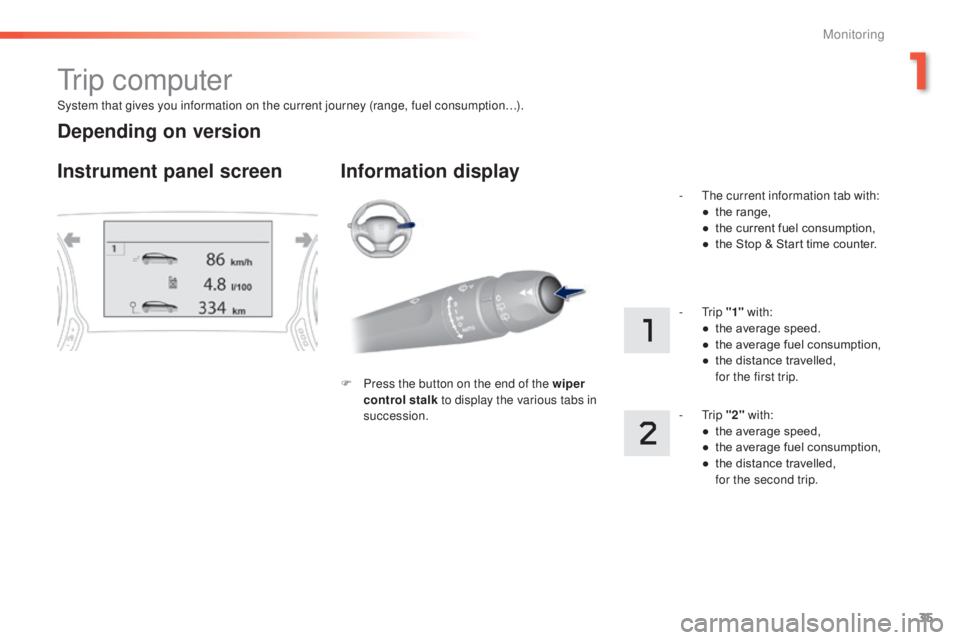
System that gives you information on the current journey (range, fuel consumption…).
tr i p c o m p u t e r
Instrument panel screen Information display
F Press the button on the end of the wiper control stalk to display the various tabs in
succession. -
t
h
e current information tab with:
●
t
he range,
●
t
he current fuel consumption,
●
t
he Stop & Start time counter.
- t
r
ip
"1" with:
●
t
he average speed.
●
t
he average fuel consumption,
●
t
he distance travelled, f
or the first trip.
- t
r
ip "2" with:
●
t
he average speed,
●
t
he average fuel consumption,
●
t
he distance travelled,
f
or the second trip.
Depending on version
1
Monitoring
Page 39 of 416
37
308_en_Chap01_controle-de-marche_ed01-2015
tr i p c o m p u t e r
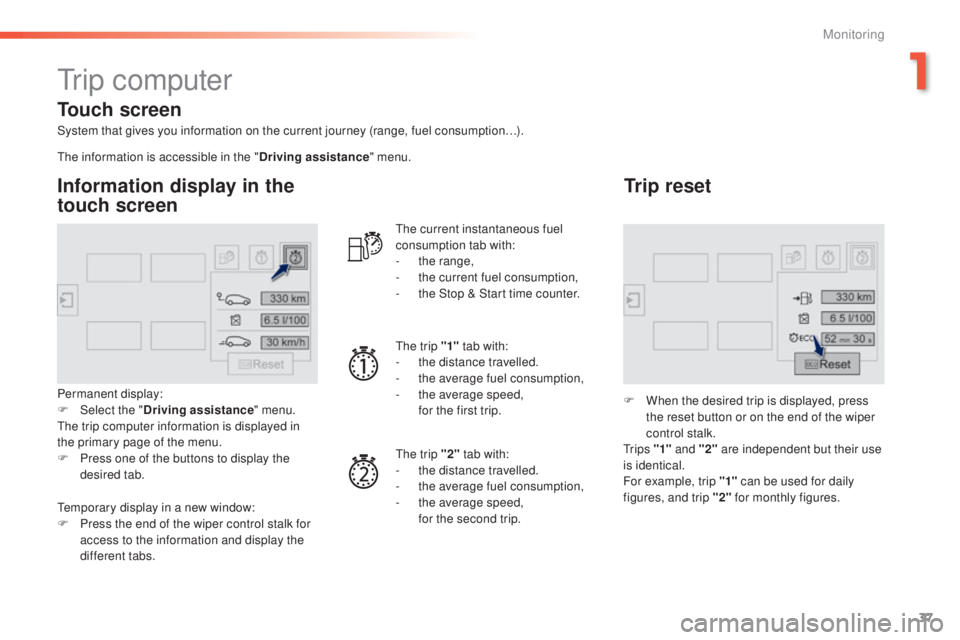
System that gives you information on the current journey (range, fuel consumption…).
Information display in the
touch screen
Permanent display:
F Sel ect the " Driving assistance " menu.
th
e trip computer information is displayed in
the primary page of the menu.
F
P
ress one of the buttons to display the
desired tab.
th
e current instantaneous fuel
consumption tab with:
-
t
he range,
-
t
he current fuel consumption,
-
t
he Stop & Start time counter.
th
e trip "1"
tab with:
-
t
he distance travelled.
- t he average fuel consumption,
- t he average speed,
f
or the first trip.
th
e trip "2" tab with:
-
t
he distance travelled.
-
t
he average fuel consumption,
-
t
he average speed,
f
or the second trip.
Trip reset
F When the desired trip is displayed, press the reset button or on the end of the wiper
control stalk.
t
r i p s "1" and "2" are independent but their use
is identical.
For example, trip "1" can be used for daily
figures, and trip "2" for monthly figures.
th
e information is accessible in the "
Driving assistance" menu.
te
mporary display in a new window:
F
P
ress the end of the wiper control stalk for
access to the information and display the
different tabs.
Touch screen
1
Monitoring